Buy one Get one Free – BOGO discount rule maker for WooCommerce

Buy one Get one Free – BOGO discount rule maker for WooCommerce
Description
Buy one get one free is a common form of sales promotion.
Demo Link | Documentation Link
Try out the pro features before purchase
https://websitemaintenanceservice.in/bogo_demo
Check the demo of different types of offer
Buy 1 and get 1 at 50% discount
Category level discount rule Video
Product level discount rule Video
Buy 1 and get 1 free of the same product
Buy 3 and get 1 unit free Offer that will start at some time in future
Buy one get one Free of other product
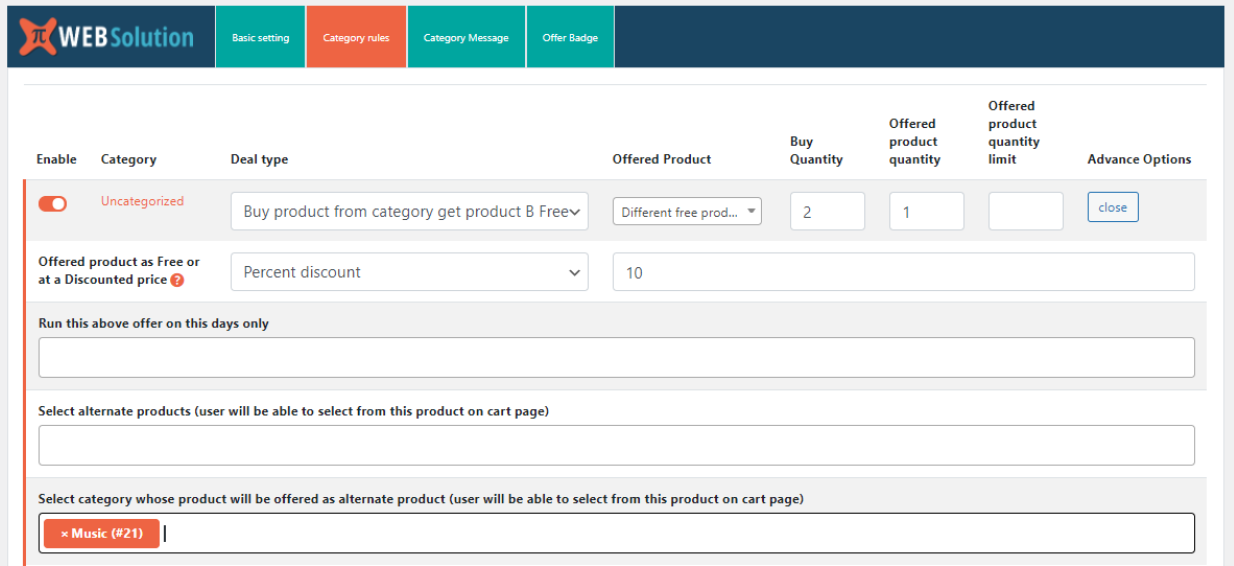
Buy product from category get product B free
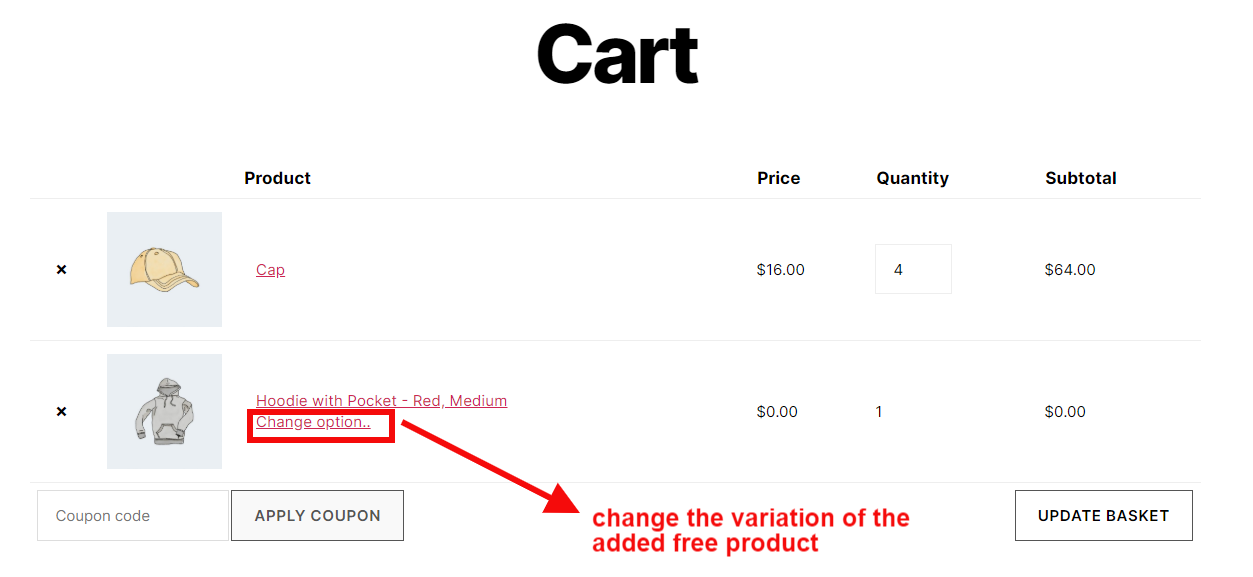
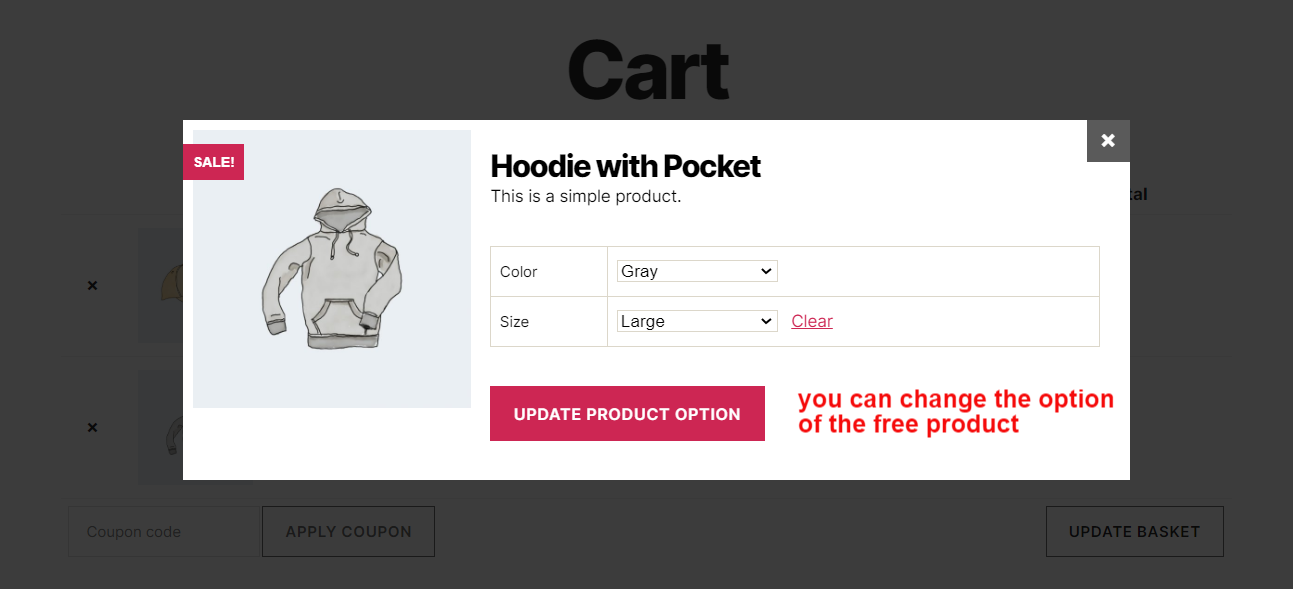
Change variation of the free product
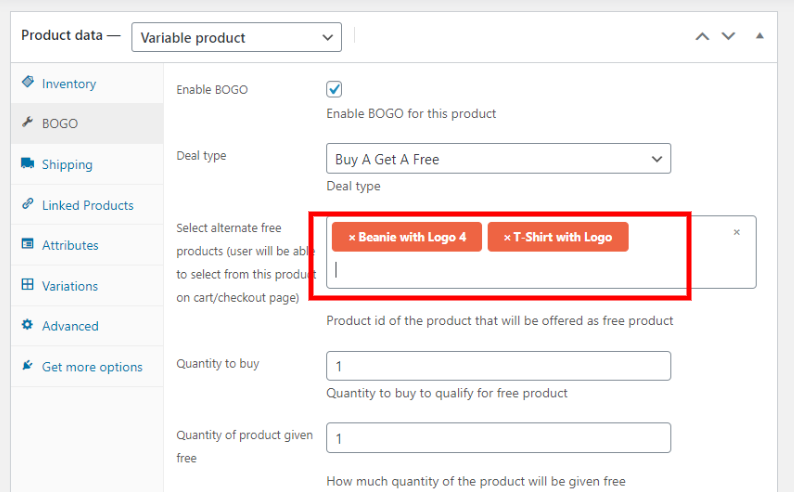
Buy one get one free with option to select the 1 free product from list of products
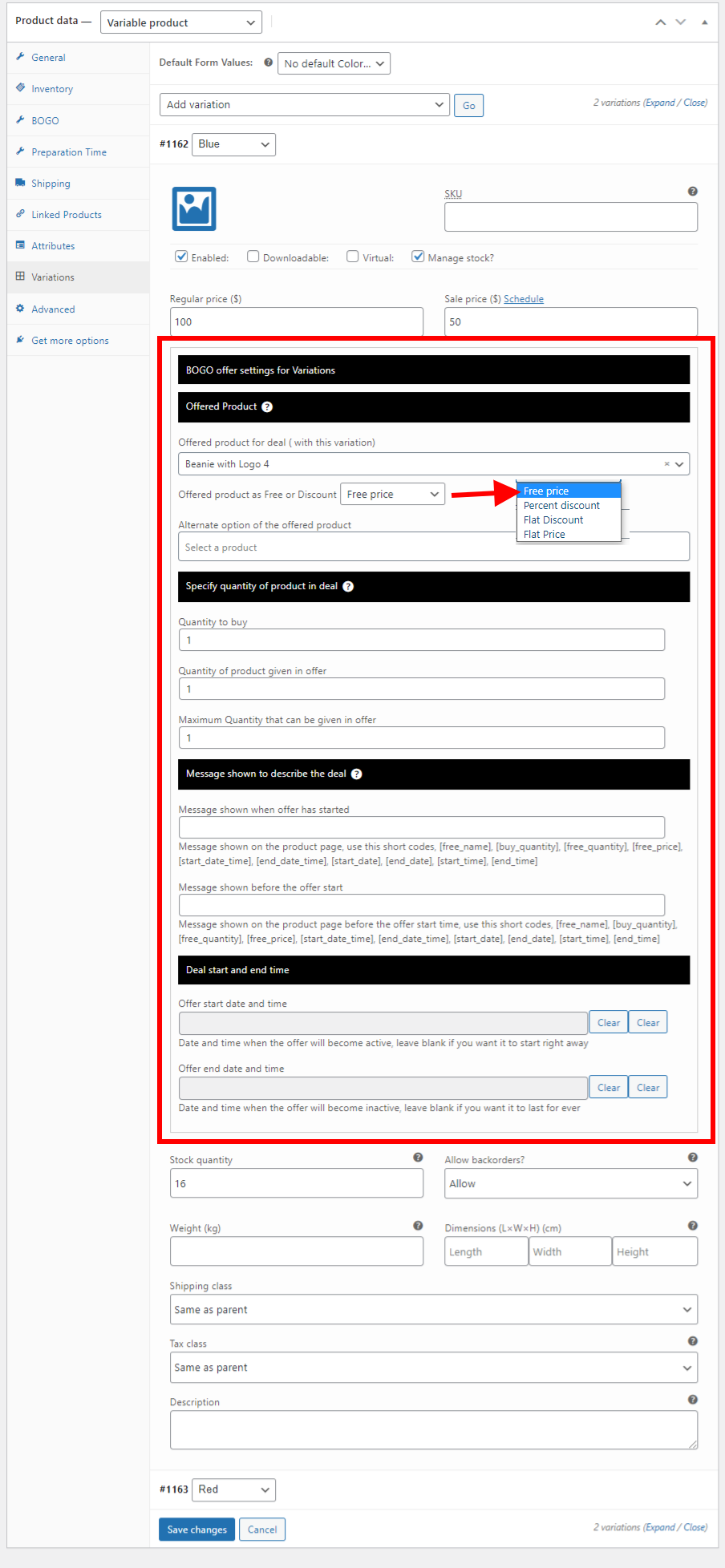
Offer different free product with each of the variations
Demo | Video
Buy any 2 products from category and 1 product will be added free
Create buy one get one free or buy X get Y of product free discount rule in your WooCommerce based website
-
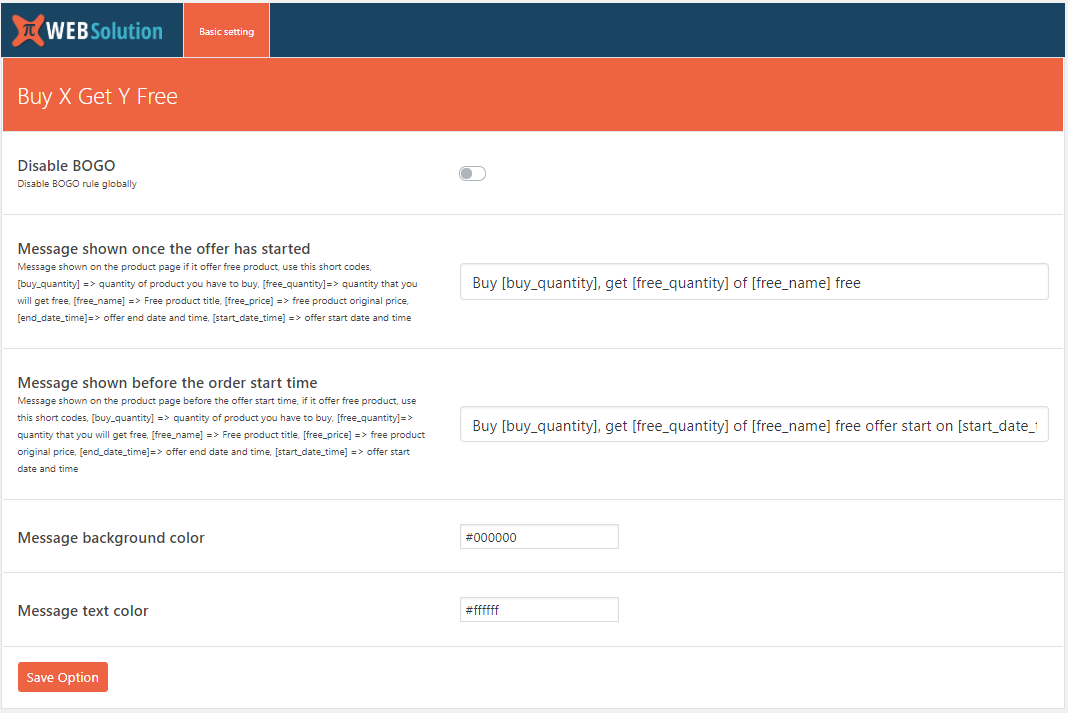
Set a global how much product to buy to set how much of free quantity
-
You can specify the amount of free product given on global level
-
It adds the same product as free product (you can add other product as free product in the PRO version)
-
You can enable BOGO deal on specific product
Pro version
-
It allows you to set the buy quantity for each product differently
-
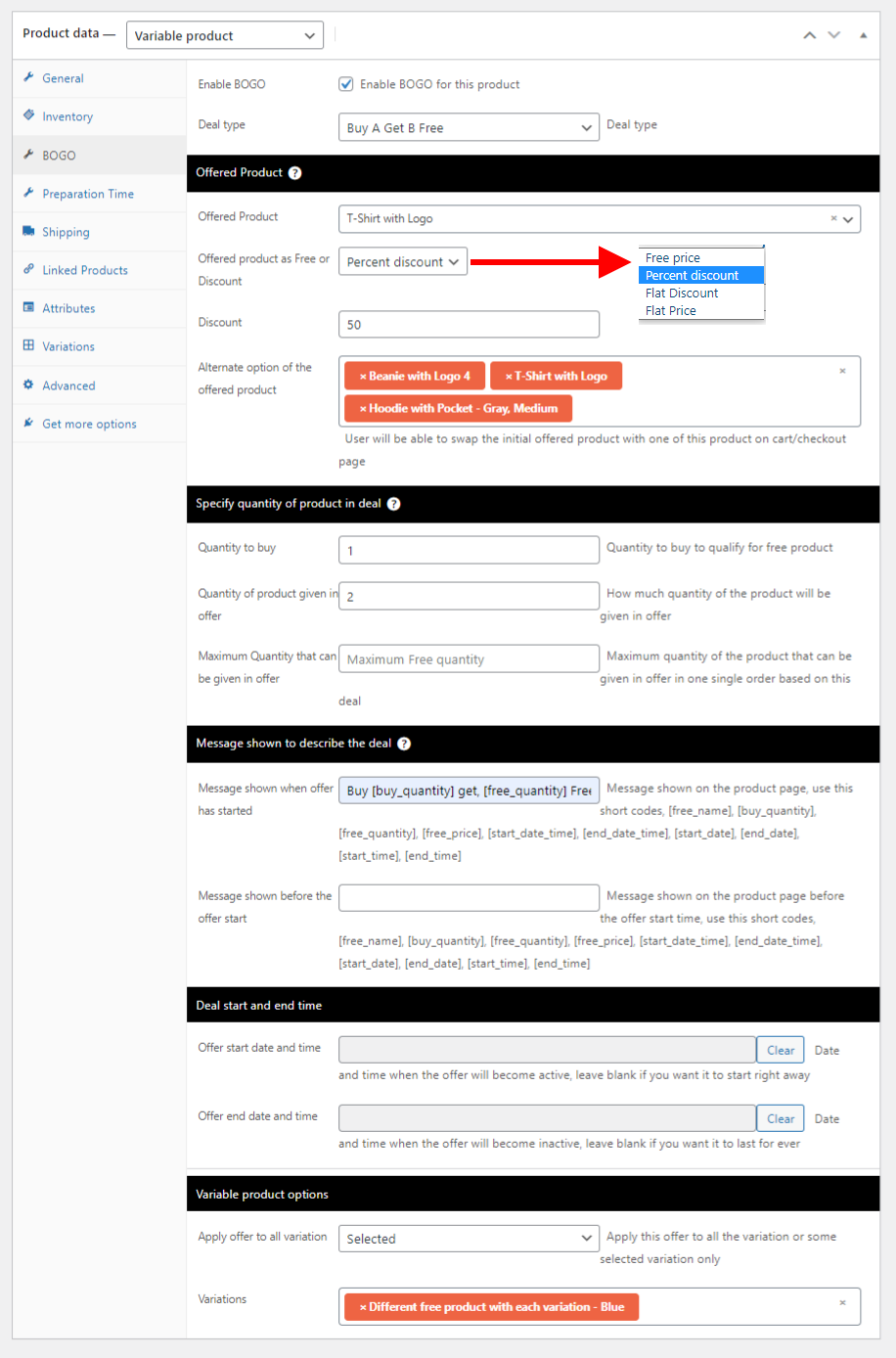
Offer the BOGO Deal product as Free or At Discounted price
-
Set free quantity differently for each product
-
It allows you to offer other product as free product instead of giving the same product as free
-
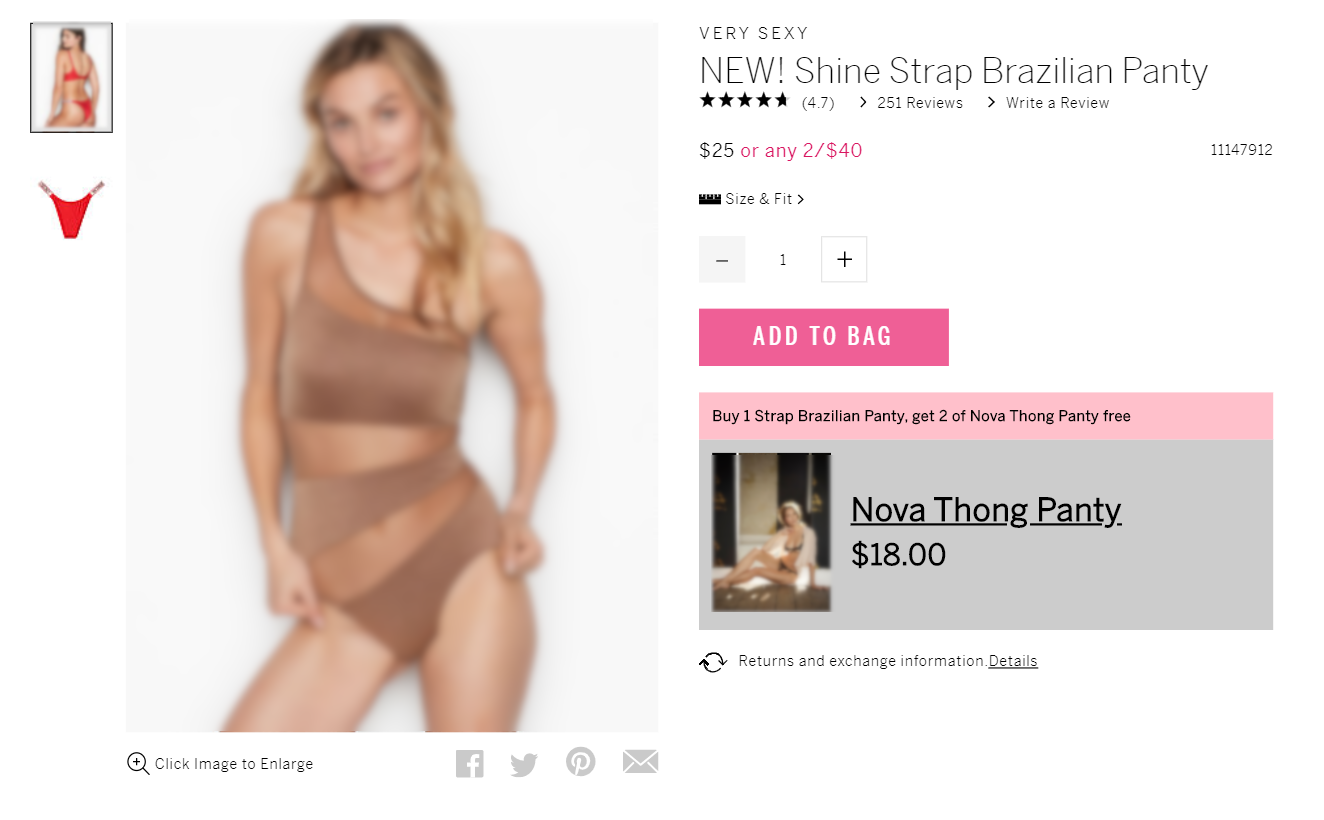
You can set a message on the single product page, to describe the offer
-
You can customize the message shown for each product in your own wording
-
List of shortcodes that you can use as placeholders while making offer message [free_name], [buy_quantity], [free_quantity], [free_price], [start_date_time], [end_date_time], [start_date], [end_date], [start_time], [end_time]
-
You can show different parameters of the offer in the message using the shortcode
-
Set an offer start and end time, you can set this different for each product
-
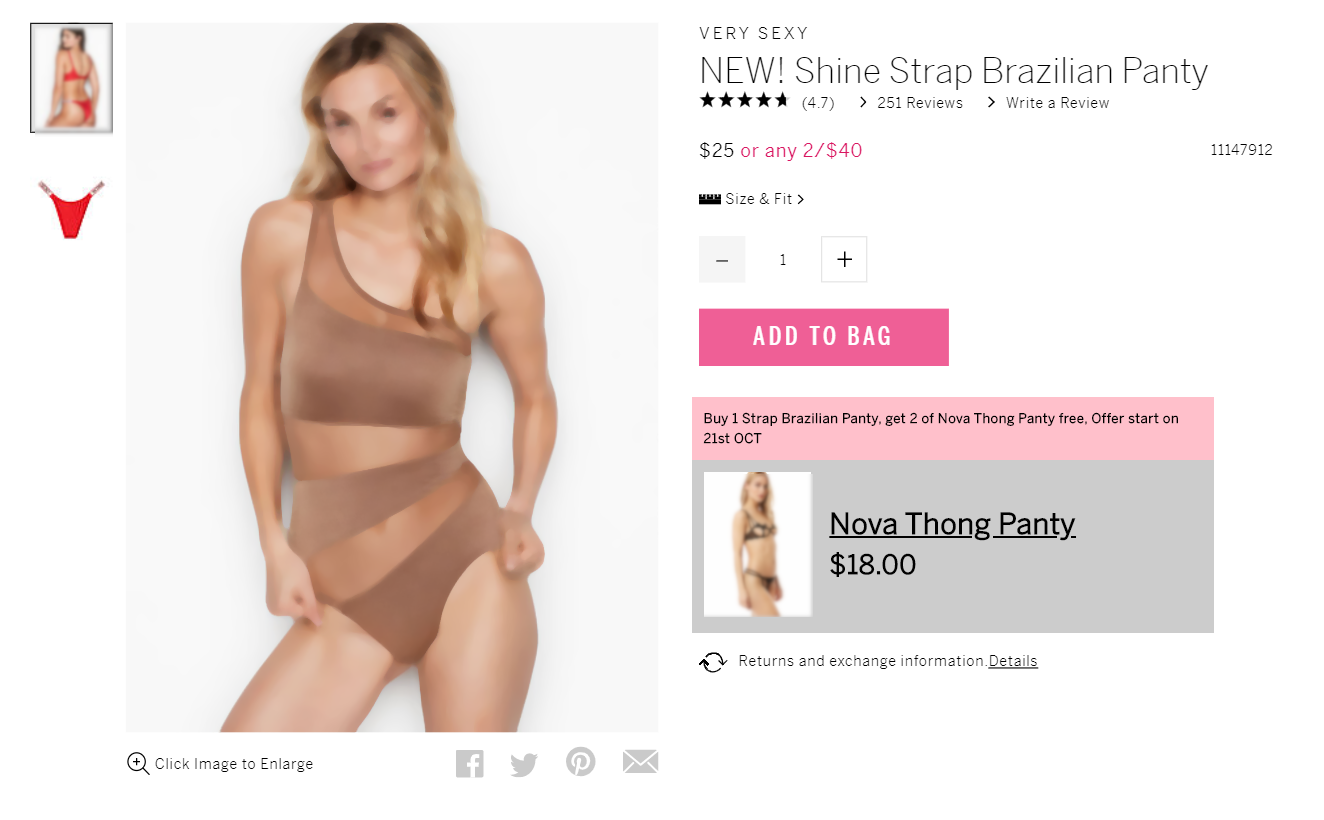
Set a message that will be shown before the offer starts, you can set this different for each product
-
Set different message to show when the offer has started, you can set this different for each product
-
Set maximum quantity of free product that can be offered with parent product.
Say 1 unit of Product A gives 1 unit of B and max quantity is 2 then, when you add 3 units of A the quantity of Free B will be kept at 2 only as Max quantity is 2 (without max quantity restriction it would have been 3) -
Create BOGO or Buy X get Y free offer on the Category level, so you don’t have to create this offer on an individual product basis
-
Run category level rule on specific days of the week
-
Exclude a product or a variation from a category level BOGO offer
-
Overwrite the BOGO on category level with a separate rule for the product on product level rule
-
You can run offer for all the variations of variable product
-
Restrict the offer to run for some specific variations for a variable product
-
Offer info will only show when the buyer selects a variation that has the offer, if he selects some other variation that doesn’t have offer, the message box will disappear
-
Offer different product as Free product with each of the variations in a variable product
-
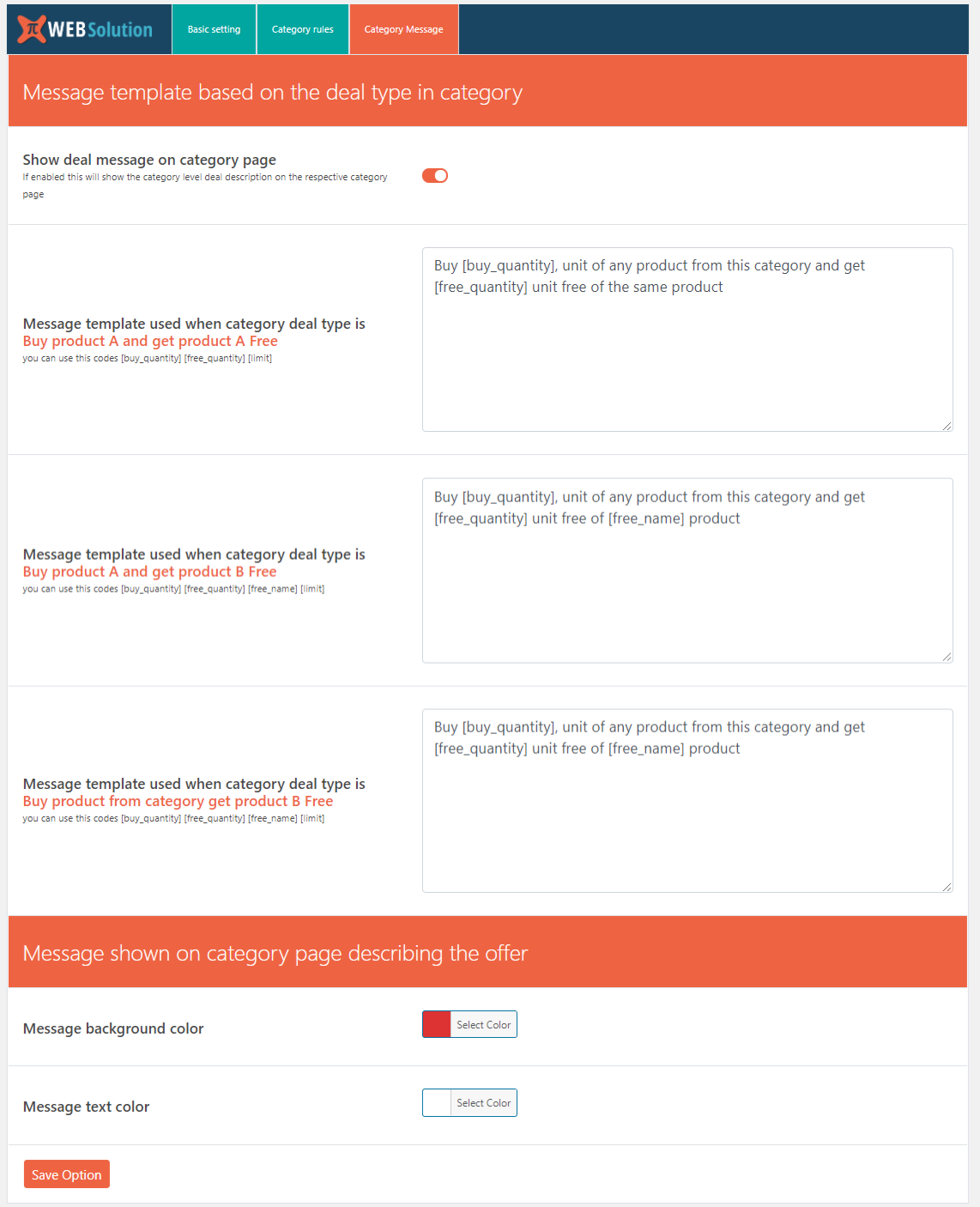
Show category level offer message on the respective category pages
-
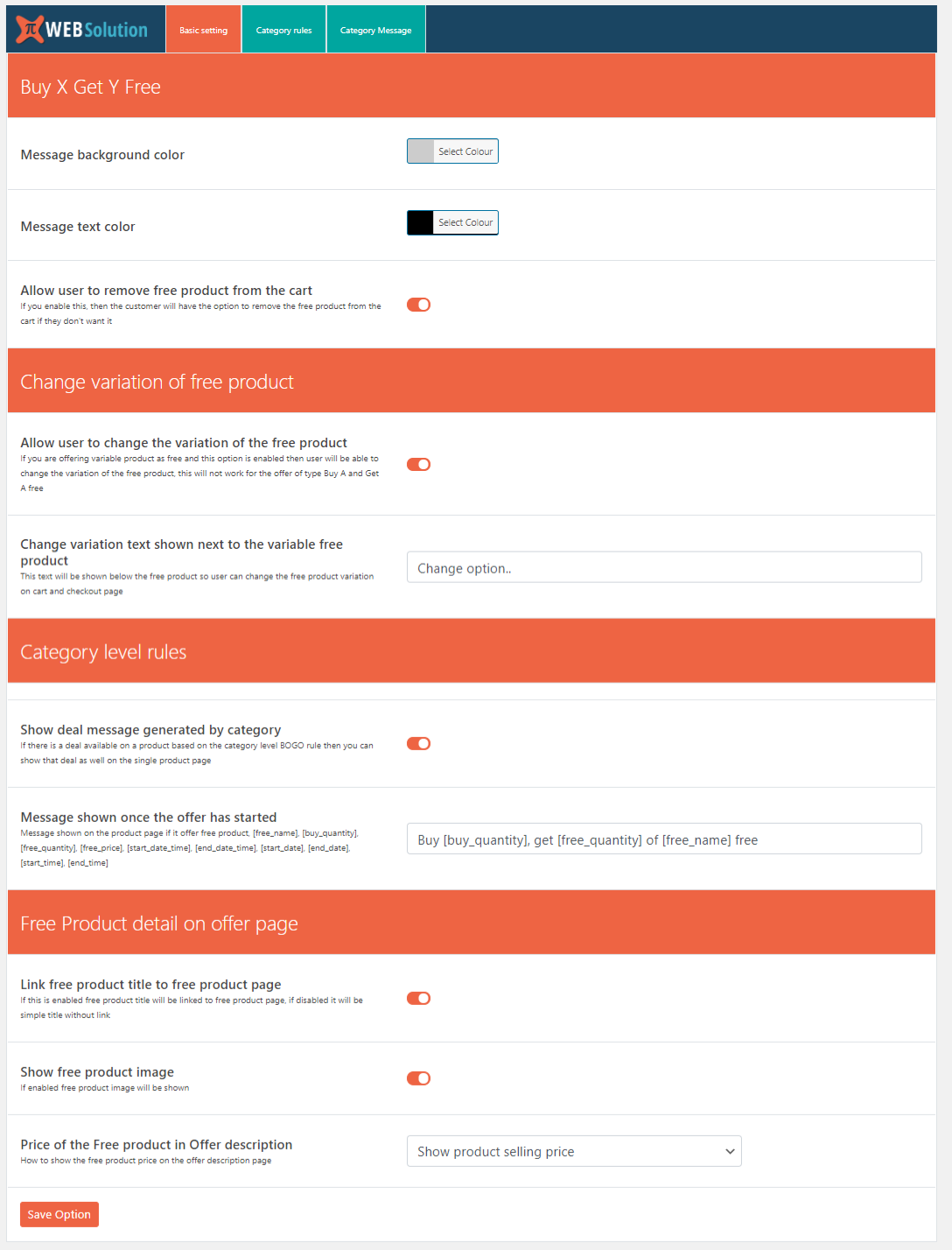
Give option to the customer to remove the free product from the cart (in case they don’t want to receive the free product)
-
If the free product is a variable product then you can allow customer to change the variation of the free product in the cart or on checkout page
-
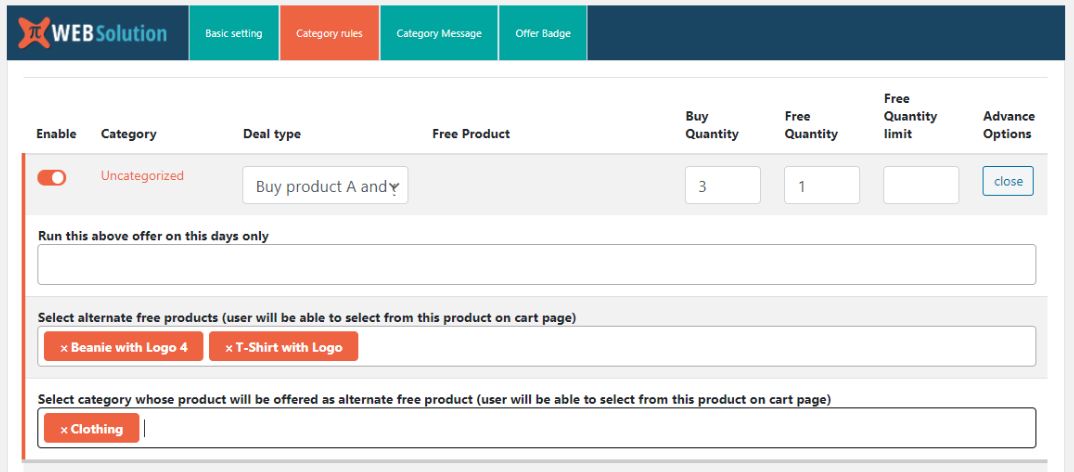
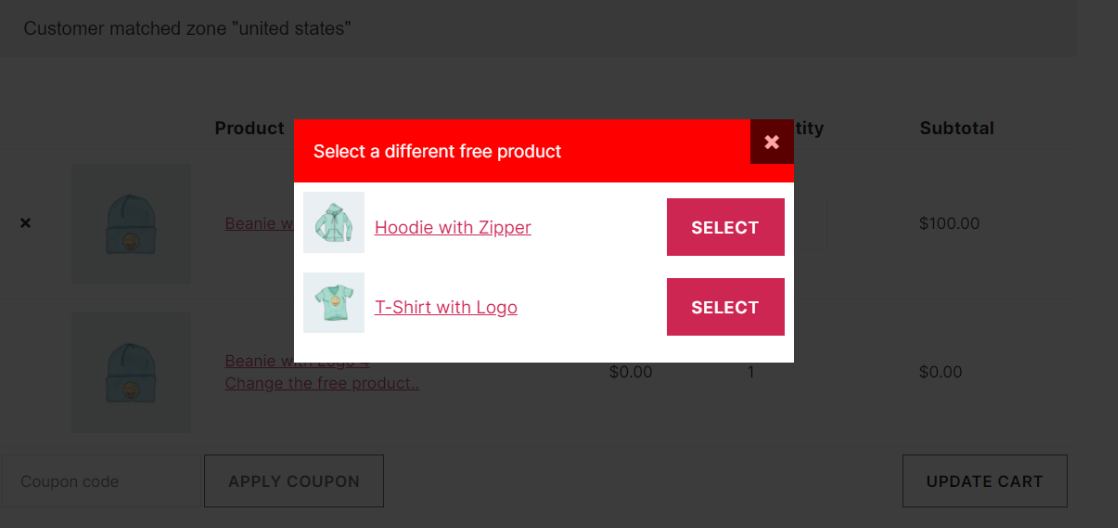
You can give option to the customer to select a free product from list of products, (you have to make the list of products that you will like to offer them for selection). Initially one product will be added to cart for free and will be given an option to change the free product (if you have given a list of alternate free products)
-
You can make the alternate free product to be always less than the price of the product added by the customer in the cart, That is making the BOGO offer (this applies in the category based BOGO rules)
-
You can control how many times a customer can avail the offer, you can set a limit on the number of times a customer can avail the offer. Say you have set the limit to 2 on the category X bogo rule, then the customer A can avail the offer only 2 times, after that the offer will not be applied for that customer A, but customer B can get the offer 2 times as well, so the limit is per customer not for all the customers. Customer A can get the benefit of the offer set on some other category B.
Full control over variable product BOGO offer
- Select the variation that you want to have the BOGO offer and keep other variations out of the bogo offer using product level rule
- Offer different product as free product with each of the variations
- Set different buy quantity, Free product quantity, Max free product limit for each variation
- Set different start time and end time for the variation
- Set different message for each variation
Difference between the 3 category level rules
Buy product A and get product B Free
E.g: Category A has product –> B, C
Free product –> D
Free unit –> 1
Max limit –> 22 x B he will get 2 units of D
3 x C he will get 2 units of D
Buy product A and get product A Free
E.g: Category A has product –> B, C
Free unit –> 1
Max limit –> 22 x B he will get 2 units of B
3 x C he will get 2 units of C
Buy product from category get product B Free
E.g: Category A has product –> B, C
Free product –> D
Free unit –> 1
Max limit –> 32 x B he will get 2 units of D
3 x C he will get 1 unit of D
Explore our other plugins to supercharge your WordPress website:
- CSS JS Manager, Async JavaScript, Defer Render Blocking CSS supports WooCommerce
- Direct checkout, Add to cart redirect, Quick purchase button, Buy now button, Quick View button for WooCommerce
- Export WooCommerce customers list csv, WordPress users csv, Email customer list daily
- Fake sales notification, Live sales notification, Recent sales popup for WooCommerce
- Free shipping bar WooCommerce, message, popup and alert
- HTTP/2 Push, Async JavaScript, Defer Render Blocking CSS, HTTP2 server push
- Order delivery, Order pickup, Order date time, Pickup Location for WooCommerce
- Product Quantity, Minimum Maximum quantity & Minimum Order amount for WooCommerce
- Restaurant Menu plugin for WooCommerce
- WooCommerce estimated delivery date per product | shipping date per product
- WooCommerce Product Enquiry Quotation, WooCommerce product catalog
- Buy one Get one Free – a Bogo WooCommerce plugin
Privacy
If you choose to opt in from the plugin settings, or submit optional feedback during deactivation, this plugin may collect basic technical information, including:
- Plugin version
- WordPress version
- WooCommerce version
- Site url
- Deactivation reason (if submitted)
This data is used solely to improve plugin quality, compatibility, and features. No personal or user-specific data is collected without consent.
Screenshots
Faq
You can create buy 1 get 1 discount rule using this plugin, only thing is in the Free version it will offer the same product as free product, whereas in the PRO version you can offer another product as free product
Yes, you can make buy 2 get 1 free
You can show custom message on the single product page, to describe the offer
You can do that, you can have different offer message for each of the products
You can do so in the pro version of BOGO WooCommerce plugin, it gives you an offer start date and offer end date
Yes you can do so in the pro version of BOGO WooCommerce plugin, you can set a message that will be shown to the customer on the product page when the offer is not yet started. This message will change on its own and show a different message when the offer starts
Yes, you can do that in pro version, you can set different max quantity for each product
Yes, You can do that in the pro version
Yes you can do that in the Pro version
As of now this is not available
In the pro version you can do that, you can create a message for each of the products
and you can use various shortcodes that give various details of that offer
here are the shortcodes that you can use in your crafted message as placeholders
[free_name], [buy_quantity], [free_quantity], [free_price], [start_date_time], [end_date_time], [start_date], [end_date], [start_time], [end_time]
You can do that in the pro version, it allows you to set options like apply deal to all variations, or selected variations, or all variations other than the one selected
Yes, as the user selects a variation that doesn’t have the deal applied for that variation, the offer message box will hide, and it will come back as he selects a variation that has the offer on it
Yes you can do that in the pro version from the product rule, you can set a different free product for each of the variations
check out the video for the same
You can do that in the pro version, it allows you to set this value for each of the variations
Yes you can do that in the pro version, it allows you to write different offer messages for each of the variations
Yes you can do so in the pro version it allows you to set different Bogo offer start and end date time for each variation
Yes you can do that in the pro version check this demo
In pro version user can remove free product from the cart
You can do that in the pro, The offered free shoe will be added to the user’s cart and they can click on edit option button to change the size and other variation of the free product
Pro version gives you option to enable the category level option to run on specific days of the week, so you can create an offer on special menu category to run only on Saturdays and Sundays, so the offer will auto start on each Saturday and Sunday and will remain closed for rest of the weekdays
Yes you can do that in the pro version, when the condition is satisfied one product will be added to the cart for free, and user will see an option to change the free product in the cart and checkout page, over there they can select a different free product
Yes you can do that in the pro version category based rules
Yes you can do that in the pro version, When the Bogo deal will be satisfied the offered product will be added to the customer cart at a discounted price
Yes you can exclude a product from category level BOGO offer in PRO version, E.g. say you are creating a BOGO offer of buy 2 from Category B and get 1 product A free, now you want this offer not to apply on product X of category B then you can exclude the product X from the offer, so even if the customer will buy 2 units of this product X the offer will not be applied. You can even exclude a single variation of the product from the category level BOGO offer.
Yes the Free version and PRO version both are HPOS compatible
Reviews
Good!!
By 
I am using the free version and it is excellent for my use with simple products
Misleading
By 
Can't do anything without paying money
Free version is useless
By 
The free version only allow you to create 1 simple BOGO rule, without any configuration.
So it's useless for any serious store, also it does advertise the plugin everywhere in your site, it's so anoying.
Deceptive
By 
I wanted a plugin that allows you to create a coupon like "Buy x and get y at z% discount". The description of this plugin indicates this should be possible. Turns out they're just trying to get you to buy the pro version. If I had to buy a pro version of a plugin, it wouldn't be from these guys
It does the job!
By 
Good plugin. Does exactly what it says it would do.
Nice Bogo plugin with great support!
By 
Your WooCommerce Store eill benmewfit from BOGO (Buy One Get One Free) Plugin by PI WebSolution!
I recently integrated the Buy One Get One Free (BOGO) WooCommerce Plugin by PI WebSolution into my online store, and the results have been nothing short of spectacular! This plugin has proven to be a game-changer for both my sales strategy and customer satisfaction.
Seamless Integration and User-Friendly Interface The installation process was a breeze. With just a few clicks, the plugin was up and running. The user interface is intuitive, allowing even those with limited technical knowledge to set up and manage BOGO offers effortlessly. The clear and well-organized dashboard makes it easy to navigate through various options and settings.
Versatile and Customizable One of the standout features of this plugin is its versatility. It offers a plethora of customization options, allowing me to create tailored BOGO deals that fit my store’s unique needs. Whether it’s “Buy One Get One Free,” “Buy Two Get One Free,” or any other combination, the flexibility provided by this plugin is unmatched. Additionally, I can set specific products or categories for the offer, giving me full control over my promotions.
Boost in Sales and Customer Engagement Since implementing the BOGO offers, I've noticed a significant boost in sales and customer engagement. The appeal of getting an additional product for free has attracted new customers and encouraged repeat purchases. This plugin has not only increased my average order value but also enhanced the overall shopping experience for my customers.
Reliable Performance and Excellent Support The plugin runs smoothly without any glitches, ensuring a seamless shopping experience for my customers. On the rare occasion that I had a query, the support team at PI WebSolution was prompt and helpful. Their exceptional customer service is commendable and has further solidified my trust in their products.
Conclusion The Buy One Get One Free (BOGO) WooCommerce Plugin by PI WebSolution is a must-have for any WooCommerce store owner looking to boost sales and enhance customer satisfaction. Its ease of use, customization options, and reliable performance make it a valuable addition to my e-commerce toolkit. I highly recommend this plugin to anyone seeking an effective and efficient way to implement BOGO deals on their online store.
Kudos to PI WebSolution for developing such an outstanding product!
Super plugin
By 
Plugin très flexible et très stable, franchement top.
Nous sommes partis directement vers la version payante parce que franchement, à 25$ le plugin, ça ne vaut vraiment pas le coup de se casser la tête !
Plugin is advertising itself too much. Literally everywhere in the website.
By 
Plugin is advertising itself too much. Literally everywhere in the website.
In terms of the functionality, It provides with no good things.
No variations in free version
By 
Not very usefull to me if the free version has such limited options and doesn't support variations.
Usefull
By 
Usefull
Changelog
1.10.93
- small code change
1.10.92
- Tested with WC 10.0.2
1.10.91
- UI improvement in Buy one get one free woocommerce plugin
- Tested with WC 9.9.5
1.10.90
- Buy one get one free woocommerce plugin Tested with WC 9.9.3
1.10.77
- Deprication warning fixed
1.10.74
- Tested with WC 9.7.0
1.10.71
- Tested with WC 9.6.0
1.10.69
- Tested with WC 9.4.0
1.10.67
- Tested with WP 6.7.0
1.10.66
- Tested with WC 9.3.0
1.10.64
- Tested with WC 9.2.0
1.10.63
- Tested with WC 9.1.3
1.10.62
- Tested with WP 6.6.1
1.10.9
- Tested with WC 7.5.1
1.10.7
- Compatible with WP 6.2.0
1.10.1
- Quick save button added