Buyience NovaCore B2B Quote Engine
Buyience NovaCore B2B Quote Engine
Description
Buyience NovaCore B2B Quote Engine is a WordPress plugin that extends WooCommerce with B2B-focused quoting, pricing rules, and buyer workflows. The plugin allows customers to request quotes, supports customer-specific pricing and payment terms, and provides structured quote management within WordPress. For users who choose to connect an external Buyience account, the plugin can optionally load advanced hosted features such as AI-assisted quote recommendations and a digital quoting interface.
This plugin is suitable for wholesalers, distributors, manufacturers, and businesses that require quote-based selling workflows.
Key Features
- Request a Quote on Any Product: Replace the Add to Cart button or offer both.
- AI-Assisted Quote Recommendations (optional Buyience integration): Generate smart quotes using AI-driven pricing, historical data, and buyer behavior. AI-assisted features provide recommendations only and do not make automated pricing decisions.
- Buyer Portal:Buyers can view quotes, approve offers, manage orders, and download invoices.
- Admin Dashboard Integration: Access all Buyience features directly from WordPress admin
- Public Storefront: Display quote builder storefront on public-facing pages using shortcodes (no WordPress user session data is exposed).
- WooCommerce Integration: Add “Request a Quote” buttons to WooCommerce product pages
- Product Sync (Optional): Synchronize WooCommerce product data with an external Buyience service when enabled
- Navbar Integration: Add Dashboard button directly to your site’s navigation menus
- Secure API Authorization: Secure token-based API authorization between WordPress and Buyience services
- External Links: Request Quote and Store Front open in new tabs for WordPress.org compliance
No WooCommerce core data is modified or removed by the plugin.
How It Works
The plugin integrates Buyience-hosted interfaces into WordPress using secure external links.
Core quote request and WooCommerce integration features are handled within WordPress.
Optional hosted interfaces are loaded from Buyience servers when enabled by the site administrator.
This approach allows advanced functionality to be delivered while maintaining security and isolation between systems.
Service Integration
This plugin can optionally connect to an external service provided by Buyience to enable hosted quoting interfaces and advanced automation features.
Core WooCommerce quoting functionality remains available without enabling the external service.
When the administrator connects the plugin:
- The administrator’s email address may be transmitted directly to Buyience over HTTPS to retrieve account information.
- The administrator’s password is transmitted securely to this WordPress site first, then forwarded securely to Buyience for authentication.
- WordPress does NOT store the Buyience password.
- Only an access token returned by Buyience is stored in WordPress.
- No data is transmitted without explicit administrator action.
Service details:
Service Provider: Buyience
Service URL: https://app.buyience.com
Privacy Policy: https://buyience.com/privacy-policy
Terms of Service: https://buyience.com/terms-and-conditions
Credential Handling
This plugin requires explicit administrator action before connecting to the Buyience service.
When the administrator chooses to connect:
- The administrator’s Buyience email may be sent directly over HTTPS to Buyience for account lookup/connection setup.
- The administrator’s Buyience password is submitted to the WordPress site first, then securely forwarded over HTTPS from WordPress to Buyience for authentication.
- WordPress does NOT store the Buyience password.
- Only the access token returned by Buyience is stored in WordPress for authenticated API communication.
- The access token is used solely for API communication.
No credentials are transmitted automatically.
No data is sent without explicit administrator consent.
Privacy
This plugin stores quote and configuration data within WordPress by default. Limited user data is transmitted only after explicit admin action to enable the Buyience integration; when enabled, limited user information (such as name and email) may be transmitted securely for API authorization and quote processing purposes.
The plugin itself does not perform tracking or analytics.
Authorization & Security
This plugin follows WordPress security best practices and does NOT create, modify, or programmatically access WordPress user sessions:
- WordPress Access Only: All plugin features require an active WordPress admin session using standard WordPress access flows
- No User Creation: The plugin does not create WordPress user accounts or modify existing user credentials
- No Session Bypass: The plugin does not use wp_set_current_user() or similar functions to bypass WordPress session checks
- Capability Checks: All administrative endpoints require the manage_options capability via current_user_can()
- External API Authorization: The “Buyience API authorization” feature stores API credentials for the external Buyience service only – these are not WordPress user credentials
- Token-Based API Access: Internal API authorization tokens are used for secure communication between WordPress and Buyience services, not for WordPress user sessions
- Permission Callbacks: All REST API endpoints include proper permission_callback functions that validate WordPress user permissions
The plugin relies entirely on WordPress’s standard access control system. Users must access WordPress through the standard admin session flow before using any plugin features.
Privacy Policy
This plugin integrates with the Buyience service. When you use this plugin:
- WordPress Access: The plugin does not create or modify WordPress users. All users must access WordPress using standard WordPress access flows.
- Buyience API Credentials: When connecting to the external Buyience service, the administrator manually initiates authorization. The email may be sent directly to Buyience over HTTPS for account lookup/connection setup. The password is sent to WordPress first, then securely forwarded to Buyience for authentication, and is NOT stored in WordPress. Only the access token and API key returned by Buyience are stored securely in WordPress options for API communication.
- Internal Session Tokens: Secure session tokens may be used for API communication when the site administrator connects to the Buyience service. The plugin uses external links to Buyience; content is not embedded in WordPress.
- Data Transmission: No credentials or user data are transmitted automatically. Data is sent only after explicit administrator action (e.g., clicking “Connect to Buyience Account”). When enabled, limited user information (email, name, WordPress user ID) is securely transmitted to Buyience for quote processing purposes only.
- Data Security: Sensitive data is stored securely using WordPress best practices.
- No Tracking: The plugin does not collect or store any additional user data. No tracking or analytics are performed by the plugin itself.
For information about how Buyience handles your data, please refer to the Buyience Privacy Policy and Terms of Use.
Installation
Automatic Installation
- Access your WordPress admin panel
- Navigate to Plugins > Add New
- Search for “Buyience NovaCore B2B Quote Engine”
- Click “Install Now” and then “Activate”
Manual Installation
- Upload the
buyience-novacore-b2b-quote-enginefolder to/wp-content/plugins/directory - Activate the plugin through the ‘Plugins’ menu in WordPress
- Navigate to Buyience NovaCore B2B Quote Engine > Settings to configure
Auto-Created Page
On activation, the plugin automatically creates a “Create Store” page (slug: buyncbqe2-create-store, filterable via buyncbqe2_auto_page_slug) containing the [buyncbqe2_quote_builder] shortcode. This page displays the B2B quote builder storefront.
To disable auto page creation, add this to your theme’s functions.php before activating:
add_filter( 'buyncbqe2_allow_auto_page_creation', '__return_false' );
To customize the page slug, add before activating:
add_filter( 'buyncbqe2_auto_page_slug', function() { return 'my-custom-slug'; } );
To create the page as draft (for manual review before publishing):
add_filter( 'buyncbqe2_auto_page_status', function() { return 'draft'; } );
Configuration
- Go to Buyience NovaCore B2B Quote Engine > Settings in WordPress admin
- Connect your Buyience Account: Click “Connect to Buyience Account” button to authorize your Buyience account. Your subdomain will be automatically configured during API authorization.
- Configure domain settings (available in Developer Mode):
- Production Mode: Admin Domain is app.buyience.com, Store Domain is buyience.store (Different Buyience subdomains may be used depending on configuration.)
- Set Quote Path if needed (default: /) – available in Developer Mode
- Enable Persistent Connection if desired – available in Developer Mode
- Save settings
Note: The subdomain is automatically configured when you connect to your Buyience account. You do not need to manually enter it.
WooCommerce Integration
- Install and activate WooCommerce
- Go to Buyience NovaCore B2B Quote Engine > Settings > WooCommerce Integration
- Enable the integration
- Configure button position, text, and styling
- Optionally hide “Add to Cart” buttons and prices
- Save settings
Product Sync
- Go to Buyience NovaCore B2B Quote Engine > Settings > Product Sync
- Enter your WooCommerce Site URL (auto-populated from WordPress)
- Enter WooCommerce REST API Consumer Key and Secret
- Enter your Buyience API URL (auto-generated from subdomain)
- Click “Sync Products”
Scheduled Product Sync
The plugin can automatically sync products daily:
- Configure your WooCommerce REST API credentials in Product Sync settings
- The scheduler runs daily at midnight to sync new/updated products
- View sync logs in the Product Sync section
- Manually enable/disable the scheduler as needed
Navbar Integration
- Go to Buyience NovaCore B2B Quote Engine > Settings
- Enable Navbar Integration
- Select the menu location for the Dashboard button
- The button will open the Buyience storefront in a new tab when clicked
Screenshots

Demo Product Page

Request a Quote Button
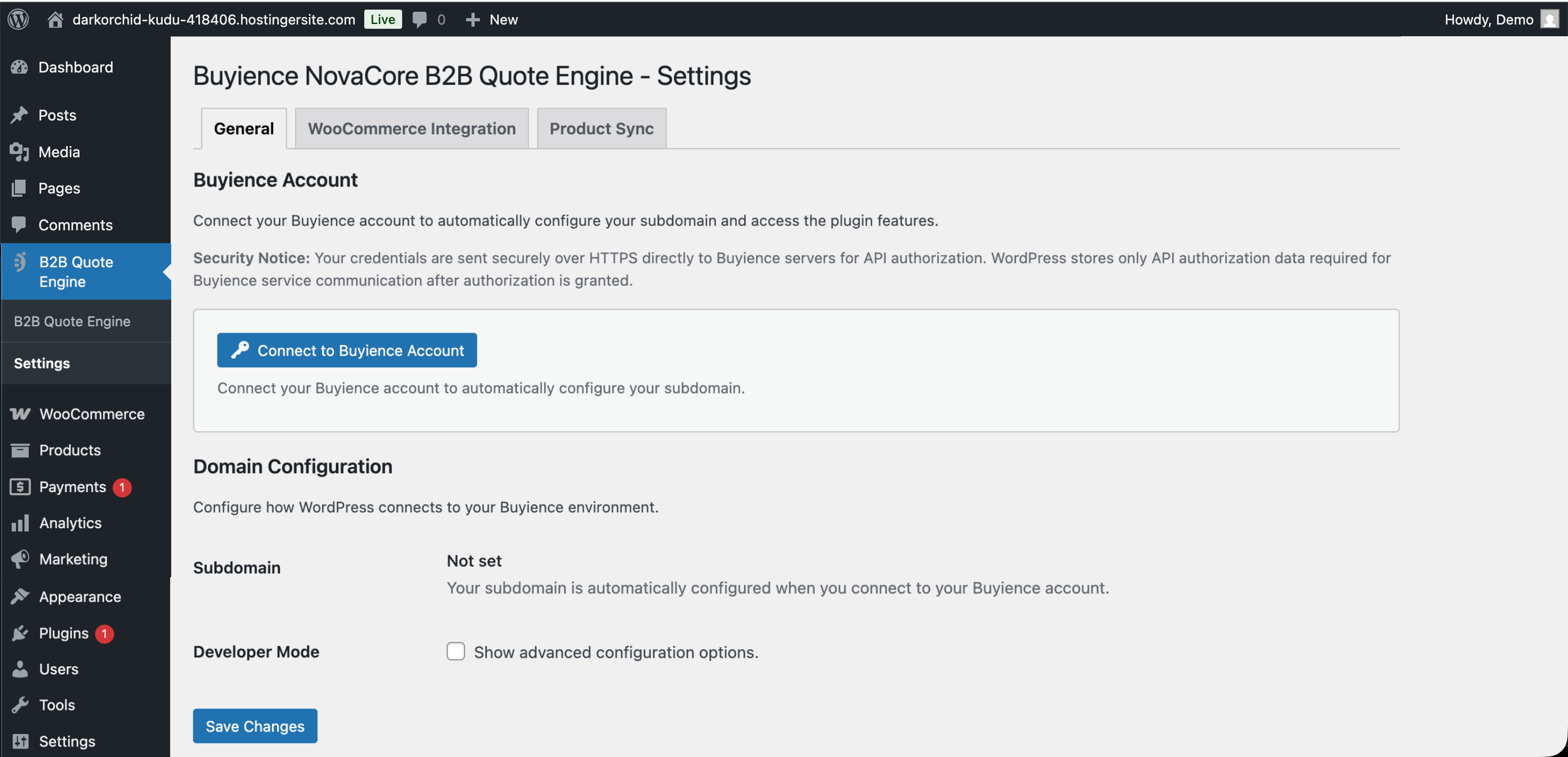
Admin Settings
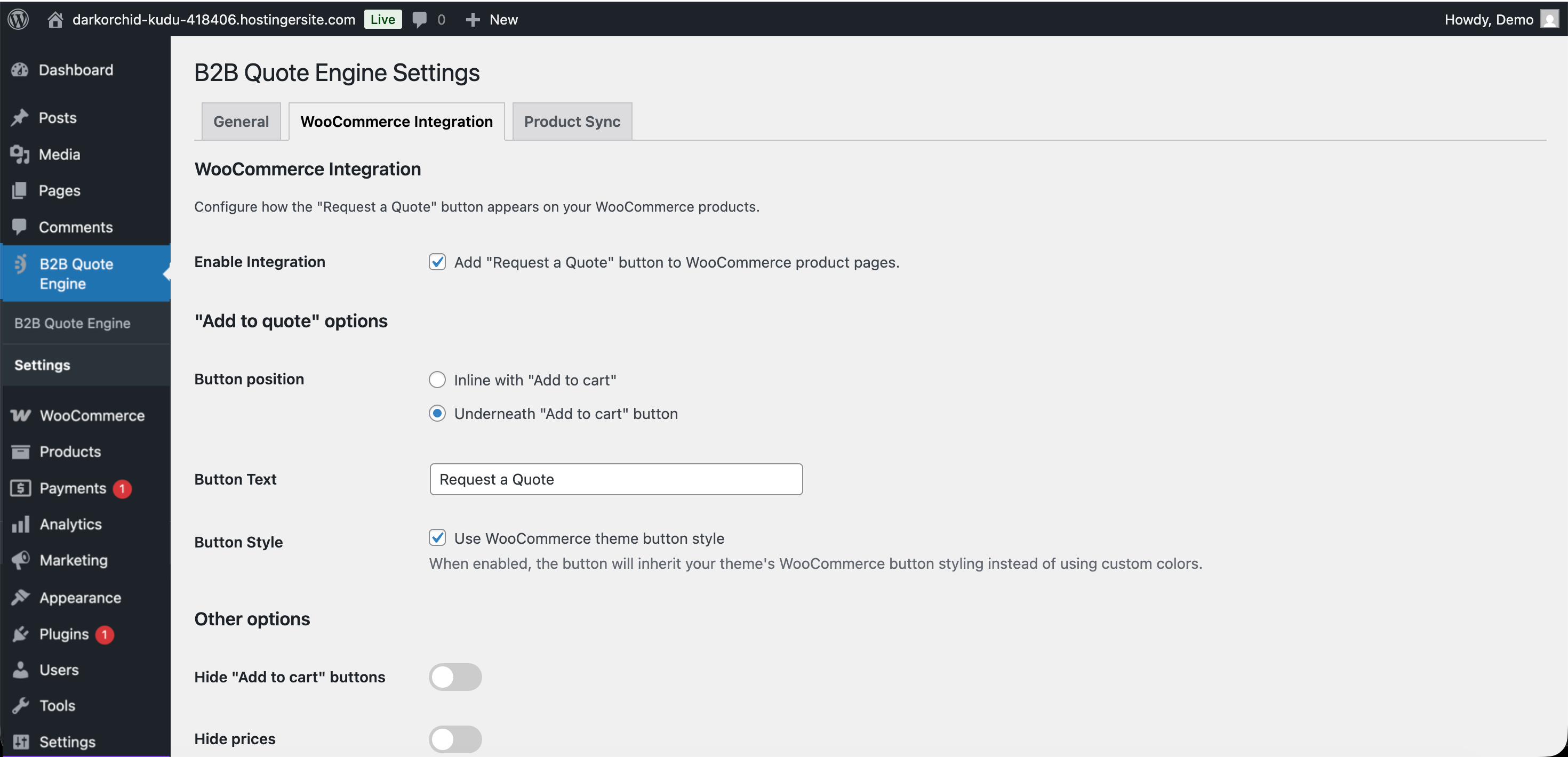
WooCommerce Integration

Product Sync
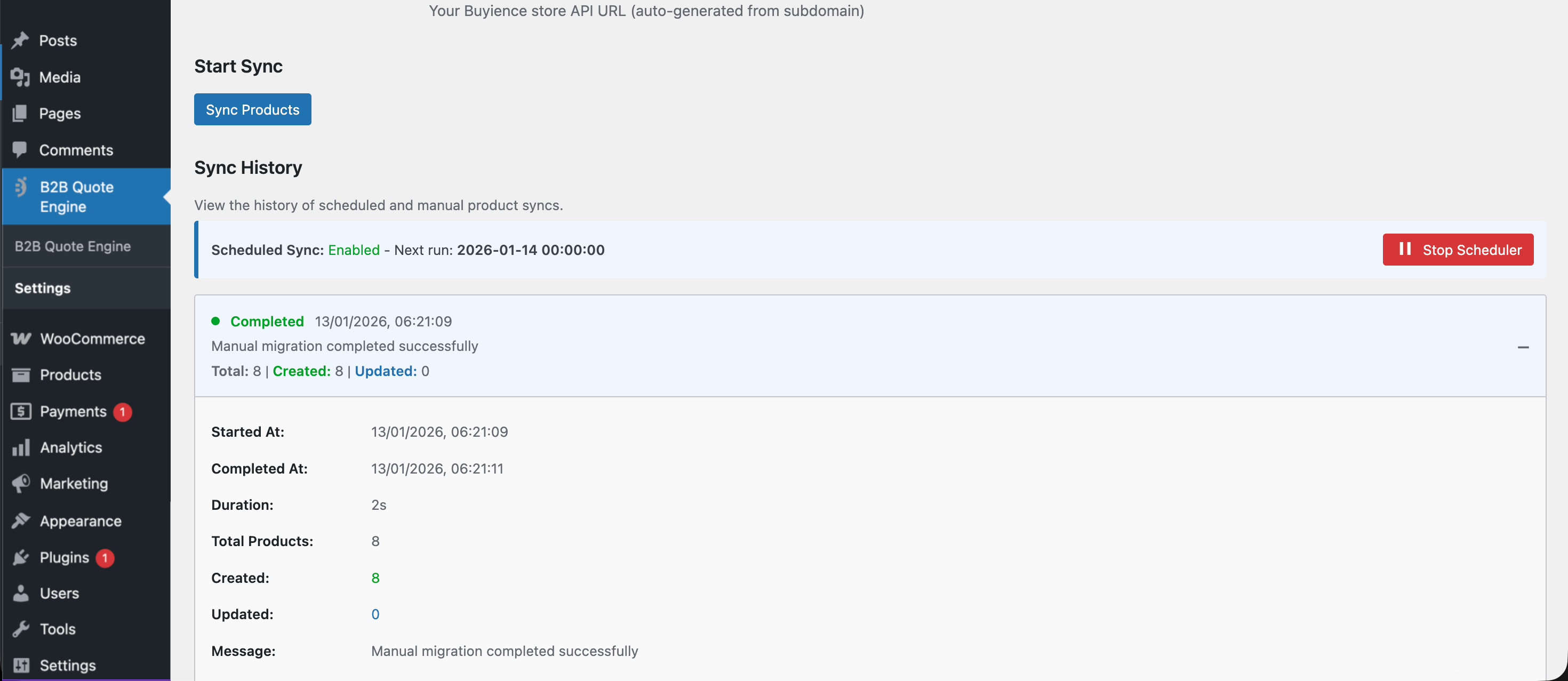
Sync Logs
Faq
No. Core quote request and WooCommerce integration features are available without enabling an external service. A Buyience account is required only if you choose to enable hosted interfaces or advanced automation features.
Yes, the plugin is free. However, Buyience service may have its own pricing plans.
Yes! The plugin includes full WooCommerce integration. You can add “Request a Quote” buttons to product pages and sync products from WooCommerce to Buyience.
Yes, you can customize the button text, color, position, and styling in the plugin settings.
Yes. The plugin uses secure token-based API authorization. Sensitive data is stored securely using WordPress best practices. User data is only transmitted for API authorization and quote processing purposes.
No. This plugin does NOT create or modify WordPress users. All plugin features require an active WordPress admin session using standard WordPress access flows. The “Buyience API authorization” feature only stores API credentials for connecting to the external Buyience service – these are not WordPress user credentials. The plugin uses current_user_can() and is_user_logged_in() for all permission checks and does not use wp_set_current_user() or similar functions.
No. The plugin does not perform any user tracking or analytics. Any data handling performed by the Buyience service is governed by its own privacy policy and terms.
Yes, but each site needs its own Buyience subdomain configuration.
WordPress 5.8 or higher and PHP 7.4 or higher.
Reviews
Changelog
1.2.5
- Compliance: Removed remaining admin/dashboard iframe embedding references and standardized external-link card flow.
- Compliance: Confirmed Plugin URI (
https://buyience.com/wordpress-plugin) is publicly accessible. - Security: Ensured all REST routes include permission callbacks with admin capability checks.
- Security: Added/standardized capability checks for all plugin AJAX handlers.
- Security: Standardized remote API calls with explicit timeout and error handling patterns.
- Security: Ensured Buyience password is never stored and token-related options use autoload disabled.
- Documentation: Updated service integration disclosure to align with actual authorization flow.
1.2.4
- Security: Added explicit consent prompt before direct Buyience API authorization.
- Security: Improved origin validation using URL parsing to enforce HTTPS protocol.
- Security: Removed legacy session token from cross-origin postMessage payloads (uses ssoToken instead).
- Security: Removed REST nonce from cross-origin postMessage payloads.
- Security: Removed hardcoded origin URLs from API authorization receiver.
- Code quality: Refactored activation/deactivation hooks into class-based static methods.
- Code quality: Updated Plugin URI to point to documentation page.
- Code quality: Removed debug logging statements from production JavaScript.
- Code quality: Replaced deprecated synchronous AJAX with async pattern.
- Added explicit security disclosure for Buyience API authorization in admin settings.
1.2.3
- Added filterable opt-out for auto page creation on activation (
buyncbqe2_allow_auto_page_creationfilter). - Added filter to control auto-created page status (
buyncbqe2_auto_page_statusfilter). - Documented auto-created “Create Store” page in readme.
1.2.2
- Preserved WooCommerce consumer secret values when saved via Settings API and during product migration.
- Escaped WooCommerce button color when generating inline CSS.
- Removed development-only API authorization check script from the distributed plugin.
1.2.1
- Version alignment with plugin header and code
- Added WooCommerce integration with customizable quote buttons
- Added product sync from WooCommerce to Buyience
- Added scheduled daily product sync with logging
- Added dashboard button shortcode for public pages
- Added navbar integration for dashboard access
- Added Test Mode for switching between production and testing environments
- Added Developer Mode with development server URL support
- Improved API authorization and session management
- Enhanced modal functionality with minimize/fullscreen
- Added support for product SKU and quantity in quote requests
- Improved error handling and user feedback
- Enhanced security with proper nonce verification
1.0.0
- Initial release with basic quote builder integration
- Admin dashboard access
- Public storefront shortcode
- Basic API authorization