Calorie Calculator
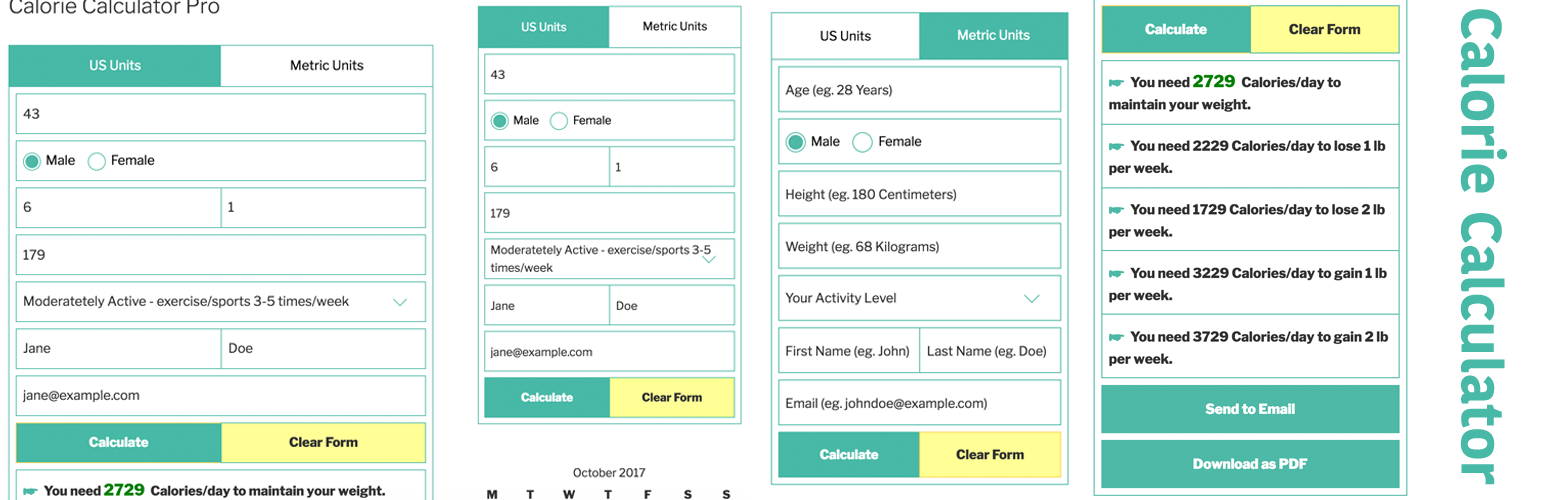
Calorie Calculator
Description
GDPR-ready: Optional privacy consent before storing calculator logs — turn it on under Behaviour, with a customisable consent label.
Calorie Calculator is a free WordPress calorie calculator for fitness, nutrition, health, and coaching sites. Visitors estimate daily calorie needs from age, sex, height, weight, and activity — then see clear BMI, BMR, TDEE, and lose/gain guidelines.
Embed it with a block, shortcode, Elementor widget, or classic sidebar widget. Configure layouts and colours once under Look & feel, then reuse the same calculator across pages.
Results are estimates based on averages. Encourage a balanced diet and sensible activity alongside the numbers.
Why add a calorie calculator?
Interactive tools keep visitors on the page longer and turn curiosity into leads. Optional name and email fields store private Calculator Logs in wp-admin, and Free can notify you or fire a webhook when a log is created.
Science behind the numbers
Free uses the Mifflin–St Jeor equation for basal metabolic rate (BMR), then an activity multiplier for total daily energy expenditure (TDEE / maintain calories). BMI uses height and weight and shows a category label. Results always name the formula used.
What Free results include
- BMI with category (underweight, normal, overweight, or obese)
- BMR — calories at rest
- TDEE — calories to maintain weight for the selected activity level
- Lose / gain calorie targets (for example 0.5 kg / 1 lb per week)
- Goal display as lose/gain lines or a single goal dropdown
How to use
- Install and activate Calorie Calculator.
- Add the Calorie Calculator block, shortcode
[calorie_calculator], Elementor widget, or classic widget. - Units default to both US and Metric; you can show only one.
- Pick a layout: Modern, Card, Plain HTML (theme-friendly), or Classic — or set a site-wide default under Look & feel.
- Optionally show Name and Email fields to store calculator logs.
Using shortcodes
- Default:
[calorie_calculator] - In PHP/themes:
<?php echo do_shortcode( '[calorie_calculator]' ); ?> - Useful Free attributes:
unit="usunit/metricunit/both"(defaultboth)template="general/bootstrap-general/plain/old"(omit to use the Look & feel default)show_name_field="true/false"(defaulttrue)show_email_field="true/false"(defaulttrue)show_firstname_only="true/false"(defaultfalse)goal_ui="lines/dropdown"(default follows Behaviour, otherwiselines)
- Example:
[calorie_calculator unit="metricunit" template="general"]
Tip: open Calorie Calculator Embed for a shortcode builder with live preview and Copy.
Calculator logs
When name and/or email fields are used, submissions can be stored as private Calculator Logs (including BMI and basal BMR). Open Calorie Calculator Logs to review them. Logs are not publicly queryable.
Look & feel (Free)
Under Calorie Calculator Look & feel you can:
- Set the site-wide default layout (Modern, Card, Plain HTML, or Classic)
- Choose a base font size (small / normal / large)
- Set primary and alert / error colours (defaults match the Modern teal + yellow brand)
Behaviour (Free)
Under Calorie Calculator Behaviour you can:
- Choose the default goal display: lose/gain lines or a single goal dropdown
- Require a GDPR / privacy consent checkbox before a log is stored (customisable label)
- Send an outbound webhook (Zapier / Make / n8n Catch Hook) when a log is created
- Optionally email the admin when a calculator log is stored
Tools (Free)
Under Calorie Calculator Tools you can:
- Export / import settings (and restore defaults) for migration or support
- Copy a system info report for support threads (no secrets)
Pro locked previews
Settings also show locked Pro tabs (Formula & goals, Labels, Integrations, Email, Foods & exercises) so you can preview upgrades without leaving Free. The calculator itself remains fully usable on Free.
Pro version
Calorie Calculator Pro adds PDF download, email results, email-required lead gate, macronutrient breakdown, mailing-list integrations, foods and exercises tables, body fat / Katch–McArdle, Labels overrides, multi-step form flow, and premium support.
Installation
From WordPress.org
- In wp-admin go to Plugins Add New, search for Calorie Calculator, then Install and Activate.
- Open Calorie Calculator in the admin menu and review Look & feel and Behaviour (optional).
- Add the calculator to any page:
- Block editor: insert the Calorie Calculator block
- Shortcode:
[calorie_calculator](or build one under Embed) - Elementor: Calorie Calculator widget in the Calorie Calculator category
- Classic widgets: Appearance Widgets Calorie Calculator
- Publish the page and test on the front end.
Manual zip upload
- Download the plugin zip from WordPress.org.
- Go to Plugins Add New Upload Plugin, choose the zip, then Install Now and Activate.
- Follow steps 2–4 above.
Screenshots
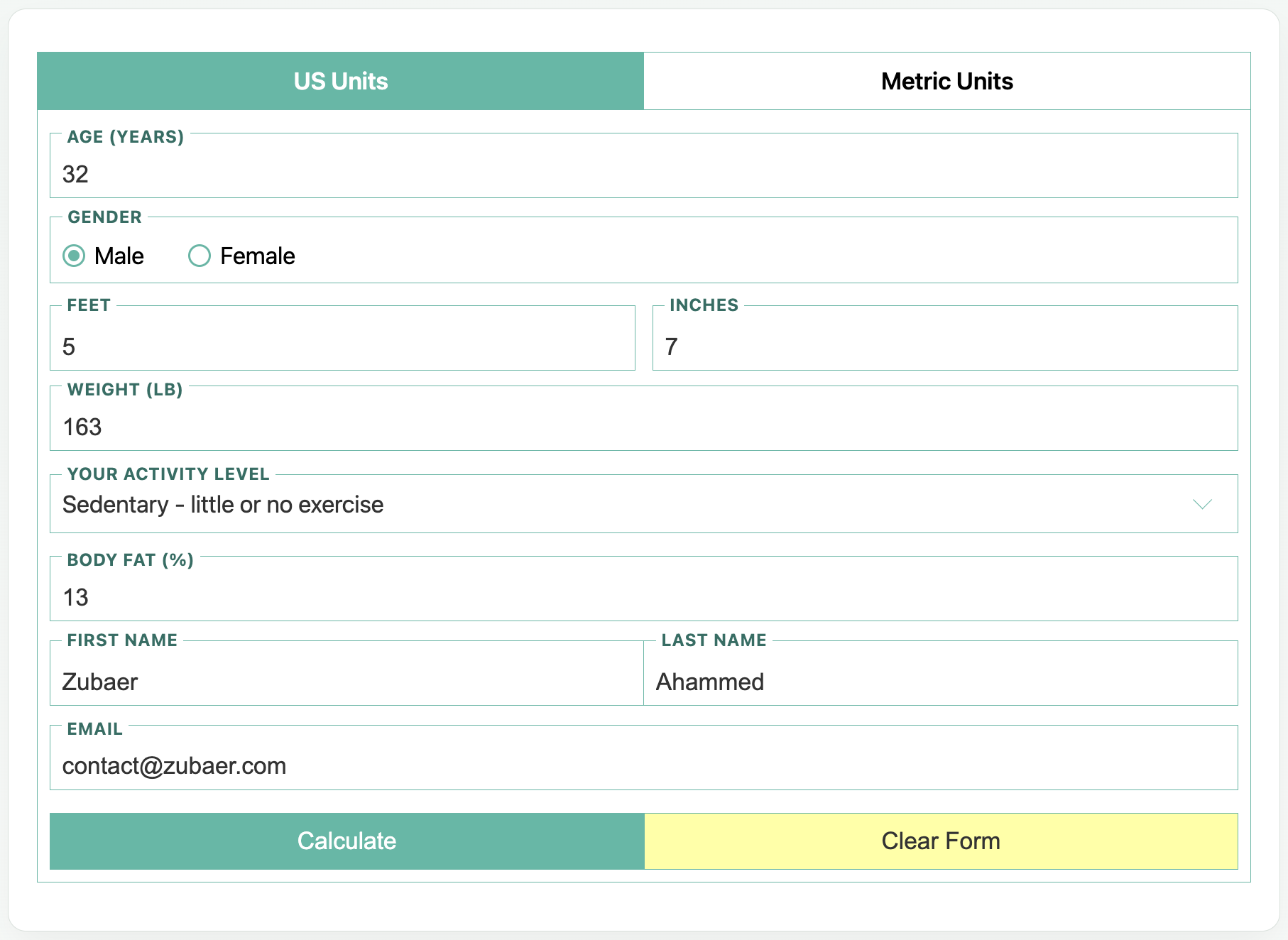
One-screen calculator form (US units) with floating labels
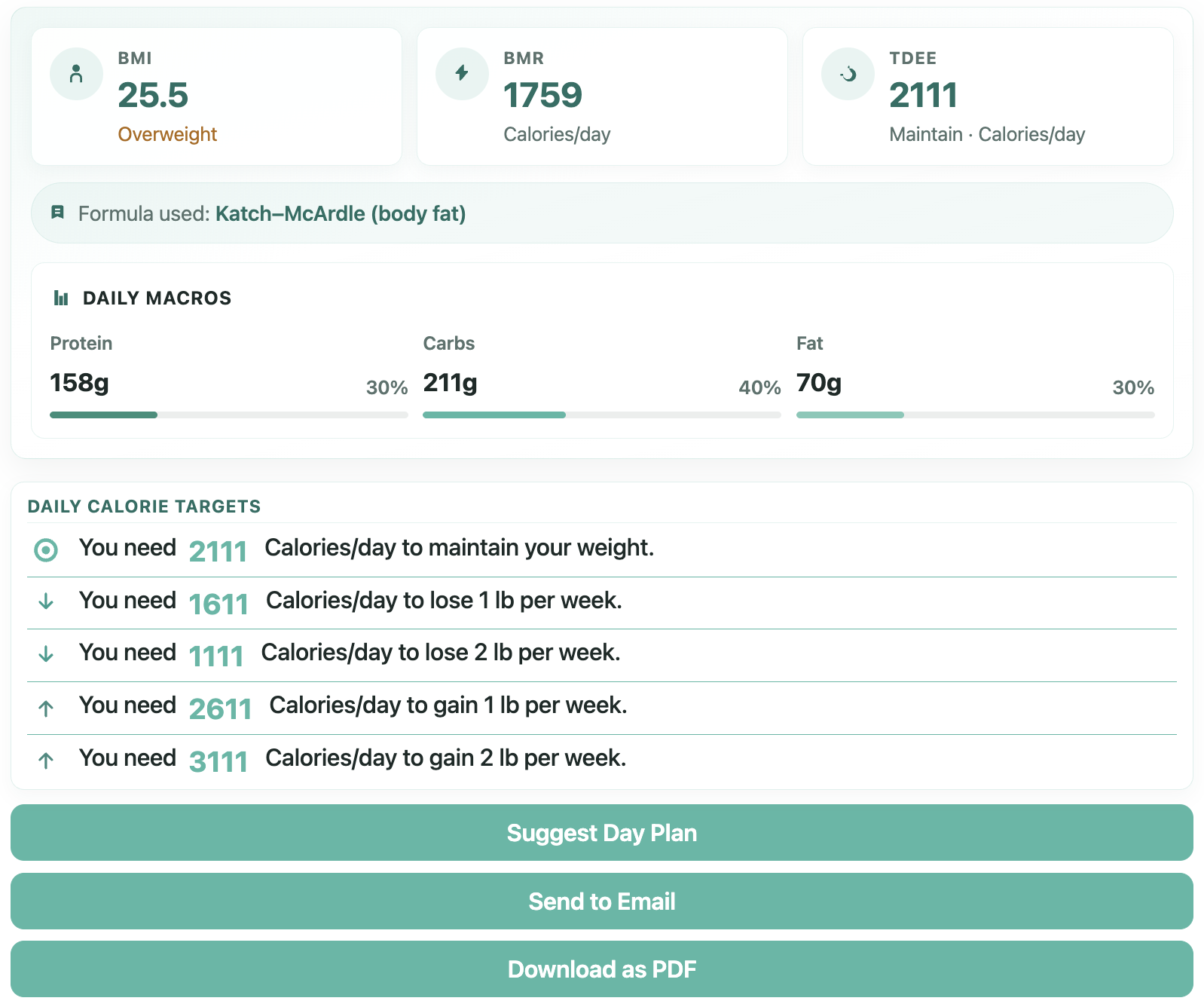
Results — BMI, BMR, TDEE snapshot cards and daily calorie targets
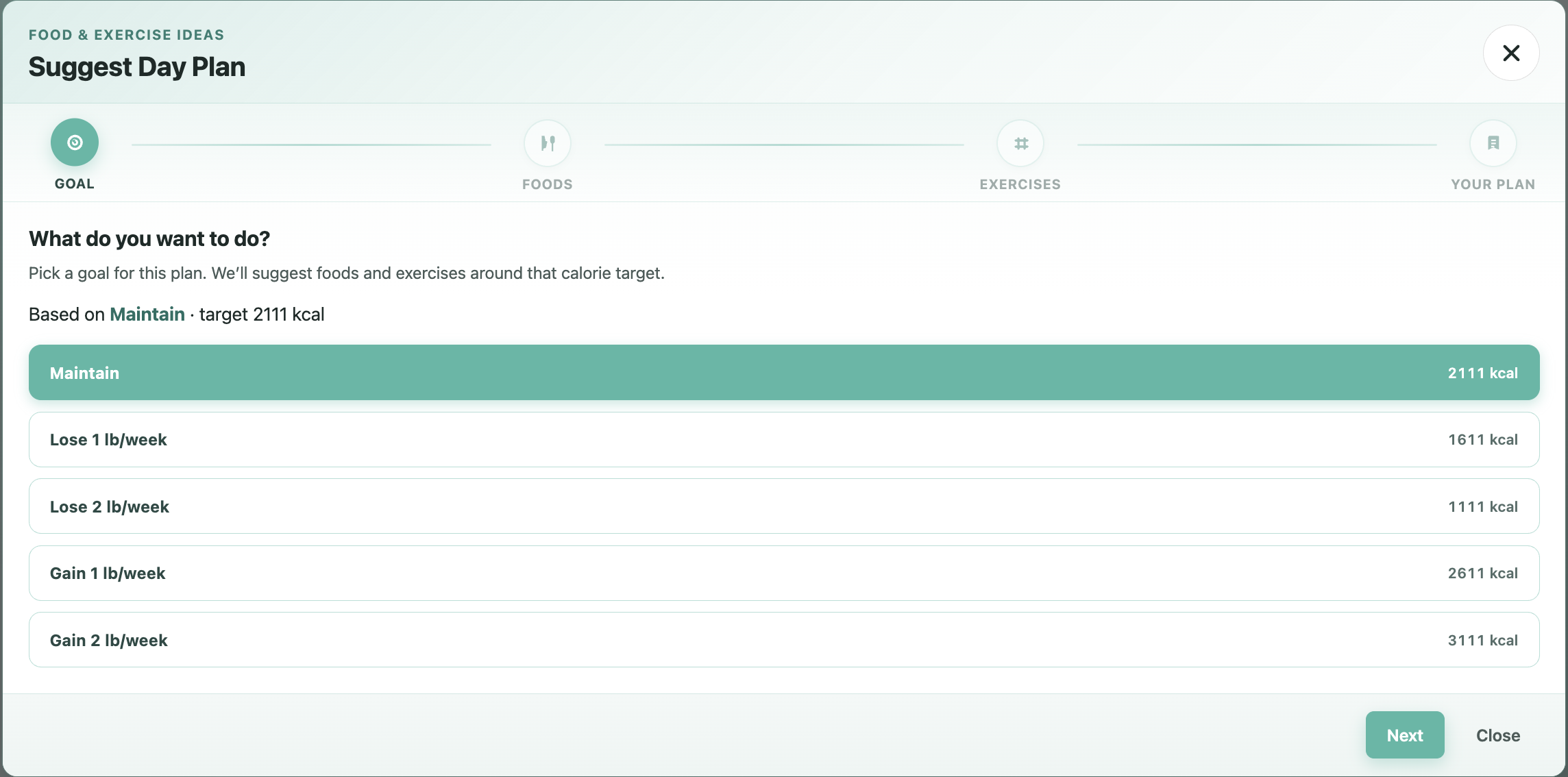
Suggest Day Plan — choose a goal (Pro preview)
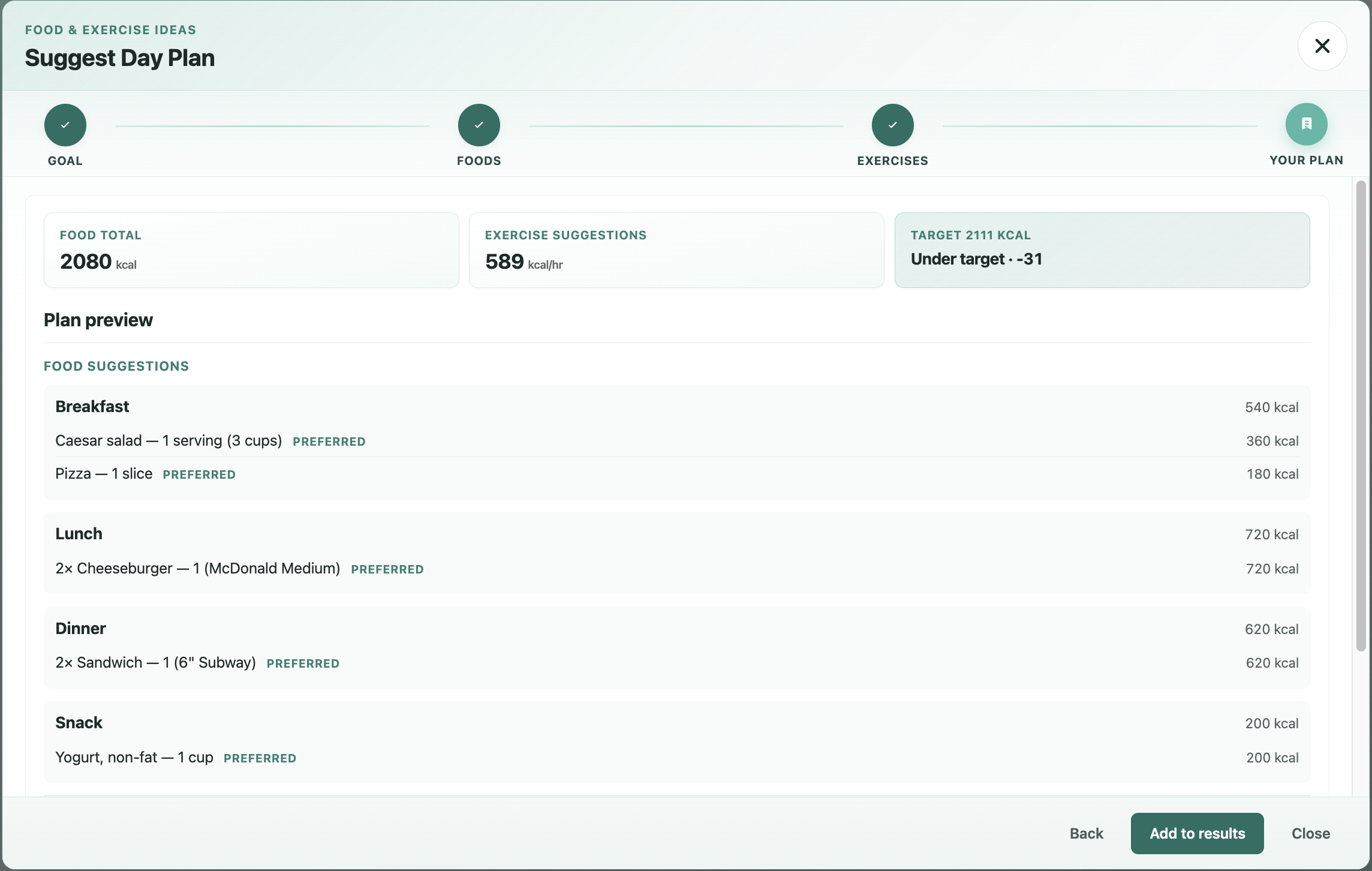
Suggest Day Plan — food and exercise preview (Pro preview)
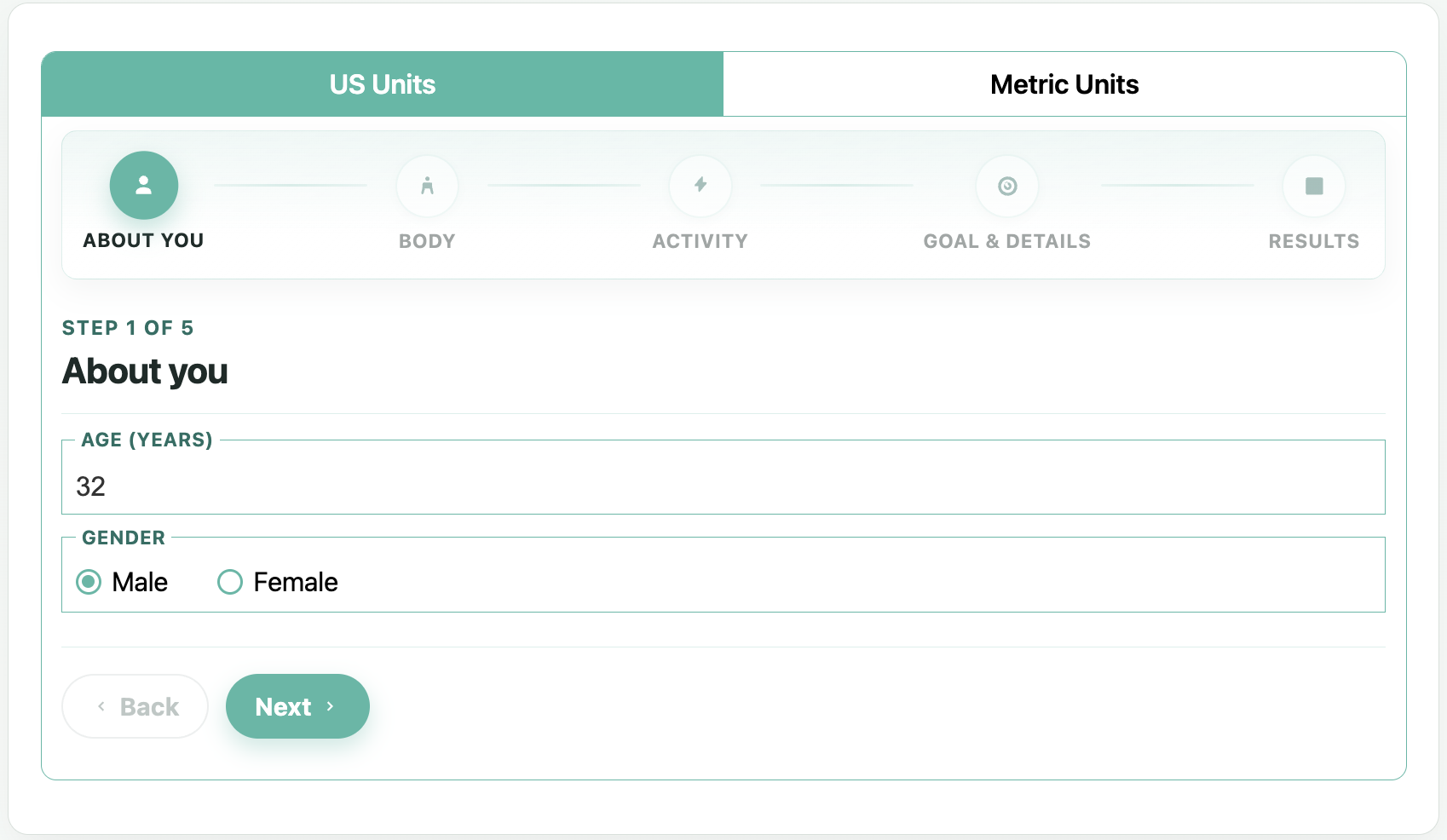
Multi-step calculator — About you (Pro preview)
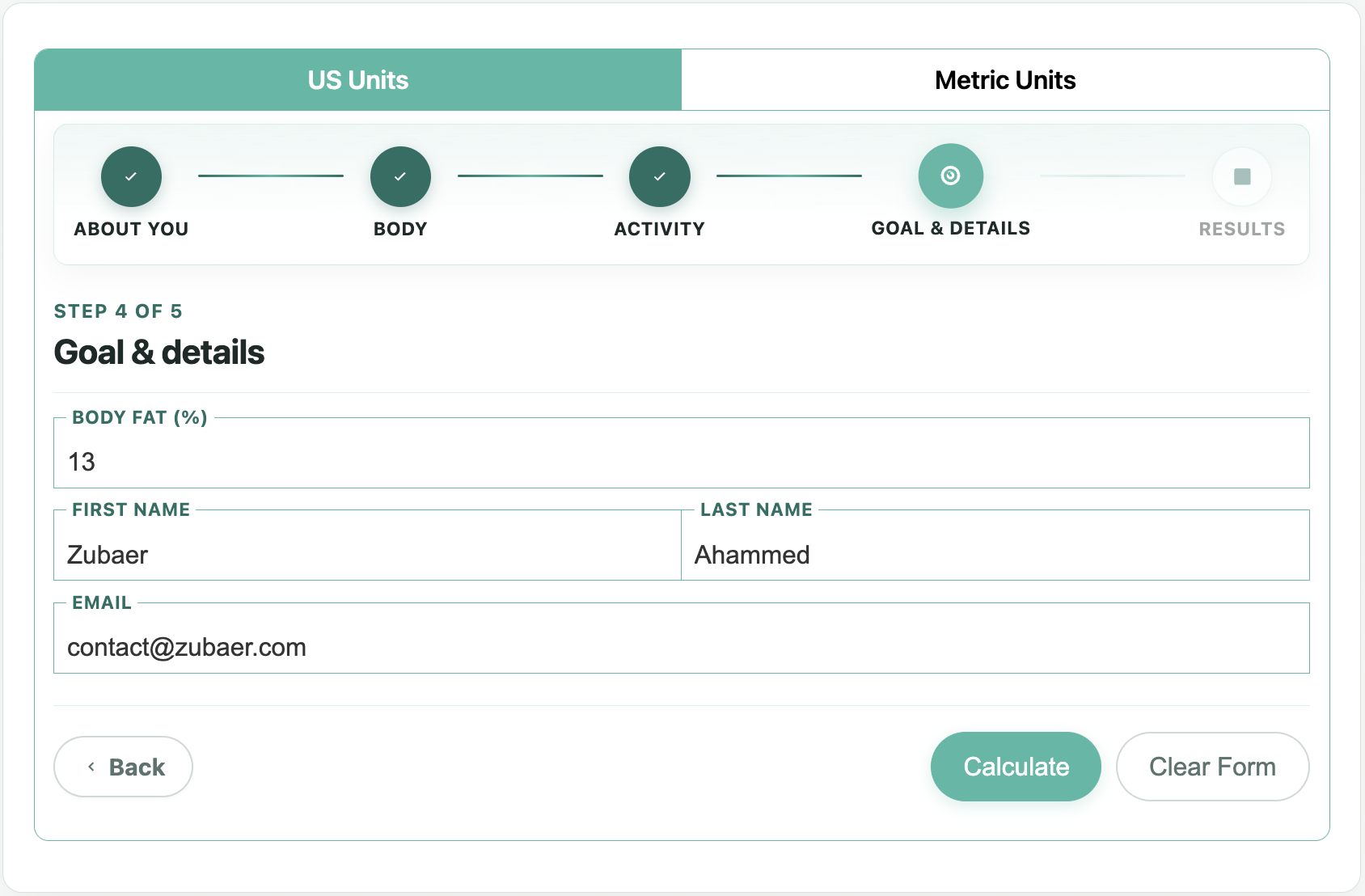
Multi-step calculator — results stage (Pro preview)
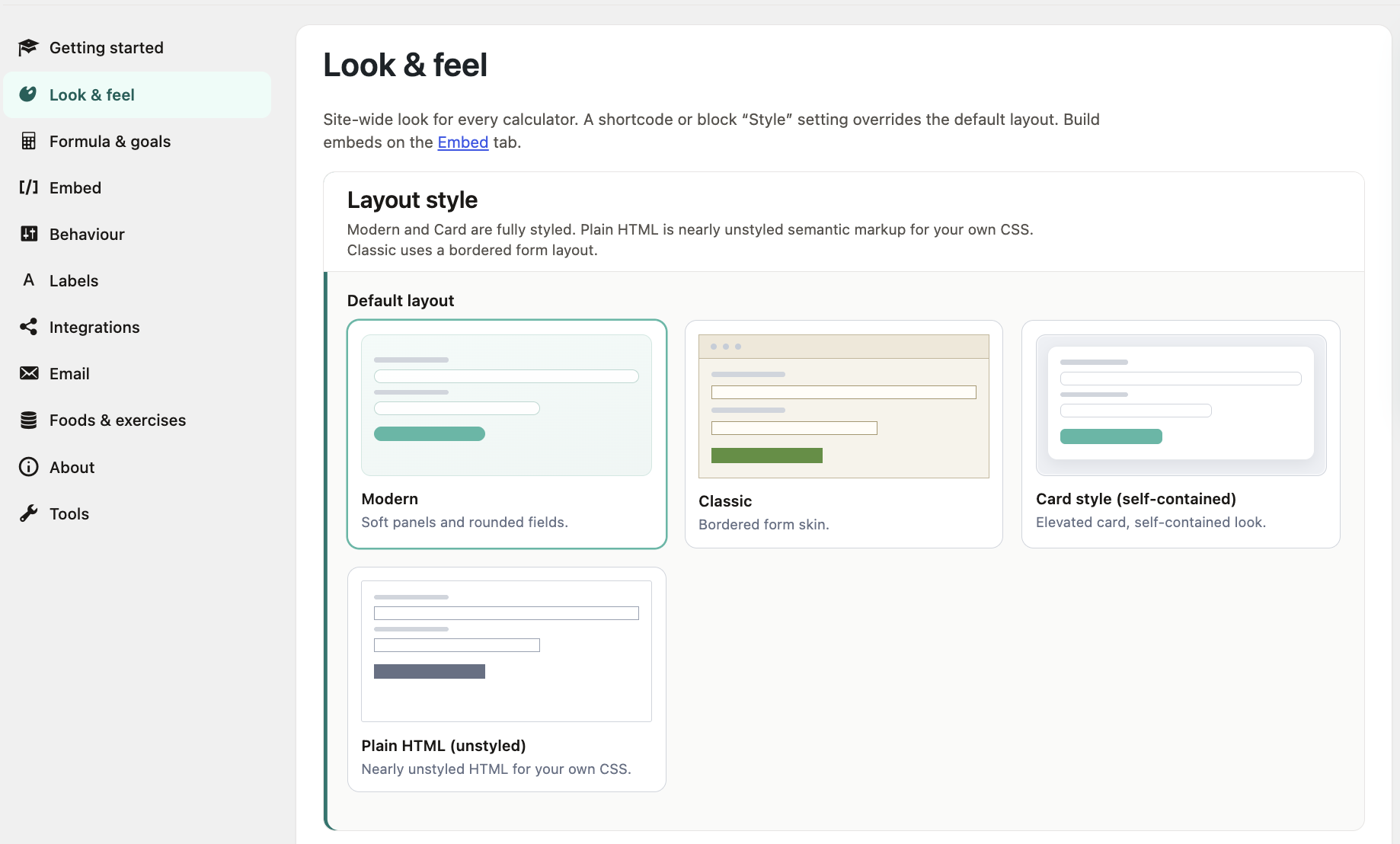
Look & feel settings

Email templates and Tools settings backup (Pro preview)
Faq
A free WordPress plugin that embeds a calorie calculator (block, shortcode, Elementor, or classic widget) so visitors can estimate daily calorie needs and see BMI, BMR, TDEE, and simple lose/gain targets.
Use the Calorie Calculator block, paste [calorie_calculator], add the Elementor widget, or place the classic widget in a sidebar. The Embed tab can generate a shortcode with a live preview.
Free uses the Mifflin–St Jeor equation for BMR, then an activity factor for TDEE (maintain calories). BMI is calculated from height and weight. Results are estimates, not medical advice.
Yes. Free results show BMI (with category), basal BMR, and TDEE alongside lose/gain calorie targets. Pro adds extras such as macros, PDF/email delivery, and more formulas.
Free is fully usable for embedding and calculating. Some admin tabs are locked Pro previews so you can see what upgrades unlock — they do not block the Free calculator on the front end.
Yes. Show US, Metric, or both (default). Set it per shortcode/block/widget with unit="usunit", unit="metricunit", or unit="both".
Open Calorie Calculator Look & feel. Choose Modern, Card, Plain HTML, or Classic, set base font size, and pick primary / alert colours. You can also override layout per shortcode with template.
Yes. Optionally show Name and Email fields; submissions can be stored as private Calculator Logs. Under Behaviour you can require GDPR consent, email the admin, and send an outbound webhook (Zapier / Make / n8n).
You can require a privacy consent checkbox before a log is stored, and customise the consent label under Behaviour. Align the wording with your privacy policy.
Under Behaviour, enable the outbound webhook and paste your Catch Hook URL. Free fires when a calculator log is created.
In wp-admin under Calorie Calculator Logs. They are private (not publicly queryable) and can include BMI and basal BMR when those fields are collected.
Yes. Add the Calorie Calculator widget from the Calorie Calculator category in Elementor.
Free covers embedding, Mifflin–St Jeor results (BMI / BMR / TDEE / goals), layouts, GDPR consent, webhook, admin email, logs, and settings backup. Pro adds PDF/email results, lead gate, macros, mailing-list integrations, foods & exercises, body fat / Katch–McArdle, Labels, multi-step flow, and premium support. Details: Calorie Calculator Pro.
Use the WordPress.org support forum. Under Tools (or Support), copy the system info report (no secrets) into your thread to speed up troubleshooting.
Reviews
Great Plugin and Great Support
By 
Don't waste your time on this one
By 
Awsome plug-in. Amazing support. Definitely suggested!
By 
Lies
By 
jast Awesome plugin
By 
Bait and Switch...
By 
NO Free version
By 
Very useful
By 
Awesome Plugin
By 
I myselft think it's helpful.
By 
Changelog
3.8.86
- Card template: Activity / Goal select text no longer clipped by tight theme control heights
- Classic template: selected US / Metric unit tab fills the whole half-width cell (front end, FOUC, and block editor)
3.8.85
- Classic unit tabs: stretch active tab link so the white sheet is not a small label pill
3.8.84
- Classic / Card skins: harden unit-tab and form chrome against theme list and button resets
3.8.83
- Skin polish: keep Classic and Card unit headers readable under common theme styles
3.8.82
- Classic: body fat / name / email use label-above layout like modern (classic chrome kept)
3.8.81
- Gutenberg: Calorie Calculator block uses brand C + check SVG; tables keep editor-table
3.8.80
- Gutenberg blocks: monochrome Dashicons (forms / table) like Elementor widgets
3.8.79
- Gutenberg block inserter: show brand SVG icon instead of a solid teal square
3.8.78
- Classic block editor preview: unit tabs form a continuous 50/50 header bar
3.8.77
- Classic template: restore selected US/Metric tab white sheet (FOUC no longer overrides active)
3.8.76
- Card template: show form when themes hide
.tab-content(e.g. Techblaze widget tabs)
3.8.75
- Classic multi-step: restore horizontal US/Metric tab header against theme list grid
3.8.74
- Card and plain templates: theme-proof unit tabs and result lists against list-card / chevron styles
3.8.73
- Classic template: kill theme list-card / chevron bullets on US–Metric unit tabs
3.8.72
- Theme-proof results layout against content p/h4/ul styles without changing designed chrome
3.8.71
- Harden US/Metric unit tabs against theme list styles (stacked tabs, custom bullets)
3.8.70
- Fix Calculate and Clear Form vertical misalignment on small screens
3.8.69
- Fix Calculate falsely requiring empty fields when Akismet injects honeypot inputs (US and Metric, all templates)
- Sidebar results: stack BMI/BMR/TDEE cleanly, align Daily macros, slightly smaller type in narrow hosts
- Show the hand pointer on Calculate and Clear Form buttons
- Activity dropdown shows the selected level instead of always showing the placeholder
3.8.68
- WordPress.org listing: richer Description, Installation, and FAQ (short description unchanged)
3.8.67
- Short description trimmed to WordPress.org’s 150-character limit
3.8.66
- WordPress.org screenshots replaced with clear captures (previous set was corrupted)
3.8.65
- Admin nav matches Pro: all Pro tabs shown as locked teasers, including Foods & exercises
- Tools: settings export / import / restore defaults unlocked on Free
- Look & feel: primary + alert/error colour defaults (teal / yellow) aligned with Pro
- Docs refreshed (overview, settings, shortcodes, support); WordPress.org screenshots updated
3.8.6
- Floating field labels so filled inputs keep a compact, visible name (Age, Weight, Gender, …)
3.8.5
- Results: BMI / BMR / TDEE snapshot cards + macros bars, separate from daily calorie target lines
3.8.4
- Look & feel: clickable layout style previews (Modern, Card, Plain, Classic) with primary-colour accent
3.8.3
- Support tab with a copyable system report (versions, PHP extensions, webhook host, active plugins)
3.8.2
- Admin tabs use clearer section panels (teal accent bars) on Look & feel, Behaviour, Embed, About, and Pro teasers
- Menu labels: Styling Look & feel, Calculation Formula & goals
- About tab: Plugin, Help, and Pro sections
3.8.1
- Results now show which BMR formula was used (Mifflin–St Jeor in Free)
3.8.0
- New Styling settings tab: site-wide default layout, base font size, and brand colours (moved off Behaviour)
- New Plain HTML layout — semantic form markup with minimal plugin chrome so themes can own the look
- Shortcode/block/widget Style options include Plain HTML; omit
templateto use the Styling default
3.7.0
- Optional goal dropdown: show one target calorie figure for Maintain, Mild/Weight Loss, or Mild/Weight Gain (default stays the existing lose/gain lines)
- New
goal_ui="lines/dropdown"attribute for the shortcode, block, Elementor widget, and classic widget; Behaviour tab sets the site-wide default - Primary and secondary colour pickers on the Behaviour tab (empty keeps the current look)
- Shortcode builder with live preview and Copy button on the Embed tab
- Behaviour tab settings can now be switched off and cleared reliably
- No Free features removed
3.6.0
- Behaviour tab: optional privacy consent before logging
- Outbound webhook (Zapier / Make / n8n) when a calculator log is created
- Optional admin email notification when a log is stored
- No Free features removed
3.5.0
- Results now show BMI, basal BMR, and TDEE alongside existing calorie goals
- BMI / basal BMR stored on calculator logs
- No Free features removed
3.4.0
- Modern foundation: self-contained Card style (no theme Bootstrap required)
- Gutenberg block for the calculator
- Elementor calculator widget
- Working
[calorie_calculator]shortcode in Free - Privacy: calculator logs are no longer publicly queryable
- Security hardening for log submissions
- Shared core helpers for Free/Pro alignment
3.3.1
- Performance Improvements
- Compatibility with the latest WordPress version
3.3.0
- Performance Improvements
- Compatibility with the latest WordPress version
3.2.9
- Performance Improvements
- Compatibility with the latest WordPress version
3.2.8
- CSS bug fixes
3.2.7
- RTL Language support
3.2.6
- Bug fixes
- Performance Improvements.
3.2.5
- Bug fixes
- Performance Improvements.
3.2.4
- Bug fixes
- Performance Improvements.
3.2.3
- Made setting Calculator Easier.
- Visual Improvements.
3.2.2
- Added helpful message and updated compatibility.
3.2.1
- Issue with Firefox browser is now fixed.
- Bug fixes and enhancements.
3.2.0
- Bug fixes and enhancements
3.1.9
- Weight field tooltip issue fixed.
3.1.8
- CSS Issue fixation.
3.1.7
- Bootstrap Style Not Showing issue fixed.
3.1.6
- CSS Overflow issue with Select Activity option Fixed.
3.1.5
- CSS Enhancement
3.1.4
- Bug Fixes and CSS Enhancement
3.1.3
- Bug Fixes and Improved user experience
3.1.0
- Bug fixes and improved user experience
3.0.1
- Bug fix with Calorie Calculator Logs
3.0.0
- Attractive and Imporved User Interface
- Save user details as Calculator Logs
- User Name and User Email Field.
- Use Calculator Logs and User Details as you wish
- Made Faster and Secure.
2.5.0
- Working with the latest version of wordpress 4.8
2.5.0
- Performance improvement
- Security improvement
- Ready to upgrade
2.0.2
- Frontend template and bootstrap template issue fixation
2.0.1
- Bootstrap template showing issue fixation.
2.0.0
- Support for Twitter Bootstrap. Now, you can enable “Twitter Bootstrap” specific styling if your theme supports twitter bootstrap.
- Performance improvement.
1.1.0
- Switch for showing ‘US Units’ or ‘Metric Units’ or both added.
- Plugin has been made compitable for translation.
1.0.0
- First version of Calorie Calculator.