SilentShield – Captcha & Anti-Spam for WordPress (CF7, WPForms, Elementor, WooCommerce)
SilentShield – Captcha & Anti-Spam for WordPress (CF7, WPForms, Elementor, WooCommerce)
Description
SilentShield is a unified captcha and anti-spam plugin for WordPress.
It works with the most popular form builders and protects login, registration, and comment forms – without slowing your site.
Why choose SilentShield?
– Invisible defense – Captcha, honeypot, and blacklists working silently.
– Instant results – Install, activate, and stop spam.
– Universal support – Works with Contact Form 7, WPForms, Elementor, WooCommerce, and more.
– Privacy-first – No cookies, no tracking, fully GDPR / DSGVO compliant.
SilentShield doesn’t just protect forms.
It protects your time, your customers, your business.
Core Features
- Invisible Captcha (Arithmetic, Honeypot, Image)
- Smart IP Blocking & Blacklists
- Spam filters for links, code & keywords
- Whitelisting for admins & customers
- GDPR-ready, no cookies, no tracking
Supported Form Plugins & Integrations
SilentShield protects forms from all major WordPress form builders and core features:
Form Builders:
– Contact Form 7 (CF7)
– WPForms / WPForms Lite
– Elementor Pro Forms
– Gravity Forms
– Fluent Forms
– JetFormBuilder
– Avada (Fusion Builder) Forms
WooCommerce:
– Checkout (classic & PayPal Payments)
– Login
– Registration
WordPress Core:
– Login form (wp-login.php)
– Registration form
– Comment forms
Other:
– Ultimate Member (Login & Registration)
– WP Job Manager (Job Applications)
Each integration can be enabled or disabled individually under Settings > Extended.
Protection Layers
SilentShield uses 10+ protection mechanisms working together:
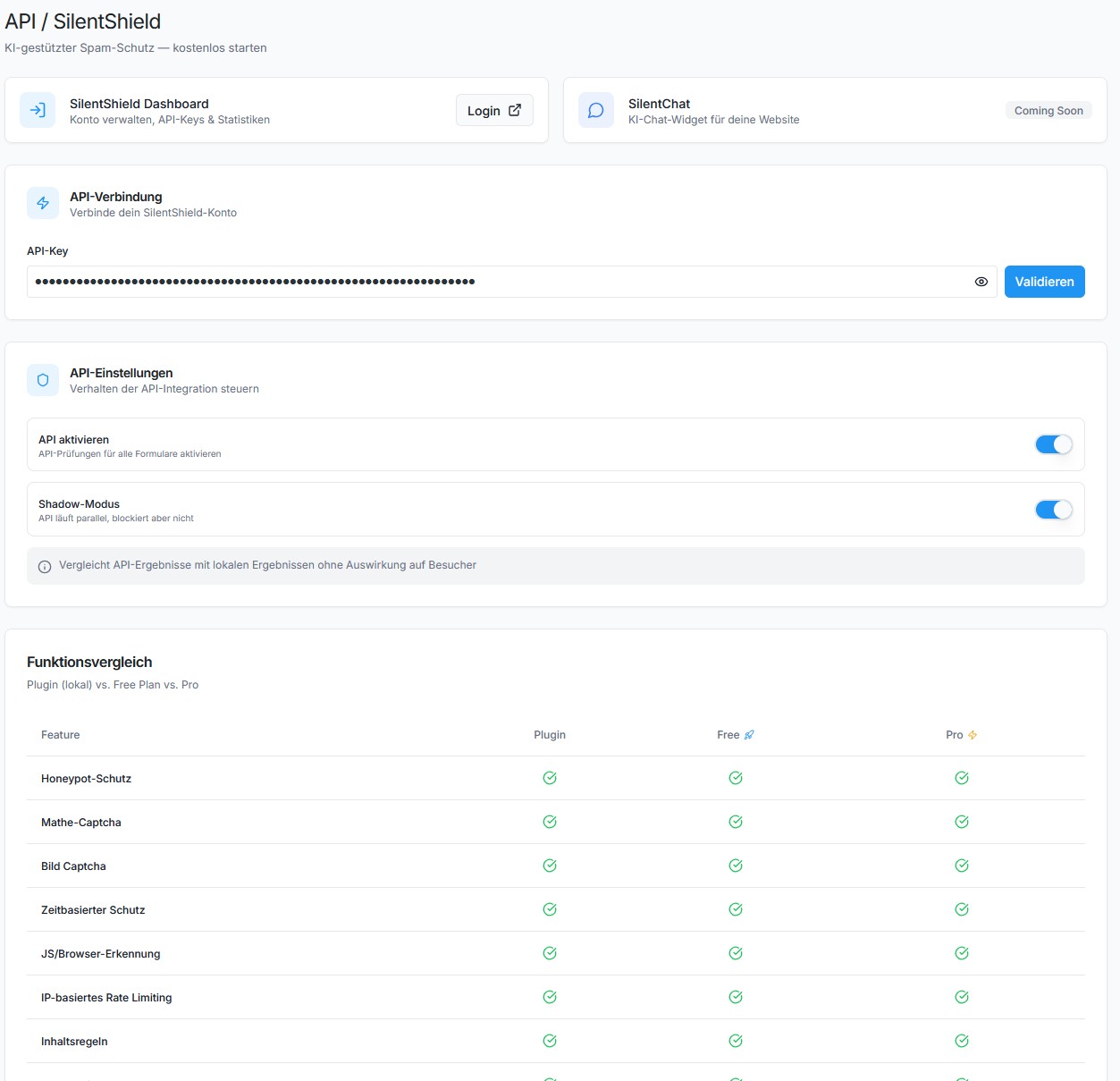
- Captcha – Arithmetic math, honeypot, or image-based captcha
- JavaScript Protection – Detects submissions from bots without JS support
- Browser Detection – Validates User-Agent strings
- Timer Protection – Blocks submissions faster than a human can type
- Multiple Submission Protection – Prevents rapid duplicate submissions
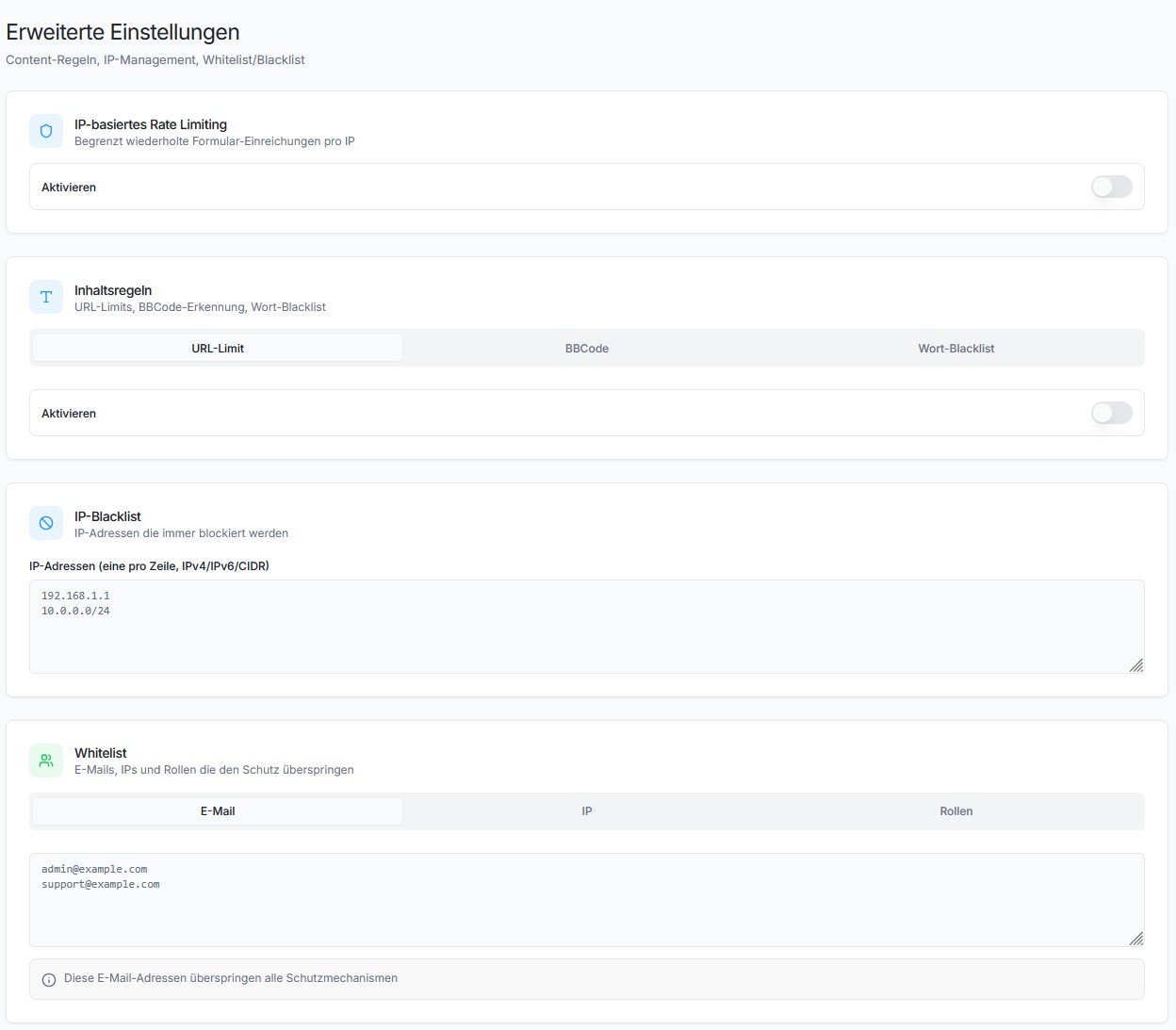
- IP Rate Limiting – Limits requests per IP and time window
- IP Blacklist – Block known bad IPs
- Content Rules – Limit URLs, block BBCode, keyword blacklist
- Whitelist – Skip validation for admins, logged-in users, or specific emails/IPs
- SilentShield API (Beta) – Cloud-based spam detection
The Promise
SilentShield is not “just another plugin.”
It’s an invisible wall against the background noise of the internet.
Activate once – and your forms are human again.
Privacy & Telemetry
- No cookies, no user tracking.
- Encrypted IP storage (max. 2 months, only for spam defense).
- Telemetry is optional and anonymized.
- You can disable telemetry anytime in plugin settings.
Collected fields:
– plugin_slug, plugin_version
– snapshot_date
– settings_json (anonymized config – only boolean/integer flags, no free-text)
– features_json (enabled features)
– created_at, first_seen, last_seen
– counters_json (spam events)
– wp_version, php_version, locale
GDPR / DSGVO Compliance
– Basis: Art. 6 Abs. 1 lit. f DSGVO (legitimate interest – plugin optimization).
– No personal data, no cookies, no user tracking.
Installation
- Upload to
/wp-content/plugins/. - Activate via WordPress “Plugins” menu.
- Configure protection settings under Settings > SilentShield.
For detailed setup instructions, see docs/installation.md.
Screenshots
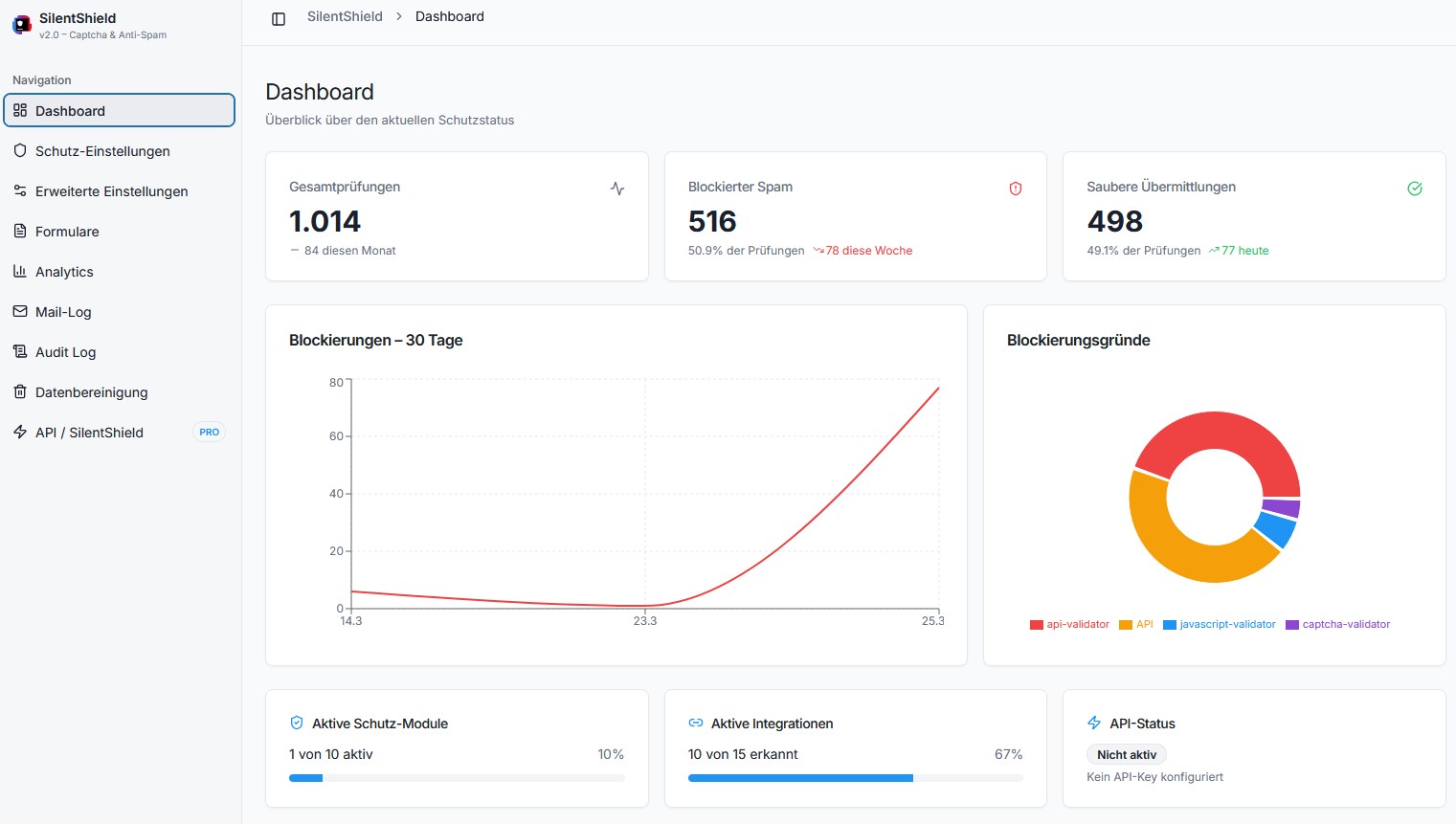
IP Protection settings
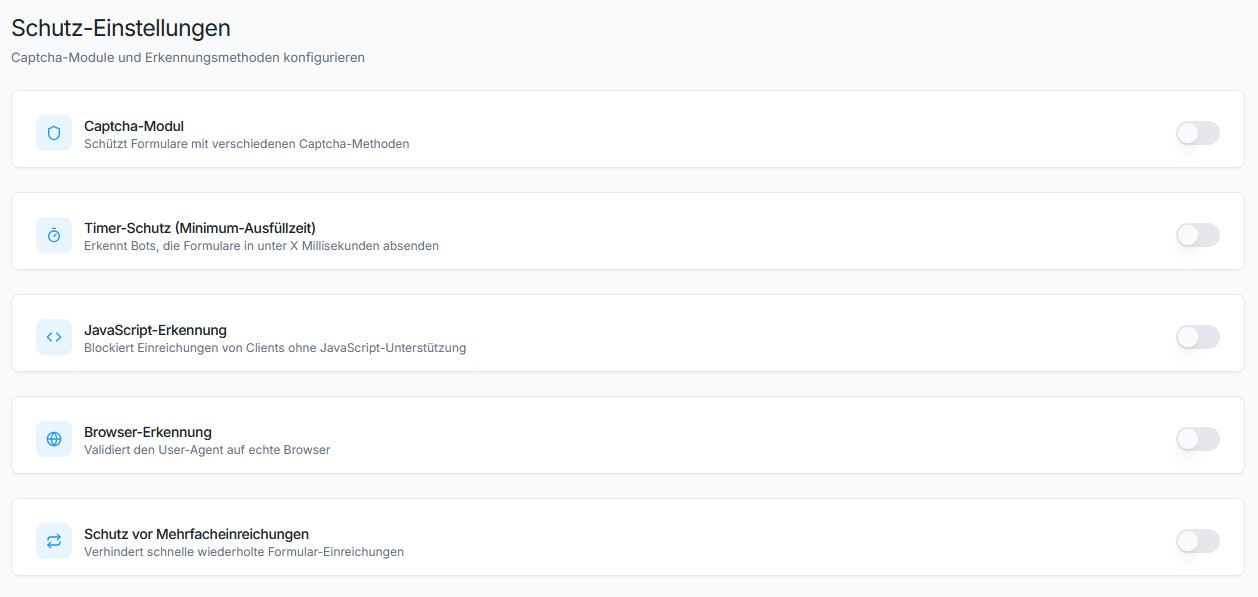
Spam protection in comments
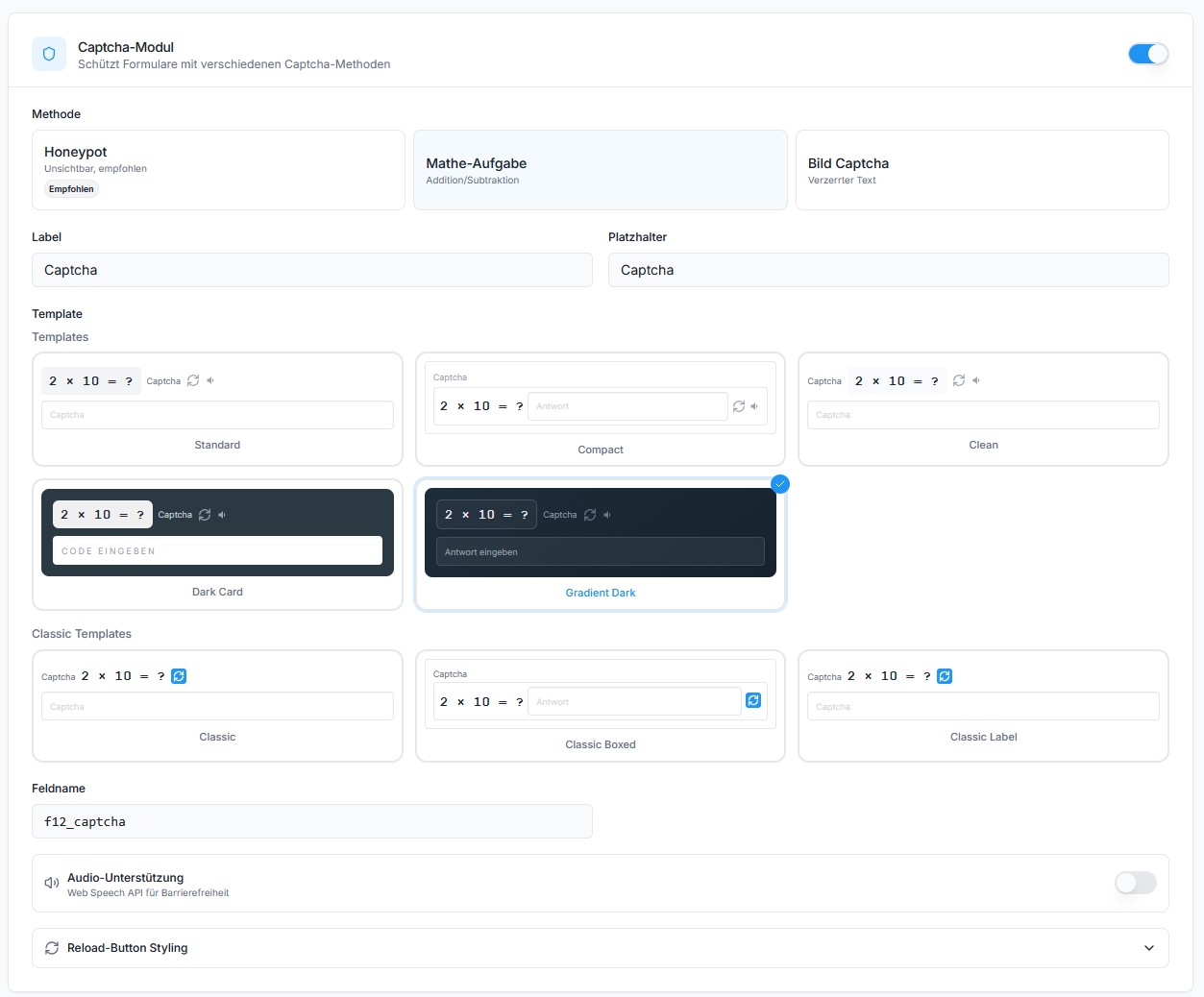
Contact Form 7 integration
Avada Forms integration
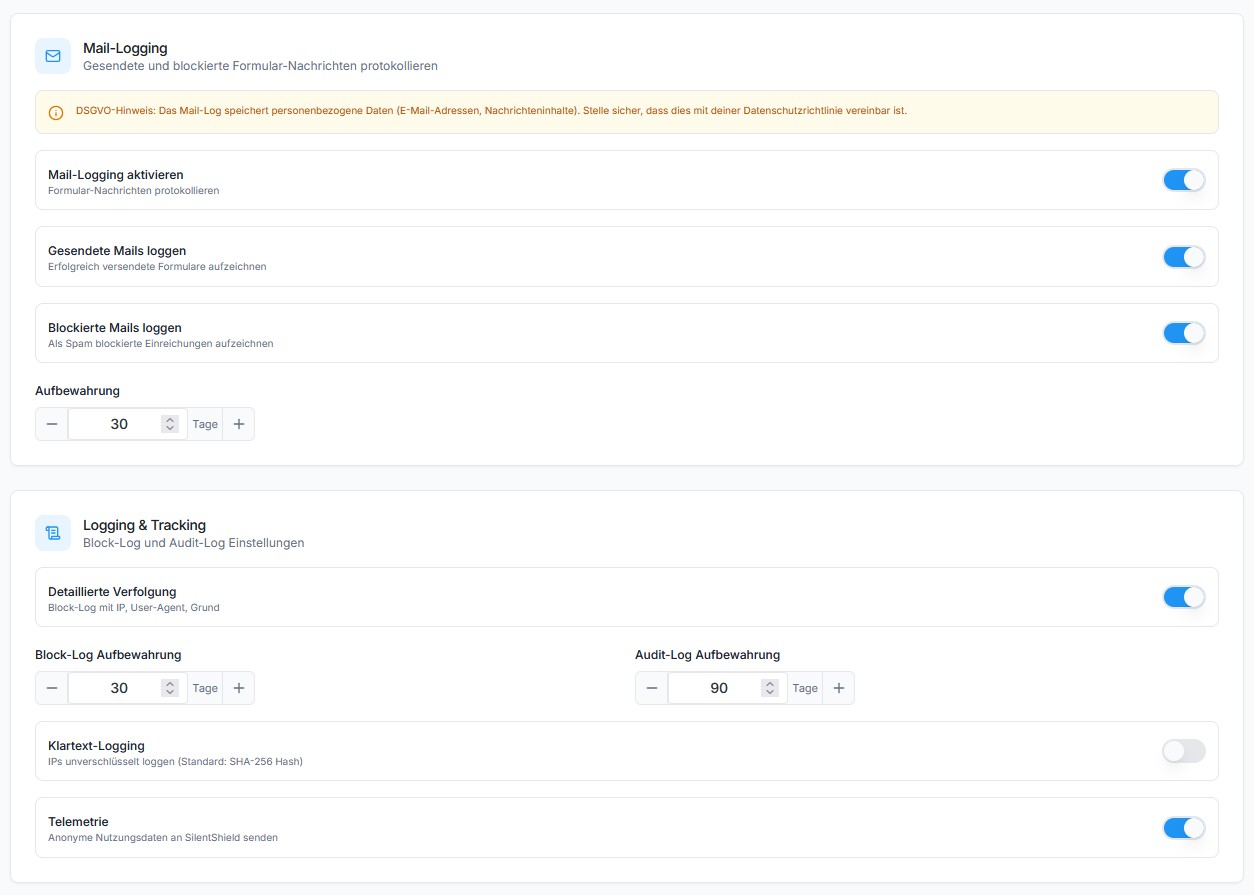
Image Captcha example
Arithmetic Captcha example
Honeypot Captcha example
Faq
Not all, but it drastically reduces it. SilentShield combines multiple detection layers (captcha, honeypot, IP blocking, JavaScript detection, timer, content rules) for maximum coverage.
Yes – no cookies, no tracking, only anonymized data. IPs are stored encrypted for max 2 months (only for spam defense). See the Privacy section below.
No. Everything is managed via WordPress Dashboard.
Yes. SilentShield automatically injects JavaScript protection timestamps into PayPal checkout requests. Both PayPal Standard Buttons and Card Fields are supported.
Yes. Choose from 3 built-in templates, customize the label and placeholder text, and select a reload icon color (black/white). Developers can further customize the output via filters.
Yes. Every protection mechanism (captcha, timer, JavaScript, browser, IP, rules, etc.) can be individually enabled or disabled.
Under Settings > Extended > Whitelist, enable “Whitelist Admin Users” and/or “Whitelist Logged-In Users”. You can also whitelist specific emails and IPs.
SilentShield includes optional anonymous telemetry (opt-out).
This helps us understand which features are used, so we can improve usability and remove unused complexity.
We are a small independent team – we don’t earn money with this plugin, and we don’t sell or share data.
Telemetry is used only for optimization and maintenance purposes.
See the docs/ directory in the plugin folder for complete documentation of all settings, hooks, REST API, and developer reference.
Reviews
Great Plug-In
By 
Easy to use and does exactly what it should. Not overloaded, pretty easy to setup. Awesome ! Works like a charm with Elementor !
Finally the spam stopped!!!
By 
This is FINALLY the solution I was looking for. Thousands of spam emails from my website have been a plague. Now - with this amazing plug-in - it has STOPPED. My gratitude is immense. A real game changer!!
Beware: Blocks login
By 
Blocks login even if login protection is not checked in dashboard. Moreover, the right answer does not allow to login. You get locked out your own WP site.
Just perfect!
By 
I'm using this plugin for 1-2 years and it's the best solution yet.
Top-notch Support
By 
The support team is next level! Jumped in immediately and resolved the issue quickly. The plugin works great for my client's gravity form. Highly recommend and will use again in the future.
This great protection makes my websites safer
By 
As webmaster, I always use this great plugin in all my websites to protect any contact form (using CF7) and also the WordPress administration login page. Now, my websites are safer, and my customers are not bothered any more. Finally, the support is excellent.
Great Captcha Solution with even better Support
By 
This plugin is the best solution I've tested so far in over 15 years of creating websites for my clients. It works smoothly, is GDPR / DSGVO compliant, lightweight and protects contact forms very reliably.
I experienced some minor issues at times and reached out for support to FORGE12 - the team is amazing! They reply very fast (same day) and with brilliant solutions - well-earned five stars and highly recommended!
Simple and effective solution - with amazing support
By 
A five star rating for this plugin, and for the support.
The captcha works perfectly for keeping the bots away - but at the same time, it does not discourage your visitors and users to register or log in at your site.
In two years of use, I've had two minor issues, and when I reach out for tech support, I get an answer within 12 hours. This is pretty amazing, If you use this plugin it will work very well, and you'll also need the support you need. 5 Stars.
Fraud - They add their own link to the site code without permission
By 
Fraud -They add their own link to the site code without permission -
<noscript><a title="Digital Agentur" href="...www(dot)forge12(dot)com">Digitalagentur Forge12 Interactive GmbH</a></noscript> </body>
A lot of false positives
By 
It works great to stop spam, unfortunately stops many legitimate users too.
Changelog
2.6.13
- Fix [Admin UI]: Resolved sidebar/navigation not rendering on sites with WooCommerce or other React-based plugins. The plugin now uses WordPress’ built-in React instead of bundling its own copy, preventing duplicate React instance conflicts that broke context providers.
- Fix [Cron]: “Daily Telemetry” cron job no longer runs when telemetry is disabled. Previously, disabling telemetry in the admin UI only took effect on the next page load; the cron could still fire in between. Cron state is now synced immediately when settings are saved.
- Fix [Cron]: Audit log no longer shows “Daily Telemetry completed” entries when telemetry is disabled. The audit hook for the telemetry cron is now only registered when telemetry is active.
2.6.12
- Fix [Settings]: Plugin action link (“Settings” in plugin list) now correctly opens the new React admin UI instead of the removed legacy page.
- Fix [Dashboard]: “View Audit Log” link in the dashboard widget now points to the new Audit Log page instead of the removed legacy page.
- Fix [Navigation]: Old admin page URLs (e.g.
admin.php?page=f12-cf7-captcha,f12-cf7-captcha-extended,f12-cf7-captcha-audit-log) now redirect to their React equivalents instead of showing a permissions error. - Fix [Forms]: Integration presets (WooCommerce, Fluent Forms, JetForm, etc.) no longer default to “enabled” when the setting has not been explicitly saved. Previously, unsaved settings defaulted to enabled, making it appear as though integrations were active even when the corresponding plugin was not installed.
- Fix [Dashboard]: Internal telemetry errors (e.g.
TELEMETRY_UNEXPECTED_RESPONSE) are no longer shown in the “Recent Issues” section of the dashboard widget. These technical messages are not actionable by end users. - Improved [Dashboard]: Protection Score widget is now more compact — score circle reduced from 120px to 72px, stats displayed beside the circle instead of below, and module list uses smaller type for a tighter layout.
- Improved [Settings]: Added descriptive help text to all numeric fields in Advanced Settings (IP Rate Limiting, Content Rules, Mail Log Retention, Block Log Retention, Audit Log Retention) so users understand what each value controls.
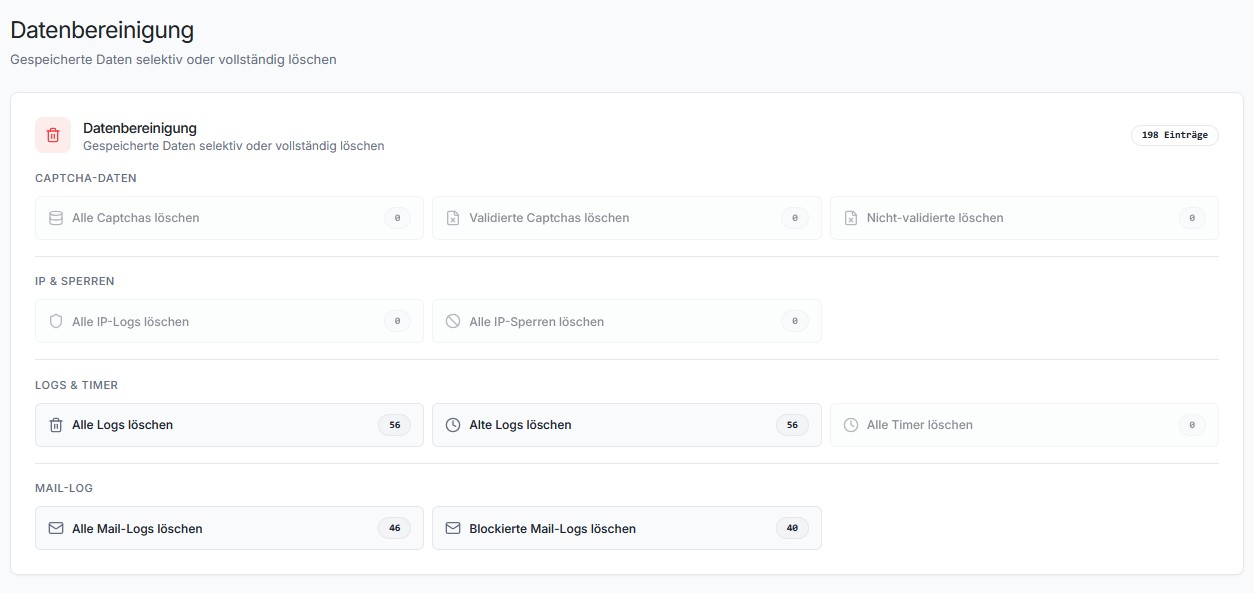
- Improved [Cleanup]: Every cleanup action now shows a description below the button label explaining exactly what it does (e.g. “Removes log entries older than 3 weeks”).
2.6.11
- Fix [Settings]: Global settings (including integration enable/disable toggles) were not loaded on non-admin pages (wp-login.php, frontend). The settings cache only included values from the
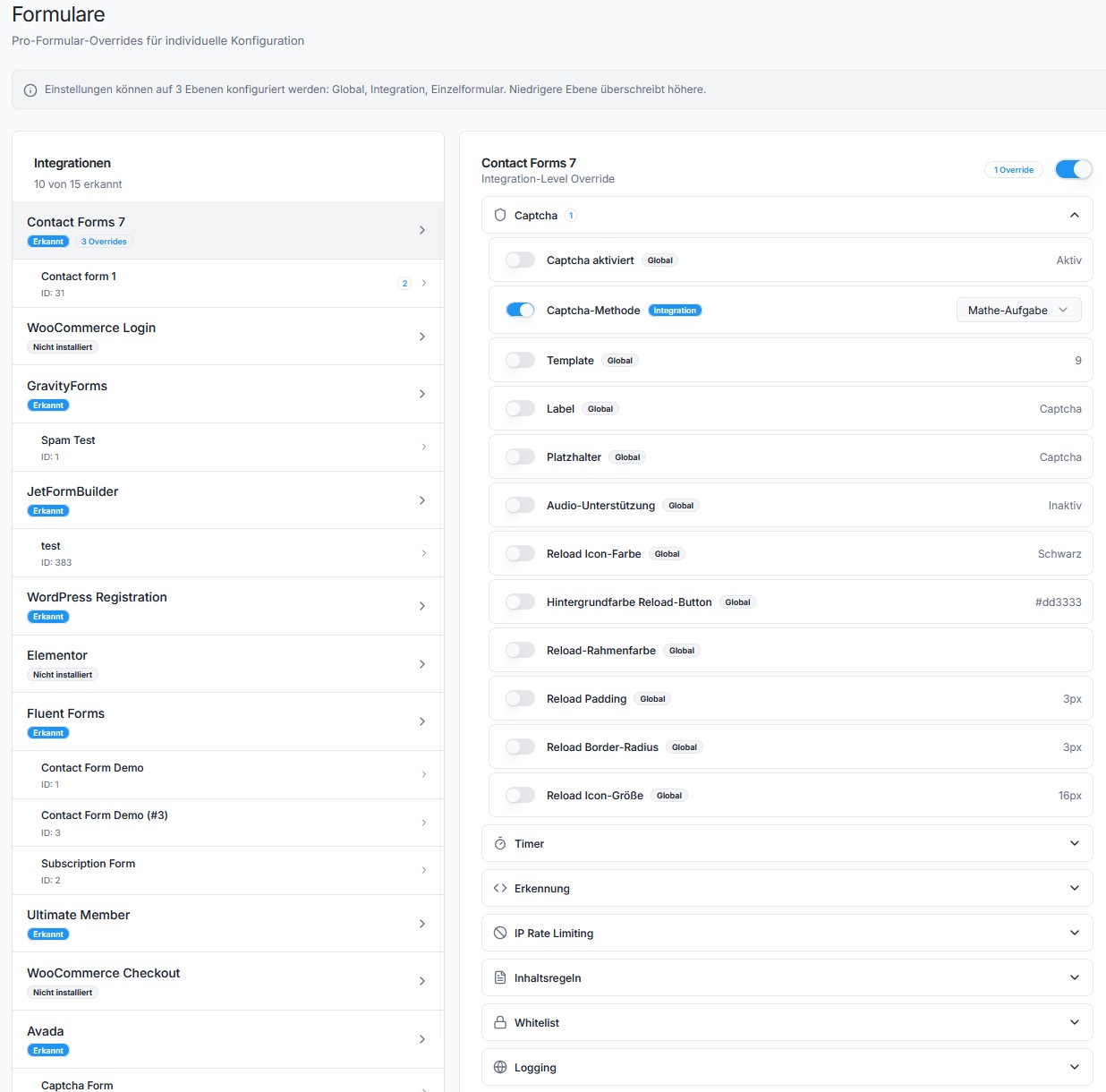
f12-cf7-captcha_settingsfilter defaults, which are only registered on admin pages. DB settings containers not covered by filter defaults were silently dropped. Allget_settings()calls returnednullon the login page, causing every protection module to fall back to its enabled default. This also meant integration toggle settings and per-module overrides were ignored on the login page. - New [Forms]: Added master toggle to enable/disable entire integrations (WordPress Login, WooCommerce, Avada, CF7, etc.) directly from the Forms page. Previously, only per-module overrides were available — there was no way to completely deactivate protection for a specific integration via the UI.
- Fix [Cleanup]: Data Cleanup page showed all counts as zero. The
handle_cleanup_countsendpoint calledget_count()on Cleaner classes (CaptchaCleaner,IPLogCleaner,IPBanCleaner,CaptchaTimerCleaner) which do not have this method. The resultingErrorwas silently caught. Addedget_count()delegate methods to all four Cleaner classes. - New [API]: New REST endpoint
POST /integration/toggleto programmatically enable or disable integrations by setting their global settings key. - New [API]: The
/forms/discoverendpoint now returnsenabledandsettings_keyper integration, so the UI can display and toggle the integration status.
2.6.10
- Fix [Telemetry]: Disabling telemetry in Advanced Settings no longer stops the daily telemetry cron job from running. The cron was scheduled unconditionally on every page load and
send_telemetry_snapshot()never checked the setting — data was still sent to the API even when telemetry was turned off. Now the cron is only registered when telemetry is enabled, removed immediately when disabled, and the send function includes a guard check as defense-in-depth.
2.6.9
- Fix [Whitelist]: Email whitelist never matched — the
is_whitelisted_email()method logged the match but was missing thereturn truestatement, so whitelisted emails were still checked by all protection modules. - Fix [Whitelist]: Admin role check caused early return that blocked IP and email whitelist checks. When admin whitelist was enabled and a non-admin user submitted a form, the method returned
falseimmediately instead of continuing to check IP/email whitelists. - Fix [Whitelist/Blacklist]: REST API settings save (
handle_settings_save) usedsanitize_text_field()for textarea fields (whitelist emails, whitelist IPs, blacklist IPs), which strips newlines. Entries saved via the React admin UI were merged into a single line and never matched. Now usessanitize_textarea_field()for these fields, matching the PHP form handler behavior. - Fix [Whitelist/Blacklist]: IP and email parsing now uses
preg_split('/[\s,]+/')instead ofexplode("\n"), so entries separated by spaces or commas (e.g. from previously corrupted saves) are correctly recognized. - Fix [Protection]: SilentShield API mode and local protection modules (JavaScript, Timer, Captcha, etc.) can now run simultaneously. Previously, enabling the API disabled all local modules and prevented the local JS from loading, causing false
NO_JAVASCRIPTblocks on login and other forms. - Fix [Assets]: Local protection script (
f12-cf7-captcha-cf7.js) is now always loaded when a form is detected, even when the SilentShield API client (client.js) is also active. Previously the two were mutually exclusive. - New [Documentation]: Added in-plugin Help page (SilentShield > Help) with full user guide covering all protection modules, integrations, whitelist/blacklist, per-form overrides, API mode, logging and FAQ.
- New [Documentation]: Contextual help links (info icon) added to all section headings on Settings, Dashboard, API and Forms pages, linking directly to the relevant documentation section.
- New [Documentation]: Inline tooltips on 14 key settings fields (whitelist, blacklist, IP protection, content rules, logging, asset loading) explaining each option on hover.
- New [Translations]: German (de_DE, de_DE_formal) and French (fr_FR) translations added for all documentation strings.
2.6.8
- Fix [API]: Unified all API endpoints to use
/api/v1base path. The verify endpoint changed from/v1/verifyto/api/v1/captcha/verify-nonce. Affects key validation, trial creation, telemetry, shadow mode, and blacklist retrieval. - New [API]: Introduced separate
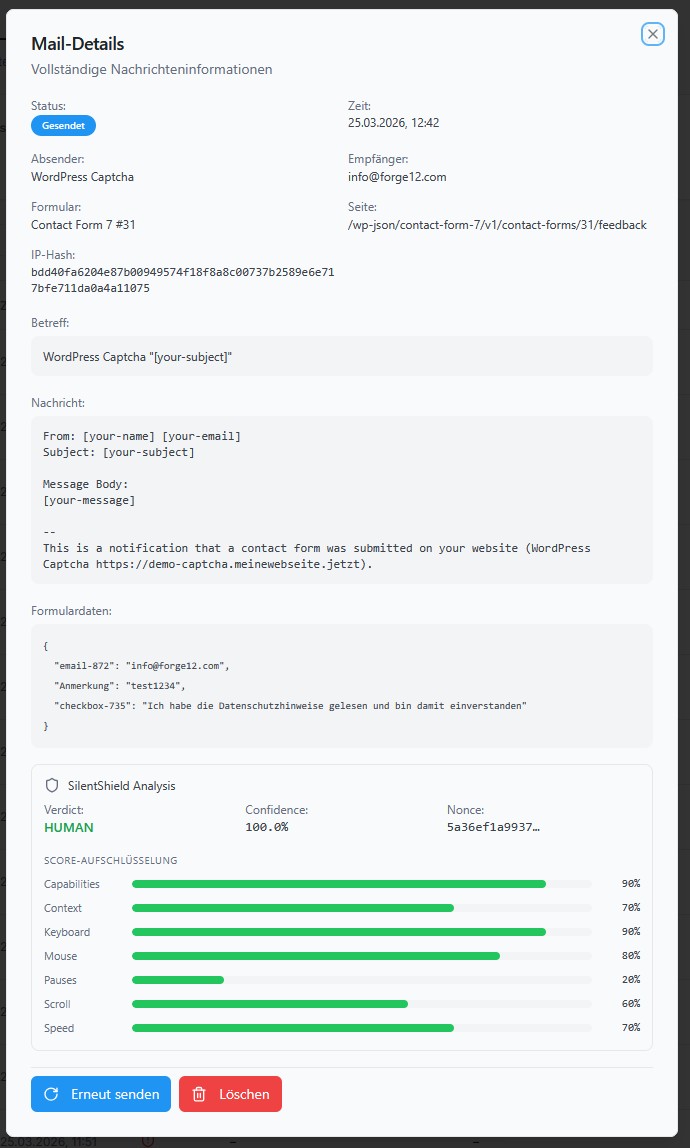
F12_CAPTCHA_CLIENT_URLconstant to decouple the behavior client script URL from the API base URL. The client.js loader now readsclient_urlfrom localized data with fallback tourl. - New [Mail-Log]: API response metadata (verdict, confidence, reason codes) is now forwarded to mail log entries for both blocked and passed submissions, enabling better audit trail and debugging.
- Fix [Settings]: Added
invalidate_settings_cachehook atinitpriority 99 to ensure the settings cache is rebuilt after UI page filters register their defaults. - New [Debug]: Added detailed debug logging in the API spam check flow for nonce detection, API request/response, and verdict evaluation. Temporary logging to
error_logfor troubleshooting integration issues.
2.6.7
- Fix [Translations]: Fixed 4 German strings that were mistakenly used in the French (fr_FR) translation files instead of French. Affected strings: “Enable Mail Logging…”, “Also block partial matches…”, “The analytics page…”, “Synchronized with WordPress Disallowed Comment Keys”.
- Fix [Translations]: Fixed incorrect French translation for relative time indicator “in” — changed from “dans” to “en” (e.g. “en 5 minutes”).
- Fix [UI]: Fixed overflow-hidden on the individual forms list (FormsPage) which prevented scrolling when the list exceeded viewport height. Replaced with overflow-auto.
- Fix [Settings]: Fixed settings cache race condition where
Protection::init_modules()calledget_settings()before UI pages registered their filter defaults, caching an empty array. The REST API then returned[]instead of{ global: {...}, beta: {...} }, causing the admin UI to show empty settings. The cache is now invalidated oninit(priority 99) after UI page filters are registered.
2.6.6
- Fix [Translations]: Fixed
_load_textdomain_just_in_timenotice introduced in WordPress 6.7. Translation loading for UI pages (e.g. Upgrade page) was triggered too early during plugin initialization. Thedo_action('_ui_after_load_pages')call inUI_Manageris now deferred to theinithook, ensuring__()is only called after translations are available.
2.6.5
- New [Templates]: Captcha image now uses transparent PNG background, blending seamlessly with all template styles (Standard, Compact, Clean, Dark Card, Gradient Dark). Dark templates (Gradient Dark) use light text colors for readability.
- New [Templates]: Classic templates (0–2) from v2.3.x are now visible and selectable in the template picker alongside the modern templates, ensuring backward compatibility for existing users after updates.
- New [Templates]: Template picker UI now groups templates into “Templates” (modern) and “Classic Templates” (legacy) sections with distinct preview styles.
- Fix [Templates]: Audio tooltip text (“Click to have the CAPTCHA read aloud”) was rendered as visible text instead of a hover tooltip. Added global CSS rule to hide by default and show on hover.
- Fix [Templates]: Compact template (6) reload and audio icons were separated instead of grouped on the right side. Fixed flex layout so icons stay together.
- Fix [Templates]: Compact template (6) input field was too short and had no border. Added proper border styling and flex layout for hint text + input inline.
- Fix [Templates]: Audio button icon was misaligned vertically with reload icon across all templates. Added
line-height: 0; display: inline-flex; align-items: centerto audio buttons. - Fix [Templates]: Removed
padding-right: 0override on.c-header > divfor all v2 templates (5–9) which caused math captcha question mark to stick to the container edge. - Fix [Captcha Pool]: Pool entries now store the template ID they were generated for. On retrieval, only entries matching the current template are used, preventing stale images with wrong colors after template changes.
2.6.4
- Fix [Charts]: Fixed empty/blank Recharts charts on Dashboard and Analytics pages. MySQL returns
COUNT(*)as strings via$wpdb->get_results(), but Recharts requires numeric values fordataKey. All chart data (LineChart, BarChart, PieChart) now castsentry.counttoNumber()before rendering. - Fix [Admin UI]: Fixed
useSettingsContext must be used within a SettingsProvidercrash on API and other pages. The context hook now returns a safe loading-state fallback instead of throwing, preventing app crashes from stale browser cache or module loading race conditions. - Fix [Admin UI]: Hidden “Kostenlose Trial starten” section on the API page when an API key is already configured. Previously clicking “Trial starten” with an active key returned a 409 error.
- Fix [Admin UI]: Replaced text-based status badges in the Mail-Log table with compact status icons (CheckCircle, ShieldAlert, RotateCw) and hover tooltips. Fixes “Erneut gesendet” badge text wrapping to a new line in narrow columns.
- New [Translations]: Built .po/.mo files for 12 previously missing locales: Bulgarian (bg_BG), Czech (cs_CZ), Danish (da_DK), Finnish (fi), Croatian (hr), Hungarian (hu_HU), Dutch (nl_NL), Polish (pl_PL), Romanian (ro_RO), Slovak (sk_SK), Slovenian (sl_SI), Swedish (sv_SE). All 25 languages now have compiled translation files at 100% coverage (492/492 strings).
2.6.3
- Fix [Type Safety]: Fixed
is_enabled()type comparison bug in JavaScript, Browser, and Multiple Submission protection modules. Settings value was not cast to(int)before comparison, causing string'0'(disabled) to evaluate as truthy — these modules could not be reliably disabled via settings. - Fix [Type Safety]: Fixed
Api::is_enabled()default value from1(enabled) to0(disabled). Previously, ifbeta_captcha_enablewas not explicitly set, the API mode defaulted to active, potentially bypassing all local protection modules. - Fix [Timer]:
Timer_Validator::get_validation_time()now reads theprotection_time_mssetting instead of using a hardcoded 2000ms value. The UI default is 500ms — previously the setting had no effect. - Fix [Multiple Submission]:
Multiple_Submission_Validator::get_validation_time()now reads theprotection_time_mssetting instead of using a hardcoded 2000ms value. - Fix [Context]: Added missing
set_context()/clear_context()calls in Elementor, Ultimate Member, and WP Job Manager controllers. Without context, spam blocks were logged with emptyform_pluginand mail logging could not identify the source integration. - Fix [Analytics]: Fixed protection module label mapping in the Analytics block log UI. The database stores module names with
-validatorsuffix (e.g.timer-validator,captcha-validator), but the React UI was looking for short names without suffix (e.g.timer,captcha). All labels, badge variants, and pie chart entries now use the exact database values. - Fix [BlockLog]: Block reason detail now uses the module’s specific error message (
$modul->get_message()) instead of the generic static map description. For content rules, this means the actual rule violation (e.g. “The word ‘viagra’ is blacklisted”) is logged instead of the generic “Content matched a blacklist rule”. - Fix [Mail-Log]: CF7 sent mail logging now uses the universal
wp_mailfilter instead of the CF7-specificwpcf7_mail_componentshook. This ensures all form plugins (CF7, WPForms, Elementor, Gravity Forms, Fluent Forms, Avada, JetFormBuilder, WooCommerce) are covered with a single hook. - Fix [Mail-Log]: Sent mail logging now captures the actual resolved mail data (recipient, subject, body) from
wp_mail()instead of raw CF7 templates with unresolved[tags]. - Fix [Mail-Log]: Form data (posted fields) is now stored for sent mails, enabling proper review and resend from the admin UI.
- Fix [Mail-Log]: Added
table_exists()check inMailLog::log()to prevent silent failures on fresh installations before the upgrade migration runs.
2.6.2
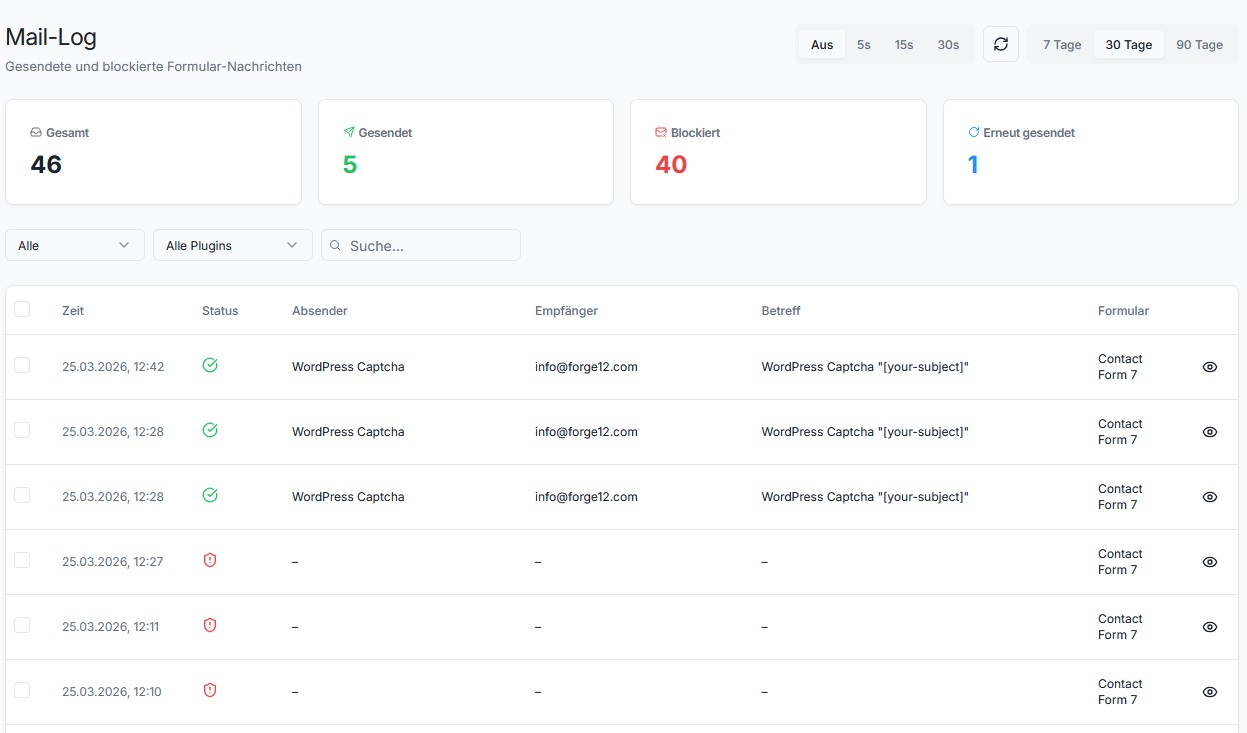
- New [Mail-Log]: Added complete mail logging system for tracking sent and blocked form submissions. Stores sender, recipient, subject, body, headers, attachments, form data, IP hash, and block reason in a dedicated database table (
f12_mail_log). - New [Mail-Log]: Blocked submissions are automatically logged from the central
Protection::is_spam()method, capturing block reason and form data. Works across all supported integrations (CF7, WPForms, Elementor, Gravity Forms, Fluent Forms, Avada, WooCommerce, WordPress core). - New [Mail-Log]: Successfully sent Contact Form 7 mails are logged via
wpcf7_mail_componentsfilter, capturing the fully resolved mail data (recipient, sender, subject, body with all [tags] replaced, headers, attachments). Previously usedwpcf7_before_send_mailwhich only had raw templates with unresolved CF7 tags. - New [Mail-Log]: Added “Resend” functionality — any mail log entry (sent, blocked, or previously resent) can be resent directly from the admin UI via
wp_mail(). Attachments are only included if files still exist on disk. Status is updated to “resent” with audit log entry. - New [Admin UI]: Added dedicated “Mail-Log” page with summary cards (total, sent, blocked, resent), filterable/searchable table (status, form plugin, free-text search with debounce), pagination, and auto-refresh controls.
- New [Admin UI]: Mail-Log detail dialog shows full message body, form data (JSON), block reason, IP hash, headers, and action buttons (resend with confirmation, delete with double-confirmation).
- New [Admin UI]: Bulk actions for Mail-Log — select individual entries via checkboxes or “select all” on the current page. Bulk resend (with confirmation dialog) and bulk delete (with toggle-switch double-confirmation) for multiple entries at once.
- New [Admin UI]: Delete confirmation uses a double-confirm pattern: a toggle switch “Ich verstehe, dass dieser Eintrag unwiderruflich gelöscht wird” must be activated before the delete button becomes clickable. Applied to both single and bulk delete.
- New [Admin UI]: Added Mail-Log sidebar navigation entry with Mail icon (between Analytics and Audit Log).
- New [Admin UI]: Added “Mail-Logging” settings section in Advanced Settings with GDPR warning banner, enable/disable toggle, sub-toggles for sent/blocked logging, and configurable retention period (1–365 days).
- New [Admin UI]: Added Mail-Log cleanup options in Data Cleanup page (“Alle Mail-Logs löschen”, “Blockierte Mail-Logs löschen”) with entry counts.
- New [REST API]: Added 5 admin-only Mail-Log REST endpoints:
GET /mail-log/entries(paginated with filters),GET /mail-log/summary(counts by status),GET /mail-log/entry/{id}(full entry with body),DELETE /mail-log/entry/{id},POST /mail-log/resend/{id}. - New [Core]:
MailLogPHP class (core/log/MailLog.class.php) with full CRUD operations, table existence checks,suppress_errorsfor resilient inserts, and separatelog_blocked()/log_sent()convenience methods. - New [Core]: Automatic Mail-Log cleanup integrated into
Log_Cleanercron job with configurable retention (protection_mail_log_retention, default 30 days). - New [Settings]: 4 new settings:
protection_mail_log_enable(default: off),protection_mail_log_sent(default: on),protection_mail_log_blocked(default: on),protection_mail_log_retention(default: 30 days). - Fix [API Fallback]: Frontend assets (
client.jsvs local JS bundle) now respect the API health check transient. When the SilentShield API is unreachable, the local JS bundle (with JavaScriptProtection, SubmitGuard, form handlers) is loaded instead of the API client — fixing missingjs_end_timetimestamps, broken captcha reload, and CORS errors from offline API endpoints. - Fix [REST API]: Increased admin endpoint rate limit from 10 to 60 requests per minute to prevent rate-limit errors when using auto-refresh or loading pages with multiple concurrent API calls.
- Improvement [Settings]: Changed default for
protection_global_asset_loadingfrom 0 to 1, ensuring frontend JS/CSS assets are loaded on all pages by default. Prevents issues where captcha fields render but JS handlers are not loaded.
2.6.1
- Fix [API]: Fixed settings type mismatch between PHP REST API and React admin UI. The REST save handler converted all values to strings via
sanitize_text_field(), but the React frontend used strict equality (=== 1) to check toggle states. This caused API-related toggles (API enable, Shadow Mode) to always appear as “off” after saving, even though the value was correctly stored. The server now preserves native integer, float, and boolean types during save, and the React UI usesNumber()coercion for defensive comparison. - Fix [API Fallback]: When the SilentShield API is enabled but unreachable (e.g. dev/staging environment offline, network issues, server errors), the plugin now automatically falls back to all local protection modules (Captcha, Timer, JS detection, Browser detection, IP blocking, Content rules, etc.) instead of silently disabling all protection. Previously, an active API key with an unreachable API resulted in no captcha output and no spam protection at all.
- New [Admin Notice]: Added a dismissible admin warning that appears when the API fallback is active, informing administrators that the SilentShield API is unreachable and local protection modules have been automatically reactivated. Includes a link to the API settings page.
- New [API Health Check]: Added lightweight API reachability check with transient caching (5 min on success, 2 min on failure) to avoid hitting the API on every request. HTTP 2xx–4xx responses are treated as “reachable” (the API is up, even if the key is invalid); only connection errors and 5xx responses trigger the local fallback.
- New [Audit Log]: API health failures are now logged as
API_HEALTH_UNREACHABLE(connection error) orAPI_HEALTH_SERVER_ERROR(5xx response) audit events with endpoint and error context. - Fix [Database]: Added missing upgrade migration for BlockLog and AuditLog tables. Sites that upgraded to 2.6.0 without deactivating/reactivating the plugin had missing database tables, causing
wpdberrors on the Audit Log and Analytics pages and cascading rate-limit failures. - Fix [Database]: AuditLog and BlockLog query methods now gracefully return empty results when the underlying table does not exist, preventing HTML error output from leaking into REST API JSON responses.
- Fix [Database]:
$wpdb->suppress_errors()is now used around AuditLog and BlockLog insert operations to prevent database error HTML from breaking REST responses when tables are missing. - Fix [Admin UI]: Fixed IP hash string overflowing into adjacent columns in the block detail and audit event detail dialogs. Long hash strings now wrap automatically via
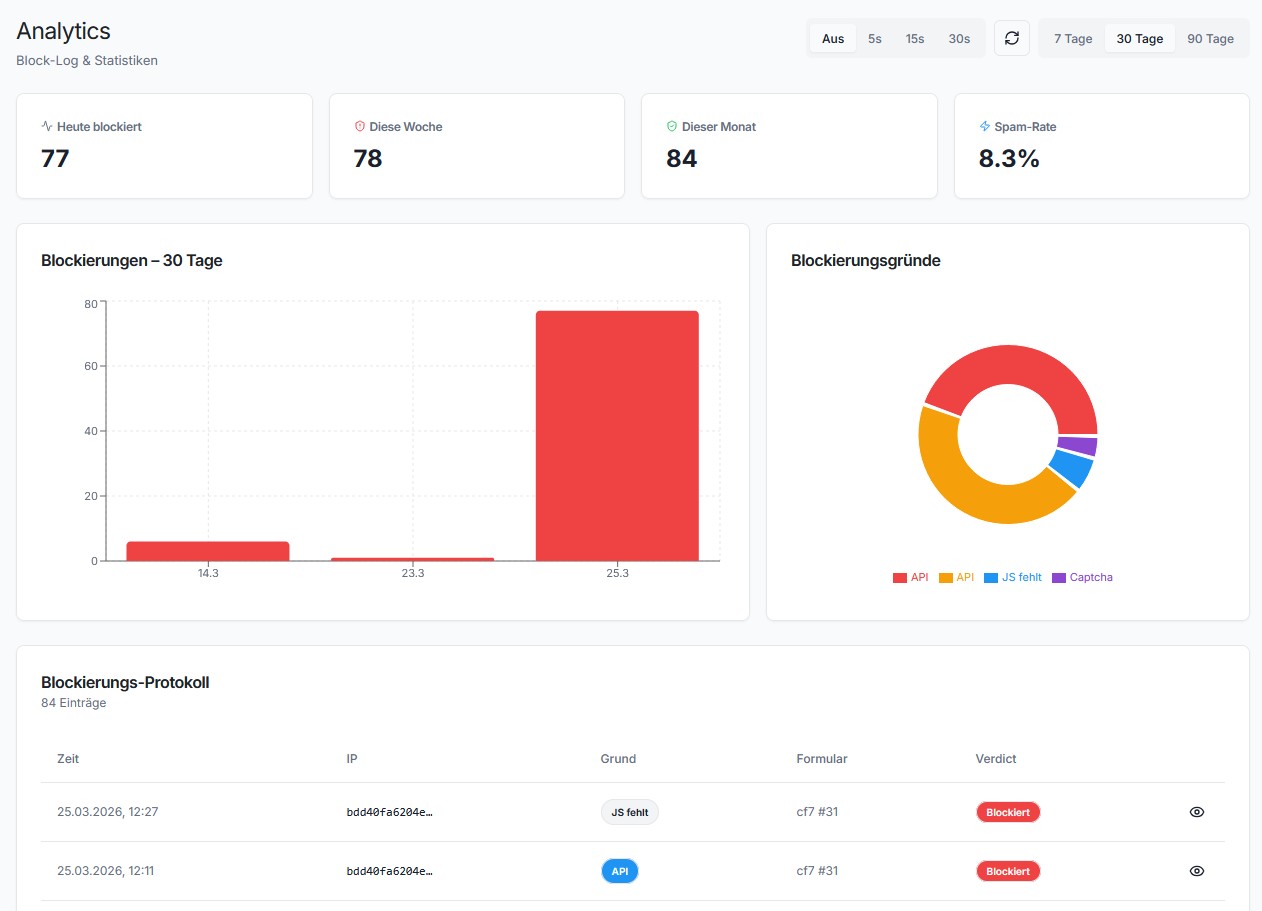
break-all. - New [Admin UI]: Added “Erweitertes Tracking” hint banner on the Analytics page. When detailed tracking is disabled (default), a dismissible warning explains that Analytics requires this setting and links directly to the Advanced settings page to enable it.
- New [Admin UI]: Added auto-refresh controls to both Analytics and Audit Log pages. A tab bar allows selecting refresh intervals (Aus / 5s / 15s / 30s) and a manual refresh button with spin animation is available for on-demand data reload.
2.6.0
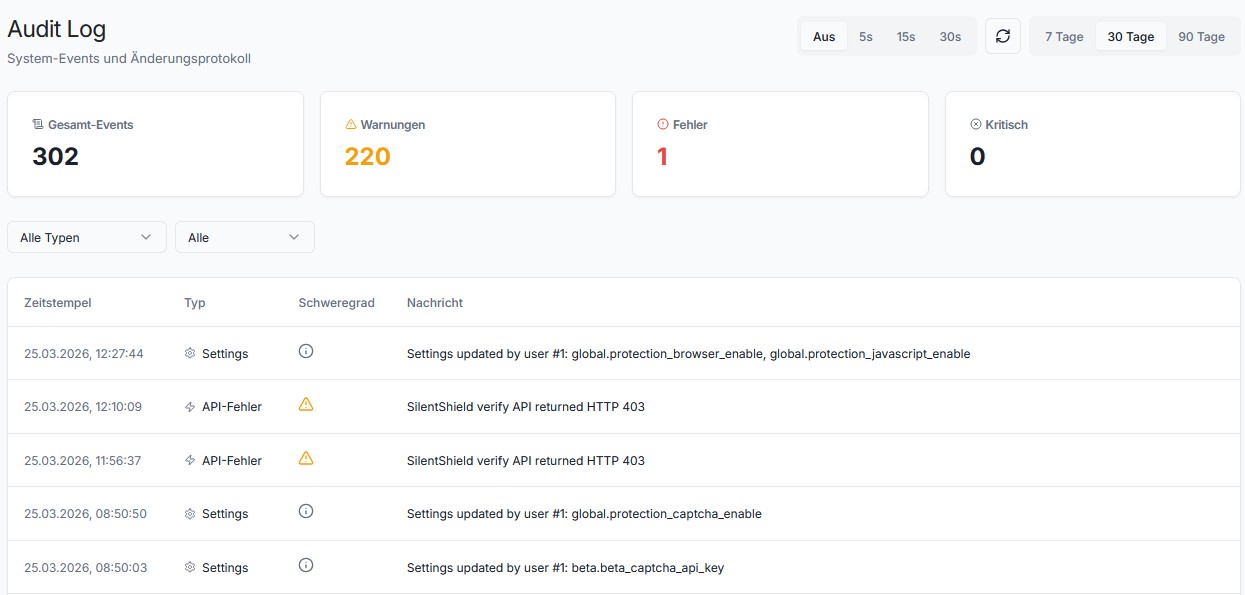
- New [Audit Log]: Added always-active audit log system (
AuditLogclass) that records admin and system events (settings changes, cron runs, activation/deactivation, rate limiting, API errors, DB errors, trial events, i18n failures) to a dedicated database table with throttling, sensitive data masking, and error_log fallback. - New [Admin UI]: Added Audit Log admin page (SilentShield Audit Log) with summary cards, filterable/paginated event table, severity color-coding, and slide-out detail panel with JSON context viewer.
- New [Admin UI]: Dashboard widget now shows the 5 most recent warnings/errors/critical events with a direct link to the full Audit Log page.
- New [REST API]: Added 2 new admin-only REST endpoints (
/audit/entries,/audit/summary) with filters for time range, event type, severity, and pagination. - New [Core]: API verification errors (
Api.class.php) now logAPI_VERIFY_UNREACHABLEaudit events with endpoint and fail-mode context. - New [Core]: Trial activation failures now log
TRIAL_API_UNREACHABLE,TRIAL_API_ERROR, andTRIAL_INVALID_RESPONSEaudit events. - New [Core]: All 6 cron jobs now have bookend audit hooks that log start/completion with execution timing and catch/log failures as
CRON_FAILEDevents. - New [Core]: Telemetry, monthly report, and weekly report cron handlers now audit-log send failures and unexpected responses.
- New [Core]: Translation loading failures now log
TRANSLATION_LOAD_FAILEDaudit events with locale and path context. - New [Core]: BlockLog database operations (
log,get_entries,get_overview,cleanup) now audit-log insert/query/cleanup failures asBLOCKLOG_*events. - New [Settings]: Added configurable “Audit Log Retention” setting (7–365 days, default 90) under Settings Extended. Log cleanup respects this setting automatically.
- Improvement [Core]: Log_Cleaner now also cleans up AuditLog and BlockLog tables during the weekly cron job, respecting their individual retention settings.
- New [Audit Log]: API key validation failures (
API_KEY_VALIDATION_UNREACHABLE,API_KEY_INVALID) are now audit-logged when the SilentShield key validation endpoint is unreachable or returns invalid. - New [Audit Log]: API key lifecycle changes are now audit-logged: key set (
API_KEY_SET), key removed (API_KEY_REMOVED), key rotated (API_KEY_CHANGED). - New [Audit Log]: API mode and Shadow Mode toggles are now audit-logged (
API_MODE_ENABLED/DISABLED,SHADOW_MODE_ENABLED/DISABLED). - New [Audit Log]: API verify HTTP error responses (4xx/5xx) and unparseable JSON are now audit-logged as
API_VERIFY_ERROR_RESPONSE. - New [Audit Log]: Trial expiration is now proactively audit-logged once as
TRIAL_EXPIREDwhen the admin visits the Beta settings page after the trial period ends.
2.5.0
- New [F2P]: Added Shadow Mode for statistical estimation of API-blocked spam. Samples 30% of passed submissions and projects weekly totals. Enable under Settings > Beta. Dormant API call behind
F12_CAPTCHA_SHADOW_API_LIVEconstant. - New [F2P]: Added Weekly Email Report (opt-in) with block statistics, top 3 reason codes, breakdown by protection type, and upgrade CTA with UTM tracking. Enable under Settings > Extended > Weekly Report.
- New [Analytics]: Shadow Mode comparison section on Analytics page showing estimated additional API catches with 4 stat cards and upgrade CTA.
- New [Beta]: Shadow Mode toggle added to Beta settings page.
2.4.0
- New [Analytics]: Added Analytics admin page (SilentShield Analytics) with block statistics overview, timeline chart, protection module breakdown, reason code frequency, and paginated block log with detail drawer.
- New [Analytics]: 4 new REST API endpoints for analytics data (summary, timeline, reasons, log) with admin-only access and rate limiting.
- New [Analytics]: Score breakdown visualization for API-mode blocks showing 7 sub-score categories with color-coded progress bars.
- New [Analytics]: Time range selector (7/30/90 days) for all analytics views.
- New [Privacy]: Added “Disable Log Anonymization (Debug Mode)” toggle in Extended Settings Detailed Tracking. When enabled, email addresses and IP addresses are stored in plain text in submission logs and the block log, allowing admins to identify blocked users. Disabled by default. Includes GDPR/DSGVO privacy warning. Passwords are always masked regardless of this setting.
- New [Core]: Added
Protection::has_module()method to safely check module availability before access. - Fix [Admin UI]: Fixed fatal error “Module captcha-validator does not exist” on Extended Settings page when SilentShield API mode is active. The Captcha management section now shows an informational message in API mode instead of crashing.
2.3.6
- New [Accessibility]: Added Audio CAPTCHA feature using the Web Speech API. A speaker button next to the CAPTCHA allows visually impaired users to have the challenge read aloud via browser-native text-to-speech. Privacy-first — no external API calls. Disabled by default, enable under Settings > Protection > Audio Accessibility.
- New [Accessibility]: Added hover/focus tooltip on the audio button (“Click to have the CAPTCHA read aloud”) so users understand the button’s purpose before clicking.
- New [REST API]: Added rate-limited
POST /captcha/audioendpoint (5 req/min per IP) that returns spelled-out characters for image CAPTCHAs and the formula for math CAPTCHAs. - Improvement [Image CAPTCHA]: When Audio CAPTCHA is enabled, the character pool is restricted to lowercase letters + digits to avoid ambiguity (TTS cannot distinguish upper/lowercase). Existing pooled CAPTCHAs with uppercase characters are automatically discarded and regenerated.
- Improvement [Translations]: Added all new Audio CAPTCHA strings to all language files (de_DE, de_DE_formal, es_ES, fr_FR, it_IT, pt_PT).
2.3.5
- Fix [Fluent Forms]: Fixed JavaScript protection failing for Conversational Forms (
[fluentform type="conversational"]). Conversational Forms render as a Vue.js app inside a<div>instead of a<form>element, so the regularrender_item_submit_buttonhook and the JS form discovery (querySelectorAll("form")) never fired. Timing fields (php_start_time,js_start_time,js_end_time) are now injected viajQuery.ajaxPrefilterdirectly into the innerdataPOST parameter where the PHP backend expects them. Hooks into bothwp_footer(embedded forms) andfluentform/conversational_frame_footer(standalone pages).
2.3.4
- Fix [Templates]: Reload button inline styles were stripped by
wp_kses()CSS property filtering (safecss_filter_attr), causingdisplay:inline-flex,align-items,box-sizingetc. to be removed. Reload button HTML is now output directly (all values are escaped at construction viaesc_attr/esc_url), ensuring per-form and per-integration style overrides work correctly. - Fix [CSS]: Removed hardcoded
width:32px; height:32px; display:flex; background-colorfrom template-1.c-reload aCSS rule that overrode per-form settings. All visual properties are now controlled exclusively via inline styles fromget_reload_button(). - Fix [CSS]: Removed
!importantdeclarations on reload button icon dimensions in template-1 CSS that prevented per-form icon size overrides from taking effect. - Fix [CSS]: Removed redundant global inline CSS (
wp_add_inline_style) for reload button styling that conflicted with the hierarchical settings resolution (form > module > global). - Fix [CSS]: Reload button icon is now vertically centered using flexbox (
display:inline-flex; align-items:center) instead ofmargin-top:5px. - Improvement [CSS]: All reload button inline styles now use
!importantto prevent theme and plugin CSS from overriding configured values (background-color, padding, border-radius, display, icon dimensions, margin, max-width). - Fix [Core]: Replaced deprecated
CF7Captcha::getInstance()calls in UI_Extended withCF7Captcha::get_instance().
2.3.3
- New [Admin UI]: Added full reload button styling options: background color, border color (color pickers), padding, border radius, and icon size (number inputs). All settings have backward-compatible defaults.
- New [Admin UI]: All reload button styling settings can be overridden per integration (CF7, Avada, WPForms, etc.) and per individual form via the existing override panel system.
- New [Admin UI]: Added live preview for the reload button in global settings and all override panels (integration + form level). Changes are reflected in real-time.
- New [Admin UI]: Added “Asset Loading” section with global toggle to force-load all plugin assets (CSS/JS) on every page, useful when automatic form detection fails.
- New [Admin UI]: Added custom URL path exceptions textarea. Define URL paths (one per line) where assets should always be loaded, e.g. for custom login pages (WPS Hide Login) or exotic page builders.
- Improvement [Core]:
should_load_assets()now checks global asset loading toggle and custom URL paths before falling back to automatic form detection.
2.3.2
- Fix [Captcha]: Fixed reload button href being stripped by wp_kses. Changed
javascript:void(0)to#to be compatible with WordPress HTML sanitization.
2.3.1
- New [Admin UI]: Added per-integration and per-form override settings. Protection settings can now be customized at the integration level (e.g. all CF7 forms) or for individual forms, with hierarchical inheritance (Global > Integration > Form).
- New [Admin UI]: Added slide-in configuration panels on the Extended and Forms admin pages. Click “Configure” next to any integration or form to open the override panel.
- New [Admin UI]: Added Forms admin page listing all discovered forms across installed integrations (CF7, WPForms, Elementor, Gravity Forms, etc.) with override status badges.
- New [REST API]: Added
POST /overrides/saveendpoint for persisting integration and form-level override settings via AJAX with admin permission checks and rate limiting. - New [Core]: Added hierarchical settings resolution system (
Settings_Resolver) that merges Global, Integration, and Form-level settings with proper inheritance. - New [Core]: Added form discovery system (
Form_Discovery) that detects forms across all supported integrations. - New [Core]: Added
ProtectionContextfor per-form setting resolution during spam validation, enabling form-specific protection behavior. - Fix [Compatibility]: Resolved “Translation loading triggered too early” PHP Notice on WordPress 6.7+ that caused “Cookies are blocked due to unexpected output” errors on login pages, breaking compatibility with plugins like SecuPress Move Login.
- Fix [JavaScript]: Resolved global scope collision where the bundled
WPFormsclass overwrotewindow.WPForms, breaking the WPForms plugin. Build output is now wrapped in an IIFE. - Improvement [Translations]: Added 57 new translatable strings for override panels and Forms page to all language files (de_DE, de_DE_formal, es_ES, fr_FR, it_IT, pt_PT).
- Improvement [Compatibility]: Updated integration controllers (Avada, CF7, FluentForms, Gravity Forms, WPForms) with form discovery support and per-form protection context.
2.3.0
- Fix [Security]: Closed mass-assignment vulnerability in IPBan and IPLog classes. Properties are now set via explicit allowlist instead of
property_exists(), preventing overwrite of internal state like the logger or ID fields. - Fix [Security]: Replaced
parse_str()on raw POST data in API verification with targeted regex extraction, eliminating a potential denial-of-service vector via deeply nested keys. - Fix [Security]: Added
esc_html()to spam error messages informat_spam_message()as defense-in-depth against potential XSS if future modules include dynamic content in messages. - Fix [Security]: Added
defined('ABSPATH')guards to 10 PHP files that were missing them (BaseController, BaseModul, Api, Browser, IP_Blacklist_Validator, Whitelist_Validator, Javascript_Validator, Log_WordPress_Interface, Validator, Browser_User_Agent). - Fix [WooCommerce / WordPress Login]: Resolved a cross-concern filter leak where WooCommerce registration validation could accidentally bypass WordPress login spam checks (and vice versa). Each integration now uses its own scoped filter (
f12_cf7_captcha_wc_login_validated,f12_cf7_captcha_wc_registration_validated). - Fix [WordPress Registration]: Changed error code from integer
500to string'spam'for consistency with all other controllers. - Fix [Comments]: Replaced abrupt
wp_die()with a proper error page that includes the specific spam reason, a “Go Back” link, and HTTP 403 status. - Fix [CF7]: Changed greedy regex
(.*)to non-greedy(.*?)in submit button detection, preventing incorrect captcha placement when multiple input elements exist on the same line. - Fix [Telemetry]: Counters now track request-local deltas and merge them with the current database values at shutdown, significantly reducing lost updates under concurrent requests.
- Fix [Database]: Standardized all
$wpdbnull-checks in IPBan and IPLog to use strictnull === $wpdbcomparison consistently.
…