Caresort Site Health Monitor

Caresort Site Health Monitor
Description
WebsiteCare helps site owners and agencies automatically maintain their websites through health monitoring, update tracking, maintenance mode, and monthly reports.
No technical knowledge required. Install, activate, and your site health score appears immediately.
Dashboard
Every time you log in you see a real health score out of 100 — not a vague notice. The score is weighted across four checks:
- WordPress version up to date (30 pts)
- PHP version current (25 pts)
- Plugin updates pending (25 pts)
- WP-Cron running (20 pts)
Score History & Trend
WebsiteCare snapshots your health score every day and shows you a trend:
- Today: 94/100
- Last Week: 91/100
- Last Month: 88/100
- Trend: Improving
SSL & Disk Space Monitoring
Two of the most common causes of site outages are tracked automatically:
- SSL certificate status with exact days until expiry
- Disk usage with progress bar and Used / Free / Total breakdown
Updates Dashboard
All pending core, plugin, and theme updates in one clean table. One-click manual update check. Direct update links.
Maintenance Mode
Put your site into professional maintenance mode:
- Custom message to visitors
- Logged-in administrators always bypass automatically
- Admin bar indicator so you never forget it is on
Activity Log
A structured log of everything WebsiteCare does — filterable, paginated, clearable.
Monthly Email Report
Receive a professional HTML monthly report covering health score, updates, environment info, and recent activity.
Two-Factor Authentication
Add an extra layer of login security with authenticator-app-based two-factor authentication (compatible with Google Authenticator, Authy, Microsoft Authenticator, 1Password, and any other standard TOTP app):
- Set up from WebsiteCare -> 2FA Security, or from your own WordPress profile page
- Scan a QR code or enter the key manually – no third-party account or API key required
- One-time backup codes for when you don’t have your device
- Administrators can reset (disable) 2FA for another user who has lost access
WordPress Dashboard Widget
Your site health score is now visible the moment you log in, without navigating to WebsiteCare’s own pages:
- Health score ring and grade shown right on Dashboard -> Home
- The single most important issue (if any) surfaced directly, not just a number
- A prompt to enable Two-Factor Authentication if it isn’t active yet on your account
Deactivation Feedback (Optional)
If you ever deactivate WebsiteCare, you’re asked why, from a list that includes genuine product feedback (too complex, a bug, a missing feature, switching plugins) as well as options for test installs and accidental/reward-driven installs, so real feedback doesn’t get lost in the noise. Selecting most reasons shows a short, targeted follow-up question. This is entirely optional:
- Your answer is always saved to this site’s own activity log, and nothing more happens unless you say so
- Sharing it with the developer requires explicitly checking a consent box every time — off by default
- See the Privacy Policy section below for exactly what is sent if you do opt in
Privacy
WebsiteCare stores its core data in your own database and makes no external HTTP requests by default. The one exception is an optional, opt-in deactivation feedback feature, off by default — see the Privacy Policy section below for full details.
Privacy Policy
WebsiteCare does not collect or transmit any data by default.
The only exception is the optional deactivation feedback feature. When you deactivate the plugin, you’re asked why, from a fixed list of reasons; some reasons show a short follow-up question (for example, reporting a bug prompts you to describe it). This answer is always saved to this site’s own activity log and never leaves your server on its own.
If, and only if, you explicitly check “I agree to share this feedback with the plugin developer” before confirming deactivation, the following is sent over HTTPS to the developer’s server:
- The reason you selected, and any text you typed in the follow-up box
- This site’s web address
- The plugin version and WordPress version number, for troubleshooting
No names, email addresses, passwords, or content from your site is ever included. Nothing is sent unless that checkbox is checked at the moment of deactivation; there is no other tracking, analytics, or external call anywhere else in this plugin.
This plugin also uses WordPress’s built-in Privacy Policy tools (Settings Privacy) to suggest matching disclosure text for your own site’s Privacy Policy page.
Support
Support is provided via the WordPress.org support forum:
https://wordpress.org/support/plugin/caresort-site-health-monitor/
We monitor the forum and aim to respond within 2 business days.
Installation
- Upload the
caresort-site-health-monitorfolder to/wp-content/plugins/ - Activate via WP Admin Plugins
- Navigate to WebsiteCare Dashboard
No configuration required to get started.
Screenshots
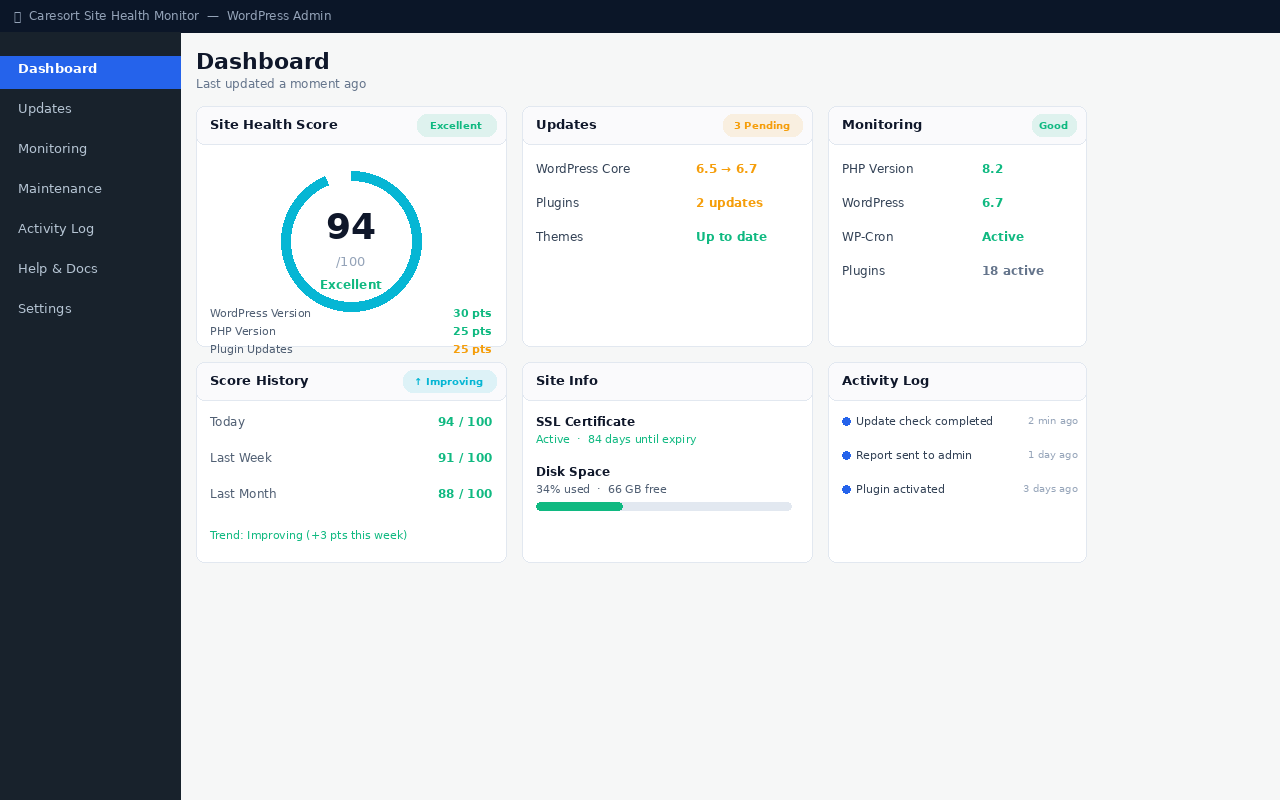
Dashboard with health score, updates summary, score history, and site info
Faq
No. Most assets load only on WebsiteCare’s own admin pages. A small stylesheet also loads on the main WordPress Dashboard (Home) screen to style the health score widget there. Dashboard data is cached for 5 minutes. No front-end assets are loaded.
No. Logged-in users with the Administrator role always see the live site.
WebsiteCare creates three tables: caresort_shm_logs, caresort_shm_reports, and caresort_shm_health_scores. All data is removed when you delete the plugin if you enable “Delete All Data on Uninstall” in Settings Advanced.
Only if you choose to. When you deactivate WebsiteCare, you’re asked why. Your answer always stays in your own database. If you explicitly check the “share this feedback” box before deactivating, that answer is also sent to the plugin developer’s server to help improve the plugin. This is off by default, optional every time, and never happens for any other feature in this plugin. See the Privacy Policy section below for exactly what is sent.
PHP 8.0 or higher. PHP 8.2+ is recommended.
Reviews
Changelog
1.0.6
- Added an optional deactivation feedback prompt asking why you’re leaving, with an explicit opt-in checkbox to share it with the developer (off by default). Your answer is always kept locally either way.
- Each reason shows a targeted follow-up question (e.g. “Please explain the bug” when reporting a bug), plus separate options for test installs and accidental/reward-driven installs, so genuine feedback stays distinguishable from noise.
- The deactivation prompt can be dismissed via a close button or by clicking outside it, without deactivating the plugin.
- Added a Privacy Policy section to this readme and WordPress-native Privacy Policy page suggestions (Settings -> Privacy).
- Added a Privacy Policy link to the Help & Documentation page.
1.0.5
- Added a WordPress Dashboard widget (Dashboard -> Home) showing your health score, grade, and the most important issue needing attention at a glance.
- The Dashboard widget prompts you to enable Two-Factor Authentication if it isn’t active yet on your account.
- Uninstalling the plugin (with “Delete All Data on Uninstall” enabled) now also removes stored two-factor authentication secrets and backup codes for every user, instead of leaving them behind.
1.0.4
- Added two-factor authentication (TOTP), with QR code setup, backup codes, and admin-side reset. New WebsiteCare -> 2FA Security page.
- Fixed a “headers already sent” warning that could prevent login from completing on the two-factor verification step on some hosting environments.
- Fixed the 2FA Security page’s Regenerate Backup Codes and Disable actions failing on some hosting environments due to how the redirect was timed relative to the admin page header.
1.0.3
- Lowered minimum required PHP version from 8.1 to 8.0 for broader host compatibility.
- Fixed activation on unsupported PHP versions failing with an unclear fatal error; now shows a clear message instead.
- Corrected installation instructions and database table names in this readme.
1.0.2
- Added help and support page.
1.0.1
- Fixed assets folder CSS.
1.0.0
- Initial release