CoCart – Headless REST API for WooCommerce

CoCart – Headless REST API for WooCommerce
Description
You’ve chosen WooCommerce for your store. Now you want a modern frontend — React, Next.js, Astro, Vue — without being locked into WordPress themes. That’s exactly what CoCart is built for.
CoCart gives WooCommerce a proper frontend REST API: cookie-less session management built for stateless frontends, authentication that makes sense, and CORS support built-in. Cart sessions, authentication, and product data. Scale up when you’re ready.
In active development since 2018, with a ★4.9/5 rating from the developers who build headless stores with it every day.
🚀 Make your first API call in 2 minutes
Install CoCart and you’re immediately ready to call the API — no setup required:
curl -X POST https://your-store.com/wp-json/cocart/v2/cart/add-item \
  -H "Content-Type: application/json" \
  -d '{"id": "123", "quantity": 1}'
Want to explore before installing? Try a free sandbox
💬 Loved by 1,000+ developers worldwide
Rated ★★★★★ 4.9/5 on WordPress.org.
★★★★★
“An excellent plugin, which makes building a headless WooCommerce experience a breeze. Easy to use, nearly zero setup time.” — Harald Schneider
★★★★★
“This plugin works great out of the box for adding products to the cart via API. The code is solid and functionality is as expected, thanks Sebastien!” — Scott Bolinger, Creator of Holler Box
★★★★★
“Thanks for doing such great work with this! Works exactly as expected and CoCart seems to have a nice community around it. The founder seems really devoted and that’s one of the key things for a plugin like this to live on and get the right updates in the future. We just got ourselves the lifetime subscription.” — Mighty Group Agency
See our full wall of love for more developer testimonials.
Why CoCart?
WooCommerce’s Store API can be used headless, but it was designed for the Gutenberg block editor ecosystem. Its session model relies on nonces passed via response headers — suited for anonymous single-session shoppers, but the nonce is tied to WordPress’s nonce lifecycle and less straightforward to persist across sessions or devices.
CoCart is purpose-built for headless from day one: cart sessions identified by a persistent key — no nonces, no cookies — a single unified endpoint set for both product and cart data, and authentication for customers that supports any shop requirement.
Features
🚀 Session management that works
- 🔐 Cookie-less sessions — database-stored, built for concurrent requests and stateless frontends
- 👤 Guest customer support — full cart session support for unauthenticated shoppers, no login required
- 🔄 Load any session into checkout — hand off to WooCommerce’s native checkout with any payment gateway
🛒 Essential cart operations
- ✅ Add, update, and remove items via simple POST/PUT/DELETE requests
- 🔎 Product search — query by name, SKU, or ID, authenticated or not, with flexible filtering
- 💸 Name Your Price support — donation-based and flexible pricing built in
- 📦 Bulk cart requests — combine multiple operations into a single API call
💻 Developer experience, done right
- 🔑 Flexible authentication — email, username, or phone login; no admin API keys to manage
- 🌍 CORS support built in — first-party CORS handling; your frontend connects without configuration hell
- 🧩 180+ filters — customize every response, add logic without writing new routes
- 📊 Cart insights — monitor active, expiring, and expired sessions from the dashboard
- 🛠 Works with your existing stack — built on WooCommerce Data Stores with familiar hooks for broad plugin compatibility
🎯 Battle-tested
- Tested with every major WooCommerce release
- Multisite compatible
Who builds with CoCart?
Frontend developers shipping storefronts in Next.js, React, Vue, Nuxt, Astro, Svelte, or Remix — keep WooCommerce as the commerce engine and own the entire frontend experience, from server components to fully static builds.
Mobile app developers building shopping apps in React Native, Flutter, Swift, or Kotlin — the same cart key works across devices, so a customer can start a cart on their phone and finish on the web.
Agencies delivering high-performance client storefronts — reuse one proven commerce backend across projects while every client gets a custom frontend, free of WordPress theme constraints.
Product teams going beyond the browser — progressive web apps with persistent carts, in-store kiosks, point-of-sale screens, even chat and voice commerce. Anywhere a customer can shop, CoCart can serve the cart.
Free vs. CoCart Plus
The free community version handles everything a headless cart needs: sessions, auth, CORS, cart operations, and product queries. It is actively maintained with security updates.
New features ship in CoCart Plus. When you’re ready to build a complete headless storefront — with coupons, shipping, fees, rate limiting, and checkout — Plus has you covered:
- 🎫 Coupon Management — apply discounts and promo codes, boost conversions
- 🚢 Shipping Calculations — real-time rates and method selection
- 💰 Cart Fees — handling fees, rush charges, and custom pricing logic
- 🥪 Advanced Batch API — multiple cart operations in a single request
- 🕒 Rate Limiting — protect your API from abuse under load
- 🧾 Checkout — complete orders with any WooCommerce-supported gateway (coming soon)
- 💲 Subscription Support — new subscriptions and renewals (coming soon)
View CoCart Plus features and pricing
👍 Add-ons
Free add-ons that extend the core:
- CoCart – Rate Limiting — add rate limiting to CoCart Plus
- CoCart – JWT Authentication — authenticate via JWT token
SDKs & Tools
Official SDKs — authentication, session management, and cart operations out of the box:
- cocart-js (TypeScript/JavaScript) — GitHub
- cocart-php (PHP) — GitHub
- cocart-python (Python) — GitHub
- cocart-go (Go) — GitHub
More are also in development and look forward to your feedback.
Developer tools:
- CoCart OpenAPI Specs — generate client libraries or test with Postman/Insomnia/Yaak
- CoCart for VS Code — snippets and autocompletion for functions, classes, and hooks
- Raycast Extension — access CoCart docs without leaving your keyboard
- Cart Callback Example — register custom callbacks triggered on cart updates
Need Support?
Free users: Post in the WordPress support forum or join the CoCart Discord community — a growing group of developers, agencies, and shop owners building headless stores together.
CoCart Plus customers receive priority support with faster response times.
More Information
💯 Credits
Developed and maintained by Sébastien Dumont
Founder of CoCart Headless, LLC.
Contributors & Developers
You can help translate “CoCart” into your language.
INTERESTED IN DEVELOPMENT?
Browse the code on GitHub, or follow the CoCart development blog for the latest development updates. You can also follow @cocartapi on Twitter to stay up to date about everything happening with CoCart.
Please share your experience
We’d love to hear what you have to say. Share your experience and help others discover CoCart. It helps to keep the plugin going strong, and is greatly appreciated.
Installation
Minimum Requirements
- WordPress v6.7
- WooCommerce v9.0
- PHP v7.4
Recommended Requirements
- WordPress v6.7 or higher.
- WooCommerce v10.0 or higher.
- PHP v8.2 or higher.
Automatic installation
Automatic installation is the easiest option as WordPress handles the file transfers itself and you don’t need to leave your web browser. To do an automatic install of CoCart, log in to your WordPress dashboard, navigate to the Plugins menu and click Add New.
In the search field type “CoCart” and click Search Plugins. Once you’ve found the plugin you can view details about it such as the point release, rating, and description. Most importantly of course, you can install it by simply clicking “Install Now”.
Manual installation
The manual installation method involves downloading the plugin and uploading it to your web server via your favorite FTP application. The WordPress codex contains instructions on how to do this here.
Upgrading
Review the changelog before upgrading. CoCart follows Semver — MAJOR versions may contain breaking API changes.
Screenshots
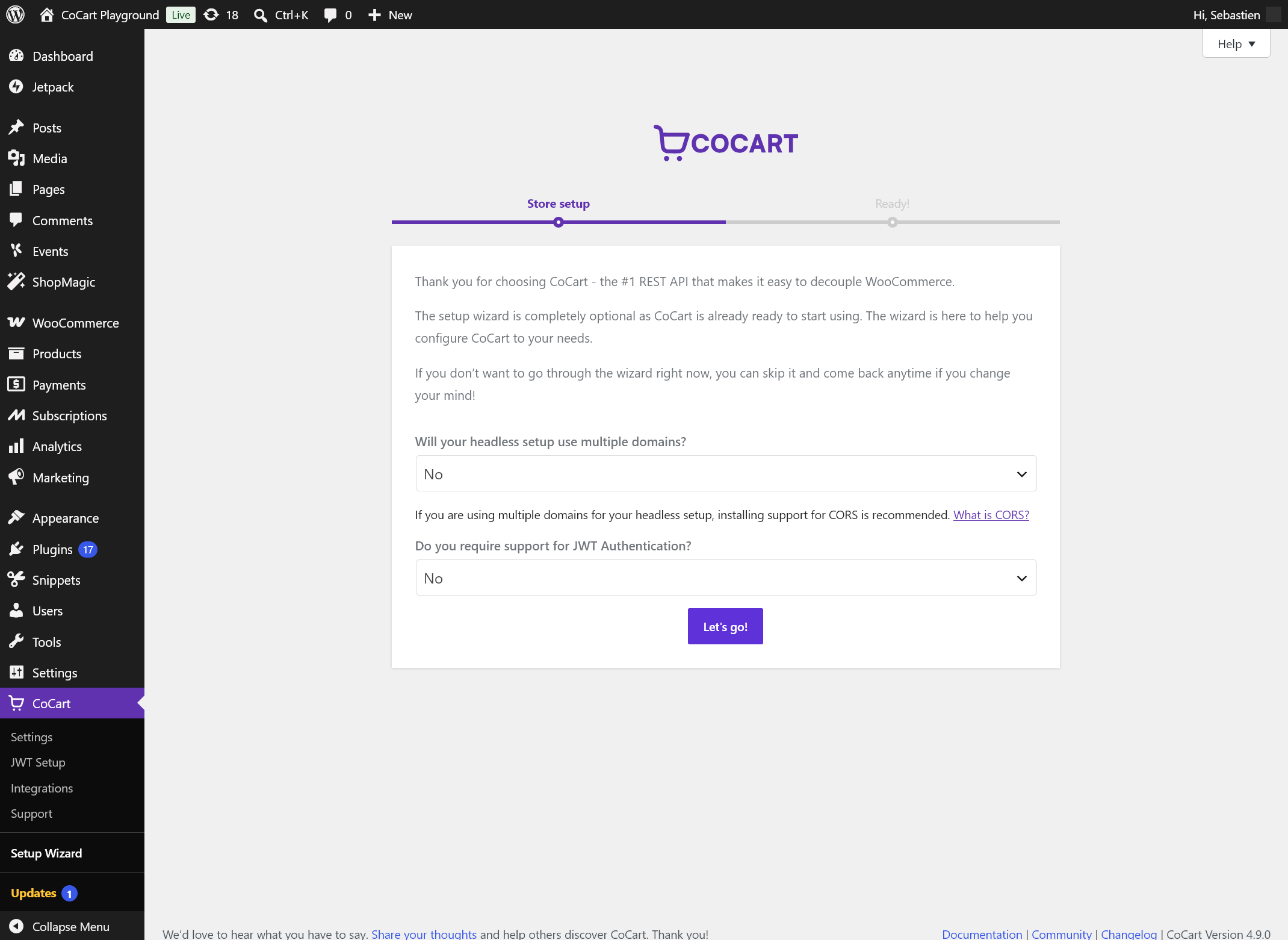
The optional setup wizard gets your headless store configured in minutes.
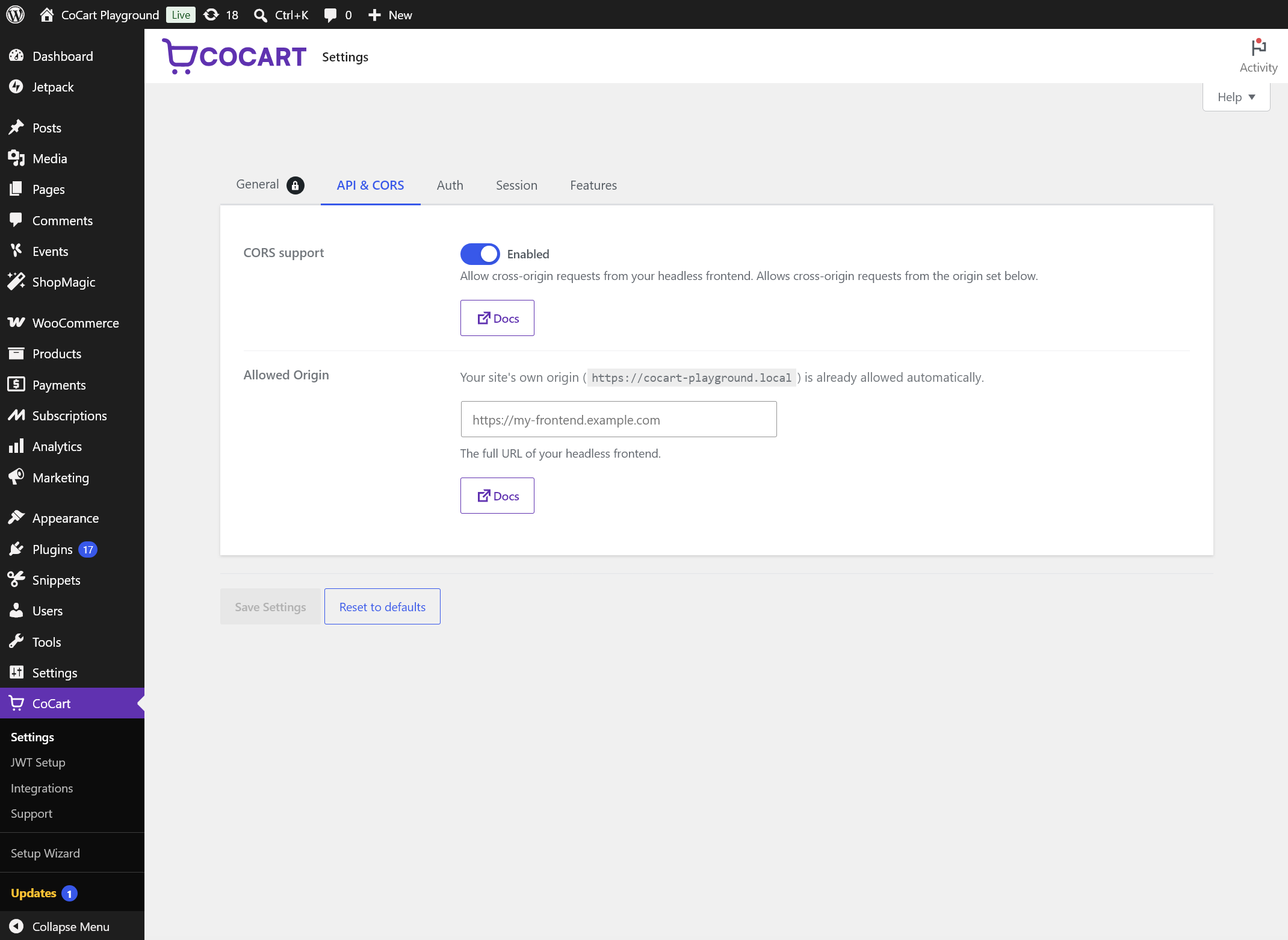
Settings page — configure CORS, authentication, sessions, and features without touching code.
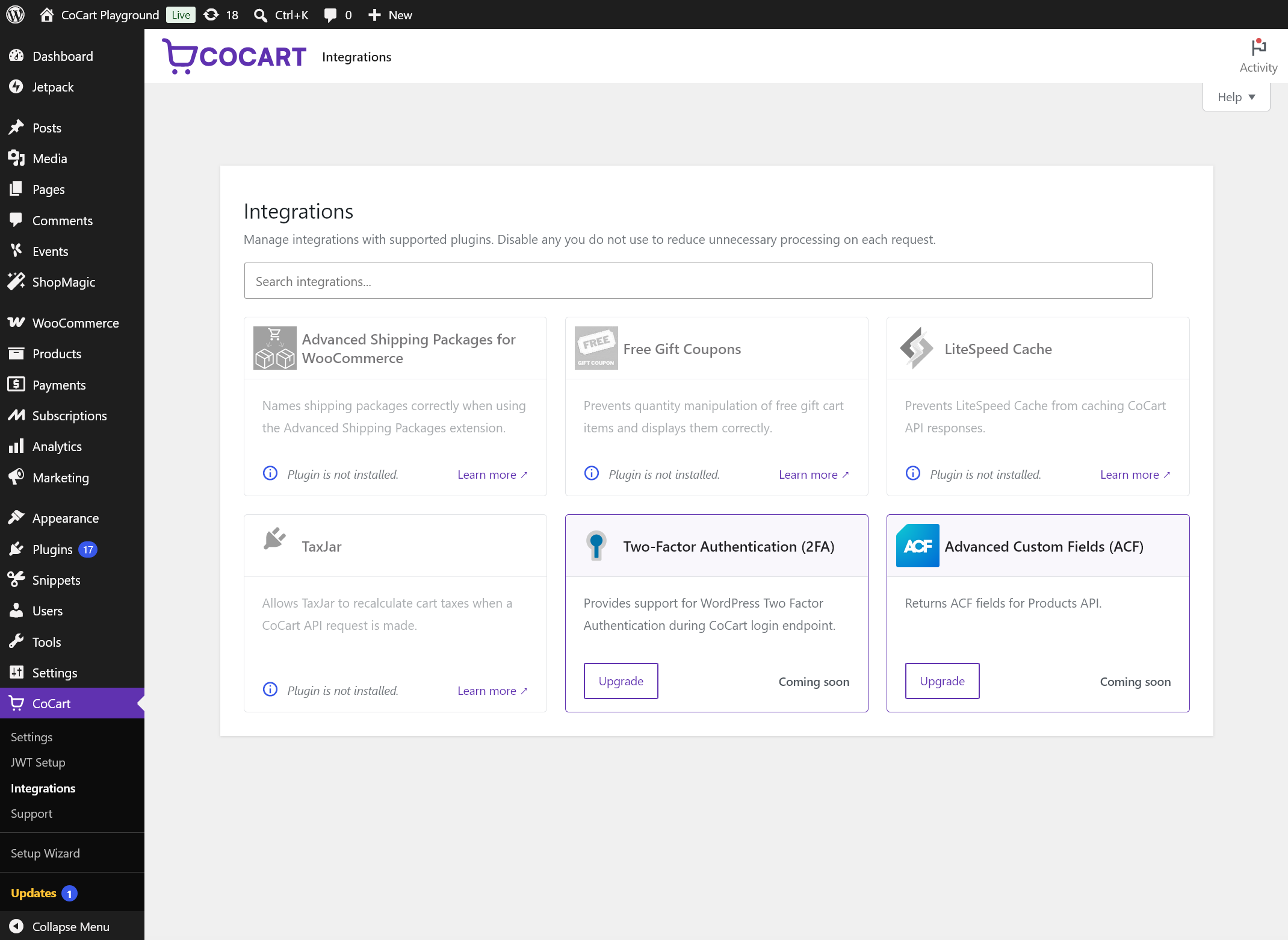
Integrations page — control which supported third-party plugins load during CoCart requests.
Faq
Developers building headless or decoupled WooCommerce storefronts. If you can make HTTP requests and read JSON, you’re ready. No WordPress development experience required — CoCart abstracts the complexity and gives you clean, predictable API responses. Perfect for:
- Frontend developers building with React, Next.js, Astro, Vue, or any modern framework
- Agencies creating high-performance client storefronts
- Mobile app developers who need a reliable eCommerce API
Install WooCommerce and configure your store, then install and activate CoCart. You’re immediately ready to call the API — no additional setup required. Check the installation section for requirements, then follow the API reference to start building.
Nothing. The free community stays fully functional. It covers sessions, authentication, CORS, cart operations, and product queries — everything you need to build a working headless cart. CoCart Plus adds advanced features like coupons, shipping, fees, and rate limiting for when you need them.
No. CoCart runs entirely on your WordPress server. No customer data, cart contents, or store information is ever sent to CoCart’s servers. The plugin collects no analytics without your consent. Full privacy policy
Plugins that modify backend functionality — payment gateways, shipping, tax, inventory — continue to work. Plugins that only modify the PHP frontend (themes, shortcodes, widgets) won’t apply to the REST API layer, which is expected in a headless setup.
WooCommerce’s Store API can be used headless, but it was designed for the Gutenberg block editor ecosystem. Its session model relies on nonces passed via response headers — suited for anonymous single-session shoppers, but tied to WordPress’s nonce lifecycle and less straightforward to persist across sessions or devices. CoCart is purpose-built for headless: cart sessions identified by a persistent key and authentication that supports any shop requirement.
Headless storefronts are stateless by nature — there’s no browser session to rely on, and concurrent requests are common. CoCart’s session handler is cookie-less, database-stored, and safe for concurrent requests, with full support for both guest and authenticated customers from day one.
Yes — that’s the primary use case CoCart is built for. Enable CORS via the free CORS add-on or manually via the filter documented here.
Yes. CoCart doesn’t block or replace any other API. Once authenticated, your frontend can access CoCart endpoints, WooCommerce endpoints, and any custom endpoints you’ve built — all at the same time.
CoCart does not implement SSO itself — it authenticates customers against WordPress user accounts using Basic Auth or JWT (via add-on). It does not natively speak SAML, OAuth 2.0, or OIDC.
That said, CoCart can work alongside SSO in a headless setup. The typical pattern is:
- Your identity provider (Google, Okta, Auth0, etc.) authenticates the user via your frontend.
- A WordPress SSO plugin (e.g. one handling OAuth 2.0 or SAML) creates or matches a WordPress user account for that identity.
- Your frontend then authenticates with CoCart using Basic Auth or JWT as that WordPress user.
The SSO layer handles identity; CoCart handles the commerce session from that point on. Whether this works smoothly depends on how your chosen SSO plugin manages WordPress user creation and session state — that part is outside CoCart’s scope.
Yes. Install and activate CoCart on each site where you want to use it.
Yes — there are 180+ filters available to customize responses, add fields, or remove data you don’t need.
No — it restricts tax calculation to WooCommerce Blocks and Jetpack only. We don’t recommend it for headless setups. TaxJar for WooCommerce (v3.2.5+) is supported.
Yes. CoCart automatically excludes its API endpoints from page caching, so caching plugins won’t interfere with cart sessions or API responses. LiteSpeed Cache is explicitly supported out of the box. Though, some hosts may require manual configuration to exclude CoCart API endpoints.
Each cart is assigned a unique cart key, which your frontend passes as a request header or query parameter on subsequent API calls. This makes sessions fully stateless and safe for concurrent requests — no cookies, no session conflicts. See the session documentation for implementation details.
CoCart runs entirely on your WordPress server — there’s no external service, no cloud dependency, and no data leaving your environment. You own your stack.
On the CoCart GitHub repository or in the #bug-report channel of the Discord community. Search first to avoid duplicates.
Check the full FAQ on cocartapi.com or browse the documentation.
Reviews
Works great!
By 
Perfect for setting up a headless woocommerce backend
Very good!
By 
Very good plugin, it helped me to connect Laravel catalog (for PageSpeed Insights, you know) & Woocommerce cart/checkout processing. Brilliant!
Perfect. And so much potential!
By 
Plugin works great. Docs are great. Road map is great.
When store front is finished we'll go PRO 😎
Excellent Plugin
By 
beste
By 
Great Plugin & Great Support
By 
This plugin saved me
By 
Quickly empties the cart !
By 
Amazing Plugin
By 
CoCart Plugin
By 
Changelog
CoCart is open source and community-driven. Every release is tested, maintained, and published here on WordPress.org. Need more power? CoCart Plus unlocks advanced features and priority support.
v4.9.7 – 30th September, 2026
Security Patch
This release hardens how CoCart’s REST authentication check is scoped, ensuring WordPress’s own request verification is not bypassed on other REST endpoints. It is recommended that you update to this release as soon as possible.
- REST API: Authentication error check now only applies to requests CoCart authenticated itself, so WordPress’s own nonce verification is no longer bypassed on other endpoints, including the batch endpoint. Reported by Naoki Kawahigashi.
v4.9.6 – 10th September, 2026
Improvement
Developer note: We don’t recommend using plain permalinks as it reduces the performance of lookup but we added support should it be the only option for you. e.g.
?rest_route=/cocart/v2/products
- REST API: Recognize requests made via the
?rest_route=query parameter (plain permalinks). - WordPress Dashboard: Prevent enabling integrations without a loader module.
Compatibility
- Tested with WooCommerce v11.1
v4.9.5 – 1st September, 2026
Security Patch
This release hardens how the cart session handler validates the cart key, however it is supplied — whether as a request parameter or via the header — ensuring a cart can only be loaded by the account it actually belongs to. It is recommended that you update to this release as soon as possible.
- REST API: Session handler now verifies ownership of the requested cart key before loading cart data, regardless of whether it was supplied via parameter or header.
v4.9.4 – 24th August, 2026
[!IMPORTANT]
PHP 7.4 is once again the minimum requirement to install and use CoCart. While PHP 7.4, 8.0, and 8.1 are past end-of-life/security support, we recognize many hosts still run them, and we don’t want that to be a barrier to using CoCart. For the best performance and security, we still recommend running PHP 8.2 or later, but CoCart will continue to function correctly on 7.4+.
Change
- Reverted PHP version to 7.4 as the minimum requirement to install and use CoCart.
v4.9.3 – 20th August, 2026
Change
- REST API: Checks the product’s password directly rather than
post_password_required()function.
Compatibility
- Tested with WordPress 7.1
v4.9.2 – 12th August, 2026
Bug Fixes
- REST API: Products that have password protection were still accessible. Now return as invalid ID when accessed directly and are excluded from results.
Compatibility
- Tested with WooCommerce v11
v4.9.1 – 20th July, 2026
Bug Fixes
- REST API: Fixed adding to cart via the v2 add item controller not checking stock for the combined quantity when an item already existed in the cart, allowing the cart to exceed available stock.
- REST API: Fixed the “Update Cart” callback not checking stock before setting a new item quantity, allowing the cart to be updated beyond available stock.
- Plugin: Fixed
cocart_update_plugin_suggestionsscheduled action never running via WP-Cron or WP-CLI — the callback was only registered onadmin_initand the updater class only loaded whenis_admin()was true, so Action Scheduler could not find a registered callback and the action was never rescheduled. Fixes #576 reported by @isam-aqu.
Change
- REST API: Standardized “not enough stock” error messages across v1 and v2 cart controllers into a single consistent format.
Compatibility
- Plugin: Updated styling for the WooCommerce floating admin header refreshed in WooCommerce v10.9.
v4.9.0 – 12th July, 2026
What’s New?
[!WARNING]
PHP version 8.2 is the minimum requirement to install and use CoCart. PHP 7.4, 8.0, and 8.1 are all past end-of-life/security support so to help manage development resources to maintain CoCart, it will no longer be tested on these versions. Running CoCart on PHP 8.2 not only ensures you are secure but it also improves the performance of the CoCart API. Thank you for your understanding.
- REST API: Added ETag support for all cart endpoints (GET/POST/PUT/DELETE) enabling conditional requests with
If-None-Matchheader for immediate use. - REST API: Added ETag support for product endpoints (products, categories, tags, attributes, reviews).
- REST API: Added
CoCart-Cacheresponse header indicating cache status:HIT,MISS, orSKIP. - REST API: Added
_skip_cachequery parameter to bypass caching for individual requests. - REST API: Added
stale-while-revalidatedirective to cacheable routes (products) for improved performance. - REST API: Added check for
X-HTTP-Method-Overrideheader if it exists during authentication. -
WordPress Dashboard: New integrations page to provide more control over which supported plugin is running when making a CoCart request.
-
Plugin: New settings page providing quick easy control of CoCart without touching code for the following:
-
- CORS and allowed origin.
-
- Authorization header server variable.
-
- Session expiration for guest and logged-in users.
-
- “Load Cart from Session” feature.
-
- “Name Your Price” feature.
Settings show a locked state when controlled by an external filter with a link providing information as to what and where.
Bug Fixes
- REST API: Requests made via the WordPress REST API batch endpoint were not recognized and caused a fatal error when adding items.
- REST API: Shipping address fields were blank after submitting billing-only details — billing fields now mirror to shipping when
ship_to_different_addressis not set, matching WooCommerce checkout behaviour. Shipping packages now also return correctly after a complete address is saved. - REST API: Slugs, permalinks and attribute names with non-ASCII characters (e.g., Chinese, Arabic) are now returned decoded instead of encoded across all product and cart endpoints.
- REST API: Authentication not determining user in time when
rest_url_prefixfilter is used causing several cloned guest sessions with cart items. - REST API: Fixed fatal error when adding an invalid product to cart via v2 controller due to missing
WP_Errorcheck after product validation. - REST API: Corrected
Last-Modifiedheader in GMT per HTTP spec with more robust date parsing. - Plugin: Fixed
cocart_deprecated_filter()returningnullwhen the debug log was active, causing callers to receive no value from the deprecation wrapper.
PHP 8.2+ Fixes
- REST API: Fixed warnings for undefined array keys
cart_item_dataandcart_item_keyin v1 add item controller. - Session: Fixed warning for undefined array key
totalin session handler cart hash generation. - Plugin: Fixed warnings for undefined array key
countwhen database queries return no results in cart counting functions. - Plugin: Fixed warning for undefined variable
$per_pagein admin plugin search. - Plugin: Fixed deprecated
${var}string interpolation syntax in plugin update screen.
Change
- Session: Removed the max expiration exceed limit of 30 days to allow adjusting the lifetimes via the
cocart_cart_expiringandcocart_cart_expirationfilters as needed.
Dev note: You will still be warned “Keeping sessions for longer than X days can cause performance issues and larger session tables.”
Improvements
- REST API: Slight performance increase by preventing admin content from loading in the background for every REST request made.
- REST API:
cocart_upload_file()andcocart_upload_image_from_url()now use atry/finallyblock to guarantee theupload_dirfilter is always removed, even when an exception is thrown during upload. - REST API:
cocart_upload_image_from_url()now useswp_parse_url()to extract the filename from the image URL, correctly stripping query strings instead of splitting on?. - Session: Adjusted
get_session()usingwp_cache_set()instead ofwp_cache_add(), which caused stale persistent object cache entries to never be overwritten. - Session: Adjusted
get_session()andupdate_cart()using an uninitialized expiration value on frontend requests, preventing sessions from being cached after a database read. - Session: Adjusted
save_data()writing to object cache with a potentially negative TTL when session expiration was stale or unset. - Session: Adjusted
update_cart()not syncing the object cache after a database write, causing subsequent reads to return stale cached data. - Session: Added
get_cache_expiration()helper to reliably resolve cache expiration across both REST API and frontend contexts.
Breaking Changes
- REST API: The
cocart_does_product_allow_price_changefilter now defaults tofalse. Price overrides via thepriceparameter oncocart/v2/cart/add-itemare disabled by default. To restore the previous behaviour, addadd_filter( 'cocart_does_product_allow_price_change', '__return_true' );— or returntrueconditionally for specific products only.
Developers
- Logger: Log entries now include a source line identifying the calling class, method, file, and line number for easier debugging.
- Introduced new filter
cocart_etag_cart_routesto customize which cart routes support ETag. - Introduced new filter
cocart_etag_product_routesto customize which product routes support ETag. - Introduced new filter
cocart_etag_routesto add ETag support for third-party plugin routes. - Introduced new filter
cocart_cache_max_ageto customize cache duration (default: 1 hour). - Introduced new filter
cocart_stale_while_revalidateto customize stale-while-revalidate duration (default: 24 hours).
Deprecation’s
- Filter
cocart_secure_registered_usersdeprecated for security — unauthenticated access to registered user carts is now always blocked.
Compatibility
- Tested with WordPress 7.0
- Tested with WooCommerce v10.9
v4.8.4 – 21st April, 2026
Bug Fixes
- Plugin: Fixed fatal error from
sprint_f()typo in database update scheduler (sprintf). - REST API: Apply
Access-Control-Allow-Credentialsheader correctly. - Load Cart: Only trigger warning if hook
cocart_load_cart_overridewas used. - Load Cart: Fixed uncaught type error merging an empty cart value. Reported by @allkhor 👍
- WordPress Dashboard: Fixed HTML issue in the WooCommerce admin bar title.
Compatibility
- Tested with WooCommerce v10.7
v4.8.3 – 26th January, 2026
Bug Fixes
- REST API: Updating a customer address after one is placed would not update.
- REST API: Return error responses correctly so all headers return.
Changes
- Plugin: Updated broken external links throughout the plugin.
v4.8.2 – 20th January, 2026
Improvements
- Plugin: WordPress plugin checker helped resolve a few PHP code standards.
Compatibility
- Tested with WordPress 6.9
- Tested with WooCommerce v10.4
v4.8.1 – 24th November, 2025
Bug Fixes
- REST API: Updating a customer address after one is placed would not update.
- REST API: No customer data, no applied coupons or removed items in session caused undefined errors.
- REST API: Customer data was not converting correctly to return in the Session API.
- REST API: The product object was not passed correctly in the Session API for items.
- REST API: Damaged or empty cart sessions was failing in the Session API.
Improvements
- Plugin: WordPress plugin checker helped resolve a few database issues to keep up with security practices.
Compatibility
- Tested with WooCommerce v10.3
- Added support for the next CoCart Plus update.
v4.8.0 – 22nd September, 2025
What’s New?
- Authentication: Enhanced login endpoint with improved permissions control via the new hooks mentioned below.
Improvements
- Authentication: Removed priority order so our JWT Auth integration can run earlier in the process.
- Authentication: Refactored
get_ip_addressfor better trusted proxy support and better IP address detection with additional headers. - REST-API: Session handler now loads during the login endpoint operations.
- Security: Item keys are now restricted to 32 characters maximum for better validation.
- User Management: Refactored
is_user_customerfunction to support additional user roles beyond just customers.
Developers
- Logging: Added informational logs for IP address detection and proxy handling.
- Introduced a new filter
cocart_login_permission_callbackallows additional authentication checks after basic authorization for the login endpoint. - Introduced a new filter
cocart_login_secure_auth_methodsdetermines which authentication methods should skip additional auth checks. - Introduced a new filter
cocart_login_query_parametersallows plugins to add additional parameters to the login endpoint. - Introduced a new filter
cocart_trusted_proxiesallows adding trusted proxy IPs/CIDR for secure IP detection. - Introduced a new filter
cocart_ip_headersallows customization of headers used for IP address detection. - Introduced a new hook
cocart_login_permission_grantedthat triggers when login permission is granted for the login endpoint.
Compatibility
- Tested with WooCommerce v10.2