Catalog Booster & Product Catalog Mode for WooCommerce

Catalog Booster & Product Catalog Mode for WooCommerce
Description
Are you looking for a simple solution that will help you manage your WooCommerce layout? Do you need to disable some of the WooCommerce functionality? Would you like to set a new design for your product listing or product pages?
Look no further! You just found your solution.
Disable WooCommerce parts (also in admin)
Would you like to disable shopping cart, price, ratings, reviews? Catalog Booster for WooCommerce will let you achieve this with simple checkboxes for each element. It will also disable it in dashboard if you want.
Add a button to each WooCommerce product page
You can now enable button with custom label that will show up on each product page. Every product can have different button URL or no button at all.
Enhance your store look
Catalog Booster for WooCommerce in conjuction with eCommerce Product Catalog will let you select from one of 3 modern product listing templates. You will give your store a new look in a couple of seconds!
Simplify your product page design
Give your product pages a new look. You have two different product page designs to choose from. You will be also able to disable lighbox or image with one click.
Enable Separate Catalog
Do you have a group of products that is not for sale or only with ask for price option? It was never easier to enable separate product catalog. Try it now and see how well organized your products will be!
Translations
- English – default, always included
- Your translation? – Just send it in
Note: All our plugins are localized/translatable by default. This is very important for all users worldwide. So please contribute your language to the plugin to make it even more useful.
Installation
Minimum Requirements
- WordPress 3.5 or greater
- PHP version 5.2.4 or greater
- MySQL version 5.0 or greater
Manual installation
The manual installation method involves downloading our product catalog plugin and uploading it to your web-server via your favourite FTP application.
- Download the plugin file to your computer and unzip it
- Using an FTP program, or your hosting control panel, upload the unzipped plugin folder to your WordPress installation’s wp-content/plugins/ directory.
- Activate the plugin from the Plugins menu within the WordPress admin.
Upgrading
Automatic updates should work like a charm; as always though, ensure you backup your site just in case.
If on the off-chance you do encounter issues with the product catalog pages after an update you simply need to flush the permalinks by going to WordPress > Settings > Permalinks and hitting ‘save’. That should return things to normal.
Screenshots
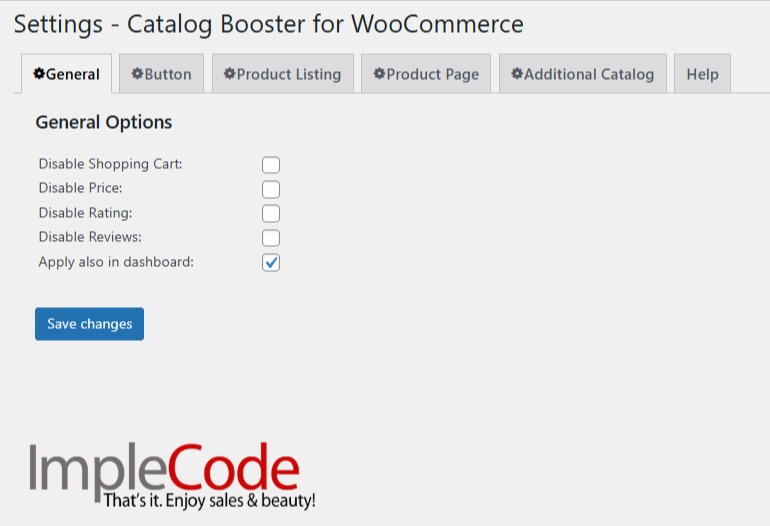
Catalog Booster for WooCommerce General Settings.
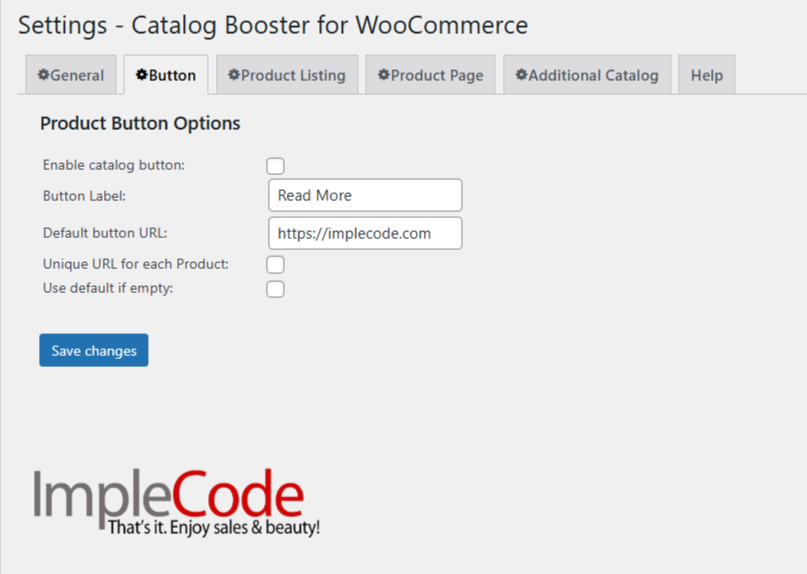
Catalog Booster for WooCommerce Button Settings.

Modern Grid can be enabled for all WooCommerce products or for selected with a shortcode.

Modern Tabbed Product page can be enabled for all WooCommerce products.

Plain product page can be enabled for all WooCommerce products

Classic grid can be enabled for all WooCommerce products or for selected with a shortcode.

Classic list can be enabled for all WooCommerce product or for selected with a shortcode.
Reviews
bad Experience
By 
Worse thing i ever did by installing this. , it deactivated my elentore plugins and changed the look of my front page to ugly page, i deactivated the plugin but i can't get rid of ugly page. stayaway
Not as described
By 
Prices bug
By 
Easy tool to modify WooCommerce Layout
By 
Changelog
1.2.8 – 05/09/2025
- WooCommerce compatibility update
- Plugin name changed to Catalog Booster & Product Catalog Mode for WooCommerce
1.2.7 – 13/11/2024
- WordPress compatibility update
- WooCommerce compatibility update
1.2.6 – 09/09/2024
- WooCommerce compatibility update
1.2.5 – 17/07/2024
- WooCommerce compatibility update
1.2.4 – 24/01/2024
- WooCommerce compatibility update
1.2.3 – 08/11/2023
- WooCommerce compatibility update
1.2.2 – 26/05/2022
- WordPress compatiblity update
- WooCommerce compatibility update
1.2.1 – 21/07/2021
- Better compatibility with WooCommmerce variations
- Compatibility with WooCommerce featured products shortcode
1.2.0 – 30/06/2021
- Ability to choose the cart mode
1.1.1 – 22/09/2020
- Compatibility with new EPC tooltips
1.1.0 – 18/08/2020
- Support for WooCommerce add to cart button on a product page
1.0.14 – 13/08/2020
- Tooltip added on activation
- Help tab added in settings
- Saving settings error fixed
1.0.13 – 12/08/2020
- WordPress compatiblity update
- WooCommerce compatibility update
1.0.12 – 28/10/2019
- WordPress compatiblity update
- WooCommerce compatibility update
- eCommerce Product Catalog compatibility update
1.0.11 – 17/05/2019
- eCommerce Product Catalog compatibility update
1.0.10 – 17/01/2019
- eCommerce Product Catalog shortcode mode compatibility
1.0.9 – 21/05/2018
- WooCommerce Catalog fully compatible with the latest WooCommerce and eCommerce Product Catalog plugins
1.0.8 – 08/05/2018
- Compatibility update
- Configuration wizard fully compatible with eCommerce Product Catalog
1.0.7 – 13/02/2018
- Compatibility update
1.0.6 – 05/01/2018
- Tweak – better support for default WooCommerce gallery
- Tweak – support for default WooCommerce reviews
1.0.5 – 13/12/2017
- Compatibility update
1.0.4 – 06/12/2017
- Compatibility update
1.0.3 – 16/05/2017
- Fix – WooCommerce Catalog Booster textdomain for translations
1.0.2 – 01/03/2017
- Fix – show correct category image when custom listing is enabled for WooCommerce
1.0.1 – 03/02/2017
- Tweak – WordPress multisite support
- Compatibility with EPC 2.6.4
1.0.0 – 13/01/2017
- Initial Release