Contact Form 7 – Datalist

Contact Form 7 – Datalist
Description
This control works in a similar way to the existing drop-down menu, but rather than a fixed list of options that the user must select from it is presented to the user as a textbox.
Once the user begins typing a list of possible options will be shown, selecting one will fill in the rest of the field with the selected option, if the desired option is not present in the list then the user can type in their own option.
Installation
- Ensure Contact Form 7 is installed and activated.
- Install the plugin through the WordPress plugins screen or upload the plugin files to the
/wp-content/plugins/cf7-datalistdirectory. - Activate the plugin through the ‘Plugins’ screen in WordPress.
Screenshots
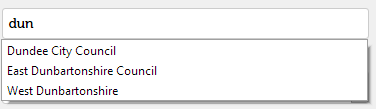
User has typed in 'dun' and matches are shown.
Faq
How do I use this?
When editing a Contact Form 7 form you should now be able to add a datalist tag.
Which browsers support this?
According to MDN https://developer.mozilla.org/en-US/docs/Web/HTML/Element/datalist this is supported by Chrome 20+ (33+ on mobile), Edge, Firefox 4+, IE10+ and Opera 9.5+ but not Safari.
Reviews
excellent
By 
Thank you ! I had a quick solution for this, and after looking all of the similar methods, and maybe complicated instalation into CF7 , your plugin works like a charm !
Thank you !
great plugin! working perfectly!
By 
One of a kind
By 
Changelog
1.2
- Tested for WordPress 5.0.
1.1
- Fixed Contact Form 7 depreciation errors.
1.0
- Initial release.