CF7Woo – add ContactForm7 forms to WooCommerce products ✌
CF7Woo – add ContactForm7 forms to WooCommerce products ✌
Description
Display ContactForm7 forms on the WooCommerce single product page. Useful for Inquiry or Pre-sales questions.
For more free WordPress plugins please visit ♣️ plugins.club.
Installation
- Upload the plugin file to the
/wp-content/plugins/directory. - Activate the plugin through the ‘Plugins’ menu in WordPress.
For basic usage, you can also have a look at the plugin web site.
Screenshots

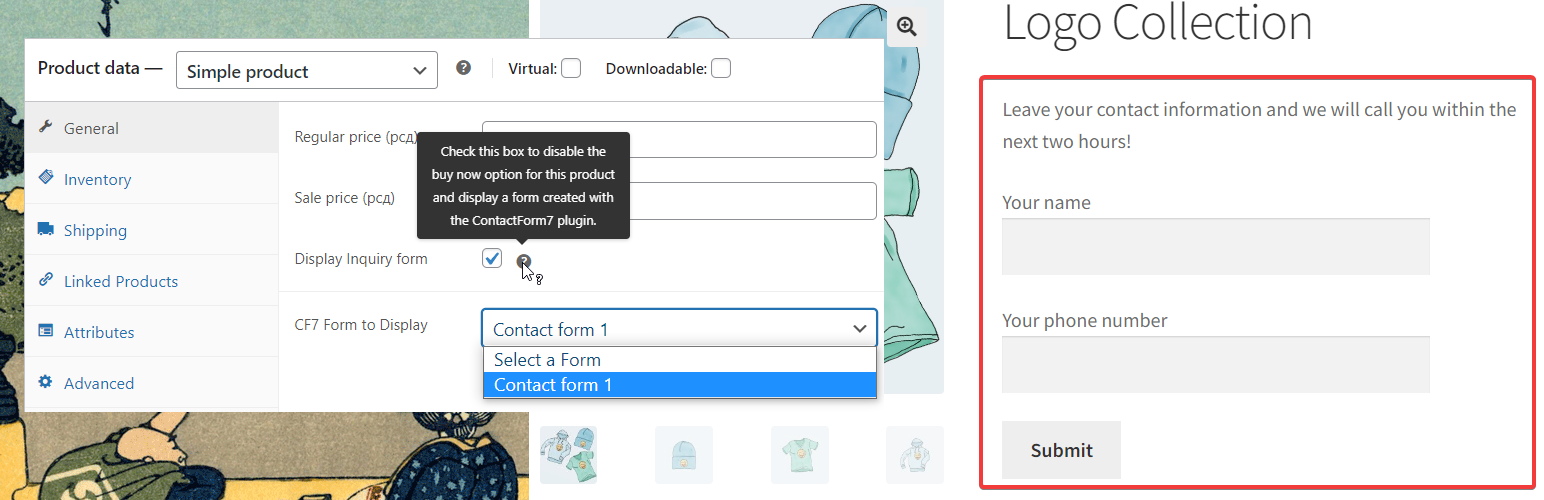
Add a Contact form to WooCommerce product-link

Form takes style form the theme
Faq
Bellow the price field you will notice a checkbox and form field. Simply check the option to display a form instead of the buy now button and select a CF7 form in the field bellow.
Forms can be created with the ContactForm7 plugin.
To add the WooCommerce product name, SKU, and link to the email that is sent by the ContactForm7 form
You can use ContactForm7’s dynamic text extension to include the product information in the email.
For example, to add WooCommerce product name, SKU, and link to the email sent by the ContactForm7 you can include:
<p>[text product-name default:get_post_title]</p>
<p>[text product-sku default:get_post_meta key=_sku]</p>
<p>[text product-link default:get_permalink]</p>
This code includes three text fields: product-name, product-sku, and product-link. The default value of each field is set to a dynamic value that retrieves the product information from the current post.
Simply remove the price for the product and leave the CF7 form enabled.
Please send all your suggestions and ideas to our email address and they may be developed and included in the plugin in future.
Reviews
Perfect
By 
It still works on wordpress V. 6.4.1. I hope the developer doesn't abandon this project. Thank you for this excellent plugin.
Changelog
1.0
- Initial release