Change Category Checkbox to Radio Button

Change Category Checkbox to Radio Button
Description
If you need to restrict your WordPress posts to select only one category, this plugin automatically changes the category/taxonomy checkboxes to radio buttons in the post editor. This simplifies category selection for users who only want to assign one category to a post.
For full documentation, please visit Documentation.
You can watch this video tutorial for a quick guide: YouTube Video
Installation
This section describes how to install the plugin and get it working.
- Upload
plugin-name.phpto the/wp-content/plugins/directory. - Activate the plugin through the ‘Plugins’ menu in WordPress.
- Once activated, the category checkboxes will automatically change to radio buttons in your post editor.
Screenshots
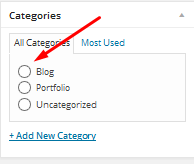
Example of category radio buttons in the post editor.
Faq
- Upload
plugin-name.phpto the/wp-content/plugins/directory. - Activate the plugin through the ‘Plugins’ menu in WordPress.
Simply install and activate the plugin. Once activated, go to your post editor and check the category/taxonomy section. The checkboxes will have changed to radio buttons, allowing you to select only one category at a time.
Yes, the plugin supports both the Classic Editor and Gutenberg block editor.
Reviews
The plugin breaks the appearance of categories in the menu
By 
Doesn't work with WordPress 5 Gutenberg editor
By 
Great
By 
Installed because I wanted to stop users (mu site) from selecting more than one category. For some reason, they like to choose several!
This will stop them.
Works perfectly.
thanks
Changelog
2.0.1
- Added full Gutenberg editor support.
- Updated plugin compatibility to WordPress 6.6.
- Updated readme for better documentation.
1.1
- Added support for WordPress 4.3.
1.0
- Initial release.