CI Calorie Calculator

CI Calorie Calculator
Description
Discover your ideal daily calorie intake with our Calorie Calculator. Find out exactly how many calories you need to eat to lose, maintain, or gain weight.
Add the calculator to any page, post or widget area with the shortcode [ci_calorie_calculator].
What you enter: Gender, Age, Height, Weight, Activity, Zigzag Plan Goal, Joules, Calories, BMR Estimation Formula, Body Fat.
What you get: DAY.
Features:
- Works as soon as it is activated: no account, no API key and no settings page.
- Calculates in your visitor’s browser. Nothing they type is sent to calculator.io or anywhere else, and the plugin loads no ads, trackers or external scripts.
- Responsive: the form and the results sit side by side on wide pages and stack on narrow ones. The frame resizes itself to fit the calculator.
- Optional light, dark or automatic (follows the visitor’s system setting) theme, a custom accent colour and a maximum width, all set in the shortcode.
- The calculator runs in an iframe, so your theme’s styles cannot break it and it cannot break your theme.
More about this calculator: https://www.calculator.io/calorie-calculator/
Usage
Add the Calorie Calculator shortcode to your page, post or sidebar:
[ci_calorie_calculator]
Or add the following code to your template where you would like the Calorie Calculator to appear:
<?php echo do_shortcode( '[ci_calorie_calculator]' ); ?>
All attributes are optional:
title–1(default) shows the calculator heading with its icon,0hides it. Example:[ci_calorie_calculator title="0"]theme–light(default),dark, orautoto follow the visitor’s light/dark system setting. Example:[ci_calorie_calculator theme="auto"]accent– an accent colour for buttons and highlights, as a hex value. Example:[ci_calorie_calculator accent="#2563eb"]max_width– the widest the calculator may be: a number followed bypx,%orrem. The calculator is centred when it is narrower than its column. Example:[ci_calorie_calculator max_width="720px"]
Attributes can be combined: [ci_calorie_calculator title="0" theme="auto" accent="#2563eb" max_width="720px"]
Source code and libraries
The plugin’s own JavaScript and CSS are shipped unminified and human-readable: assets/js/*.js (except assets/js/lib/), assets/css/main.css, assets/css/ci-widget.css, assets/css/ci-embed.css and the PHP file. main.css is the compiled, unminified stylesheet of calculator.io. The calculator is also published on the calculator.io website: https://www.calculator.io/calorie-calculator/
Third-party libraries bundled in assets/js/lib/. Where a file is minified, the readable source is available at the upstream address:
- math.js 3.37.1 (Apache-2.0) –
assets/js/lib/math.min.js, minified build. Source: https://github.com/josdejong/mathjs - marked 15.0.12 (MIT) –
assets/js/lib/marked.min.js, minified build. Source: https://github.com/markedjs/marked - Inputmask 5.0.9-beta.70 (MIT) –
assets/js/lib/input-mask.min.js, minified build. Source: https://github.com/RobinHerbots/Inputmask - lazysizes 5.3.2 (MIT) –
assets/js/lib/lazysizes.js. Source: https://github.com/aFarkas/lazysizes - Air Datepicker 3.3.0 (MIT) –
assets/js/lib/air-datepicker.js. Source: https://github.com/t1m0n/air-datepicker - Inter font (SIL Open Font License 1.1) –
assets/fonts/inter-v20-latin.woff2. Source: https://github.com/rsms/inter
Installation
- Upload the /ci-calorie-calculator/ folder to the /wp-content/plugins/ directory, or install the plugin from the Plugins screen.
- Activate the Calorie Calculator plugin through the “Plugins” menu in WordPress.
- Add the
[ci_calorie_calculator]shortcode to a page or post.
Screenshots
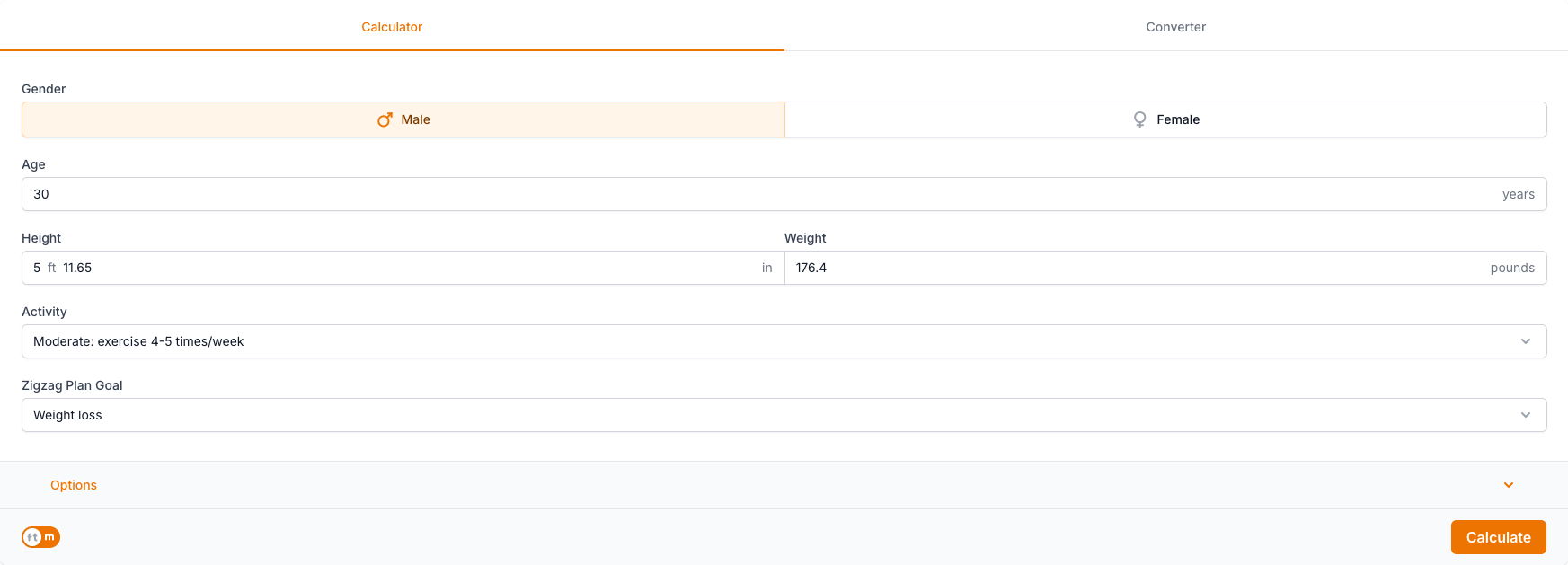
The Calorie Calculator input form: Gender, Age, Height, Weight, Activity, Zigzag Plan Goal, Joules, Calories, BMR Estimation Formula, Body Fat.

The Calorie Calculator results: DAY.
Faq
Add the shortcode [ci_calorie_calculator] to a page or post. In the block editor use a Shortcode block. In a theme template use <?php echo do_shortcode( '[ci_calorie_calculator]' ); ?>.
title (1 or 0), theme (light, dark or auto), accent (a hex colour such as #2563eb) and max_width (for example 720px, 80% or 40rem). See the Usage section for examples. Invalid values are ignored and the default is used instead.
Use theme="dark" for always dark, or theme="auto" to follow the visitor’s light/dark system setting. The default, theme="light", keeps the calculator light on any background.
Yes. Use title="0" and the heading with the calculator’s icon is not printed, so you can write your own.
No. The calculation happens in the visitor’s browser, nothing they enter leaves the page, and the plugin makes no requests to calculator.io or any other external service. It sets no cookies and loads no ads or trackers.
The frame adjusts its height automatically while the page is open. If your theme or a caching or optimisation plugin removes scripts from the page, the frame keeps a default height; exclude the plugin’s ci-embed.js file from script optimisation.
On average, adult males need between 2,000 and 3,000 calories a day to maintain their weight, while adult females need between 1,600 and 2,400. Your exact needs depend on age, weight, height, biological sex, and activity level, which is why the calculator estimates them from your own inputs.
It first estimates your Basal Metabolic Rate (BMR), the calories your body burns at complete rest, using the Mifflin-St. Jeor, Harris-Benedict, or Katch-McArdle equation. It then multiplies that BMR by an activity factor (typically 1.2 to 1.95) to give your total daily energy expenditure (TDEE), the calories needed to maintain your weight.
Because roughly 3,500 calories equals about one pound of fat, eating 500 calories below your daily maintenance level aims for about 1 pound of weight loss per week. Cutting up to 1,000 calories a day targets 2 pounds per week, but losing more than 2 pounds weekly can harm your health and muscle mass.
Zigzag calorie cycling alternates higher- and lower-calorie days while keeping your weekly total the same, preventing your metabolism from adapting to a constant low-calorie intake. For example, to hit a 14,000-calorie week you might eat 2,300 calories on three days and 1,775 on the other four instead of a flat 2,000 every day.
Unless you are monitored by a medical professional, Harvard Health Publications recommends women eat no fewer than 1,200 calories per day and men no fewer than 1,500. Chronically eating below this baseline forces your body to prioritize survival functions while shutting down processes essential for hormone production and overall health.
Reviews
Great calculator!
By 
Nice design and free to use.
Changelog
1.1.0
- New shortcode attributes:
title,theme(light, dark, auto),accentandmax_width - Responsive layout: form and results wrap into one column on narrow pages, wide tables scroll inside their own box
- The frame now follows the calculator’s height when it changes or the window is resized
- Fixed the missing heading icon
- The plugin’s JavaScript and CSS are now shipped unminified
- The WordPress-side script and styles load only on pages that use the shortcode
1.0.1
- Removed leftover files of earlier plugin versions
- Tested up to WordPress 7.1
1.0.0
- Initial release of Calorie Calculator