Spam protection, Honeypot, Anti-Spam by CleanTalk

Spam protection, Honeypot, Anti-Spam by CleanTalk
Description
Top-rated anti-spam protection for WordPress. No CAPTCHA, no questions, no animal counting, no puzzles, no math and no spam bots. Universal AntiSpam plugin.
Anti-Spam features
- Stops spam comments.
- Stops spam registrations.
- Stops spam contact emails.
- Stops spam orders.
- Stops spam bookings.
- Stops spam subscriptions.
- Stops spam surveys, polls.
- Stops spam in widgets.
- Stops spam in WooCommerce.
- Real-time email validation. Is email real or Not.
- Checks and removes the existing spam comments and spam users.
- Compatible with mobile users and devices.
- Compatible with General Data Protection Regulation (GDPR) (EU).
- Blocking disposable & temporary emails.
- No Spam – No Google Penalties. Give your SEO boost.
- Mobile friendly Anti Spam & FireWall.
- Stops spam in Search Form.
- Disable comments.
- Spam FireWall: Anti-Flood.
- Spam FireWall: Anti-Crawler.
- Hide «Website» field for comments.
- Block messages by languages, countries, networks and stop words.
- Email Address Encoder – protection for email addresses published on your site.
- No jQuery.
Free trial then $12 per year
CleanTalk is an anti-spam plugin which works with the premium Cloud Anti-Spam service cleantalk.org. This plugin as a service https://developer.wordpress.org/plugins/wordpress-org/detailed-plugin-guidelines/#6-software-as-a-service-is-permitted
Public reviews
It’s more than just a tool to combat spam; it’s an integral component that enhances the overall quality and performance of your website.
techbusinessnews.com.auImprove Your Security WordPress Spam Protection With CleanTalk Anti-Spam
The Hacker News.CleanTalk – Cloud-Based Anti-Spam Service to Keep Your Site Bot-Free.
NewsWatch Review.Compare reCAPTCHA & Akismet VS CleanTalk
https://www.saashub.com/compare-recaptcha-vs-cleantalk
https://www.saashub.com/compare-akismet-vs-cleantalkI know you have heard of a number of anti-spam plugins. But you must know, the cloud-based ones are the best regarding detection rate. They compare all the content in forms with their own algorithm to find out the legibility.
www.techwibe.comThe key selling point of CleanTalk for me is not simply its effectiveness. It’s the fact that CleanTalk works in the background. It does not make users jump through hoops in order to submit a comment or complete a form.
www.kevinmuldoon.com
AntiSpam protection for comments
Native spam protection for WordPress, JetPack comments and any other comment plugins. The plugin moves spam comments to SPAM folder or you can set the option to ban spam comments silently. You can also enable the option in the plugin settings to auto-delete comments from SPAM folder.
Contact Form 7 spam filter
Plugin extends spam protection for Contact Form 7 (CF7). It can be used with any other third-party spam filters.
How to protect your Contact Form 7 using CleanTalk Anti-Spam plugin
Elementor Website Builder filter
Plugin extends spam protection for Elementor Website Builder. It filters spam submisssions and tested for contact form type.
Gravity forms spam filter
Plugin extends spam protection for Gravity forms. It filters spam submisssions for any type of forms.
Formidable Form Builder spam filter
Plugin extends spam protection for Formidable Form Builder. It filters spam submisssions for any type of forms – Contact Form, Survey & Quiz Forms.
Leaky Paywall subscription protection
Plugin protects Leaky Paywall plugin (by ZEEN01) against spam subscriptions. It can be used with any other third-party spam filters.
HubSpot protection for embedded forms
Plugin protects HubSpot embedded forms against any spam submissions. Guide to start using embedded forms https://knowledge.hubspot.com/forms/how-can-i-share-a-hubspot-form-if-im-using-an-external-site
Contact Form by WPForms spam filter
Plugin extends Contact Form by WPForms to provide spam protection. It filters spam submissions for each type of forms – simple contact form, marketing form, request a quote and etc.
WooCommerce spam filter
Anti-spam by CleanTalk filters spam registrations and spam reviews for WooCommerce. The plugin is fully compatible with WooCommerce 2.1 and higher.
Spam filter for theme contact forms
The plugin blocks spam emails via any theme (built-in ones included) contact forms. The plugin filters spam emails silently (without any error notices on WordPress frontend) in AJAX forms as well.
bbPress spam filter
Spam protection for everything about bbPress: logins, registrations, forums, topics and replies.
Many other great contact, signups and all kind of forms that supported by CleanTalk
- AWeber form builder https://wordpress.org/plugins/aweber-web-form-widget/
- Contact form by BestWebSoft https://wordpress.org/plugins/contact-form-plugin/
- Contact Form Plugin by Fluent Forms Ninja forms https://fluentforms.com
- Forminator contact from https://wpmudev.com/project/forminator-pro/
- Ninja forms https://ninjaforms.com
- Newsletters – MC4WP: Mailchimp for WordPress (mc4wp.com), MailPoet – emails and newsletters in WordPress (https://www.mailpoet.com/)
- WS Form Lite https://wordpress.org/plugins/ws-form/
- WP User Frontend, UserPro.
- WordPress Landing Pages.
Protection for forms above works as built-in function of Anti-Spam by CleanTalk, without any additional actions from a user. Anywaym, if you have missed spam, try to activate a few options below. If nothing helps, ask for help at support forum https://wordpress.org/support/plugin/cleantalk-spam-protect/
- Any WordPress form (checkbox ‘Custom contact forms’).
- Any submission to the site (checkbox ‘Check all POST data’).
Check existing comments for spam. Bulk spam comments removal. Spam comment Cleaner
With the help of anti-spam by CleanTalk you can inspect through existing comments to find and quickly delete spam comments at once. To use this function, go to WP Console -> Comments -> Find spam comments.
Check existing users for spam. Bulk spam accounts removal. Spam users cleaner
With the help of anti-spam by CleanTalk you can inspect through existing accounts to find and quickly delete spam users at once. For use this function, go to WP Console -> Users -> Check for spam. Also, you can export a list of spam users to the CSV.
Private black lists for anti-spam service
Automatically block comments and registrations from your private black IP/email address list.
Hide «Website» field for comments
This option hides the «Website» field from standard WordPress comments forms. After that spammers won’t be able to send spam links using «Website» field in the bottom of the comments form.
Low false/positive rate
This plugin uses multiple anti-spam tests to filter spam bots having as low false/positive rate as possible.
How does CleanTalk improve SEO for your website?
CleanTalk works faster than most of the other anti-spam plugins. It is common knowledge that the faster your site loads, the better your customer experience is, the better your SEO will be, and the better your site will convert. Speed is becoming increasingly important in SEO, conversion and user experience. Today, site speed is one of the most important ranking factors on Google. A site that loads slowly will lose visitors and potential revenue.
Among anti-spam plugins CleanTalk is one of the fastest. Despite the large plugin functionality, the developers have optimized the performance of
the plugin so that AntiSpam by CleanTalk is faster than most analogs. This contributes to the cloud service architecture, as all calculations take place in the cloud, not on the server, the server receives the finished result for further action.
https://s.w.org/plugins/cleantalk-spam-protect/screenshot-5.png?r=1288723
Unlike stand-alone plugins (like Antispam Bee) Anti-Spam by CleanTalk uses less CPU that improves site response, visitors experience and SEO results.
Spam FireWall
Spam FireWall allows blocking the most active spam bots before they get access to your website. It prevents spam bots from loading website pages so your web server doesn’t have to perform all scripts on these pages. Also it prevents scanning of pages of the website by spam bots. Therefore Spam FireWall significantly reduces the load on your web server. Spam FireWall also makes CleanTalk the two-step protection from spam bots. Spam FireWall is the first step and it blocks the most active spam bots. CleanTalk Anti-Spam is the second step and checks all other requests on the website in the moment of submitting comments/registers etc. How does it work?
- The visitor enters to your web site.
- HTTP request data are being checked in the nearly 5.8 million of the identified spam bot IPs.
- If it is an active spam bot, the bot gets a blank page, if it is a visitor then he receives a normal page. This process is completely transparent for the visitors.
All the CleanTalk Spam FireWall activity is being logged in the process of filtering.
Spam FireWall: Anti-Flood & Anti-Crawler
Spam FireWall: Anti-Flood and Anti-Crawler options are intended for blocking unwanted bots, content parsing, shop goods prices parsing or aggressive website scanning bots. Learn more https://cleantalk.org/help/anti-flood-and-anti-crawler
How to protect sites from spam bots without CAPTCHA?
The most popular anti-spam method is CAPTCHA – the annoying picture with curved and sloping symbols, which are presented to the visitor to decipher and fill in. In is supposed that spam bots won’t discern these CAPTCHA, but a visitor will. CAPTCHA provokes great irritation, but if the visitor wants to comment, he has to fill in these symbols time after time, making mistakes and starting once again. Sometimes CAPTCHA reminds us of the doodles of a two year old child. For users with vision problems CAPTCHA is an insurmountable obstacle. Users hate captcha. Captcha for users means “hate”. Unreadable CAPTCHA stops about 80% of site visitors. After 2 failed attempts to decipher CAPTCHA 95% of visitors reject further attempts. At the sight of CAPTCHA and after input errors, many visitors leave the resource. Thus, CAPTCHA helps to protect the resource spam both from bots and visitors. CAPTCHA is not a panacea from spam. Doubts concerning the Need for CAPTCHA?
“Ultimately, CAPTCHAs are useless for spam because they’re designed to tell you if someone is ‘human’ or not, but not whether something is spam or not.” Matt Mullenweg
You do not have to work in IT to know what spam is. Besides piles of unwanted email, there are spam bots, or special software programs designed to act as human website visitors that post unwelcome messages over the Internet to advertise dubious services. More often than not spam messages do not even make sense. Similar to bacteria and virus mutations developing antibiotic resistance, spam bots are becoming more resilient in penetrating Internet firewalls and security layers.
Real-time email validation. Is email real or Not.
It is very important to be sure that the user used his real email address. Spambots very often use fake email addresses, i.e. which addresses do not exist.
CleanTalk will check email addresses for existence in real time.
Non-existing email addresses also entail several other problems for website owners.
- You can never contact them by email,
- the client will never receive any notifications from you (account activation letter, password recovery, email distribution, notifications, etc.),
- if you use email marketing for your clients, then a large number of nonexistent emails in the mailing list may result in your IP address being added to various blacklists of email servers.
Improve your email list with email validation without fake emails.
Blocking disposable & temporary emails
Block fake and suspicious users with disposable & temporary emails to improve email delivery. So, it also prevents malicious activity, spam bots, and internet trolls.
Latest and the most SPAM active IPs, Emails, Domains and ASN
- yawiviseya67@gmail.com
- xrumer888@outlook.com
- irinademenkova86@gmail.com
- zekisuquc419@gmail.com
- prince@stopformspam.xyz
- 191.101.217.24
- 199.167.138.22
- 178.159.37.17
- 185.190.42.200
- 45.133.172.23
Effective date is July 13th, 2025. Real-time data is available at https://cleantalk.org/blacklists.
Stops Spam in Search Form
Spam bots can use your search form to make a GET request with spam text. CleanTalk Anti-Spam has the option to protect your website search form from spam bots. Each time, the search generates a new page and if there are many requests, this can create additional load. So, under some conditions, spam searches can be indexed, which affects SEO,
- Anti-Spam protection for website search forms repels spambots.
- If your search form gets data too often the CleanTalk Anti-Spam plugin will add a pause and increase it with each new attempt to send data. It saves your web server processor time.
- Spam protection allows you to not forbid indexation for the crawler bots if you really need it but simultaneously you will get protection from spambots.
You will always know what users were looking for on your site.
Disable comments
This option disables comments on your site. You can choose one or several options:
- Disable comments for posts
- Disable comments for pages
- Disable comments for media
When using Disables comments, existing comments will not be deleted and will remain on the pages.
Email, Phones Address Encoder
CleanTalk Anti-Spam offers a feature called “Encode contact data” that is designed to encode all email addresses on the website pages. Encoding email, phontes addresses increases the level of protection of contact data from being abused, parsed, getting spammed and used in spam mailing lists by bots and online criminals. To reveal the encoded email address simply click on it and it will be decoded instantly.
Will the anti-spam plugin protect my theme?
Yes, it will. The Anti-spam by CleanTalk is compatible with any WordPress theme.
Should I use other anti-spam tools (Captcha, reCaptcha and etc.)?
CleanTalk stops up to 99.998% of spam bots, so you can disable other anti-spam plugins (especially CAPTCHA-type anti-spam plugins). In some cases several anti-spam plugins could conflict with each other.
Honeypot field
The option helps to block bots. The honeypot field option adds a hidden field to the form. When spambots come to a website form, they can fill out each input field. Enable this option to make the protection stronger on these forms. Learn more about supported forms here.
Installation
Installation instructions
-
Download, install and activate ‘Anti-spam by CleanTalk’.
-
Get Access key https://cleantalk.org/register
-
Enter Access key in the settings: WordPress console -> Settings -> Antispam by CleanTalk
-
Do dummy spam comment (registration or contact message) with email stop_email@example.com. You should see notice: Forbidden. Sender blacklisted.
-
Done! The plugin is ready to use.
Video guide – Anti-Spam Plugin Installation in WordPress.
Important! To test spam protection you must post a dummy submissions as website visitor (use must logged out from WordPress console), because the plugin doesn’t filter submissions from WordPress administrators.
How can setup plugin in WPMU version?
In WordPress multisite version you can switch the plugin to use Global Access key. In this way the plugin doesn’t show any options to enter Access key in plugin settings and doesn’t show Trial banner in WordPress backend. To setup global CleanTalk access key for all websites in WPMS, define constant in your wp-config.php file before defining database constants:
define('CLEANTALK_ACCESS_KEY', 'place your key here');
Make it before you activated the plugin. If the plugin already activated, deactivate it and add the code and active it again.
Now, all subsites will have this access key.
Manage and control spam protection
Go to Dashboard at the cleantalk.org or use Android, iPhone anti-spam app to manage and control spam protection.
Screenshots
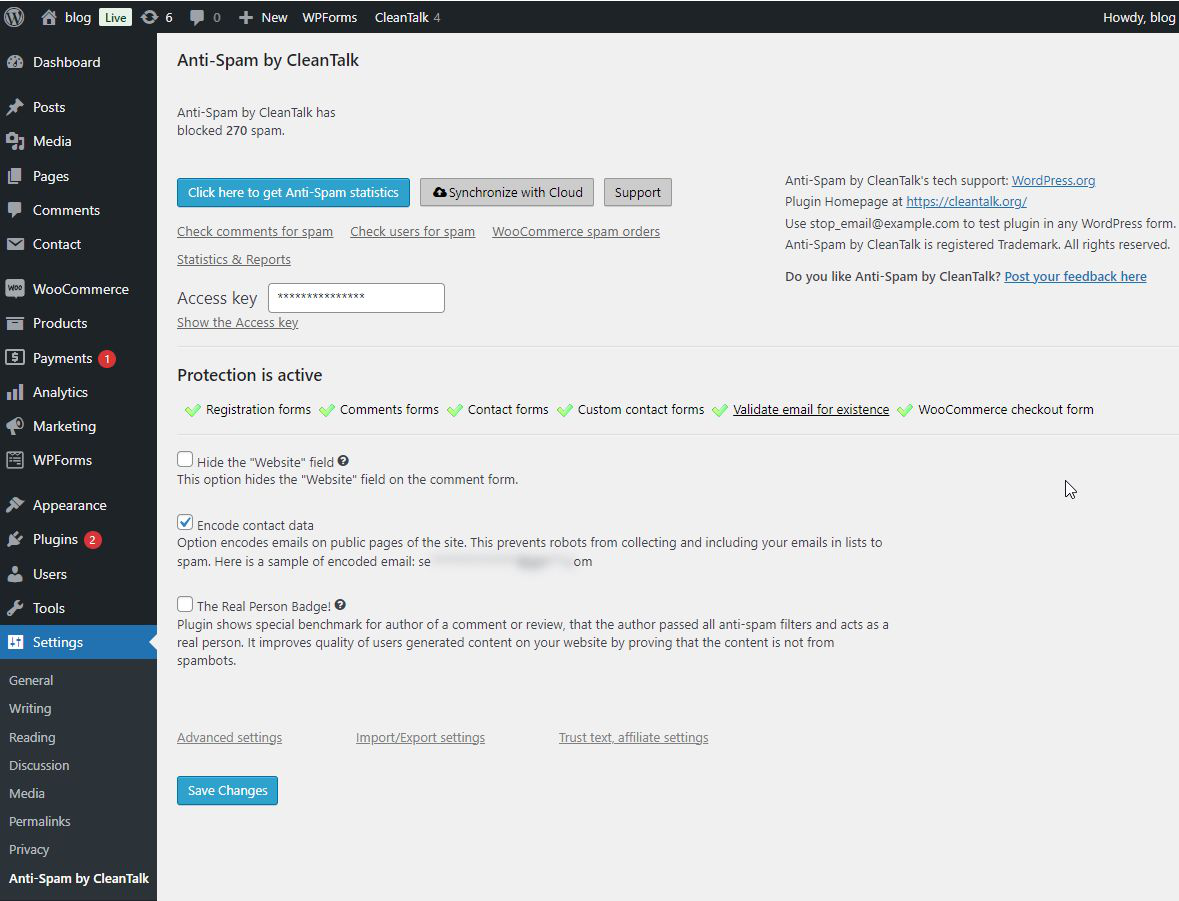
AntiSpam settings are easy to use to protect any contact forms. For example - Ninja forms, Fluent forms and etc.
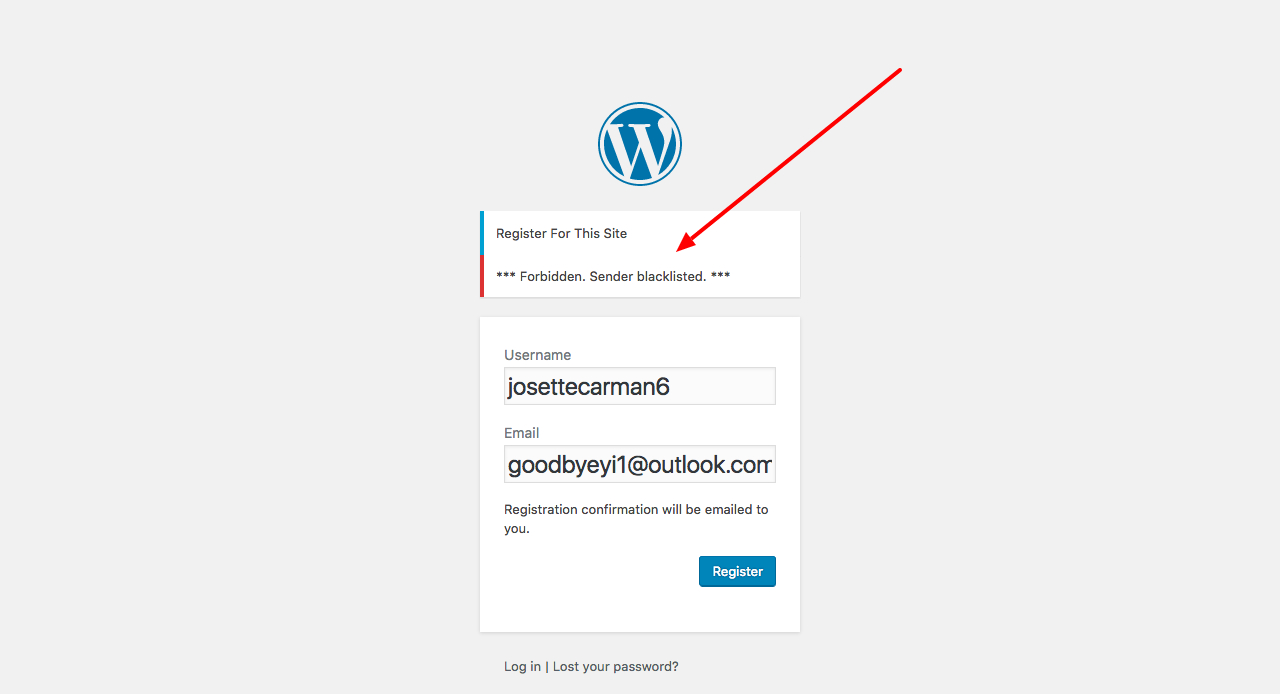
AntiSpam plugin rejected a spam bot at the CAPTCHA less registration form. The plugin provides explanation to visitor and websites about each rejected comment/registration or contact message.
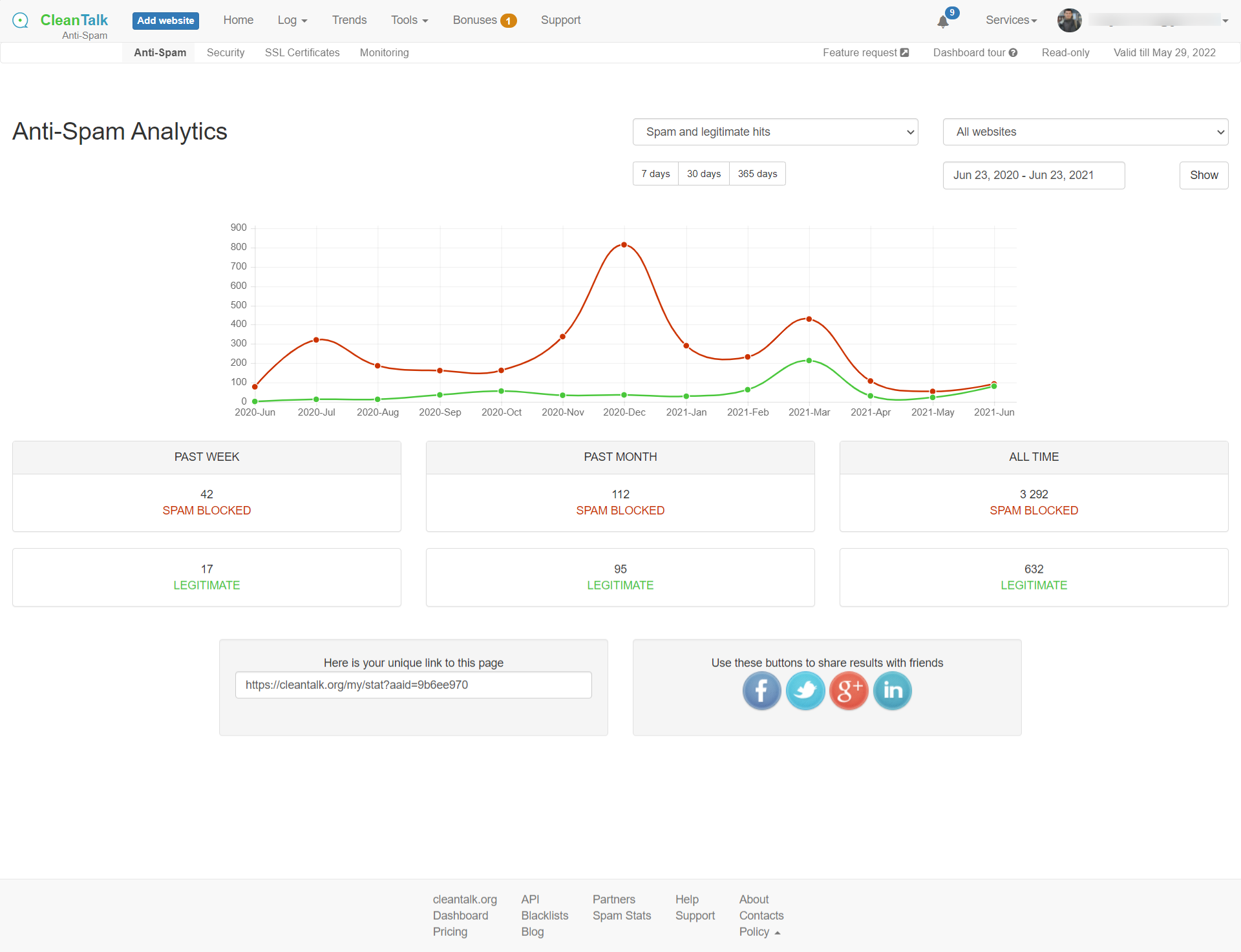
Use AntiSpam analytics tool for each website in service Dashboard to have information about spam/legitimate stats.
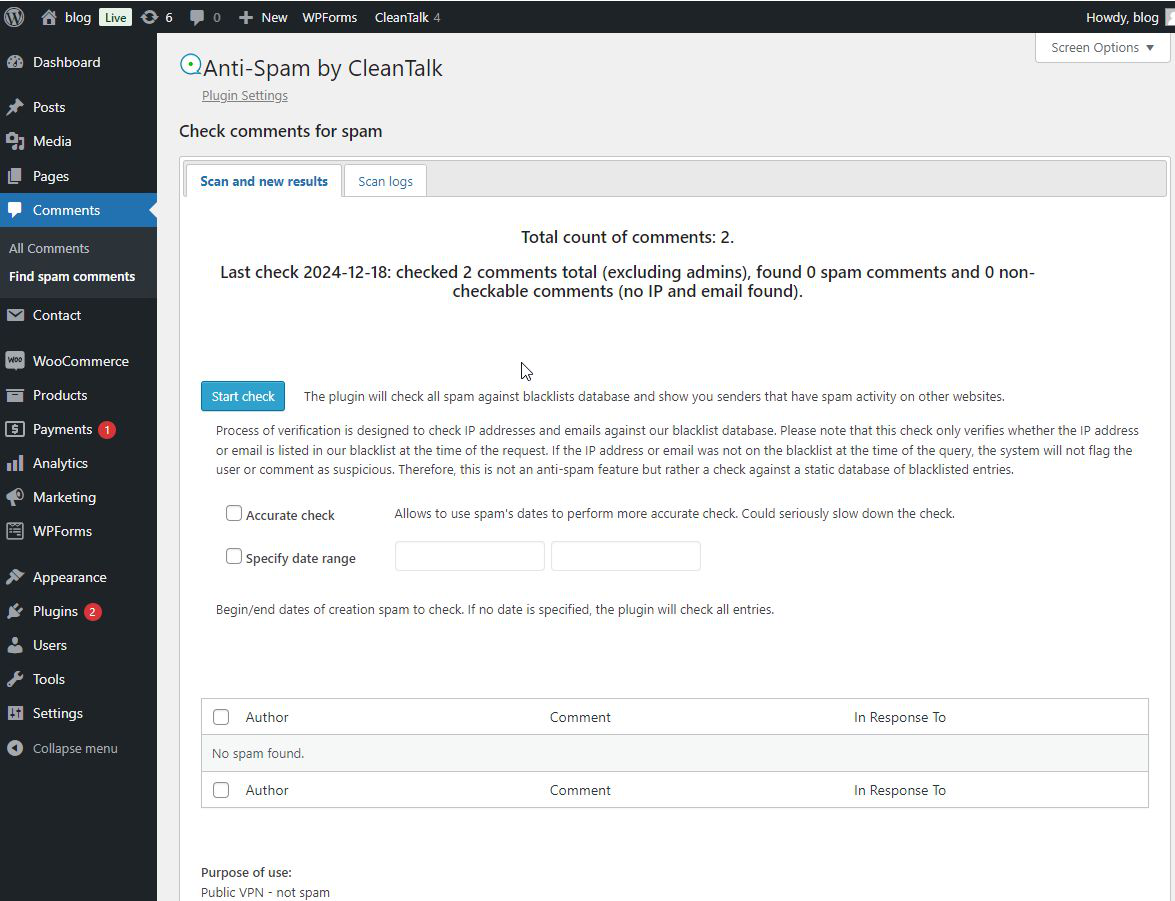
Special interface to find spam comments.
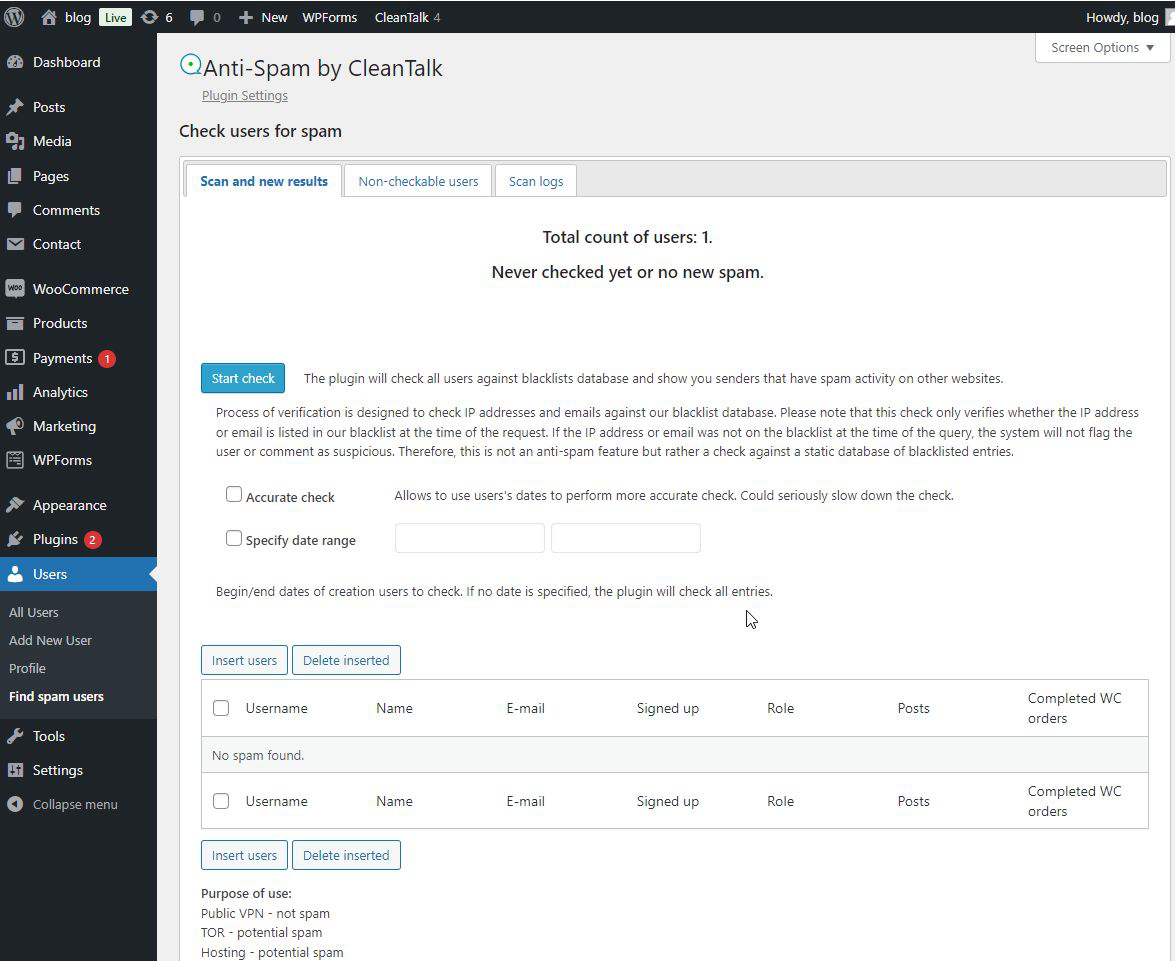
Special interface to find spammers in users.
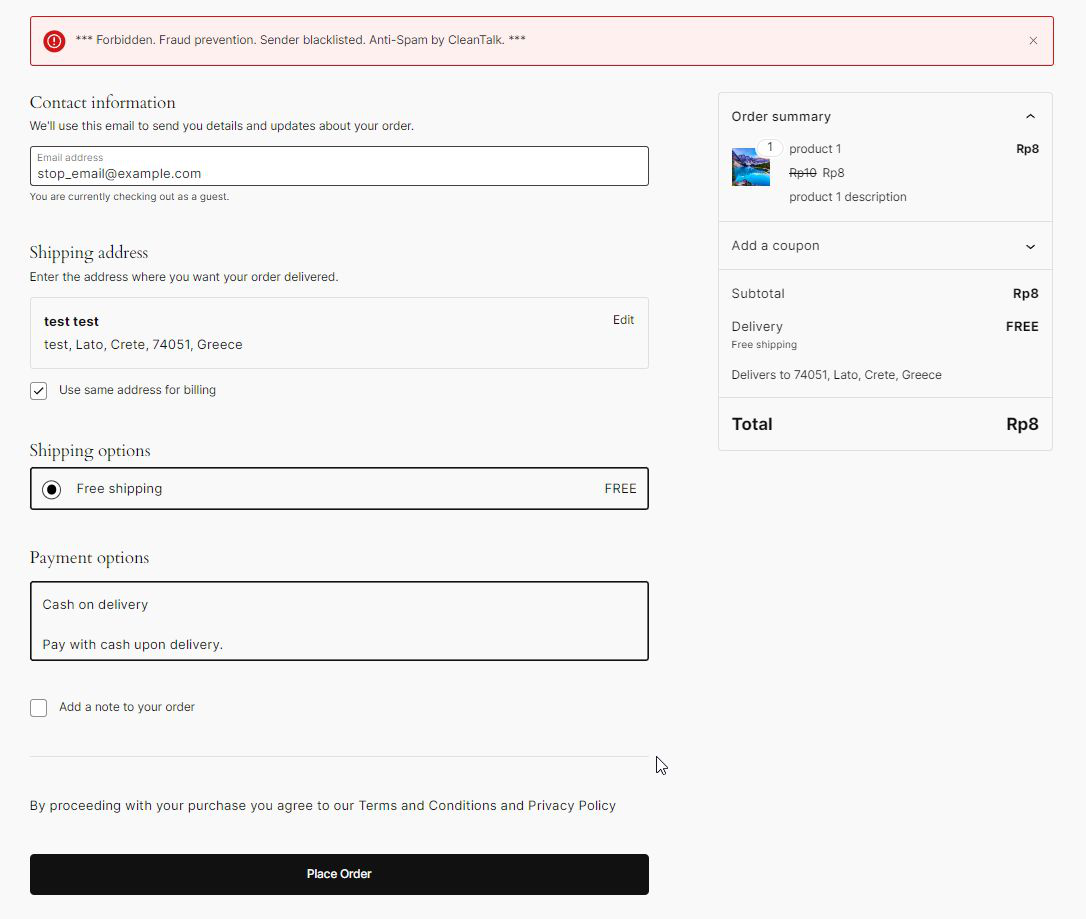
Prevent WooCommerce checkout from spammers.
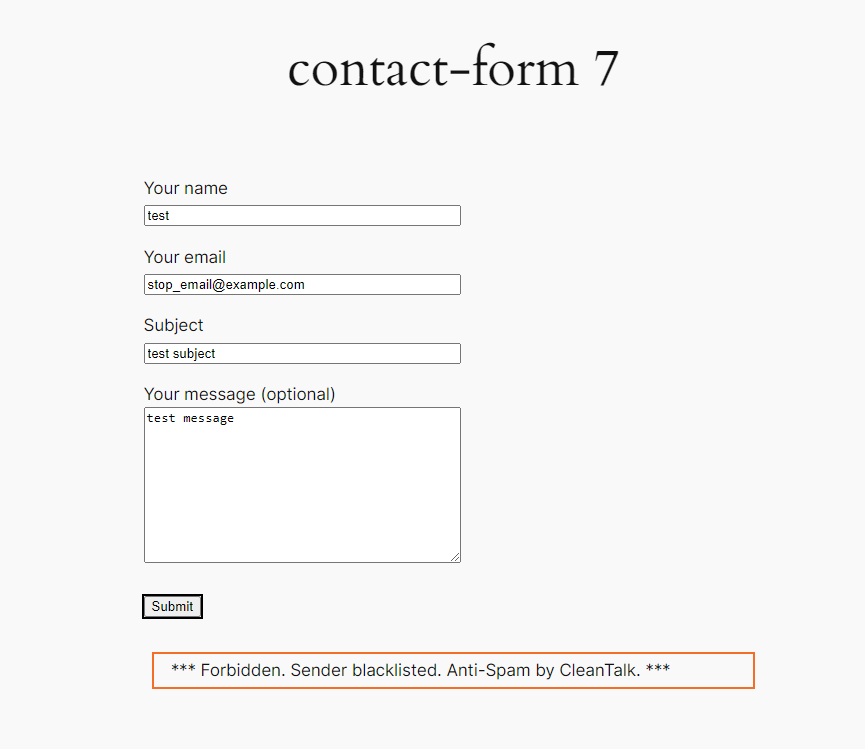
Prevent spam contact occurs in your life.
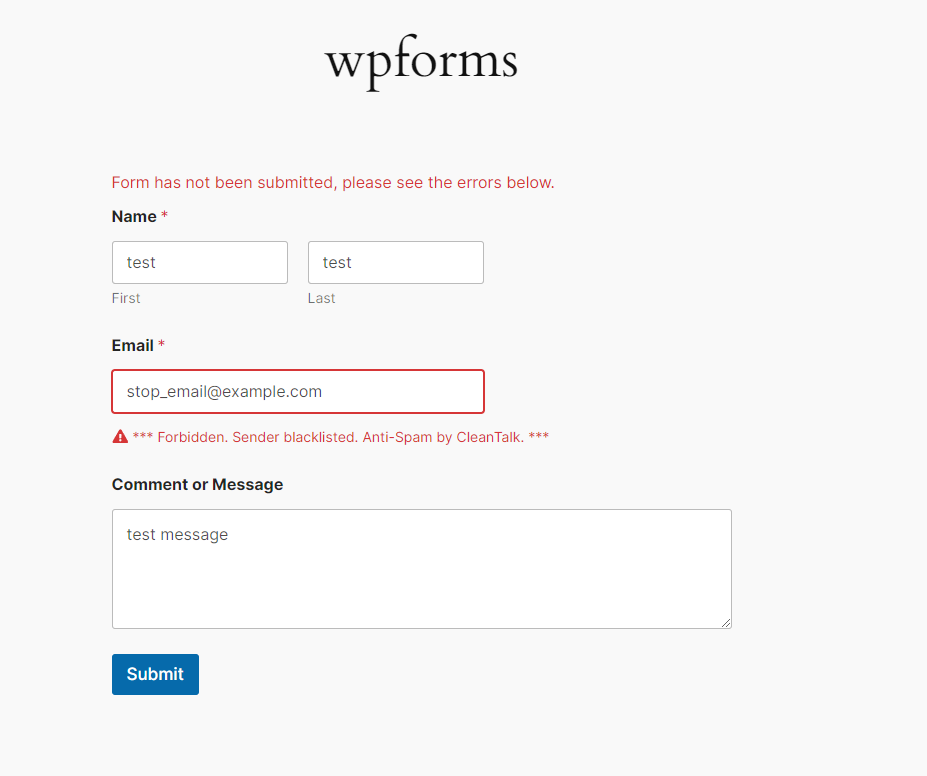
Prevent any other spamers, from any other forms, for example from WPForms.

Faq
Spammers want to get backlinks from your site to improve their site’s PageRank or redirect your visitors to malicious sites.This level of spam can damage your reputation with readers and commentators if you fail to tackle it. It is not uncommon for some WordPress websites to receive hundreds or even thousands of comments every week. However, by using a CleanTalk plugin, spam can be easily handled by your WordPress website.
Yes, it is. The plugin doesn’t block mobile visitors as well as desktop website visitors. It uses several independent anti-spam tests to decrease the number of false outcomes and to have as low false-positive rate as possible. Multiple anti-spam tests help to avoid false/positive blocks for real website visitors even if one of the tests failed.
Spam comments are being moved to SPAM folder by default or you can set the option to ban spam comments silently.
Please use the email stop_email@example.com for comments, contacts or signups to see how the anti-spam protection works. Also, you can see the logs for the last 7 days in the Dashboard or look at the folder “Spam” for banned comments.
Please, note – administrator’s actions are NOT being checked.
The plugin uses several simple tests to stop spammers:
- JavaScript anti-spam test. 99% of spam bots don’t have full JavaScript functions support. So, the plugin has the code which can be run by normal visitor and can’t be run by the spam bot.
- Email, IP, domain spam activity list entries check. The plugin uses spam activity database online at cleantalk.org, consisting of more than 20 billion spam activity records of IPs, Emails, Domains and ASN. If the sender’s IP or Email is in the database, the sender gets some spam scores. To reduce false/positive rate the plugin not only uses the blacklist test to ban spammers, the sender will be banned when and only when multiple spam tests have been failed.
- Comment submit time. Spam bots usually submit the info immediately after the page has been loaded, this happens because spam bots don’t actually fill the web form, they just send $_POST data to the blog. The normal visitor sends the data after several seconds or minutes.
The plugin passes pingbacks without any checks by default. All trackbacks will be blocked if the sender had spam activity.
Yes, you can. The plugin has the option to test all pending comments via database of spam active IP/Email, found spam comments will be moved to Trash folder.
The plugin checks all non-spam comments in the blacklist database and shows you those senders who have spam activity on other websites.
There are some differences between blacklist database and API to protect you from spam bot registrations/comments online. Blacklists show all history of spam activity, but our API (which is used in spam tests) relies on other parameters too: last day of activity, number of spam attacks during the last days etc. These mechanisms help us to reduce the number of false outcomes. So, there is nothing strange, if some emails/IPs are not found by bulk comments/accounts test.
To check comments please go here:
WordPress console -> Comments -> Find spam comments
To check users please go here:
WordPress console -> Users -> Find spam users
Yes, the plugin is compatible with WordPress MultiUser. Each blog in multisite environment has individual anti-spam options for the protection from spam bots.
There are a few reasons for this:
- With the indexing of your web-site by the search systems, appearance of external links and better search results position, your web-site attracts more and more spambots.
- Non-transparent protection systems like CAPTCHA or question/answer, that don’t have spam attacks stats, don’t let you see the whole picture, or the picture is incomplete.
- Counting methods for spam attacks and spam bots are different for different systems, thus the diversity appears. We seek to provide detailed stats.
The plugin has several options to detect spam bots and humans. If you just post spammy text like this:
"I want to sell something", "Buy something here.." and etc
the comments will be passed, because the plugin detects sender as a human. So, use special email stop_email@example.com to test the anti-spam functionality or wait a few days to see how the plugin works.
The plugin is free and distributed under the GPLv2 license.
CleanTalk anti-spam plugin works with a cloud base anti-spam service and this plugin is a Software as a service (SaaS).
CleanTalk it’s a free plugin that works with premium Cloud Anti-Spam service.
https://en.wikipedia.org/wiki/Software_as_a_service
The fact that the plugin works with a premium type service is mentioned in the plugin annotation and in its WordPress catalog description.
We are ready to help you with any issue regarding CleanTalk. There are hundreds of environment compositions and we do our best to cover as many as possible.
Anti-spam by CleanTalk doesn’t use static HTML code in its templates, so all anti-spam functions work correctly with any WordPress cache plugins.
Yes, it does. Plugin protects web-forms on your websites which send data to third-party servers (like MailChimp). To enable this protection set the option ‘Protect external forms’ in the plugin settings.
CleanTalk is fully compatible with CloudFlare. Service doesn’t filter CloudFlares IP’s (AS13335) through blacklists database, so in this case plugin/service filters spam bots using other anti-spam tests.
Yes, it is. CleanTalk works with any CDN system, i.e. CloudFlare, MaxCDN, Akamai.
Yes, you can. Follow this guide https://cleantalk.org/help/api-check-message
This script is used for AJAX JavaScript checking. Different themes use different mechanisms of loading, so we use two methods for loading our script. If you absolutely know what you are doing, you can switch one of the methods off by defining constants in your wp-config.php file:
define('CLEANTALK_AJAX_USE_BUFFER', false); //false - don't use output buffering to include AJAX script, true - use it
or
define('CLEANTALK_AJAX_USE_FOOTER_HEADER', false); //false - don't use wp_footer() and wp_header() for including AJAX script, true - use it
Yes, you can. There is a special setting in plugin settings.
You could use this guide to learn more: https://cleantalk.org/help/exclusion-from-anti-spam-checking#wordpress
Yes, you can exclude your data. There is a special setting in plugin settings.
You could use this guide to learn more: https://cleantalk.org/help/exclusion-from-anti-spam-checking#WordPress_field_exclusions
Use special IP 10.10.10.10 in URL to test Spam FireWall. For example,
https://cleantalk.org/blog/?sfw_test_ip=10.10.10.10
Attention! The incognito mode should be enabled in your browser when you do a test. To enable incognito mode press Ctrl+Shift+N for Chrome, Opera и Safari browsers; press Ctrl+Shift+P for Firefox, Internet Explorer and Microsoft Edge. A full guide to enable Incognito mode is here: https://www.wikihow.com/Activate-Incognito-Mode
To set up global CleanTalk access key for all websites in WPMU, define constant in your wp-config.php file before defining database constants:
define('CLEANTALK_ACCESS_KEY', 'place your key here');
Now, all subsites will have this access key.
CleanTalk works with Varnish, it protects WordPress against spam, but by default the plugin generates a few cookies for the protection from spam bots and it also disables Varnish cache on pages where CleanTalk’s cookies have been stored. To get rid of the issue with cache turn off the option ‘Set cookies’ in the plugin settings.
WordPress console -> Settings -> CleanTalk -> Advanced settings
Now the plugin will protect WordPress comments, registrations and most of popular contact forms, but will not protect some of rarely used contact forms.
Yes, it does. But you have to turn off the SpamFireWall and the option ‘Use AJAX for JavaScript check’ in Advanced settigns of the plugin to be fully compatible with Accelerated Mobile Pages.
No. You don’t need to change anything in the plugin’s settings or in your CleanTalk Dashboard. The plugin will work regardless of the protocol.
By default, all spam comments are placed in the spam folder, now you can change the way the plugin deals with spam comments:
- Move to the Spam folder. All spam comments will be placed to the folder “Spam” in the WordPress Comments section except comments with Stop-Words. Stop-Word comments will be always stored in the “Pending” folder.
You can prevent the proliferation of Spam folder. It can be cleaned automatically using the option “Keep spam comments for 15 days.” Enable this option in the settings of the plugin: WordPress Admin Page -> Settings -> Antispam by CleanTalk -> Advanced settings -> enable “Keep spam comments for 15 days” -> Save Changes.
-
Move to Trash. All spam comments will be placed to the folder “Trash” in the WordPress Comments section except comments with Stop-Words. Stop-Word comments will be always stored in the “Pending” folder.
-
Ban comments without moving to WordPress backend. All spam comments will be deleted permanently without going to the WordPress backend except comments with Stop-Words. Stop-Word comments will be always stored in the “Pending” folder.
What comments were blocked and banned can be seen in the Anti-Spam Log here: https://cleantalk.org/my/show_requests?int=week
To manage the actions with spam comments, go to the Control Panel, select the website you want to change the actions for and go to “Settings” under the name of the website.
Please, read more here:
https://cleantalk.org/help/spam-comment-management
Yes, it is. Please read this article,
https://cleantalk.org/publicoffer#cleantalk_gdpr_compliance
Reviews
Overnight Things Improved
By 
I was receiving a high volume of spam traffic on my website, numerous attacks, and many failed orders. It was frustrating. It caused lots of headaches, led to chargebacks, took a lot of time, and more. A friend recommended CleanTalk, so I installed it, and overnight, things turned around. The spam and failed orders ceased immediately. I got back time, a sense of security, and a better website. I haven't had any issues since! CleanTalk is AMAZING!
Great Service
By 
Great service
Solid plugin and responsive support
By 
Cleantalk is effective at blocking spam but most importantly for a plugin like this the support are knowledgeable and responsive. Great plugin and highly recommended.
Works Great!
By 
Tried several plugins that failed to eliminate spam, but, THIS ONE IS AWESOME!!
Works well
By 
The only plugin that worked again spam-attacks
Лучший плагин
By 
На сайте кастомные формы, плагин справляется на 5+
Unbelievable Results
By 
An amazing piece of software, its wiped out all of our spam orders
The best spam filter since Mollom
By 
CleanTalk is all you need to filter spam. It checks email addresses, IP addresses, activity patterns, and message content. You can add your own filters. CleanTalk combines everything it learns from protecting thousands of sites, so most attackers are blocked on the first attempt. CleanTalk can protect forms or your entire site. Do you remember Mollom? CleanTalk is everything Mollom was and better.
very good plugin- works very wel for my agencie
By 
<span style="font-size: inherit;">Does its job perfectly: blocks spam without any hassle.</span>
No captchas, no false positives, no slowdowns.
A solid and trustworthy plugin.
This plugin has worked the best for me so far
By 
I have had my site ZibataHoy.com up and running since the summer of 2025, but only recently has it been the subject of spam attacks that create new user accounts and nothing more. Since my site is user engagement-focused, I had to figure out how to stop the bot spam immediately, as I do not want to inadvertently delete actual users. I tried Wordfence and 2 other honeypot plugins, none of which were effective. I installed CleanTalk, and that did the trick. I have not had a span regio in days, and that's all I could ask for. My pocket is a bit lighter, but the site is running smoothly without issue.
Changelog
6.73.1 19.02.2026
- Fix. Code. JS loading by
deferfixed.
6.73 19.02.2026
- Upd. Code. SFW Update. HTTP multi request refactored.
- New. ShadowrootProtection. Implementation of form protection in Shadowroot elements, integration with Mailchimp shadowroot
- Mod. ShadowrootPrt. Architectural changes in logic, the addition of situational callbacks
- Fix. CurlMulti. Editing implementation comments
- Fix. Integration. Ninja forms. Filter NF common fields before processing.
- Fix. Exclusions. “woocommerce-abandoned-cart”
- Fix. Exclusions. “woo-abandoned-cart-recovery”
- Fix. Exclusions. “abandoned-cart-capture”
- Fix. Code. Returned the lost code during the merge
- Fix. FluentForm. Vendor integration compliance fixed.
- Upd. Integrations. Elementor UltimateAddons Register integration handler to use ajax middleware.
- Fix. IntegMailChimp. Clearing all fields except for the field whose name contains message
- Fix. Code. Edit Remote Calls
- Fix. AdminActions. Checking permissions for Actions
- Upd. Exclusions. Ajax. Plugin “wp-multi-step-checkout”.
- Fix. Exclusions. Ajax. Plugin “woo-abandoned-cart-recovery”. Fixed condition.
- Code. Unit tests for apbct_is_skip_request() refactored.
- Fix. Code. Escaping woocommerce order data
- Upd. Exclusions. Ajax. Plugin “woocommerce-sendinblue-newsletter-subscription”
- Fix. Remote Calls. Skip check if no sign of RC action provided in Request.
- Fix. Exclusion. Added path invoice4u/v1/callback.
- Fix. Contact Encoder. Every hook that has actions BEFORE modify now have actions AFTER.
- Fix. Enqueue. Script individual-disable-comments.js renamed to cleantalk-individual-disable-comments.js
- Upd. CommentsCheck. Improve statement.
- Upd. JS parameters. Gathering dynamic lod implemented.
- Fix. Connection reports. Email for reports fixed.
- Fix. Integration. SmartQuizBuilder integration fixed.
- Fix. ContentEncoder. Editing the data type in the 3rd str_replace argument
6.72 05.02.2026
- Upd. WooCommSpamOrders. Added a hint for the disabled option to save spam orders.
- Fix. Integrations. Fluent Forms. Visible fields collection fixed.
- Fix. Integrations. Skip encoding for woo registration button. (#722)
- Upd. Integration. Mailpoet. Visible fields gathering.
- Upd. Visible fields extractor. Static method to get a new extractor.
- Fix. Integration. Exclusions for WC requests fixed.
- Fix. Integrations. GiveWP multi-page form. Exclude requests without email.
- Fix. Integrations. GiveWP. Skip external forms check.
- Fix. Integrations. GiveWP. Bot detector token. Intercept iframe fetch to add field if available.
- Fix. Integrations. Fixed fetch request fields assignment (NoCookie|EventToken)
- Fix. Woocommerce. Stored oreders. Fixed code error.
- Mod. ContentEncoder. The ability to exclude the main page by hook
- Fix. Code. Getting cleantalk addresses fixed.
- Fix. Integrations. Add event token in jQuery catching for forms of “wpr_form_builder_email” action.
- Upd. Footer. Footer promo link added. (#729)
- Fix. Integrations. WooCommerce. Stripe express checkout address normalize excluded.
- Fix. Integrations. Paid Membership Pro. Login form excluded.
- Upd. Updater. Add index update mechanism. (#721)
- Fix. Skip Elementor login widget request for WooCommerce checkout.
- Fix. Integration. Mailpoet integration fixed.
6.71.1 26.01.2026
- Fix. Promotion. GF2DB promo setting and message reverted.
6.71 22.01.2026
- Fix. Integration. Woocommerce (checkout by REST) integration fixed.
- Fix. Integration. Fluent forms integration fixed
- Fix. Integration. Klaviyo (external forms) integration fixed.
- Upd. PHPUnit. testIsAllowMessage/User refactored
- Fix. Settings. Description for Send connection reports fixed.
- Fix. Contacts Encoder. Exclusions fixed.
- Fix. Contacts Encoder. Regex pattern for emails fixed.
- Upd. Links. UTM preset for bbPress spam scanner added.
- Fix. Fetch request catching. Fixed case with empty GET requests from pojo-accessebility plugin.
- Fix. SFW pages. Fixed bundle name with resolver.
- Fix. Common. Helper. PHP 8.4. Function str_getcsv() escape argument added
- Fix. Workflow. Make the zip with subfolder instead of zip-root.
- Fix. Exclusions by URL. Fixed validation and URL gain for ajax requests.
- Upd. Requirements Checker. Modified curl_multi_exec to curl_multi array of functions.
- Upd. SFW update. Do not start update if curl multi funcs are not available.
- Fix. Integrations. Excluded recaptcha from cloning and ensured it is reinserted into the origin form during processing.
- Fix. Integrations. Update condition to skip check of account update for logged in users.
- New. Promotions. GF2DB.
- New. Settings. Added RC to init settings update.
- New. Integration. Bit Form integration implemented.
- Upd. Code. PHP compatibility increased to 7.2.
- New. Settings. Added project management menu item.
6.70.1 19.12.2025
- Fix. Integration. Fluent forms integration fixed (fix for commit ae74511a96417b607f2b79b83ef984de7eac0588).
6.70 18.12.2025
New. Integrations. Protect Bitrix24 external forms.
New. SFW. Update. Constant APBCT_SERVICE__SFW_UPDATE_CURL_MULTI_BATCH_SIZE. Used to reduce curl multi batch size.
Upd. Integrations. Added precheck email for Gravity Forms.
Upd. Contact Data Encoder. Encoder lib updated to support new formats.
Upd. Contact Data Encoder. Added new format to encode phone numbers.
Upd. Setting. Do not drop settings state on disabling. Uses a special list.
Mod. FluentForm. Added the ability to connect js scripts for logged in users.
Fix. FluentForm. The verification depends on the data__protect_logged_in and is_user_logged_in() options.
Fix. Contact Data Encoder. Fixed shortcode flow on multiple use.
Fix. Contact Data Encoder. PHP 8.4 notices fixed.
Fix. The Real Person. Adding a check that excludes duplication of TRP.
6.69.2 09.12.2025
Fix. Contact Data Encoder. Fixed deprecation notice.
Fix. Contact Data Encoder. Frontend. Fixed connection errors handling.
6.69.1 08.12.2025
Fix. Integrations. Update Woo add to cart check.
6.69 04.12.2025
New. WPRecipeMaker. Integration with WP Recipe Maker
Upd. Code. ContactsEncoder module refactoring.
Upd. ContactEncoder. Improve UX.
Upd. TRP. Restart show badge on woo review page.
Upd. WCAddToCart. Processing and adding event_token to the request
Upd. Integrations. JS. Dynamic rendered form interval clearance on window load custom events.
Upd. EmailEncoder. Added new format to encode phone numbers.
Mod. CheckEmailExist. Integration of Check Email Exist with Ninja Forms
Mod. WPRecipeMaker. Editing the blocking message
Fix. Bot detector. Set event_token for the different cookies types fixed.
Fix. Integration. Ninja Forms refactored – no using force_alt_cookies.
Fix. Integration. Fluentbook. Added public scripts echoing on author landing visit.
Fix. Integrations. JS. Run dynamic forms catching on interval.
Fix. Woocommerce. Exclusion for WC Stripe Apple Pay frontend request.
Fix. Integration. Brick theme ajax response fixed.
Fix. Integration. FunnelKit. Funnel builder action added.
Fix. WPMS. Getting and recreating personal tables on WPMS.
Fix. OptiPress. Editing the integration in passing the message parameter
Fix. WPRecipeMaker. Combining logic under one condition
Fix. Helper. Correcting the error of using ‘static’ in string callables inside array_map since version 8.2
Fix. FluentForm. The verification depends on the data__protect_logged_in and is_user_logged_in() options
Github. New action to create assets from dev/fix on push event.
6.68 13.11.2025
New. Integration. Ultimate affiliate plugin (Codecanyon).
New. Integration. Gwolle Guestbook integration implemented.
Upd. Integrations. Improved capability with perfmatters.
Upd. Settings. Improved UX.
Upd. Email Encoder. Try to decode in both ways ssl/str_base.
Fix. ContactEncoder. Editing duplicate pages due to buffer interception.
Fix. Code. Unit text TestRequirementsChecker refactored.
Fix. Integration. WPForo. Catch email and nickname via native WPF object. Get message from input.
Fix. Integrations. Nex-forms POST clearance from service fields after check.
Fix. Protection by fake button. Sender.net forms ignored, preparing for the next iteration.
Fix. Integrations. GiveWP. Partially protected Give REST submission.
Code. Unused code removed.
Mod. TRP. TRP edits, duplicate the cleantalk_allowed_moderation option and move it to settings.
6.67 30.10.2025
New. AdminBanner. Separation of banners about an empty and invalid key
New. AdminBanner. Editing logic for a banner about an incorrect key
Fix. ContactEncoder. Revert svg content.
Fix. Integrations. Prevent spam requests to third-party services.
Fix. Integrations. Added Beaver Builder.
Fix. Integrations. Improved gathering data for fluentbooking pro.
Fix. OptimizePress. Registration process protected.
Fix. Integration. WP Booking System integration fixed.
New. Integration. Doctor Plus theme registration and login.
Fix. Integration. WPForms. Fixed missed request on non-emtpty WPForm form errors array.
Fix. Hide website field. Forced condition to replace via honeypot.
Upd. Server Requirements Checker. Added curl_multi_exec to the check-list.
New. Email exists check. Implemented for CF7. (#669)
Upd. Settings. Updated access key link parameters for improved registration process.
Fix. Settings. Typo (system requirements) fixed.
Fix. Settings. Complete deactivation fixed.
Fix. State. Default fw_stats fixed.
Fix. SFW. SFW updating (process exclusions) fixed.
Fix. Exclusion. Newsletter Automation. Skip test newsletter check.
Fix. Integration. btQuoteBooking form params gathering fixed.
Fix. Integration. WP Mailer Lite. Fixed exclusion.
6.66 16.10.2025
Fix. Remote calls. Debug RC now hide sensitive data.
Fix. TRP. Show TRP for admins and editors.
Fix. TRP. Twenty Twenty-Five theme support added.
Fix. Settings. Activator fixed.
New. Summary and statistics. Support user action moved.
Fix. Integrations. Skip service requests for checkout process.
Fix. FW. Improved rules to update personal tables.
Fix. Integrations. Updated statement to skip woo-mailerlite service requests.
Fix. Integrations. Fixed statement for cwginstock.
Fix. Integrations. Improved statement to intruding to checkout request.
6.65 02.10.2025
Fix. Code. Pluggable exclusions logic fixed.
Fix. Common. Alt cookies getting fixed.
Fix. ContactEncoder. Skip SVG content.
Fix. Integration. Added WPCommunity login to request exclusions.
Fix. Integration. Fluent Booking Pro integration fixed – exclude requests from general contact forms checking.
Fix. Integration. Skip BuddyBoss login form.
Fix. Integration. WooCommerce mark spam orders fixed.
Fix. Integration. WP Booking System integration fixed – support pro version.
Fix. Integrations. Added rules to skip woocommerce service request.
New. CheckEmailExist. Support for Registration Form.
New. CheckEmailExist. Support for Woocommerce checkout form.
New. Integration. Added NEXForms integration.
New. Integration. Indeed Coming Soon integration implemented.
New. Summary and statistics. Temporary support user creation implemented.
Upd. CheckEmailExist. Improve support for Woocommerce checkout form and update option description.
Upd. Search form. Added CleanTalk unique sign for native form.
Upd. UsersChecker. Include first name, last name, and nickname in csv report of user data output.
6.64 18.09.2025
New. Integration. Integration with WPFunnels.
New. CheckEmailExist. Support for Registration Form.
New. Integration. LifterLMS (registration) protection implemented.
New. CheckEmailExist. Support for Fluent Forms.
Upd. Request parameters. Calculate no submittime if bot detector enabled.
Upd. Bot detector gathering. Changed URL of wrapper to fd.cleantalk.org
Mod. Integration. Unset visible fields.
Fix. Integration. Happy Forms protection fixed.
Fix. Integration. HabSpot external form (transparent div) protection fixed.
Fix. Integration. Back-In-Stock ajax catching detect fixed.
Fix. Integration. Back-in-stock-notifier fixed event token transport.
Fix. External forms. Protection by cover fixed.
Fix. Code. Undefined object botDetectorLocalStorage using removed.
6.63 04.09.2025
New. Integrations. BuddyPress App REST API protection.
New. Integration. WooCommerce Wholesale Lead Capture registration protection implemented.
Fix. Integration. SiteReviews integration fixed.
Fix. Integration. Connecting the required js bundle and bot detector for Fluent Booking.
Fix. JS. Passing the original context to an anonymous function
Fix. Integration. FluentBooking integration fixed.
Fix. Code. JS function getCleanTalkStorageDataArray moved to common file.
Fix. Anti-Spam. Integrations by class logic fixed.
Fix. Registration. Checking WP_Error during registration protection.
6.62 21.08.2025
- Mod. Firewall. Disabling SFW, AntiCrawler, and AntiFlood if the key is invalid or empty
- Fix. Woocommerce. Add to cart validation on AJAX fixed.
- Mod. Settings. Renaming email verification options before submitting the form
- Fix. EmailCheckExist. Edit for WL mode
- Ref. Frontend. Optimize flow to prevent forсed reflow.
6.61 07.08.2025
- New. Integration. Asgaros Forum topics and replies protected.
- Upd. EmailEncoder. Add mode handler for shortcode.
- Upd. Settings. Restore notice about get key auto.
- Upd. Footer links. Footer links block Recommended plugins updated.
- Upd. ServerRequirementsChecker. Check updated, unit test provided, docs added.
- Ref. JS. Refactoring to optimize bundle size.
- Mod. Code. Removing the option – Manage comments on public pages.
- Del. Script. Remove cleantalk-public-admin.js.
- Fix. Integrations. Do not skip check for woo registration during checkout.
- Fix. Integrations. Fixed uni cpo gathering meta data about woocommerce item.
- Fix. Woocommerce. Deleting REST API order if on pending status.
- Fix. Woocommerce. Event token gathering fixed on any cookies mode.
- Fix. Searchform. JS error on form class gathering fixed.
- Fix. Settings. Search forms. Forgotten space added.
= Look for early changelogs in changelog.txt=