Admin Columns
Admin Columns
Description
Admin Columns lets you customize and organize the columns displayed in the WordPress admin list tables for posts, pages, users, comments and media.
Instead of the limited default list table, you get to display the information you actually need – like custom fields, featured images, taxonomies, file data and more.
Trusted by 100,000+ WordPress sites worldwide.
With a simple drag-and-drop interface you can:
- Add any column to posts, pages, users, media and comments
- Reorder and resize columns to match your workflow
- Choose from 200+ column types including custom fields, taxonomies and file data
- Display rich metadata such as images, dates, colors and relational fields
- Create clean overviews for even the most complex websites
It works for any site from simple blogs to large WooCommerce stores.
Why Admin Columns?
Default WordPress list tables are limited. They often show only the title, author and date.
Admin Columns turns them into useful management screens that show you what matters.
Examples:
- See featured images, custom fields and taxonomies directly in the post list table
- Display media file size, dimensions or EXIF data
- View user metadata and roles in the users screen
- Keep track of large content libraries
Popular use cases
Admin Columns is used by developers, agencies and site owners to manage content more efficiently.
Common setups:
- Managing WooCommerce products with price, SKU or stock columns
- Displaying ACF custom fields in post list tables
- Organizing large media libraries
- Reviewing SEO metadata from Yoast
- Organizing custom post types with the right columns
Built for developers
Admin Columns is open source and built to be extended. Use actions and filters to register custom column types, modify output or integrate with your own plugins.
- Full hooks and filters reference for custom integrations
- Register column configurations in PHP for version-controlled setups
- Designed to work alongside page builders, custom post type plugins and third-party extensions
Explore the developer documentation.
Admin Columns Pro
Upgrade to Admin Columns Pro for sorting, filtering, inline editing and more. With Pro you can:
- Sort any column
- Filter content with stackable smart filters
- Inline editing – edit titles, custom fields, taxonomies and more directly from the list table
- Bulk editing – update multiple items at once
- Conditional formatting – color-code rows and cells based on rules
- Export to CSV
- Import/export column sets between sites or team members
- Save to PHP for version-controlled column configurations
Admin Columns Pro also provides deep integrations with popular plugins:
- Advanced Custom Fields – display and edit all field types
- WooCommerce – product and order columns
- Yoast SEO – SEO score and metadata columns
- Toolset Types – custom fields and relationships
- Pods – Pods fields and content types
Learn more about the additional features of Admin Columns Pro on our website:
Supported content types
Admin Columns works with the following WordPress admin screens:
- Posts, Pages and Custom Post Types
- Users
- Media Library
- Comments
- Taxonomies (Pro)
Custom field column
Admin Columns allows you to display custom fields (post meta and user meta) directly in the admin list table.
Supported field formats include:
- Color
- Date
- Images
- Number
- Text
- URL
- True/False
- Relational: Posts, Users and Media
Docs & Support
Is this your first time using Admin Columns? Check out our documentation and guides:
Documentation
Getting Started
Developer documentation
Need help? Please visit the Admin Columns support forums.
Contribute
Admin Columns is open source and community-driven. There are several ways to contribute:
- Translate: Help translate Admin Columns on WordPress.org or Pro translations on Transifex
- Report issues: Found a bug? Report it on GitHub
- Suggest features: Submit ideas to our public roadmap
Installation
Automatic installation
- Visit Plugins > Add New in your WordPress dashboard
- Search for “Admin Columns”
- Install and Activate Admin Columns from your Plugins page
- Visit Settings > Admin Columns to create your first column set
Manual installation
- Download the plugin from WordPress.org
- Upload the
codepress-admin-columnsfolder to/wp-content/plugins/ - Activate the plugin through the Plugins screen
- Visit Settings > Admin Columns to get started
After activation
Head to Settings > Admin Columns and start customizing your columns. Check out the getting started guide for a walkthrough.
Screenshots
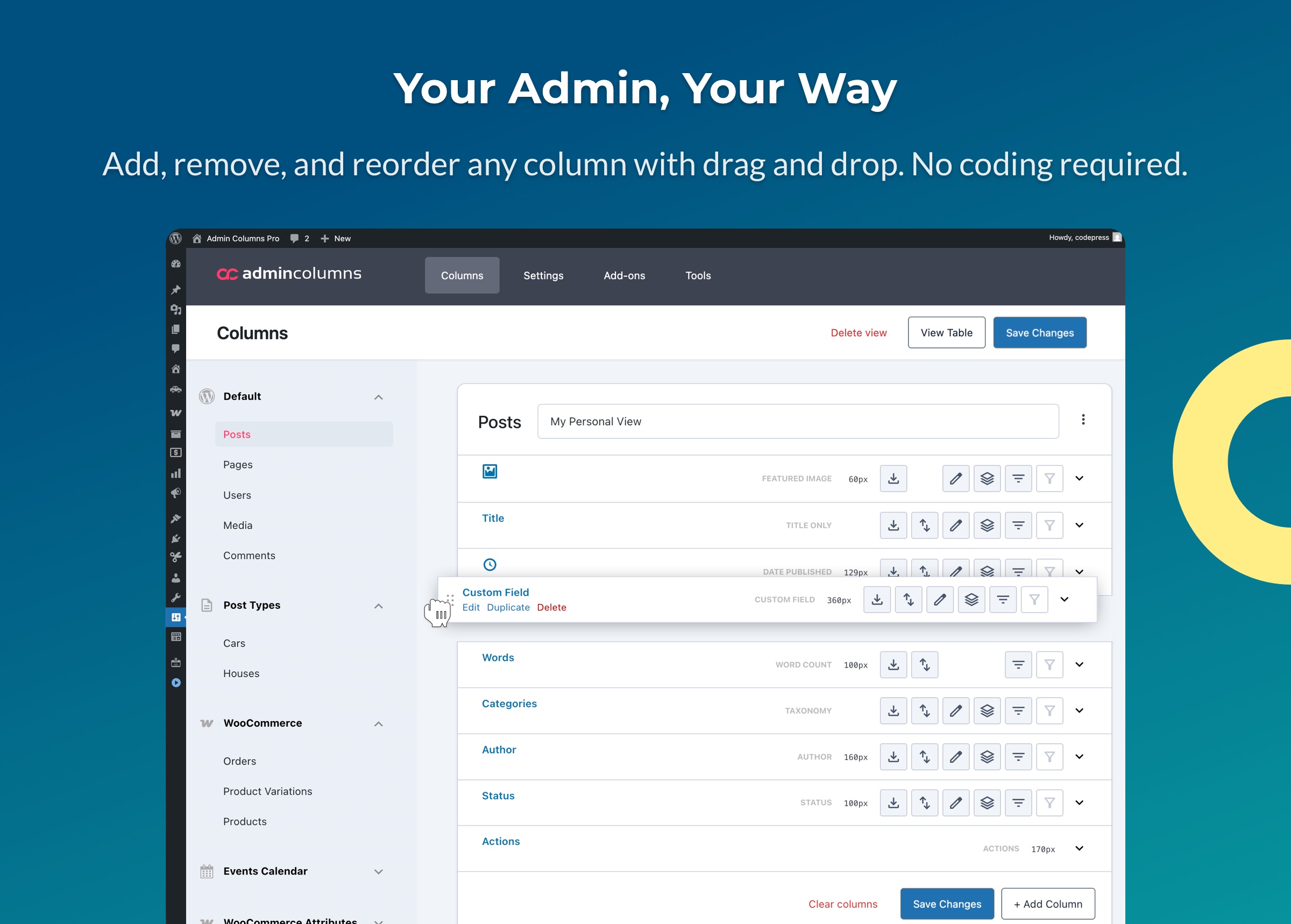
Configure your columns with a simple drag-and-drop interface. Add custom fields, featured images, taxonomies, and more - then reorder them exactly how you want.
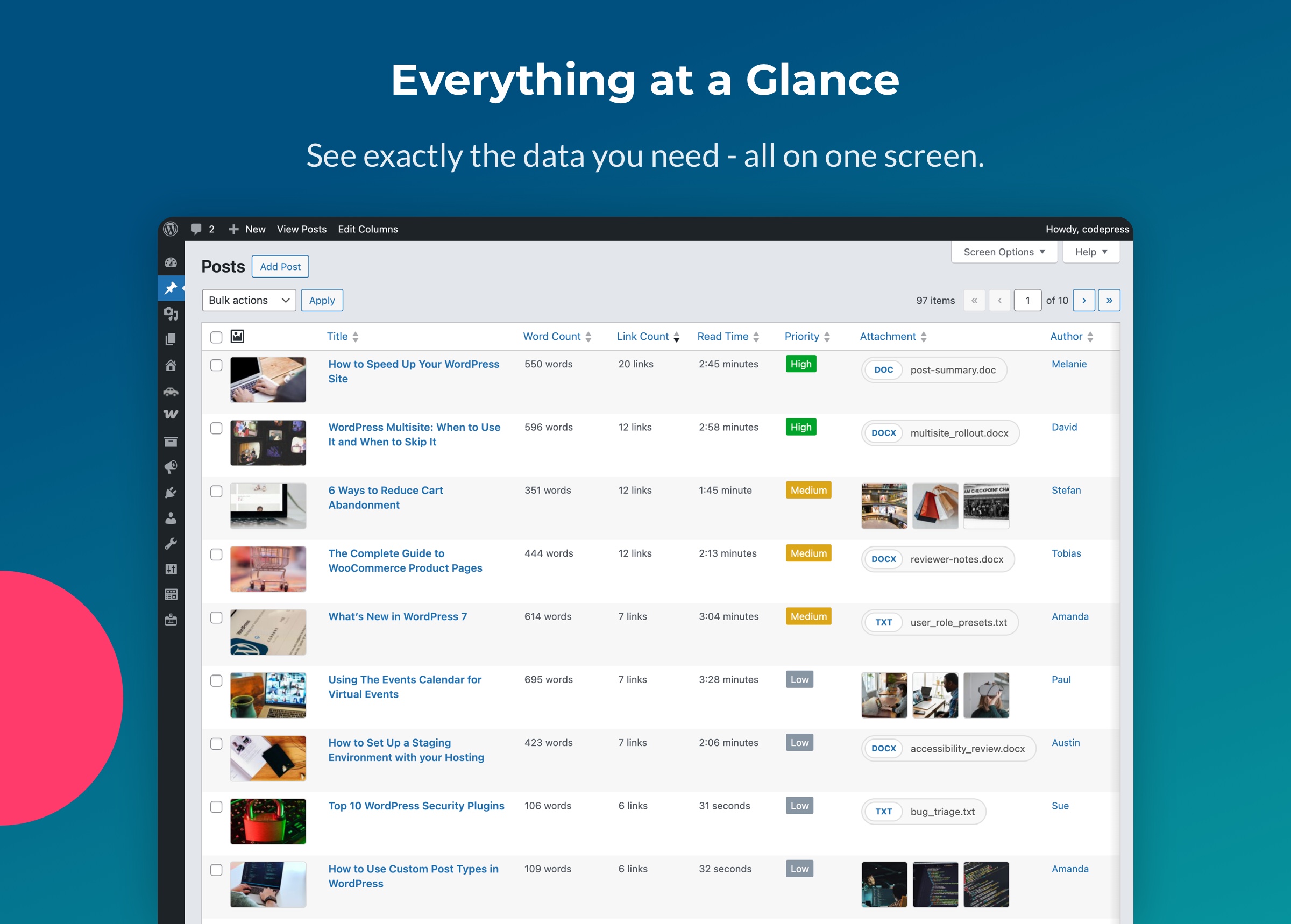
Transform your WordPress posts list into a clear content overview. View featured images, word count, reading time, and custom fields without opening a single post.
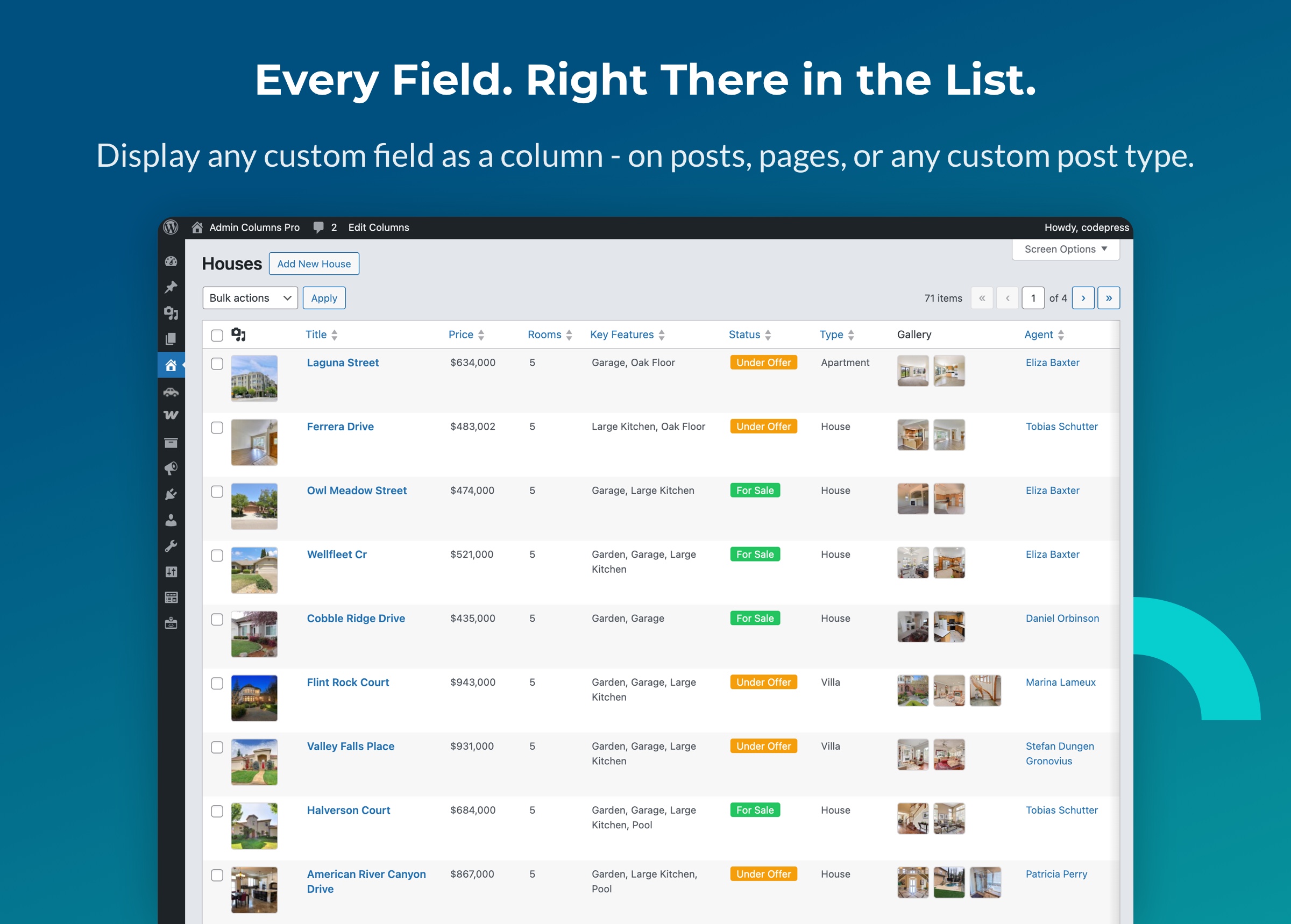
Admin Columns works on any custom post type. Add columns for your custom fields and see all your data at a glance - no more opening records one by one.
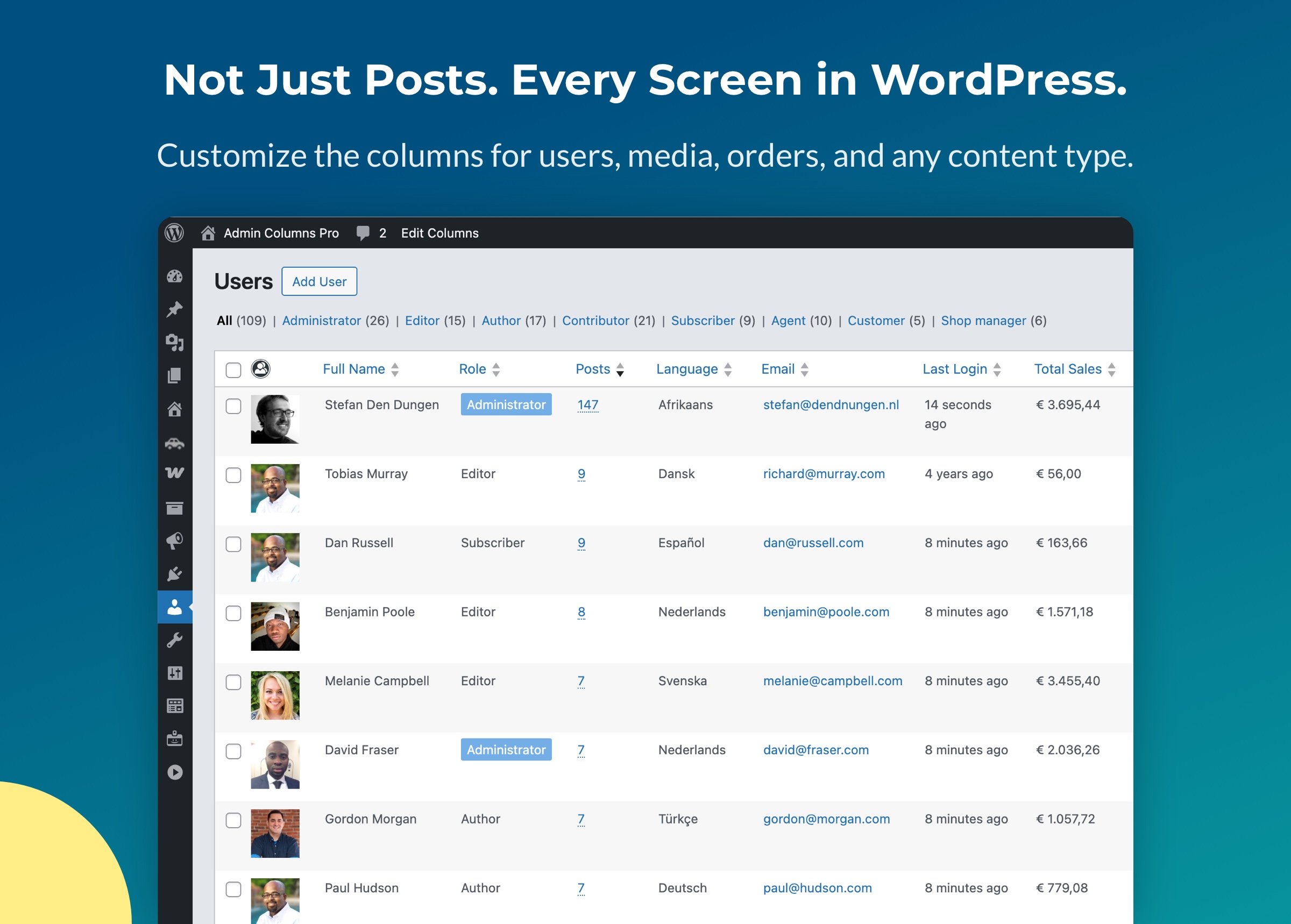
Admin Columns works across every WordPress screen. Enhance the Users list table with last login, post count, role, and more - and apply the same power to media, orders, and custom post types.
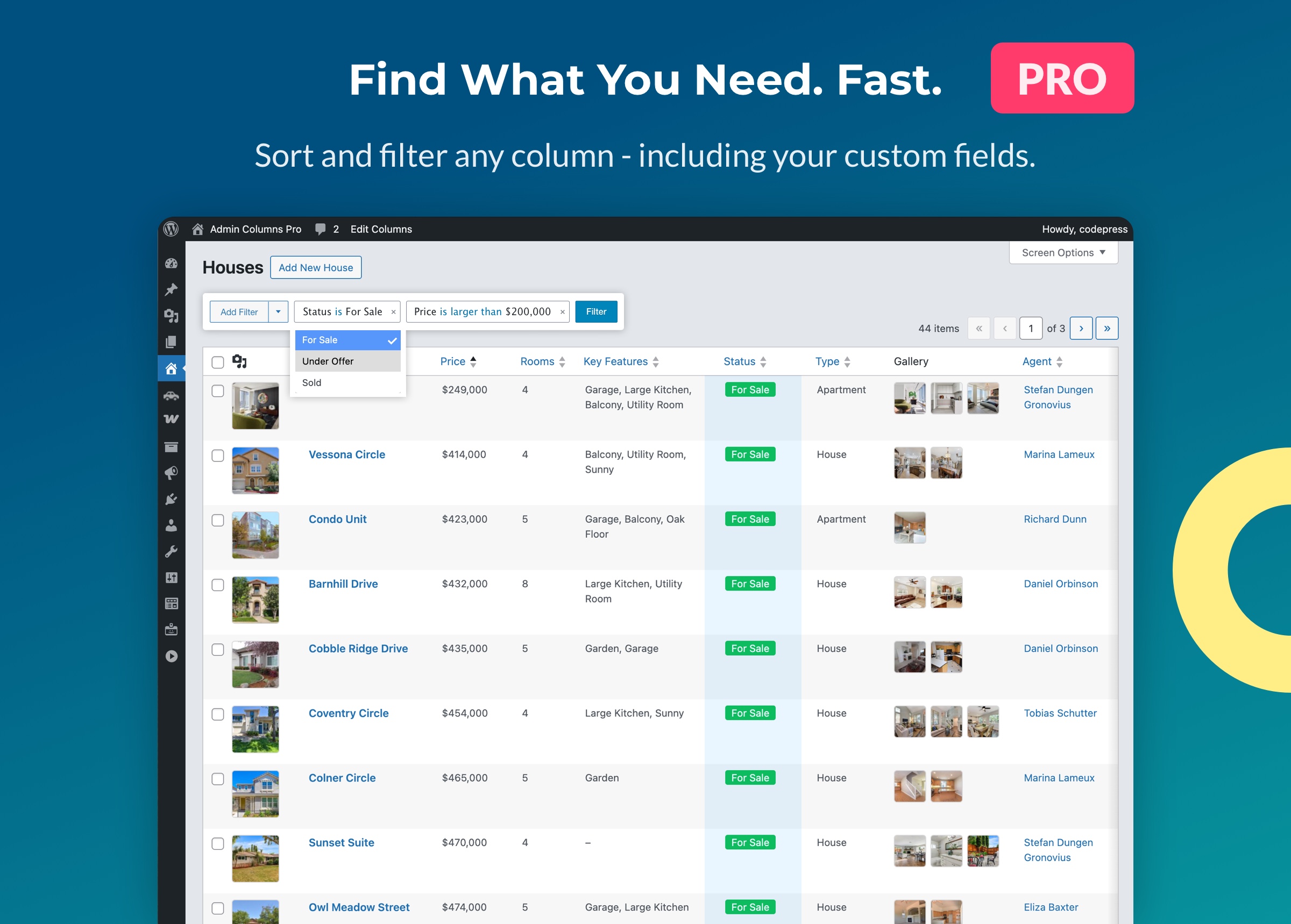
Sort by any column and filter with smart conditions like "contains", "before", and "is greater than". Save filters as segments and share them with your team. Works on posts, pages, users, and custom post types. (Admin Columns Pro feature)
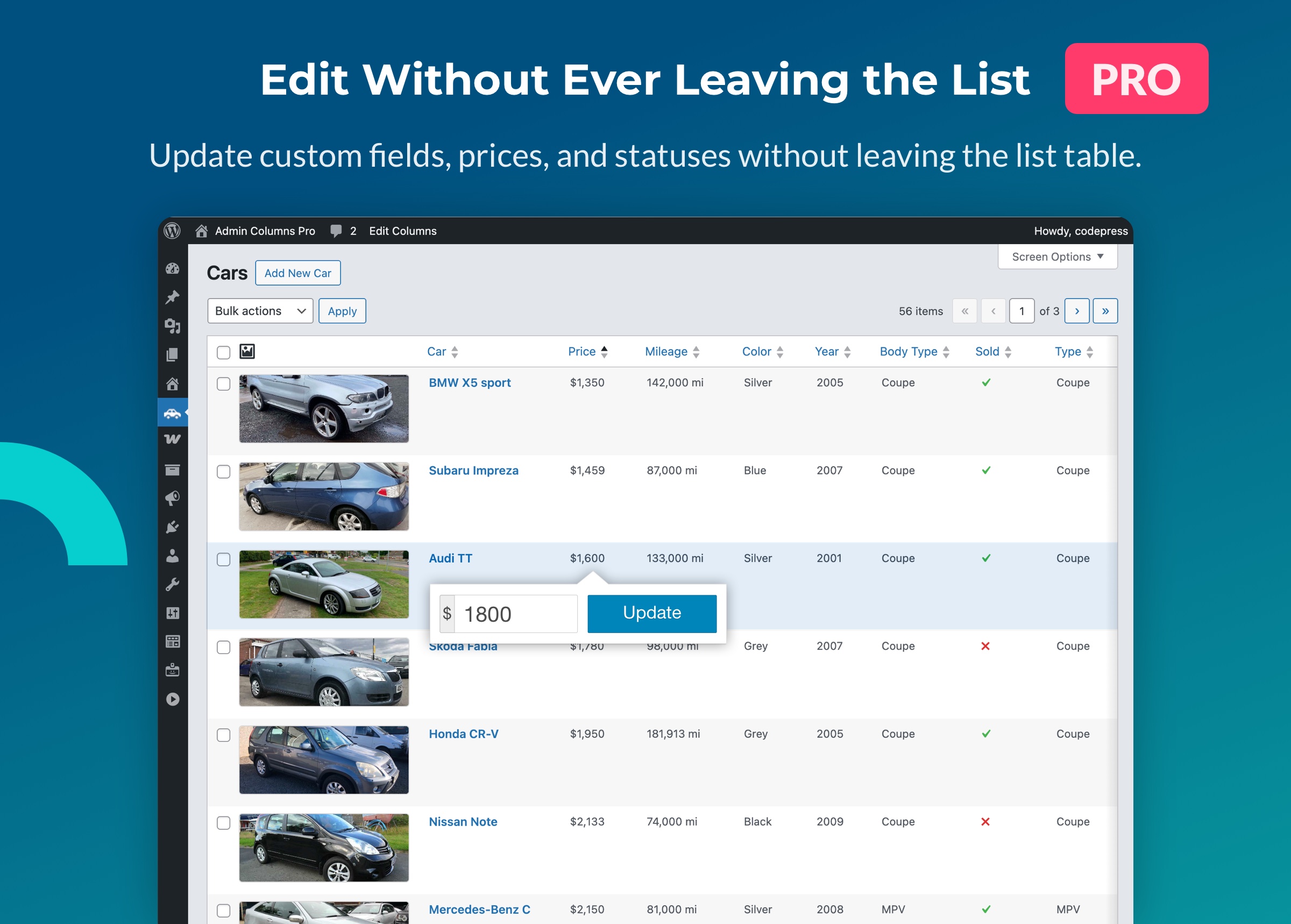
Admin Columns Pro lets you edit posts, users, and custom fields directly from the list table. No more opening and closing individual edit screens. (Admin Columns Pro feature)
Faq
Yes. The core plugin is free and includes column management for posts, pages, users, comments and media.
Admin Columns Pro adds advanced features such as sorting, filtering, inline editing, bulk editing, conditional formatting and CSV export. Learn more.
Yes. Admin Columns lets you display custom fields for posts and users directly in the list table. Supported types include images, numbers, URLs, dates and more.
Admin Columns Pro also provides deep integrations with plugins such as Advanced Custom Fields, which adds support for all ACF field types.
Yes. Admin Columns works with most WordPress plugins out of the box. Admin Columns Pro provides dedicated integrations for WooCommerce, Advanced Custom Fields, Yoast SEO, Toolset Types, Pods and more.
Sorting and filtering are available in Admin Columns Pro, so you can quickly find what you’re looking for.
Yes. Admin Columns Pro supports inline editing and bulk editing, so you can update titles, taxonomies, custom fields and more without leaving the list table.
You can reset column settings from the column settings page by clicking “Restore columns” in the sidebar. This restores the default WordPress columns for that screen. See our getting started guide for more details.
Developers can extend Admin Columns using many actions and filters. You can find the full reference here: Hooks & Filters
Reviews
Very helpful for tracking and editing custom field data
By 
This plugin is very useful for basic improvements to the WP dashboard GUI, e.g. displaying a featured image in the Posts listing screen so editors can see which posts are missing images. Good for cleanup after a migration or redesign.
If you have custom data, e.g. a custom post type with custom fields, it's indispensable for displaying the field data right on the listing screen. It makes it a lot easier to track down and edit data. With the Pro version, you can edit the fields right on the listing screen without having to click into each post.
The humans doing plugin support are prompt, courteous, and helpful.
Great plugin
By 
Simply great!
Nice to see what you want to see
By 
I'm not sure why this isn't something available by default without the need for a plugin. But since it isn't, it is nice to be able to add it back in where it belongs.
Top
By 
Très bon plugin
Extension vraiment utile !
By 
Extension très pratique, je l'installe sur tous mes sites internet.
Does exactly what I needed
By 
Does exactly what I needed. Makes looking for posts, events, etc so much easier.
Viewing the list of articles has become more intuitive.
By 
Unnecessary columns made the default post list look awful. Specifically, when the post title column width was small, the title would appear split across multiple lines. After using Admin Columns to reduce the number of columns to just the essentials, the list became cleaner and more visually appealing.
Works for me
By 
In the past I used a plug-in that created a sidebar widget with the number of comments posted by each student on my class blogs, but that plug-in went the way of all flesh, and I found Admin Columns as an acceptable substitute. I quickly added a Comments column to the Users page, and voila! I can see how many comments have been posted by each student.
So annoyed
By 
It feels like there’s no clear update plan for this plugin. Changes are made and released without thorough testing, bugs are discovered afterward, and then another update is pushed. This leads to daily updates, which is extremely annoying
Added the columns that I needed
By 
Was able to add exactly what I needed to the columns. Excellent plugin.
Changelog
7.1.4
Release Date: August 28th, 2026
- [Added] Custom Field column: the counting field type is split into “Number of Values”, which counts the values within one custom field and no longer always shows 1, and “Number of Fields”, which counts how often the field is stored and is the sortable one of the two. Existing columns become “Number of Values”.
- [Fixed] A fatal error occurred when the property of a Parent column was set to a custom field with the Color, Date, HTML or True / False field type.
- [Fixed] Custom Field column: a Date field set to “Auto Detect” showed an empty cell on the Parent column.
7.1.3
Release Date: August 20th, 2026
- [Fixed] Row selection, the value modal and the responsive table layout broke on WordPress 7.1, because the primary column is now rendered as a table header cell and the checkbox column as a table cell.
7.1.2
Release Date: August 10th, 2026
- [Fixed] Prevented a fatal error when a column configuration contained corrupt serialized data.