CodePros Autocomplete Address for WooCommerce
CodePros Autocomplete Address for WooCommerce
Description
CodePros Autocomplete Address for WooCommerce integrates Google Places API into your WooCommerce checkout form, providing customers with intelligent address suggestions as they type. This plugin significantly improves the checkout experience by reducing form completion time and minimizing address entry errors.
Key Features
- Google Places Integration: Seamless integration with Google Places API for accurate address suggestions
- Billing Address Support: Enable autocomplete for billing address fields
- Shipping Address Support: Enable autocomplete for shipping address fields
- Auto-fill Fields: Automatically populates city, postcode, and state fields when an address is selected
- Country Restrictions: Respects WooCommerce country restrictions for address suggestions
- Easy Configuration: Simple settings page to configure API key and enable/disable features
- Lightweight: Minimal code footprint with efficient script loading only on checkout pages
- Performance Optimized: Scripts only load on checkout pages, ensuring no impact on other pages
- WooCommerce Integration: Native WooCommerce settings tab integration for seamless configuration
- Dynamic Country Support: Automatically updates autocomplete restrictions when country selection changes
How It Works
Once configured with your Google Places API key, the plugin adds autocomplete functionality to the address fields on your WooCommerce checkout page. As customers start typing their address, they’ll see relevant suggestions from Google Places. When they select an address, the plugin automatically fills in the city, postcode, and state fields based on the selected address data, saving time and reducing errors.
The plugin intelligently respects your WooCommerce store’s country restrictions, ensuring address suggestions only appear for countries you’ve enabled in your WooCommerce settings. The autocomplete dynamically updates when customers change their country selection, providing accurate suggestions for the selected country.
Requirements
- WooCommerce plugin must be installed and active (version 5.0 or higher)
- Google Places API key (get one from Google Cloud Console)
- PHP 7.4 or higher
- WordPress 6.6 or higher
External services
This plugin connects to Google Maps/Places API to provide address autocomplete functionality. It’s needed to show address suggestions as users type in the checkout form.
When the autocomplete feature is enabled and users type in address fields, the plugin sends address queries to Google’s servers. Google may also automatically collect the user’s IP address and approximate location data to provide relevant address suggestions.
This service is provided by Google LLC. For more information about how Google handles data, please review:
* Google Maps Platform Terms of Service
* Google Privacy Policy
Example usage in the plugin:
include/AutocompleteAddress.php:79 – Loads Google Maps JavaScript API with Places library
Installation
Automatic Installation
- Log in to your WordPress admin panel
- Navigate to Plugins > Add New
- Search for “CodePros Autocomplete Address for WooCommerce”
- Click “Install Now” and then “Activate”
Manual Installation
- Upload the plugin files to the
/wp-content/plugins/codepros-autocomplete-address-for-woocommercedirectory, or install the plugin through the WordPress plugins screen directly - Activate the plugin through the ‘Plugins’ screen in WordPress
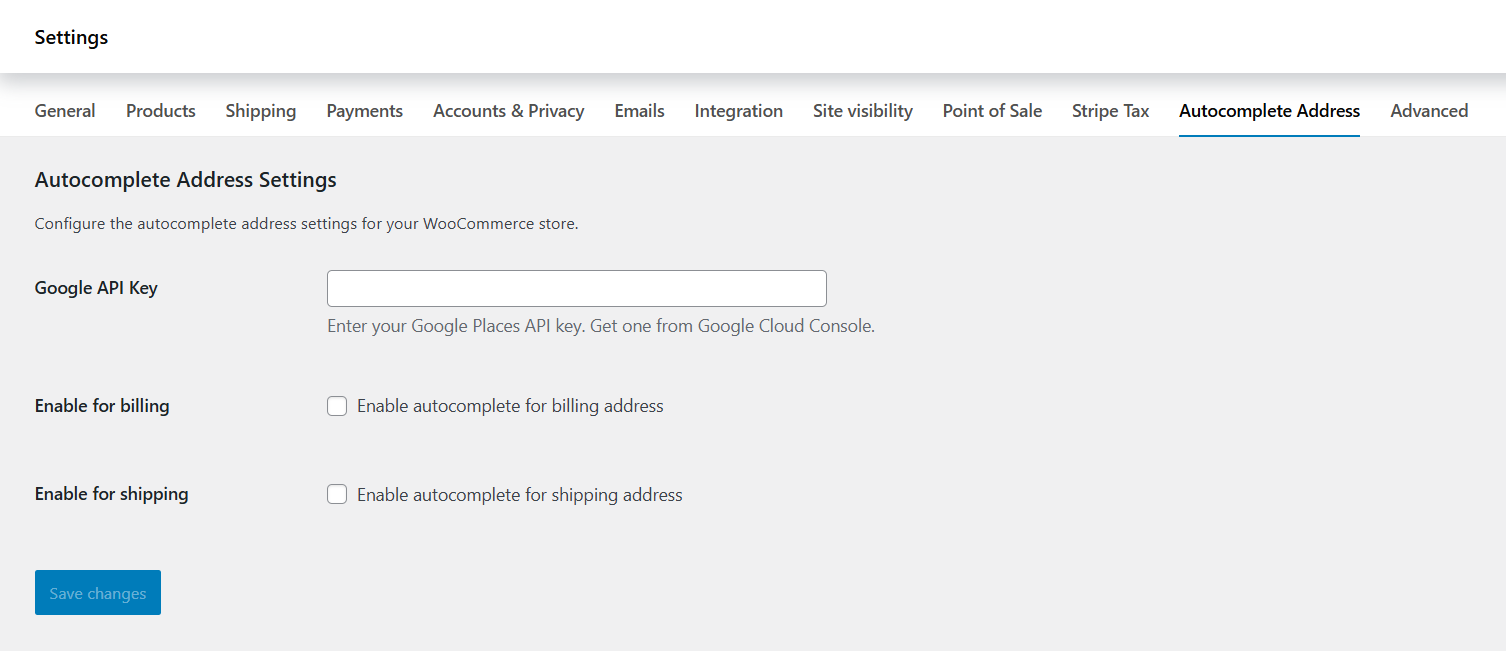
- Go to WooCommerce > Settings > Autocomplete Address to configure the plugin
Configuration
- Obtain a Google Places API key from the Google Cloud Console
- Create a new project or select an existing one
- Enable the Places API (New) for your project
- Create credentials (API key) for your project
- Optionally, restrict the API key to your domain for enhanced security
- Navigate to WooCommerce > Settings > Autocomplete Address in your WordPress admin
- Enter your Google Places API key in the provided field
- Enable autocomplete for billing address (optional)
- Enable autocomplete for shipping address (optional)
- Click “Save Changes”
The plugin is now ready to use on your checkout page!
Screenshots
Address fields automatically populated after selecting a suggestion
Faq
Yes, you need a valid Google Places API key to use this plugin. You can obtain one from the Google Cloud Console. Make sure to enable the Places API (New) for your project.
Yes, this plugin is designed to work with any WooCommerce-compatible theme. It uses standard WooCommerce checkout field IDs and hooks, ensuring compatibility across different themes.
Yes, you can enable autocomplete independently for billing and shipping addresses through the plugin settings page. Simply check or uncheck the respective option in WooCommerce > Settings > Autocomplete Address.
Yes, the plugin automatically respects the country restrictions you’ve set in WooCommerce settings. Address suggestions will only appear for countries that are enabled in your WooCommerce store configuration.
No, the plugin only loads the Google Places API script on checkout pages, ensuring minimal impact on site performance. The scripts are loaded in the footer and only when an API key is configured and at least one address type (billing or shipping) is enabled.
Google Places API has usage-based pricing. Please check the Google Places API pricing page for current rates. Google provides free credits for new accounts, which may be sufficient for small to medium-sized stores.
Yes, you can restrict your Google Places API key in the Google Cloud Console. Make sure to allow your domain in the API key restrictions. The plugin loads the Google Places API script from the frontend, which is the standard and recommended approach for this API.
If no API key is entered, or if both billing and shipping autocomplete are disabled, the plugin will not load any scripts and will have no impact on your site.
The plugin will display an admin notice if WooCommerce is not installed or active. The plugin will not activate if WooCommerce is not present or if WooCommerce version is below 5.0.
You can access the plugin settings by navigating to WooCommerce > Settings > Autocomplete Address. Alternatively, you can click the “Settings” link in the plugin action links on the Plugins page.
Reviews
Changelog
1.0.0
- Initial release
- Google Places API integration
- Support for billing address autocomplete
- Support for shipping address autocomplete
- Automatic field population (city, postcode, state)
- Country restriction support
- Dynamic country selection updates
- WooCommerce settings tab integration
- Admin settings page
- Lightweight script loading (checkout pages only)
- WooCommerce compatibility check on activation
- Support for shipping address checkbox toggle