Columns Alignment Fix for Elementor
Plugin Banner

Columns Alignment Fix for Elementor

by sukiwp

Download
Description

How Elementor’s “Columns Gap” Originally Works

The Columns Gap feature on Elementor’s section and inner section will add unnecessary paddings on the sides. This makes inconsistent content alignment with theme’s container or other sections’ container.

What This Plugin Does

It will remove the unnecessary side paddings on Elementor’s section and inner section. This fix is done by CSS, so no content would be lost.

Example

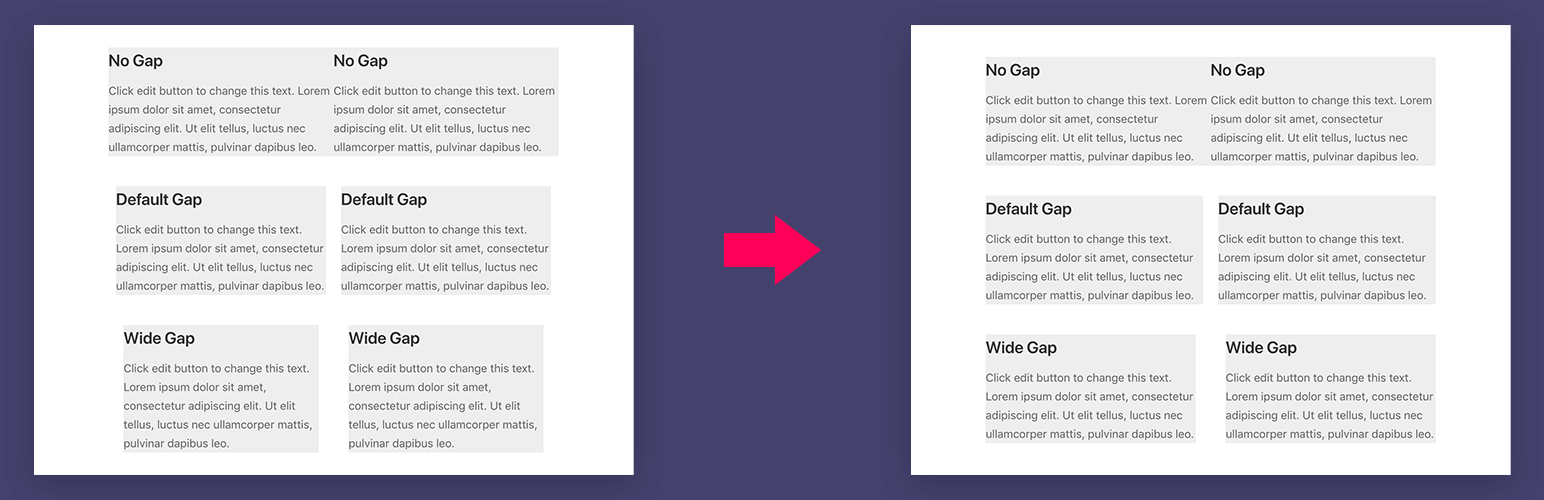
Try to create 3 sections on Elementor and fill them with any content widget. After that, try to set different “Columns Gap” for each section.

  • Section 1, columns gap set to “Default”
  • Section 2, columns gap set to “No Gap”
  • Section 2, columns gap set to “Wide”

Without the columns alignment fix:
You will see inconsistent alignment on the content on those 3 sections.

With the columns alignment fix:
Those 3 sections will have consistent side padding!

How to Activate The Columns Alignmet Fix

1. Global configuration

Go to Elementor > Settings > Style and check the Enabled globally option.

2. Individual section

When on Elementor builder, select a section / inner section, from the Layout tab and check the Enable Columns Alignment Fix option.

  1. Go to Plugins > Add New.
  2. Search for Columns Alignment Fix for Elementor.
  3. Click Install button and then Activate the plugin right away.

Will activating this plugin break my content I made before?

Not at all, the fix is very optional and could be enabled only on some specific sections. So you can choose which sections you want to have the fix enabled. You might not need to enable the fix on your existing sections, your content would stay the same.

What if I enabled the fix on my sections, and then decided to deactivate the plugin in the future?

No worries. Once the plugin is deactivated, you would have default Elementor’s columns alignment back.

After enabled, the columns look perfect on desktop, but on mobile devices my content sticks to screen edges. Why?

This is expected as we already removed the native inconsistent side padding. The best suggestion is to set the section’s left and right padding to a consistent number that you desire. For example, you want to have consistent 20px gap to the screen edges, so you set the section’s left and right padding to 20px.

Does it work with any theme?

Absolutely! You can use any theme you like, however we really recommend you to use our theme: Suki – which is highly customizable, lightweight, and of course 100% compatible with Elementor and Elementor Pro.

Does this plugin still work

By ZC Web on March 15, 2021

Does this plugin still work. I added it to my website and it didn't do anything. I set the section as wide column gaps. Then enabled the switch from this plugin. And it didn't fix still have the padding on both sides of the left column and right column. Also what about margins? what if you want to align columns that have a margin? Sometimes you put a background color to a column.

Man, thank you! 😉

By Artan (artankrasniqi1988) on July 20, 2020

Elementor is really a huge awesome builder with a lot of cool features. But the problem with the grid-gap possibility is an old one. In terms of responsible layouts where you don´t want to touch the columns for every device size, the option to set the "column gap" is not really a solution. Just adding a padding to the columns has nothing really to do with a grid-gap. It breaks your structure when you want to have a smooth layout floating evenly from top to bottom aligned fully to the left and right. As setting layout structures is one of the first steps (for me) and the base for the following implemented widgets for pictures and texts and so on, it´s a bit sad that it creates so much problems for me and other people... :/ Trying css with grid-gap was also not a solution: Problem, the additional grid-gap pixels cause the columns to break earlier than they would, so that a weird structure occures at some point (example 2 columns in 1 row and then 1 column in 1 row). This solution seems to be the best one at the moment and I thank you so much that you safe us so much time trying to work around this problem! :* All the best for you! 🙂

Yes yes yes

By swinggraphics on December 4, 2019

Same praise as the other reviewers. I feel like Elementor actually works for building sites now. The plugin is wonderfully simple, and seeing how this was done has lead me to experiment with other custom functionality.

Makes Elementor work as it should

By jodamo5 on June 13, 2019

Fixes Elementor to what the default should be! Thanks!

Perfect fix that should be native!

By yankiara on February 20, 2019

Hi, very usefuln thanks a lot! But please allow me a little request: It would be nice to have the ability to manually set the left and right external padding of the row, so that we could align everything properly with other rows. Using the same values as gaps would be the solution. Another reason is that with your plugin, text on external columns sticks to the left and right edges, which is sometimes really annoying because you have to manually change padding of the section or columns, or use only internal sections inside a normal section to set a global padding. Thx again, mate!

Why isn't this feature part of the Elemetor core yet?

By Arthur Končar (arthur.koncar) on February 1, 2019

For me completely incomprehensible, why this feature needs a separate plugin! Anyway, this one here is definitely the ultimate reinforcement for my daily work with Elementor. Thank you for your efforts! Cheers, Arthur

YES!

By esbfi on December 7, 2018

I'm a picky graphic designer, and it always bothered me how Elementor's column gap worked. This plugin is awesome, and makes me happy again. Thanks SukiWP!

Nailed a major flaw

By Peter (tooting horn) on December 1, 2018

Thanks so much for spending your time fixing this! Definitely should be picked up by Elementor

Ha !!!!!

By ianstudio on July 24, 2018

Thank you for making this, this same l/r padding on all columns even external ones when increasing the space between them is really pretty lazy design on the part of Elementor, thanks for making this ! I imagine some day they'll pick up on it when they're not too busy adding eye-candy gimmicks right and left.

A very much needed addition to Elementor

By vanjadin on July 12, 2018

Thank you so much for this plugin! The way Elementor handles padding and alignment when using more than one column can be very frustrating if you want to build a custom website layout. This plugin adds an "elemental" option to Elementor that should have been included all along (see the FAQs of this plugin).

v1.2.0

  • Add global setting on Elementor > Settings > Style.

v1.1.0

  • Use inline CSS instead of static CSS file.
  • Add overflow-x: hidden CSS on content container to fix overflowing columns in small devices.

v1.0.1

  • Add load textdomain for translation

v1.0.0

  • Initial release
Back to top