Accept PayPal Payments using Contact Form 7
Accept PayPal Payments using Contact Form 7
Description
The payment collection is possible with the form using this plugin.
Accept PayPal Payments Using Contact Form 7 will solve all integration problems efficiently. As the newly extended plugin seamlessly integrates PayPal with Contact Form 7 by allowing the WordPress developers, to add a PayPal submit button in the contact form 7 that redirects to PayPal’s website so that you can continue with secure payment. After submitting the form, the payment is one click away.
You can make the payment once and all as there is no recurring payment option. This extension can surely add real value to WordPress sites seeking secure, quick online payment integration.
Features of Accept PayPal Payments Using Contact Form 7
- PayPal Refund Functionality: Integrated capability to process refunds through PayPal directly from the admin panel.
- Limited Payment Response Details: Admin side store up to 10 recent PayPal payment response details for review.
- Export Contact Form 7 payment data to CSV.
- PayPal payment with 25 currencies supported.
- Option to Integrate multiple PayPal accounts in a single CF 7.
- Can take values from all input fields.
- Accepts dynamic value from frontend for parameters like item description, amount and quantity.
- ‘Sandbox’ testing option available to ensure proper functioning.
- ‘Return URL’ and ‘Cancel URL’ options for payment success and cancellation facility.
- Compatibility of WordPress VIP.
- On-Site Payment Option: Secure, seamless payment experience without redirecting users away from your site.
- On-Site Payment (credit-card): Secure, seamless payments without redirecting users.
Demo for Accept PayPal Payments using Contact Form 7
Features of Accept PayPal Payments Using Contact Form 7 Pro
We have released the PRO version of this plugin with extra advantageous features added.
- 22 PayPal languages supported – Multilingual.
- Save Contact Form 7 payment data into database.
- Admin can edit or delete Contact Form 7 payment data.
- PayPal payment response details stored at admin side.
- Export Contact Form 7 payment data to PDF and CSV.
- All filters and search facility are available at admin side.
- Admin can manage ‘Status’ of submitted data if PayPal payment has been successfully received.
- Send email to user and admin for successful payment receipts with PayPal response details in the content.
Get more information of Pro version here
Demo for Accept PayPal Payments using Contact Form 7 Pro
OUR OTHER PLUGINS
- Abandoned Contact Form 7 Pro
- Accept 2 Checkout Payments Using Contact Form 7 Pro
- Accept Authorize.NET Payments Using Contact Form 7 Pro
- Accept Elavon Payments Using Contact Form 7 Pro
- Accept PayPal Payments Using Contact Form 7 Pro
- Accept Sagepay(Opayo) Payments Using Contact Form 7 Pro
- Accept Stripe Payments Using Contact Form 7 Pro
- Custom Product Options WooCommerce Pro
- Generate PDF Using Contact Form 7 Pro
- Smart Appointment & Booking Pro
- Smart Showcase for Google Reviews Pro
- User Registration Using Contact Form 7 Pro
Getting Help With WordPress
If you have any questions about this plugin, you can post a thread in our WordPress.org forum. Please search existing threads before opening a new one or feel free to contact us at support@zealousweb.com
We also offer custom WordPress extension development and WordPress theme design services to fulfill your e-commerce objectives.
Our professional impassioned WordPress experts provide profound and customer oriented development of your project within short timeframes.
Thank you for choosing a Plugin developed by ZealousWeb!
Installation
Install & Activate
Installing the plugin is easy. Just follow these steps:
- From the dashboard of your site, navigate to Plugins –> Add New.
- Select the Upload option and hit “Choose File.”
- When the popup appears select the accept-paypal-payments-using-contact-form-7.zip file from your desktop.
- Follow the on-screen instructions and wait till the upload completes.
- When it’s finished, activate the plugin via the prompt. A message will display confirming activation was successful.
That’s it! Just configure your settings as you see fit, and you’re on your way to creating forms with paypal button in your style. Are you facing problems while installation? Need help getting things started? Check out the (documentation link)[https://www.zealousweb.com/wordpress-plugins/docs/accept-paypal-payments-using-contact-form-7.html] here.
Screenshots
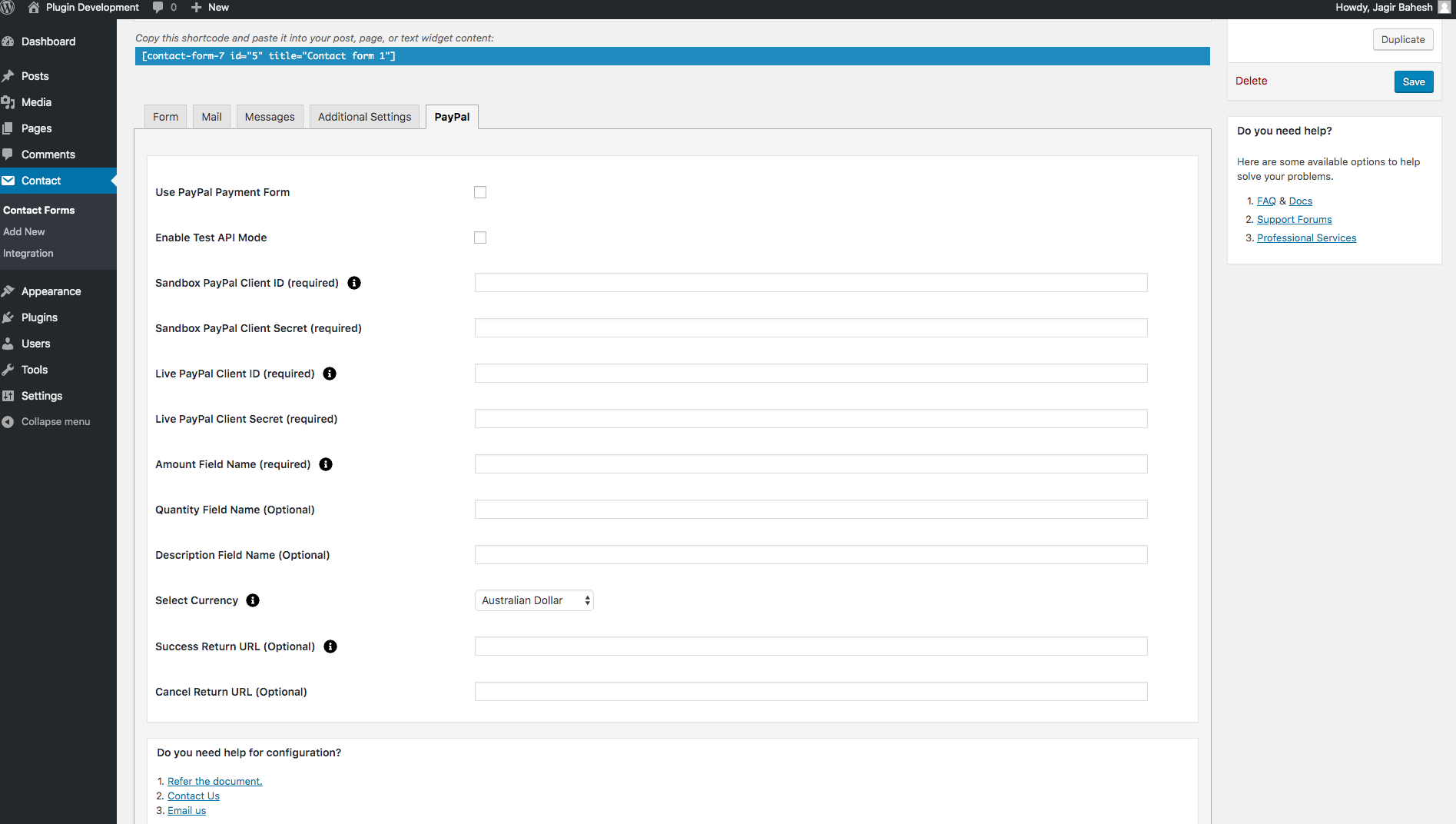
PayPal Settings and Configuration
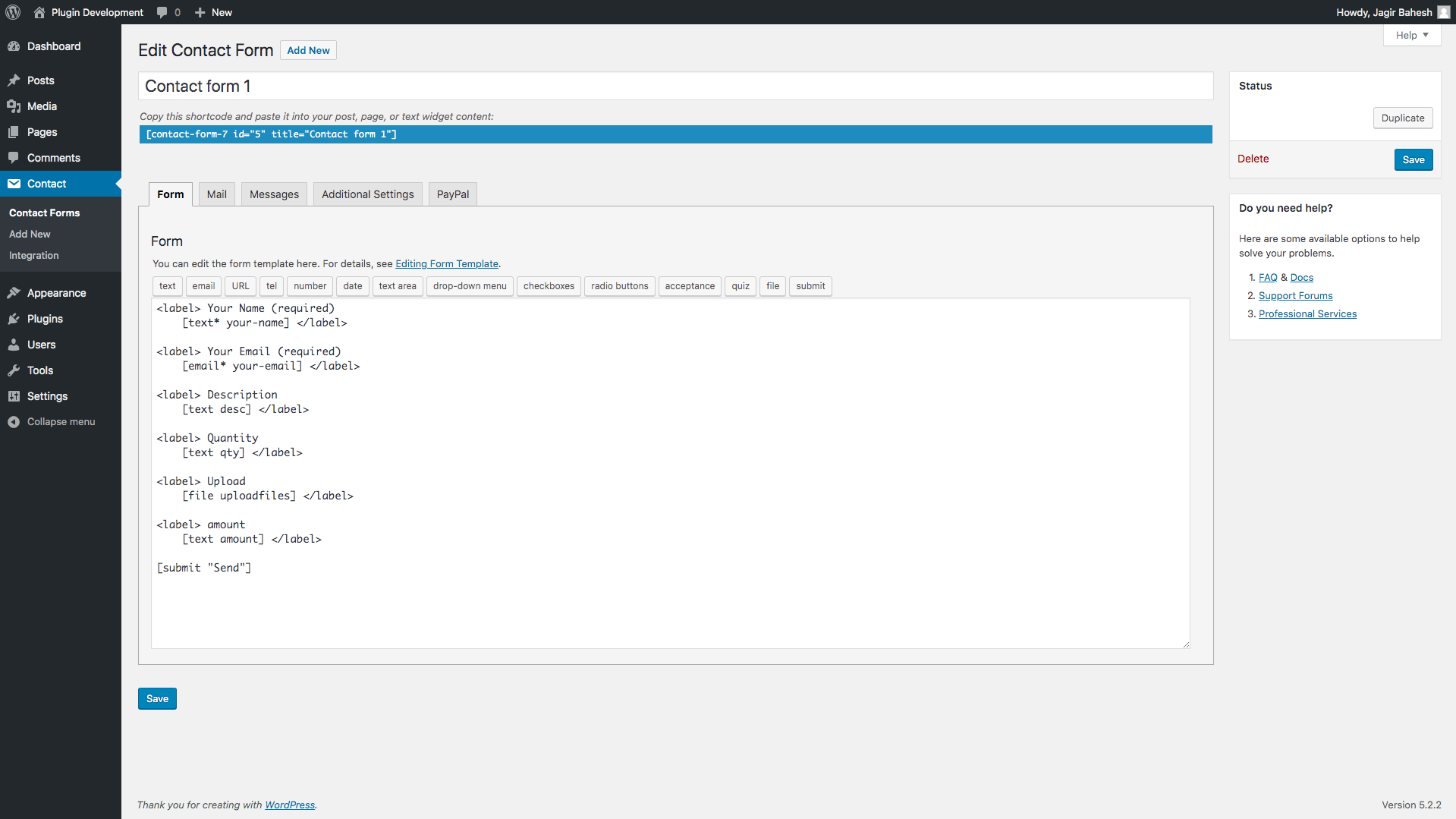
PayPal Demo Form
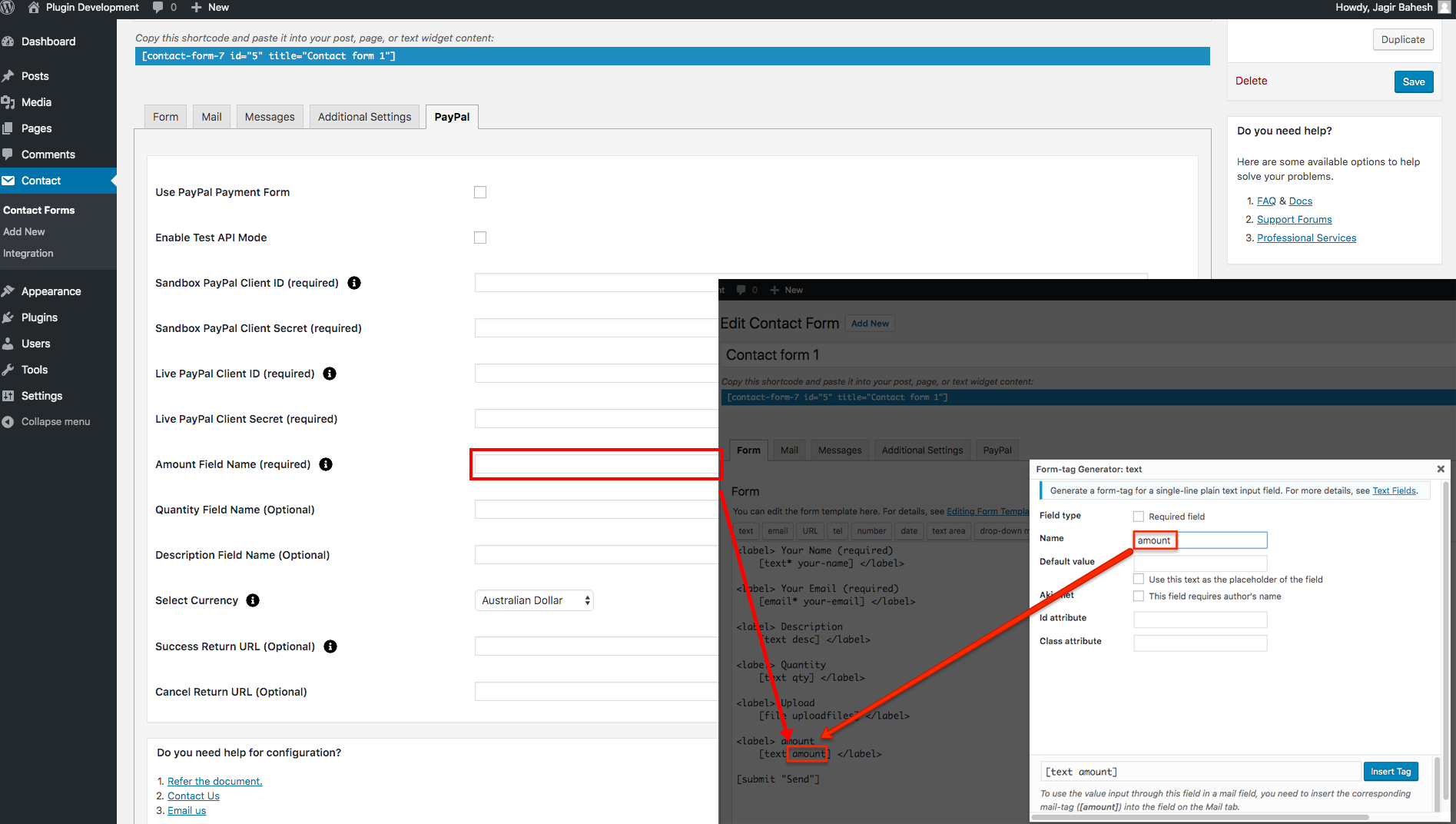
PayPal Amount field configuration
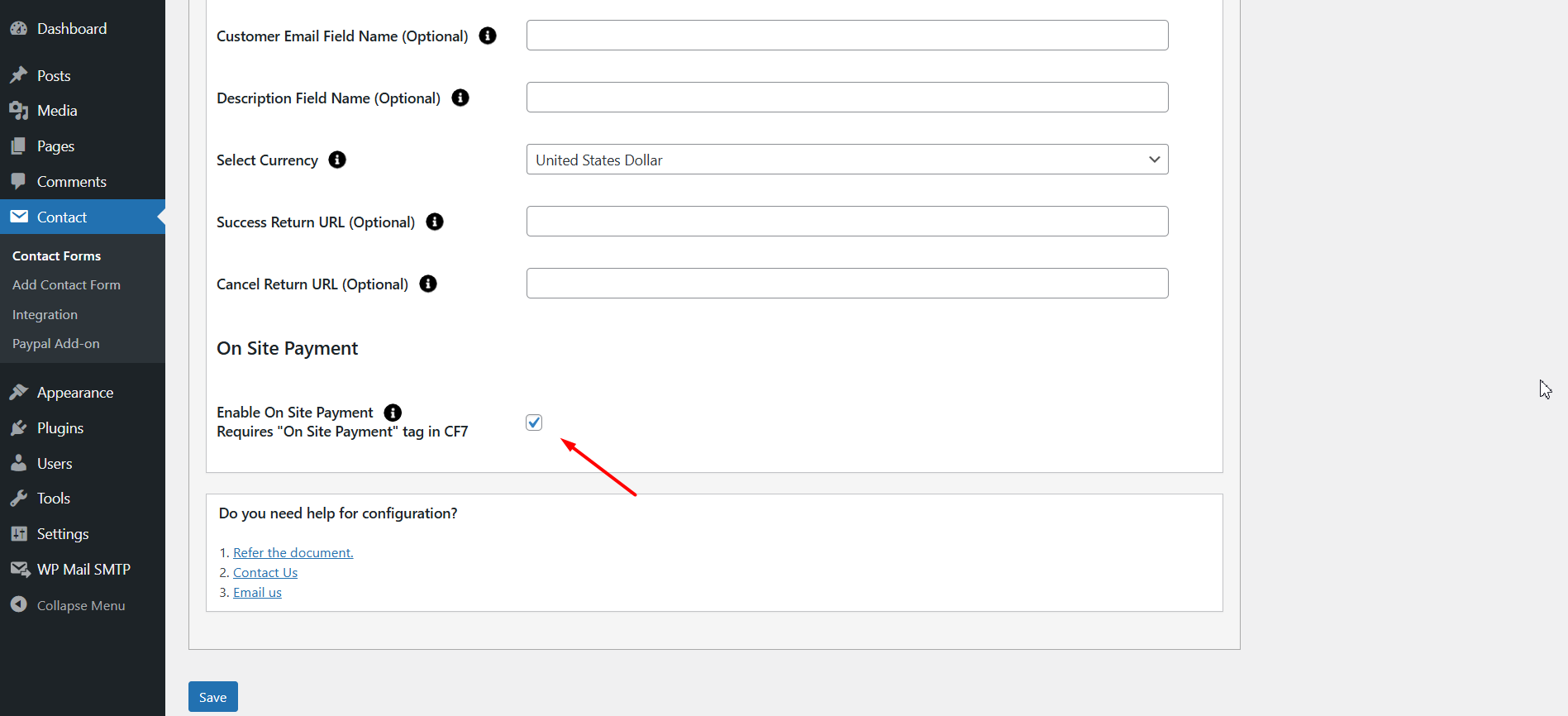
Enable On-Site Payment requires the 'On Site Payment' tag to be added in your Contact Form 7 form.
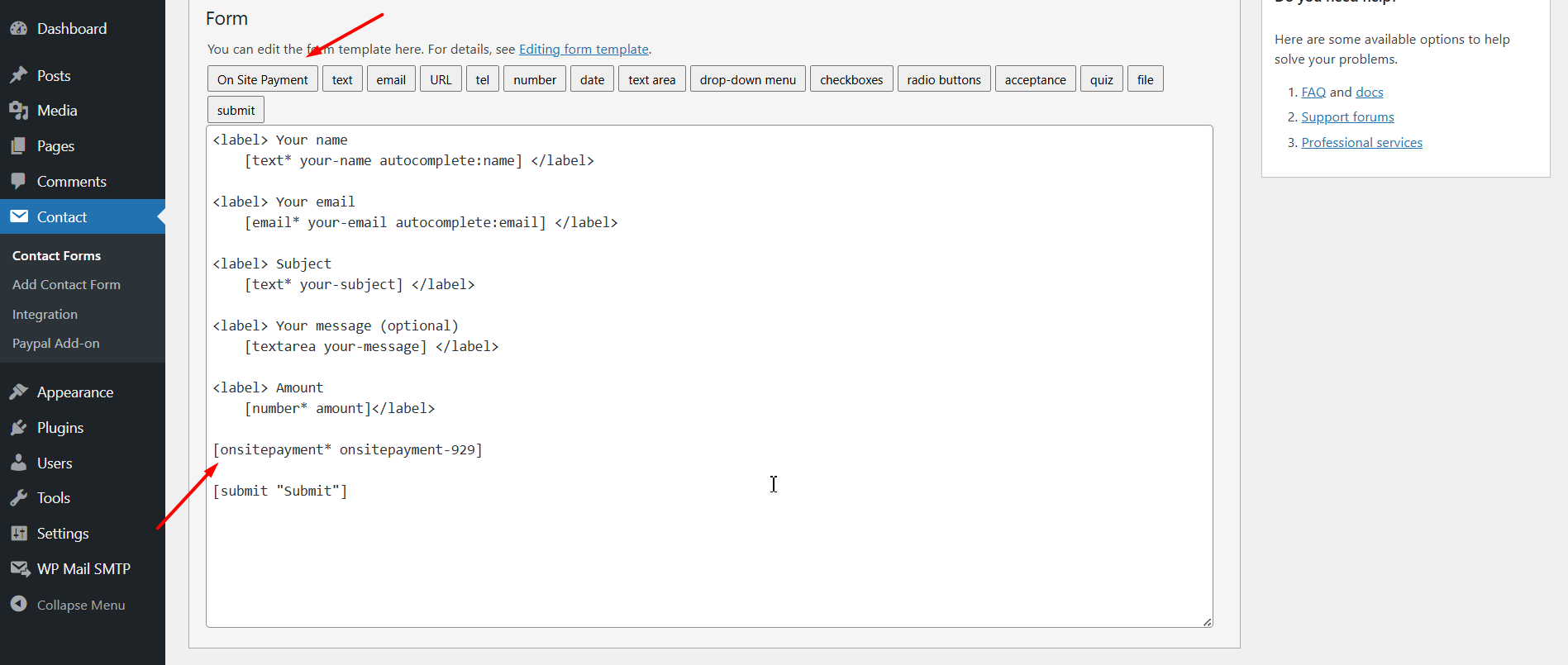
Add the 'On Site Payment' tag to your Contact Form 7 form to enable On-Site Payment.
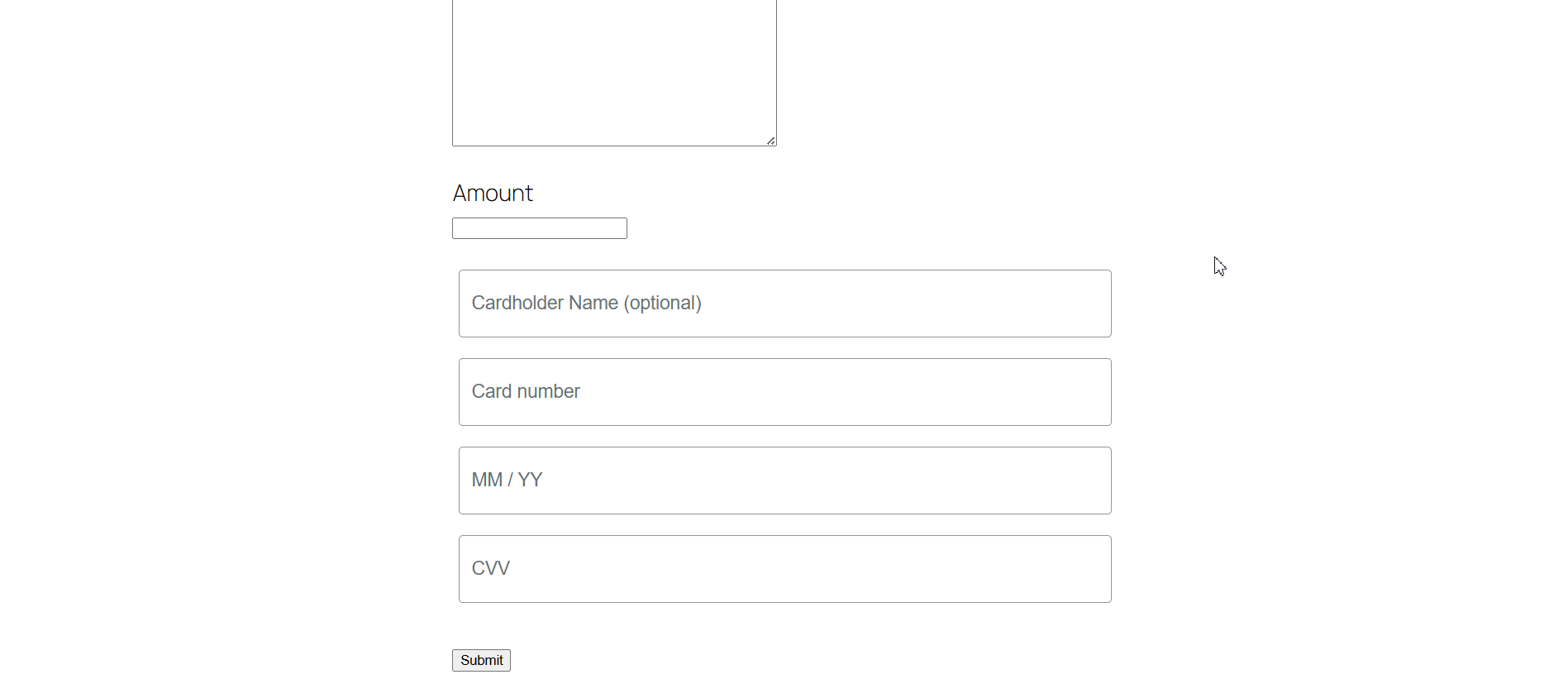
Users can see the On-Site Payment option on the frontend.
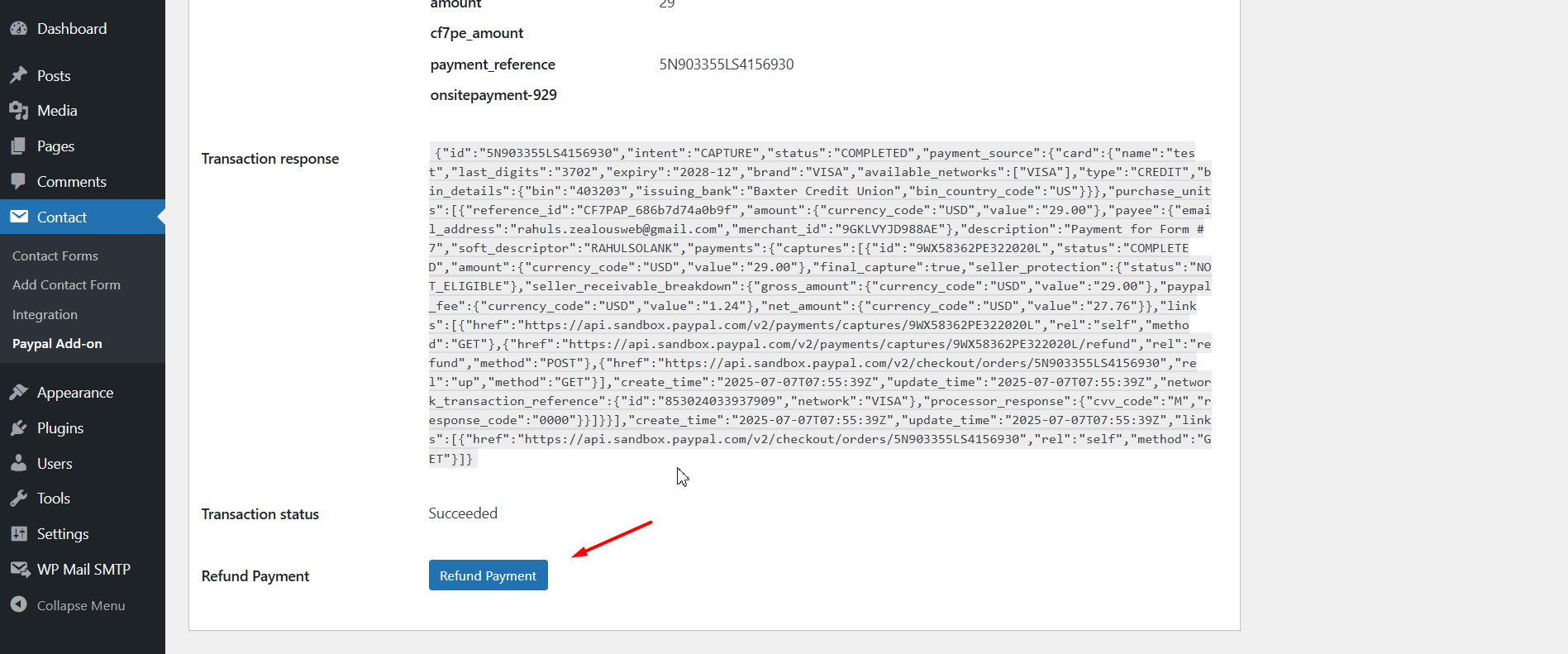
PayPal Refund functionality
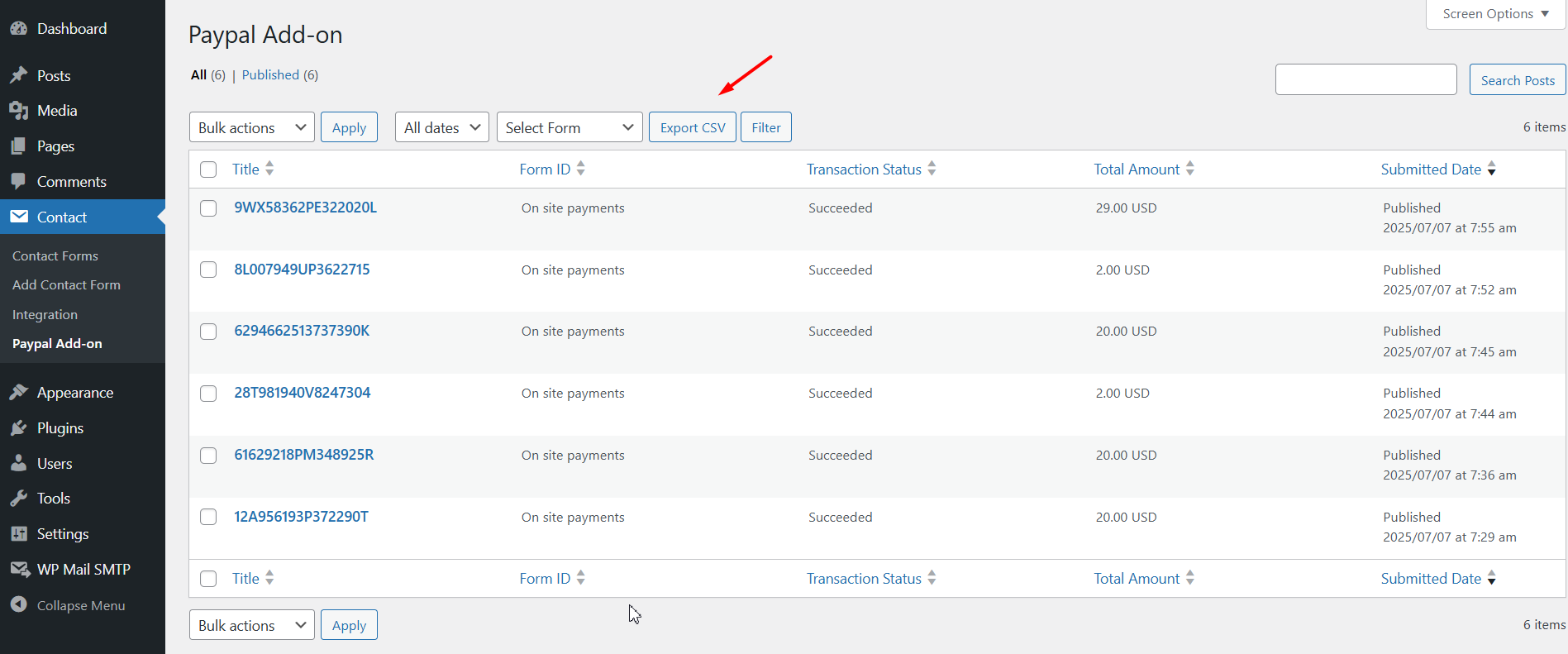
Export Contact Form 7 payment data to CSV.
Faq
No, you can use a Standard PayPal account.
On-Site Payment allows users to complete credit card transactions directly on your website without being redirected to an external payment gateway.
Reviews
Contact 7 with payment gateway
By 
We have just starting using this plugin after numerous issues with another that was designed for syncing Contact 7 forms with PayPal (or stripe) and not working properly. This plugin does work, however our only concern is that as another reviewer commented that notifications are only sent on successful completion after returning from paypal, not right after submitting the form. This may result in not getting a copy of all completed forms if a customer doesnt finalise the payment process.
Good support
By 
I found some issues with the plugin and they resolved them quickly.
Great Support!!!
By 
Very happy with the support from ZealousWeb. Very responsive and professional with all the correspondence. Great Work, thanks!!!
Had email sending problem
By 
The notification email that is normally sent after submitting the form was not being sent. The customer support for this issue was top notch and timely. Turns out, this email is sent only after making a successful paypal payment - not right after submitting the form and before being taken to paypal.
Very Nice Plugin will buy the pro version
By 
First I faced an issue with PayPal Live mode, and then I contacted customer support, and they helped me very much with a free version of the plugin.
I recommend this plugin.
Very cooperative customer support.
Thank You Team ZealousWeb
Nice plugin
By 
Nice plugin
Nah
By 
Broken link for the documentation.
By 
Couldn't get it to work for live payment
By 
Big Waste of Time and Money
By 
Changelog
4.0.4
- Enhanced On-Site Payment Option : Improved code for a more secure and seamless payment experience—users can now complete transactions without being redirected off-site.
4.0.3
- On-Site Payment Option: Secure, seamless payment experience without redirecting users away from your site.
4.0.2
- Minor changes – Doc update
4.0.1
- Minor changes in workflow
4.0.0
- Added an admin listing for successful PayPal transactions and form data.
- Implemented a refund button in the admin panel.
- Export Contact Form 7 payment data to CSV.
3.9
- Improved compatibility with WordPress VIP platform by refactoring code to adhere to VIP coding standards.
3.8
- The problem of not sending an email confirmation when the payment is canceled has been successfully resolved.
3.7
- Test – Checking with Latest wordPress and Contact form 7, Tested and works fine.
3.6 – 31/12/2021
- Compatibility with new cf7 version
- Fix Array to string conversion error in mail.
3.5 – 17/03/2021
- Compatibility with new cf7 version
- Fix minor bugs and improve functionality
3.4 – 21/08/2020
- Change – Update some documents and Dontation Links.
3.3 – 29/07/2020
- Fix – Make compitible with Contact Form 7 older and Latest version.
3.2 – 23/07/2020
- Fix – Solved admin setting Design issue.
3.1 – 06/07/2020
- Fix – Update Tooltip Screenshot and fix 404 Erros.
3.0 – 16/04/2020
- Fix – resource id issue resolved.
2.9 – 15/04/2020
- Fix – Live payment issue resolved.
2.8 – 20/03/2020
- Fix – plugin standard changes.
2.7 – 23/07/2019
- Fix – Resolve pro plugin notice error.
2.6 – 19/07/2019
- Fix – Resolve save meta option.
2.5 – 04/07/2019
- Add – Create and update plugin structure.
- Fix – Remove unwanted code.
- Add – Enhance user experience.
- Change – Move PayPal settings Tag to Tab.
- Change – Change PayPal method (email ID to API).
2.4 – 13/07/2018
- readme file updated.
- Change – Fixed bug
2.3 – 14/03/2015
- Change – Fixed bug
2.2 – 31/10/2015
- Change – Fixed bug
2.1 – 31/10/2015
- Change – Solved Select Box with pipe sign bug. Use “Text – Value” format instead of Text in “Text|Value”.
2.0 – 06/08/2015
- Change – Launched PRO Version “Contact Form 7 – PayPal Extension PRO” and some layout changes
1.8 – 15/06/2015
- Change – Added support for hidden field.
1.7 – 14/07/2015
- Change – Fixed bug.
1.6 – 11/06/2015
- Change – Compatibility fix with Contact Form 7 4.2.
1.5 – 08/06/2015
- Change – Fixed bug.
1.4 – 05/06/2015
- Change – Fixed some bug.
1.3 – 11/05/2015
- Change – Some little fixes.
1.2 – 02/05/2015
- Change – Added ‘Quantity’ PayPal field for generating tag to accept value of quantity from user from frontend.
1.1 – 27/04/2015
- Change – Compatibility upto PHP 5.2+ version.
1.0
- Initial Release