Content Unpublisher

Content Unpublisher
Description
Content Unpublisher lets you schedule a date and time for posts, pages or custom post types to automatically:
– Be moved to the Trash, or
– Be converted back to a draft
Perfect for time-sensitive content such as promotions, events, job listings, announcements, or temporary landing pages.
If you find this plugin useful, you can buy me a coffee.
Features:
– Set a future unpublish date and action per post, page or custom post type
– Native block editor support: an “Unpublish” row in the Summary panel, right below the publish date
– Classic Editor support: an Unpublish Settings box below the Publish box
– Choose which post types get the unpublish options (Content Unpublisher > Settings)
– Choose to trash or unpublish to draft
– Quick presets (in 1 week, in 30 days, end of month) and a clear warning when a date is in the past
– See schedules in the Posts list (“To draft on Dec. 24, 2026”), with a sortable column and Quick Edit / Bulk Edit support
– Admin overview of all scheduled actions: filter by action or post type, sort, and remove one or many at once (with Undo)
– History of executed actions, and a note on the post itself explaining why it is no longer published
– Lightweight and clean – no custom database tables
How to use it:
- Open a post, page or enabled custom post type.
- Block editor: in the Summary panel, click the value next to “Unpublish” (it says “Never” until you set a date). Classic Editor: use the Unpublish Settings box in the sidebar.
- Pick a date and time, or click a preset: In 1 week, In 30 days or End of month.
- Under “Then change status to”, choose Draft (hidden, easy to republish) or Trash.
- Save or update the post. The date shows up in the Posts list and on the Content Unpublisher overview.
To schedule many items at once, select them in the Posts list, choose Bulk actions > Edit, set Unpublish to “Schedule…” and pick a date and action. To change or remove a single schedule, use Quick Edit, the editor, or the overview page.
License
This plugin is licensed under the GPLv2 or later.
Installation
- In WordPress, go to Plugins > Add New, search for “Content Unpublisher” and click Install Now. Or upload the plugin folder to
/wp-content/plugins/. - Activate the plugin through the Plugins screen.
- Posts and pages are enabled right away. To use it on custom post types such as events or job listings, enable them under Content Unpublisher > Settings.
- Open any post and set a date next to “Unpublish” in the Summary panel (or in the Unpublish Settings box in the Classic Editor).
- Optional: on low-traffic sites, set up a real server cron job so actions run exactly on time (see the FAQ).
Screenshots

Block editor: set the unpublish date, a quick preset and the action from the "Unpublish" row in the Summary panel.
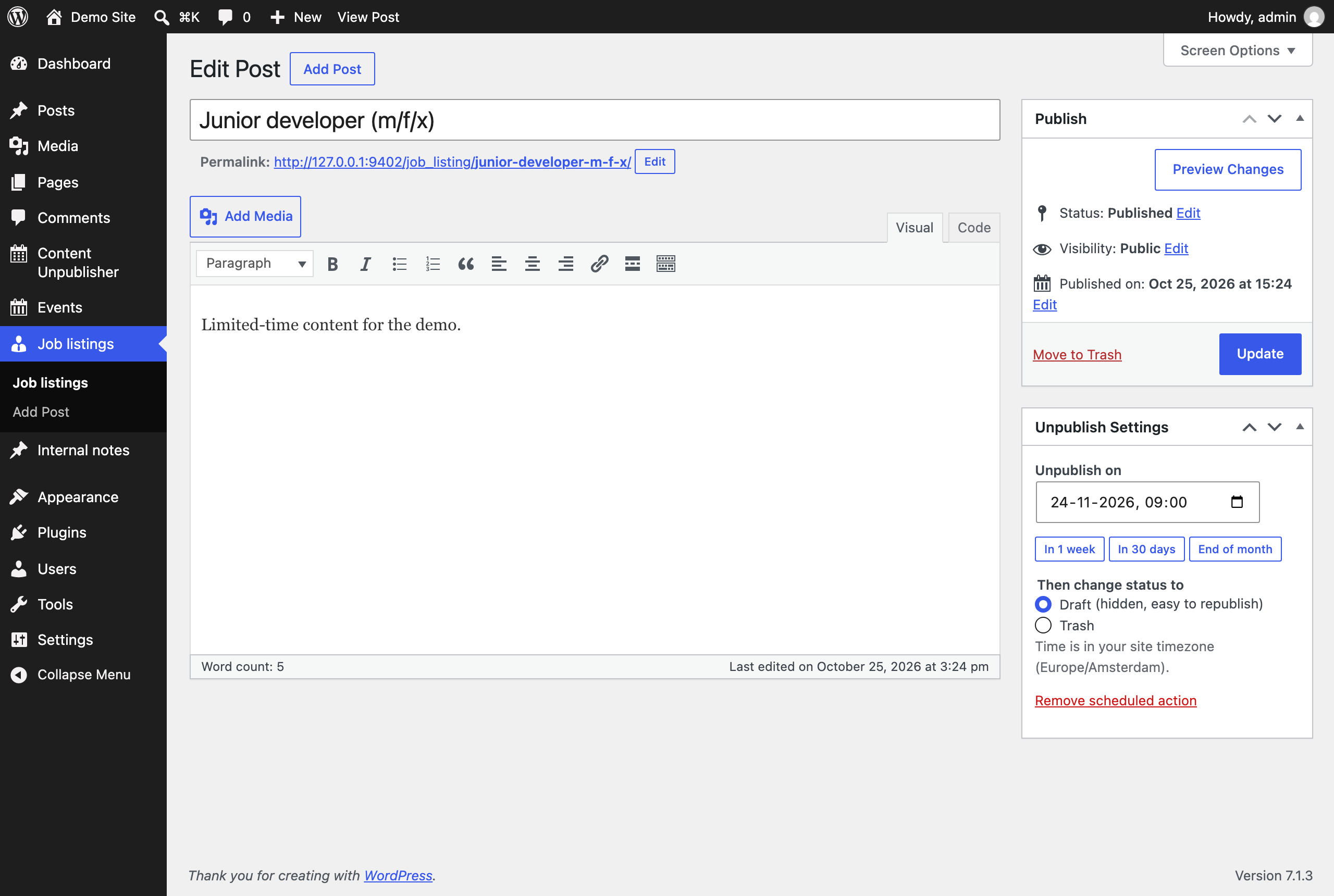
Classic Editor: the Unpublish Settings box with date presets and Draft / Trash choice.
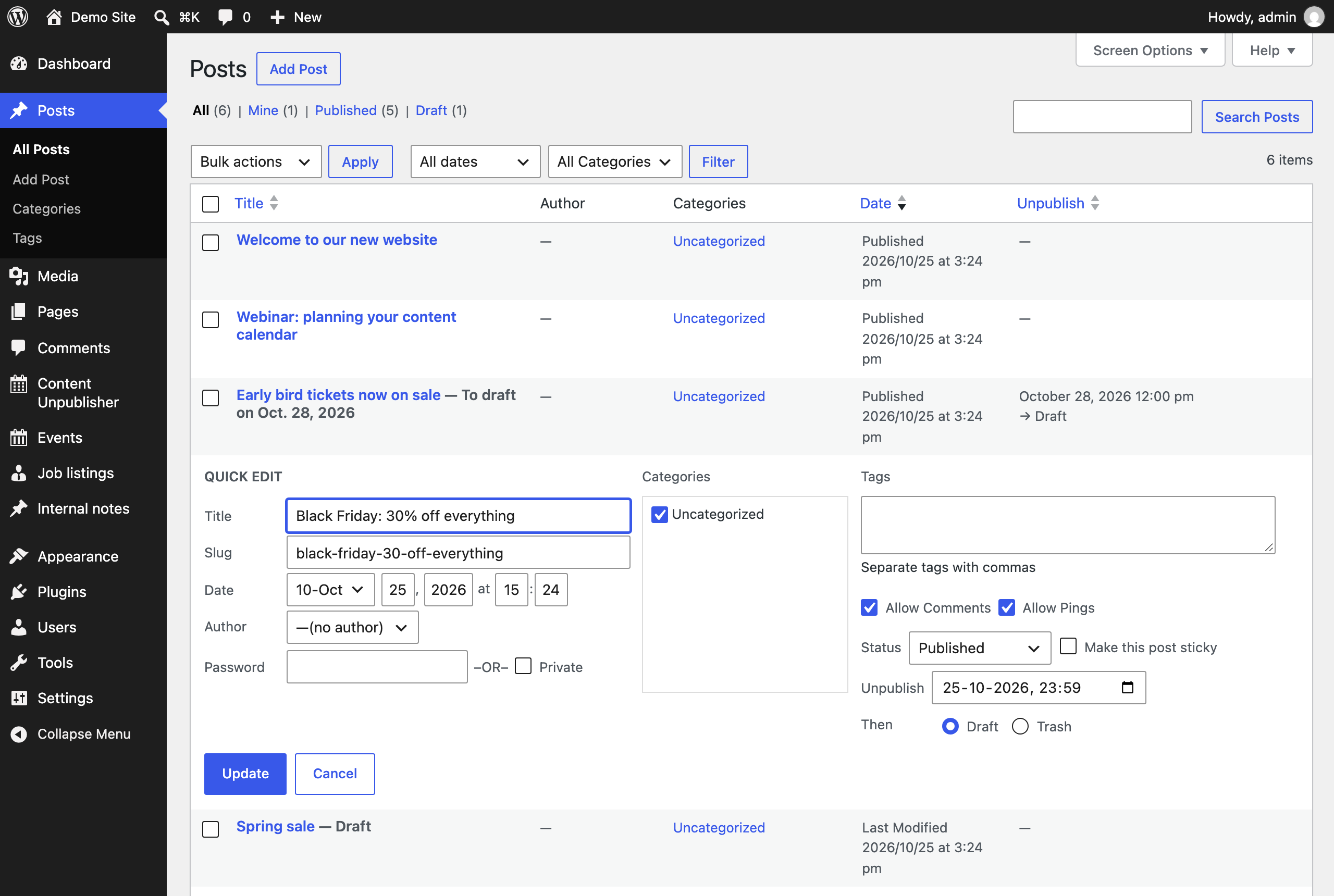
Posts list: scheduled items show "To draft on …", an optional sortable Unpublish column, and Quick Edit support.
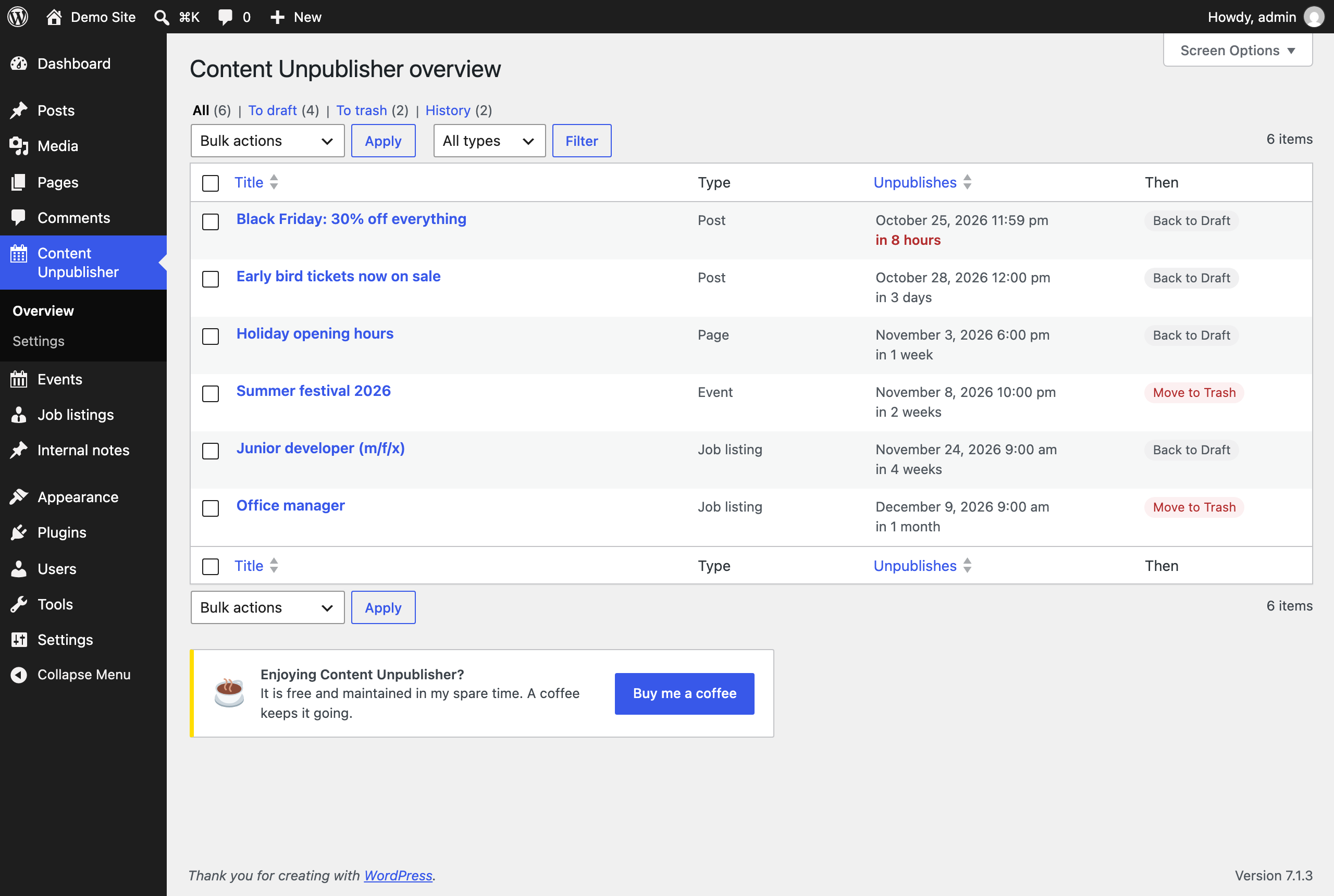
Overview: all scheduled actions with relative dates, filters by action and post type, sorting and bulk removal.
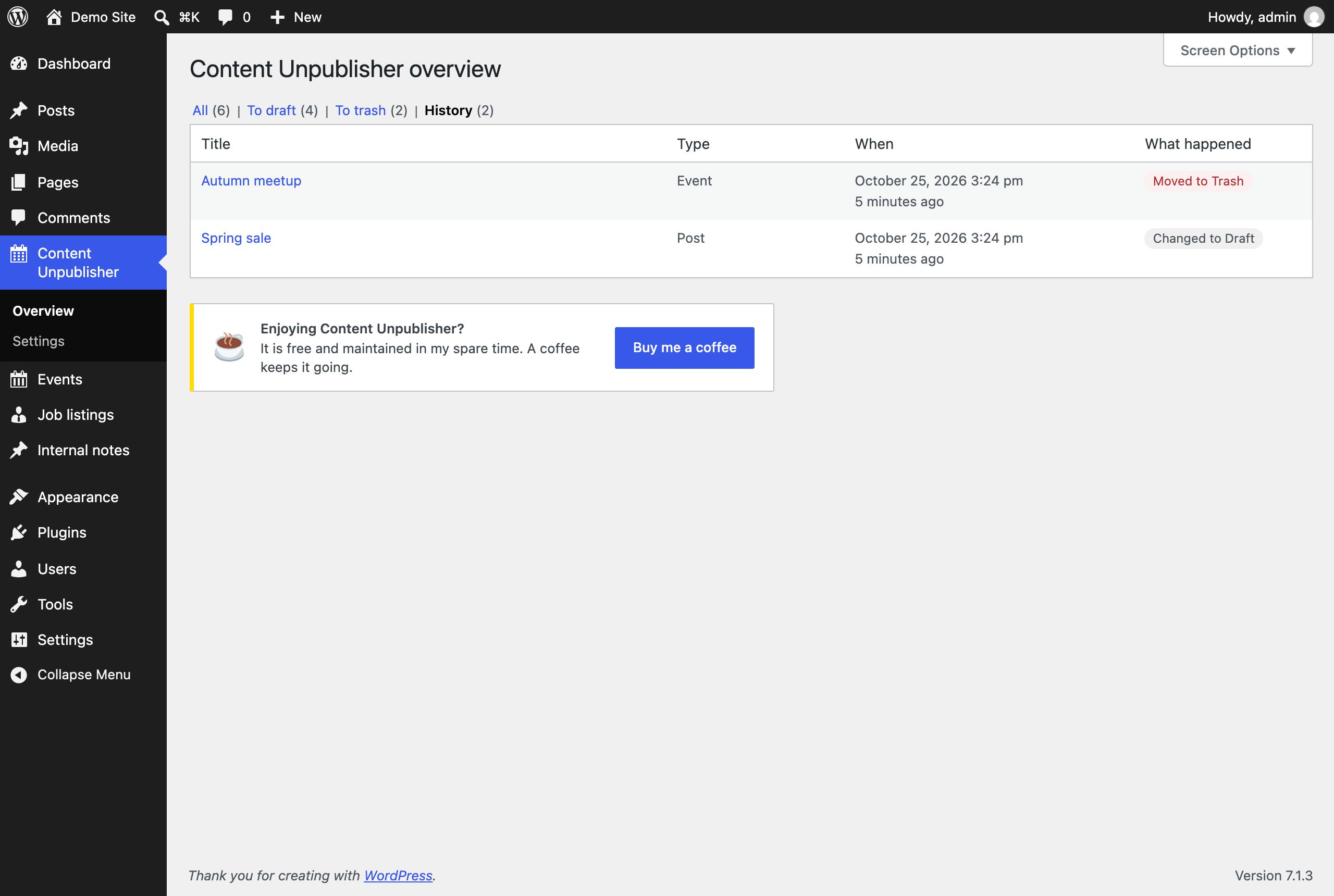
History: the last 50 actions Content Unpublisher has carried out.

Settings: choose which post types get the unpublish options.
Faq
Yes, it uses WordPress’s built-in scheduling system to run unpublish tasks. WP-Cron runs when someone visits the site, so on quiet sites an action can run a little late. The overview warns you when actions are overdue; a real server cron job makes them run on time.
Add define( 'DISABLE_WP_CRON', true ); to wp-config.php and let your host call https://your-site.com/wp-cron.php every 5 minutes with a server cron job. Most hosts have a “Cron jobs” screen for this. Without it, actions run on the first visit after their scheduled time.
Open Content Unpublisher > Overview and click History for the last 50 executed actions. A post that was changed to Draft also shows a note in the editor saying when and why.
The date and time you enter use the timezone configured under Settings > General.
Yes. Posts and pages are enabled by default. Enable other public post types, such as events or job listings, under Content Unpublisher > Settings. Developers can also change the list with the contun_post_types filter.
Normally yes. If your site sets EMPTY_TRASH_DAYS to 0, WordPress has no trash and the item is deleted permanently instead.
Yes: from the edit screen, from Quick Edit or Bulk Edit in the Posts list, or from the overview page (one at a time or in bulk).
Reviews
Great plugin
By 
An easy to use plugin for a function that maybe should be a native WordPress -function.
Changelog
1.4
- New: block editor support. Set the unpublish date and action from an “Unpublish” row in the Summary panel, next to the publish date. The Classic Editor keeps the Unpublish Settings box
- Past days can no longer be picked, and Draft is preselected so a date is never saved without an action
- Shows a warning when Trash would delete permanently (
EMPTY_TRASH_DAYSis 0) - Enabled block editor post types get custom fields support, which WordPress needs to save the schedule from the block editor (the classic Custom Fields box stays hidden)
- New: quick date presets (in 1 week, in 30 days, end of month) in both editors
- The Classic Editor box uses Draft / Trash radio buttons instead of a dropdown
- A past date is no longer dropped silently: you see a warning while editing and a notice after saving
- New: the Posts list shows “To draft on …” or “To trash on …” next to scheduled items, plus an optional sortable Unpublish column (Screen Options)
- New: set or remove schedules from Quick Edit and Bulk Edit
- Overview rebuilt as a standard WordPress table: readable dates with “in 3 days”, items due within a day highlighted, filter by action or post type, sorting, and bulk removal
- Removing a schedule no longer asks “Are you sure?”: it happens right away with an Undo link, on the edit screen and on the overview
- New: History view on the overview with the last 50 executed actions
- New: a post that was changed to Draft shows a note in the editor explaining what happened and when
- The overview warns when actions are overdue or WP-Cron is turned off (DISABLE_WP_CRON)
- Uninstall also removes the history and the post notes
1.3
- New: unpublish support for custom post types, enabled per post type under Content Unpublisher > Settings (posts and pages stay enabled by default)
- New:
contun_post_typesfilter to change the enabled post types in code - Overview page now shows the post type of each scheduled item
1.2
- Added an optional, unobtrusive “Buy me a coffee” link (Plugins screen, overview page and readme)
1.1
- Tested up to WordPress 7.1 and PHP 8.3
- Fix: the unpublish time is now interpreted in the site timezone (previously it could run hours too early or too late)
- Fix: clearing the date or action and saving now removes the scheduled event
- Fix: dates in the past are no longer stored as a schedule that never runs
- Security: capability check on the overview page remove action
- Added translation support (text domain: content-unpublisher)
- Added uninstall cleanup of all scheduled data
- Requires WordPress 6.0 and PHP 7.4
1.0
- Initial release
- Schedule draft or trash actions
- Admin overview
- AJAX removal support