Contest Gallery – Upload & Vote Photos, Media, Sell with PayPal & Stripe

Contest Gallery – Upload & Vote Photos, Media, Sell with PayPal & Stripe
Description
Create voting and upload galleries for photos, video, audio and files. Gallery monetization, social sharing and user registration.
All-in-One Photo Contest, Media Voting & File Gallery
Photo contest and media voting plugin supporting: JPG, PNG, GIF, ZIP, WEBM, MP4, MOV, TXT, DOC, DOCX, XLS, XLSX, PPT, PPTX, CSV, MP3, WAV, OGG, M4A. Contest Gallery PRO additionally supports PDF uploads with generated previews.
Create galleries (material, modern, responsive) and allow users to vote and comment on files, photos, or embed social posts from YouTube, TikTok, X (Twitter) and more.
Live WordPress photo contest
See a responsive photo contest gallery with categories, voting and entry details in 10 seconds.
Popular WordPress gallery use cases
- Photo Contests: Collect frontend submissions, organize categories, protect voting and choose winners. View the live photo contest example
- SEO-Friendly Galleries: Publish descriptive entry pages with unique URLs, controlled indexing and structured media data. View the SEO-friendly gallery example
- Video Contests: Accept video entries and combine focused playback with ratings and comments. View the video contest example
- Product Review Galleries: Combine five-star average ratings with written feedback in a searchable gallery. View the product review example
Real Watermark Protection
Protect your image entries with real watermarks that are written into the public image files. Contest Gallery keeps the original files safely protected from direct public access, so you can present, share and sell your images with more confidence.
Key Features
- Flexible Uploads: Create custom upload forms and add additional files to every entry.
- Real Watermark Protection: Show watermarked public images while keeping the original files safely protected.
- User Management: Includes user registration, login forms, and a “Google Sign-In button” for easy access.
- Monetization: Sell entries or digital content directly via PayPal or Stripe API.
- Social Reach: Built-in Social Media Share Buttons to boost your contest’s visibility.
- No 100-entry limit: The former 100-entry limit was removed in 2019. Contest Gallery does not impose a limit on the number of gallery entries. Hosting storage and server resources still apply.
Paid uploads, votes and comments (PRO)
- Contest Gallery PRO can sell upload, voting and comment credits directly from regular galleries.
- Visitors can sign in with Google or a one-time email PIN and purchase credits through PayPal or Stripe.
- Prices, taxes, currencies, invoices and order emails use the general Ecommerce configuration.
- Compare the FREE and PRO versions feature by feature
Average ratings and comments
Combine five-star average ratings and comments in one clear two-step interaction.
Ecommerce PayPal and Stripe APIs available
- Sell entries as shipping, download or service, or charge for uploads, via PayPal or Stripe API. Configure prices, shipping, taxes and currencies for your products. Configure checkout notes and agreements. Watermark image files, add download or service keys. Selling download or service and charging for uploads only available in PRO version.
Different file types upload form
- Upload form for different file types
- Manual or Auto-activation: Instantly display uploaded files in the gallery or review them first.
- Different file types upload form and gallery example
See how visitors can prepare a complete photo-contest entry directly in the WordPress frontend.
Video contest gallery
Create responsive video contests with categories, ratings, comments and focused full-window playback.
PDF galleries with generated previews (PRO)
- PDF uploads and generated preview images are available in Contest Gallery PRO.
- Create real PDF preview images from the WordPress backend or a frontend upload form.
- Display PDF entries with ratings, comments and other media files in the same gallery.
- No Imagick installation is required.
- PDFs with preview gallery and PDF upload form with preview example
Social Media Share Buttons
- Facebook, WhatsApp, Twitter, Telegram, Skype, Pinterest, Reddit, XING, LinkedIn, Email, SMS, Gmail, Yahoo, Evernote, VK, OK, Douban, RenRen, Qzone, Weibu
- Real Custom Post Type Pages behind every entry… so real social share URLs
- Social share buttons example
Add YouTube / Twitter / Instagram / TikTok Posts
- Combine different file types and social embed posts in same gallery
- Ask users for consent (GDPR) to show YouTube / Twitter / Instagram / TikTok entries option available.
- YouTube and photos gallery example
- Social media embeds and mixed file types gallery
OpenAI
- Create or edit images via OpenAI API
- Add created or edited images to your WordPress media library
External services
Contest Gallery Network
Contest Gallery Network is an optional public gallery directory operated at https://www.contest-gallery.net/.
The plugin contacts this service only when an administrator explicitly clicks “Publish to network” in the WordPress admin area and confirms the Contest Gallery Network privacy notice. After publishing, the listing is refreshed once daily by WordPress Cron while the plugin remains active. Administrators can remove the listing again with “Unpublish from Network”.
Submitted data includes public website and gallery listing information: website title and URL, gallery title, gallery description, tags/categories, the selected public gallery URL, preview image URLs, and public activity numbers such as entries, votes and comments.
The plugin does not submit IP addresses, email addresses, usernames, registration data, comment text, form field values or other private user data to Contest Gallery Network.
Contest Gallery Network may verify domain ownership, review submitted public content and images for safety, and publish the listing only if it passes review. If the service does not receive updates for 14 days, the public listing can expire and be removed from the Network index.
Service privacy policy: https://www.contest-gallery.net/privacy-policy/
Service terms: https://www.contest-gallery.net/terms-and-conditions/
FREE and PRO versions
- The free version includes the core gallery, frontend upload, voting, commenting and sharing workflows.
- Advanced workflows, including PDF uploads with generated preview images, are available only in Contest Gallery PRO.
- Compare the FREE and PRO versions feature by feature
Upload form and gallery examples
- Different file types upload form and gallery
- Different galleries with different options on same page
- Click through galleries on same page
Amazing contest for your WordPress page
Normal and registered user galleries
- Display entries of all users
- User see only own entries which were uploaded by the user after registration and login
Three voting types
- IP recognition
- Cookie recognition
- Login session based (create account via registration form or Google sign in button and login)
Drag & Drop upload form creator
- Add field types and arrange them
- Add e-mail field and allow to send confirmation e-mail
- Available field types: (Files Type, Input, Textarea, Select, Select Categories, Email, URL, Check agreement, HTML, Simple Captcha, Google reCAPTCHA)
- Configure subscription e-mail
Drag & Drop user account registration form creator
- Add field types and arrange them
- Available field types: (WP-Last-Name, WP-First-Name, WP-Username, WP-Nickname, WP-Email, WP-Password, WP-Password-Confirm, Input, Textarea, Select, URL, Check agreement, Profile Image, HTML, Simple Captcha, Google reCAPTCHA)
- Allows membership as “Contest Gallery User” WordPress role
Create login area
- Add login area to your website
- Allow voting only for registered users
Three e-mail types
- Admin information e-mail when new file is uploaded
- Activation e-mail to user when his file is activated
- Registration confirmation e-mail when user create a new account
Contest management
Manage activation, categories, entry details, comments, votes, winners and sales settings from one workspace.
Available options
Upload form options
- Automatically activate user entries after successful frontend upload
- Allow only registered users to upload files or to upload you
- Restrict front end upload size
- Maximum upload size in MB
- Activate bulk upload in front end
- Maximum number of files for bulk upload
- Minimum number of files for bulk upload
- Restrict resolution uploaded images
- Activate in gallery upload form
- Forward to another page after upload
- Confirmation text after upload
- Inform admin e-mail after upload in frontend
- Inform entry activation e-mail
- Inform successful entry e-mail
Registration options
- Confirmation text after registration
- Confirmation text after e-mail confirmation
- Confirmation mail options (Addressor, Reply mail, Subject, Email content)
Login options
- Forward to another page after login
- Forward to URL
- Confirmation text on same site after login
- Confirmation Text after login
Vote options
- Allow one-star favorite voting
- Allow cumulative or average star ratings
- Require a comment for voting, offer it as an optional follow-up or disable vote comments
- Inform registered user when there was a vote for his entry
- Show custom message after voting
- Allow vote out of gallery
- Hide voting until user voted
- Configure votes amount per user
- Show only user votes (user see only his votes not the whole rating)
- Votes in time interval per user
- Delete votes (frontend users can delete their votes and to another entry)
Commenting options
- Allow comments
- Allow comment out of gallery
- Inform registered user when there was a comment for his entry
- Review written comments
- Remove written comments
Contest end options
- End contest immediately
- Activate contest end time
Gallery view options
- Show images EXIF data
- Add categories widget when categories field in upload form is added
- Allow full window gallery
- Number of files per screen (pagination)
- Allow search for files (search by fields content, categories or file name)
- Allow sort
- Random sort
- Random sort button
- Configure gallery and entry behavior separately for supported shortcode types
- Open entries in the responsive full-window blog view
- Forward directly to the dedicated entry page or original source
- Make gallery entries unclickable when only the overview should be shown
See the responsive gallery, full-window entry view and comment panel on a smartphone.
Single entry view options
- View entries in the full-window blog view
- Forward to the dedicated entry page
- Link to original file source
- Only gallery view
Backend language
- English
Frontend languages
- English
- German
- Dutch
- Italian
- Spanish
- Portuguese
- French
- Polish
- Slovakian
- Norwegian (not complete)
- Swedish (not complete)
- Russian
- Chinese
- Own translations can be added in backend
Installation
- Install and activate Contest Gallery through the WordPress plugin installer.
- The Contest Gallery menu appears on the left side of the WordPress admin area.
- Create a new gallery.
- Add entries or configure the frontend upload form.
- Insert
[cg_gallery id="1"]into a page to display the gallery. - Insert
[cg_users_upload id="1"]into a page to display the upload form.
Documentation to configure different options: Click here..
Screenshots
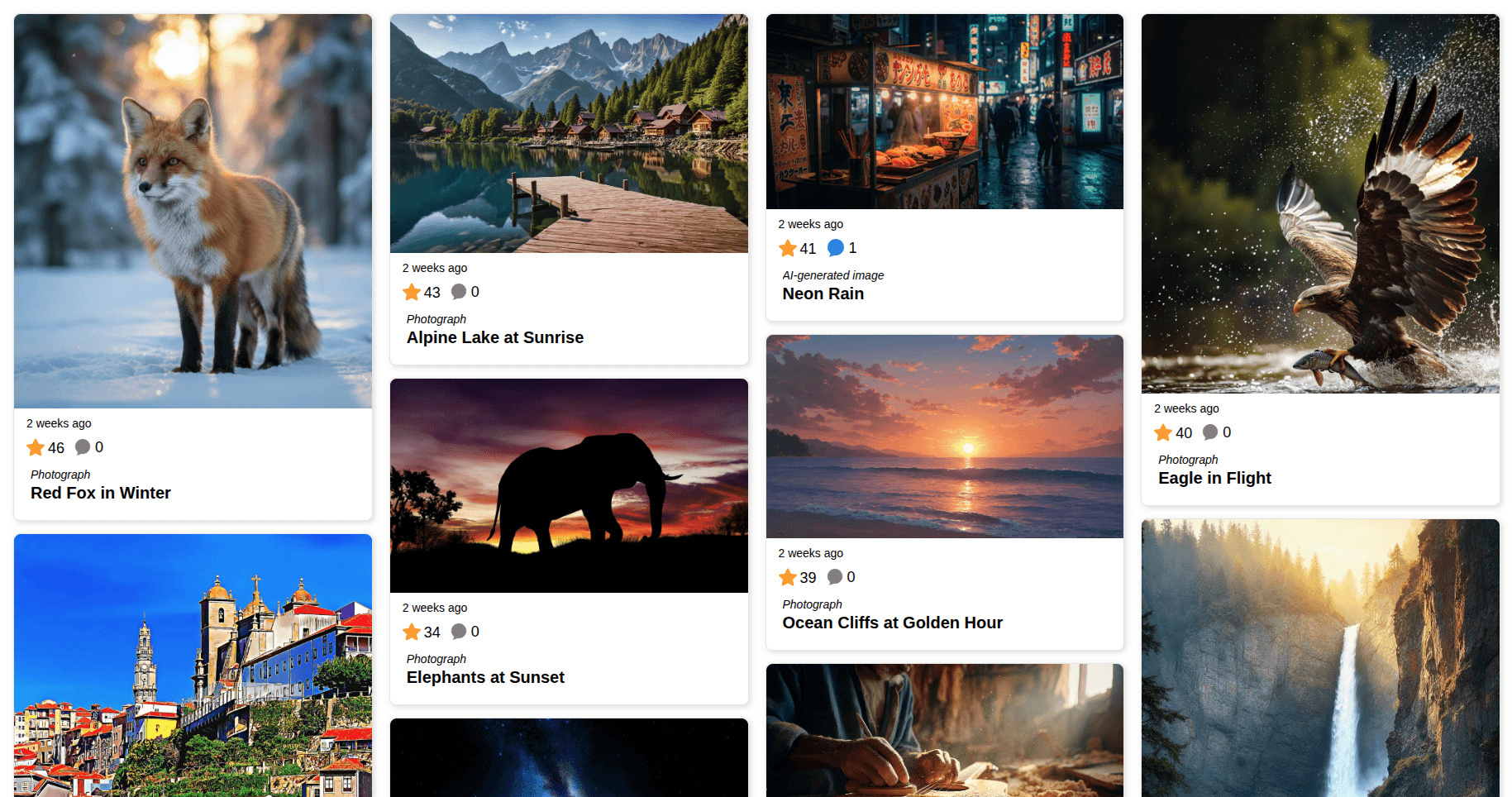
Live photo contest gallery with entries, votes, comments and descriptive titles
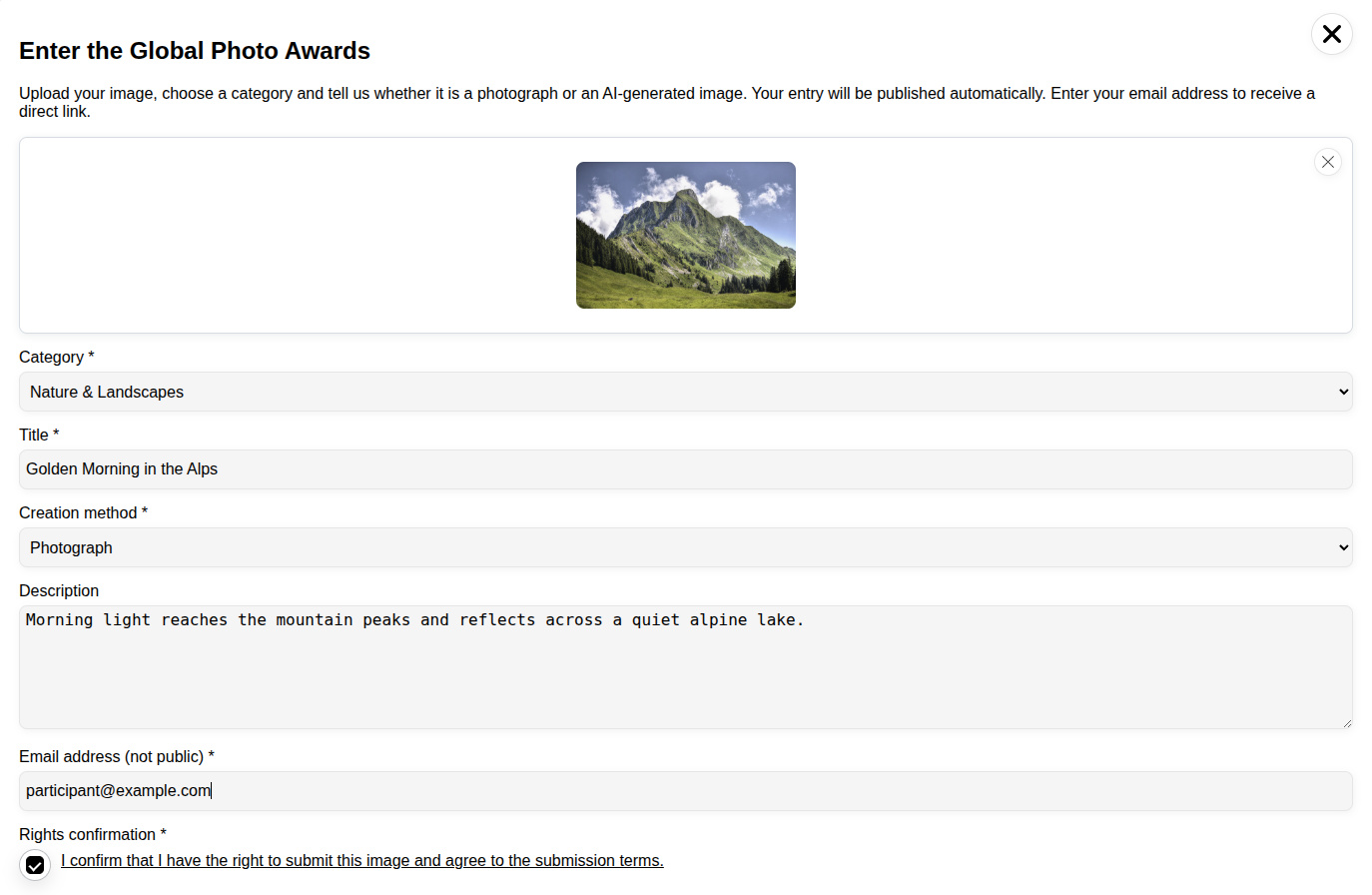
Frontend upload form with image preview, category, title, description and email
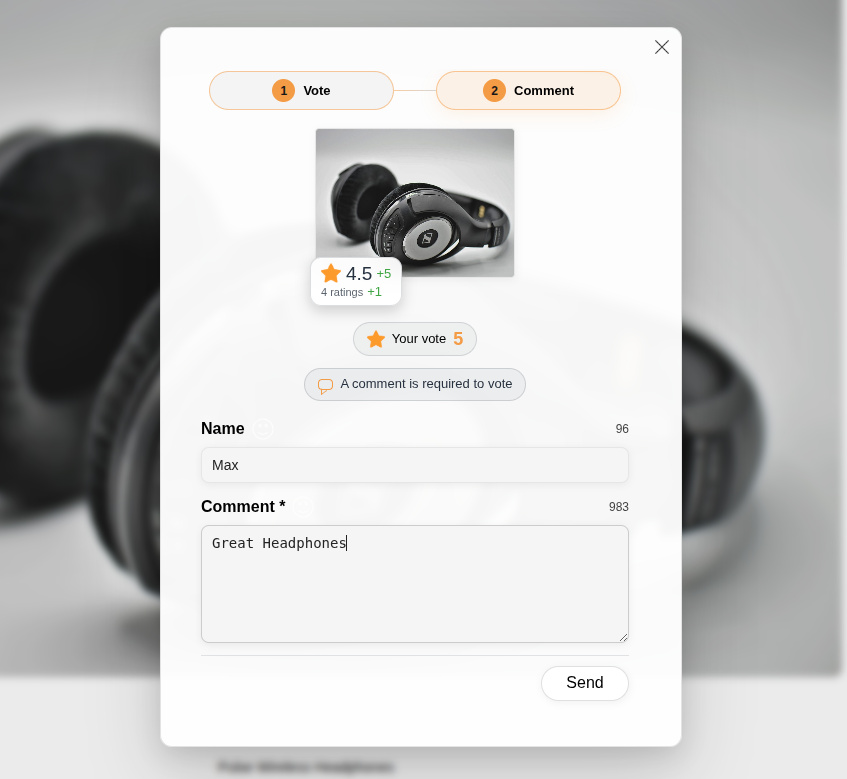
Two-step average rating and required comment dialog
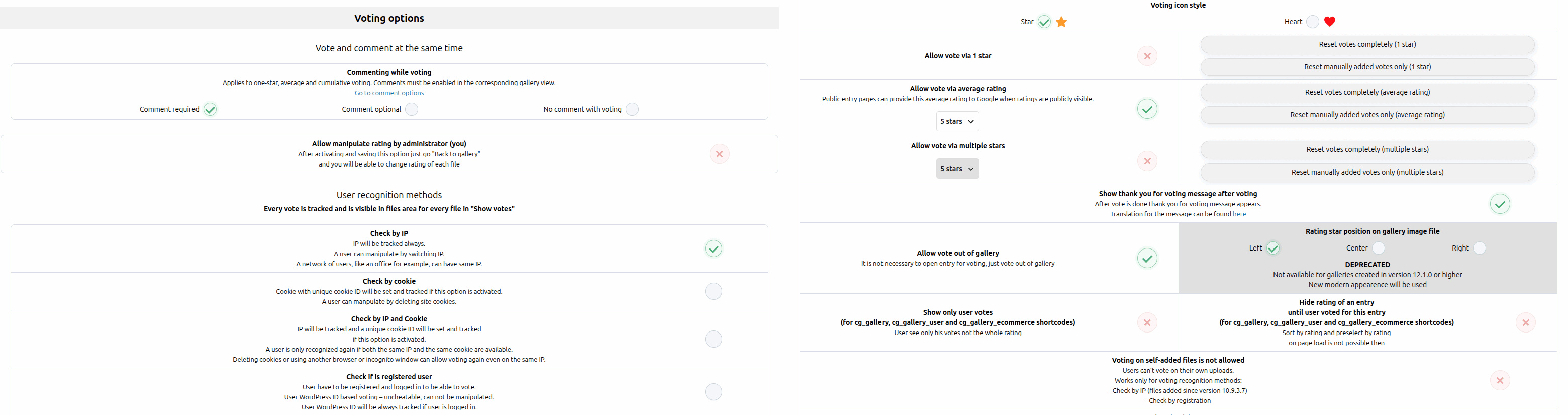
Voting options for rating types, vote-and-comment mode and voter recognition
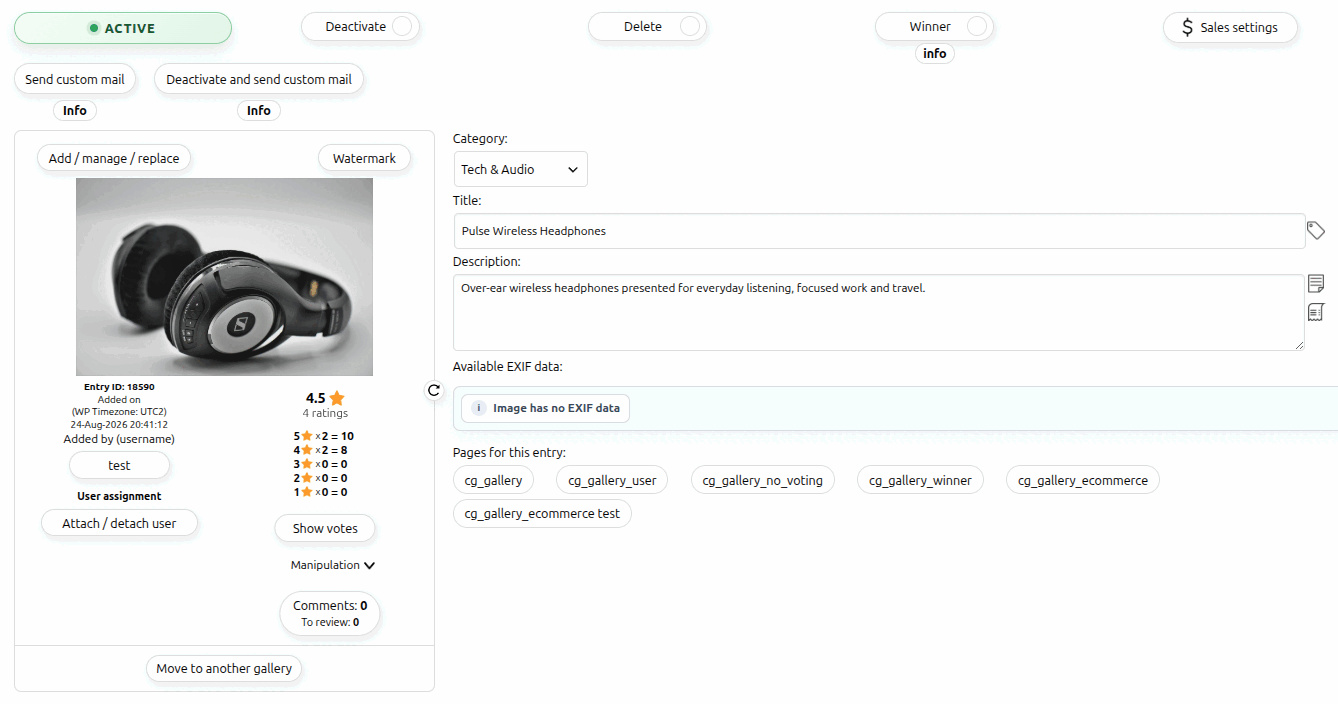
Backend contest entry management with activation, winners, ratings and comments
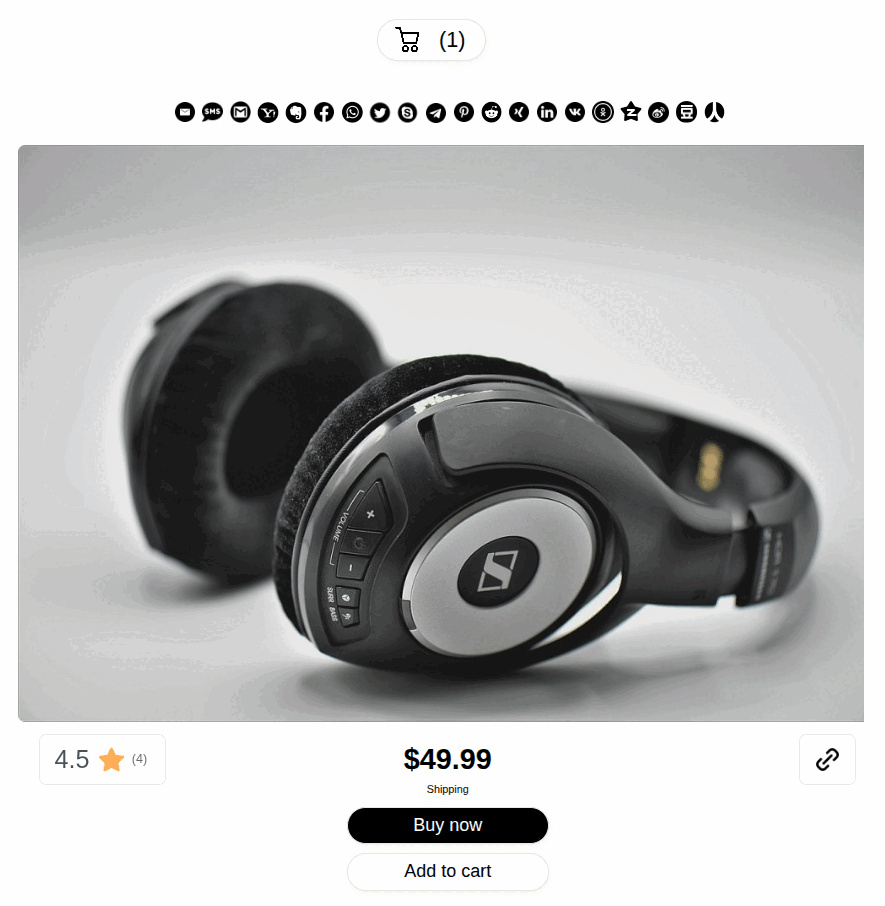
Ecommerce product view with rating, price, shipping and purchase actions
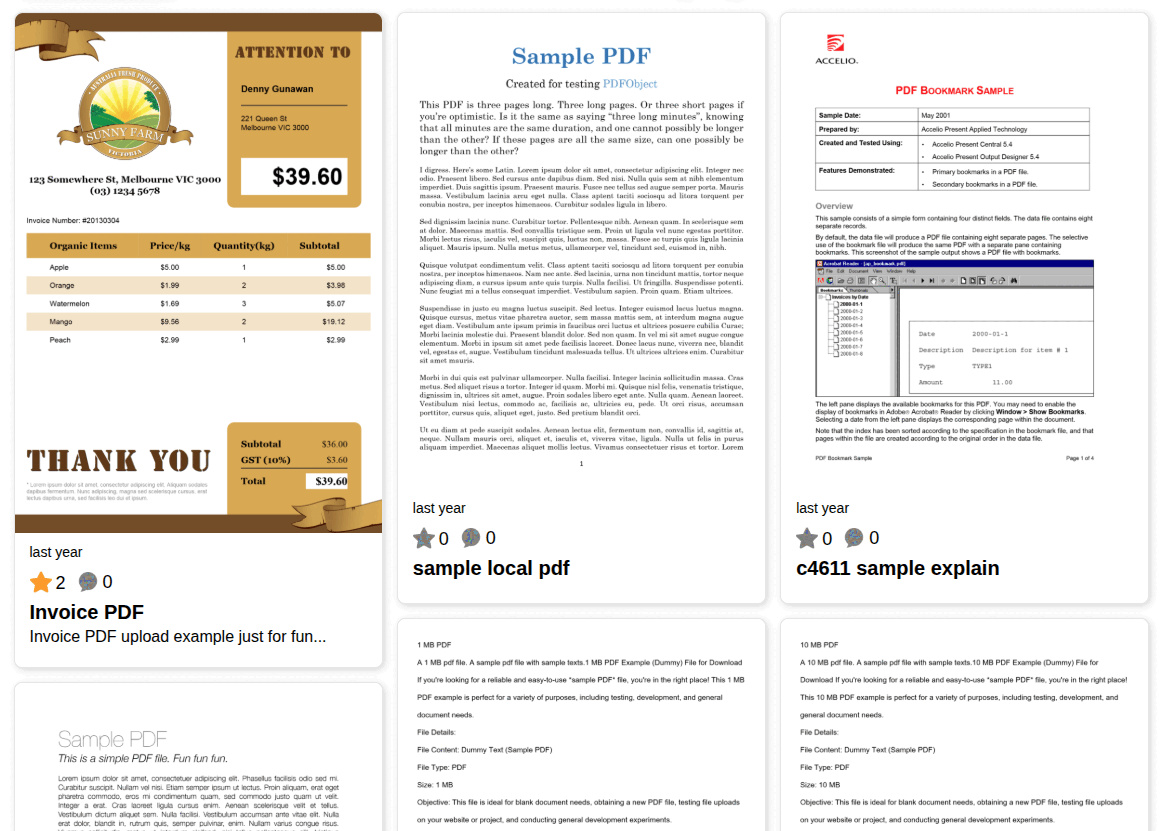
PDF gallery with generated previews, ratings and comments (PRO)
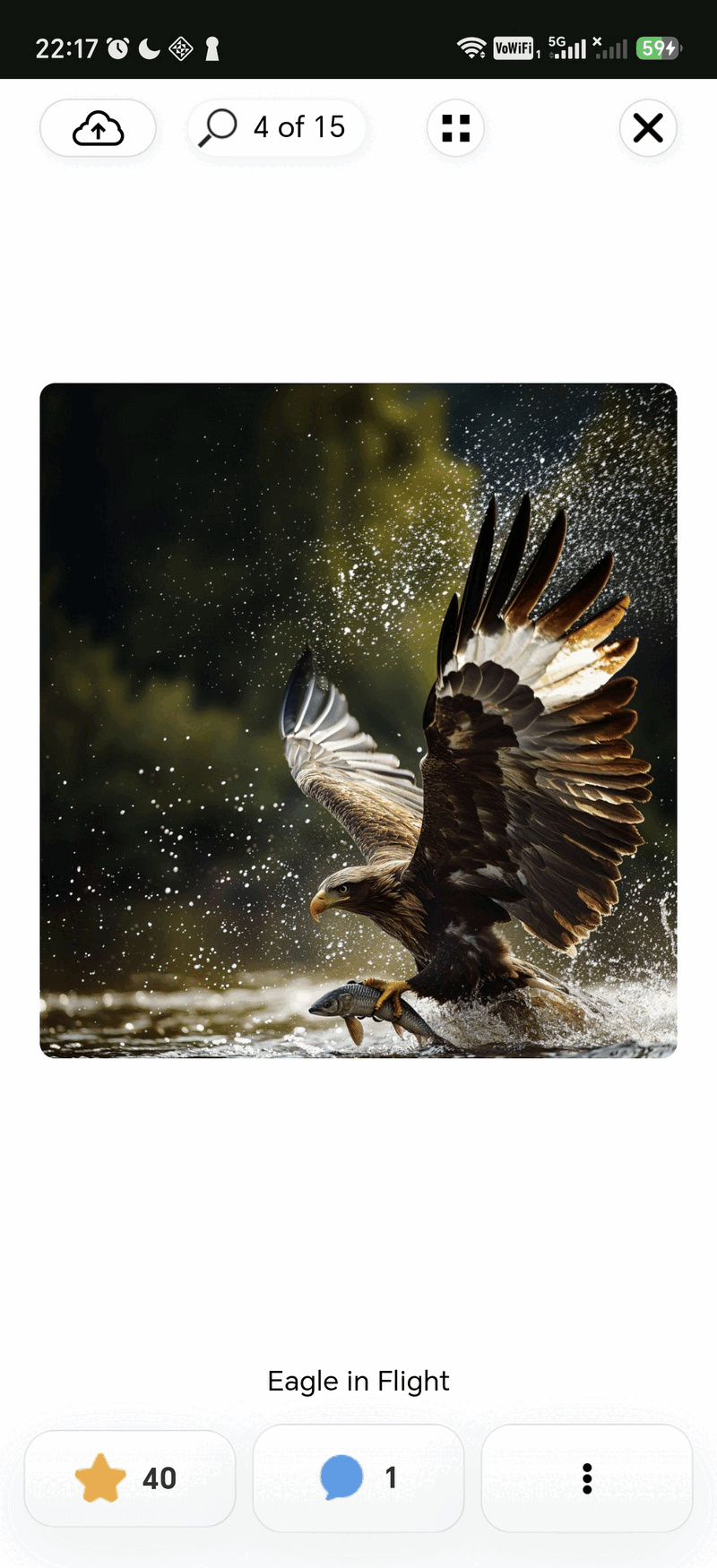
Responsive full-window gallery view captured on a smartphone
Faq
Yes.
That’s possible! You can activate to be informed after every frontend upload
and add an email where you like to be informed.
Yes. If the user added his e-mail during uploading his file he will be informed when the file
is activated. He can also receive a link in his mail which leads directly to his file.
Use option “Edit options” >>> “File activation e-mail” >>> “Send this activation e-mail when activating users files”.
Yes. You can configure Addressor, Reply mail, Cc mail, Bcc mail, Subject and Body text.
You can also insert a link in the mail Body text which will lead directly to his image.
Yes. You can use WordPress Media Library for uploading files and adding them to gallery.
In frontend uploaded files appears also in WordPress repository and in gallery.
Yes. As default you can upload as many files as you want in backend.
Default in frontend is one file per upload. But you can configure
an amount you like. So you are also able to upload multiple files during one upload in frontend.
Yes. You decide via “Edit upload form” which information can be added for every file.
It’s also possible to configure which information should appear frontend.
As many you like 🙂
Contest Gallery does not impose a limit on the number of gallery entries. The practical limit depends on your hosting storage and server resources.
You can report security bugs through the Patchstack Vulnerability Disclosure Program. The Patchstack team help validate, triage and handle any security vulnerabilities. Report a security vulnerability.
Reviews
Powerful Plugin
By 
This plugin provides an excellent functionality, and the result has meaningfully enriched a website I manage. I have found navigating the options and the interface to be a bit of a challenge at times, but the developer, Wasiliy, has provided excellent and prompt support when needed.
Empfehlenswertes Plugin
By 
Ich habe verschiedene Plugins getestet und mich für Contest Gallery Pro entschieden. Es ist anfangs etwas viel Umfang, und man benötigt Einarbeitungszeit. Für mich hat es sogar zu viele Funktionen, aber manche können das sicher gut gebrauchen. Der Support ist super schnell und freundlich.
An excellent plugin for organizing a photo contest
By 
I have been organising an annual photography competition for three years. After considering various options, I decided to purchase a licence for Contest Gallery. As the competition organiser, I need a reliable and versatile platform for submitting photographs and generating galleries so that they can be voted on by the public and assessed by a jury. Now that I’ve got to grips with the plugin, it meets all my needs with ease, despite the complexity of having to manage a high volume of participants. Whenever I’ve had any doubts, I’ve always been able to count on Wasily Strecker’s support, who has quickly resolved all my queries. I couldn’t be happier with this platform for managing the competition, and I’ve always recommended it.
Hace tres años que organizo un concurso fotográfico anual. Después de analizar distintas opciones, decidí adquirir una licencia de Contesto Gallery. Como gestor del concurso necesito una plataforma fiable y versátil para enviar las fotografías, y generar galerías para que puedan ser votadas por el público y para poder ser evaluadas por un jurado. Una vez familiarizado con el plugin, cubre todas mis necesidades de manera sencilla, a pesar de la complejidad de tener que gestionar un volumen alto de participantes. En caso de duda, siempre he contado con el soporte de Wasily Strecker, que ha resuelto todas mis dudas rápidamente. No puedo estar más satisfecho con esta plataforma para gestionar el concurso, y la he recomendado siempre.
Highly Customisable, Good After Sales Service by Developer
By 
The backend UI takes some time to figure out, but once you've figured it out, you'll find that the plugin can do wonders. So, be prepared to go through a steep learning curve. It's worth the journey.
After sale service is good so if there's anything you are not sure of, the developer is glad to help via email.
Kudos to the developer for creating this plugin.
Excellent Plugin, Clear Directions
By 
Excellent Plugin! The install directions are very well written and easy to follow. This is an awesome program with everything you could possibly want.
Amazing Plugin Worth Every Penny!
By 
Purchased the PRO version of this plugin and have found it to be exactly what I was looking for. There is nothing out there like it! The backend is extensive and after about 15 minutes of playing around with it, I was able to create and customize the look, feel and function to exactly what I wanted.
In addition, the support was amazing when needed. Very quick and efficient. The creator also updates the plugin often which I love. Always improving it! Would highly recommend!
Lot of futures with useless UI
By 
Lot of very good futures with tons of option, BUT:
The UI is terrible at the back- and front end too:
- design comes from ages of Netscape Navigator
- incredible long options pages without tabs
- can't manage default settings
- in the free version can't hide pro options, what's have very frustrating green background
I spent hours for testing, but I can't find setting of upload qty limitation - maybe thanks for the ui.
This plugin need deep knowledge, but the documentation is very-very pure.
This plugin is very potent, but in this form useless for our photoclub.
Sorry. We will not buy the pro (and not use the free too).
This plugin is what I need !
By 
I started this year with the second Rigid Inflatable Boat Photo Contest based on the plugin. The reasons are:
- Adequate after sales support: fast response and always correct solutions.
- Client-centered
- The jury members find it easy to vote and comment.
A few remarks:
- As an admin the UI needs some getting used to.
- There are many ways to sort but I would really like to sort alphabetically as well.
- The search function needs some attention, it can be more accurate.
Overall
I've searched for plugins to have a competition on my website and this one ticks all the boxes for me. Congrats to the developers and the helpdesk.
Excellent product and support
By 
Using plugin for media voting contest and it has been working great. Support is very responsive. I would recommend this plugin.
Awesome plugin
By 
Even the basic version is rich in features and very powerful, a great plugin that allows you to optimally manage a photo contest. Highly recommended
Changelog
34.0.2
- NEW: Email gallery participants with recipient filters, test emails, drafts and message history.
- NEW: Custom sign-in text and registration agreements with saved consent records.
- FIXED: Plugin activation, member profile links and date formatting.
- SECURITY: Security hardening.
34.0.1
- NEW: Private member messages and friendships.
- NEW: Participant directories and public profiles with friends and entries across galleries.
- NEW: Configurable member notification emails with optional message previews.
- NEW: Administrator message overview and per-user communication controls.
- IMPROVED: Profile loading, mobile layouts and backend status and repair controls.
- FIXED: Voting result visibility, vote and comment updates, profile navigation and entry scrolling.
- SECURITY: Security hardening. Reported by Nicat Sultanov.
34.0.0
- NEW: Browse gallery participants and their public profiles with entries from the current gallery.
- NEW: Gallery member area with email PIN or Google sign-in, My entries and private access to unpublished entries. Available for galleries created or copied with version 24 or later.
- NEW: Frontend profile editing with configurable public fields and profile images. Google profile images are used when no other profile image is available.
- NEW: URL fields for registration and public profiles.
- NEW: Owners can edit, delete and replace entry files, including individual files in multiple-file entries. Social embeds can be replaced with files. Replacement supports time and vote limits.
- NEW: Frontend image uploads and file replacements can resume interrupted processing.
- NEW: Configurable logout redirects and return links from the WordPress profile.
- IMPROVED: Styled gallery, overview and entry headers with image previews and consistent dark backgrounds.
- IMPROVED: Unified sharing and file-action dialogs with profile and share buttons on gallery entries. Sharing options include WhatsApp.
- IMPROVED: Standalone upload forms offer a sign-in card when passwordless upload access is enabled.
- IMPROVED: Clearer reCAPTCHA key setup for registration and upload forms.
- FIXED: Gallery navigation, mobile and full-window layouts, pagination, theme consistency, owner entry links and file replacement previews and selection.
- FIXED: Voting, credit balances, profile updates, registration forms and URL validation.
- FIXED: PIN resends, confirmation email retries and password resets on cached pages. Improved Wordfence compatibility.
- FIXED: Social media consent persists across gallery and page changes in the same browser tab.
- SECURITY: Security hardening.
Full updates history can be found in changelog.txt in plugins directory.