Convertus – AI Dynamic Content Personalization

Convertus – AI Dynamic Content Personalization
Description
Convertus personalizes your website content for each visitor segment in real time. This plugin is a thin connector: it links your WordPress site to your Convertus account and installs the personalization snippet correctly — including an early anti-flicker step and exclusions so caching/optimization plugins don’t break it. All configuration (segments, content variants, analytics) lives in your Convertus dashboard.
- One-click connect — no API keys to copy or paste.
- Caching-plugin compatibility for WP Rocket, LiteSpeed Cache, Autoptimize, SiteGround Speed Optimizer, and Cloudflare Rocket Loader.
- Free-forever tier (volume-limited, see “What’s free” below) — personalization keeps working after any trial. Nothing in this plugin is paywalled.
Get started in 60 seconds
- Create a free Convertus account at https://app.convertus.ai/register and verify your email.
- Install and activate this plugin.
- Go to Settings Convertus and click “Connect to Convertus”.
That’s it — the snippet is injected automatically. Create your first segment and page version in your Convertus dashboard.
See both products in action:
AI website personalization
Every visitor lands on the same page — but they don’t all want the same thing. Convertus rewrites your existing pages for each audience, on the same URL, with no duplicate pages to build or maintain.
- No new tracking to install — it reads the Google Tag Manager and Google Analytics events your site already fires, so you can start building audiences right away.
- Build audiences from UTM parameters or on-site events, filter on an event value (equals, contains, or a numeric threshold), and combine segments into clusters with AND / OR logic.
- The AI reads your page copy and writes a variant for each of the main headlines and paragraphs it finds. You review them, and nothing goes live until you enable it.
For example:
- Someone who submitted your form but never booked a call sees a page about booking — not the generic pitch they already scrolled past.
- A visitor who clicked your “free trial” ad lands on a page that continues that exact promise, instead of a homepage saying something else.
Same traffic — you just convert more of it.
Who’s it for
- Local service businesses — the visitor who clicked your “emergency repair” ad reads about emergency repair; the one from your newsletter reads about this month’s offer.
- SaaS and B2B — one page version for the visitor who compared your plans, another for the one who started a trial but never booked a demo.
- Ecommerce — speak to each shopper in terms of the campaign or category that brought them.
- Agencies — give every client campaign its own page version without building landing pages.
What’s free
Free forever on WordPress: up to 1,000 personalized page views and 50 AI-written content variants a month, for website personalization. Paid plans add more volume, AI Google Ads automation and competitor intelligence — see https://convertus.ai/pricing/.
Compatibility
- Page builders and themes: Elementor, the block editor and any theme that calls
wp_head(). Convertus personalizes the page your visitors see, whichever builder made it, and stays out of the Elementor editor, post previews and the Customizer. - Caching and optimization: WP Rocket, LiteSpeed Cache, Autoptimize, SiteGround Speed Optimizer and Cloudflare Rocket Loader — exclusions are added automatically.
- Analytics: reads the Google Tag Manager and Google Analytics (GA4) events your site already sends.
- Requirements: WordPress 6.3+ and PHP 7.4+.
Competitor intelligence — take the demand your rivals already proved
See the exact searches your competitors win and you don’t — organic and paid, side by side. Every keyword arrives scored: real search volume, click price, competition, buyer intent, and how winnable it is right now. The easy wins surface first, so you know where to move today — rank for the organic gaps, bid on the paid ones.
And it goes further than any report: our AI reads the ads your rivals are running and writes yours to beat them — hitting where they’re weak and you’re stronger. Your competitors spent years proving where the demand is. Create your free account, connect in one click, and your first report is minutes away.
AI Google Ads automation (optional)
Convertus is more than personalization. Give it a campaign topic and its AI builds a complete Google Ads Search campaign — data-backed long-tail keywords, ad groups, and ad copy written to match your on-page content, so your ads and landing pages tell one story. Campaigns run with Google AI Max on, so your ads reach AI-powered and conversational searches, not just exact keywords. You review and publish from your dashboard, and AI agents optimize the campaign every week from its performance data. Available on free-trial for everyone and on paid plans afterwards.
Watch the AI Google Ads automation in action
Documentation & support
- Website personalization: https://convertus.ai/web-personalization/
- Pricing and plans: https://convertus.ai/pricing/
- Guides and tutorials: https://convertus.ai/blog/
- Free UTM Builder: https://convertus.ai/utm-builder/
- Support: hello@convertus.ai
External service
This plugin connects your site to Convertus, a third-party SaaS operated by Convertus (https://convertus.ai). It is required for the plugin to function.
- On “Connect”, you authorize the link in your Convertus dashboard, and your site stores a secure connection token.
- On each page view, the personalization script is loaded from cdn.convertus.ai and your visitor’s browser communicates with api.convertus.ai to fetch personalized content.
- The personalization script sets two first-party cookies to tell returning visitors apart and keep their session. They contain only randomly generated values; see the Convertus Privacy Policy for details.
By connecting, you agree to the Convertus Terms of Use (https://convertus.ai/terms/) and Privacy Policy (https://convertus.ai/privacy-policy/). You remain responsible for your own visitor-consent obligations, as with any analytics or tracking tool.
Installation
- Create a free Convertus account at https://app.convertus.ai/register and verify your email, then return to your WordPress admin — nothing else to set up on the web app first.
- Install and activate the plugin.
- Go to Settings Convertus.
- Click “Connect to Convertus” and authorize the site in your Convertus dashboard.
- Done — the snippet is injected automatically. Manage everything from your dashboard.
Screenshots
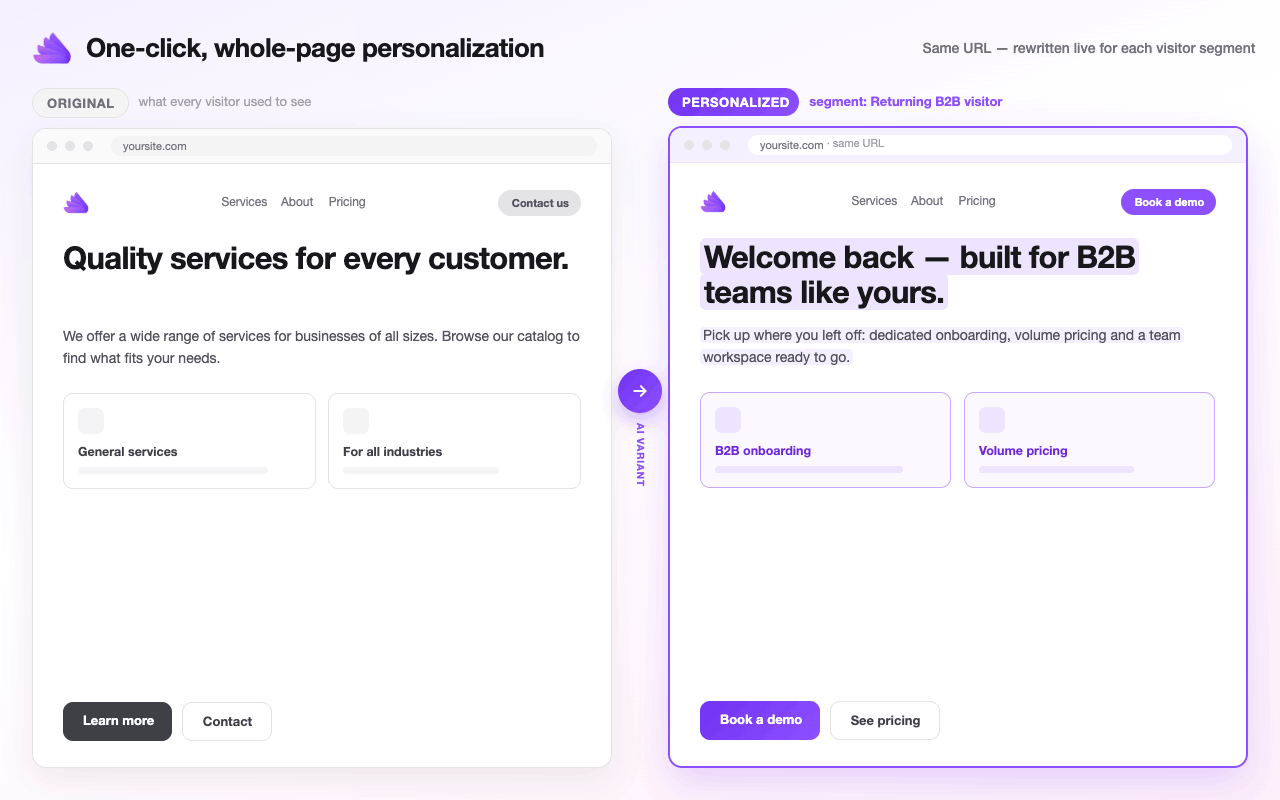
Before / after — one click rewrites your page live for each visitor segment, on the same URL.
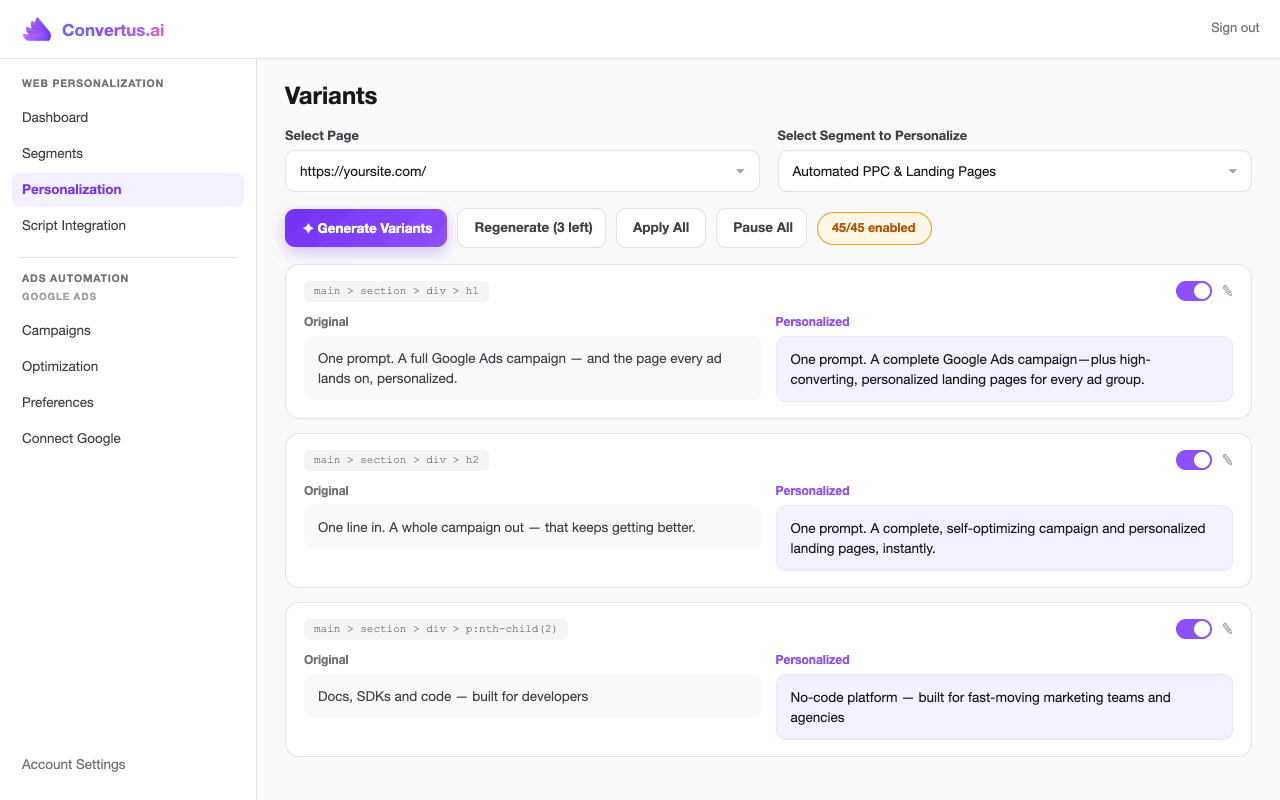
Personalization dashboard — AI-generated variants for every headline and paragraph, with original vs. personalized side by side.
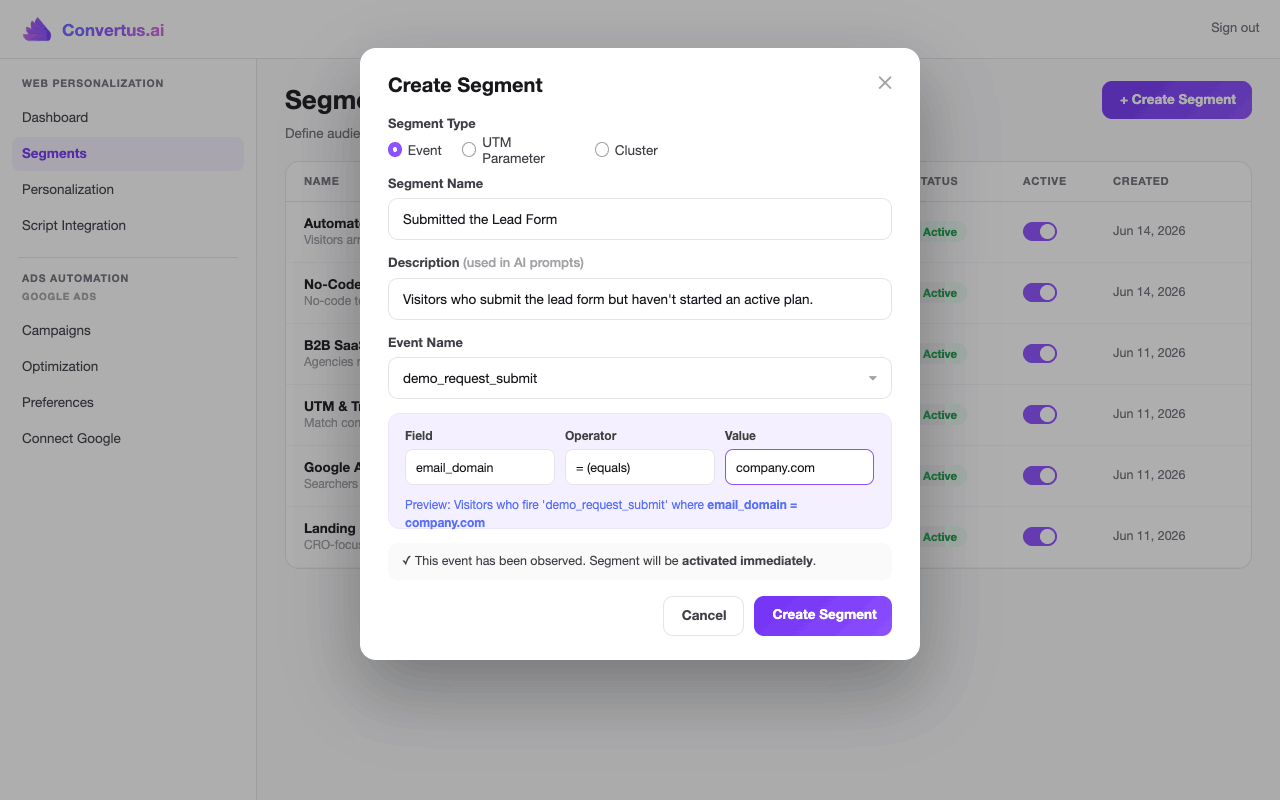
Segments — target visitors by events, UTM parameters, or clusters, with plain-language descriptions the AI uses.

Clusters — combine segments with AND / OR and exclude others with NOT, for precise targeting.

Competitor gap analysis — the searches your rivals win and you don't, scored by opportunity, with their ad copy on the table and a one-click campaign built from the best gaps.

One prompt in, a full Google Ads campaign out — AI crawls your page, selects audiences, structures ad groups, and writes keywords & ad copy.

Review the AI draft before anything ships — budget, locations, audiences, headlines, and keywords with real search volumes.

Approved campaigns go live in your Google Ads account — nothing publishes without your approval.

Campaign performance — impressions, clicks, conversions, CPA, and daily trends by ad group.

Weekly AI optimization — safe changes auto-applied, the rest awaiting review, summarized in an email digest.

Connected in one click from wp-admin — no code, no API keys.
Faq
Yes. You can connect (and authorize) an existing account in one click. A free-forever tier is available.
No. Connect in one click and the snippet is injected automatically. You build and manage everything — segments, one-click content variants of the whole page, and autopilot AI campaigns — visually in your Convertus dashboard.
Immediately. The moment you connect, the snippet starts tracking visitor behavior, and personalization goes live as soon as you publish your first content variant — no waiting.
No. The snippet automatically captures your existing Google Tag Manager and Google Analytics dataLayer events, plus any custom events — so you can build audience segments and personalize from day one. If your events carry values, you can segment on them too: contains a value, or greater than / less than a numeric threshold.
Yes. The plugin automatically excludes its snippet from JS combine/defer/delay for WP Rocket, LiteSpeed, Autoptimize, SiteGround Speed Optimizer, and Cloudflare Rocket Loader. The Settings Convertus page shows which optimizers it detected. If you use a different optimizer, exclude index.global.js from its JS-delay/defer settings.
Yes. Convertus personalizes the page your visitors see, whichever builder made it — Elementor, the block editor or your theme. It stays out of the Elementor editor, post previews and the Customizer, so your editing canvas is never hidden and your own edits aren’t counted as visitors. Developers can skip loading on any other request with the convertus_skip_injection filter (return true to skip).
The plugin revokes its connection token with Convertus and removes its stored settings. Personalization stops immediately.
Reviews
Fantastic
By 
Very good plugin. Increased my conversions meaningfully. And good support, responsive.
Changelog
1.0.3
- Pages now wait up to 4 seconds (was 3) for personalization before they show, so visitors on slower connections see their personalized page instead of the original flashing first.
1.0.2
- The plugin no longer loads inside the Elementor editor, post previews (block editor and Elementor “Preview changes”) or the Customizer, so your editing canvas is never hidden and editor visits aren’t counted.
- New
convertus_skip_injectionfilter to skip loading on any other request, such as another page builder’s editor. - Listing update: new name, tags and description sections.
1.0.1
- Listing update: refined plugin title, added an event-clustering screenshot, and caption polish. No functional changes.
1.0.0
- Initial release: one-click connect, snippet injection with anti-flicker, and caching-plugin exclusions.