Copyscape Premium

Copyscape Premium
Description
The Copyscape Premium plugin lets you check if a WordPress post is original before it’s published, by using the Copyscape Premium API to check for duplicate content on the web.
The plugin will add a ‘Copyscape Check’ button to your WordPress interface, allowing you to check your posts whenever you wish. You may also set the plugin to automatically check your posts when you click ‘Publish’ and/or ‘Update’.
When duplicate content is found, a report of matching pages is shown. You may also see a detailed comparison that highlights your content on the found page.
If you do not already have a Copyscape Premium account, please sign up, purchase some credits, and enable your API access. You may then begin using the plugin.
Installation
You may download and install the Copyscape Premium plugin using the built-in WordPress plugin installer. If you wish to download the Copyscape Premium plugin manually, make sure to save it in the directory “/wp-content/plugins/copyscape-premium/”.
Begin by activating the Copyscape Premium plugin in the “Plugins” admin panel using the “Activate” link. A simple installation wizard will guide you through the process of configuring the plugin.
To use the plugin, you must have a Copyscape Premium account with credits and an API key. If you don’t yet have an account, please sign up and purchase some credits. To get your API key, please visit the API configuration page, click ‘Enable API Access’, and your API key will be displayed.
Screenshots

A 'Copyscape Check' button allows checking for duplicate content.

A notification appears when duplicate content has been detected.

A report shows the matching results found.
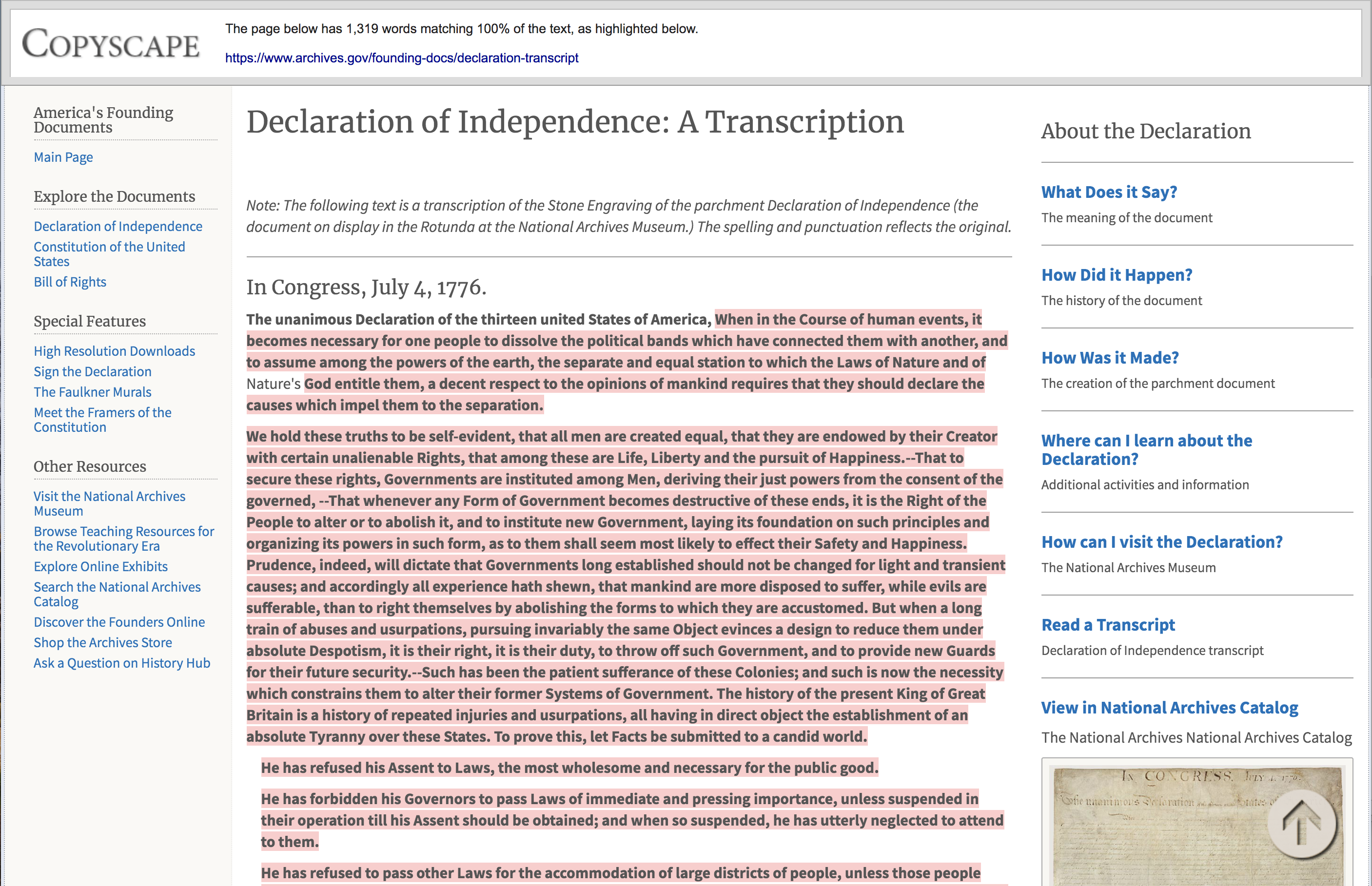
A detailed comparison shows the user's content highlighted on the found page.
Faq
Please read the list of Frequently Asked Questions below. If you have additional questions, please feel free to contact us.
To use the plugin, you must have a Copyscape Premium account. If you do not already have an account, please sign up.
To use the plugin, you will need to purchase Copyscape Premium credits. If you have not already done so, please purchase some credits now.
To get your API key, please visit the API configuration page, click ‘Enable API Access’ (if it is not already enabled), and your API key will be displayed.
If you run out of credits, checks will not be performed. If automatic checking is on, posts will be moved to drafts, and you will receive a notification that you have run out of credits. You will also be given a link to purchase additional credits.
If a check is performed immediately again on the exact same text, the previous report will be presented without a new check being performed.
In the Plugin Settings, check the box marked ‘Check for copies when a post is published’ (or ‘Check for copies when a post is updated’). Upon clicking publish (or update), your post will be checked. If your site runs WordPress version 5.0 or higher, when matching content is found, the option to view the detailed report will be presented along with the choice to unpublish the post and move it back to Drafts. If your site runs earlier versions of WordPress, when matching content is found the post will be unpublished automatically, and an option to view the detailed report will be presented, along with the choice to publish the post anyway.
Reviews
The plugin is not working
By 
The plugin is not working. I paid for the service, checked all the settings. After pressing the check button, the page is updated, but nothing changes, and the limits are not written off.
worthless plugin, reporting cookie consents as plagiarism
By 
I've spent 15$ to get hundreds of matches for... cookie consent pop-up. What a BS.
The plugin works great for detecting plagiarism
By 
I personally installed the plugin in my site to detect plagiarised content that i did not notice before. and well just for 10$ I got almost unlimited credits to check for it on product and posts pages. The tool is perfect detecting spam. The only thing is that it also autodectects the same website content as duplicate. And also after saving Twice, The plugin conflicts a little with wpml plugin and changes the language of the post which damages the page. Though i need the plugin and still works. I hope others check this great tool to fight the latest google spam updates more easily. and I hope the author can do a great update for this great plugin!!!!
very good, could be even better
By 
A must plugin for serious writer
By 
Worthless Plugin
By 
Changelog
1.0
First released version.
1.1
Added support for WordPress 5.0+
1.2
Added support for Gutenberg and classic editor
Solved warnings and notices that were shown in the dashboard
1.3
Solved issues of button hidden after the wp 5.6 update
1.3.2
Solved conflict with SEO plugins
1.3.3
Prevent sending API requests on shorter paragraphs
1.3.4
Fix View matches button not showing in gutenberg on slow themes
1.3.5
Fix fatal error in some cases
1.3.6
Add copyscape check button in WordPress 6.6.1
1.3.7
Fixed CSRF vulnerability and updated to work with WordPress 6.6.2
1.3.8
Fixed nonce validation issue
1.3.9
Improve security and fix nonce validation issue
1.4.0
Escape input values to prevent XSS attacks
1.4.1
Improve error message handling and Tested it up to latest WordPress Version