Coupon Audit and Analytics for WooCommerce

Coupon Audit and Analytics for WooCommerce
Description
Most shops accumulate coupons. A launch code from two years ago, a partner discount nobody switched off, three variations of the same campaign where only one was meant to survive. WooCommerce will happily keep honouring all of them, and it will not tell you.
This plugin reads your coupons and says what is wrong with them.
The audit
Works on day one, in every shop, with no setup and no cost data:
- Never expires — live, with nothing scheduled to ever turn it off.
- Dormant — live, but nobody has redeemed it in months.
- Dead campaign — live, while every other code from its campaign has expired.
- Applies to everything — live, with no product or category restriction at all.
- Overlaps — two live coupons that can both apply to the same product. Nothing in WooCommerce compares one coupon against another, so this is not a finding you can reach any other way.
Status is worked out when you look, never stored, so a coupon that expired overnight says so the next morning.
Filter the list by discount type, or by whether a coupon expires at all — a shop with four hundred coupons cannot be read top to bottom, and “show me everything that never expires” is the question worth asking first.
The warning where it matters
The same findings appear on the coupon edit screen, against the coupon in front of you. They never block a save. You are told, and you decide.
The margin
For each coupon: revenue, what it gave away, the cost of the goods it moved, and the gross margin left over. Over the last 30 days.
This half needs cost data, and it is honest about not having it. WooCommerce’s own cost-of-goods feature is off by default, so the plugin also reads the cost plugins shops actually use:
- WooCommerce’s built-in Cost of Goods (10.3 and later)
- Cost of Goods for WooCommerce, by WPFactory
- WooCommerce Cost of Goods
- Booster for WooCommerce
Figures come from one of these, never a mixture — a margin blended from two sets of books reconciles with neither. If several are installed you choose which one to believe.
Where cost is only partly known, the margin says so and states how much of it is real. Where no cost is known at all, no margin is shown. A wrong number in a financial dashboard destroys trust far faster than a missing number builds it.
The paid version
Coupon Audit and Analytics Premium is this plugin with more in it. It replaces this one rather than sitting beside it: installing the paid version deactivates the free one automatically, and your settings and the figures already gathered carry straight over.
It is not a licence key that switches on something already sitting here. The paid features are not in this plugin at all — they ship in the paid build and nowhere else.
- A year of margin history. The margin report covers 365 days.
- Export to CSV. The audit with its findings, and the margin figures, as they are on screen — whatever you have filtered the list down to.
- Net margin. Gross margin less what it cost to take the money. The fee is read from the gateway that actually charged it — Stripe, WooPayments and PayPal are supported, and another can be added with a filter. Where no fee was recorded, or where it was settled in a different currency from the order, the figure says so instead of guessing: a confident wrong margin is worse than an honest gap.
What it costs, and how to get it
What it does not do
It does not track your shoppers, and it does not need an account to work. Your coupons, orders and customers never leave your server: every figure on every screen is computed from your own database, on your own machine.
The plugin itself does talk to one outside service. It checks for updates, and it asks — once, and it takes no for an answer — whether you are willing to send diagnostics about the site. “Third Party Services” below says exactly what that covers.
Third Party Services
This plugin uses Freemius for software licensing, updates and — only with your agreement — usage diagnostics. Freemius is operated by Freemius, Inc.
What is sent, and when
When the plugin is activated you are shown an opt-in screen. Nothing about you or your site is sent unless you accept it, the screen can be skipped, and the plugin works in full either way.
If you opt in, Freemius receives:
- your site’s URL, name and language, and an anonymous site identifier
- the name and email address of the WordPress user who opted in
- the plugin’s version, and whether it is the free or the paid build
- whether the site is a local development install
Separately from the opt-in, the plugin contacts freemius.com to check for plugin updates and, where the paid version is installed, to validate its licence key.
What is never sent
No coupon, order, customer or revenue data. Every figure this plugin reports is calculated on your own server, from your own database, and stays there.
Installation
- Install and activate the plugin.
- Go to WooCommerce Coupon Audit. The audit works immediately.
- For margins, make sure your shop records product costs — either through WooCommerce’s own Cost of Goods feature or one of the supported plugins — then look at WooCommerce Coupon Margin.
Past orders are read in the background after activation, so margins for older periods fill in over a few minutes rather than all at once.
Screenshots
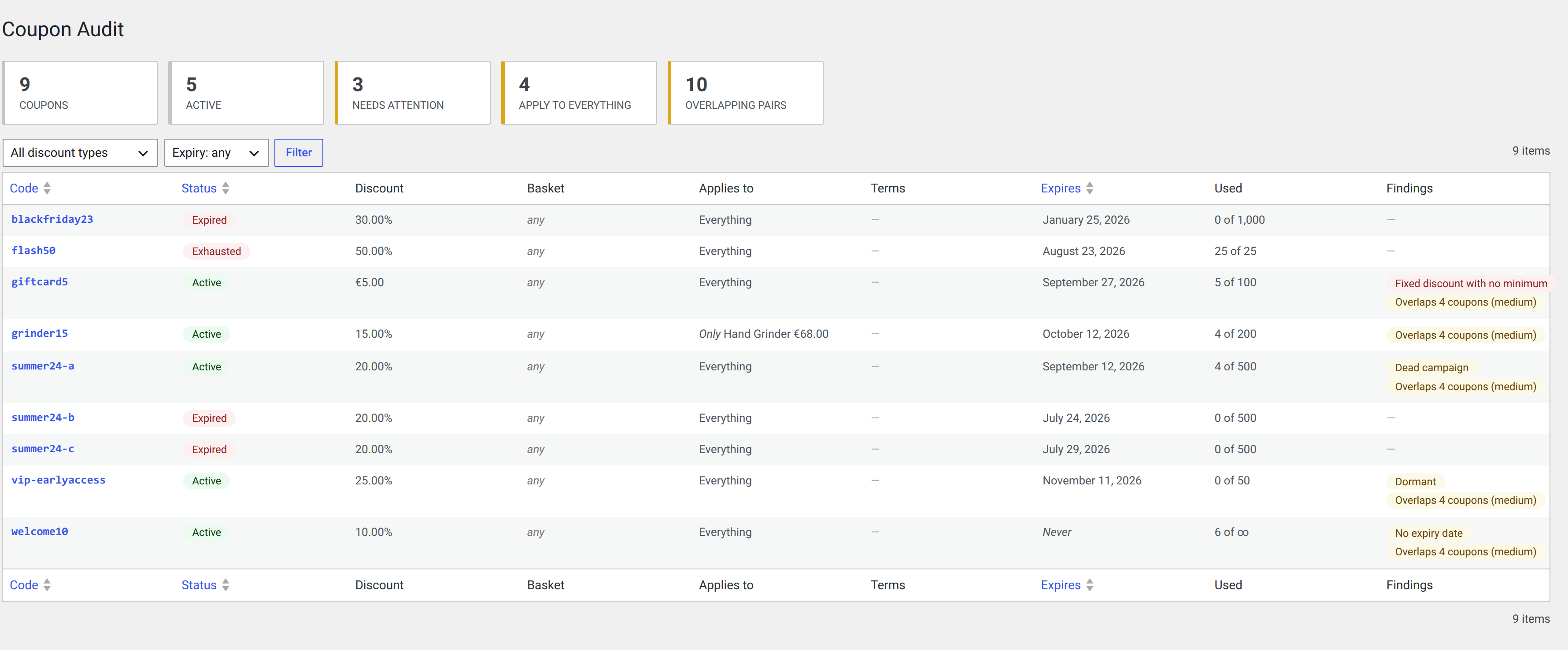
The coupon audit: every coupon, its real status, what it applies to, and what is wrong with it — expired, exhausted, dormant, dead campaign, no expiry date, and overlapping. Filter by discount type or by whether it expires.
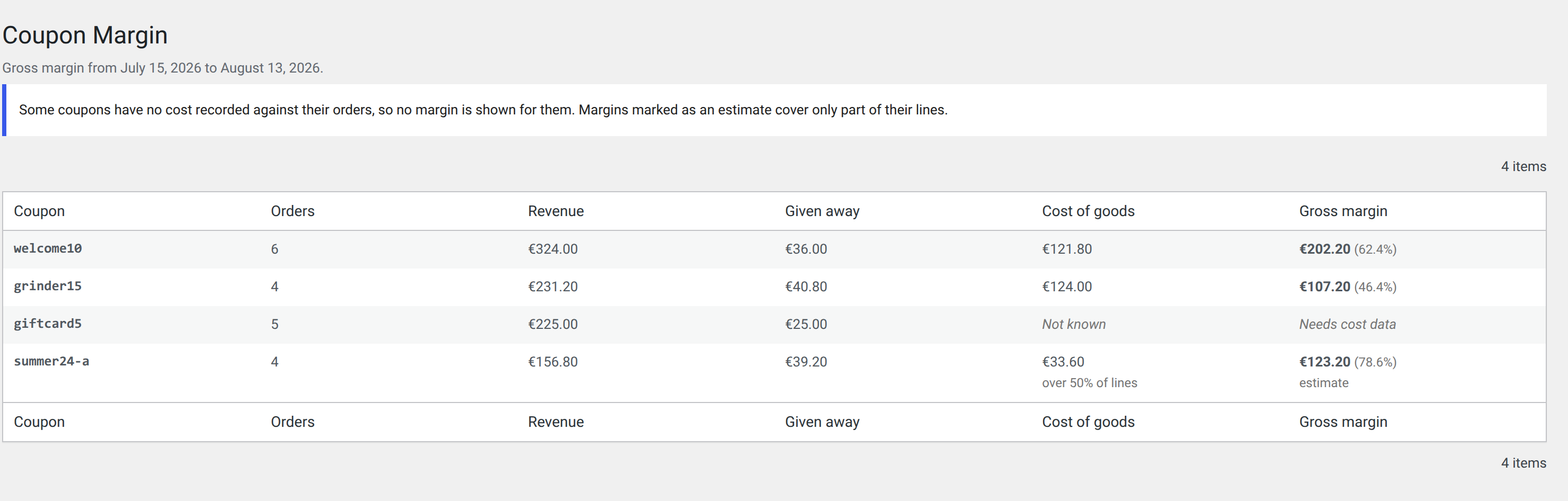
Per-coupon margin. Cost coverage is stated rather than assumed: one coupon's margin is exact, one is an estimate over half its lines, and one has no cost recorded at all and so shows no margin.
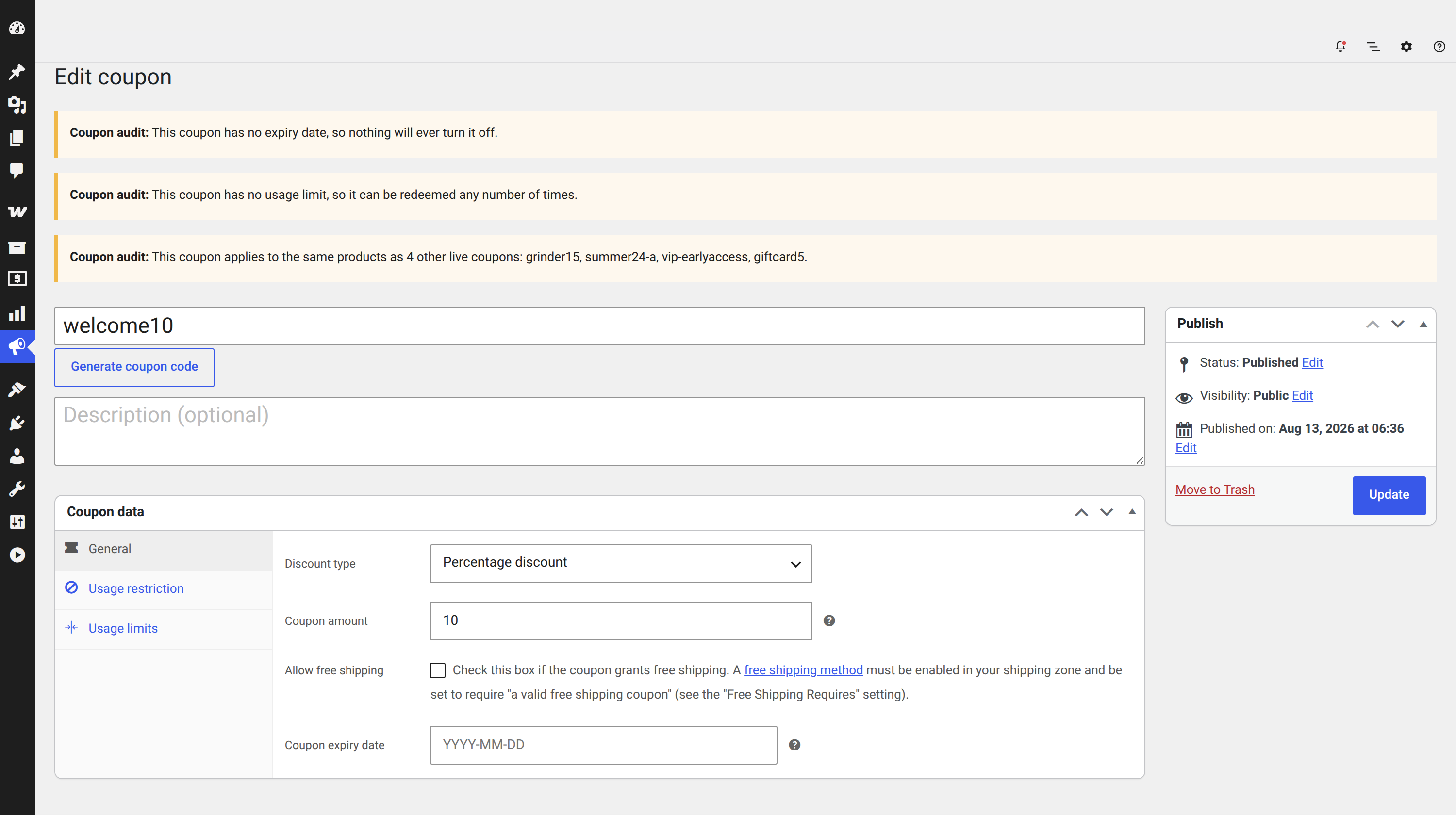
Warnings on the coupon edit screen, against the coupon in front of you. They never block a save.
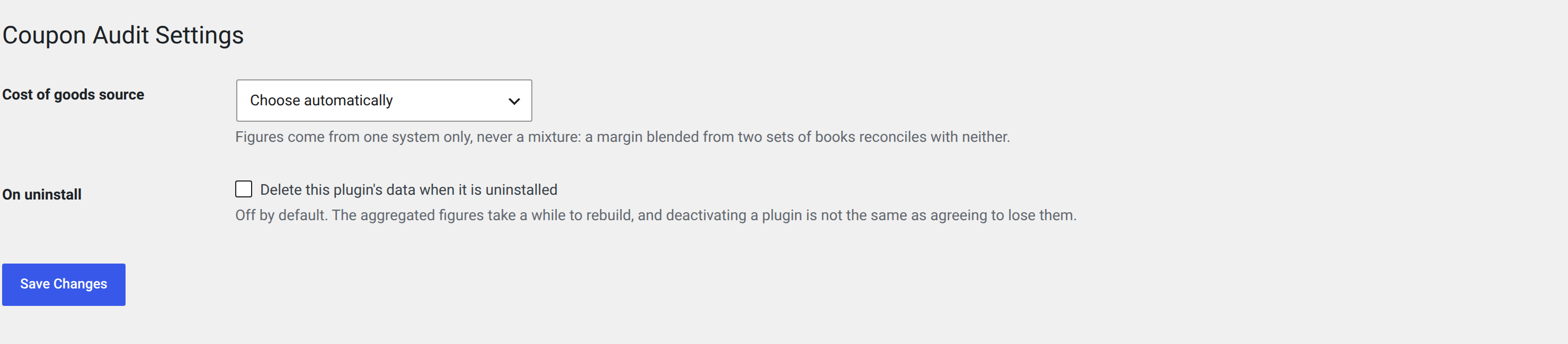
Settings: which cost-of-goods system to read, and whether uninstalling should take the data with it.
Faq
No. The audit half — expiry, overlaps, orphans, scope — needs no cost data at all and works the moment you activate.
Margins do need cost data, but not necessarily another plugin: WooCommerce has included its own Cost of Goods feature since 10.3, and it only needs switching on. If your shop already records cost in one of the third-party plugins listed above, this reads that instead — whichever one you tell it to believe.
Because none of its orders has a cost recorded against it. The plugin will not guess, and it will not quietly treat an unknown cost as zero, because that would report your revenue as your profit.
Either some order lines have no cost recorded, in which case the covered share is stated alongside; or your cost plugin only stores what a product costs today rather than what it cost when each order was placed. Both are useful. Neither is exact, and the screen says so.
One of them, chosen by you under WooCommerce Coupon Audit Settings. It never mixes them.
It does not run on the storefront at all. Aggregation happens in the background through Action Scheduler, and the admin screens read precomputed figures.
Your shop’s data, no — not a coupon, not an order, not a customer. Everything the plugin reports is worked out on your own server and stays there.
The plugin does contact one outside service, Freemius, to check for updates and to license the paid version. It also asks whether you are willing to send diagnostics about the site itself, such as its address and the version of WordPress it runs. It asks before sending anything, you can say no, and saying no changes nothing about how the plugin works. “Third Party Services” below lists every field.
Reviews
Changelog
0.9.1
- Now runs on PHP 7.4. The plugin used to require PHP 8.1, which shut it out of the many shops — most of them on managed hosting that chooses the PHP for them — still on 7.4. It installs and runs there now. Nothing about what it does has changed.
0.9.0
- For developers: the
dfxcaaw_coupon_query_argsfilter has been removed. Usedfxcaaw_coupon_rows_whereinstead — it does the same job on every read the plugin makes, at any shop size. The old filter reachedget_posts(), which the audit stopped using when it was rebuilt for large shops; what remained of it applied only to shops with fewer than three hundred coupons, so it worked on a small site and quietly did nothing on a large one. If you filter the audit and have not moved yet, this is the release that requires it. - No change to any screen or to any figure.
0.8.0
- The audit no longer lists coupons nobody can use. WooCommerce only finds a coupon by code when it is published, so a private, draft or pending coupon cannot be entered at the basket — and this screen is about what might cost you money. If your shop has any, the number of coupons it reports will drop after this update. Nothing has been deleted; they are simply not audited.
- Coupons in those states are kept when something applies them automatically, because those genuinely can discount an order — applying a coupon by ID does not check its status. Scheduled coupons are kept as well: they publish themselves when their date arrives.
- For developers: counting and the audit’s other reads now agree about what the shop holds, and counting no longer reads every coupon to produce a number. It also no longer answers
dfxcaaw_coupon_query_args;dfxcaaw_coupon_rows_whereapplies to every read, including this one.
0.7.1
- Fixes reward coupons coming back into the coupon audit. If your shop uses YITH WooCommerce Points and Rewards, the coupons it generates are kept out of the audit again. They had been reappearing since the audit screen was rebuilt for large shops, and on a busy points shop that also switched overlap detection off for every real coupon you have.
- For developers: coupons are now kept out of the audit with a new filter,
dfxcaaw_coupon_rows_where, which applies to every read the plugin makes. The olderdfxcaaw_coupon_query_argsstill works where it always did, but it cannot reach the audit screen any more — that screen stopped reading throughget_posts()when it was rebuilt. Anything relying on it to filter the audit needs to move to the new filter.
0.7.0
- The coupon audit shows when each coupon was created and when it was last used. Both columns sort, which is how you find the coupons that have been sitting there longest and the ones nobody has ever redeemed.
- Sorting by “Last used” puts the never-used coupons first. One nobody has redeemed is staler than one redeemed two years ago, not fresher than one redeemed today.
- Both dates are in the audit CSV export as well, in the paid version, and that file’s columns now run in the same order as the table on screen.
0.6.1
- Fixes a failure that stopped a day’s figures being built. WooCommerce records an order’s coupon with a placeholder when it can no longer tell which coupon was used — an old order for a coupon that has since been deleted — and reading one stopped the whole day. Any shop that has ever deleted a coupon could hit this.
- Days whose figures could not be built are now tried again by themselves, and again whenever this plugin is updated, rather than being lost.
- Reading past orders no longer stops at the first day it cannot build. It used to halt there, so a shop with years of history behind that day never saw any of it.
- The margin screen says when figures for some days could not be built, instead of leaving a gap that reads like a quiet week.
0.6.0
- The coupon audit works on shops with tens of thousands of coupons. It used to read every coupon in the shop before it could draw a single row, so past about ten thousand it ran out of memory and showed nothing at all. It now reads the page it is showing you. A shop with 26,000 coupons opens in a few seconds.
- The audit now starts on the coupons that are in force. Scheduled, expired, exhausted and draft coupons are one click away, on the links above the table, along with “All”. A shop holding thousands of spent, long-expired codes gets an audit rather than a list.
- “Needs attention” and “Apply to everything” are links now. They were numbers with no way to see which coupons they counted.
- Opening a coupon for editing no longer reads every other coupon in the shop first. On a large shop that was enough to fail the page.
- Coupon margin reads one page at a time as well, and sums the period in the database rather than in memory, so it works on a shop with years of orders behind it.
- Cost of goods is found by the data your shop actually stores rather than by which plugin is installed, so cost set by custom code under a supported key is now read.
- The plugin’s screens sit beside Coupons in the menu, wherever your version of WooCommerce puts them.
- Building the daily figures no longer loads each order in full, so the first run through a large shop’s history finishes.
- No change to any figure. Everything above is about reaching the same answers on a shop the plugin could not previously serve.
0.5.4
- Fixes a second fatal error on activation in the paid version. The free plugin was never affected by either.
0.5.3
- Fixes a fatal error on activation in the paid version. The free plugin was never affected.
0.5.2
- The links on this page work. WordPress.org shows a bare address as plain text, so the link to the plugin’s own site and the links to Freemius’s terms and privacy policy were all unclickable — including the two the privacy disclosure exists to point at.
0.5.1
- Corrects this page. It described the paid version as installing alongside the free one; it replaces it — installing the paid version deactivates the free one automatically, and your settings and figures carry over. The 0.5.0 description reached the directory before that correction did.
- Net margin reads payment fees from Stripe, WooPayments and PayPal, not from Stripe alone as the previous description said.
- No change to any screen or to any figure.
0.5.0
- A paid version is now available: a year of margin history, CSV export, and margin after payment fees. It replaces this plugin rather than sitting beside it; see “The paid version” above.
- The plugin now asks, once, whether you are willing to share diagnostics about the site. You can decline and everything keeps working. “Third Party Services” below says exactly what that covers.
- No change to what any screen shows, or to any figure it reports.
0.4.1
- Clearer answer on cost data: WooCommerce has included its own Cost of Goods feature since 10.3, so no separate plugin is needed for margins — the third-party ones are still read if your shop already uses one.
- A banner and an icon for the plugin directory.
0.4.0
- Filter the audit by discount type, and by whether a coupon expires at all. The summary tiles keep describing the whole store, so the counts do not move as you narrow the list.
0.3.1
- Tested against WordPress 7.1 and WooCommerce 11. No code changes.
0.3.0
- The margin window is now a documented filter,
dfxcaaw_margin_window_days, rather than a fixed cap. Thirty days remains the default; anything can change it, including a snippet in your own theme. - Removed the internal feature-gate layer. Nothing in this plugin is withheld.
0.2.1
- Fixed the basket column, which read “0.00 to 0.00” against every coupon that has no spend limits. It now says “any”, which is what it means.
- Fixed a warning that never appeared: a fixed discount with no minimum spend was not reported, because every coupon looked as though it required a basket of at least zero.
0.2.0
- The overview now shows what each coupon actually is: the discount, the basket it requires, free shipping, individual use, and the usage caps per customer and per basket.
- “Applies to” names the products and categories, prices them, and strikes through anything a customer cannot currently buy.
- New finding: a fixed discount worth more than the minimum spend it demands, or more than something it applies to. WooCommerce applies these without comment.
- Support for WooCommerce Extended Coupon Features, including coupons it applies automatically — which is what makes a high-severity overlap possible at all.
- Support for YITH WooCommerce Points and Rewards: its generated reward coupons are kept out of the audit, where tens of thousands of them would bury the coupons you chose.
- Filters for other plugins to add columns, fill them, and shape the coupon query.
- Much faster on shops with a lot of coupons. The overview used to read every coupon’s settings one at a time and weigh each coupon against every other by searching the list afresh; both are now done once. On a test shop of 500 coupons and 300 products the screen went from 737 database queries to 27, and from roughly 3.7 seconds to 0.6.
0.1.0
- First release: coupon audit, overlap detection, pre-publish warnings and 30-day gross margin.