Vulnerability Monitor for the EU Cyber Resilience Act

Vulnerability Monitor for the EU Cyber Resilience Act
Description
EU Cyber Resilience Act (CRA) readiness for WordPress, from inside wp-admin.
This plugin builds a component inventory and a CycloneDX SBOM, monitors your components for known vulnerabilities, and generates the documentation a CRA vulnerability-handling process relies on.
The EU Cyber Resilience Act (CRA, Regulation (EU) 2024/2847) is a new European law for almost any product with “digital elements”, which includes software placed on the EU market. If your business makes, sells or distributes software, for example commercial WordPress plugins and themes, or software products built on WordPress, the CRA most likely applies to you. (Purely online services are generally covered by other rules such as NIS2 rather than the CRA.)
What the CRA requires
To work towards compliance you are expected to know what your software is made of, to monitor it for vulnerabilities, and to document both. In practice that means three things: a Software Bill of Materials (SBOM), ongoing vulnerability monitoring, and auditor-ready documentation. Vulnerability reporting obligations apply from 11 September 2026, and the full set of obligations from 11 December 2027.
What this plugin does
- Builds an inventory of everything your site is made of: WordPress core, plugins and themes, must-use plugins and drop-ins, with versions, suppliers and licenses.
- Generates a standards-based CycloneDX 1.6 SBOM, a format auditors and enterprise customers commonly request.
- Monitors your components against known vulnerabilities (CVEs) and tells you, in plain language, what is at risk and how urgent it is.
- Produces the documents the CRA actually requires: a CSAF 2.0 / VEX advisory and an EU Declaration of Conformity, ready to hand over.
- Keeps a tamper-evident audit log so you can show what you knew and when.
No tool can make you fully compliant on its own, because the CRA also covers your internal processes. What this plugin does is produce the WordPress-side evidence and documentation for those requirements.
Free features (run entirely on your own server, no account needed)
- Component inventory of WordPress core, plugins (active and inactive), must-use plugins, drop-ins and themes, with version, author, license and declared dependencies.
- CycloneDX 1.6 SBOM export with package URLs (PURL), SHA-256 hashes, SPDX license identifiers, transitive Composer and npm dependencies, and a “known unknowns” flag for minified or obfuscated assets.
- Transitive dependency parsing from composer.lock and package-lock.json.
- Plugin and theme health scoring (abandonment risk) and file integrity checks against the official WordPress.org checksums.
- Compliance dashboard showing your posture and per-component status on screen.
- Hash-chained audit log you can view and verify.
- CSAF 2.0 / VEX advisory export and a SECURITY.md generator, built locally on your server.
- EU Declaration of Conformity generator (printable HTML and JSON), built locally on your server.
- Compliance report export with per-component status and a time-to-patch view.
- CI policy gate (
wp cravm policy-check) that exits non-zero so a pipeline can block a risky release. - WP-CLI commands for the inventory, SBOM and every document export, ready for CI/CD.
All of the above run entirely on your own server and are free. Note that the document exports describe whatever vulnerabilities your last scan recorded, so without an active license (see below) they list no vulnerabilities.
Premium features (require an active license)
Vulnerability data is provided by the Mecanik API (api.mecanik.dev), so no third-party scanning keys are ever shipped inside the plugin. You can buy a license at https://mecanik.dev/en/plugins/eu-cyber-resilience-act-wordpress/. See the External Services section below for exactly what data is sent and when.
- Continuous vulnerability monitoring of your components against the U.S. National Vulnerability Database (NVD), OSV.dev and Wordfence Intelligence, on demand and on a daily schedule.
- Risk prioritisation with CVSS severity, EPSS exploit probability and CISA “known exploited” (KEV) signals, so you fix what matters first.
- Automated alerts by email and webhook (Slack, Discord, Microsoft Teams or generic JSON), with configurable thresholds and scheduled digests.
A license adds the live vulnerability data and alerts; this is what fills the free SBOM, VEX, SECURITY.md and compliance documents with actual findings.
External Services
This plugin connects to the Mecanik API (https://api.mecanik.dev), operated by Mecanik Dev Ltd, to provide vulnerability scanning. The free features (inventory, SBOM generation, the CSAF/VEX, SECURITY.md, Declaration of Conformity and compliance-report exports, and the WP-CLI commands) run entirely on your server and send nothing to the Mecanik API. The Health and Integrity features query WordPress.org’s own public services, as described below.
No external request is made to the Mecanik API until you take an explicit action: entering a license key, or enabling and running a scan.
What is sent, and when:
- License activation and validation (when you enter a license key, and once a day afterwards to revalidate): your license key, your site domain, a one-way hashed site identifier derived from your site URL, and the plugin version.
- Vulnerability scanning (only when you hold an active license and a scan runs, on demand or daily): the list of installed components as name, slug and version, plus the identifiers above. No post content, user data or visitor data is ever sent. On the Mecanik API your components are matched against advisory data from the U.S. National Vulnerability Database (NVD), OSV.dev and Wordfence Intelligence; the plugin itself never contacts those sources directly.
- Plugin and theme health and integrity (when you open the Health or Integrity screens, or run the matching WP-CLI commands): the plugin or theme slug and version are sent to WordPress.org, to api.wordpress.org for maintenance data and to downloads.wordpress.org for official file checksums. These are WordPress.org’s own public services and no license is required.
No personal data about your site visitors is collected or transmitted. The hashed site identifier is used to bind a license to a site and cannot be reversed into your URL.
- Service provider: Mecanik Dev Ltd, https://mecanik.dev/en/
- Terms of Service: https://mecanik.dev/en/legal/terms/
- API Terms: https://mecanik.dev/en/legal/api-terms/
- Privacy Policy: https://mecanik.dev/en/legal/privacy-policy/
Installation
- Upload the
cra-vulnerability-monitorfolder to/wp-content/plugins/, or install it through the Plugins screen in WordPress. - Activate the plugin through the Plugins menu.
- Open “CRA Monitor” in the admin menu to view your component inventory and generate a CycloneDX SBOM and the compliance documents. This is free and needs no account.
- To add live vulnerability monitoring and alerts that populate those documents with findings, enter your license key on the License screen.
Screenshots
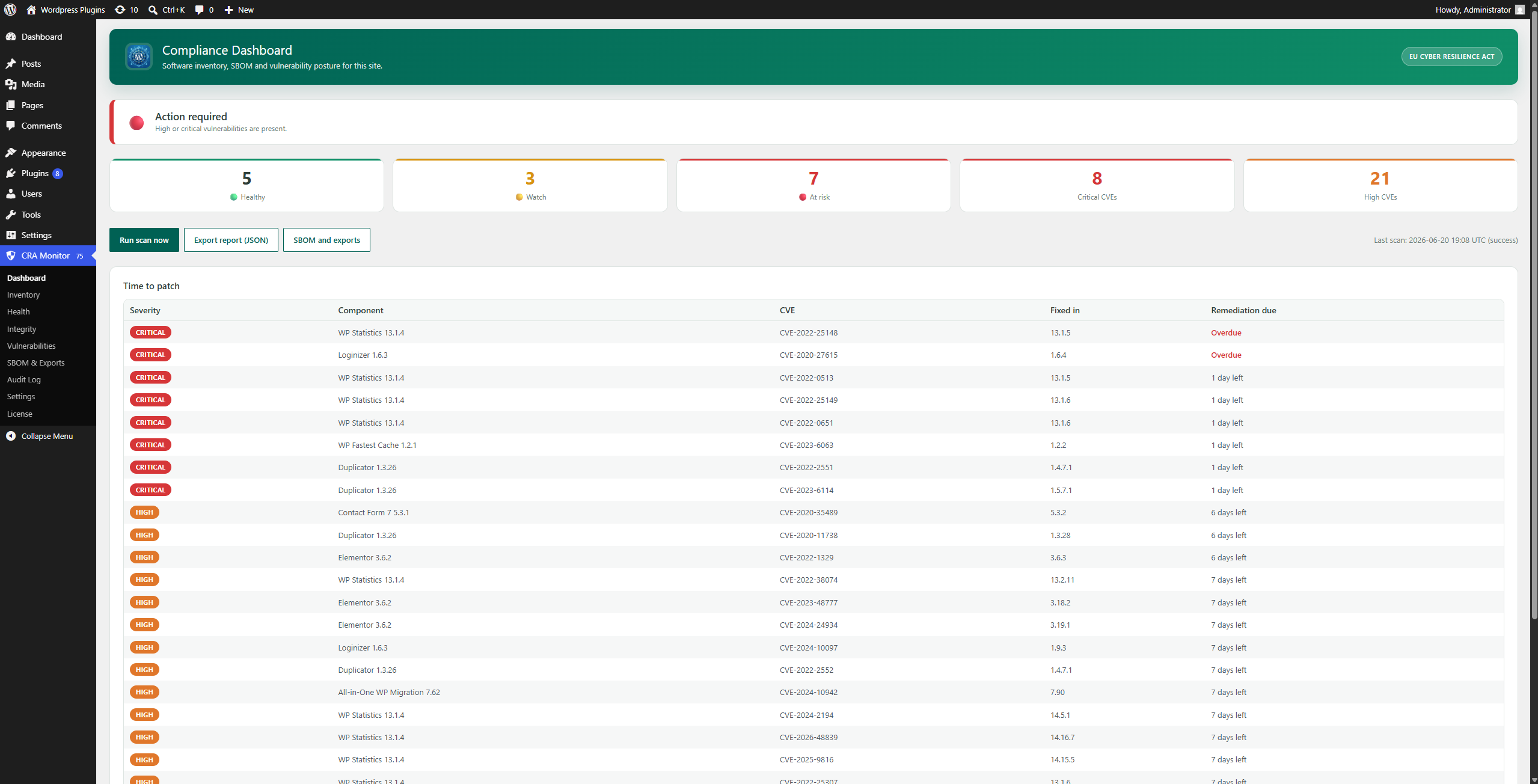
Compliance dashboard: overall posture and the time-to-patch queue.
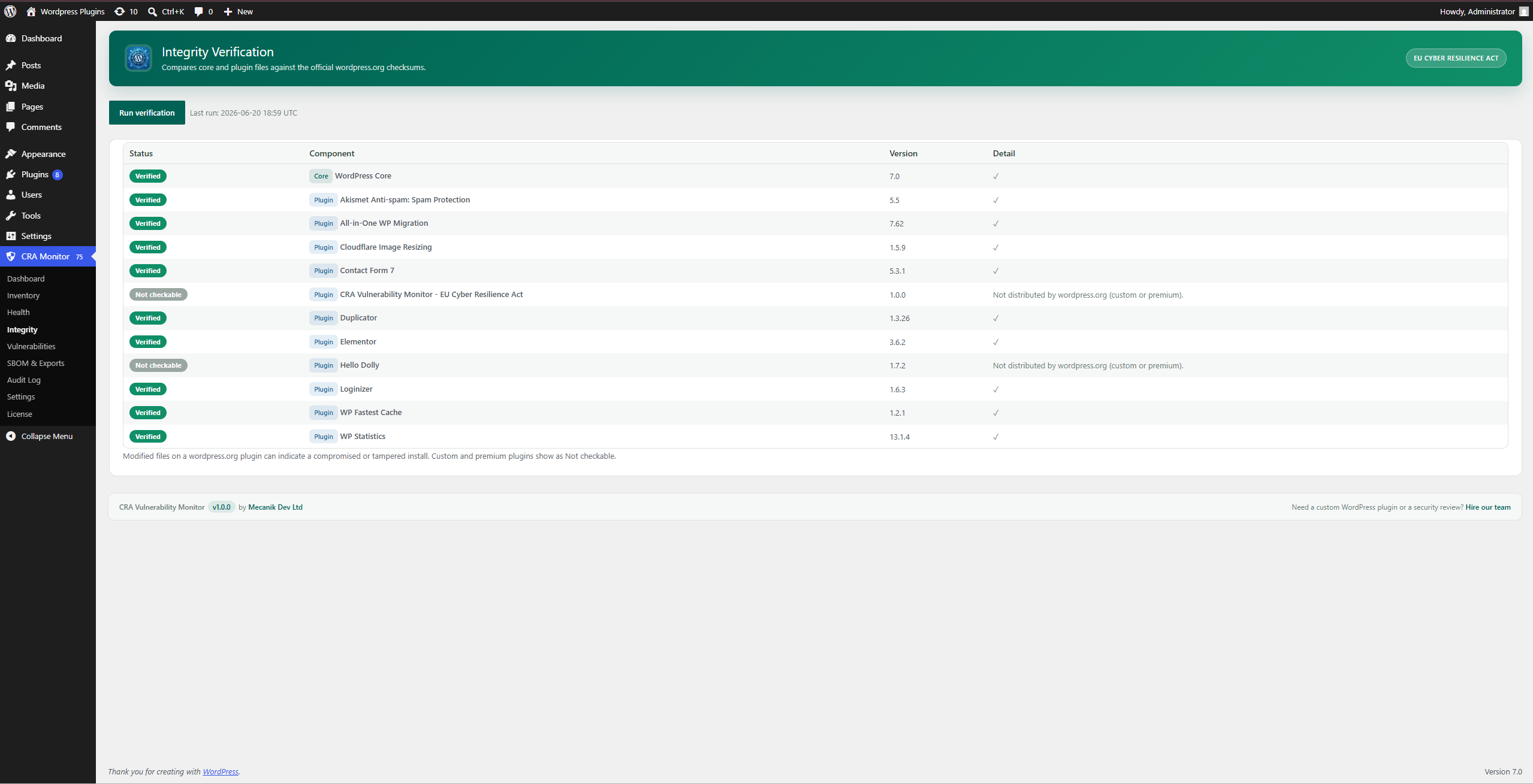
Integrity: core and plugin files verified against the official WordPress.org checksums.
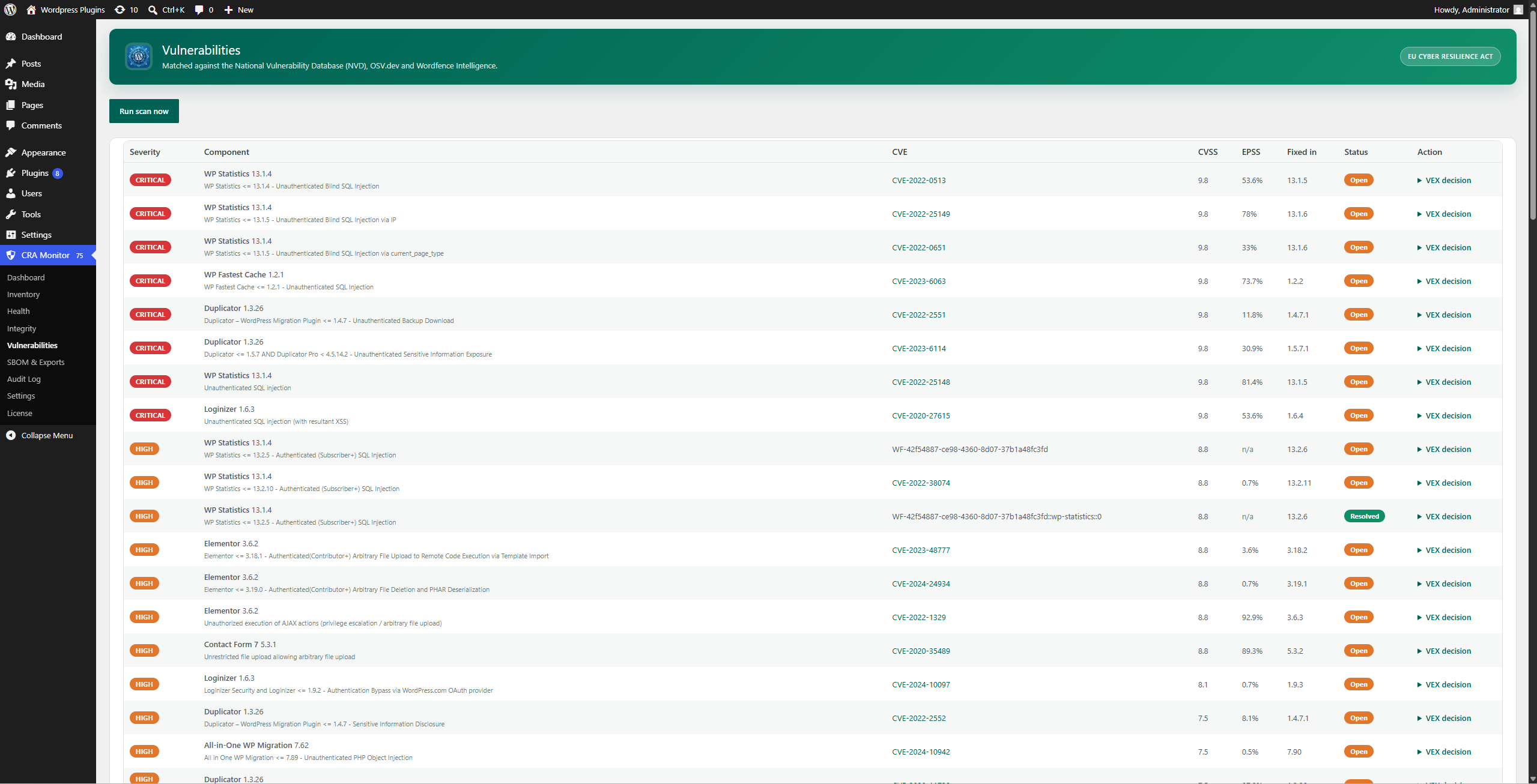
Vulnerabilities: findings prioritised with CVSS, EPSS and CISA KEV signals.
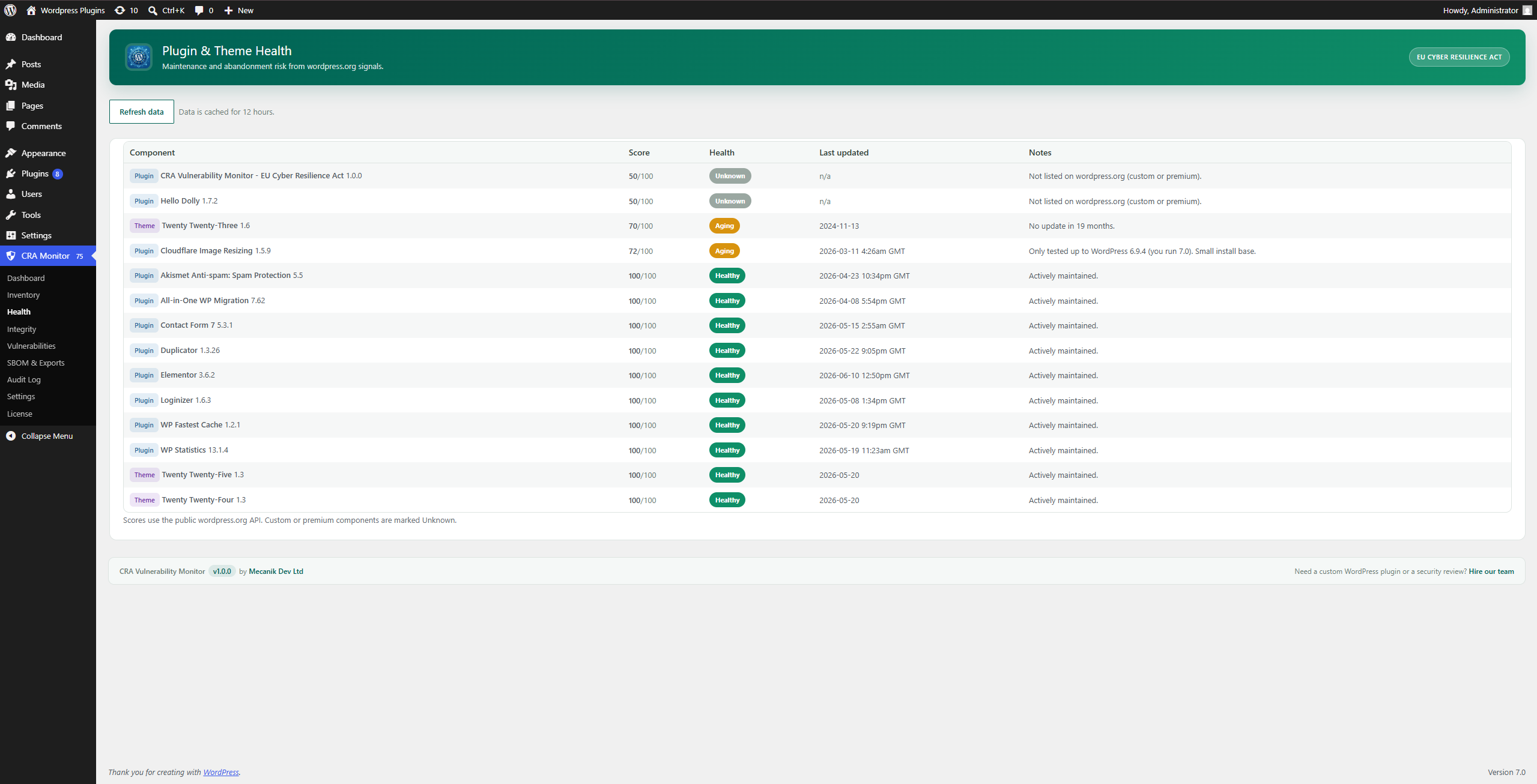
Health: plugin and theme maintenance and abandonment-risk scoring.
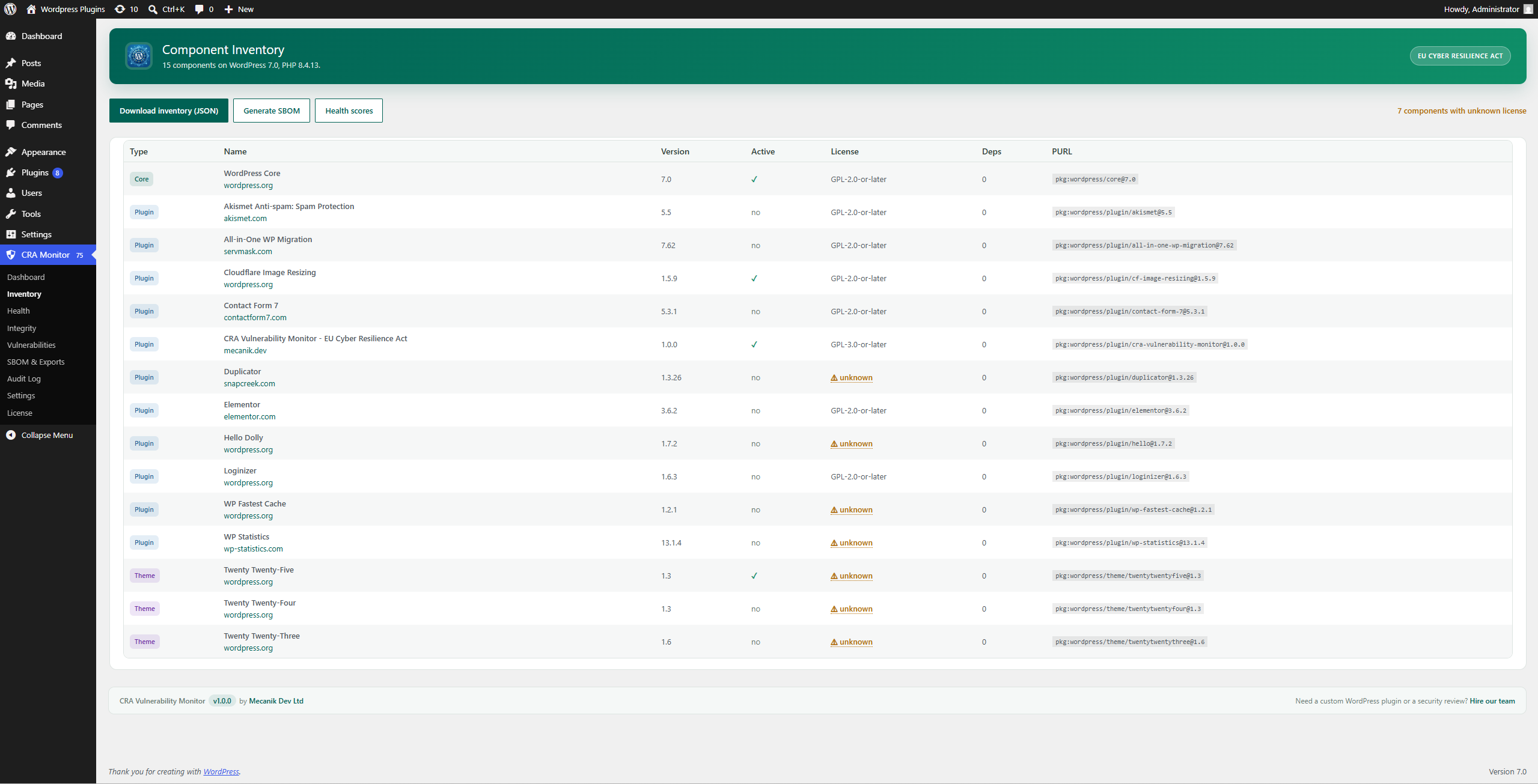
Inventory: every component across core, plugins, themes, must-use plugins and drop-ins.
Faq
The EU Cyber Resilience Act (Regulation (EU) 2024/2847) is European law that sets cybersecurity requirements for products with digital elements placed on the EU market. It expects makers of such products to know what their software is made of, to track and handle vulnerabilities, and to document conformity.
The CRA applies to manufacturers, importers and distributors of products with digital elements placed on the EU market, which includes commercial WordPress plugins and themes and other distributed software products built on or shipped with WordPress. (Purely online services are generally covered by NIS2 rather than the CRA.) Non-compliance can mean fines of up to 15 million euro or 2.5% of worldwide annual turnover, and products being withdrawn from the EU market. The main obligations apply from 11 December 2027, with vulnerability reporting from 11 September 2026.
No single tool can make you fully compliant, because the CRA also covers your internal processes. This plugin provides core technical evidence for a WordPress site: a component inventory, a CycloneDX SBOM, vulnerability monitoring, and the CSAF/VEX and Declaration of Conformity documents that support a CRA vulnerability handling process.
Yes. The core is free and GPL-licensed: the component inventory, the CycloneDX SBOM export, the CSAF/VEX, SECURITY.md, EU Declaration of Conformity and compliance-report exports, plugin/theme health and integrity checks, the on-screen compliance dashboard, the audit log and the WP-CLI commands. Continuous vulnerability monitoring and automated alerts require a premium license; that license is what fills the free documents with actual vulnerability findings.
No. The component inventory, the CycloneDX SBOM and every document export (CSAF/VEX, SECURITY.md, Declaration of Conformity and the compliance report) run locally on your server and are completely free. A license adds the live vulnerability data and alerts; until a scan runs, the documents simply list no vulnerabilities.
Your inventory is sent to the Mecanik API, which matches it against the U.S. National Vulnerability Database (NVD), OSV.dev and Wordfence Intelligence, and returns the findings enriched with CVSS, EPSS and CISA KEV signals. No post content, user data or visitor data is ever sent, and no upstream API keys are bundled in the plugin.
Yes. The core compliance tasks are available through WP-CLI, including the inventory, SBOM, scanning, the document exports and the policy gate, for example wp cravm generate-sbom and wp cravm policy-check, the latter exiting non-zero so a pipeline can block a release. (Configuration such as alert settings and suppression rules is done in wp-admin.)
Reviews
Changelog
1.0.0
- Initial release: component inventory, CycloneDX 1.6 SBOM, transitive dependency parsing, plugin/theme health and file integrity checks, compliance dashboard, hash-chained audit log, vulnerability monitoring, risk prioritisation, automated alerts, CSAF/VEX export, EU Declaration of Conformity, compliance report export, CI policy gate and WP-CLI commands.