CrawlerToll

CrawlerToll
Description
Encrypt your content. CrawlerToll is a paywall where the content itself is the lock.
Mark a post as premium and place the cut. Everything below the cut is encrypted (AES-256-GCM) before it leaves your server, so visitors, AI crawlers, RSS feeds, the REST API and page caches all get the same thing until someone pays: your preview and ciphertext. After payment the key is released and the reader’s browser decrypts the post in place.
- Paid to you, not to us. Readers pay by card on your own Stripe account. AI agents pay in USDC over the open x402 standard, settled by a third-party facilitator into your own wallet. CrawlerToll holds no payment credentials and takes no cut.
- One paywall for people and AI agents. People see a payment panel. Agents get a signed HTTP 402 offer they can pay by machine.
- Fail-closed. If the unlock service cannot be reached, sealed posts stay locked and no payment can start. If a card payment goes through and the article doesn’t open, the reader’s browser remembers the payment and finishes it on the next try in the same browser, without a second charge.
- Search-friendly. The preview stays crawlable and carries paywall structured data. Every visitor, search engines included, gets the same content: the preview and the encrypted block.
- Declared AI crawlers. Recognises 30 declared AI-crawler user-agents (GPTBot, ClaudeBot, PerplexityBot, Google-Extended and more) and publishes RSL-style licence lines in robots.txt. AI crawlers are shown your price, or told the content is not licensed until you can be paid. Paid access is sold per article: mark posts as premium.
- Receipts and refunds. Every paid unlock leaves a receipt linking to the Stripe payment or on-chain transaction. Refunds happen in your own Stripe account.
- EU/UK right of withdrawal. An optional consent step before paid unlocks, recorded on the Stripe payment and the receipt.
- Cross-device access. After an unlock, a QR code or 8-character code moves the access to another device without paying twice.
Everything above is in the free plugin. CrawlerToll Pro adds access passes, section bundles, metered free articles, per-path pricing, per-crawler rail routing, a revenue dashboard, bot-request logs, email alerts, signed unlock webhooks and “Revoke access” for refunds.
For developers: what happens on each request
- Recognise. The user-agent is matched against a curated catalogue of 30 declared AI crawlers: GPTBot, ChatGPT-User, ClaudeBot, Claude-User, Google-Extended, Applebot-Extended, PerplexityBot, Meta-ExternalAgent, Bytespider, CCBot, Cohere, Mistral, You.com, Diffbot, Bright Data and more.
- Apply policy. Your robots.txt policy, written with RSL-style lines (
License:,Permits:,Prohibits:,Compensation:), is applied to the request path. - Answer. HTTP 402 with
Crawler-Price,Crawler-Price-RailandLinkheaders plus a structured JSON payment offer when policy says so and your site can be paid; 403 “not licensed” when it cannot be paid yet or policy disallows without compensation; otherwise the request passes through withX-CrawlerToll-Action,X-CrawlerToll-OperatorandX-CrawlerToll-Bot-Nameheaders for downstream logging.
Two discovery endpoints for crawlers: /robots.txt (your RSL-style policy, added through WordPress’s standard robots_txt filter) and /.well-known/context-license.json (machine-readable licence metadata built from your settings).
What this plugin does NOT do
- Hold your money. Card payments settle on your Stripe account and USDC lands in your wallet. There is no CrawlerToll balance, payout, or fee.
- Replace Cloudflare Pay Per Crawl. Pay Per Crawl runs at Cloudflare’s edge; this plugin runs inside WordPress. You can use both, at their own layers; there is no integration between them.
- Identify scrapers that hide. User-agent recognition only covers crawlers that declare themselves; a headless browser pretending to be a person is invisible to any plugin. That is why sealing exists: on premium content an unidentified scraper receives the encrypted body, not the article. Edge tools such as Cloudflare Bot Management handle the rest of your site.
CrawlerToll Pro
The free plugin is a complete paywall. CrawlerToll Pro adds the revenue tooling:
- Access tiers and bundles: 24-hour, 30-day or permanent passes per section, or one pass for a whole section.
- Read packs: sell “10 articles for $5” so card readers can pay small article prices. Readers then open articles in one tap until the pack is used up.
- Summaries sold separately: add a Summary block and readers can buy just the key points for less; the full article includes it.
- AI training licences: let AI agents buy an article together with the right to train on it, with a signed licence that records the purchase.
- Metered free articles: a number of free reads per month per section, without reader accounts.
- Per-path pricing and rail routing: different prices for different sections, and different payment rails per crawler.
- Revenue dashboard: what readers and agents actually paid, by rail, next to the 402s you priced.
- Bot-request logs: every decision, filterable, with CSV/JSON export and a retention window you choose.
- Email alerts: daily and weekly summaries plus spike alerts.
- Content provenance: SHA-256 fingerprints of exactly what each crawler received.
- Unlock webhooks: signed
unlock.succeededevents to your own systems. - Revoke access: end a reader’s pass after a refund.
$4.90/month or $32.90/year per site, with a 14-day trial and no card required. See crawlertoll.com/pro.
External services
Crawler recognition, RSL policy and plain 402 responses run entirely on your server. The sealed paywall and the payment rails use these services. None of them ever receives your article text in the clear.
- CrawlerToll unlock service (registry.crawlertoll.com) — the key escrow, operated by Charthouse Ltd. It records unlock receipts (content id, rail, transaction reference) that you can read back in Settings. It never receives the article text, card numbers, or wallet keys. If it is unreachable, sealed posts stay locked and no payment can start. There is no SLA at launch, for either tier. Terms: https://crawlertoll.com/terms · Privacy: https://crawlertoll.com/privacy What it receives, and when (free and Pro unless marked):
- When you open the CrawlerToll settings screen, the plugin checks https://registry.crawlertoll.com/health (at most every 5 minutes). Like every WordPress HTTP request, this sends your site’s address in the User-Agent.
- When a premium post is first viewed or repriced, the plugin sends the post’s content key, content id (your host + post id), price, pricing rules and, if set, your USDC payout address. The first time, it also enrols your site with the service: your domain, site name, up to five category names (or your tagline) and the address of your licence file. Enrolling does not list your site anywhere.
- When a reader pays by card, the plugin sends the Stripe payment id, the tier and a device id so the service can release the key.
- Readers’ browsers fetch the price offer from it (including the daily reference rate used to convert a price in another currency to USDC) and, after paying, the key.
- Optional: if you enter an “Email for CrawlerToll” or ask to be listed in the CrawlerToll directory, that email and your request are sent with your enrolment and whenever you change them. The email is never published; Charthouse uses it only to contact you about the service. A listing request is reviewed before your domain, site name, categories and price appear in the public directory. The plugin also contains code for an hourly content-fingerprint feed to the directory (SHA-256 hash, request path, time, price); it is never scheduled in this version, so nothing is sent. If you set up a webhook (Pro), its URL and signing secret are stored by the service, which sends unlock events to it.
- Stripe — only when you enter your own Stripe keys. The plugin creates and verifies PaymentIntents on your Stripe account, and readers’ browsers load Stripe.js (js.stripe.com) to show the card form. Stripe receives the amount, currency, the post id in the payment metadata and, when given, the reader’s email for the Stripe receipt. Terms: https://stripe.com/legal · Privacy: https://stripe.com/privacy
- x402 facilitator (facilitator.xpay.sh by default) — contacted by the unlock service, not by your site, to settle a reader’s or agent’s signed USDC authorisation on-chain into your wallet. Terms: https://www.xpay.sh/legal/terms-of-use/ · Privacy: https://www.xpay.sh/legal/privacy-policy/
- Coinbase Smart Wallet (keys.coinbase.com) — only when a reader chooses “Coinbase passkey wallet” to pay in USDC. The reader’s browser opens Coinbase’s wallet window, where the reader signs in with a passkey and approves the payment. Your site sends Coinbase nothing; Coinbase sees the reader’s wallet address and the payment they approve. Terms: https://wallet.coinbase.com/terms-of-service · Privacy: https://www.coinbase.com/legal/privacy
- Freemius (Pro version only) — license validation, checkout, and Pro updates. When you activate a Pro license the plugin contacts Freemius (the licensing provider and merchant of record). After you opt in (optional and skippable), Freemius may also collect anonymous environment data such as your WordPress and PHP versions to improve the product. Terms: https://freemius.com/terms/ · Privacy: https://freemius.com/privacy/
- Bot catalogue updates (Pro) — the plugin periodically fetches the latest AI-crawler list from https://registry.crawlertoll.com/v1/bots.json via a plain HTTP GET. No visitor data is sent; like every WordPress HTTP request, it carries your site’s address in the User-Agent. Terms: https://crawlertoll.com/terms · Privacy: https://crawlertoll.com/privacy
Why CrawlerToll exists
AI answers read articles without paying for them, paywalls that only hide content are bypassed, and bot blocking relies on crawlers telling the truth about who they are. CrawlerToll builds on open standards instead of a closed platform: HTTP 402, RSL-style licence lines (rslstandard.org) and x402.
Installation
- Upload the
crawlertollfolder to/wp-content/plugins/, or install via the Plugins Add New menu. - Activate through the ‘Plugins’ menu in WordPress.
- Go to Settings CrawlerToll.
- Review the default policy. It names the 7 most common AI crawlers with a per-crawl price (
Compensation:5000 micros, i.e. $0.005). Crawlers are shown that price once your site can be paid (Stripe keys, a USDC address or a payment URL); until then they are told the content is not licensed. Adjust price, currency, rail and policy to fit your site. - Save.
To sell content to people, set your Article price for readers (default $1.00), enter your Stripe keys and/or USDC address, then switch on Premium in the Paywall panel of the post editor and place the cut where the free preview ends. The post is encrypted as it publishes.
The plugin starts enforcing immediately. Test with:
curl -sI -H 'user-agent: GPTBot/1.2' https://your-site.example/
Once your site can be paid you should see a 402 Payment Required response with the Crawler-Price header; before that, a 403 “not licensed” answer.
Screenshots
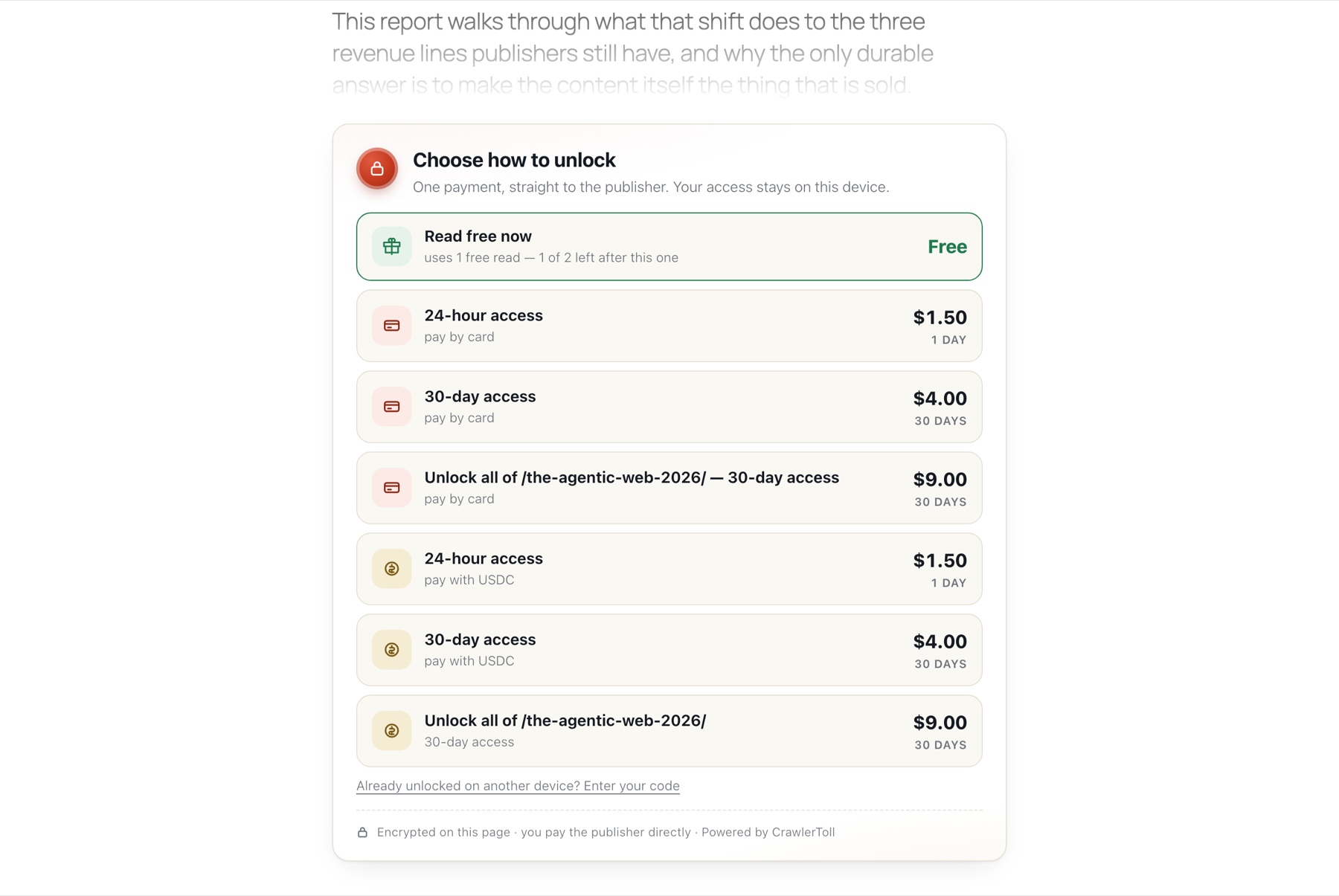
A sealed article as a reader sees it: the free preview, then passes by card or USDC, paid straight to the publisher.
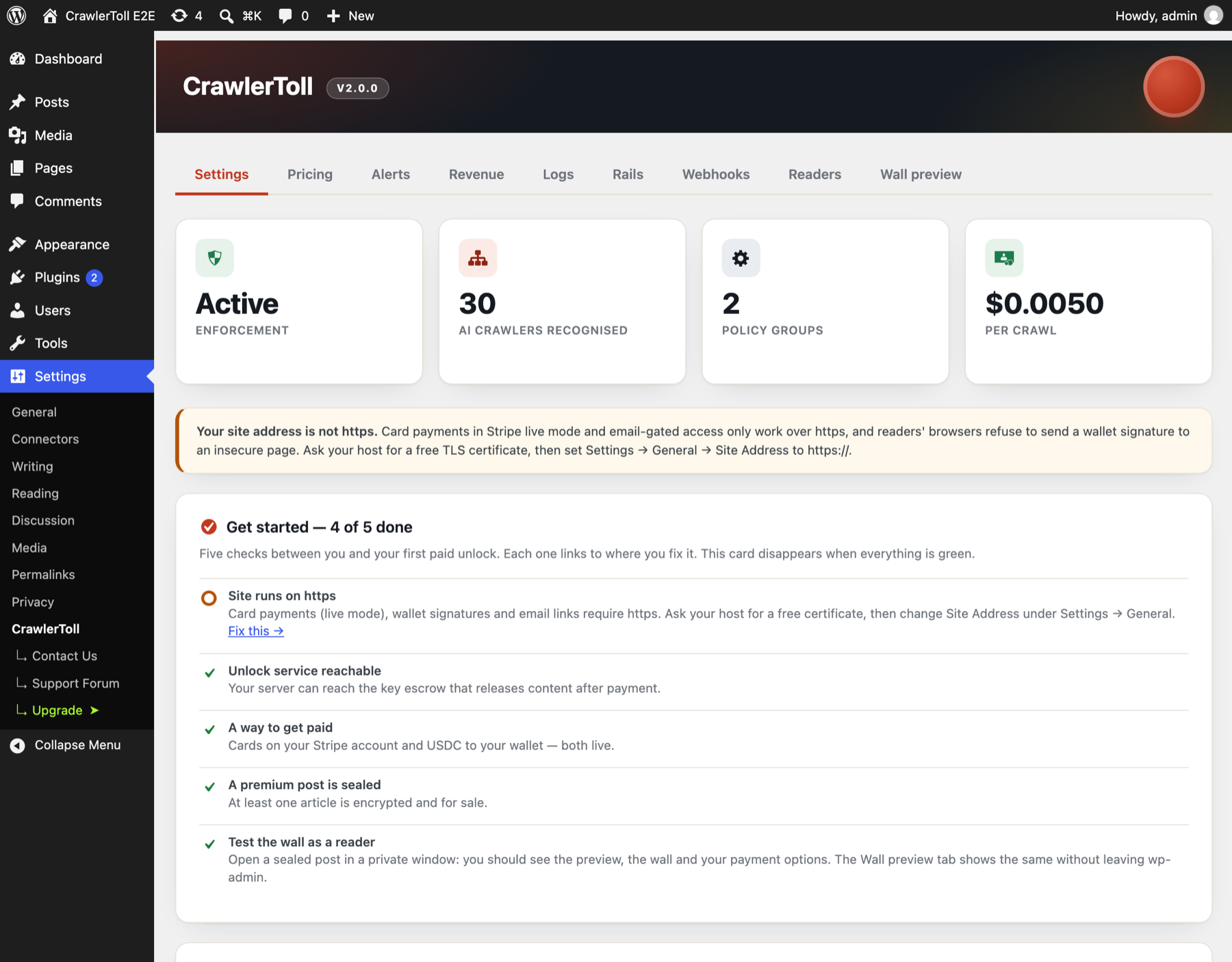
Settings → CrawlerToll: live status, the Get started checklist with links to each fix, and the https warning where cards need it.

Revenue dashboard (Pro): realised revenue next to priced 402s, and Traffic: browser requests, declared AI crawlers, search engines and undeclared automation, with the sealed-content funnel.
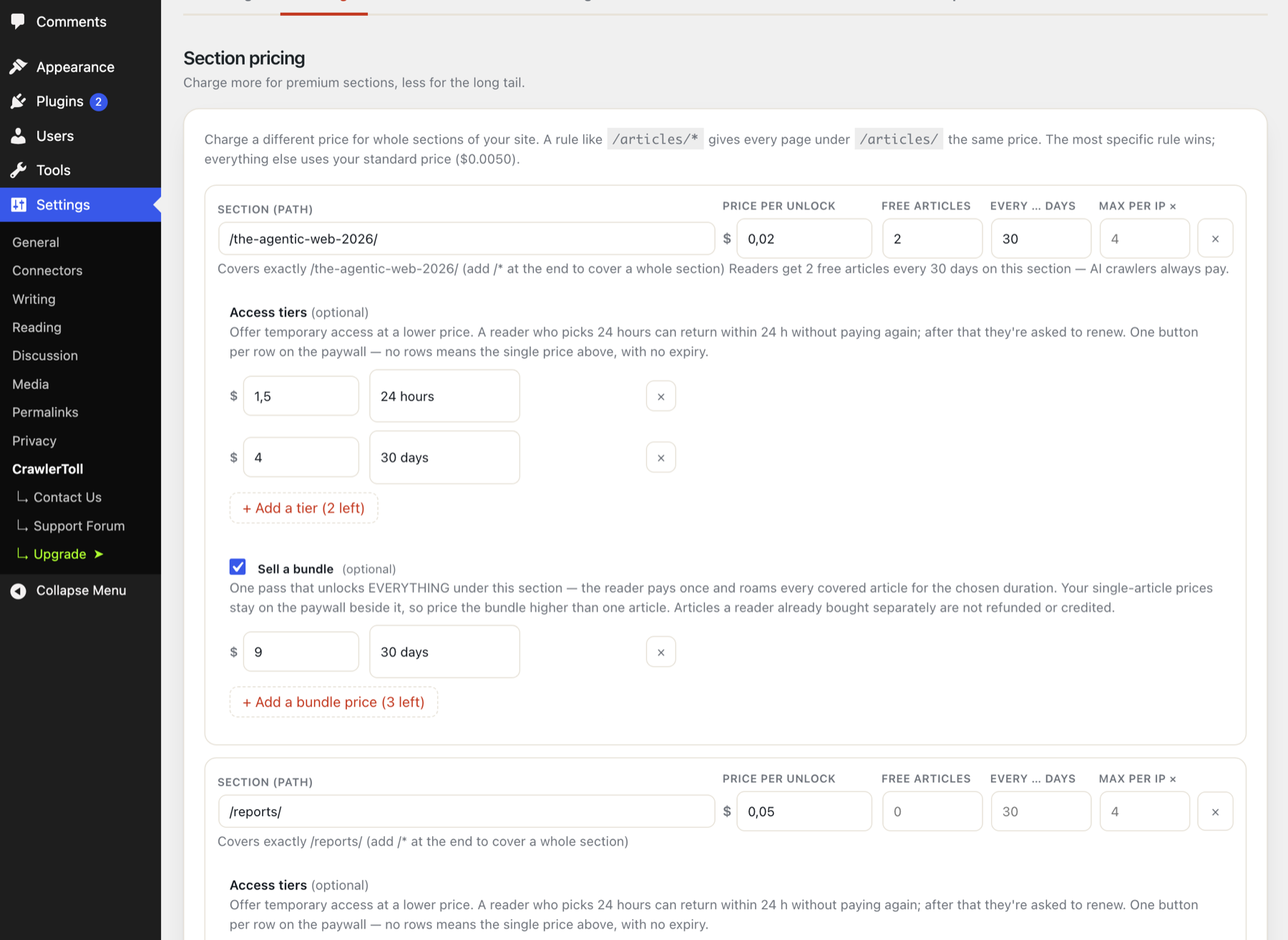
Section pricing (Pro): per-path prices, free metered reads, access tiers and bundles.
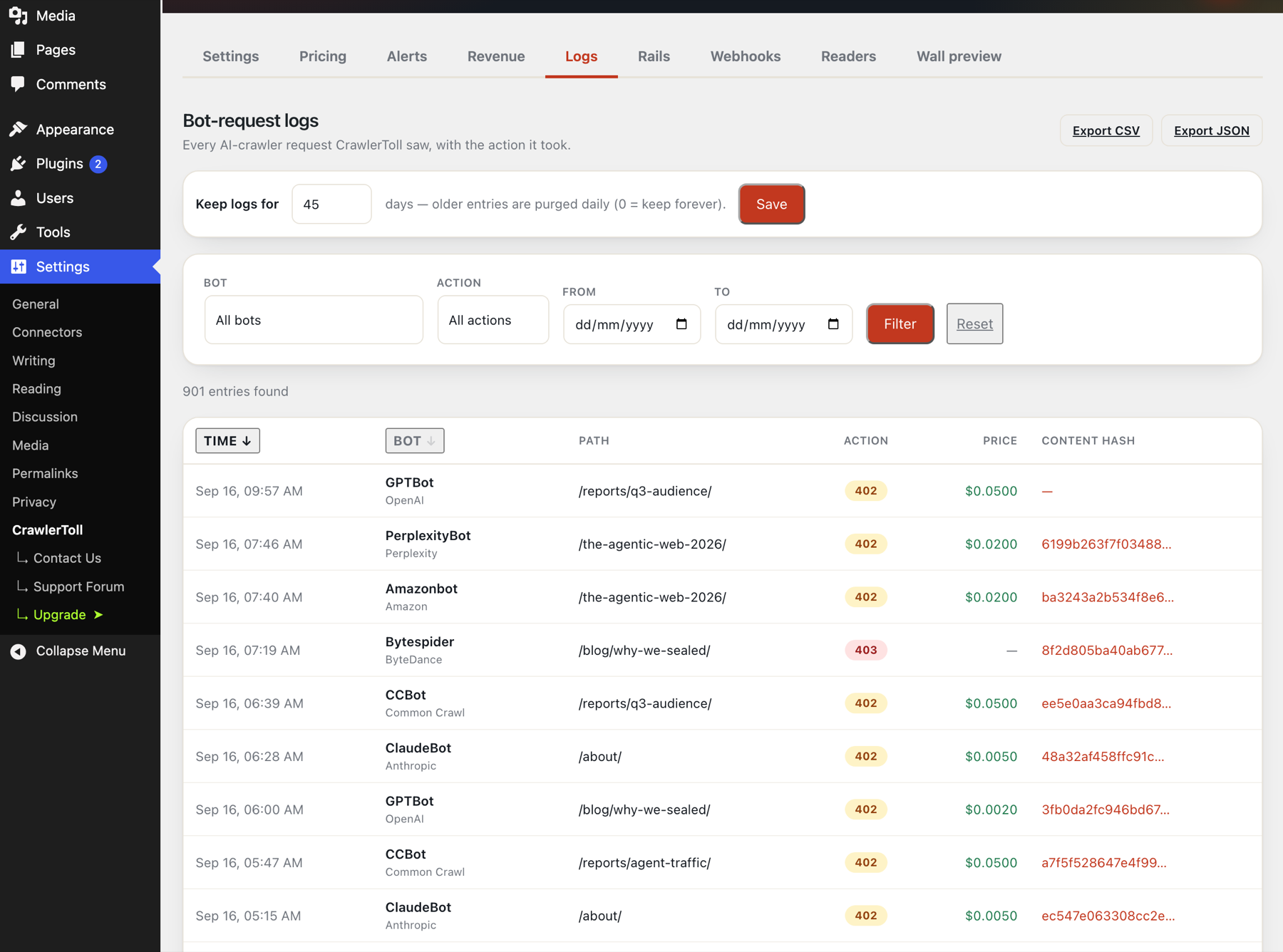
Bot-request logs (Pro): every AI-crawler request with the action taken, price and content hash, filterable and exportable.
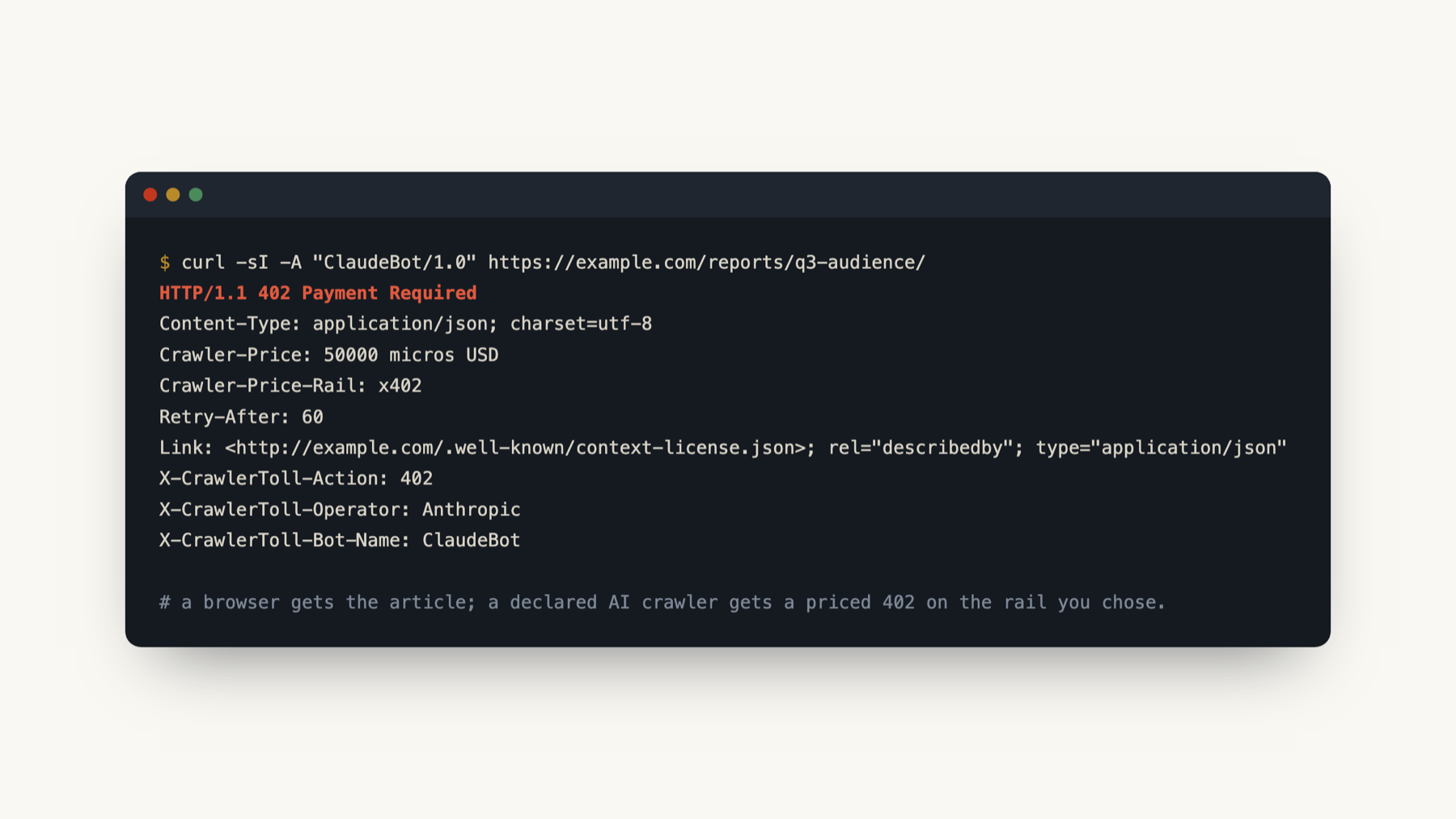
What a declared AI crawler gets: a priced HTTP 402 with the offer headers and a link to your machine-readable policy.
Faq
No. Card payments run on your own Stripe account and USDC is paid to your own wallet. CrawlerToll holds no Stripe secret, no platform account, no facilitator key and no wallet key. Our only revenue is the optional Pro subscription.
Yes. Encryption controls who can read a post, not what a paying reader does afterwards, and every buyer of a post receives the same key. This is true of any paywall. What sealing removes is the free leaks: the article sitting in the page, the RSS feed, the REST API or a cache.
No payment can start while the unlock service is down: the wall shows that unlocking is unavailable. If a card payment goes through and the article doesn’t open, the reader’s browser remembers the payment and finishes it on the next try in the same browser, without a second charge. The rest of your site keeps working normally. There is no SLA at launch. See https://crawlertoll.com/docs/unlock-service for what the service stores.
Yes. CrawlerToll Pro adds access tiers and bundles, read packs, summaries sold separately, metered free articles, per-path pricing, per-crawler rail routing, a revenue dashboard, filterable bot-request logs with CSV/JSON export, email alerts, content provenance, unlock webhooks and access revocation. The free plugin’s crawler recognition, 402 responses and sealed paywall with both payment rails remain fully functional without it. See crawlertoll.com/pro.
Yes. Readers paying with a USDC wallet can pay from $0.001 per article, and the money goes straight to your wallet. Card payments have a $0.50 minimum, so for card readers sell a read pack (Pro), for example 10 articles for $5, paid once on your own Stripe account.
Yes. Set “Article price for AI agents” in Settings. Declared AI crawlers such as ClaudeBot and GPTBot are quoted and charged that price, in USDC. It can be higher than the reader price, not lower. A bot that hides who it is pays the reader price, and the article stays encrypted either way.
No — payment settles before access. When a crawler or reader pays, the money lands directly in your own Stripe account or wallet, and only then is the content unlocked. There is no credit, no monthly billing cycle, and nothing to chase.
Every paid unlock leaves a receipt you can read back in Settings CrawlerToll (recent unlocks; the Pro revenue dashboard totals them by rail). On the Stripe rail the payment is in your own Stripe account; readers can ask for Stripe’s emailed receipt on the card step. Stripe does not add tax or issue invoices for these payments unless you set that up: you are the seller, so VAT or sales tax on what you sell is yours to handle (ask your accountant). On the x402 rail, the on-chain transaction hash is the receipt, linked in the unlock record to the exact article and time.
Yes, normally 14 days, but for content that unlocks immediately it ends once the reader has agreed to immediate access and acknowledged losing it. With Settings CrawlerToll “EU/UK right of withdrawal” on (automatic for sites that look European), the paid options stay locked until the reader ticks that box. The consent time is stored on your Stripe payment and on the unlock receipt, and the reader can save a receipt that states it. You are the seller; this helps you meet the rule and is not legal advice.
No. The default policy targets specifically AI crawlers — GPTBot, ClaudeBot, Google-Extended (Google’s training-data crawler, not Googlebot), Applebot-Extended (Apple’s training crawler, not Applebot), etc. Search-engine crawlers continue to index your site normally unless you explicitly add them to the policy.
Yes. They run at different layers and there is no integration between them. Pay Per Crawl runs at Cloudflare’s edge; CrawlerToll runs inside WordPress on any host and adds the sealed paywall, the card rail and the human-reader unlock. You can use both, or just one.
If you already use a hosted paywall or licensing service, choose the custom payment URL rail and the 402 response will point crawlers at it via a Link: <…>; rel="payment" header. Sealing and the built-in rails are not required.
Activate it on each site. Every site has its own settings. Network activation has not been tested.
Edit the policy textarea in Settings CrawlerToll. The policy uses standard robots.txt syntax extended with RSL-style directives: License:, Permits:, Prohibits: and Compensation:. See rslstandard.org for the vocabulary they are modelled on.
The crawler check is a user-agent match and a policy lookup on each front-end request, with no external calls. A sealed post is encrypted the first time it is viewed after it changes; later views reuse the stored ciphertext.
Plugins Deactivate Delete. Your /robots.txt returns to its previous form. Settings are kept unless you tick “Remove all data on uninstall” in Settings CrawlerToll first; then deleting the plugin also removes every option (including your Stripe keys), its tables, per-post data and scheduled tasks.
Post in the plugin’s support forum on WordPress.org, or email hello@crawlertoll.com.
Yes. CrawlerToll limits payment attempts per reader, and reads the reader’s address from the proxy’s headers when the request comes from Cloudflare or from your own server or private network. If your proxy uses other public addresses, add them with the crawlertoll_trusted_proxies filter (a list of IPs or CIDR ranges). Headers from any other source are ignored, so a visitor cannot fake their address.
Reviews
Changelog
2.1.0
- Security: the Latest Posts block no longer shows premium articles in full (“full post” mode shows excerpts on sites with premium posts).
- Security: a damaged seal secret is replaced and affected posts are re-sealed.
- A failing unlock service no longer slows every page view (backoff, 5-second limit); failed price updates are logged.
- Selling premium posts no longer lists your site in the CrawlerToll directory: listing is an optional, reviewed request in Settings. New optional private email so the unlock service can reach you.
- Pro: read packs (“10 articles for $5”), summaries sold separately, and AI-training licences for AI agents.
- Free: micro-unlocks from $0.001 in USDC.
- Prices in any currency: card readers pay your listed price, and USDC is converted at a daily rate and shown before the reader approves.
- If a payment goes through but the article does not open, the reader’s browser remembers it and finishes the unlock on the next try or reload in the same browser, without a second charge.
- Changing your wallet address now reaches every premium post, with a notice in Settings. Clearing it makes posts card-only.
- Choose what to buy first, then how to pay. Browser wallets and a passkey wallet are supported; in-app browsers offer to reopen the article in the real browser.
- Honest answers to AI crawlers: they are shown your price, or told the content is not licensed until you can be paid. robots.txt and the licence file say only what is true.
- Plainer wording across Settings, and a “Send keys to the unlock service again” recovery button.
Also in this release (first published version):
- Sealed paywall: premium post bodies are AES-256-GCM encrypted in the page; the key is released only against a settled payment.
- Readers pay by card on your own Stripe account, or in USDC over x402 to your own wallet, and the post decrypts in place.
- Fail-closed: if the unlock service is unreachable, sealed posts stay locked and no payment can start.
- Receipts for every paid unlock, with links to the Stripe payment or on-chain transaction.
- Optional EU/UK right-of-withdrawal consent before paid unlocks.
- Cross-device access: move an unlock to another device with a QR code or 8-character code.
- Traffic view: requests that reach WordPress, by kind: browser requests, declared AI crawlers, search engines and undeclared automation.
- Get started checklist with live checks, plus a Health & diagnostics card.
- Recognition of 30 declared AI-crawler user-agents, RSL-style policy and HTTP 402 offers.
- Pro: access tiers, bundles, metered free articles, per-path pricing, revenue dashboard, logs, alerts, webhooks and access revocation.
Pre-release history (never published on WordPress.org)
- 0.2.0: first sealed-content engine and unlock app.
- 0.1.1 (2026-05-21): admin dashboard, bot catalogue browser, live curl tester.
- 0.1.0 (2026-05-19): crawler catalogue, RSL-style policy, HTTP 402 offers, robots.txt and context-license endpoints.