Creativehone History

Creativehone History
Description
Creativehone History adds a custom Elementor widget to easily search and display creative history content without any coding.
Key Features:
* Custom Elementor widget named Creativehone History
* Search and display history content dynamically
* Works with Elementor Free and Elementor Pro
* Optimized for performance and easy to configure
* Compatible with the latest WordPress version (6.8)
Installation
- Upload the
creativehone-history.zipfile via the WordPress admin dashboard (Plugins > Add New > Upload Plugin). - Activate the plugin through the “Plugins” menu in WordPress.
- Make sure Elementor (Free or Pro) is installed and active.
- Open Elementor editor.
- Drag and drop the Creativehone History widget onto your page.
- Configure its settings and display creative history content.
Screenshots
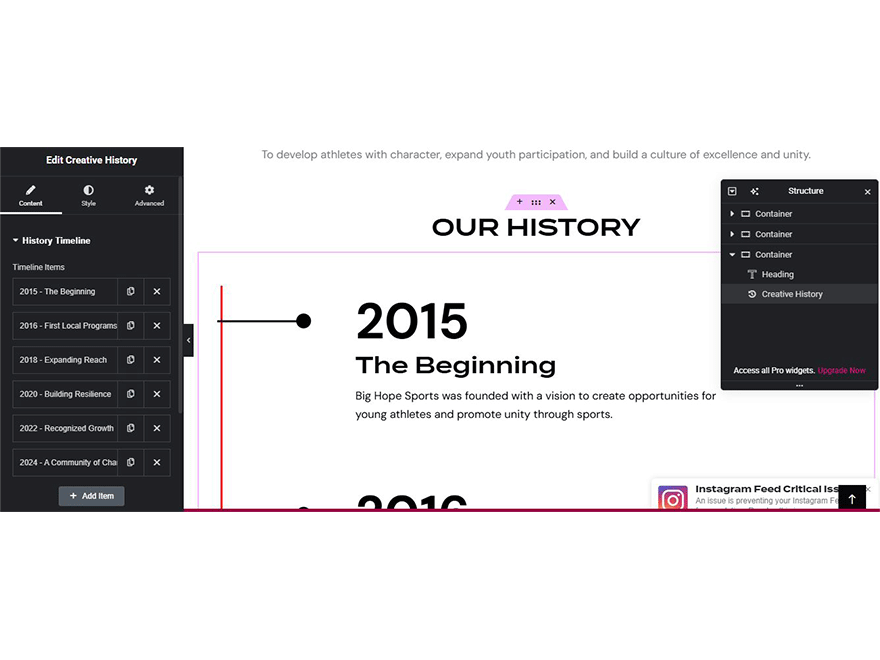
Creativehone History widget inside Elementor editor.

Frontend view of history search results.1. Creativehone History widget inside Elementor editor.
Faq
No. Creativehone History works with both Elementor Free and Elementor Pro.
WordPress 5.2 or higher.
This plugin requires PHP 7.2 or higher.
No. Creativehone History is lightweight and optimized for performance.
For documentation, updates, and support, please visit the official plugin page:
https://github.com/tosisoft/Creativehone-History
or the Tosisoft website:
https://tosisoft.com/creativehone-history/
Reviews
Changelog
1.0.1
- Fixed minor bugs.
- Improved Elementor widget performance.
- Updated compatibility with the latest WordPress version.
1.0.0
- Initial release of Creativehone History.
- Added Elementor widget for searching and displaying history content.