Dashboard Notes

Dashboard Notes
Description
The plugin Classic Widgets is needed (this plugin doesn’t work with Gutenberg).
Compatible with PHP 8.2
Do you find this plugin helpful? Please consider leaving a 5-star review.
Dashboard Notes lets you create super simple notes and instructions for your clients within the WordPress dashboard. Choose the color of the notification, whether or not to include a logo, and exactly what pages to include the notification on (uses simple URL matching).
Usage
- Install the Dashboard Notes.
- Go to Appearance > Widgets where you will see a new “Dashboard Notes” sidebar.
- To create a note, simply drag a new widget into the sidebar and give it some content (we typically use a text/HTML widget).
- Once you’ve added content to the widget, click save, and the Dashboard Notes settings for this widget will appear.
- Adjust the settings to meet your needs, and click save when you’re done.
- Refresh, or navigate to any page to see your new note in action.
- Use the plugin settings found via Settings > Dashboard Notes to choose which user roles can/can’t see the notices.
Credits
Special thanks to Kaspars Dambis for his work on Widget Context – much of this project is based on that code.
Installation
- Install the Dashboard Notes.
- Go to Appearance > Widgets where you will see a new “Dashboard Notes” sidebar.
- To create a note, simply drag a new widget into the sidebar and give it some content (we typically use a text/HTML widget).
- Once you’ve added content to the widget, click save, and the Dashboard Notes settings for this widget will appear.
- Adjust the settings to meet your needs, and click save again.
- Navigate to any page to see your new note in action.
Screenshots
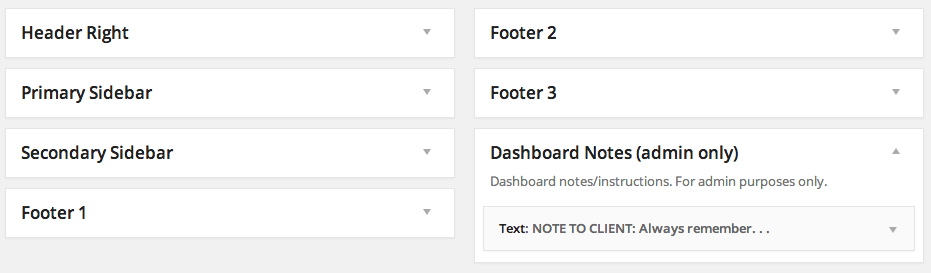
Dashboard Notes adds a new widget area which can be used to add new notes.
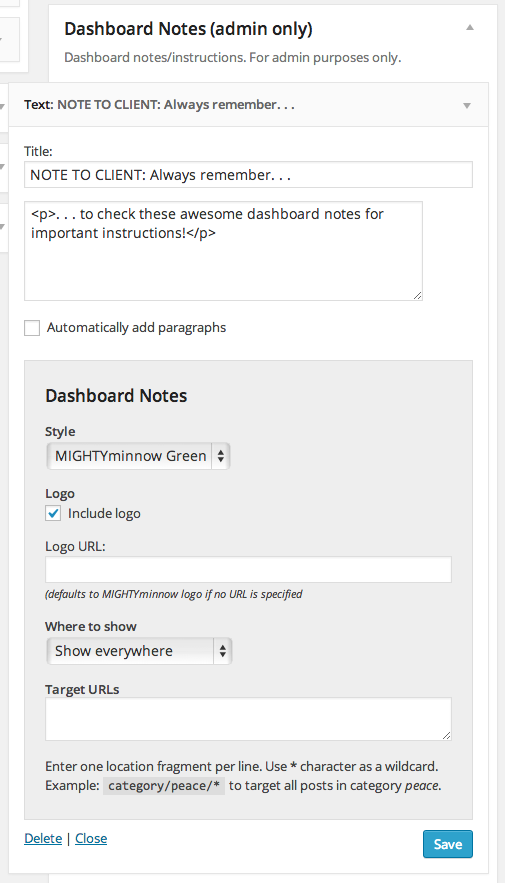
Each widget in the Dashboard Notes widget area has a number of settings you can use to customize how and where the note appears (note: you must initially save the widget once for these settings to appear).
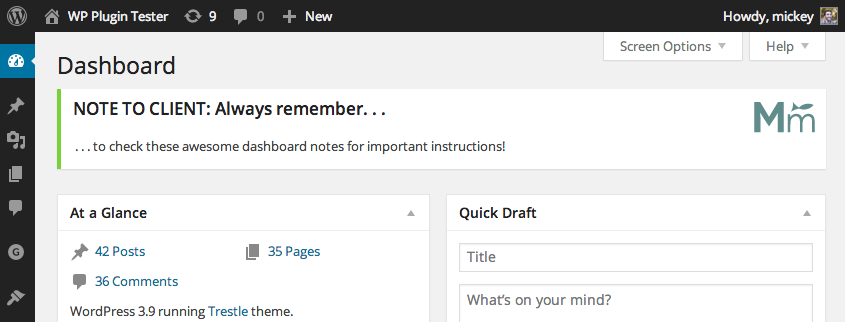
The final product! Add as many notes as you like.
Faq
You can report security bugs through the Patchstack Vulnerability Disclosure Program. The Patchstack team help validate, triage and handle any security vulnerabilities. Report a security vulnerability.
Reviews
It works!
By 
great plugin
Good but has bugs with URLs | Почти хорош, но с багом
By 
/wp-content/plugins/dashboard-notes/dashboard-notes.php
file,
find the following function:
function check_widget_visibility( $widget_id ) {
and replace the
if($this->match_path( $this->get_current_url(), $vis_settings['url']['urls'] )...
with something like
if(strpos($this->get_current_url(), $vis_settings['url']['urls']) !== false)...
I have done and enjoy as well!
But... sice the moment, you MUST NOT update the plugin. To remebmer, I usually add "do not update!!!" after the " * Plugin Name: " at the start of the main plugin` file*.
*the current plugin has one PHP file only, it is the main file.
======================
Плагин отличный... будет. После того, как вы пофиксите в нём единственный баг.
Похоже, автор плагина забил толстый болтец на доведение своего детища до ума, поэтому - берём в свои руки! Фиксим один единственный бажек, и наслаждаемся!
Откройте единственный PHP-файл плагина,
найдите код
function check_widget_visibility( $widget_id ) {
и замените в нём ниже
if($this->match_path( $this->get_current_url(), $vis_settings['url']['urls'] )...
чем-то вроде
if(strpos($this->get_current_url(), $vis_settings['url']['urls']) !== false)...
???
PROFITAwesome-ness
By 
Make it easiert to find
By 
Perfect solution
By 
works fine
By 
awesome, working great
By 
Changelog
1.0.3
- Add plugin setting to choose which roles can and can’t see the dashboard notes.
- Added .pot file for translation.
1.0.2
- Added isset() to ‘include-logo’ option conditional to fix warning message
1.0.1
- Removed extraneous header info causing install error
1.0.0
- First release!