ArrayCodes Datalayer for WooCommerce FREE

ArrayCodes Datalayer for WooCommerce FREE
Description
Track WooCommerce product views and purchases in Google Analytics 4 — and use the same data to build your own Facebook Pixel or Google Ads tags in Google Tag Manager — with no coding required.
Datalayer for WooCommerce FREE pushes a complete dataLayer into Google Tag Manager for every visitor action:
- Product Detail Impressions (
view_item) — full product data (ID, price, currency), ready to power a custom Facebook Pixel or Google Ads tag too - Related Products in Product Page (
view_item_list) - Purchase (
purchase) — full order data (ID, value, currency, items), ready to power a custom Facebook Pixel or Google Ads tag too
Want a ready-made GTM container for Google Ads, Meta Ads, Pinterest Ads, TikTok Ads and Microsoft Ads — plus all events (add_to_cart, begin_checkout, add_shipping_info and more), Consent Mode and Server-to-Server tracking?
Get the PRO version from the Official WooCommerce Store: Datalayer for WooCommerce PRO
Discover our demo store:
Demo Shop
Installation
- Upload the plugin files to the
/wp-content/plugins/datalayer-for-ecommerce-freedirectory, or install the plugin through the WordPress plugins screen directly. - Activate the plugin through the ‘Plugins’ screen in WordPress
- Use the WooCommerce > Datalayer for WooCommerce -> screen to configure the plugin
Configuration
Google Tag Manager ID -> Enter the GTM-XXXXXX ID to activate the Google Tag Manager code snippet
DataLayer for WooCommerce Ecommerce GA4 -> Enable this option if you use only Google Analytics 4 (GA4)
Show user info -> Select if user information show or not when logged
Import Google Tag Manager
- Download the workspace.zip file in WooCommerce > Datalayer for WooCommerce > Download import File GTM.
- Go to Google Tag Manager > Admin > Import Container
- Select the file you want to import: GTM-GA4-FREE.json
- After selecting the file, import the tags.
Settings Google Analytics 4
- In GTM, go to the tag GA4 – Tag and add your measurement id and click save.
Screenshots

Google Tag Manager Settings screen plugin.

Ecommerce Settings screen plugin.

Ecommerce Advanced screen plugin.

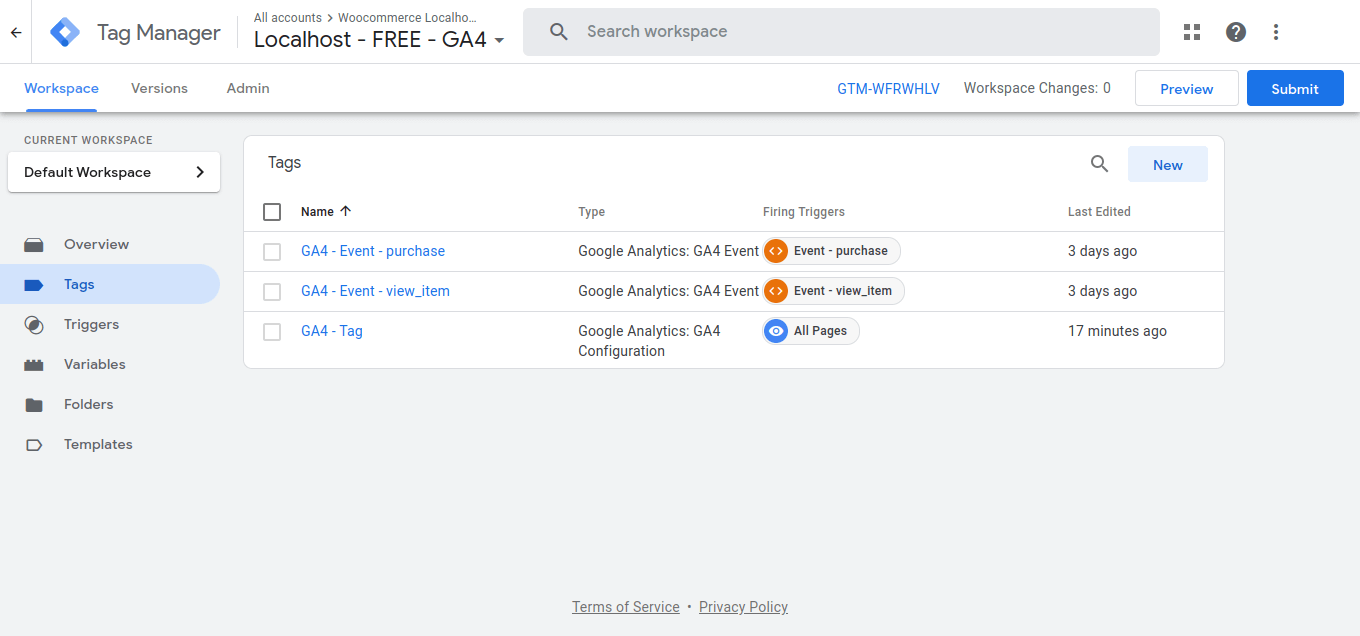
Tags Google Analytics 4 imported
Reviews
Changelog
6.0.0 – 2026-10-22
- Update: The purchase event now reports the order’s own currency instead of the store’s base currency, fixing multi-currency stores
- Update: Customer phone number is now formatted as a full international number (E.164), using the billing country of the order
- Fix: Purchase event firing when the thank-you page is loaded inside an iframe
- Fix: Phone number wrongly formatted when typed with a leading +, 00, (0) or a trunk zero
- Support: Support -> WP 7.1 WC 11.1.2
5.5.2 – 2026-09-11
- Update: Plugin display name updated to comply with WordPress.org directory naming guidelines
- Fix: “Requires at least” now declares only the major WordPress version
- Fix: Added sanitize_callback to the settings registered via register_setting()
5.5.1 – 2026-09-09
- Support: Support -> WP 7.1 WC 11.1.0
5.5.0 – 2026-08-06
- New: Option Trigger Purchase only once – prevents a duplicate purchase event when the customer refreshes the thank you page
- New: Option Purchase value without tax
- Support: Support -> WP 7.0.3 WC 11.0.0
5.1.0 – 2026-03-05
- Update: Packages dependencies
- Support: Support -> WP 6.9 WC 10.5.3
4.8.0 – 2025-05-14
- Support: Support -> WP 6.8.1 WC 9.8.5
4.6.0 – 2025-01-29
- Update: Packages dependencies
- Support: Support -> WP 6.7.1 WC 9.6.0
4.3.0 – 2024-10-28
- New: Option Show view_item_list related product in product page
- Support: Support -> WP 6.6.2 WC 9.3.3
4.0.0 – 2024-07-03
- Remove: Option DataLayer for WooCommerce Enhanced Ecommerce removed
- Support: Support -> WP 6.5.5 WC 9.0.2
3.4.0 – 2024-06-10
- Update: Push Datalayer function without jQuery
- Update: Get Country Code Phone Number User
- Support: Support -> WP 6.5.3 WC 8.9.2
3.3.0 – 2024-03-27
- New: Parameter item_category with multiples categories in all events
- Fix: Php 8.2 deprecated function get options
- Fix: Product tax update in item price
- Support: Support -> WP 6.4.3 WC 8.7.0
3.2.0 – 2023-12-15
- Update: Compatibility with multicurrency WPML plugin
- Support: Support -> WP 6.4.2 WC 8.4.0
3.1.0 – 2023-11-29
- Update: Select only one datalayer type in ecommerce settings
- Support: Support -> WP 6.4.1 WC 8.2.2
3.0.0 – 2023-10-30
- New: Full compatibility with WooCommerce Blocks
- New: New Modern Admin Page
- Support: Support -> WP 6.3.2 WC 8.2.1
2.7.0 – 2023-06-21
- New: Select if user information show or not when logged
- New: Full Compatibility HPOS – High-Performance order storage (COT)
- Support: Support -> WP 6.2.2 WC 7.8.0
2.4.0 – 2023-03-29
- Support: Support -> WP 6.1.1 WC 7.5.1
- Update: optimization and improvement of the code that triggers the events
2.0.2 – 2022-09-21
- Support: WP 6.0.2 WC 6.9.3
- Fix: Multisite full support check WooCommerce Active
2.0.0 – 2022-06-22
- First Release