Delivery Date & Time Slot Picker for WooCommerce
Delivery Date & Time Slot Picker for WooCommerce
Description
Adds a delivery date and time slot picker to WooCommerce checkout (Classic and Blocks) with blackout dates, custom slots, and slot limits.
Features
- Compatible with WooCommerce Blocks Checkout and Classic Checkout
- Consistent field design on both checkout types — label always above the input
- Customers can select a delivery date via date picker with “Select a delivery date” placeholder
- Choose from custom time slots (configured in settings)
- Delivery Time Slot select styled to match other WooCommerce checkout fields
- Add multiple blackout dates via calendar
- Limit max orders per time slot
- Disable weekdays (e.g. no Sunday delivery), set a minimum lead time and a maximum booking window
- Works with all WooCommerce shipping methods
- HPOS compatible – works with WooCommerce High Performance Order Storage
- Delivery details displayed on the Classic checkout thank-you page and order confirmation
- Settings available at WooCommerce > Settings > Shipping > Delivery Settings
Installation
- Upload the plugin folder to
/wp-content/plugins/ - Activate the plugin through the Plugins menu in WordPress
- Configure delivery settings in WooCommerce > Settings > Shipping
Screenshots

Delivery date and time slot fields on Classic & Block-based checkout
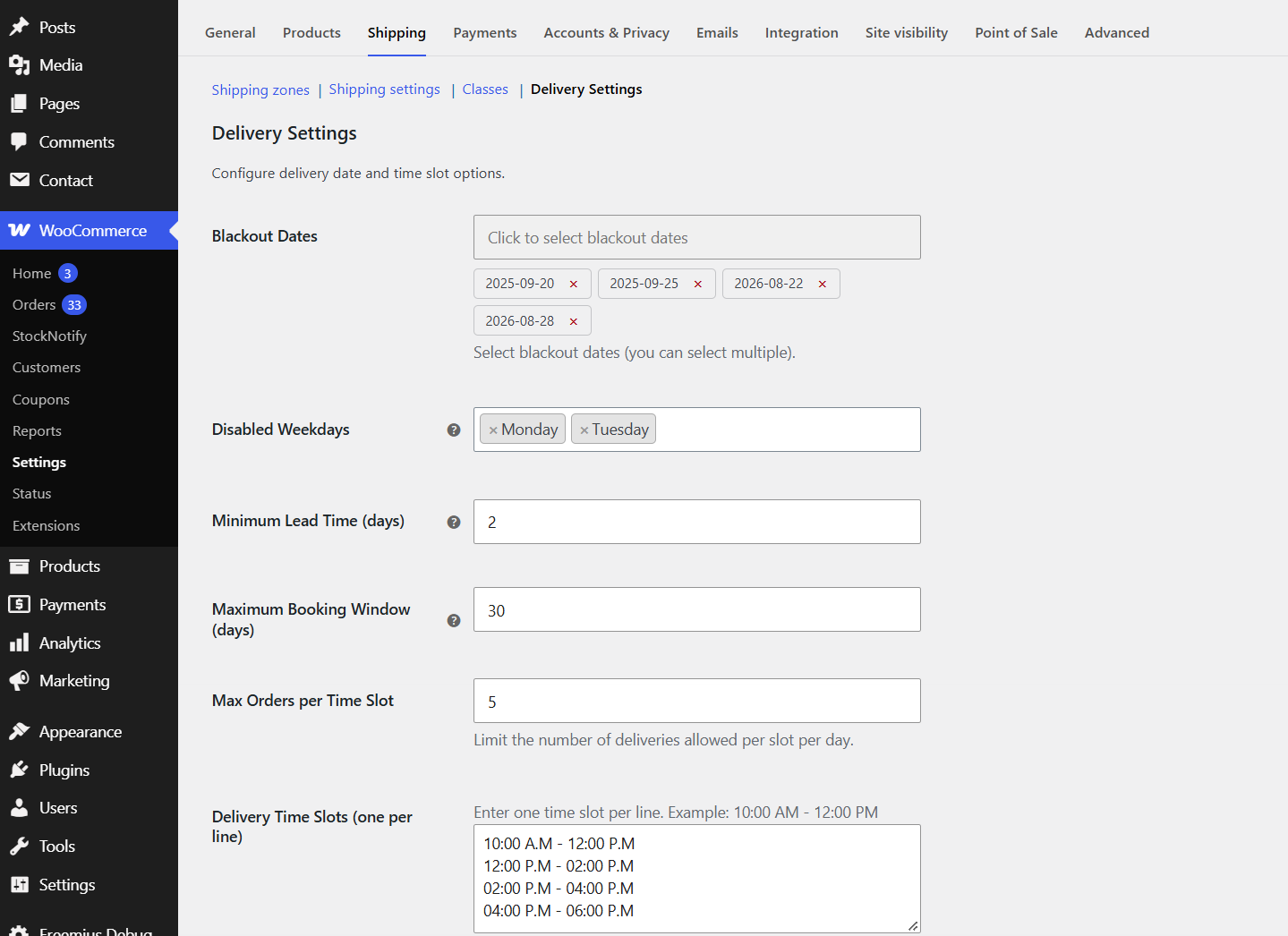
Delivery Settings: blackout dates, disabled weekdays, lead time, booking window, slot limit and time slots

Delivery date and time slot shown on the WooCommerce admin order details screen
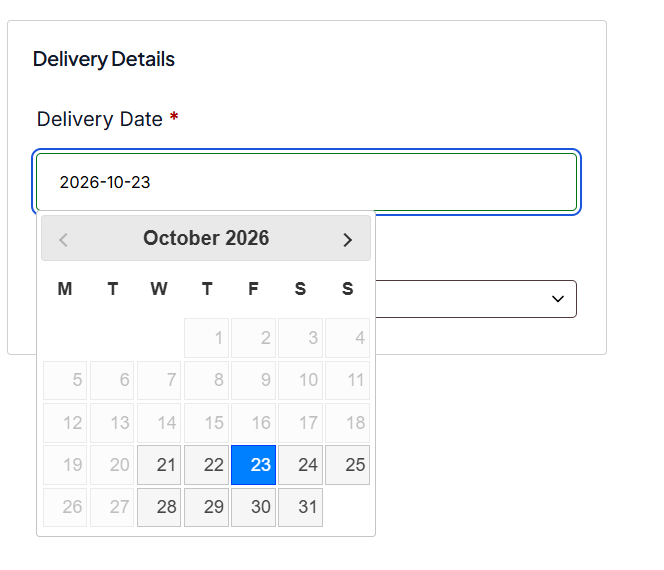
Checkout calendar with disabled weekdays, blackout dates and lead time applied
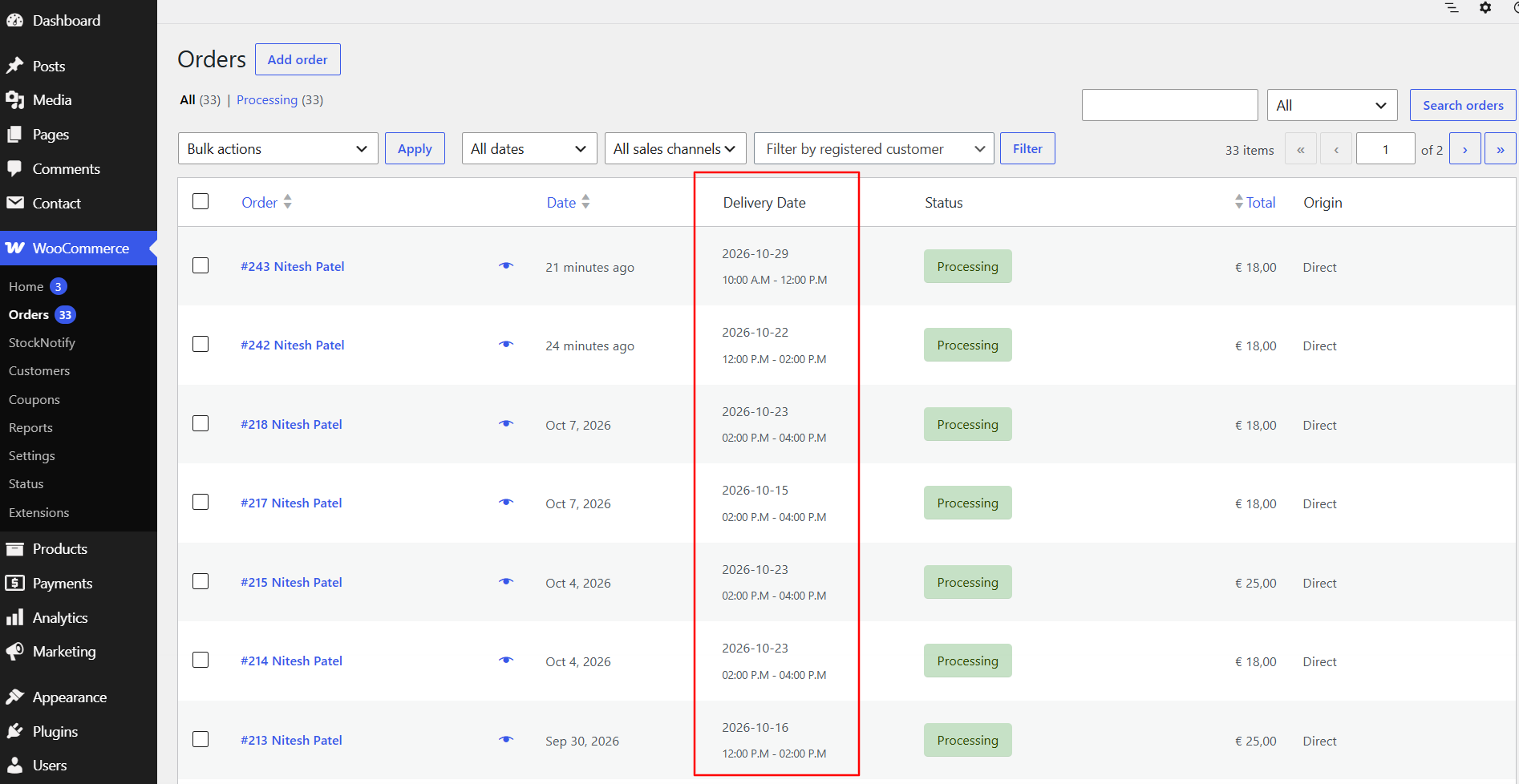
Delivery Date column on the WooCommerce Orders list
Faq
Yes. The plugin supports both Classic Checkout and WooCommerce Blocks Checkout. Both checkout types display the same consistent field design.
Yes, use the “Blackout Dates” calendar in plugin settings.
Yes, choose them in “Disabled Weekdays” in plugin settings.
Yes. “Minimum Lead Time” sets the earliest delivery date in days from today, and “Maximum Booking Window” sets the furthest date customers can pick.
Use the “Delivery Time Slots” field to define one time slot per line.
Yes, it is fully compatible with shipping zones and shipping methods.
Yes. The plugin uses $order->get_meta() and $order->update_meta_data() throughout, which are fully compatible with WooCommerce High Performance Order Storage (custom order tables).
Reviews
Great Plugin
By 
This plugin was easy to set up and gave my customers a seamless date-and-time slot picker at checkout. I appreciate the ability to block holidays and set cut-off times—but would love a way to add multiple slots in one go. Support responded quickly. Highly recommended for stores that handle delivery!”
Changelog
1.8
- Added: “Disabled Weekdays” setting to block delivery on chosen days of the week (e.g. Sundays)
- Added: “Minimum Lead Time” setting to set the earliest delivery date in days from today
- Added: “Maximum Booking Window” setting to limit how far ahead customers can book
- All three rules are enforced in the date picker and server-side on Classic and Block checkout
- Regenerated the translation (.pot) template with the new strings
1.7
- Added: “Delivery Date” column on the WooCommerce Orders list (HPOS and legacy storage), with the time slot shown underneath
- Improved: delivery details on the order-received, order-details and My Account pages now use one consistent card-style table, matching the Block checkout design
- Improved: Block checkout order confirmation now shows “Delivery Details” instead of “Additional information” for orders with delivery data
1.6
- Security: delivery time slot is now validated server-side against the configured slots (Classic and Block checkout)
- Security: settings values (blackout dates, slot limit, time slots) are now sanitized on save
- Added: explicit HPOS and Cart & Checkout Blocks compatibility declarations
- Fixed: duplicate validation messages and duplicate asset loading on checkout
- Improved: slot limit check now queries only as many orders as needed
- Added: uninstall cleanup of plugin options
- Tested with WordPress 7.1 and WooCommerce 11.1
1.5
- Added a “Settings” link to the plugin’s row on the Plugins screen, linking directly to WooCommerce > Settings > Shipping > Delivery Settings
- Improved Blackout Dates admin UI: selected dates now display as removable tags below the calendar instead of a raw comma-separated list in the input box
- Regenerated the translation (.pot) template so translators have strings for the items above
1.4
- Security/compatibility
- Fixed: “Max Orders per Time Slot” setting is now actually enforced – checkout is blocked (Classic and Block) once a delivery date/time slot combination reaches its configured order limit
- Fixed: delivery date is now validated server-side (format, blackout dates, and past dates) on Classic checkout, matching the validation already used on Block checkout
- Hardened: checkout field registration is now wrapped in error handling so a registration failure can’t take down checkout
- Hardened: asset enqueueing no longer triggers a PHP warning if a CSS/JS file is unexpectedly missing
- Tested for compatibility with PHP 8.0-8.3
1.3
- Added consistent label-above-input design for delivery fields on both Classic and Block checkout
- Added “Select a delivery date” placeholder to the delivery date field on both Classic and Block checkout
- Delivery Time Slot select on Classic checkout now uses WooCommerce enhanced select (Select2), matching other checkout fields
- Fixed floating label inside Block checkout Delivery Time Slot select – label now always appears above the field
- Fixed delivery details not appearing on the Classic checkout thank-you (order-received) page
- Fixed HPOS (High Performance Order Storage) compatibility – all order meta read and write operations now use WooCommerce HPOS-safe methods (
$order->get_meta(),$order->update_meta_data()) - Added dedicated
delivery-checkout.cssfor consistent field styling across Classic and Block checkout
1.2
- Added support for WooCommerce Blocks Checkout
- Improved compatibility with the latest WooCommerce version
- Minor bug fixes and performance improvements
1.0.1
- Fixed the issue of the slug in the datepicker functionality.
1.0.0
- Initial release
- Delivery date picker + custom time slot
- Admin settings for blackout dates and slot limit