Delowar OTP Login and Two-Factor Authentication

Delowar OTP Login and Two-Factor Authentication
Description
One Time Password (OTP) Login & Two Factor Authentication (2FA) is a powerful, secure, and modern authentication platform designed for WordPress and WooCommerce.
Empower your visitors to log in instantly without passwords, safeguard administrator and member accounts with multi-channel Two-Factor Authentication (2FA), and protect your WooCommerce store against fake orders and COD fraud through real-time SMS & WhatsApp phone verification.
Designed with an elegant, responsive Sky Blue SaaS user interface, high-performance database indexing, and bank-grade cryptographic standards, Delowar OTP Login & 2FA provides a seamless experience for both users and site administrators.
🚀 Key Features
- ⚡ Passwordless OTP Login: Allow members to log in instantly using an email address or mobile phone number via secure, single-use passcodes.
- 📝 OTP Account Registration: Clean multi-step user registration with real-time phone/email verification and automatic role assignment.
- 🛡️ Universal Two-Factor Authentication (2FA):
- TOTP Authenticator Apps: Google Authenticator, Microsoft Authenticator, Authy, 1Password, Bitwarden, and Apple Keychain.
- SMS & WhatsApp 2FA: Send verification codes directly to the user’s mobile device.
- Email 2FA: Reliable fallback delivery via WordPress standard email.
- Role-Based Enforcement: Mandate 2FA for Administrators, Editors, or all user roles.
- Remember Trusted Devices: Optional 30-day device trust to balance convenience with top-tier security.
- Emergency Backup Codes: Single-use cryptographic recovery codes for account recovery if a device is lost.
- 🛒 WooCommerce Checkout Phone Verification:
- Inline or popup verification card on the checkout page.
- Require verification for Guest buyers, Logged-in customers, or both.
- Automatically bypass verification for previously verified customer accounts.
- Admin order verification status badge inside the WooCommerce Orders screen.
- Drastically reduce Cash on Delivery (COD) order fraud and spam checkout submissions.
- 📲 Multi-Channel Delivery Providers:
- SMS Gateways: Twilio, Vonage (Nexmo), MSG91, and a Universal Custom HTTP / Webhook Gateway.
- WhatsApp Gateways: Twilio WhatsApp API & Meta (Facebook) Cloud WhatsApp Business API.
- Email: Native WordPress
wp_mailwith customizable HTML templates.
- 🌐 Universal Custom HTTP / Webhook SMS Gateway:
- Connect any local or global SMS gateway provider in the world!
- Full support for HTTP
GETandPOSTmethods (JSON or Form URL-encoded). - Configurable custom HTTP request headers (Bearer tokens, API keys, basic auth).
- Dynamic placeholders:
{phone},{otp}, and{message}.
- 🔒 Bank-Grade Cryptographic Security:
- CSPRNG Generation: Generated via cryptographically secure random integers (
random_int). - Salted Hashes Only: All OTPs are stored strictly as salted SHA-256 hashes (
wp_hash()). Zero plaintext tokens exist in the database. - Constant-Time Verification: Verification uses
hash_equals()to prevent timing side-channel attacks. - Sliding-Window Rate Limiting: Multi-tiered rate limiters protecting against IP-based and identifier-based brute-force attempts.
- Configurable Cooldowns & Expirations: Set custom token lifetimes (e.g. 5 minutes) and resend wait times.
- CSPRNG Generation: Generated via cryptographically secure random integers (
- 🎨 Modern SaaS UI / UX:
- Smooth segmented 6-digit input boxes with auto-focus, backspace jumping, and paste handling.
- Country flag and international dial code picker with auto-detection.
- Live circular countdown timers for OTP expiry and resend cooldowns.
- Dark mode compatibility and customizable brand accent colors.
- 📊 Comprehensive Audit Logging:
- Detailed logs tracking all authentication events (
login_success,login_failed,otp_sent,2fa_challenged,totp_verified,order_verified). - Filter logs by date range, channel, provider, status, or search identifier.
- One-click CSV export and automated daily log retention pruning.
- Detailed logs tracking all authentication events (
- 🧪 Developer Friendly & Test Mode:
- Built-in Test Mode with dispatch simulation to test entire authentication flows without consuming SMS credits.
- Clean, modular object-oriented codebase adhering to WordPress Coding Standards (WPCS).
📦 Supported Channels & Gateways
- SMS Gateways:
- Twilio: Global enterprise SMS delivery.
- Vonage (formerly Nexmo): Reliable worldwide SMS messaging.
- MSG91: High-speed SMS delivery for India and international routes.
- Custom HTTP / Webhook Gateway: Connect any regional gateway (e.g., RouteMobile, Infobip, Textlocal, Sinch, Mobily, etc.).
- WhatsApp Business API:
- Twilio WhatsApp: Official Twilio WhatsApp Messaging Sandbox & Production.
- Meta Cloud WhatsApp Business API: Direct integration with Meta Graph API.
- Authenticator Apps (TOTP):
- Google Authenticator, Microsoft Authenticator, Authy, 1Password, Bitwarden, Duo.
- Email Delivery:
- WordPress native
wp_mail()compatible with SMTP plugins (WP Mail SMTP, Post SMTP, FluentSMTP).
- WordPress native
External services
This plugin connects to external third-party messaging services to deliver One-Time Passcodes (OTP) via SMS and WhatsApp. The plugin only connects to an external service when that specific provider is configured with API credentials and enabled by the site administrator:
-
Twilio (SMS & WhatsApp):
- What it is and what it is used for: Connects to the Twilio REST API (
api.twilio.com) to send One-Time Passcode (OTP) SMS text messages and WhatsApp messages for passwordless login, user registration, Two-Factor Authentication (2FA), and WooCommerce checkout phone verification. - What data is sent and when: Sends the recipient’s mobile phone number, sender ID/phone number, and the OTP verification message text. Data is transmitted to Twilio (
api.twilio.com) only when Twilio SMS or Twilio WhatsApp is actively configured by the site administrator and an OTP verification code is requested by a user or customer. - Service Provider: Twilio Inc.
- Terms of Service: Twilio Terms of Service
- Privacy Policy: Twilio Privacy Policy
- What it is and what it is used for: Connects to the Twilio REST API (
-
Vonage (formerly Nexmo) SMS:
- What it is and what it is used for: Connects to the Vonage SMS API (
rest.nexmo.com) to send One-Time Passcode (OTP) SMS text messages for passwordless login, user registration, Two-Factor Authentication (2FA), and WooCommerce checkout phone verification. - What data is sent and when: Sends the recipient’s mobile phone number, sender brand/ID, and the SMS message text containing the temporary one-time numeric passcode. Data is transmitted to Vonage (
rest.nexmo.com) only when Vonage is actively configured by the site administrator and an OTP verification code is requested by a user. - Service Provider: Vonage Holdings Corp. (Ericsson)
- Terms of Service: Vonage Terms of Use
- Privacy Policy: Vonage Privacy Policy
- What it is and what it is used for: Connects to the Vonage SMS API (
-
MSG91 SMS:
- What it is and what it is used for: Connects to the MSG91 OTP API (
control.msg91.com) to send One-Time Passcode (OTP) SMS text messages for passwordless login, user registration, Two-Factor Authentication (2FA), and WooCommerce checkout phone verification. - What data is sent and when: Sends the recipient’s mobile phone number, OTP numeric passcode, and optional template identifier. Data is transmitted to MSG91 (
control.msg91.com) only when MSG91 is actively configured by the site administrator and an OTP verification code is requested by a user. - Service Provider: Walkover Technologies Pvt. Ltd.
- Terms of Service: MSG91 Terms of Use
- Privacy Policy: MSG91 Privacy Policy
- What it is and what it is used for: Connects to the MSG91 OTP API (
-
Meta WhatsApp Cloud API (WhatsApp Business Platform):
- What it is and what it is used for: Connects to the Meta Graph API (
graph.facebook.com) to dispatch official WhatsApp authentication template messages containing one-time passcodes for passwordless login, user registration, Two-Factor Authentication (2FA), and WooCommerce checkout phone verification. - What data is sent and when: Sends the recipient’s mobile phone number, approved WhatsApp template name, language code, and the dynamic OTP passcode parameter. Data is transmitted to Meta (
graph.facebook.com) only when Meta WhatsApp Cloud API is actively configured by the site administrator and an OTP verification code is requested by a user. - Service Provider: Meta Platforms, Inc.
- Terms of Service: WhatsApp Business Terms and Meta Platform Terms
- Privacy Policy: WhatsApp Privacy Policy and Meta Privacy Policy
- What it is and what it is used for: Connects to the Meta Graph API (
-
Universal Custom HTTP / Webhook SMS Gateway (User-Configured):
- What it is and what it is used for: Allows website administrators to integrate any arbitrary third-party SMS gateway or REST API endpoint (such as regional or custom SMS providers) to deliver OTP verification messages.
- What data is sent and when: Sends the recipient’s mobile phone number and the OTP verification message text according to the custom endpoint URL (e.g.
https://api.example.com/...), HTTP method (GET/POST), request headers, and payload template configured by the administrator. Data is transmitted to the administrator’s designated third-party endpoint only when the Custom HTTP Gateway is selected and an OTP verification request is triggered. - Service Provider: Governed by the respective third-party SMS gateway vendor selected and contracted by the site administrator.
- Terms of Service & Privacy Policy: Users and site administrators should consult the terms of use and privacy policy of their configured SMS gateway provider.
Shortcodes
Easily embed forms anywhere on your site using WordPress blocks, Elementor, Divi, or standard shortcodes:
-
[delowar_otp_login]– Renders the Passwordless OTP Login form.redirect: Target URL after successful login. (Example:[delowar_otp_login redirect="/my-account/"])title: Custom form heading. (Example:[delowar_otp_login title="Member Sign In"])
-
[delowar_otp_register]– Renders the OTP Account Registration form.redirect: Target URL after account creation. (Example:[delowar_otp_register redirect="/welcome/"])title: Custom form heading.
-
[delowar_otp_2fa]– Standalone 2FA challenge form for custom login portals. -
[delowar_otp_security]– User profile 2FA dashboard where logged-in members can configure Authenticator Apps (QR code setup), view trusted devices, and generate single-use emergency backup recovery codes. -
[delowar_otp_phone_verify]– Standalone mobile phone number verification widget.
Installation
Automatic Installation
- Log in to your WordPress Admin dashboard.
- Navigate to Plugins > Add New.
- Search for
Delowar OTP Login & Two Factor Authentication. - Click Install Now, then click Activate.
Manual Installation
- Download the plugin ZIP archive.
- Extract the archive and upload the
delowar-otp-login-two-factor-authenticationdirectory to/wp-content/plugins/. - Go to Plugins > Installed Plugins and click Activate.
Quick Configuration Guide
- Navigate to OTP & 2FA in your WordPress admin menu.
- General Settings: Choose your default delivery channel (Email, SMS, WhatsApp) and OTP code length.
- SMS / WhatsApp Settings: Configure your API credentials for Twilio, Vonage, MSG91, Meta WhatsApp, or your Custom HTTP Gateway.
- Login & Registration: Enable passwordless login or OTP registration, and select your custom login page if desired.
- Two-Factor Authentication (2FA): Choose which user roles require mandatory 2FA and enable Authenticator Apps (TOTP).
- WooCommerce (Optional): Enable phone verification on checkout to eliminate spam orders.
Screenshots
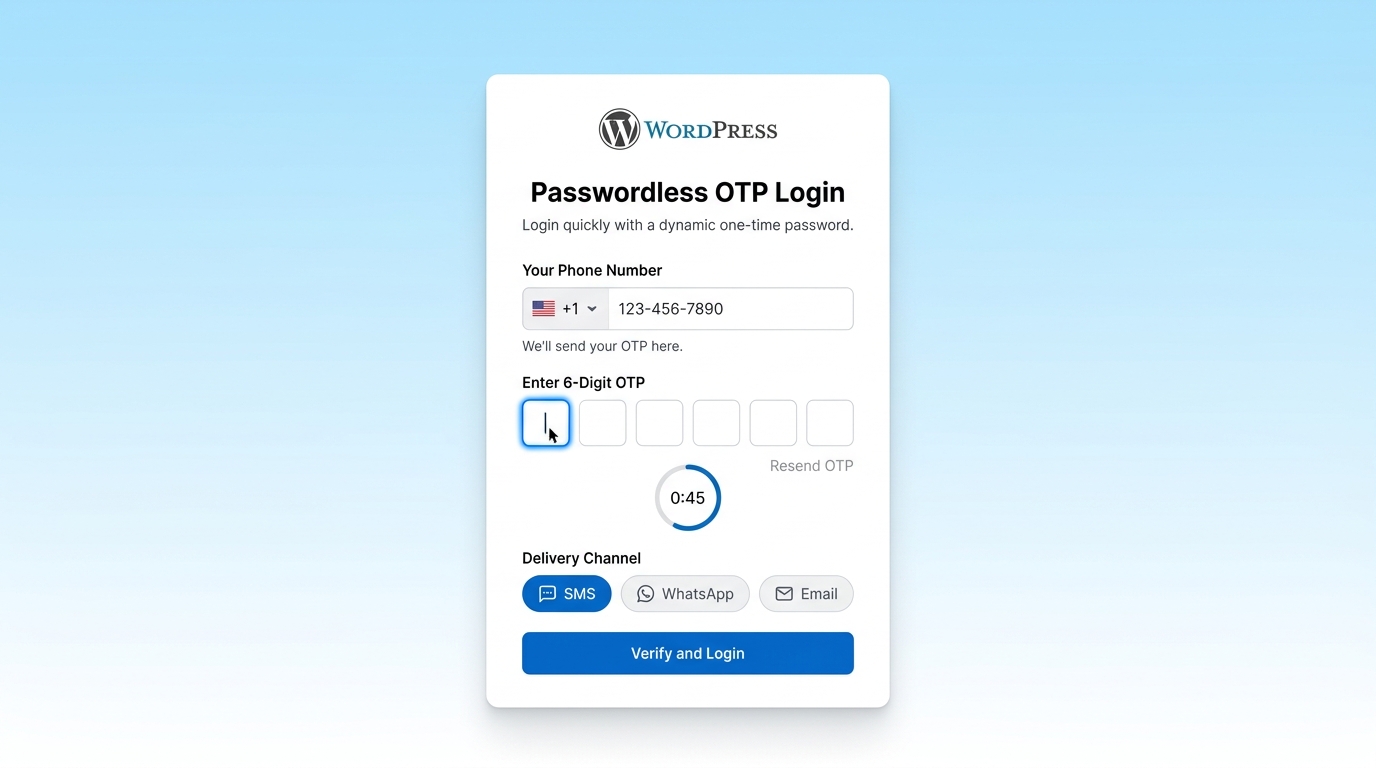
Passwordless OTP Login Screen: Clean segmented 6-digit passcode inputs with live resend countdown timers and international country flag picker.
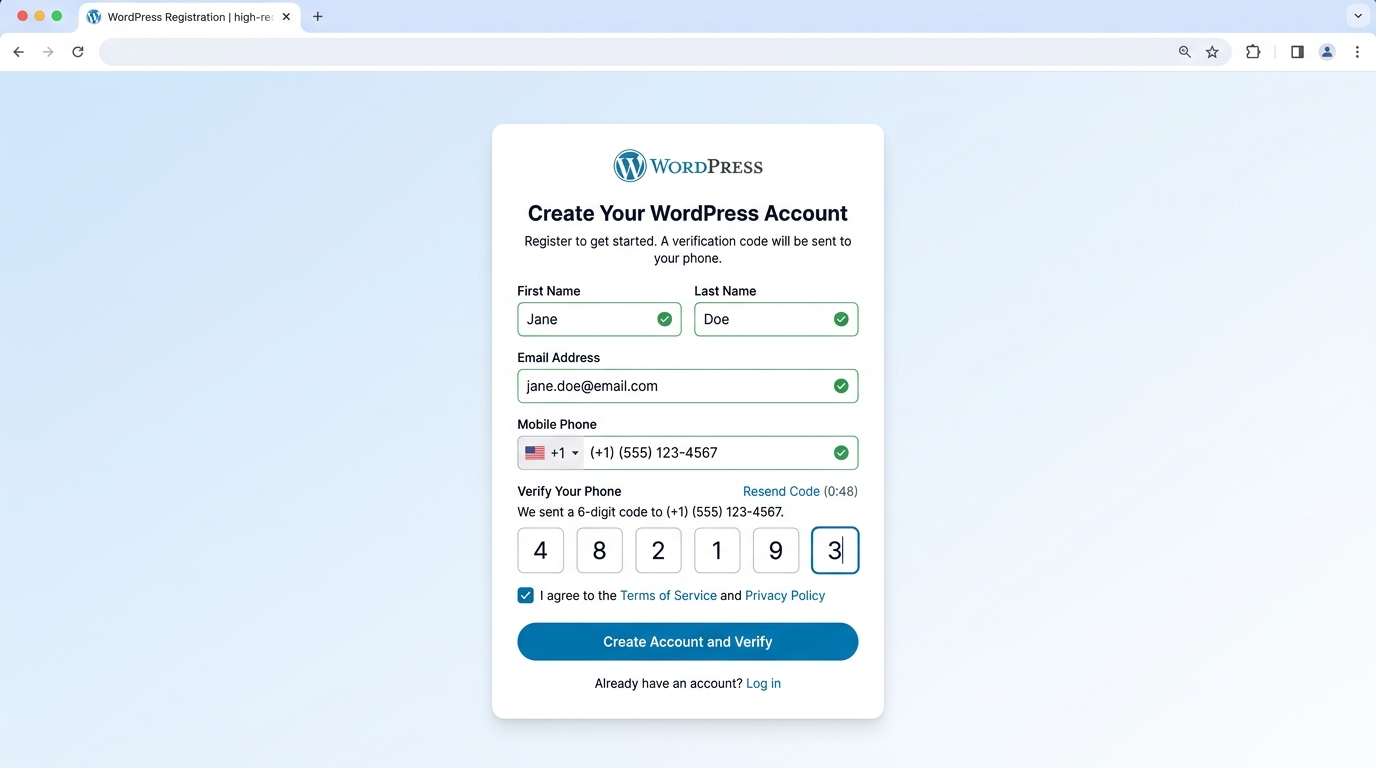
OTP Account Registration: Multi-step user registration with real-time phone number verification and automated login.
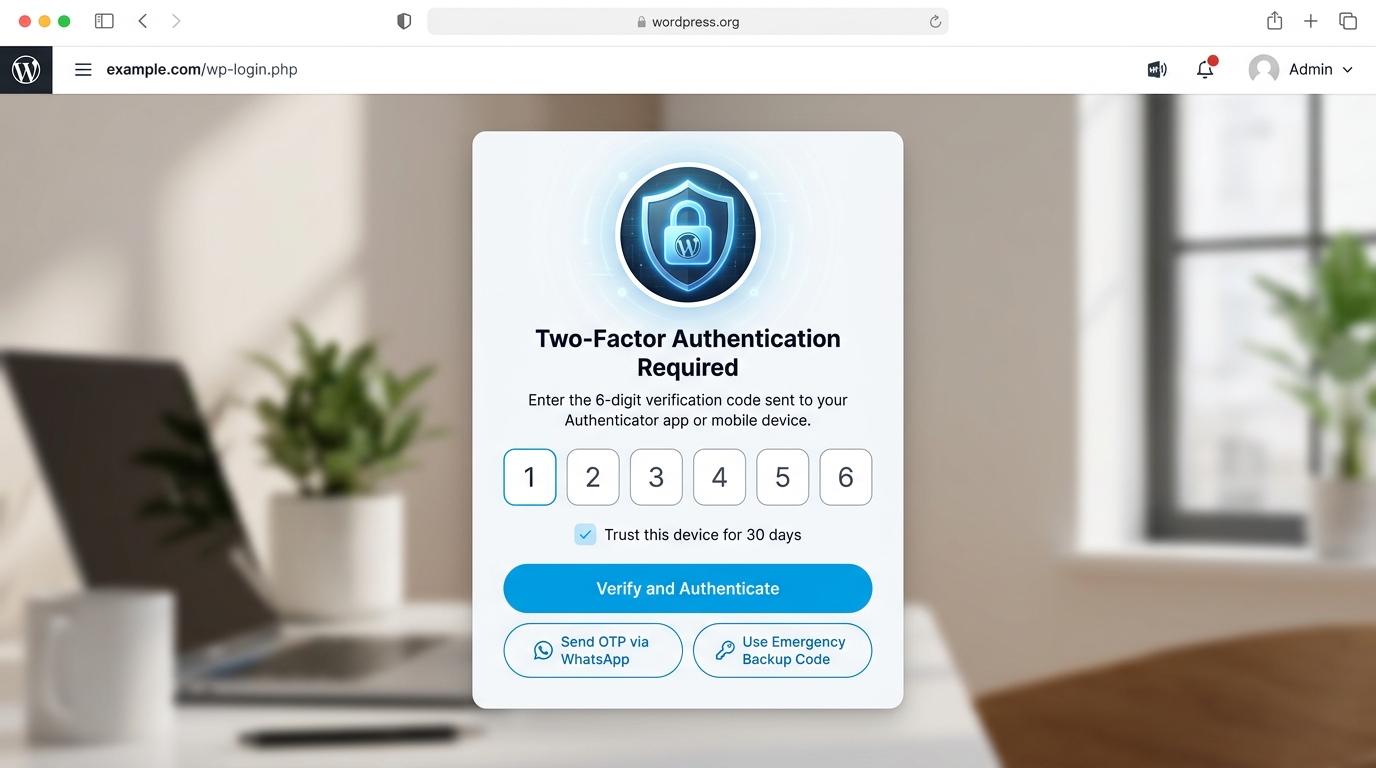
Two-Factor Authentication (2FA) Challenge: High-security 2FA challenge screen with TOTP, SMS, WhatsApp, and emergency backup options.

Authenticator App Setup & Backup Codes: In-dashboard QR code generator for pairing Google Authenticator, Microsoft Authenticator, and Authy with single-use emergency backup recovery codes.
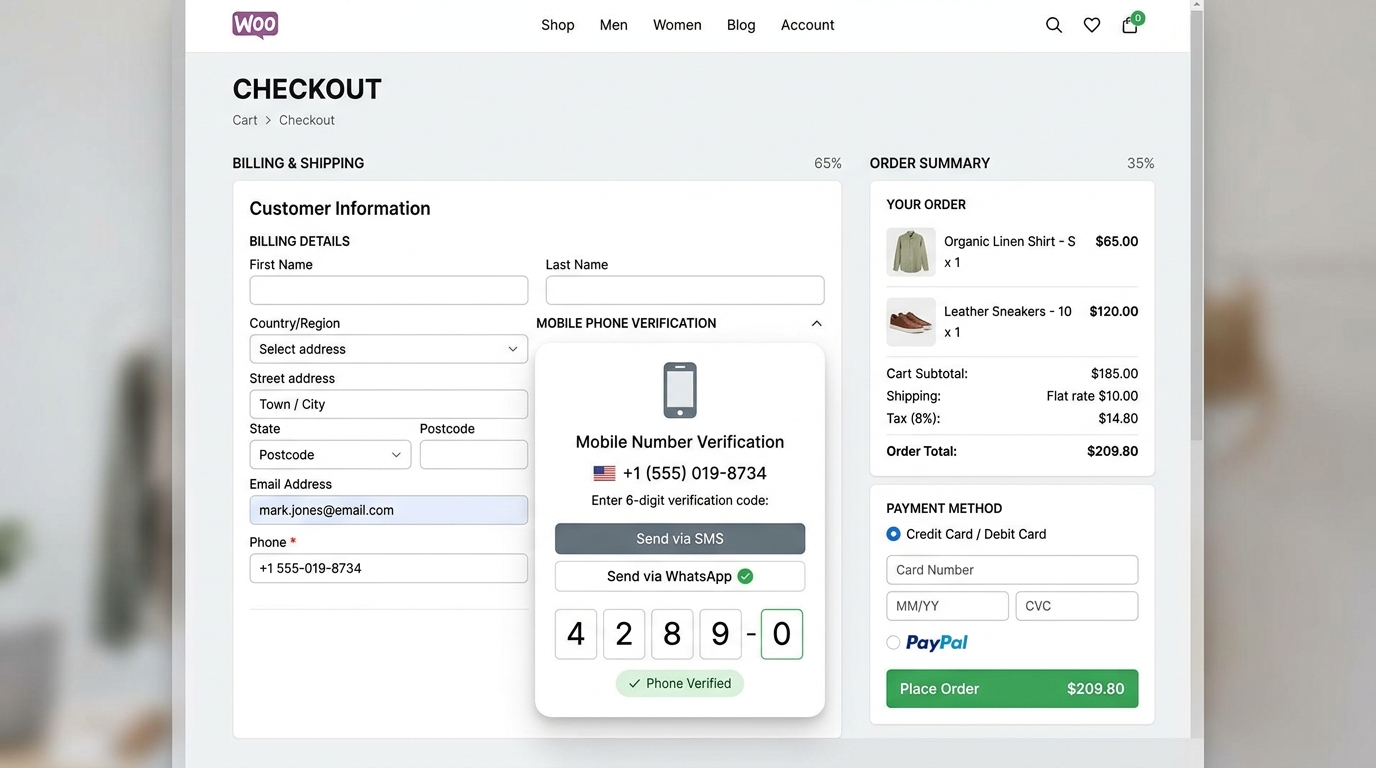
WooCommerce Checkout Phone Verification: Interactive verification widget integrated directly inside the WooCommerce checkout flow to eliminate COD fraud.
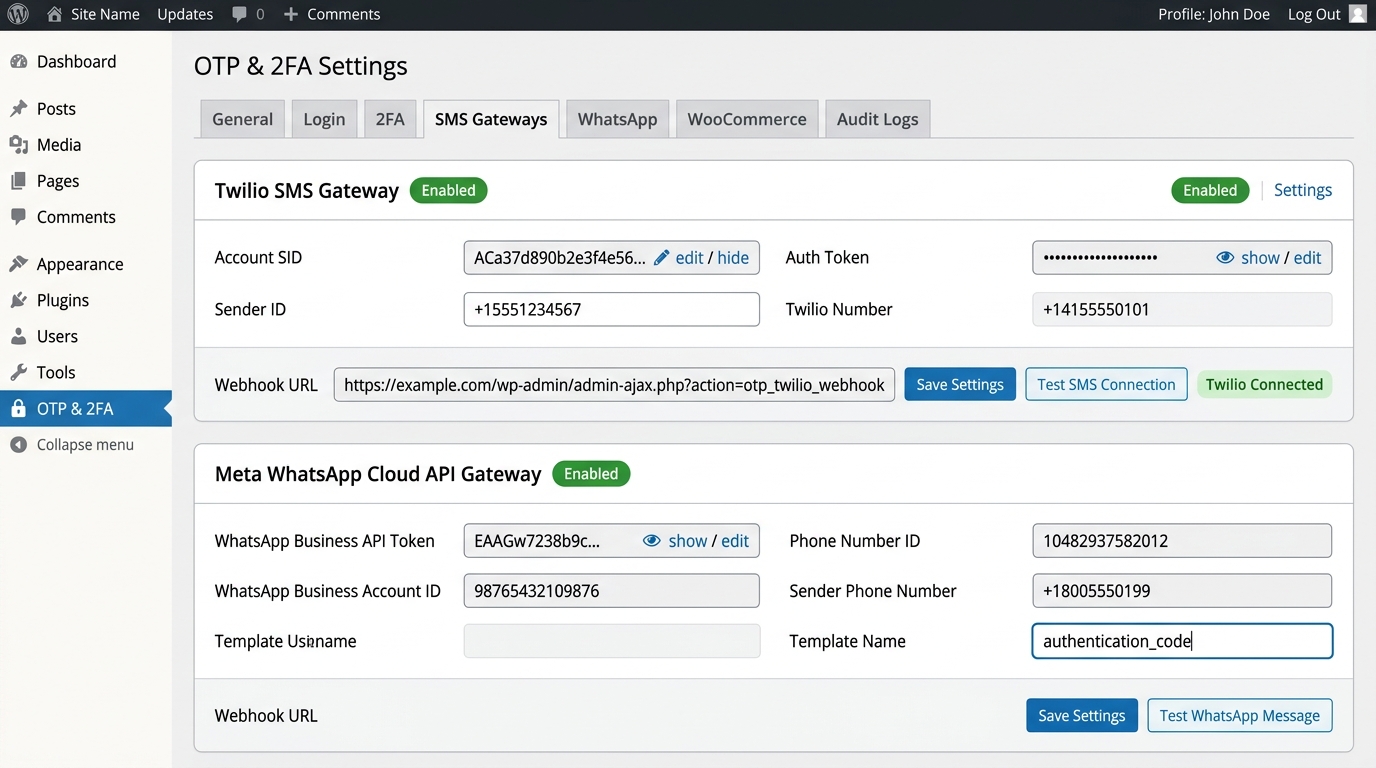
Multi-Channel SMS & WhatsApp Gateway Hub: Centralized API gateway configuration for Twilio, Vonage, MSG91, Meta WhatsApp Cloud API, and Custom HTTP Webhooks.
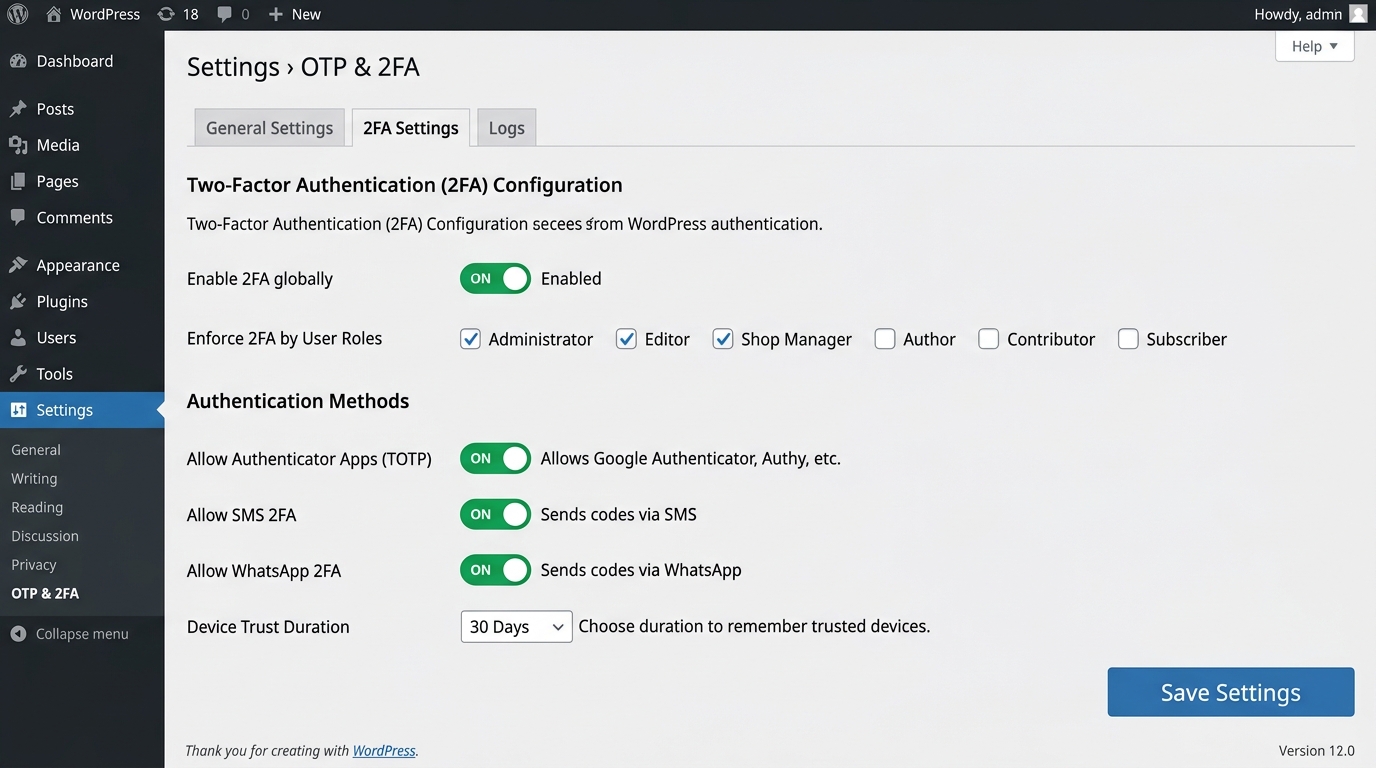
Role-Based 2FA & Security Policies: Admin controls to enforce mandatory 2FA on specific user roles (Administrators, Editors, Shop Managers) and configure trusted device expiration.
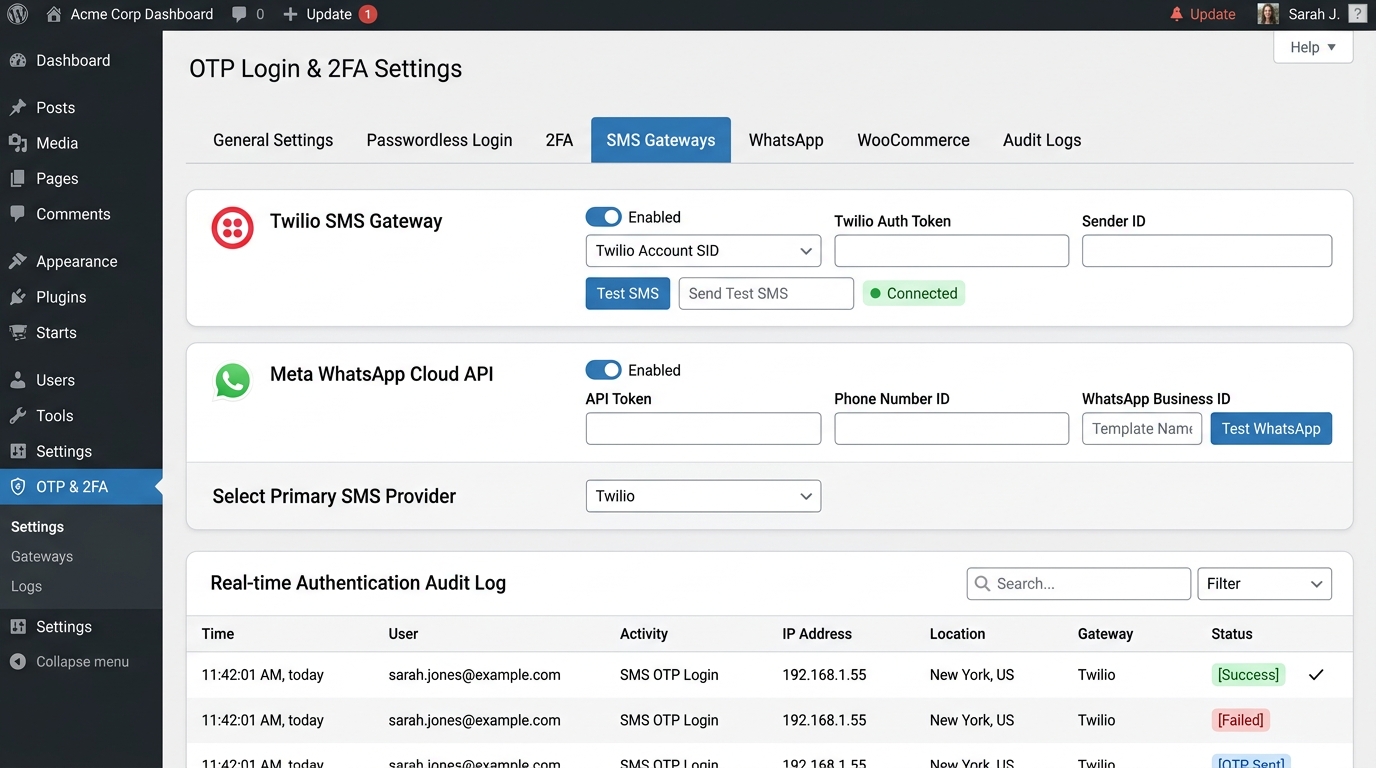
Real-Time Authentication Audit Log: Comprehensive event monitor with date filtering, status badges, and one-click CSV export.
Faq
Users enter their registered email address or mobile phone number. The plugin generates a secure, one-time passcode and dispatches it via SMS, WhatsApp, or Email. Once the user enters the correct 6-digit code, they are authenticated and logged into WordPress immediately without requiring a password.
No. Security is our highest priority. All passcodes are salted and hashed using SHA-256 before being stored in the database (wp_hash()). Verification is executed in constant-time using hash_equals() to completely eliminate timing attacks.
Users navigate to their account security tab ([delowar_otp_security]) and scan a generated QR code using an authenticator app (such as Google Authenticator, Microsoft Authenticator, or Authy). During login, the user provides the rotating 6-digit code from their app.
Yes. Under OTP & 2FA > 2FA Settings, you can select which specific user roles are required to complete 2FA (e.g., administrator, editor, shop_manager).
Users are provided with 8 emergency single-use backup recovery codes upon setting up 2FA. In the event of a lost device, they can click “Use Emergency Backup Code” on the login challenge screen to regain access.
Navigate to OTP & 2FA > SMS Gateways and choose Custom HTTP / Webhook Gateway. You can enter your gateway provider’s API URL, select HTTP GET or POST, configure request headers (such as Authorization: Bearer YOUR_API_KEY), and set the payload using {phone} and {otp} placeholders.
When enabled, an interactive verification card is displayed during checkout. The customer must enter the verification code sent to their billing phone number before the “Place Order” button allows order submission. This guarantees valid customer phone numbers and prevents spam/fake orders.
Yes. Toggle Test Mode under General Settings. When test mode is active, OTP codes are logged in the admin panel under Tools > Test Log without transmitting real SMS or WhatsApp messages.
Yes. The plugin stores only minimal authentication tokens and phone metadata necessary for authentication. Old tokens and expired rate limit records are automatically purged daily via automated WP-Cron routines.
This plugin only connects to external SMS/WhatsApp delivery services when explicitly chosen and configured with API credentials by the site administrator:
* Twilio: Dispatches SMS and WhatsApp OTP messages when configured. (Terms: https://www.twilio.com/legal/tos | Privacy: https://www.twilio.com/legal/privacy)
* Vonage (Nexmo): Dispatches SMS OTP messages when configured. (Terms: https://www.vonage.com/legal/communications-apis/terms-of-use/ | Privacy: https://www.vonage.com/legal/privacy-policy/)
* MSG91: Dispatches SMS OTP messages when configured. (Terms: https://msg91.com/terms-of-use | Privacy: https://msg91.com/privacy-policy)
* Meta WhatsApp Cloud API: Dispatches WhatsApp template messages when configured. (Terms: https://www.whatsapp.com/legal/business-terms/ | Privacy: https://www.whatsapp.com/legal/privacy-policy/)
* Custom HTTP Gateway: Dispatches OTPs to the URL endpoint designated by the administrator, subject to that provider’s terms and privacy policies.
* Note on Authenticator App (TOTP) QR Codes: QR codes are generated 100% locally and offline on your own server. No third-party APIs or external servers are ever contacted for QR code generation.
Reviews
Changelog
1.0.3
- WooCommerce Checkout Safeguards: Disabled guest checkout phone verification by default and added checks for configured SMS credentials to prevent blocking order completions on unconfigured stores.
- Activation Safety & Silence: Refactored activation redirection to admin_init via transients, eliminating premature output and ensuring clean activation under WP_DEBUG and WP-CLI.
- Database Standards & dbDelta: Standardized table schemas to strict WordPress dbDelta formatting with standard varchar types and double-spaced primary keys for reliable MySQL/MariaDB compatibility.
- Environment Requirements: Added proactive server environment checks (PHP >= 7.4, WordPress >= 5.8, JSON and Hash extensions) with informative notices.
- Admin Style Scoping: Scoped color picker and admin UI styles to plugin containers to prevent CSS leakage into core admin screens.
- 3rd-Party External Services Documentation: Added complete disclosures under “External services” in readme.txt detailing data transmission, purpose, conditions, and verified Terms of Service & Privacy Policy links for Twilio, Vonage, MSG91, Meta WhatsApp Cloud API, and Custom HTTP Gateways.
- 100% Offline Authenticator App QR Codes: Integrated local SVG QR code generation to eliminate external third-party API dependencies.
1.0.1
- Security Hardening: Enforced mandatory password verification for credentials authentication, removed user-controllable login mode parameter, and added site-wide user registration permission checks.
- Added explicit Third-Party Services disclosures in readme.txt with verified Terms of Service and Privacy Policy links (QRServer, Twilio, Vonage, MSG91, Meta WhatsApp Cloud API).
- Updated help documentation code examples to use RFC 2606 reserved example domain names.
1.0.0
- Initial public release.
- Added Passwordless OTP Login via Phone Number and Email.
- Added OTP-verified Account Registration with auto-login options.
- Added Universal Two-Factor Authentication (2FA) with role-based enforcement.
- Added TOTP Authenticator App support (Google Authenticator, Microsoft Authenticator, Authy, etc.).
- Added 8 single-use cryptographic emergency backup codes.
- Added WooCommerce Checkout Phone Verification to eliminate fake orders and COD fraud.
- Added SMS gateway integrations: Twilio, Vonage (Nexmo), MSG91, and Universal Custom HTTP/Webhook Gateway.
- Added WhatsApp gateway integrations: Twilio WhatsApp and Meta Cloud WhatsApp Business API.
- Added sliding-window rate limiting per IP address and identifier.
- Added complete Audit Logging suite with CSV export and automated daily log retention cron.
- Added developer Test Mode for simulated OTP delivery without SMS credit costs.
- Full compatibility with WordPress 5.8 through 6.7+ and PHP 7.4 through 8.3+.