Store Order Notifications for WooCommerce
Store Order Notifications for WooCommerce
Description
Store Order Notifications for WooCommerce helps store owners stay updated on every order in real time. Connect your WooCommerce store with Discord, Telegram, Slack, SMS, and Email to receive instant notifications for new orders and status changes. Version 2.0.0 introduced a redesigned dashboard, improved code, and made all notification channels free.
Whether you’re a solo entrepreneur or managing a team, this plugin keeps everyone informed with real-time updates without requiring constant access to the WordPress admin panel.
Key Features
- Multi-Platform Notifications: Receive order updates on Discord, Telegram, Slack, SMS, and Email.
- Real-Time Alerts: Get instant notifications for new orders and order status changes.
- Intuitive Dashboard: Manage settings effortlessly with a modern, user-friendly interface.
- Optimized Performance: Lightweight and fast, with improved code efficiency for seamless integration.
- Customizable Messages: Tailor notification content to your needs with advanced formatting options.
- Notification Filtering: Choose which order statuses or products trigger notifications.
- Order Details: Notifications include order number, status, customer name, and a direct link to the WooCommerce order edit page.
- Branded Notifications: Display your site’s favicon in notifications for a professional touch.
Supported Notification Channels
- Discord: Send order notifications to your Discord channel via webhook.
- Telegram: Get instant alerts via Telegram bot notifications.
- Slack: Receive notifications in your Slack workspace.
- Email: Get detailed order notifications via SMTP, SendGrid, Mailgun, Sendinblue, or Mailjet.
- SMS: Receive text message alerts via Twilio or Nexmo (Vonage).
External Services
This plugin connects to the following third-party services to deliver order notifications. Credentials (tokens, webhook URLs, API keys) are stored in your WordPress database and are only transmitted to the respective service when a notification is triggered by a WooCommerce order event.
Discord
Used to send order notifications to a Discord channel via an incoming webhook URL that you provide.
- Data sent: order number, order status, customer name, order total, and a link to the WooCommerce order edit page.
- Data is sent every time a WooCommerce order is created or its status changes (based on your configuration).
- Service provider: Discord Inc.
- Terms of Service: https://discord.com/terms
- Privacy Policy: https://discord.com/privacy
Telegram
Used to send order notifications via the Telegram Bot API using a bot token and chat ID that you provide.
- Data sent: order number, order status, customer name, order total, and a link to the WooCommerce order edit page.
- Data is sent every time a WooCommerce order is created or its status changes (based on your configuration).
- Service provider: Telegram FZ-LLC.
- Terms of Service: https://telegram.org/tos
- Privacy Policy: https://telegram.org/privacy
Slack
Used to send order notifications to a Slack channel via an incoming webhook URL that you provide.
- Data sent: order number, order status, customer name, order total, and a link to the WooCommerce order edit page.
- Data is sent every time a WooCommerce order is created or its status changes (based on your configuration).
- Service provider: Salesforce, Inc. (Slack).
- Terms of Service: https://slack.com/terms-of-service
- Privacy Policy: https://slack.com/privacy-policy
Twilio (SMS)
Used to send SMS order notifications using the Twilio API with an Account SID, Auth Token, and phone number that you provide.
- Data sent: order number, order status, and a short notification message, along with the destination phone number.
- Data is sent every time a WooCommerce order is created or its status changes (based on your configuration).
- Credentials (Account SID and Auth Token) are stored securely in your WordPress database and are never shared with anyone other than Twilio.
- Service provider: Twilio Inc.
- Terms of Service: https://www.twilio.com/en-us/legal/tos
- Privacy Policy: https://www.twilio.com/en-us/legal/privacy
Nexmo / Vonage (SMS)
Used to send SMS order notifications using the Vonage SMS API with an API key and secret that you provide.
- Data sent: order number, order status, and a short notification message, along with the destination phone number.
- Data is sent every time a WooCommerce order is created or its status changes (based on your configuration).
- Credentials (API key and secret) are stored securely in your WordPress database and are never shared with anyone other than Vonage.
- Service provider: Vonage Holdings Corp.
- Terms of Service: https://www.vonage.com/legal/
- Privacy Policy: https://www.vonage.com/legal/privacy-policy/
Source Code
The admin JavaScript (assets/admin/admin.js) is compiled and minified from source using npm and webpack. The full, human-readable source code is included in the src/ directory of this plugin. To rebuild the assets, install Node.js dependencies with npm install, then run npm run build.
Installation
- Upload the plugin files to the
/wp-content/plugins/discord-notifications-for-woocommercedirectory, or install directly via the WordPress plugins screen. - Activate the plugin through the ‘Plugins’ screen in WordPress.
- Navigate to Settings > WooCommerce Notifications to configure your settings.
- Enter your preferred webhook URLs (e.g., Discord, Telegram, Slack) and customize notification preferences.
Screenshots

Intuitive Dashboard: Explore the redesigned, user-friendly settings interface for managing notifications.
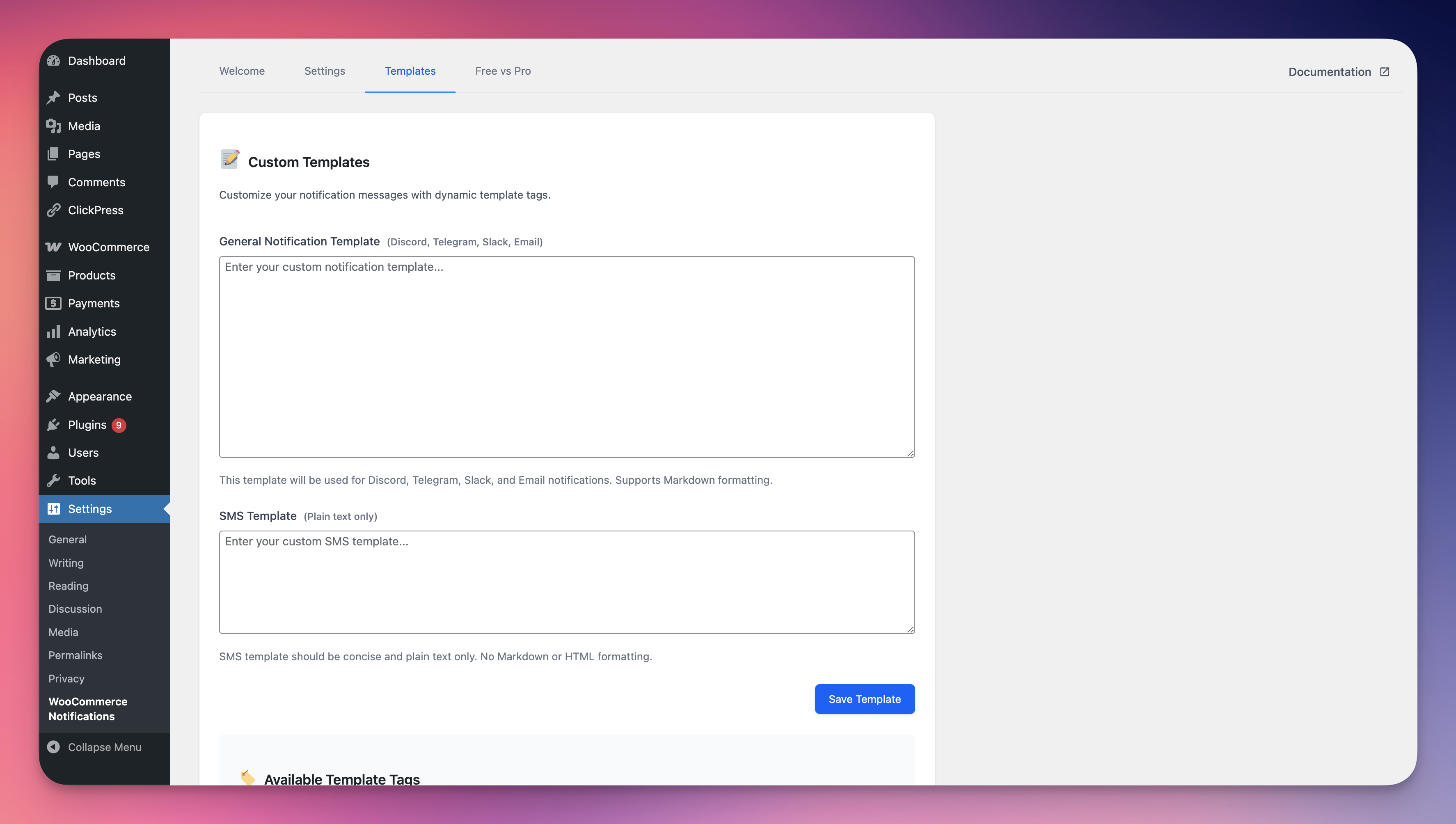
Telegram Notification: View an example of a real-time order notification sent to a Telegram chat.
Faq
- Discord: Go to Server Settings > Integrations > Webhooks > New Webhook, select a channel, and copy the URL.
- Telegram: Create a bot via @BotFather, get the bot token, and set up a webhook or use a chat ID.
- Slack: Go to your Slack workspace, create a new app, enable incoming webhooks, and copy the webhook URL.
Yes! The plugin allows full customization of notification messages, including adding specific order details, custom text, and formatting using template tags.
You can filter notifications based on order status (e.g., only “Completed” or “Processing” orders) or specific products, giving you precise control over which updates you receive.
This plugin is designed exclusively for WooCommerce to ensure seamless integration and optimal performance.
The plugin supports SMTP, SendGrid, Mailgun, Sendinblue, and Mailjet for email notifications.
The plugin supports Twilio and Nexmo (Vonage) for SMS notifications.
Reviews
Changelog
2.1.1
- Updated plugin display name to comply with WordPress.org directory guidelines.
- Added External Services section documenting Discord, Telegram, Slack, Twilio, and Nexmo APIs.
- Added Source Code section with link to public GitHub repository for compiled assets.
- Removed promotional language from description.
2.1.0
- Major Update: Removed all pro restrictions – all features now available in the free version!
- Added Slack notifications to the free version.
- Added Email notifications (SMTP, SendGrid, Mailgun, Sendinblue, Mailjet) to the free version.
- Added SMS notifications (Twilio, Nexmo) to the free version.
- Added customizable message templates for all notification channels.
- Improved settings interface with better navigation.
- Optimized code for faster performance and better compatibility.
- Updated plugin name to better reflect full feature set.
2.0.0
- Added Telegram notifications to the Free version.
- Introduced Pro version with Slack, SMS, and Email notifications.
- Added message customization and notification filtering (Pro).
- Revamped settings with a modern, intuitive dashboard.
- Optimized code for faster performance and better compatibility.
1.0.0
- Initial release with Discord notifications.