Disk Usage Insights

Disk Usage Insights
Description
Find large files and large folders in no time. This plugin scans your whole WordPress installation, counts all files and folders, sums up the sizes and outputs useful statistics to find unwanted large objects in your system.
Installation
- Upload the plugin folder to your /wp-content/plugins/ folder.
- Go to the Plugins page and activate the plugin.
Screenshots
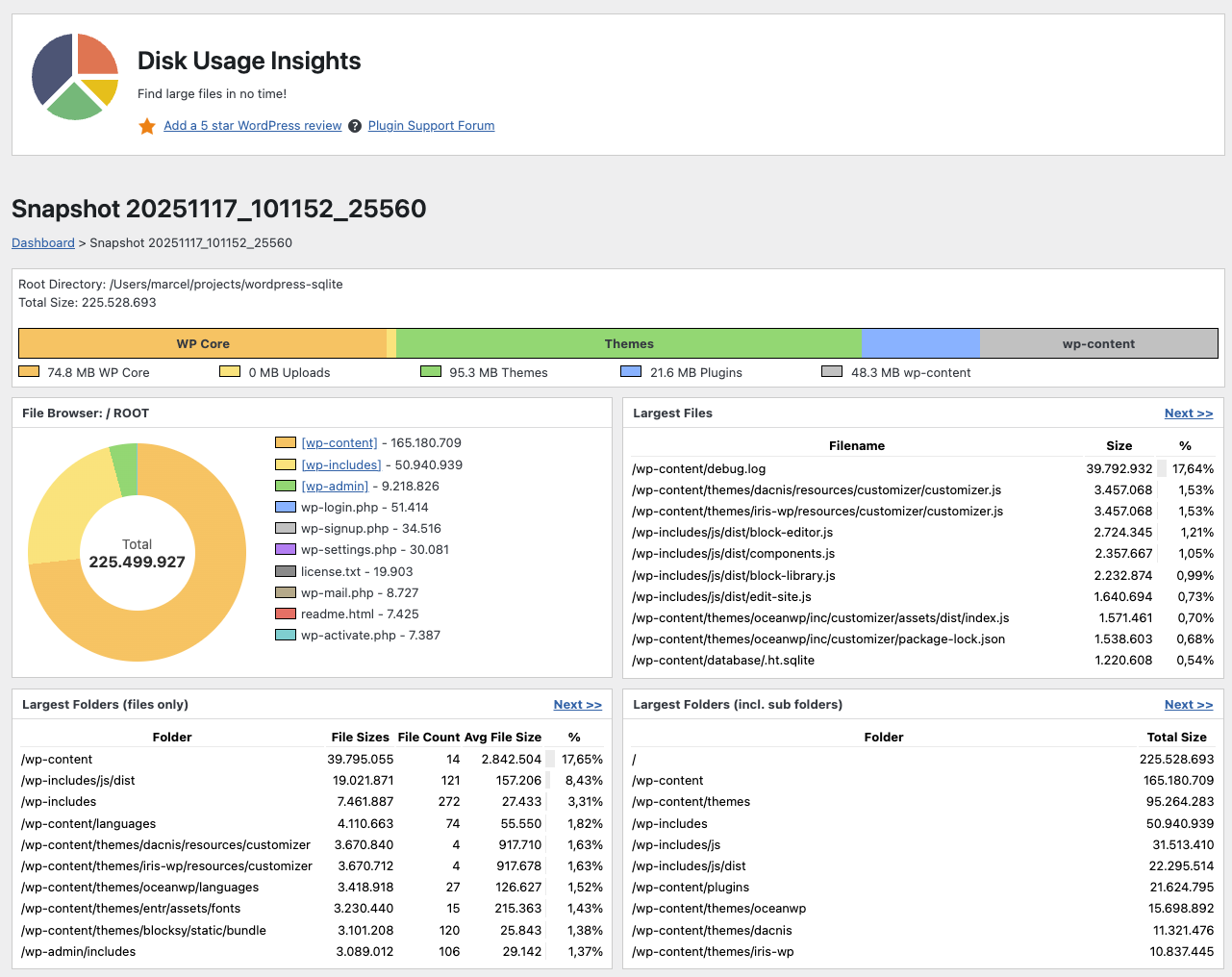
Largest Files and Largest Folders
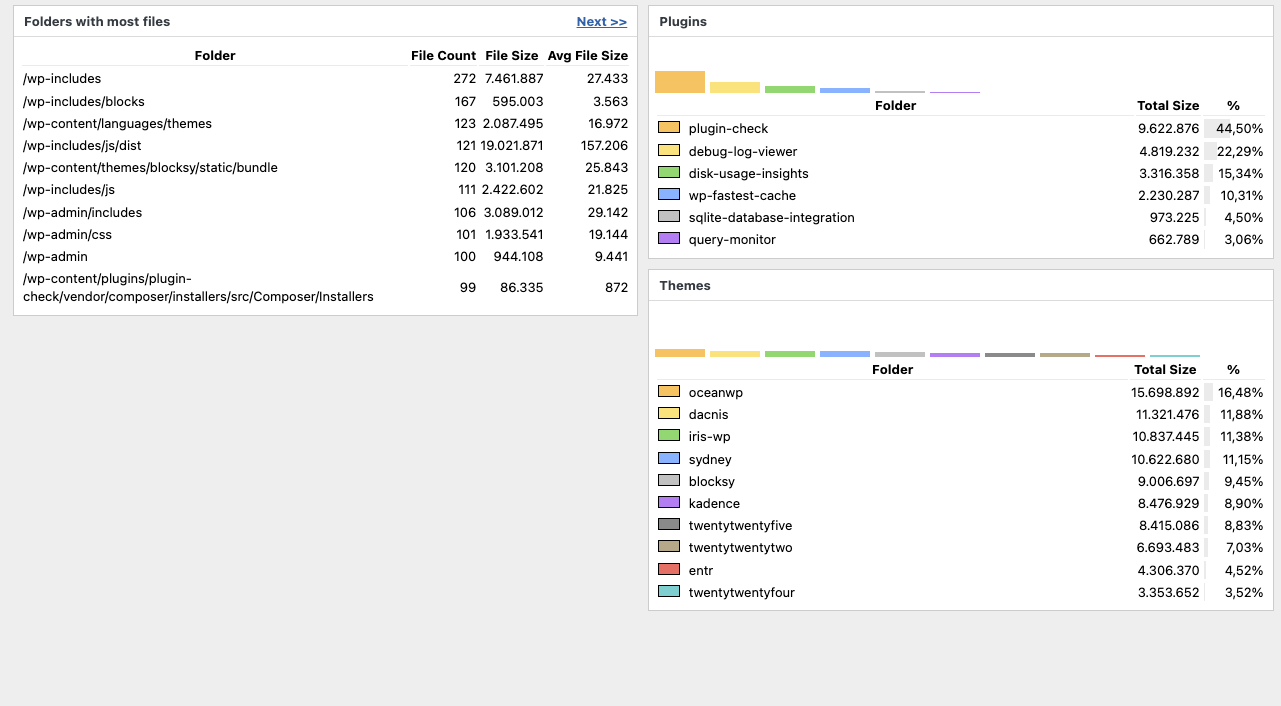
Largest Folders, Folders with most files, Largest Plugins, Largest Themes
Faq
You have two options:
* Open the Tools section in the Admin Area and select “Disk Usage Insights”.
* Click the pie chart in the admin bar.
Simply deactivate and delete the plugin. All previous snapshot databases will be deleted, too.
No, this plugin only shows big files and directories. You need to delete them manually.
All data is stored within the plugin directory of this plugin. If you update or delete this plugin, previous snapshots will be deleted.
No, but it is planned for the future.
No, but it is planned for the future.
No, but it is planned for the future.
Yes, but only for users with the “manage_sites” privilege, which Super Admins have by default.
You need a PHP version >= 7.4.
No, symlinks are completely ignored (for now) to prevent getting into loops.
Reviews
Works very well
By 
This plugin works - plain and simple.
I was recommended another plugin but I kept getting critical errors, it never compelted a full scan.
This worked first time. I got some red screens with errors but they were Cloudflare errors not website errors.
I managed to locate 4GB of log files and other junk to clear.
Thanks for the great and very useful plugin.
Does what it says on the tin
By 
Simple, effective plugin that does what it says on the tin! Top stuff!
Found 28 gigs of unneeded image backup files! Saved me costly hosting upgrades
By 
Website with a lot of images and when I went to create a staging copy of my site to do so updates, I was surprised my site had exploded in size... and I didnt have enough remaining space left in my hosting plan. I was contemplating an expensive hosting upgrade to get more storage space.
With a Disk Usage Insights scan it found TWO 13gb files that I had forgotten where there... well i didnt really know? I am also switching to a new webp/avif creator and several months prior had discovered I was creating TONS of unnecessary file sizes and I ran a tool to wipe them out... not realizing it created 26gb of zip files of the deleted images. BOOM... there was my 26gb explosion in file size. in regards to my needed staging site copy it was really 56gb of data lost.
Worth every penny... which I paid nothing! Looking for a donate option.
it's good
By 
Well made, I appreciate adding that donut chart / file browser.
Beautiful and Helpful
By 
I downloaded this plugin months ago and thought it was helpful. But recently I checked and found out this plugin changed. It now has an even better interface that is beautiful and much easier to view. Wow, I really like how this plugin looks now. Months ago it was okay but very useful, and probably I was grateful for it. But now I find myself enjoying how beautiful the new data interface is and so glad I have this plugin in times of need. I also like how now I am able to directly browse some folders on the page with folder size. Amazing plugin. I think this plugin is pretty much perfect now. Helped me so much in times of need and very easy to use. I recommend using both WordPress backend and FTP alongside this plugin. (EDIT: To further clarify, here's an example. Deleting files directly from the Media page via WordPress backend may not delete all related files, so I like to directly check via FTP for more efficient work.)
Muito bom
By 
Plugin que resolve facilmente a visualização de espaços em disco
Works great!!!!!! very usefull
By 
Works great!!!!!! very usefull
not working at all
By 
not working at all
Just what I needed!
By 
This is just what I needed to find the hidden GB's of data in my site!!! (I immediately identified the three forgotten site backups in by staging setup. Thank you guys!
Works like a charm
By 
Very useful, congrats.
Changelog
1.12 (upcoming)
- Maintenance Release
- Cleaned up CSS
- Cleaned up PHP (checks with phpstan)
- Migrated templates from include(…) to load_template(…)
1.11 (2026-06-26)
- Prevent looping by ignoring symlinks (Thanks, @djf3)
- In case of error added the URL of the ajax request for debugging purposes
- Added a stopwatch “Running for xx seconds…” in the status bar for debugging purposes
- Fix for Multisite installations (Thanks, @mattenser)
- Subtracted uploads size from wp-content size (Thanks, @kaiyoma)
- Security updates (plugin checker warnings)
1.10 (2025-12-15)
- WordPress 6.9 compatability =
1.9 (2025-11-18)
- File Browser: Donut Chart + Navigate through folders
1.8 (2025-11-11)
- Better Bar Chart
- Percentage Display for Plugins and Themes
- Changed the Review and Help links
- Vertical Bar Charts for Plugins and Themes
1.7 (2025-11-06)
- Added Bar Charts
- Error Output to Website so it can be reported to the WordPress Forum
1.6 (2025-04-08)
- Pagination for result tables
- New visuals of the data analysis phases
1.5 (2025-03-16)
- Plugin is now 2-5x faster in scanning and analysis
1.4 (2024-12-20)
- Plugin now runs with PHP >=7.4
1.3 (2024-12-19)
- Reimplemented “Largest Plugin Folder” and “Largest Theme Folders” from v1.1
- Bugfix: Report “Largest Folders (incl. sub folders)” was sorted by count instead of size
- Bugfix: Fix issues with the playground demo version
1.2 (2024-12-19)
- Support for really big and slow installations (complete code rewrite, usage of sqlite as a database and job queues on top of it)
1.1 (2024-12-19)
- Support for Multisite installations (user must have privilege “manage_sites” which Super Admins have by default)
- Disk Usage in percent is now visualized with a bar in the background of the first column
1.0 (2024-08-20)
- Plugin released.