Disk Usage Sunburst

Disk Usage Sunburst
Description
Disk Usage Sunburst 2.0 is a completely modernized WordPress plugin that visualizes your site’s disk usage through an interactive sunburst chart. Quickly identify large files and directories that may be consuming valuable storage space on your WordPress installation.
✨ New in Version 2.0
- Modern Architecture: Complete rewrite with object-oriented PHP and PSR-4 autoloading
- Enhanced Security: Proper nonce validation, capability checks, and input sanitization
- Performance Optimized: Timeout protection, memory management, and intelligent caching
- D3.js v7: Upgraded to the latest D3.js version with smooth animations and mobile support
- REST API: Full REST API endpoints for developers and external integrations
- Better UX: Responsive design, progress indicators, and detailed error reporting
- Export Options: Export charts as PNG, SVG, or raw JSON data
- WordPress 6.9+ Ready: Tested with the latest WordPress versions
🎯 Key Features
- Interactive Sunburst Chart: Click to zoom in/out through your directory structure
- Real-time Tooltips: Hover for detailed file/directory information
- Performance Settings: Configurable limits for large installations
- Cache Management: Smart caching with manual cache clearing options
- Multisite Compatible: Works seamlessly on WordPress multisite networks
- Developer Friendly: Action hooks, filters, and REST API endpoints
- Accessibility: Keyboard navigation and screen reader support
🔧 Technical Requirements
- WordPress 5.0 or higher
- PHP 7.4 or higher
- Modern browser with SVG support
🎨 How to Use
- Navigate to
Tools->Disk Usagein your WordPress admin - Click “Start Scan” to analyze your installation
- Interact with the sunburst chart:
- Click on any arc to zoom into that directory
- Click the center circle to zoom back out
- Hover over arcs to see detailed information
- Use keyboard: ESC to zoom out, Home to return to root
🔌 Developer Features
- REST API endpoints at
/wp-json/disk-usage/v1/ - Action hooks:
rbdusb_scan_completed,rbdusb_scan_error - Filter hooks:
rbdusb_exclude_paths,rbdusb_scan_results - WP-CLI support (coming soon)
Questions? Contact us: support (at) raidboxes.de
Thanks
Thanks to Mike Bostock for his great “d3js”: http://d3js.org
Thanks to Mike Bostock for his awesome “Zoomable Sunburst” implementation: http://bl.ocks.org/mbostock/4348373
Thanks to Jeffrey Sambells for his “Human Readable File Size with PHP”: http://jeffreysambells.com/2012/10/25/human-readable-filesize-php
Installation
- Upload
disk-usage-sunburst.zipto the/wp-content/plugins/directory - Activate the plugin through the ‘Plugins’ menu in WordPress
- See it in action under
Tools->Disk Usage!
Screenshots
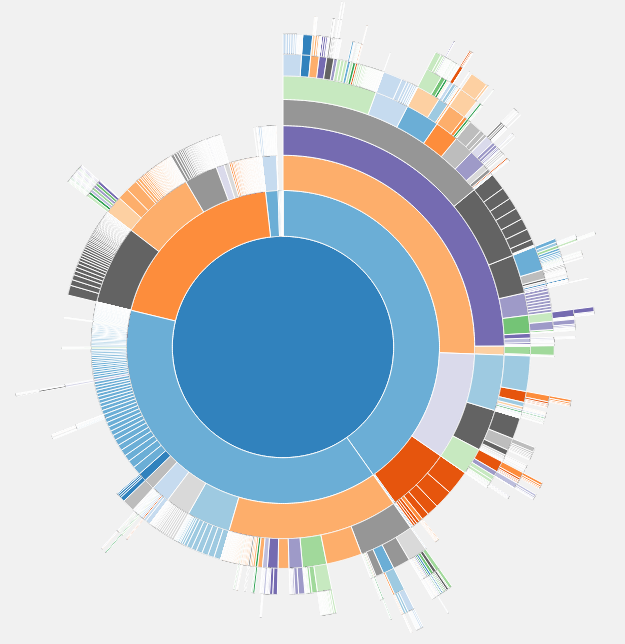
Plugin in action
Faq
After activation you find the tool under Tools -> Disk Usage
Yes since 1.1 it does. Note: For privacy reasons you need to be a Superadmin to use this on a Multisite.
In this case unfortunately this plugin can’t calculate the sizes of all your WordPress files. Check if there’s a PHP time limit in your WordPress and try to increase it.
Reviews
Error most of the time
By 
Error most of the time
Excellent plugin!
By 
Installation was quick, and within a minute I could clearly see which folders were taking up the most space. The sunburst chart is intuitive and easy to understand, and it helped me solve a disk space issue without digging through FTP or SSH. Exactly what I needed.
Brilliant Visual Diskspace Breakdown
By 
I moved my websites over to Direct Admin (DA) panels. DA doesn't include the option to see file diskspace breakdown like cPanel offers. No problem, because this plugin is far better! And I found some other little gremlins in the mix.
I can confirm it works with WP 6.5.2 (most recent at the time of this review).
Will be recommending this to my clients.
Amazing - does what it should
By 
This plugin helped me find some file oaks that made my website slow and the server memory extremely full (database cache log files).
Thank you!
If you don't use this? You're not a WP Dev
By 
must have plugin!
By 
excellent
By 
Useful
By 
Hugely useful
By 
yes, and thank you
By 
Changelog
- 2.0.4: Tooltip fix
-
2.0.3: Security Fix: Sanitize file names in tooltips to prevent Stored XSS.
-
2.0.2: Increased scan limits for large websites.
2.0.0
- MAJOR UPDATE: Complete plugin rewrite with modern architecture
- New: Object-oriented PHP with PSR-4 autoloading and namespacing
- New: Enhanced security with proper nonces, capability checks, and input sanitization
- New: Performance optimizations – timeout protection, memory management, intelligent caching
- New: Upgraded to D3.js v7 with smooth animations and mobile responsiveness
- New: REST API endpoints for developers (
/wp-json/disk-usage/v1/) - New: Export functionality (PNG, SVG, JSON)
- New: Progress indicators and detailed error reporting
- New: Responsive design with accessibility improvements
- New: Developer hooks and filters for extensibility
- New: Comprehensive test suite with PHPUnit
- Improved: Better multisite compatibility with network admin integration
- Improved: Modern WordPress compatibility (tested up to 6.5)
- Improved: Enhanced user interface with better controls and statistics
- Fixed: All security vulnerabilities and performance issues from v1.x
- Requires: WordPress 5.0+, PHP 7.4+
1.1.8
- Fix: added missing readme.txt changes
1.1.7
- Fix: removing trunk/ folder from plugin source code
1.1.6
- Update: Successfully tested up to WordPress 6.1.1
1.1.5
- Update: renamed RAIDBOXES to raidboxes
1.1.3
- Update: Fixed wrong svn trunk commits
1.1.1
- Update: Removed unused resources
1.1
- Code-rework to make it more efficient and only load resources on it’s plugin page
- Made the plugin multisite compatible (Thanks to @shawfactor for his idea)
- Successfully tested up to WordPress 5.7
1.0.9
- Update: Successfully tested up to WordPress 5.3
1.0.8
- Update: Successfully tested up to WordPress 5.1.1
1.0.7
- Update: Successfully tested up to WordPress 4.8.2
1.0.6
- Update: Successfully tested up to WordPress 4.7.1
1.0.5
- Advice: If you don’t see anything, increase php time limit… This plugin is maintained!
1.0.4
- Bug fixed: browsers without SVG support didn’t see anything. Now these will get a nice red error message 😉
1.0.3
- Bug fixed: Show error message if calculation of file/directory sizes fails (e.g. because of time limit)
1.0.2
- Bug fixed: converted short array syntax to long array syntax to support PHP versions < 5.4.0 (thanks to websupporter, https://wordpress.org/support/topic/parse-error-syntax-error-unexpected-146)
1.0.1
- Code enhanced: replaced code 10 with ‘administrator’ capability when calling add_submenu_page (thanks to doume, https://wordpress.org/support/topic/v100-deprecated-argument-in-function-call)
- User Interface enhanced: tooltip follows mouse cursor when mouse is moving
- Bug fixed: the distance between tooltip and mouse cursor was dependent on the scroll position
1.0.0
- First Version