Display Server Info

Display Server Info
Description
Full Description:
Display Server Info is a powerful WordPress plugin that provides detailed server information for administrators directly within the dashboard.
It adds server, PHP, and database information to the dashboard, top admin bar, and footer for quick access.
The settings menu includes a “Display Server Info” submenu with two tabs:
-
Server Information Tab:
In this tab, you will see the information about:
Operating System
Hostname
Server IP
Protocol
Server Software
Web Port
CGI VersionPHP Version
Memory Limit
Max Execution Time
Upload Max Filesize
Max File UploadsDatabase Server version
Database Client version
Database host
Database username
Database name
Table prefix
Database charset
Database collationPlease rate the Plugin if you find it useful, thanks.
-
Settings Tab:
Configure plugin behavior with four toggle switches to enable or disable server information display in the dashboard, admin bar, and footer.
Additionally, users can activate shortcode functionality, allowing[disi_server_info]to display server information anywhere in posts or pages.
The plugin is fully translated into 7 international languages, making it accessible for a global audience.
Privacy
This plugin respects your privacy. Any data collected (such as anonymous usage stats or optional feedback) is handled transparently and securely.
All data, including any optional email address, is transmitted securely (via TLS/HTTPS) and retained only as long as necessary. For example, feedback data is retained for a maximum of 12 months to help us improve the plugin.
For complete details on what data is collected, how it is stored (including hashing and encryption for email addresses), the legal basis under GDPR/CCPA, and your rights, please read our full privacy policy:
https://robertwp.com/privacy-policy
Source Code
This plugin includes minified JavaScript and CSS files for performance
and distribution purposes.
The original, human-readable source code for these files is publicly
available and maintained on GitHub:
https://github.com/robert2021south/display-server-info
The following files are minified in the plugin package:
– assets/css/bootstrap.min.css
– assets/css/disi-common-style.min.css
– assets/css/disi-dashboard-style.min.css
– assets/css/disi-more-style.min.css
- assets/js/bootstrap.min.js
- assets/js/disi-wajax-handle.min.js
- assets/js/disi-common.min.js
Installation
Installation from within WordPress
Visit Plugins > Add New.
Search for Display Server Info.
Install and activate the Display Server Info plugin.
Manual installation
Upload the entire display-server-info folder to the /wp-content/plugins/ directory.
Visit Plugins.
Activate the Display Server Info plugin.
If everything is all right, you will see the “Server Information” widget under the dashboard “At a Glance” widget.
Screenshots
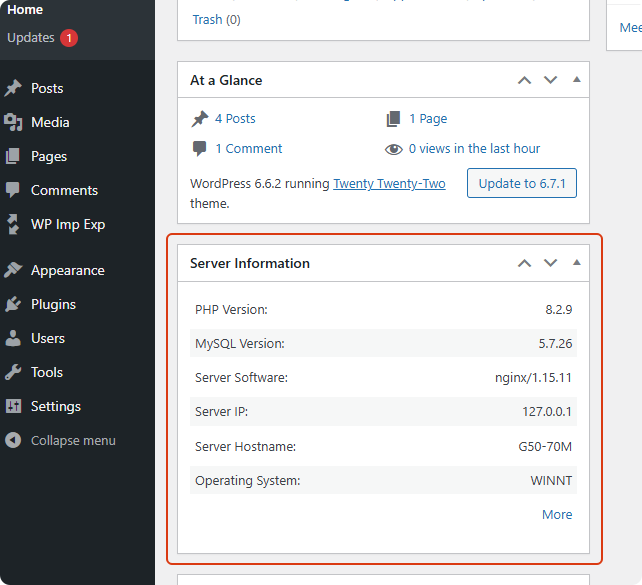
Dashboard Server Info

Admin Bar Server Info

Footer Server Info

More Page

Setting Page

Phpinfo

Shortcode Use Case
Faq
No. Display Server Info is lightweight and optimized. It performs simple server checks and does not impact your site’s performance.
You can view it in multiple places:
Dashboard widget
Top admin bar
Admin footer
“More Info” page
PHP info page
And via shortcode on posts or pages
Yes. All plugin options are removed during uninstall to keep your database clean.Lorem ipsum dolor sit amet, consectetur adipiscing elit. Ut elit tellus, luctus nec ullamcorper mattis, pulvinar dapibus leo.
Yes. The plugin is tested with the latest WordPress releases and maintained with ongoing updates.
Yes. Use the shortcode [disi_server_info] to display server details anywhere on your site.
Reviews
excellent plug-in
By 
It can display server information, such as PHP version, service software and database version, in the management bar, footer and dashboard at the same time. At the same time, it also supports short code, which allows you to display these server information in any article or page.
Changelog
2.2.0
- Added feedback form in settings page
- Implemented star rating system with half-star support
- Added option to leave feedback with email (optional)
- Enhanced user experience with toast notifications
2.1.3
- Update author name
2.1.2
- Added Author URI to the plugin header: https://robertwp.com
- Replaced namespace DisplayServerInfoPlugin with RobertWP\DisplayServerInfo
- Removed
load_plugin_textdomain()call since it’s no longer needed for WordPress 4.6 and above.
2.1.1
- Added uninstall cleanup functionality — plugin options will now be removed when uninstalled.
2.1.0
- Added uninstall cleanup functionality — plugin options will now be removed when uninstalled.
2.0.0
- Code refactored to object-oriented
- Added new feature: Display server information in the upper right corner of the management bar
- Added new feature: Display server information in the footer
- Added more pages: Display more server information, PHP information and database information
- Added configuration page: Configure whether to display in the dashboard, top management bar and footer
- Added shortcode support: Server information can be called in posts and pages
1.0.1
- Initial version