Doppler Forms

Doppler Forms
Description
Este plugin te permite crear Formularios de Suscripción totalmente personalizados que puedes agregar a tu sitio web o blog.
Lo único que tienes que hacer es ingresar un título, elegir los Campos que deseas mostrar,
la Lista a la que quieres enviar tus nuevos Suscriptores y el lugar donde aparecerá tu Formulario. ¡Eso es todo!
¿Aún no tienes cuenta en Doppler? CREA UNA GRATIS y prueba el poder del Email & Automation Marketing. No necesitas contratos ni tarjetas de crédito.
Funcionalidades
*Conexión rápida y sencilla con tu cuenta de Doppler.
*Fácil personalización del Formulario.
*Puedes asociar tu Lista de Suscriptores a Campañas automatizadas de Emails para que cada contacto reciba un Email de Bienvenida al suscribirse.
*Disponible en Español e Inglés
Configuración
-
Dirígete a “Apariencia” y haz clic en el Widget “Formularios de Doppler”.
-
Arrástralo al área de Widgets y elige el lugar de tu sitio web donde quieras que se muestre.
-
Ya podrás visualizar el Formulario en tu sitio web.
Installation
1- Dirígete al panel de control de WordPress y selecciona la pestaña “Plugins” > Nuevo Plugin.
2- Elige el plugin llamado “Formularios Doppler” y haz clic en “Instalar ahora”.
3- Elige la opción “Activar Plugin”. Este se agregará a tu lista de Plugins.
4- Vuelve al panel de control y haz clic en la pestaña “Formularios de Doppler”.
5- Ingresa tu Email de usuario y el API Key de tu cuenta de Doppler. Presiona “Conectar”.
Screenshots
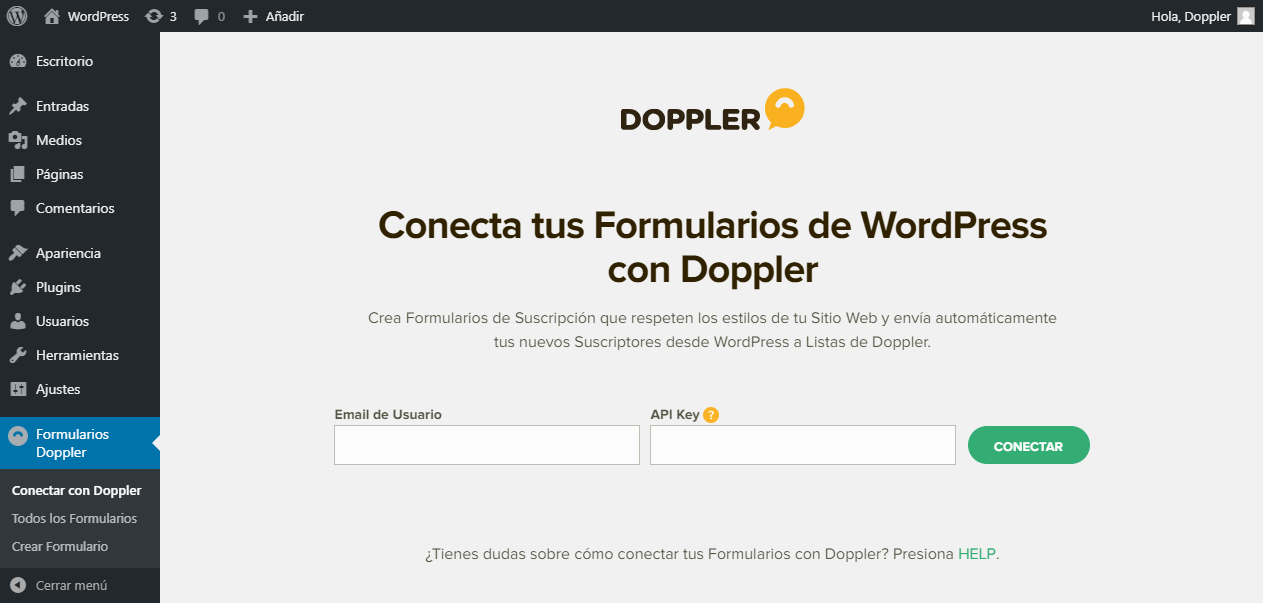
Conecta tus Formularios a Doppler.

Pantalla de conexión exitosa.

Listado de Formularios.

Creación de Formulario.

Creación de Formulario.

Creación de Formulario.

Doppler Widget.
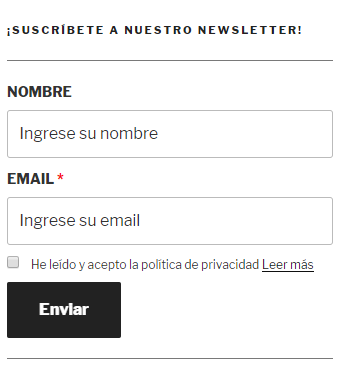
Formulario de Suscripción.
Faq
Esta versión requiere que ingreses tu Email de Usuario además de tu API Key. Si aún no lo has hecho, ese puede ser el motivo.
No, el Formulario puede ser asociado a una única Lista.
No, no hay un límite.
Sí, si tienes más de una cuenta de Doppler, y por ende, más de una API Key, puedes cambiarla. Presta atención a qué cuenta pertenece cada una para evitar enviar Suscriptores a una cuenta equivocada.
No, puedes elegir que tenga el mismo diseño que tu sitio o blog, o bien, personalizarlo a tu gusto.
En este artículo te lo explicamos.
Reviews
Great plugin form
By 
Muy facil de utilizar
By 
Lack of basic functionality
By 
Changelog
2.6.0
- Fix: Applied modifications reported by “Plugin Check”.
- Feat: Added notification banner to dashboard.
2.5.1
- Fix: Fix consent fields rendering.
2.5.0
- Feat: Add integration with Elementor Pro forms.
2.4.8
- Fix: validate content when on code editor for double optin forms.
- Fix: remove default escape slashing for doble optin content.
2.4.7
- Fix: broken access control vulnerability
- Update: Add open graph section to settings.
2.4.6
- Fix: fix XSS vulnerability
- Update: Modify tracking section to settings.
- Update: Add loading screen to wait for style library.
- Fix: Woocommerce contacts counter.
2.4.5
- Update: Replace connection section with new dashboard view
2.4.4
- Fix: Fix form rendering when used as widget.
2.4.3
- Feat: Allow to display forms in a Elementor’s pop up.
2.4.2
- Fix: Fix style conflic with plugins section
2.4.1
- Update: Apply Doppler’s styles library
2.4.0
- Feat: Add new section for gdpr.
- Feat: Allow to set date formats.
- Fix: Make horizontal forms responsive.
- Fix: Modify validations for TinyMCE.
- Fix: Add translations for every spanish language.
2.3.8
- Feat: Added new field type for string values.
- Feat: Added customizable placeholder for date fields.
- Fix: Improvement on form’s list view.
- Fix: Fixed translations.
- Fix: Fix for submittion error when there were wrong fields on double optin forms.
2.3.7
- Feat: Added new field validations when submiting forms.
- Fix: Fix for minor warnings.
- Fix: Fix for HTML editor textbox on form creation and edition.
- Fix: Fix for submittion error when there are two or more forms on page.
2.3.6
- Fix double optin forms edition.
2.3.5
- Add tracking script by default when installing.
- Fix rendering of placeholders in forms with horizontal orientation.
- Added labels for horizontaly rendered forms.
2.3.4
- Fix font’s path.
2.3.3
- Fix error when submiting forms in some scenarios.
2.3.2
- Fix error when submiting forms.
2.3.1
- Fix error messages not showing when updating Double Opt-In forms.
2.3.0
- Added new feature to allow users to create Double Opt-In forms.
2.2.7
- update: doppler form in front-end doesn’t show when doppler account is disconnected
2.2.6
- added new feature to change form layout (display it horizontally or vertically)
2.2.5
- added new feature to use a doppler form with a shortcut tag
2.2.4
- fix re-connection issue account
- fix label showing version user ui
2.2.3
- fix friendly message curl timeout
- add curl conection test case
2.2.2
- fix readme.txt
2.2.0
- add section for inserting datahub script
2.1.9
- Fix warnings
- Added phone custom field support.
2.1.8
- Change Ajax js var for a less generic name to avoid conflicts.
2.1.7
- Fix typo in lists crud
- Visual changes to extensions page
- Visual changes to disconnect screen
2.1.6
- Changed colorpicker to WordPress default (Iris).
- Better visuals for Extensions page.
- Added remove icon to custom fields in forms.
2.1.5
- Check if a List is in use by a form or extension before delete it.
- Support for WooCommerce extension
2.1.4
- Publish extensions section
2.1.3
- Optimized requests to api
2.1.1
- Fix fatal error with new extension class
2.1.0
- Added Manage Lists section.
- Added capacity for future extensions.
- New visuals, new menu.
2.0.2
- Form can be configured to redirect user to a page after subscription.
2.0.1
- Fix: Cuantity of queries to API reduced to avoid possible blocking.
2.0.0
- Added support for new API.
- It’s possible to add Doppler custom fields to the form.
1.0.0
- Initial release.