Download PDF After Submit Form

Download PDF After Submit Form
Description
Download PDF After Submit Form (DPASF) is a powerful WordPress plugin that allows you to protect and provide PDF files for download after users submit a form. Perfect for lead generation, gated content, and restricted file access.
With DPASF, you can:
- Restrict PDF downloads until a form is submitted.
- Collect user information for each download.
- Customize popup designs with editable fields.
- Use shortcodes anywhere on your site with ease.
This plugin offers the premium feature of ready popup design & provides quick access to beautiful all fields that can be edit in your popup easily.
Official Resources:
* 👉 Live Demo
* 👉 Pro Version
* 👉 Video Tutorial
* 👉 Installation Guide
Free Version Features
- Protect and restrict PDF downloads.
- Allow PDF download after form submission.
- Two general popup form templates.
- Collect and store user information when a PDF is downloaded.
Pro Version Features
Includes all free features plus:
- Fully customizable popup designs.
- Add, remove, or edit input fields.
- Real-time updates to the form layout.
- Premium support and faster assistance.
Note: Uninstall the free version before installing the Pro version.
Shortcodes
[formtodownload urlname="url" title="pdfname"]
Attributes:
- urlname – The direct URL to your PDF (e.g.,
https://yoursite.com/file.pdf) - title – A unique name for the PDF (no spaces).
Support & Documentation
You can find and more detailed information about Download PDF after Submit Form on gitlab. If you were unable to find the answer to your question on the FAQ or in any of the documentation, you should check the support forum on WordPress.org. If you can’t locate any topics that pertain to your particular issue, post a new topic for it.
Why Use Download PDF After Submit Form?
Download PDF After Submit Form gives you all the features needed to create a files restricted permission without any hassle.
Why Use Download PDF After Submit Form Pro Version with tutorial?
Contributing / Donations
Your support keeps this plugin free! If you enjoy using DPASF, please consider making a donation. Donations help maintain development and provide better support.
Other Plugins
Installation
- Download and unzip the plugin. Upload the
Download PDF After Submit Formfolder to/wp-content/plugins/. - Activate the plugin from the WordPress ‘Plugins’ menu.
- Alternatively, go to WP Admin Plugins Add New search
Download PDF After Submit Form, then install and activate. - Check our YouTube video guide for detailed instructions.
You will find the ‘Contact’ menu in your WordPress admin panel.
For basic usage, you can also have a look at the plugin website.
Screenshots
screenshot-1.png

screenshot-2.png

screenshot-3.png

screenshot-4.png

screenshot-5.png

screenshot-6.png

screenshot-7.png

screenshot-8.png

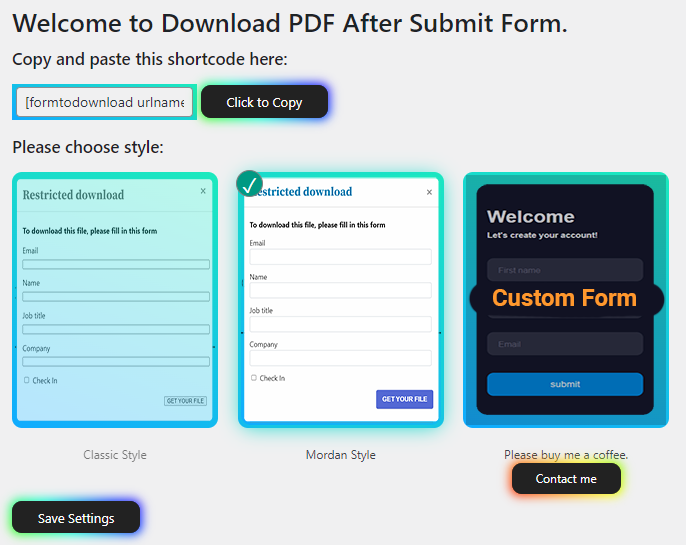
screenshot-9.png1. Main settings page
Faq
Do you have questions or issues with Download PDF after Submit Form? Use these support channels appropriately.
DPASF (Download PDF After Submit Form) allows users to download a PDF after submitting a form on your WordPress site.
Yes, the free version is fully functional. The Pro version adds advanced customization options.
Yes, you can protect and restrict any PDF file on your website.
Yes, all user information submitted via the form can be stored and viewed in the plugin entries.
Absolutely! DPASF is fully responsive and works on all devices.
See the installation tab.
Yes, DPASF is fully free which is available on WordPress.org. This free version will always be free. It also has a pro version (already development) with additional features which you can purchase from our official website.
Yes, You can and get all user info which you have findout view entries menu.
Yes, We provide full support on the WordPress.org forums. You can also post questions or bug reports through WP.org website. However, please note that, for free version’s support/replies, there can be delays upto 24-48 hours.
Please remove or unistall free version then install pro version.
Reviews
Perfect!
By 
Simple but functional plugin.
Useless app and bad service
By 
One of the worst plugins I ever installed. It is not working as advertised.
Once the app is installed - even with the pro version - it is not working at all. The setup is utterly complicated. The video instructions are totally useless and annoying.
Dealing with their service is a nuance. They do not comply with EU law and the app is also not compatible with GDPR regulations.
Good plugin, but I have an issue with this plugin
By 
plugin short code working but, when i placed short code on page, its break page layout
Worst App Ever | Popup is not working
By 
This Plugin wasted my lots time only to get a single pop up, I have watched the video more than 5 times and followed every steps but Got Nothing.
Plugin is not working.
By 
Popup not showing. Seems like plugin is broken.
Wow amazing plugins
By 
Changelog
2.2.6
- Updated for compatibility with WordPress and bug fixed.
2.2.5
- Updated for compatibility with WordPress 6.9. and bug fixed.
2.2.4
- Updated for WordPress version compatibility.
2.2.3
- Updated for WordPress version compatibility.
- Minor bug fixes.
2.2.2
- Updated for WordPress version compatibility.
2.2.1
- Add premium feature.
- View all entries.
- Updated for WordPress version compatibility.
2.2
- Major bug fix.
- Updated libraries.
2.0
- Change post type on single file.
- New post type support.
- Multiple popup designs.
1.0
- Initial release.
- Shortcode generation and PDF protection.
- Add new post type.
- Generate shortcode place and show the main file.