DT-PM AI Sale Assistant for WooCommerce
DT-PM AI Sale Assistant for WooCommerce
Description
DT-PM AI Sale Assistant for WooCommerce (DT-PM AI Sale Assistant for short) is not a generic AI chatbot bolted onto search, and it does not just match keywords in a product’s title or description. For each product category, it builds an explicit “causal chain” – a structured model of the actual questions and criteria your customers weigh when choosing between products (e.g. intended use, must-have features, budget) – and you, the merchant, review and confirm that model before it ever talks to a shopper. Every recommendation the assistant makes is then reasoned through that confirmed, category-specific model, not generated from an unstructured prompt or a plain product search.
Main features:
- Chat widget for your storefront – a friendly assistant your customers can talk to on any page of your storefront (product pages, homepage, cart, checkout, and more), asking questions and getting personalized product suggestions, with direct “Add to cart” buttons.
- Category analysis – reviews your existing WooCommerce categories and groups them into sensible subcategories for the advisor to reason about.
- Causal chain builder – an AI-assisted, merchant-reviewable model of what actually drives a purchase decision in each subcategory (e.g. intended use, must-have features, budget), which you can review and adjust before it goes live.
- Product coverage tools – prepares your product catalog (descriptions, attributes) so the assistant can match real products to real customer needs, with an overview of what is already covered and what is outstanding.
- Customizable tone of voice – match the assistant’s writing style to your brand, either written manually or generated from example pages of your own site.
- Configurable escalation – let customers reach a human via email or a link of your choice when the assistant can’t help.
- Customer feedback loop – shoppers can rate recommendations, and negative feedback is summarized for you so the underlying model can be improved over time.
- Status tab – see your current pricing tier, catalog usage against your plan’s limit, and (on the free tier) remaining purchased conversation credit, with direct links to upgrade or top up.
- Service Agent – a second assistant mode, separate from product advice, that handles order and support questions for logged-in customers:
- looks up a customer’s own order history, or one specific order by number, to answer status/shipping/tracking questions without asking for details it can already see;
- when it can’t help further, drafts a short summary and – only after the customer reviews it and clicks “Yes, send” – emails it to your configured support contact;
- answers shipping, returns, withdrawal, payment, and FAQ questions from pages you pick on your own site, kept in sync automatically;
- reports shipment tracking numbers, including a fallback for shipping plugins that don’t use the official WooCommerce Shipment Tracking format.
- Bring your own AI model – on any tier, including free, use your own Anthropic, Mistral, or OpenAI API key and pick a specific model per provider instead of our platform default.
- MCP Bridge – optionally generate a key so an MCP-capable AI client (e.g. Claude) can read and change most of this plugin’s settings on your behalf.
How it works: this plugin is a thin WordPress/WooCommerce interface. The actual AI processing (analyzing your categories, building the causal model, generating recommendations) runs on our own hosted backend service, which this plugin talks to over HTTPS. See “External services” below for exactly what is sent and when.
Free to start, paid tiers for growing stores: every store gets a free tier with a usage allowance and a one-time trial month. Larger product catalogs or higher usage require a paid plan – see the plugin’s Status tab for your current tier, catalog usage, and an upgrade link.
Requirements: an active WooCommerce installation. An outbound HTTPS connection from your server to our backend service (see “External services”) is required for the plugin to function.
External services
This plugin relies on our own hosted backend service (“DT-PM AI Sale Assistant service”, currently reachable at https://api.dt-pm.eu) to do the actual AI work behind the recommendations. Here is exactly what is sent to that service, and when:
-
When you click “Connect this store” (shown on every DT-PM AI Sale Assistant admin page until you do, right after activating the plugin): your store’s web address and store name are sent once, to set up an account for your store on our service so the advice features can work at all. You confirm the current version of our AVV (data processing agreement) as part of this same step, and that version number is sent along with it; the agreement text itself is read from, and the version number checked against, our service beforehand (no store data sent for that check). If you connected before this confirmation step existed, a dashboard banner asks you to confirm the current AVV version afterwards in the same way. Nothing is sent automatically on activation itself – the plugin waits for this explicit action.
-
While the plugin stays active, on an ongoing schedule: the plugin automatically checks in with our service multiple times a day and once a week. These automatic check-ins send only your store’s account identifier – never any product information – and are used to keep your account up to date (for example, tracking your free trial month, keeping previously-submitted product availability current, and, if you’ve connected a dt-pm.eu license key, confirming with our service that it’s still valid). These check-ins only happen once your store is actually connected (see “Installation” below) – none of them run beforehand.
-
Only after you have actively set up the Category Analysis and Causal Chain features yourself: those same daily/weekly check-ins start additionally including real data from your product catalog (product SKUs and category names), so our service can keep its recommendations accurate. No product data is ever sent before you complete that setup step. Alongside your product data, the causal chain logic generated for your categories (the decision questions and criteria the assistant uses to advise shoppers) is also stored on our servers and used to run your chat assistant. On the free tier, an anonymized summary of that structure – just the category type and the list of decision criteria used, never product names, prices, or customer data, and with no way to trace it back to your store – is additionally used to improve causal chain generation for everyone. On paid plans, you can turn this off in the plugin’s settings.
-
Only after you have started processing your product catalog for a subcategory yourself (the Product Coverage step) and that run appears to have stopped partway through: the plugin automatically checks once an hour whether previously started catalog processing is still incomplete and, if so, resumes it by resending the full data (name, attributes, price, date last modified) for the still-missing products only – the same data already sent when you click “Process remaining products” or “Update changed products” yourself. This never starts processing for a subcategory you have not already begun yourself.
-
Every time one of your shoppers uses the chat widget: their typed messages (and, where relevant, the product page they are viewing and your store’s configured language) are sent to our service in order to generate a reply. Our service forwards that message to a third-party AI provider – by default Anthropic (Claude); if your store uses its own AI provider key (BYOK, available on every tier), your configured provider (Anthropic, Mistral AI, or OpenAI) and chosen model are used instead, under your own account with that provider. Separately, finding matching products for that reply uses Mistral AI’s embedding service on our account, regardless of your BYOK setting. This only happens while a shopper is actively using the chat widget on your site – no shopper data is sent at any other time. To identify your store for these requests without exposing a long-lived credential to every visitor’s browser, your WordPress server itself exchanges your store’s permanent credential for a short-lived access token (valid 15 minutes) right before the widget needs one – this is only ever your store’s own already-known account identifier, no new data.
-
When a logged-in customer asks about an order in the chat (their own order history, or one specific order by number): that order’s status, order date, line items, shipping method, and tracking numbers are sent to our service and on to the AI provider in use (see point 5) to generate the reply, the same way a chat message is. This only ever covers orders that already belong to the logged-in customer’s own account – never a guest, and never another customer’s order.
-
Once you assign a page to a slot in the “Service Assistant Policies” section (Shipping, Returns, Withdrawal, Payment, FAQ): that page’s text is sent to our service when you save, and again once a day for as long as the slot stays assigned, so the assistant can answer from your own wording instead of guessing. Unassigning a slot (back to “— Not configured —”) removes its stored text from our service.
-
When a customer agrees to a handover to your support team (“Yes, send”) in the chat: the conversation summary and the customer’s contact details (email, and phone if given) are not sent to our service – your own WordPress installation emails them directly to your configured support contact (via WordPress’s standard mail function), with the customer’s address set as the reply-to, so a reply goes straight back to them. Immediately beforehand, the plugin confirms with our service that a genuine handover was actually offered for that conversation – only your store’s account identifier and an internal conversation reference are sent for that check, never the summary or the customer’s details.
-
If you generate a key in the “MCP Bridge” section of the Service Agent tab: an MCP-capable AI client holding that key (entered there as a Bearer token) can read this store’s current backoffice settings (e.g. AI provider/model choice, escalation target, widget title, knowledge-pool participation) from our service, and change most of them the same way the Settings page itself would – never your AI provider API keys, which stay in the browser-based Settings form only and are not exposed through this bridge. This only works while a key exists; revoking it stops it immediately.
By using this plugin you agree to our Terms of Service.
Installation
- Make sure WooCommerce is installed and active.
- Upload the plugin files to
/wp-content/plugins/dtpm-ai-sale-assistant-woocommerce, or install the plugin through the WordPress plugins screen directly. - Activate the plugin through the “Plugins” screen in WordPress.
- Go to the new “DT-PM AI Sale Assistant” menu item in your WordPress admin and click “Connect this store” – this registers your store with our backend service (see “External services” above). You can then review your connection status, run the Category Analysis, and set up your first Causal Chain.
- Once you’re happy with the setup, place the chat widget on your storefront by completing the Product Coverage step – the widget then appears automatically across your storefront (product pages, homepage, cart, checkout, and more).
Screenshots
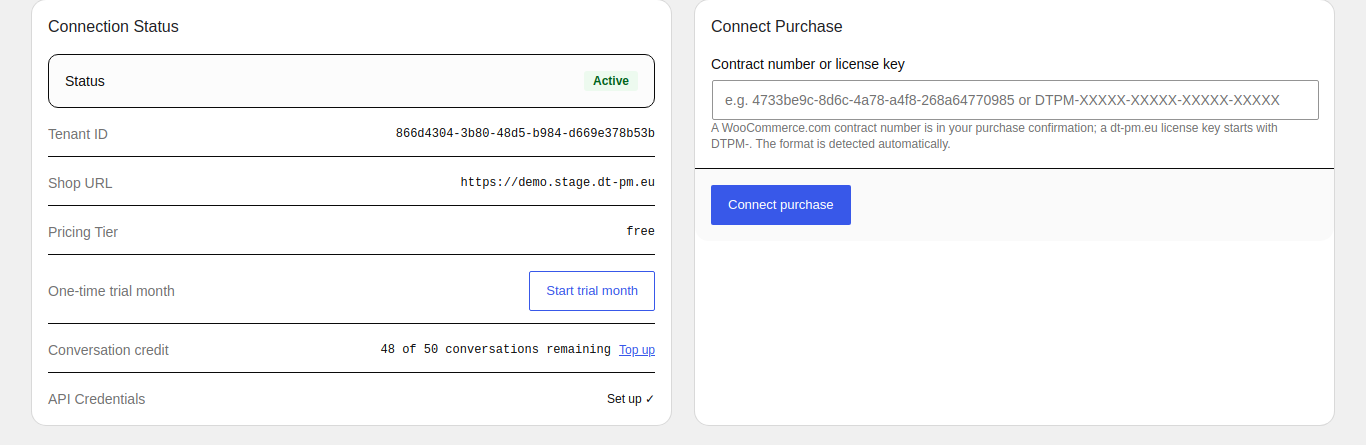
Settings: connection status and connecting a purchase (WooCommerce.com contract number or dt-pm.eu license key).
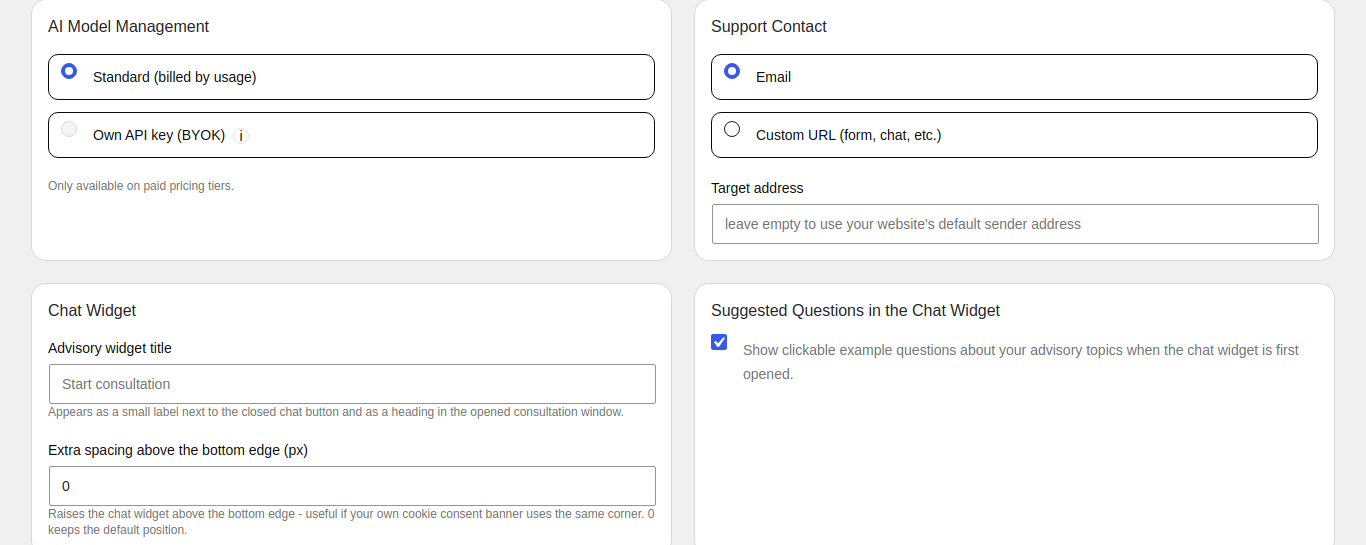
Settings: AI model (standard or your own API key), support contact, chat widget title and position, suggested questions.
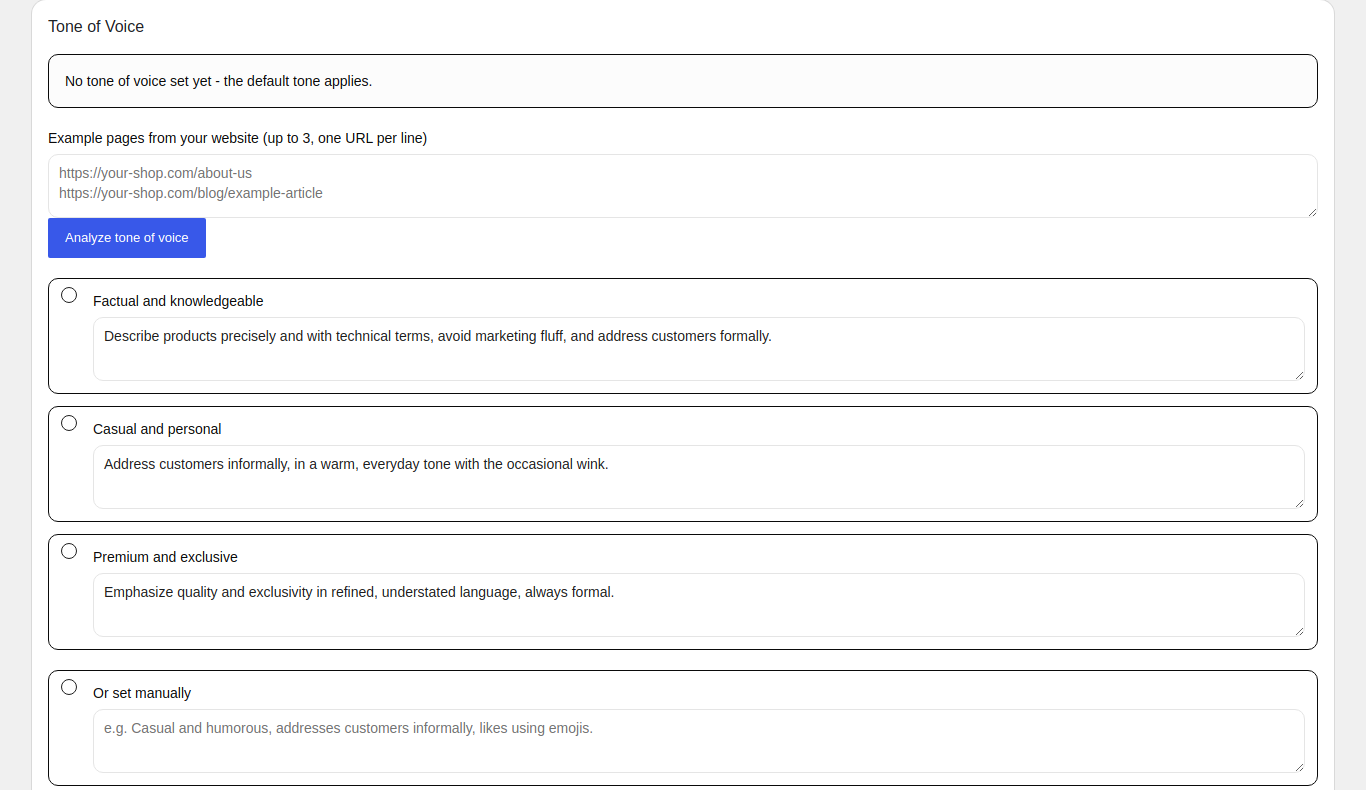
Settings: tone of voice - analyze pages of your own shop or choose a preset.

Category analysis: AI-suggested grouping of WooCommerce categories into subcategories, reviewed and confirmed by you.

Causal chain: coverage check showing product characteristics the decision model does not cover yet.
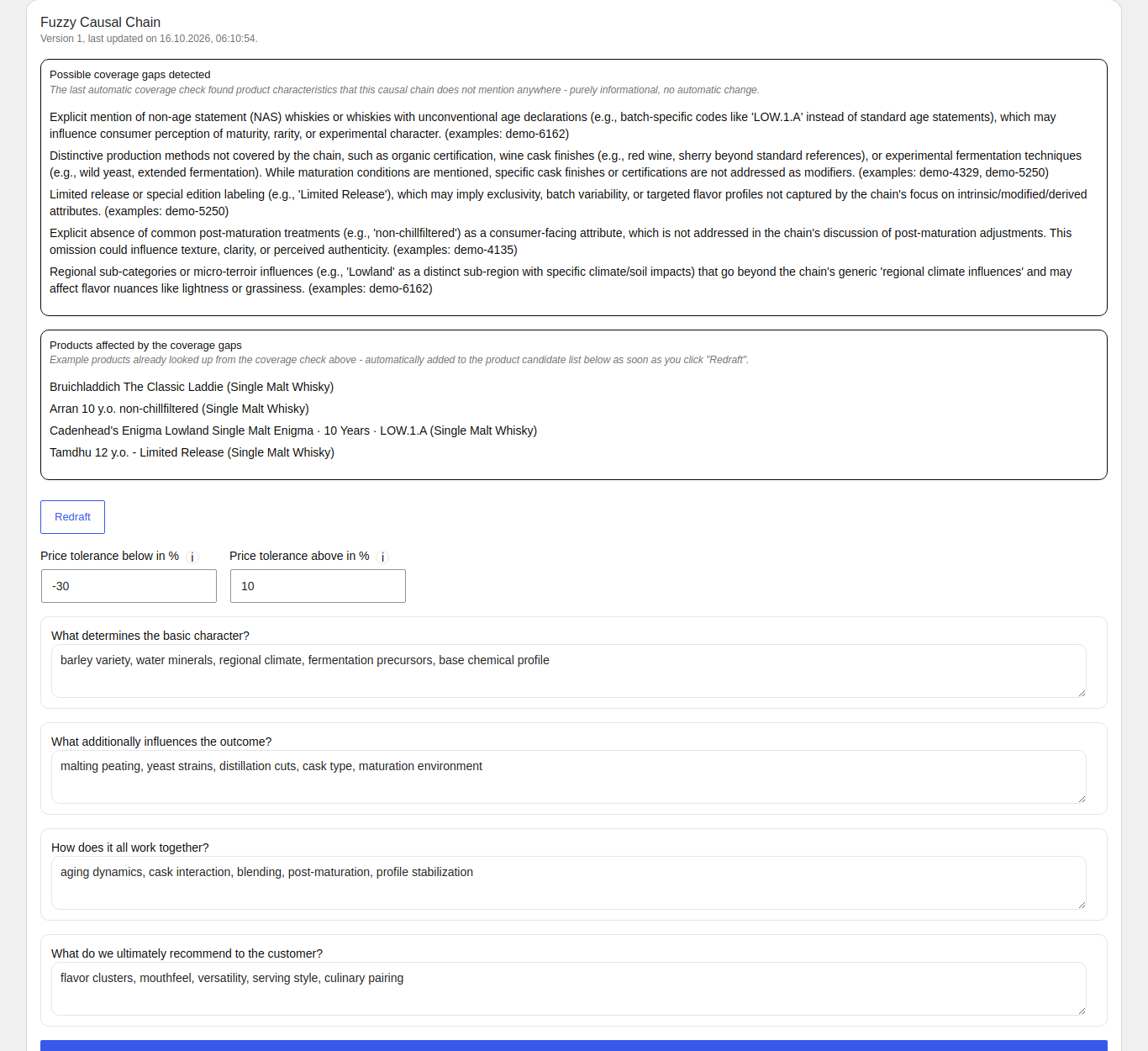
Causal chain: the decision model for a subcategory, with price tolerances and the questions that drive a recommendation.
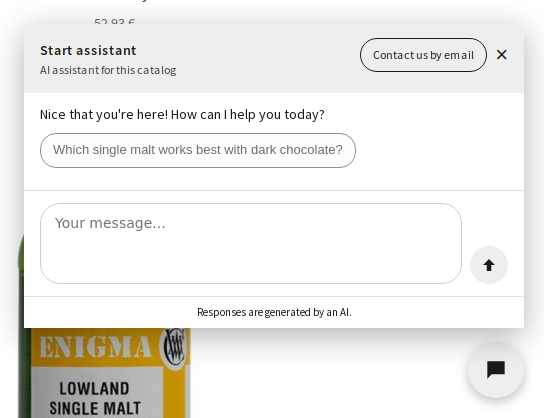
The chat widget in the storefront, with suggested starter questions.
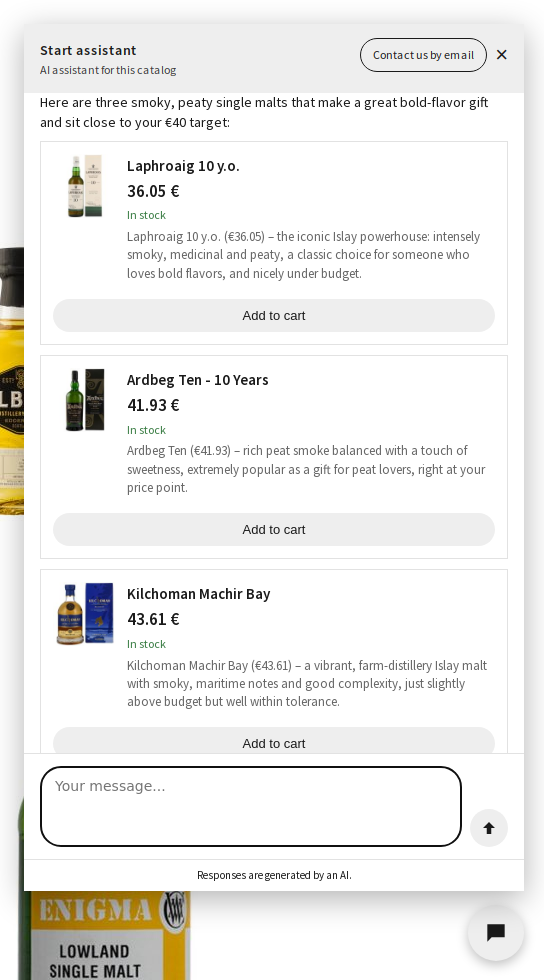
A conversation in the chat widget: the assistant asks about budget and taste, then recommends matching products with an add-to-cart button.
Faq
Yes. This plugin is built specifically for WooCommerce stores and will not do anything useful without it active.
No. The actual AI processing happens on our hosted backend service, not inside WordPress. See the “External services” section above for exactly what is sent and when.
The plugin itself is free and GPL-licensed. Every store also gets a free usage tier plus a one-time trial month on our backend service. Stores with larger catalogs or higher usage may need a paid plan with our service – your current tier and catalog usage are always visible in the plugin’s Status tab.
Deactivating the plugin stops the scheduled check-ins described in “External services” above. It does not delete your account or data on our service – reactivating the plugin resumes where you left off.
Use the support contact configured in the plugin’s settings page (email or a link of your choice) – this is the same contact your customers see when the assistant escalates a conversation to a human.
Reviews
Changelog
1.4.1
Requires Kern-API >= commit 1dfcb9a (unchanged from 1.4.0) – this is a documentation/translation-only release, no Kern-API dependency change.
* Changed: this readme now describes the Service Agent features added in 1.4.0 (order lookup, handover to support, store policy answers, shipment tracking, per-provider model choice, MCP Bridge) and discloses the external-service data flows they add; it previously still described only the product-advice features. Corrected the 1.4.0 changelog entries below that still said “Settings” for the three sections that actually live in their own “Service Agent” tab.
* Added: the three German translations (“Service Agent” and its two Help-tab paragraphs) that were still missing from the bundled German/Austrian/Swiss translations in 1.4.0.
1.4.0
Requires Kern-API >= commit 1dfcb9a – this version calls several new Kern-API endpoints (among others POST /chat/turn, POST /agent/continue-with-bestellhistorie, POST /agent/continue-with-uebergabe, POST /agent/uebergabe-autorisieren, POST /agent/uebergabe-fehlgeschlagen, GET /tenants/byok-modelle); an older Kern-API without these would reject or silently ignore the new capabilities below.
* Added: the assistant can now look up a logged-in customer’s own order history to answer “same as last time, but in green”-style questions, instead of asking for an order number.
* Added: the assistant can now also look up one specific order by its order number when a logged-in customer asks about it directly in the chat.
* Added: when the assistant can’t help further, it can now draft a short summary of the conversation and – only after the customer sees it and clicks “Yes, send” – email it to your configured support contact, instead of only showing a static contact link. An independent security review found two gaps in this before release (a way to trigger a send without the customer ever having chatted, and the “once per conversation” limit being bypassable) – both are closed server-side now.
* Added: a new “Service Assistant Policies” section in the Service Agent tab lets you pick existing pages on your site that answer shipping, returns, withdrawal, payment, and FAQ questions – their text is kept in sync automatically so the assistant can answer from them.
* Added: a new “Shipment Tracking” section in the Service Agent tab lets you enter your shipping plugin’s own meta key as a fallback if it doesn’t use the official WooCommerce Shipment Tracking format; an order with several packages now reports all of its tracking numbers instead of just one.
* Added: you can now pick a specific AI model per provider (Anthropic, Mistral, OpenAI) in Settings when using your own API key, instead of always getting our default.
* Added: bringing your own API key (BYOK) is now available on the free tier too, not just paid plans.
* Added: OpenAI now has its own API key field in Settings, alongside Anthropic and Mistral – previously missing entirely, and a key entered elsewhere would always have failed verification.
* Added: a new “MCP Bridge” section in the Service Agent tab lets you generate a key so an MCP-capable AI client (e.g. Claude) can read and change these settings on your behalf.
* Fixed: the hourly catalog availability sync could silently merge two genuinely different products into one row when they happened to share the same parent-product ID, dropping the second product’s availability without any visible error.
1.3.0
Requires Kern-API >= commit 9a769d8 – this version tracks a server-issued conversation identifier (konversation_id) across turns, shows the new mandatory AVV-consent checkbox/catch-up banner, and uses a new non-destructive category-save endpoint; an older Kern-API without GET /avv/aktuelle-fassung, POST /tenants/{tenant_id}/avv-zustimmung, POST /categories/aenderungen-speichern, or the konversation_id handling in POST /agent/turn/POST /agent/continue-with-live-data would reject or silently ignore these calls.
* Added: a conversation of up to 20 customer messages now counts as a single billable conversation instead of billing every message separately.
* Added: connecting your store now requires agreeing to the current AVV (data processing agreement); an existing store that hasn’t yet agreed sees a dashboard reminder, with no interruption to the chat widget.
* Added: the Category Analysis page can now save small changes (rename, move, add, or remove a group) without rebuilding everything from scratch, keeping causal chains and already-processed products for unchanged groups.
* Changed: the “Standalone variant” vs. “Order option only” explanation on the Product Coverage page is now also shown above the table, not just as a tooltip.
* Changed: the free-tier catalog-limit queue message no longer implies your current plan is the one limiting it.
1.2.0
Requires Kern-API >= commit a2995ac – the plugin now requests a short-lived Storefront-Token (POST /tenants/{tenant_id}/storefront-token) instead of sending the permanent tenant secret directly from the browser; an older Kern-API without this endpoint would reject every browser request once the plugin stops also offering the secret, so this is a hard requirement starting with this version.
* Changed: the chat widget’s own secret no longer appears in the page source sent to shoppers’ browsers – it now fetches a short-lived access token from the store’s own server right when the widget loads, instead.
1.1.3
Requires Kern-API >= commit 3c31fd7 (unchanged from 1.1.2) – this is a pure frontend/JS fix, no Kern-API dependency.
* Fixed: after confirming a Category Analysis, the Causal Chains tab (and, after confirming a Causal Chain, the Product Coverage tab) still said “not done yet” for it until the page was reloaded – switching tabs without reloading now refreshes that status correctly.
1.1.2
Requires Kern-API >= commit 3c31fd7 (unchanged from 1.1.1) – this fix calls only the already-existing GET /variation-attributes endpoint, no new Kern-API dependency.
* Fixed: the hourly catch-up check for incomplete product processing could report the wrong price/SKU for a product with multiple customer-relevant option combinations (e.g. several colors), using the overall product’s own (often blank) price/SKU instead of the matching option’s – the manual “Process remaining” button already handled this correctly; the hourly check now uses the same logic.
1.1.1
Requires Kern-API >= commit 3c31fd7 – an older Kern-API simply ignores the new vollstaendiger_katalog field this version adds to its “process subcategory” request (safe, additive field), but without it the orphan-cleanup fix below has no effect server-side.
* Fixed: an automatic catch-up run for a handful of still-missing products (the hourly background check, or clicking “Process remaining” right after a few products failed to process) could wipe out the rest of an already-processed subcategory’s recommendations – the run now only clears out genuinely removed products when it actually has the complete, current product list, not a partial one.
* Fixed: the product name, price, panel title and footer text in the chat widget now match the intended design sizes (price in particular was noticeably too small).
* Changed: the short “thinking trace” line during a search now shows only the current step and disappears once the answer arrives, instead of staying visible afterwards as a summary.
* Fixed: a rare layout glitch where the widget’s header could scroll out of view, leaving empty space at the bottom of the panel.
* Fixed: several backoffice screens (status/plan, settings, catalog diagnosis, product coverage, causal chains) had untranslated text in the bundled German translations; also made the informal/formal address consistent throughout (previously mixed within the same file) and corrected a few translation errors and missing umlauts. Austrian and Swiss German now match the informal German translation.
1.1.0
Requires Kern-API >= commit 06b1350 (current production state at release time) – older plugin versions keep working against this Kern-API, but the “In stock” label, the real search-hit count, and the “What I understood” box need this Kern-API version to actually show (both fields are purely additive, an older plugin simply ignores them).
* Added: the chat widget’s look now matches the current design, with a readable color contrast guaranteed against the shop’s own theme and corner rounding that no longer overlaps longer, wrapped text.
* Added: a recommended product card now states “In stock”; the assistant’s short progress line names the real number of matching products found and shows which of the customer’s own stated preferences it picked up on.
* Added: the widget now picks up the shop’s color/corner-radius/font from more sources (a real button, the theme’s own design settings, or a generic page element) instead of only the product page’s “Add to cart” button, so it matches the theme consistently on every page, not just product pages.
* Changed: the widget’s default title is now the English “Start assistant” instead of a hardcoded German phrase, shown in the merchant’s own configured language if they haven’t set a custom title.
* Fixed: proactively suggested starter questions are now kept short enough to read as one concrete question and fit on at most two lines, instead of a long message with backstory.
1.0.14
- Changed: screenshot 8 now shows an actual conversation in the chat widget (budget/taste question, matching product recommendation with an “Add to cart” button) instead of just the closed chat button.
- Changed: noted in “External services” that the store’s configured language is sent along with each shopper’s chat message (added with the language-matching improvement in 1.0.9, not previously listed here).
1.0.13
- Fixed: the “Screenshots” section in this readme listed only three outdated captions that no longer matched the screenshots actually on the plugin’s listing – replaced with eight captions matching the current screenshots in order.
1.0.12
- Changed: refreshed store banner artwork (larger, more legible title lettering) – also applied the same adjustment to the banner shown at the top of the plugin’s own wp-admin pages, for visual consistency.
1.0.11
- Added: “Switch to dt-pm.eu” button in the Status tab for stores activated via a WooCommerce Marketplace contract number – requests a voucher for the remaining time on the current plan, to redeem on a dt-pm.eu purchase. Entering a dt-pm.eu license key for a store already activated via the Marketplace is now rejected unless this voucher flow was used first, closing a previous gap where simply entering a key could silently switch the purchase channel. If a channel switch happens, a dismissible notice on the Status tab confirms it.
1.0.10
- Added: “Cancel subscription” link in the Status tab – stores activated via a WooCommerce Marketplace contract number cancel directly through the WooCommerce Billing API; stores activated via a dt-pm.eu license key are directed to the existing cancellation option in their dt-pm.eu customer account. A cancelled subscription stays active until the end of the already paid period.
1.0.9
- Fixed: the chat widget now tells the backend which language the store is set to, so the very first reply (e.g. right after clicking a suggested starter question) and the brief status messages shown while the assistant is working reliably match the store’s language, instead of sometimes defaulting to German regardless of the store’s configured language.
1.0.8
- Changed: “Top up conversation credit” now offers four package sizes for stores activated via a WooCommerce Marketplace contract number (250/1,000/5,000/20,000 conversations), matching the existing dt-pm.eu package structure, instead of a single placeholder package.
1.0.7
- Changed: “Upgrade plan” and “Top up conversation credit” now go through the WooCommerce Billing API for stores activated via a WooCommerce Marketplace contract number, instead of linking to dt-pm.eu – stores activated via a dt-pm.eu license key are unaffected and keep working exactly as before.
1.0.6
- Added:
WC requires at least/WC tested up toheaders (WooCommerce Marketplace submission requirement). - Added: High-Performance Order Storage (HPOS/
custom_order_tables) compatibility declaration – this plugin never accesses order data directly (no direct database access to order tables), so no code changes were needed beyond the declaration itself. - Changed: corrected the description of where the chat widget appears – it shows on every storefront page (including cart and checkout), not just product pages and the homepage as previously stated. Same correction applied to the matching text on the plugin’s own Help page.
1.0.5
- Changed: reverted the plugin slug/text domain to “dtpm-ai-sale-assistant-woocommerce” (was “dtpm-ai-sale-assistant-for-woocommerce” in 1.0.4) – the WordPress.org reviewer reserved the slug without “for-” during the review of this submission, and that reservation is authoritative. The display name stays “DT-PM AI Sale Assistant for WooCommerce”. No functional change.
- Added:
Requires Plugins: woocommerceheader, so WordPress 6.5+ automatically checks that WooCommerce is active before this plugin.
1.0.4
- Changed: corrected the plugin slug to “dtpm-ai-sale-assistant-for-woocommerce” (was “dtpm-ai-sale-assistant-woocommerce”) to comply with the WooCommerce trademark policy for plugin slugs. No functional change.
1.0.3
- Changed: renamed the plugin from “DT AI Sale Assistant” to “DT-PM AI Sale Assistant for WooCommerce” – the plugin itself works exactly as before, only the name/slug changed.
For the complete version history, see changelog.txt in the plugin’s own folder.