Yoast Duplicate Post
Yoast Duplicate Post
Description
This plugin allows users to clone posts of any type, or copy them to new drafts for further editing.
How it works:
-
In ‘Edit Posts’/’Edit Pages’, you can click on ‘Clone’ link below the post/page title: this will immediately create a copy and return to the list.
-
In ‘Edit Posts’/’Edit Pages’, you can select one or more items, then choose ‘Clone’ in the ‘Bulk Actions’ dropdown to copy them all at once.
-
In ‘Edit Posts’/’Edit Pages’, you can click on ‘New Draft’ link below the post/page title.
-
On the post edit screen, you can click on ‘Copy to a new draft’ above “Cancel”/”Move to trash” or in the admin bar.
-
While viewing a post as a logged in user, you can click on ‘Copy to a new draft’ in the admin bar.
3, 4 and 5 will lead to the edit page for the new draft: change what you want, click on ‘Publish’ and you’re done.
There is also a template tag, so you can put it in your templates and clone your posts/pages from the front-end. Clicking on the link will lead you to the edit page for the new draft, just like the admin bar link.
Duplicate Post has many useful settings to customize its behavior and restrict its use to certain roles or post types. Check out the extensive documentation on yoast.com and our developer docs.
Contribute
If you find this useful and if you want to contribute, there are two ways:
- Submit your bug reports, suggestions and requests for features on GitHub;
- If you want to translate it to your language (there are just a few lines of text), you can use the translation project;
Installation
Use WordPress’ Add New Plugin feature, searching “Duplicate Post”, or download the archive and:
- Unzip the archive on your computer
- Upload
duplicate-postdirectory to the/wp-content/plugins/directory - Activate the plugin through the ‘Plugins’ menu in WordPress
- Go to Settings -> Duplicate Post and customize behaviour as needed
Screenshots
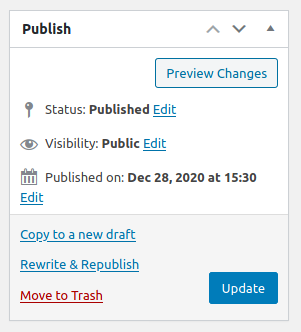
Classic editor.
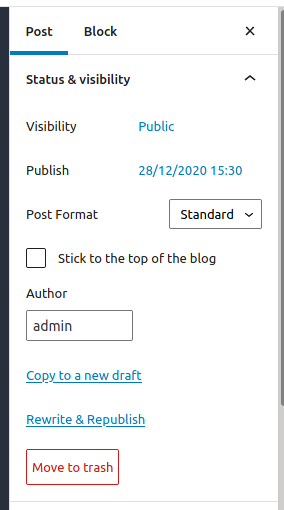
Block editor.

Post list.

Admin bar menu.
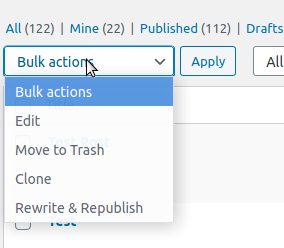
Bulk actions.
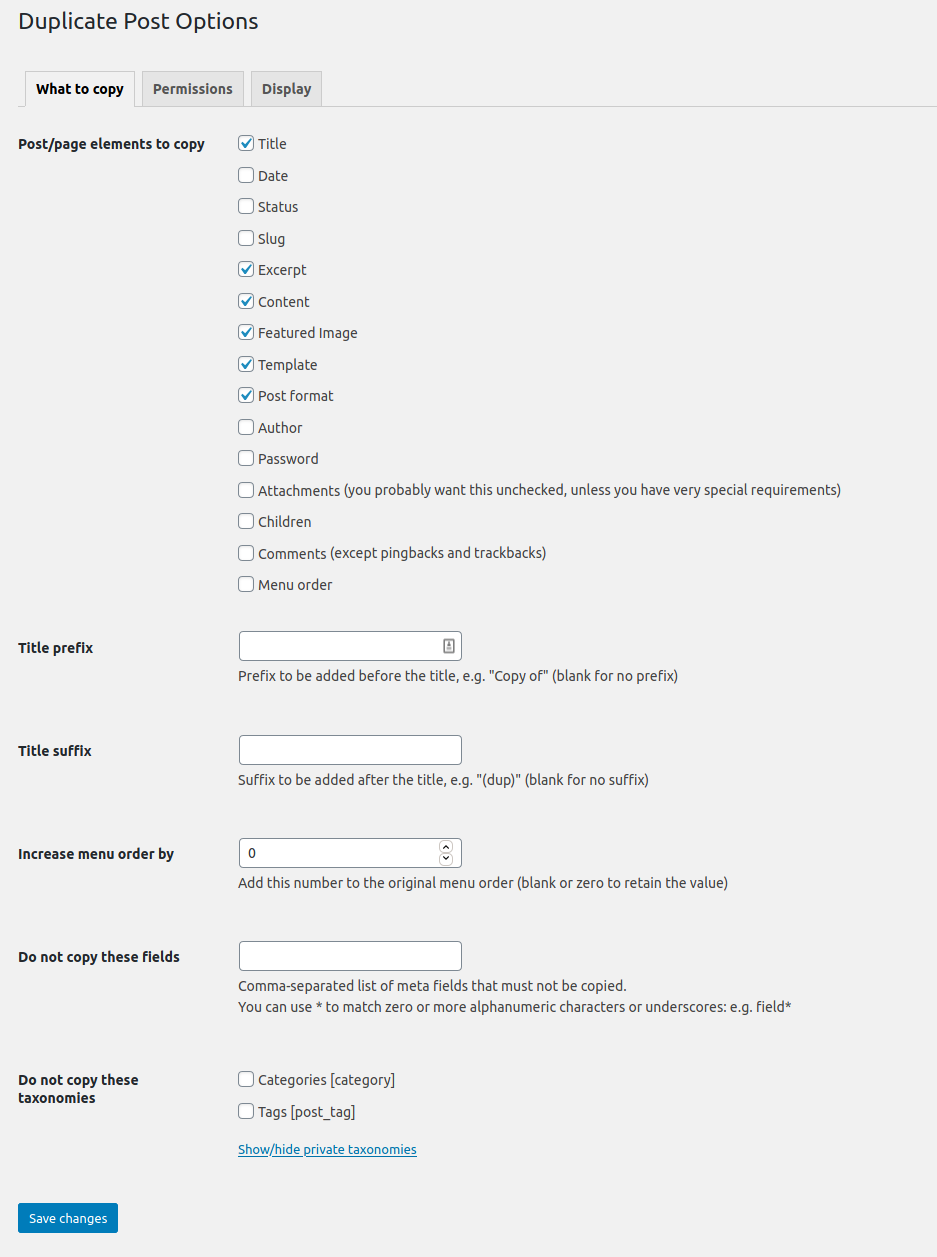
The options page.
Faq
First, check your version of WordPress: the plugin is not supposed to work on old versions anymore. Make sure also to upgrade to the last version of the plugin!
Then try to deactivate and re-activate it, some user have reported that this fixes some problems.
Pay also attention to the “Permissions” tab in the Settings: make sure the plugin is enabled for the desired roles and post types.
If it still doesn’t work, maybe there is some kind of conflict with other plugins: feel free to write in the forum and we’ll try to discover a solution (it will be really helpful if you try to deactivate all your other plugins one by one to see which one conflicts with mine… But do it only if you know what you’re doing, I will not be responsible of any problem you may experience).
From version 3.0 the plugin’s translations are managed by the WordPress.org platform and the plugin is shipped without language files, so first of all update translations under Dashboard->Updates.
If Duplicate Post is still in English, or if there are some untranslated strings, you can help translating to your language: you only need a WordPress.org account.
Reviews
Best duplicate posttypes plugin
By 
I use this usefull plugin in every WordPress website I design
Clone & Done
By 
Needed to duplicate pages real quick. Found this. Did exactly wht I wanted. Zero setup, just install n go. Saves mad time fr. Can't imagine managing my site w/o it now lol
Clone in Seconds
By 
Y did i not find this earlier omg 1 click n ur post is cloned, just edit n publish. Saves crazy amount of time esp w/ similar pages. Simple bt SO useful.
Saves copy pasting
By 
Use this all the time to clone pages. keeps my formatting so i dont gotta start from scratch every single time. Sometimes it copies old dates too which is a lil annoying but super easy to fix. rly good time saver tbh.
Massive time saver
By 
So helpful! Cloned my pages in seconds without any mess. Honestly idk how I did this manually before. Tnkz for this, life's way easier now cz I build fast.
Decent but basic
By 
Look, it clones pages fine. But tbh no advanced bulk options? It’s super annoying if u have a big site. Works well enough cz it’s free, but honestly expected more from Yoast. 3/5.
Handy But Basic
By 
Good for copying posts fast. It saves time when I need same layout again. But options feel a bit limited, and sometimes I still need to clean things manually.
Easy Clone
By 
Works well for copying posts fast. I used it a few times, and it saved me some boring repeat work. Simple and clean, just wish a few options were easier to find.
Useful but Limited
By 
Helps to clone posts fast, saves time fr sure. But feels too basic, missing some options I expected. Works ok but could be better. Hope devs improve it 👍
Helpful But Basic
By 
It helps me clone posts fast and saves some time. But I still feel it needs a few better options for smoother work. Good for basic use, not perfect yet.