Duva Mail

Duva Mail
Description
WordPress sends its emails with the web server’s mail function, which is often unreliable and ends up in spam. Duva Mail replaces that transport: every email sent with wp_mail() (WooCommerce orders, contact forms, password resets, comment notifications, any plugin) is submitted to your Duva account over HTTPS.
- Works with anything that calls
wp_mail(): the plugin hooks the corepre_wp_mailfilter, so WordPress keeps its usual contract (trueon success,falseand thewp_mail_failedaction on failure). - Respects the
wp_mail_from,wp_mail_from_nameandwp_mail_content_typefilters, and readsFrom,Reply-To,Cc,BccandContent-Typeheaders (strings or arrays,Name <address>recipients). - Attachments from local files (10 files and 5 MB in total, as accepted by the Duva API).
- No silent fallback: if Duva cannot take the email,
wp_mail()returnsfalse,wp_mail_failedfires, and the failure is shown in Settings > Duva Mail and as an admin notice. The email is never sent by another transport behind your back. - Safe retries: each email carries an idempotency key, so a network timeout is retried without ever creating a duplicate. Quota and client errors are never retried.
- API key kept out of the browser: the settings field never displays it, and you can define it in
wp-config.phpinstead (DUVA_MAIL_API_KEY). - No telemetry, no tracking, no calls to any server other than the API address you configure.
What you need
A Duva account with a verified sending domain, and an API key created for that domain in the Duva dashboard.
Things to know before you install
- Emails are sent from your Duva domain only. If WordPress (or a plugin) sets a sender on another domain, Duva Mail sends from your default sender address and puts the original sender in
Reply-To, so contact-form replies still reach the visitor. - To, Cc and Bcc: they are sent as the To, Cc and Bcc fields of the Duva API, with their names. Each address receives its own copy, which shows all the To and Cc recipients; a Bcc address appears only on its own copy. An email with Bcc recipients but no To recipient is refused, because Duva needs a To address.
- Only
text/plainandtext/htmlemails are supported. If an email has only an HTML body, Duva adds a plain-text version generated from it. Rawmultipart/*bodies are refused with an explicit error. - PHPMailer is bypassed. Plugins that customize PHPMailer (the
phpmailer_initaction) or that add their own SMTP settings have no effect on emails sent through Duva. - The API refuses some custom headers (for example
Return-Path,Message-ID); the email then fails with a message that names the header. See the FAQ.
External services
This plugin sends your site’s emails to the Duva API, a third-party service, at the API address set in the settings (default https://api.duva.ca). It is the plugin’s only purpose and the only external connection it makes.
- What is sent, and when: for each email WordPress sends, the sender, the recipients, the subject, the body, any attachments and custom headers are sent to Duva so that it can deliver the email. The “Check the connection” and “Send a test email” buttons also contact the API. Each request carries your API key, the language of the site (to localize error messages) and a user agent with the plugin, WordPress and PHP versions.
- What is not sent: nothing else about your site, your users or your visitors, and nothing is sent when no email is sent.
- Duva terms of use: https://duva.ca/en/terms
- Duva privacy policy: https://duva.ca/en/privacy
Installation
- Upload the
duva-mailfolder to/wp-content/plugins/, or install the zip from Plugins > Add New > Upload Plugin. - Activate the plugin.
- Go to Settings > Duva Mail and enter your sending domain and API key.
- Click Send a test email.
Optional: to keep the API key out of the database, add this line to wp-config.php (it then takes precedence, and the settings field is hidden):
define( 'DUVA_MAIL_API_KEY', 'dv_...' );
Screenshots
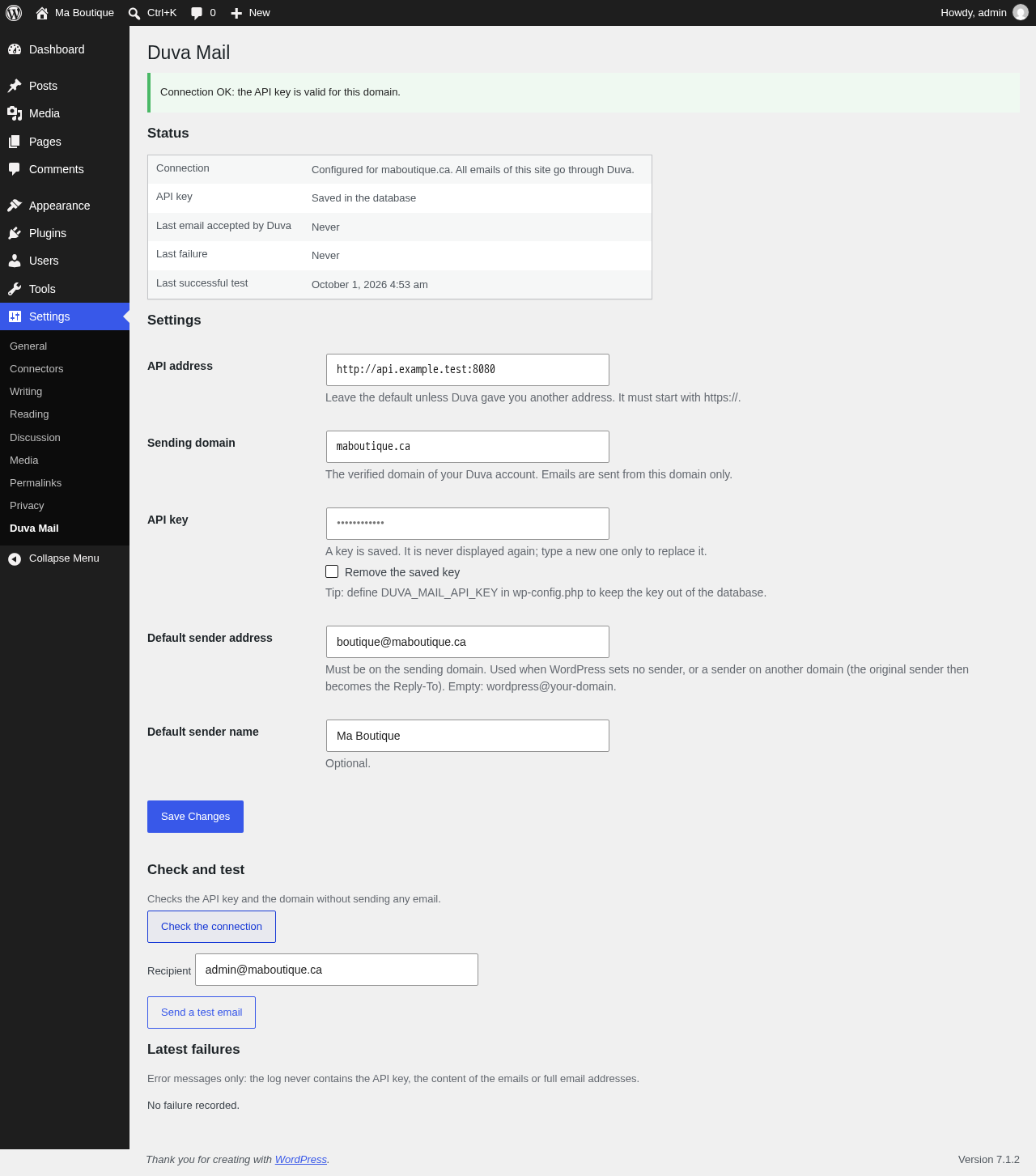
The settings screen: connection status, API address, sending domain, API key (never displayed), default sender, and the buttons to check the connection and send a test email.
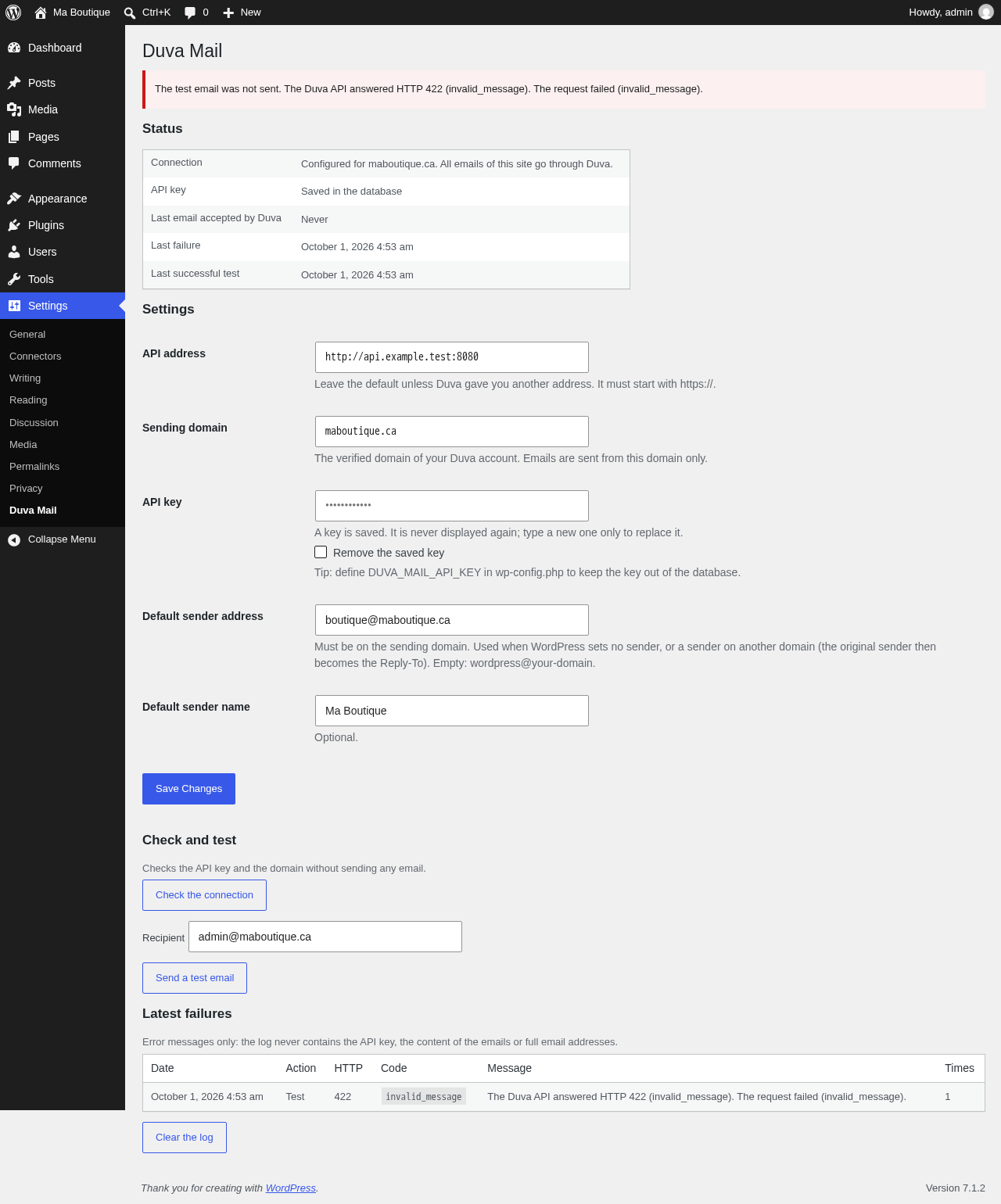
The "Latest failures" table with the HTTP status, the Duva error code and a message, shown after a failed test email.

The admin notice shown when the plugin is active but not configured.
Faq
Open Settings > Duva Mail: the status shows whether the plugin is configured, and the failure log shows the latest errors (HTTP status, error code and message). A 404 means the API key is unknown, revoked, expired, or belongs to another domain; a 403 that the domain is not verified yet or the account is not allowed to send; a 429 that a rate limit or your sending quota was reached.
No, on purpose. A silent fallback would send transactional emails from an unverified server and hide the problem. The failure is returned to the caller (wp_mail() returns false), logged, and displayed to administrators.
Yes, as long as they send through wp_mail(). Check that the sender address they use is on your sending domain; otherwise Duva Mail replaces it by the default sender address of the settings and keeps the original in Reply-To.
Recipients in To and Cc see each other, as with any email. Bcc recipients stay hidden: their address appears only on their own copy. Each address receives exactly one copy.
The Duva API only accepts X-* headers (except the ones reserved by the platform) and a short list of standard ones: List-Unsubscribe, List-Unsubscribe-Post, List-Id, In-Reply-To, References, Auto-Submitted, Precedence, Importance, Feedback-ID. Headers such as Return-Path, Message-ID or DKIM-Signature are refused. Remove them from the code that sends the email.
Local files are read and sent with the email, up to 10 files and 5 MB in total. Executable and script extensions (.exe, .js…) are refused. Accounts that are still in the Duva sandbox cannot send attachments. Beyond a limit, the email fails with an explicit error and is not sent.
Yes, with the duva_mail_payload filter, which receives the request body and the wp_mail() arguments just before the request is sent, and returns the body to send: add_filter( 'duva_mail_payload', function ( $payload ) { $payload['tags'] = array( 'wordpress' ); return $payload; } );
In the duva_mail_settings option, or nowhere in the database if you define DUVA_MAIL_API_KEY in wp-config.php (recommended). The key is never sent to the browser, shown in a page, written to the failure log or included in an error message.
Error messages only: no API key, no email content, no full email addresses (they are masked). It keeps the 20 latest failures and can be cleared.
Deleting the plugin removes its options (settings, failure log, status). Emails already submitted to Duva stay in your Duva account.
Settings are per site. Network activation is not specifically supported yet.
Reviews
Changelog
0.2.1
- Updated the banner images of the plugin page. No change to the plugin’s behavior.
0.2.0
- To, Cc and Bcc are now sent as the To, Cc and Bcc fields of the Duva API, with their names. Recipients in To and Cc see each other; a Bcc address appears only on its own copy.
- An email with Bcc recipients but no To recipient is refused.
0.1.0
- First version:
pre_wp_mailinterception, settings screen, connection check, test email, failure log.