Dynamic Time

Dynamic Time
Description
A simple calendar-based timesheet and timecard plugin for your WordPress website. This WordPress timesheet can record hours & notes on weekly, bi-weekly, monthly or bi-monthly schedules, including automatic overtime calculations. Dynamic Time is mobile compatible and integrates with existing WordPress users.
Features
☑ Automatic Overtime calculations, configurable by user, even across pay periods
☑ Multiple Time Punches per day with Predictive entry
☑ Fully Configurable Pay Periods, including notes & bonus amount field
☑ Approval Process between user, supervisor and payroll
☑ Automatic User Integration with existing WordPress users
☑ Reminder Emails for employees and supervisors
PRO Features
✅ Custom Categories – Supports custom PTO and Regular Categories
✅ PTO Banks – With Automatic Annual Accruals
✅ Signature Pad – Mobile and desktop compatible
✅ Reporting Tools – Filter and total time entries
✅ CSV export – Compatible with Excel
✅ Geolocation – Pinpoint employee punches on a map
Translation
This plugin is available in the following languages:
– English
– Spanish
– Romanian
– Italian
– French
– German
– Portuguese
– Dutch
Installation
- Upload the plugin files to the
/wp-content/plugins/dynamic-timedirectory, or install the plugin through the WordPress plugins screen directly. - Activate the plugin through the \’Plugins\’ screen in WordPress
- Visit Dynamic Time from the WordPress admin menu to configure settings
Screenshots
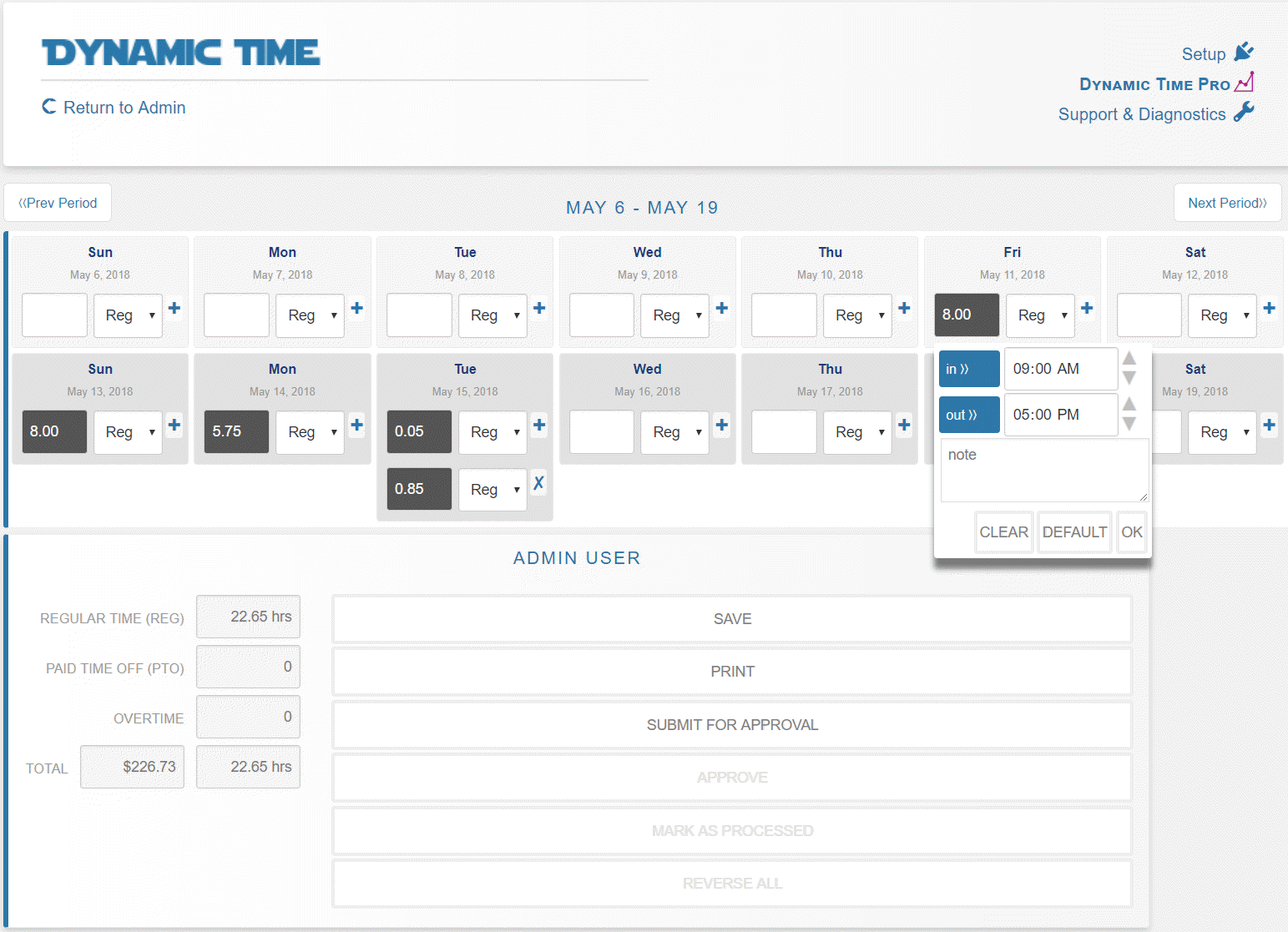
Timesheet set up for bi-weekly pay period
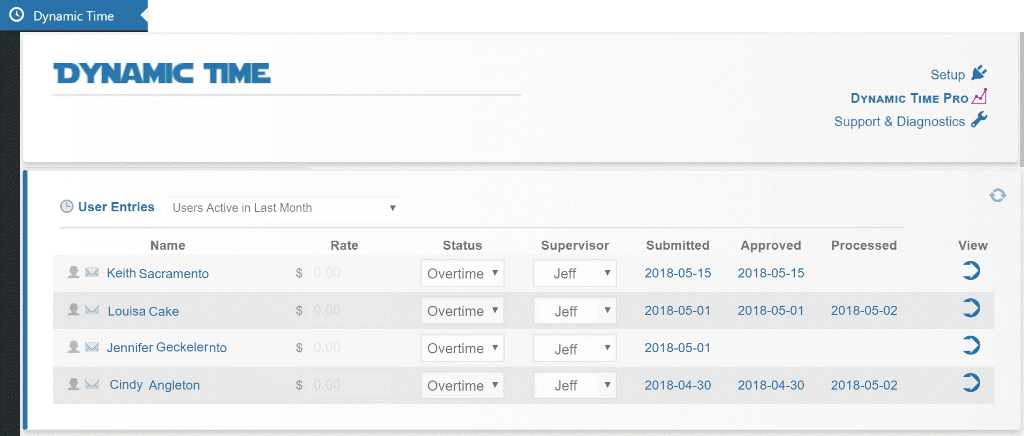
Settings Page with user list of entries
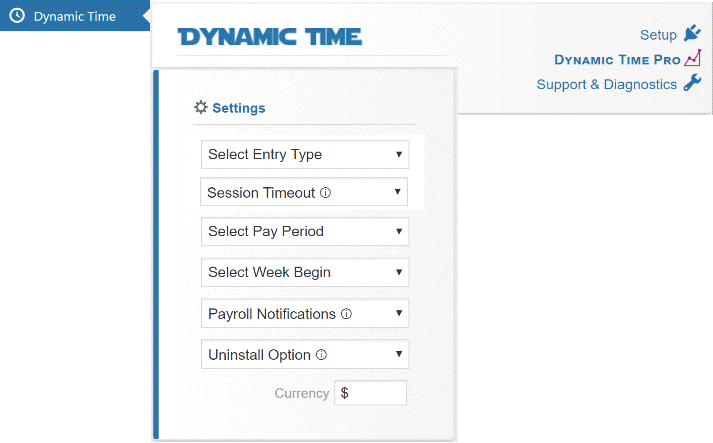
Faq
This plugin works with an unlimited number of users/employees.
To get started, users just need a WordPress login and the URL to the page where the shortcode is pasted. Once they save time, it will show up to administrators in the Dynamic Time admin page.
No, if your users have access to the WordPress dashboard they can click Dynamic Time in the main WordPress menu. If a user is not an administrator they will only see their timecard on this page.
To create a shortcut on a mobile device’s home screen that makes a URL appear like an app, you can use the Add to Home Screen functionality in mobile browsers:
First, open the page where the Dynamic Time shortcode is published.
For iPhone/Safari: Tap the Share icon (square with an upward arrow).
For Android/Chrome: Tap the Menu (three vertical dots).
Select Add to Home Screen.
Tap Add. The shortcut will appear on the home screen like an app.
WordPress administrators (with list_users permission) can see all users’ time and pay rates. If a user is not an administrator or an assigned supervisor to someone else, they will only be able to see their own timecard. Any user that views the page where the shortcode lives will be redirected to login first.
Users cannot submit time until approx one week within the time period ending. This is to prevent users from accidentally submitting time too early. If you are an administrator you can bypass this requirement by viewing the timecard from the Dynamic Time admin page.
Yes, supervisors can be assigned to every user, also a payroll admin can be assigned as a whole. If a supervisor is assigned, an email will be sent to them when a user submits a pay period for approval. If a payroll admin is assigned, an email will be sent to them when a supervisor approves a user’s pay period.
Supervisors are not required to hold any particular type of role, although providing supervisors with WP Dashboard access (minimum Reader role with moderate_comments capability) will allow users assigned to the supervisor to be displayed in a list.
Dynamic Time will attempt to use the WP Timezone in Settings > General, but you may need to correct or confirm it within the plugin settings. As an admin, open any current pay period and click ‘Timezone’ in the far bottom-right corner. Confirm the Period Begin date & UTC offset value, and click Confirm (even if no changes are made).
If your schedule is set to Biweekly, you may alter the beginning week as an admin by clicking the setting icon near the dates at the top of the pay period. Once the period is correct, save the time card. This will reset the bi-weekly period for all users.
The plugin was designed around just a few types of time, Reg, PTO, and automatic overtime. If more categorization or labels are needed, we recommend using the notes section (on each time entry) as an additional field. In the PRO version, an additional dropdown is offered for categorization and note sections can be filtered.
If you have more than 1000 users, the plugin will display the last 1000 active users in the supervisor dropdown menu. If a user doesn’t appear on the list, have that user log into WordPress, then reload the Dynamic Time admin page.
User management is accomplished through the native WP user profiles. Deleting users is not necessary, as idle users will fall off the main entry list if no time is received in the last month. To reduce accidental loss data, Dynamic Time does not automatically delete time entry data if a WP user is deleted.
To remove a previously saved time entry in simple entry mode, just type -0 (negative zero) into the hours field. To remove an entry in itemized mode, adjust clock-in and clock-out times to the same time.
Overtime is designated on the status dropdown menu, next to each user’s name. There are two types of overtime supported, ‘Standard FLSA’, and ‘California’. FLSA considers overtime as time and a half for hours worked in excess of 40/hours per week. California considers overtime as time and a half for hours worked in excess of 8 hours/day or 40 hours/week. ‘Exempt’ status will not apply overtime under any condition.
The front end timecard primary color can be changed by declaring the css variable –dyt_clr. For example, pasting :root{–dyt_clr:darkred!important} below the timecard shortcode will display the timecard in dark red.
Dynamic Time PRO provides reporting tools useful for larger groups of employees, including copying & paste data into Excel, table based overviews, and searching employee note fields.
Reviews
Unique, versatile, many options
By 
I am unaware of ANY other WP plug that can do what Dynamic Time can do. The support - even for the free version - is FAST, USA-based and very helpful. I bought the PRO version for one of my clients and they are very happy with being able to run their own mini-payroll system by themselves on a custom WP site I built. Once you become familiar with the numerous settings controls, you're off and running!
Get Fired Up, and I'm only on the free version.
By 
Rhett and the team are very responsive and gracious with their time. While I'll only installed the plugin on a testing site at this time, Rhett is making it more likely to go into production and more likely to move over to the pro version. The plugin is user-friendly, customizable, and adaptable to different industries and requirements. It provides appropriate security measures to safeguard sensitive data on a user-role basis. Dynamic Time has a responsive support team and resources to assist users whenever they encounter issues. This plugin will likely boost productivity and transparency for the company it is planned for, saving time and resources that are currently be incurred through manual time tracking.
Awesome Plugin - Rhett Rocks
By 
Pretty good
By 
Great Time Sheet Plugin!
By 
- Define your time/pay period, such as biweekly, monthly, etc. My team uses the monthly option.
- Users can edit their own time sheets. This is perfect for teams that trust their workers to correctly edit their hours, such as trusted contractors.
- Users submit their time sheets for approval.
- Most importantly, users can only edit their own hours, not other users' hours.
- Workers and supervisors can print out time sheets.
- At the time of this writing, the plugin does not appear to have been tested with the latest version of WordPress. I hope the developer will fix this in the near future.
- User interface/user experience feels a bit clunky. It only takes maybe 5-15 minutes to get used to the interface, but that can seem like a long time for potential customers examining the plugin. (I recommend the developer check out the TeamTime app for Basecamp for ideas of how to improve user interface/user experience.) I think the 1-star "poor punch in punch out for employee" review was due to the UI/UX turning a customer away; also, though Dynamic Time now offers a punch-in/punch-out only feature, it does not look as nice as competitor punch-in/punch-out time clocks; this can turn customers away from the greater functionality of Dynamic Time.
- Style. Similar to user experience, I recommend some improvements to the style of the plugin's time sheets so that they look more appealing. (I used the Code Snippets plugin to add CSS that removes the dropdown option for PTO, since my small hobby business doesn't use paid time off, and the dropdown containing PTO just occupies space and makes the time sheet look more clunky without offering any useful feature for our company at this time. Fortunately, CSS did the trick. I might try using CSS to improve the appearance of other portions of the time sheet, as well, at some point.)
- Printout shows the site brand/favicon much too large. This is because my site used a large favicon size (so that it looks good on all displays). The printout fails to reduce the favicon size for the purpose of printing. This results in the favicon occupying nearly a whole page of the printout. This is a small nitpick, because it is a great feature just to allow such easy printing of the timesheet.
Excellent service & very user friendly
By 
Great Plugin and good communication!
By 
Great plugin! Excellent support!
By 
Nice job
By 
J'adore très simple et interface good.
By 
Changelog
5.5.4
- Compatibility with WP 7.1
5.5.2
- Minor bug fixes
5.5.1
- Improved period reset process.
5.5.0
- Added unsubmitted period alerts, updated translations, date calibration labels & features, and improved efficiency of admin safeguards.
5.4.26
- Minor JS offset fixes
5.4.25
- Improvements to UTC offset functions
5.4.24
- Timezone module translation
5.4.23
- PTO col visibility
5.4.22
- JS color setting fix when input field is blank
5.4.21
- Fix presubmit behavior
5.4.20
- Fix warning for pto array
5.4.19
- Update bonus db field to allow 7 digits.
5.4.18
- Suppress iOS auto‐scroll bounce and adjust to 50vh scroll threshold
5.4.17
- Adjusted req role for processor
5.4.16
- Add processing timestamp user and IP
5.4.15
- Compatibility with WP 6.8
5.4.14
- Added time calibration module
5.4.11
- Minor bug fixes
5.4.7
- DB Rate col size increase. Adjust highlighted day for timezone.
5.4.6
- Role check improvements. Presubmit option added to interface. Additional translations created.
5.4.4
- JS improvements to loading.
5.4.3
- JS warning fix, minor updates.
5.4.2
- Mail function updates, creation of reminder emails. Itemized entry view improvements. Translation refinements. Introduced Dutch translations.