E20 Page Tree
E20 Page Tree
Description
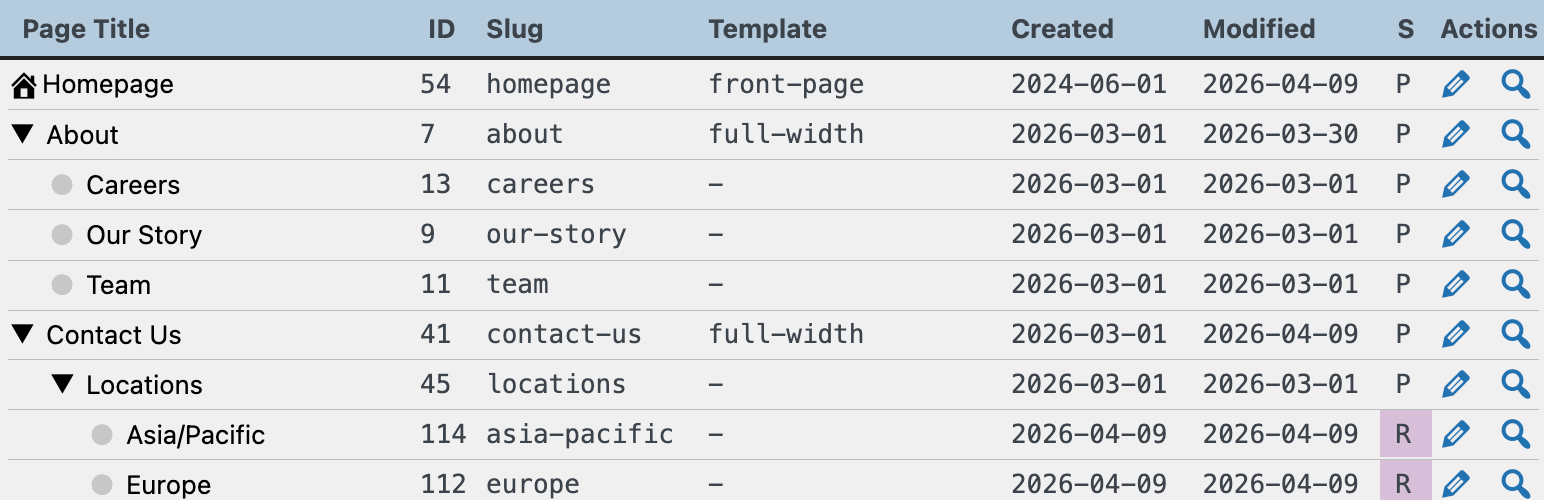
E20 Page Tree gives you a clear, interactive view of your WordPress page hierarchy. Explore your entire site structure in one place, complete with detailed page information, status indicators, and quick actions for editing and viewing pages.
You can export the tree in several formats, which is perfect for site admins or teams doing content audits, SEO reviews, page migrations, team task assignment, or any other analysis or project management needs.
Features
-
🌳 Interactive Page Tree
- Browse your full page hierarchy in a clean, expandable tree view
- Expand/collapse all pages instantly
- Visual indicators for parent/child relationships
-
📊 Spreadsheet-Ready Table View
- Copy and paste directly into Excel, Google Sheets, or Numbers
- Includes page metadata for easy analysis
-
📄 CSV & TSV Export
- Comma-separated and Tab-separated output formats for maximum compatibility
- Ideal for audits, migrations, and bulk data processing
-
🏠 Homepage Highlighting
- Automatically surfaces your site’s homepage at the top of the structure
-
🧾 Detailed Page Data
- Page title
- ID
- Slug
- Template
- Last modified date
- Status (Published, Draft, Pending, Scheduled)
-
⚡ Quick Actions
- Edit page in one click
- View page on the frontend instantly
-
🔍 Status Indicators
- Clear visual markers for page status:
- P = Published
- D = Draft
- R = Pending Review
- F = Scheduled
-
🧠 Built for Real Workflows
- Content audits
- SEO reviews
- Site migrations
- Information architecture planning
- Editorial cleanup
-
🧼 Lightweight & Focused
- No external dependencies
- Loads assets only on its admin page
Use Cases
Page Tree is useful for:
- Viewing your WordPress page tree and hierarchy
- Exporting pages to spreadsheets for analysis
- Performing content audits and SEO reviews
- Planning site migrations and restructures
- Creating a clear overview of your page structure
Screenshots

Interactive page tree view with expand/collapse controls
Faq
Users with the edit_pages capability can access the plugin.
Currently, the plugin supports WordPress Pages only.
Yes. Use the Table, CSV, or TSV tabs to copy data to your clipboard, then paste the output into your preferred spreadsheet or plain-text application.
Yes. The plugin includes published, draft, pending, and scheduled pages.
Yes. If your site uses a static front page, it will be displayed at the top.
Reviews
Changelog
1.1
- Validated support for WordPress 7.0
1.0
- Initial release