Easy Auto SKU Generator for WooCommerce

Easy Auto SKU Generator for WooCommerce
Description
Generate SKU in WooCommerce automatically when creating products, editing products, or running bulk actions.
Use one ruleset for your catalog and keep SKU values consistent without manual typing.
Built for stores that need fast SKU generation for products and variations, including bulk generation by all products or by category.
In under a minute, you can set prefix/suffix, format, length, variation separator, and batch size, then run generation safely.
Tested with WordPress 7.0 and WooCommerce 10.8.1.
Settings
WooCommerce → Settings → Products → SKU Settings
Features
- Auto-generate SKU for new products.
- Skip generation when SKU already exists (unless recreate mode is enabled).
- Generate variation SKUs for variable products.
- Choose SKU format: numbers, letters, alphanumeric, or product slug.
- Set SKU length.
- Add prefix and suffix.
- Add product ID to SKU.
- Optional “Use Previous Product” mode (+1 sequence from previous product SKU).
- Allow duplicate SKUs when needed.
- Bulk generate SKU for all products.
- Bulk generate SKU by category.
- Additional number with configurable increment format.
- Variation separator settings for variable products.
Why this plugin
- WooCommerce-focused SKU automation with both single-product and bulk generation workflows.
- Slug mode and multiple SKU formats (numbers, letters, alphanumeric) in one settings screen.
- Variation-safe generation with configurable separator logic.
- Batch processing controls for large catalogs and lower-risk runs on weak hosting.
- Clear overwrite behavior: keep existing SKU values or re-create them intentionally.
Settings Reference
Use these options in WooCommerce → Settings → Products → SKU Settings.
- Characters – sets the random SKU length.
- Prefix SKU – adds text before generated SKU (example:
BN_). - SKU format – choose numbers, letters, alphanumeric, or product slug.
- Add product ID – appends product ID to generated SKU.
- Take previous product – builds next SKU from the last published product (+1 sequence).
- Duplicate SKUs – allows repeated SKU values when your workflow needs it.
- SKU suffix – adds text at the end of generated SKU.
- Additional number – appends incrementing number in bulk mode (example:
001,002,003). - Format for Additional number – controls increment style with leading zeros.
- Enable variant settings – enables variation controls.
- Variable Product – enables/disables variation SKU generation.
- Variation Separator – separator between parent SKU and variation index (
-,--,/, etc.).
Required Plugin
This plugin works only with WooCommerce.
How it works
The plugin uses WooCommerce product meta (_sku) and applies your rules from SKU Settings.
You can use it in two modes:
- Product editor mode: SKU is generated while creating or updating a product.
- Bulk mode: SKU is generated for all products or selected categories.
When “Re-create existing SKUs” is disabled, only empty SKU values are generated.
Bulk SKU Generation
Bulk generator supports:
- Generate SKU for all products.
- Generate SKU by category.
- Optional recreation of existing SKU values.
- Progress indicator during processing.
Increasing batch size speeds up processing but increases server load.
Translations
If you want to help with translations, please visit:
translate.wordpress.org
Installation
This section describes how to install the plugin and get it working.
Install From WordPress Admin Panel:
- Login to your WordPress Admin Area
- Go to Plugins -> Add New
- Type “Easy Auto SKU Generator for WooCommerce” into the Search and hit Enter.
- Find this plugin Click “install now”
- Activate The Plugin
Manual Installation:
- Download the plugin from WordPress.org repository
- On your WordPress admin dashboard, go to ‘Plugins -> Add New -> Upload Plugin’
- Upload the downloaded plugin file and click ‘Install Now’
- Activate ‘Easy Auto SKU Generator for WooCommerce’ from your Plugins page.
Screenshots

SKU format and structure options in WooCommerce settings

Main SKU Settings page overview

Where to find SKU Settings in WooCommerce

Product edit screen with SKU field actions

SKU generation options: prefix, suffix, format, length

Bulk SKU generation settings for all products

Bulk SKU generation settings by category

Batch-size selector and generation controls

Bulk SKU generation progress modal
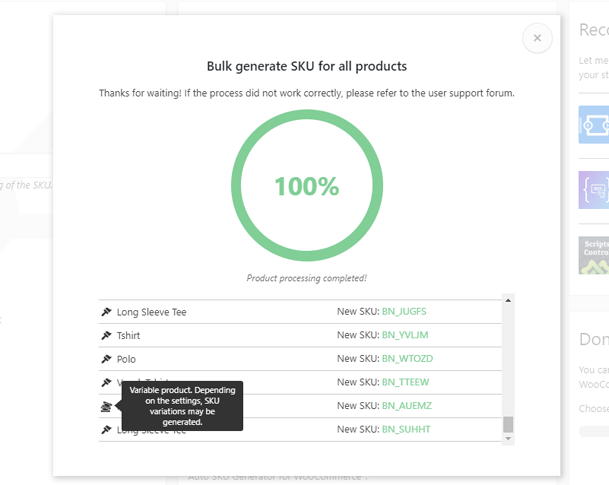
Bulk SKU generation completed state
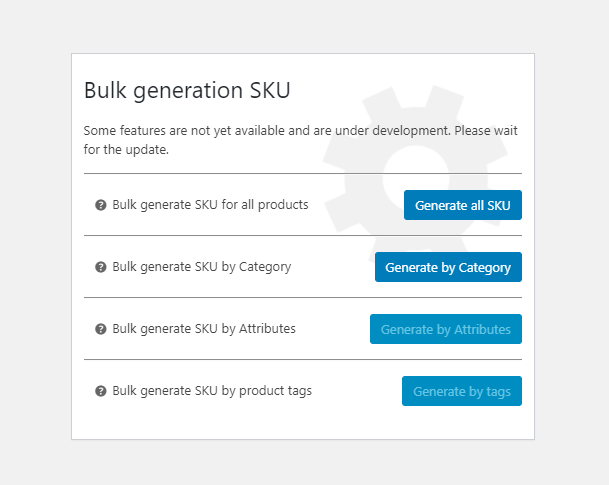
Roadmap and planned improvements
Faq
Yes. Please share ideas or bug reports on the support forum.
Open: WooCommerce → Settings → Products → SKU Settings.
See the “Settings Reference” section in this readme. It explains each option and expected behavior.
You can generate SKU values using numbers only, letters only, alphanumeric format, or product slug.
Open WooCommerce → Settings → Products → SKU Settings, configure your SKU rules, and save. Then create/edit a product or run a bulk generation action.
Go to SKU Settings and use the bulk tools to generate SKU values for all products or for a selected category. Start with a smaller batch size on low-resource hosting.
Only if you enable “Re-create existing SKUs”. If this option is disabled, the plugin generates SKU values only for products with empty _sku.
Prefix is added at the beginning, suffix at the end, and additional number appends an incrementing numeric sequence in bulk generation.
Yes. The plugin can generate SKU values for variable products and variation items based on your current settings, including custom separators.
When enabled, existing SKU values are replaced during bulk generation. When disabled, only products with empty _sku values are generated.
This option creates the next SKU based on the last published product SKU (+1 logic). It is intended for sequential SKU workflows.
Yes. You can enable duplicate SKU values in settings if your catalog workflow requires it.
For low-memory hosting, start with small batches (1-3 products per request). Increase batch size only if processing remains stable.
If bulk generation stops, first check the latest plugin version and server limits. See the related support topic here.
What to check:
-
Be sure to update the plugin to the latest version
-
Open browser DevTools on the settings page and check Console/Network for errors.
-
Check server logs for PHP or timeout errors and share details in the support forum.
-
Contact your hosting support if you see memory, timeout, or HTTP 500 errors.
Please post the error details in the support forum so we can help faster.
Yes. Leave “Re-create existing SKUs” disabled to generate SKU values only for products where _sku is empty.
Reviews
Best Sku Plugin
By 
I paid for a previous SKU generator plugin and it was horrible. Then I found this wonderful plugin and it was free. The plugin did exactly what it was supposed to do, no issues, problems or conflicts with other plugins. High recommend this plugin. It is truly a time saver!! Worked perfectly.
Great Plugin
By 
Great Plugin
ok
By 
Very useful for those who just need random sku
muy buen plugin
By 
cumple su funcion y muy facil de entender su configuracion
works flawless
By 
The plugin works flawless and is always up to date.
very good plugin
By 
very good plugin
Very good plugin
By 
I using Free version.Working very well
Thank you Developer
I Like it
By 
Really useful
Practical, powerful, simply brilliant.
By 
For those who don't like to manage these damn SKUs, this is a blessing!!! Practical, powerful, simply brilliant.
Perfect Solution
By 
This helped me out a lot
Changelog
1.3.4
- Removed: promotional pulse icon next to the SKU input. The Settings shortcut and Re-Create SKU buttons stay.
- Updated: “Tested up to” to WordPress 7.0 and WooCommerce 10.8.1.
1.3.3
- Fixed: variation SKU generation did not run when WooCommerce pre-filled variations with the parent SKU (regression from 1.3.2).
- Manual SKU values on variations are still preserved.
1.3.2
- Fixed: variation SKU values were not generated when saving a variable product.
- Fixed: condition for the “Variable product” option used inverted logic and blocked generation on default settings.
1.3.1
- Refined uninstall cleanup logic for cleaner multisite behavior.
- Updated readme SEO copy (description, screenshots text, and FAQ).
- Improved user guidance for batch processing behavior.
1.3.0
- Redesigned bulk generator modal dialogs in WordPress admin style.
- Added batch processing (1-10 products per request) for bulk SKU generation.
- Added “Recommend” button to suggest batch size based on server memory.
- Switched bulk processing responses from plain HTML to JSON.
- Refactored JavaScript modules to reduce global conflicts.
- Improved SKU field icon strip behavior and tooltip interactions.
- Improved “Take previous product” logic and internal code structure.
- Added HPOS (High-Performance Order Storage) compatibility declaration.
1.2.0
- Added new information to plugin settings.
1.1.9
- When editing or creating a product, a suffix is now appended.
- When editing or creating a product, the number specified in the “Additional number” settings is now added.
1.1.8
- Added High-Performance Order (HPOS) support
- Tested with the latest version of WooCommerce
1.1.7
- Update JavaScript settings
- Update readme
- Added subscription
1.1.6
- Update readme
- New donate link
1.1.5
- Tested compatibility with WordPress 6.3
- Tested compatibility with WooCommerce 8.0
- New readme
- The delimiter is now available when editing and adding a product
- Fixed re-creation of already existing SKU of a variant product
1.1.4
- Variant SKU customizations are now hidden in a separate group
- Preparing for global plugin update has been implemented
- Added “SKU suffix” option
- Added “Additional number” option
- Added “Format “Additional number” option
- Added “SKU suffix” option
- Added 2 formats for generating last numbers
1.1.3
- Tested compatibility with WordPress 6.2
- Tested compatibility with WooCommerce 7.9
- Added a setting for additional options in generating variant products.
- Added a setting for the separator in variant products when generating SKU.
1.1.2
- Tested compatibility with WordPress 5.9
- Tested compatibility with WooCommerce 5.8.3
- Changed SKU generator progress indicator
- Added style updates for SKU generator
- Added option “Allow identical SKUs”
1.1.1
- Added compatibility with the “Table Rate Shipping Method for WooCommerce by Flexible Shipping” plugin
- CSS class of the modal window is now unique. Added compatibility with other plugins
1.1.0
- Fixed bug with disabling SKU block
1.0.8
- Fixed an error generating variant products
- Changed the order of execution of the variable products generator script
- Fixed getting a basic SKU in relation to variable products in the SKU generator
1.0.7
- Fixed bug with SKU generation by slug of product
1.0.6
- Tested WP version 5.8
1.0.5
- Tested WP version
1.0.4
- Correction of error with number 0
1.0.3
- The limitation on the generation of the minimum number of characters has been removed
1.0.2
- Rename function “ffxf_action_javascript”
1.0.1
- Plugin tested with WordPress version 5.5
1.0.0
- Tested WP 5.4
0.9.9
- Fixed a bug that was caused due to duplication of SKU
0.9.8
- Update notice
0.9.7
- Added new functions “Bulk generate SKU by Category”
- Bugs fixed with the function of the previous product
- Take previous product has become more convenient
- Update CSS
- Update JS
0.9.6
- Update CSS
- Preparation for the introduction of a new parameter – Generation of SKU into separate categories.
0.9.5
- Fix error in notice
0.9.4
- Test WordPress 5.3
0.9.3
- Fixed bug with mass generation
0.9.2
- Re-create online button is now always available
- New support forum notification added
0.9.1
- WooCommerce test 3.8.0
- Optimize code
- Add notice
0.9.0
- fix translate and add text-domain in generate SKU
0.8.9
- update CSS
0.8.8
- fix translate
0.8.7
- Fixed translation strings
- Fixed translation selector
0.8.6
- fix missing dependencies ffxf_slug_script.js
0.8.5
- Now, after installing the plugin, you can immediately generate products without saving the general settings.
- New POT file
- Fixed text domain of the translation plugin
0.8.4
- Added and ready to use a new function “Bulk generate SKU for all products”
- New function “Bulk generate SKU by Category” prepared for implementation
- New function “Bulk generate SKU by Attributes” prepared for implementation
- New function “Bulk generate SKU by product tags” prepared for implementation
- New interface added
0.8.3
- Changed the main banner so as not to infringe on Woocommerce copyright
- In the latest version of plugin 0.8.3, preparations were made for implementing a function that generates SKUs for all products bulk.
0.8.2
- Improved numerical value handling
- Fixed related edge-case errors
0.8.1
- Improved numerical value handling tests
- Added function for converting SKU numbers from previously published products
- Added notification for error and failure states
0.8.0
- Fix error id SKU and all option
0.7.9
- New feature refinement – “Consider the previous product”
0.7.8
- Improvement of the function “Consider the previous product”
- Fixed bugs with zeros
- Using the new function, the article can now be rewritten
- New styles added
0.7.7
- Add new functions “Take into account the previous product”
0.7.6
- Product ID is now at the end SKU
0.7.5
- Fix JS error
0.7.4
- Fixed script connection
0.7.3
- Optimized code
0.7.2
- Fix JS error
0.7.1
- Fix error slug SKU
0.7.0
- Add new settings – Product Slug Generation
- Add Re-Create SKU online
- Optimized code
0.6.0
- Optimized settings code
0.5.0
- Fixed problems with literal values
0.4.0
- Added settings in ‘Woocommerce → Settings → Products → SKU Settings’
- Added option – Number of characters in SKU
- Added option – Prefix before SKU
- Added option – SKU format (Only numbers, Only letters, Letters and numbers)
- Added option – Use product ID in SKU
- Added option – Disable / Enable generation of SKU in variable goods
- Update generation function sku
0.3.0
- Update generation function sku
0.2.0
- Release