Discount Rules and Dynamic Pricing for WooCommerce
Discount Rules and Dynamic Pricing for WooCommerce
Description
Discount Rules and Dynamic Pricing for WooCommerce (formerly Easy WooCommerce Discounts) is the most complete free WooCommerce discount plugin and dynamic pricing tool. Create bulk discounts, quantity discounts, BOGO deals (buy one get one free), category discounts, storewide percentage discounts, cart-total offers, and auto-apply coupons — all without writing a single line of code. It’s a proven sales strategy for increasing average order value, reducing cart abandonment, and driving ecommerce conversions without manually re-pricing a single product.
Whether you need a buy 2 get 1 free or buy 3 get 1 free deal, a WooCommerce dynamic pricing rule, a scheduled flash sale, a cart total discount, a category-wide sale, or a WooCommerce coupon that applies automatically — the free version handles every core scenario from a single admin panel, for simple and variable products.
Need advanced features like wholesale pricing, user role-based pricing, conditional pricing, tiered pricing, live price display, purchase history rules, checkout fees, or product bundle discounts? Those are available in the PRO version.
LIVE DEMO (Front-End) | LIVE DEMO (Back-End) | Ask a Question | Documentation | Video Playlist | GET PRO — UP TO 75% OFF
✅ Free Version Features
Product Discounts
- Bulk / Quantity Discount — volume discounts by quantity tier
- Category Coupon and Category Discount — % or fixed off entire categories
- Percentage Discounts — storewide or per-product
- Storewide and scheduled discounts
- BOGO — Buy One Get One Free — Buy 1/2/3 Get 1, Buy X Get Y, and more
- Exclude products from any rule
Cart & Order Discounts
- Cart Discount Rules — e.g. 20% off sitewide on Black Friday
- Cart/order total discounts — e.g. spend $100, get 15% off
- Auto-apply and manual coupons — no code entry needed, or activate with a specific code
Display & Notifications
- Quantity / bulk pricing table — shown automatically on the product page, or anywhere via
[wccs_bulk_table] - Product page messages — inform customers of active rules before they add to cart
- “You Saved” display — total savings shown in cart and at checkout
- Rules analytics — track rule impressions and performance in the dashboard
- Discount templates — pre-built rule templates to launch your first discount in minutes
Shipping
- Free shipping by cart total, weight-based and scheduled methods
- Shipping method rules — show/hide by cart total, weight, item count, or date
📦 WooCommerce Bulk Discount & Quantity Discount
A WooCommerce bulk discount (or quantity discount) automatically lowers the per-unit price as customers buy more — a proven way to increase average order value and clear inventory faster. Also called tiered pricing. Basic bulk pricing tiers are free and unlimited; advanced per-tier percentages and role-based tiers are in PRO.
- Buy 1–5 units 0% off (regular price)
- Buy 6–10 units 10% off
- Buy 11–20 units 20% off
- Buy 21+ units 30% off
Volume kick discounts: reward the entire order once a quantity threshold is hit — e.g. buy 10+, and all 10 units get 20% off retroactively, not just the units past the 10th. A distinct alternative to standard tiered pricing when you want an all-or-nothing volume incentive.
The redesigned quantity pricing table — with pre-built themes and a live settings preview — displays automatically on the product page, or anywhere via [wccs_bulk_table].
🏷️ WooCommerce Category Discount
A WooCommerce category discount applies a percentage or fixed discount to an entire product category in one step — no editing individual products. Combine with date ranges or a minimum cart total, apply to multiple categories at once, and exclude specific products. Ideal for seasonal sales and clearance events.
- Set a percentage discount on any category (e.g. 20% off all “Winter Jackets”)
- Set a fixed amount discount on any category (e.g. $10 off all “Accessories”)
🛒 WooCommerce BOGO Deals — Buy One Get One Free
BOGO deals are one of the highest-converting promotions in e-commerce, and every common variation is free for simple and variable products. The free item adds to cart automatically, no manual step needed. Category-based and variation-based BOGO rules are in PRO.
- Buy 1 Get 1 Free — Classic buy one get one free
- Buy 2 Get 1 Free — Buy two, get the third at no cost
- Buy 3 Get 1 Free — Perfect for multi-pack promotions
- Buy X Get Y — Buy product A and receive product B free or at a discount
- Buy One Get One 50% Off — Buy one item, get the second at half price
- Buy 2X Get 1Y Free — cross-product reward, e.g. buy 2 shampoos, get 1 conditioner free
- Buy 3, Cheapest Free — automatically discounts the lowest-priced item in the cart
BOGO use cases:
- Cosmetics and personal care — buy one shampoo, get conditioner free
- Food and grocery — buy 3, pay for 2 multi-pack deals
- Apparel — buy two shirts, get one free to clear end-of-season stock
- SaaS or digital products — buy one license, get a second at no charge
💲 WooCommerce Dynamic Pricing
WooCommerce dynamic pricing changes prices and discounts automatically based on conditions you set — no manual editing, no coupon codes. Free: quantity-based, cart-total, date-based, and category-based dynamic pricing. PRO adds live price display, role-based (wholesale/VIP) conditional pricing, purchase-history pricing, and advanced tiered pricing rules.
- Quantity-based dynamic pricing (more items = lower price per unit)
- Cart-total dynamic pricing (spend $X, get Y% off)
- Date-based dynamic pricing (flash sales and scheduled promotions)
- Category-based dynamic pricing (automatic discounts on entire product categories)
📊 WooCommerce Tiered Pricing (PRO)
Tiered pricing — also called volume pricing or volume discounts — gives progressively larger discounts as customers buy more. Basic quantity tiers are free; advanced per-tier percentages, role-based tiers, and attribute conditions are in PRO: e.g. 5% off at 5 units, 12% off at 10, 20%+5% wholesale off at 20+.
PRO tiered pricing example:
- Quantity 1–4: regular price
- Quantity 5–9: 5% off
- Quantity 10–19: 12% off
- Quantity 20+: 20% off — plus an additional 5% off for wholesale user role
📖 Tutorial
🔖 WooCommerce Scheduled Discounts & Flash Sales
Free version: schedule any rule with a start/end date, run it on specific days, or repeat it weekly — perfect for flash sales, Black Friday, and holiday promotions. PRO adds a countdown timer on product pages to drive urgency.
📖 Tutorial
🎫 WooCommerce Coupon & Auto-Apply Coupon
Turn discount rules into auto-applied WooCommerce coupons — no code entry, less cart abandonment.
- Auto-apply coupons — applied automatically at checkout when conditions are met
- Manual coupons — activate a rule only when a specific code is entered
- Cart/order total coupons — e.g. apply a coupon when a customer spends over $100
- Scheduled coupons — activate and deactivate automatically on set dates
- PRO: smart coupons, shareable URL coupons (auto-apply + optionally add products to cart), and user role coupon templates
💳 WooCommerce Checkout Fee (PRO)
Add conditional surcharges at checkout — a PRO feature. Base fees on payment method, shipping postcode, cart weight, or specific products. Use a negative value to give a checkout discount instead.
📖 Tutorial
🚚 WooCommerce Shipping Rules
Free: free shipping by cart total, weight-based methods, scheduled shipping, and rules to show/hide shipping methods. PRO unlocks the full condition library (shipping zone, customer role, purchase history, and more) plus the Shipping Discount addon for percentage/fixed discounts on any shipping method.
⭐ PRO Version Features
PRO unlocks every advanced conditional pricing scenario:
- Live price display — real-time updates as quantity changes
- Advanced tiered & role-based pricing — wholesale, VIP, purchase-history conditions
- Advanced BOGO — Buy X Get X, category & variation-based, 🎁 gift emoji on free items
- Auto Add Products to Cart addon — free gift at a spending threshold
- Bundle & Mix and Match discounts — fixed bundle pricing, or “Any 3 for $60” style mix-and-match deals from a product pool
- Variation & attribute discounts
- First order & sign-up discounts — reward new customers automatically
- Recurring discounts for WooCommerce Subscriptions
- Checkout fees & payment method discounts
- Smart coupons & URL coupons — share a link that auto-applies a coupon
- WooCommerce Countdown Timer on product pages
- Usage restrictions — limit how often a rule can fire, per store or per user
- Shipping Discount addon — % or fixed discounts on any shipping method
Every PRO rule can combine any condition from our full library: customer role & purchase history, cart contents & totals, shipping zone, payment method, product categories/attributes/tags, and more. See the full condition list
📚 Tutorials & Video Tutorials
Every feature above links directly to its own step-by-step guide and video. For the complete library, visit All Tutorials or our YouTube Playlist.
🎉 Our Other Plugins
Installation
- In your WordPress admin, go to Plugins Add New.
- Search for “Discount Rules and Dynamic Pricing for WooCommerce”.
- Click Install Now, then Activate.
- Go to Woo Pricing & Discounts menu to create your first discount rule.
Or upload manually:
- Upload the
easy-woocommerce-discountsfolder to/wp-content/plugins/. - Activate through Plugins in the WordPress admin.
- Visit the Documentation for detailed setup instructions.
Minimum Requirements
- WordPress 4.4.1 or greater
- WooCommerce 3.0.0 or greater
- PHP 5.6.0 or greater
- MySQL 5.0 or greater
Screenshots
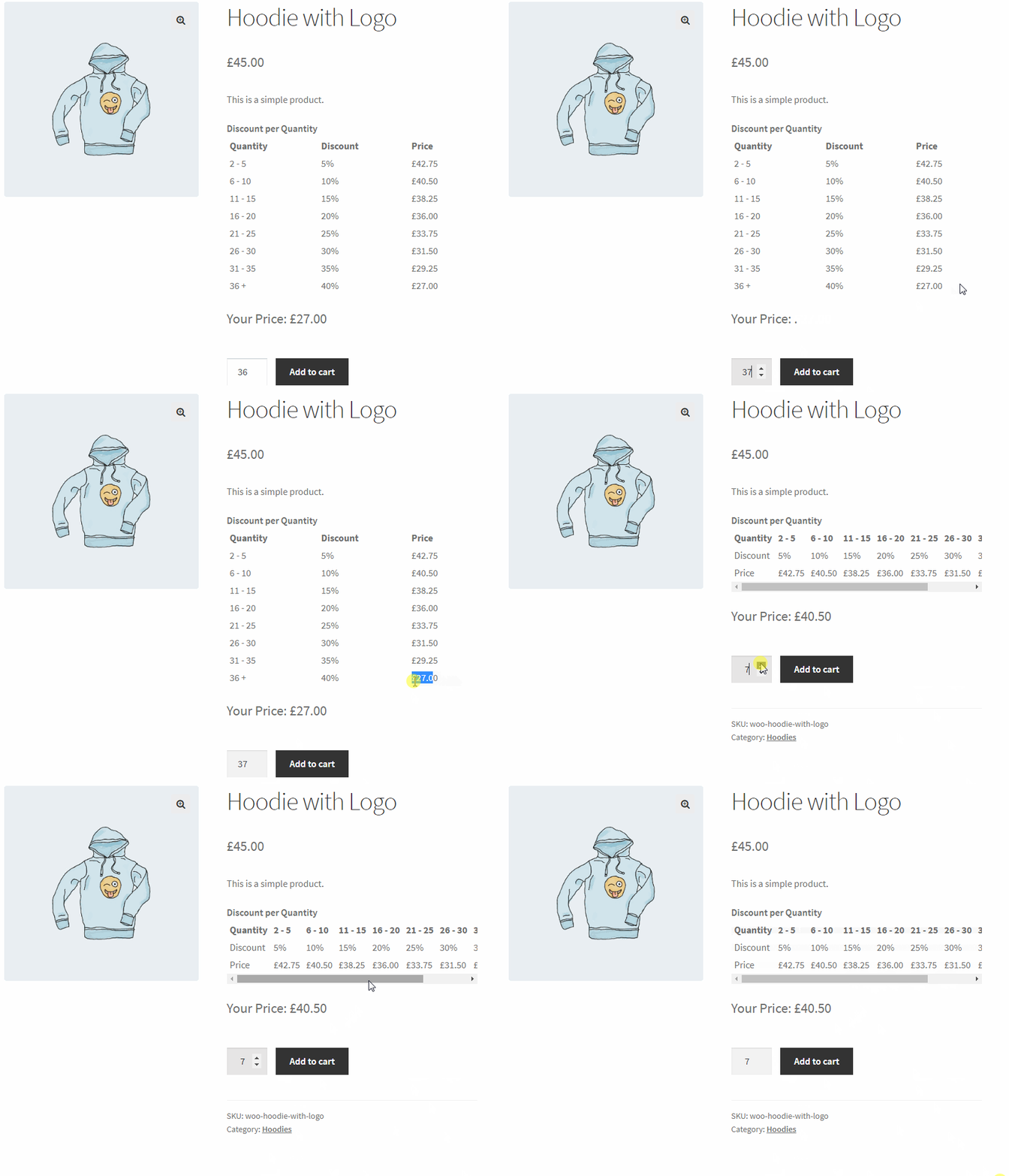
Bulk pricing discount table on the product page — showing quantity tiers with discounted prices.
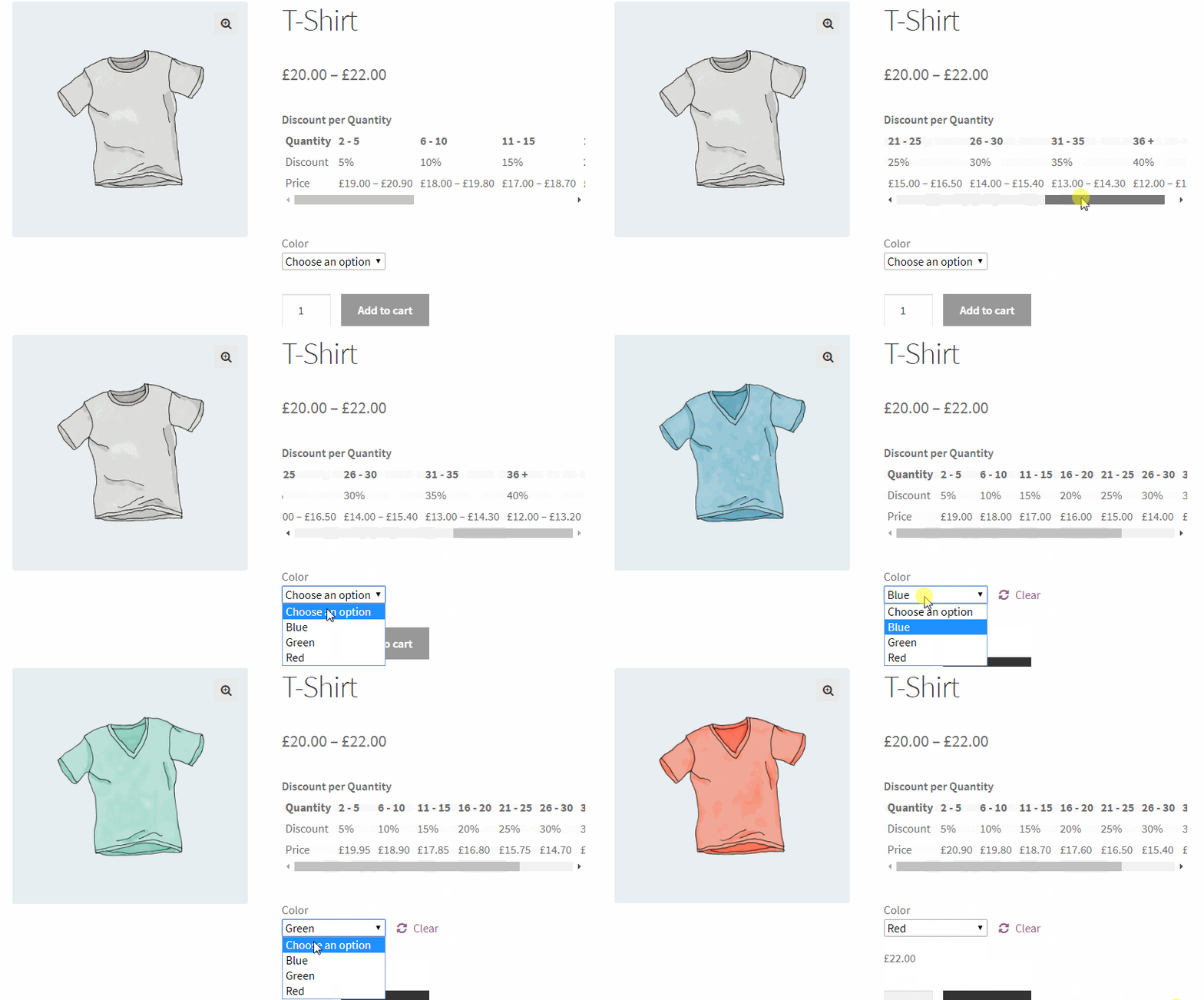
Bulk pricing for variable products.
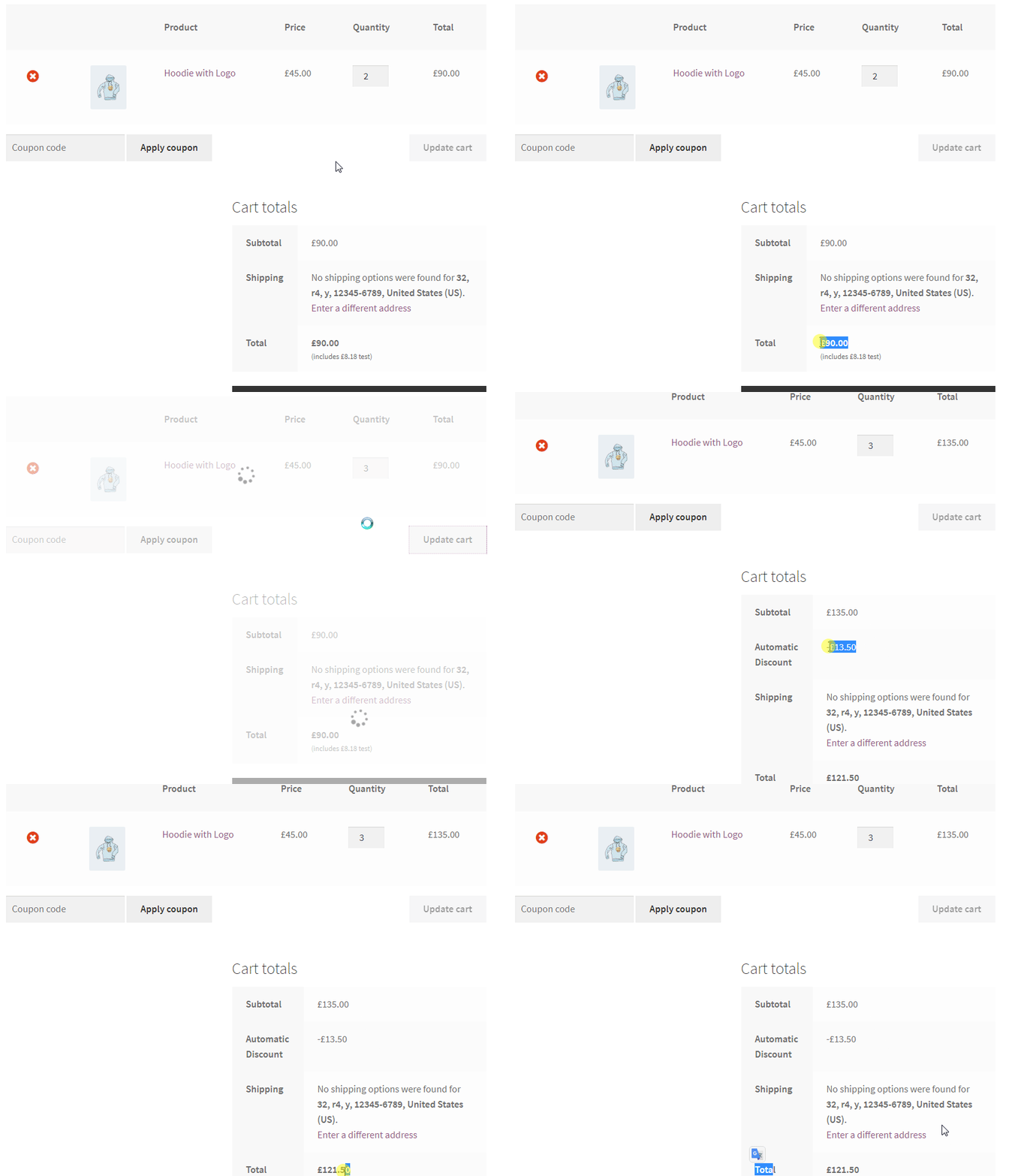
Cart discount rule — 10% off when cart subtotal exceeds $100.
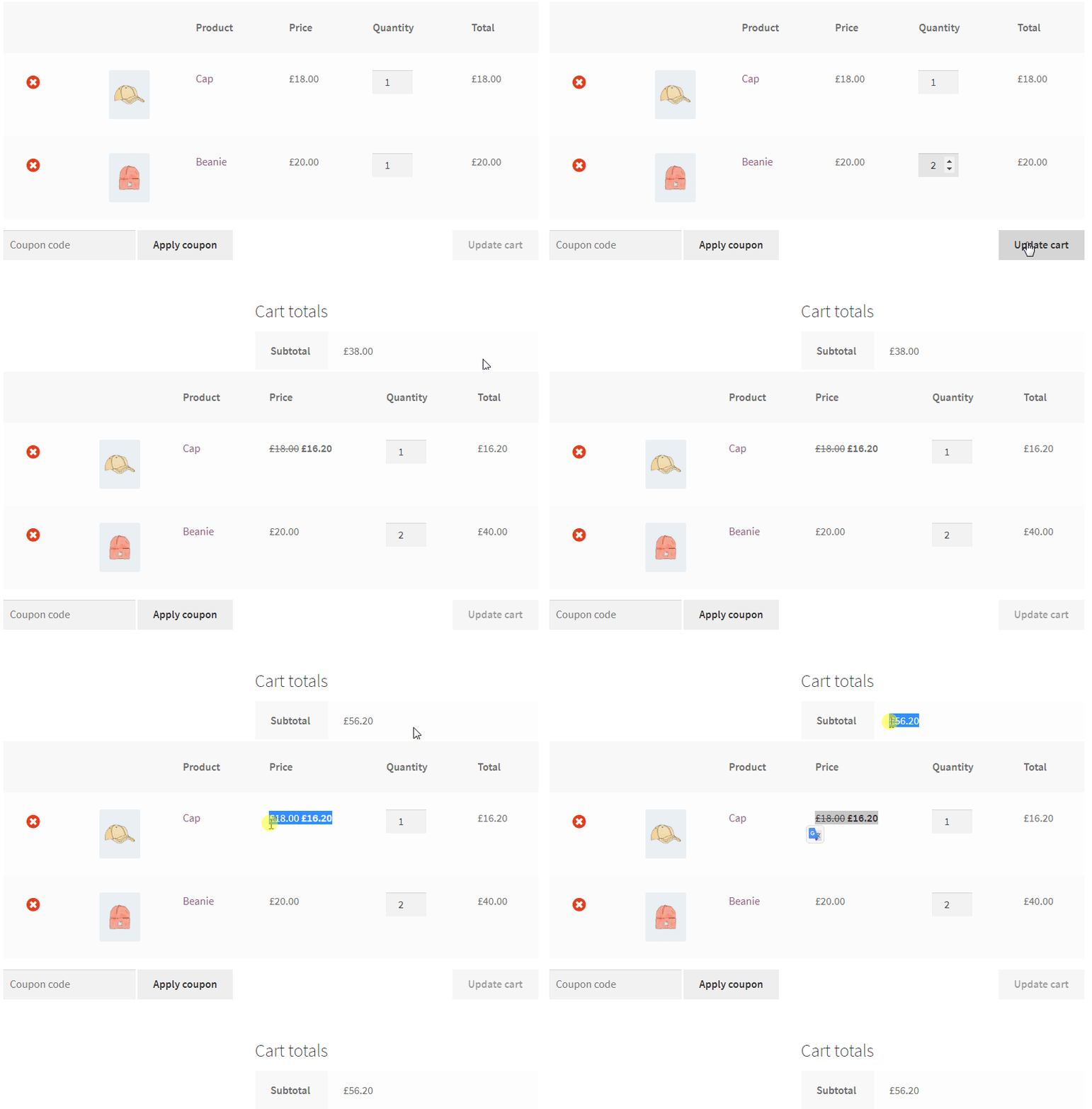
Simple product discount — 10% off a specific product when subtotal condition is met.
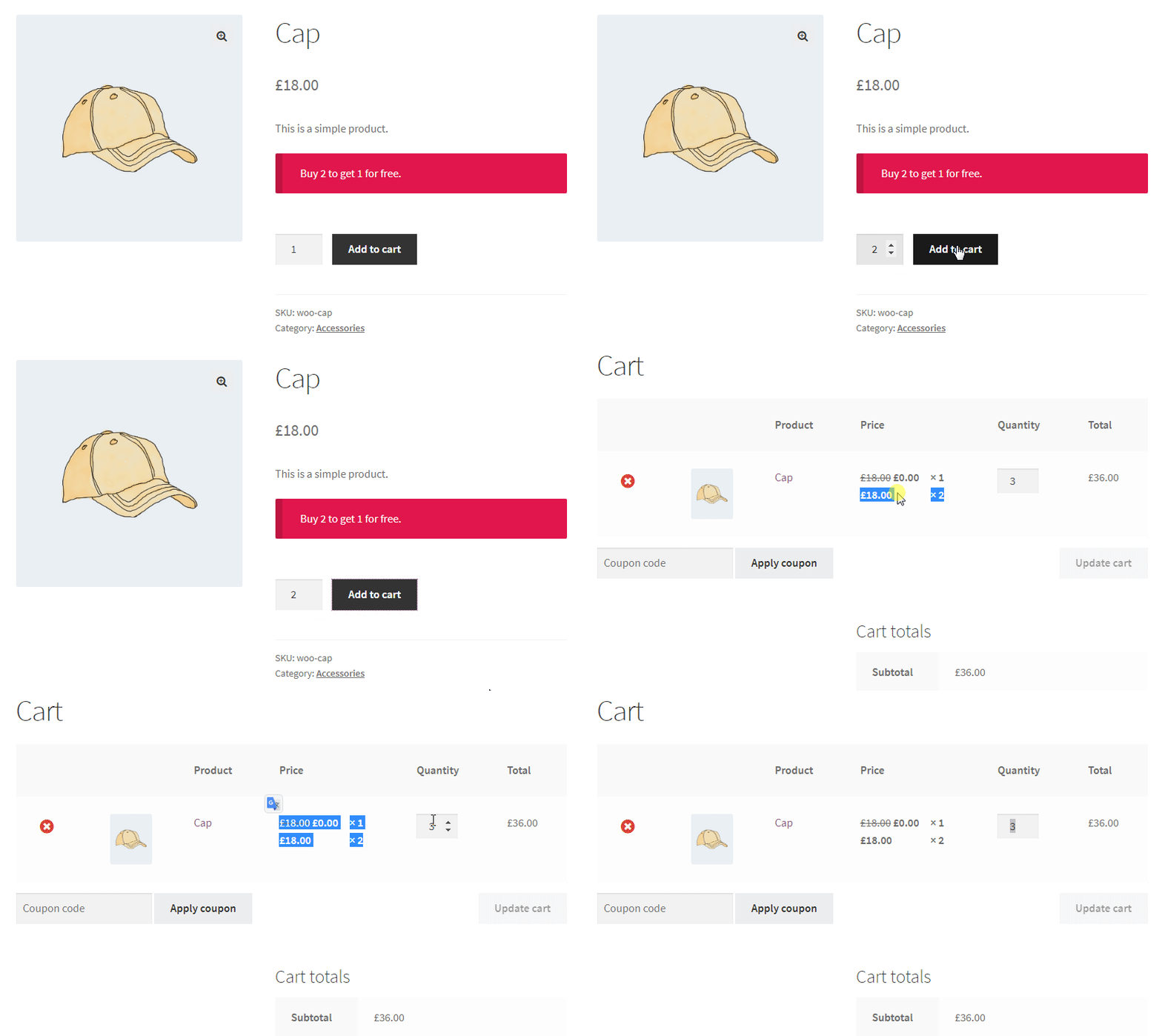
BOGO deal — free product automatically added to cart when buy condition is met.
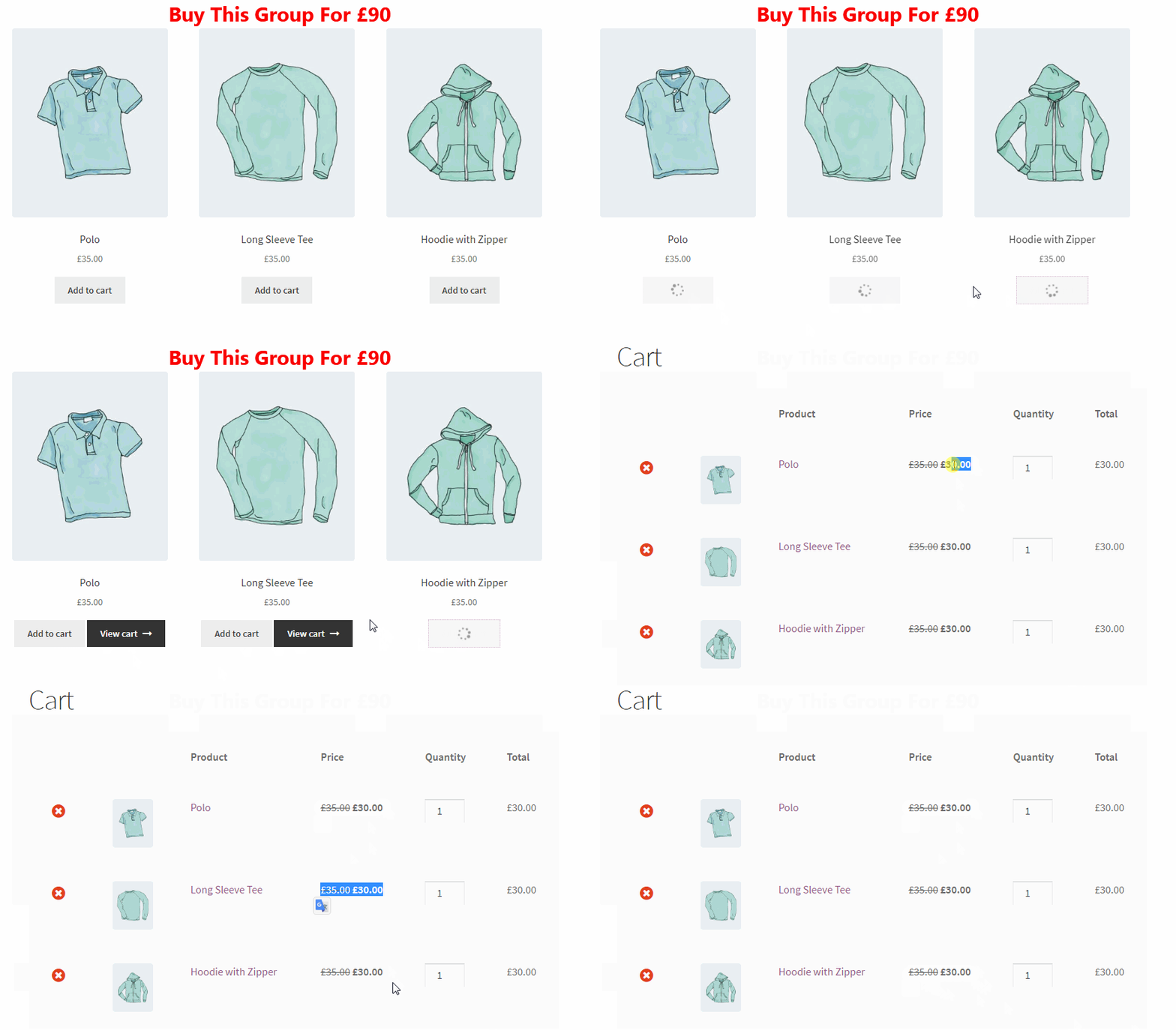
Product group / bundle discount configuration.
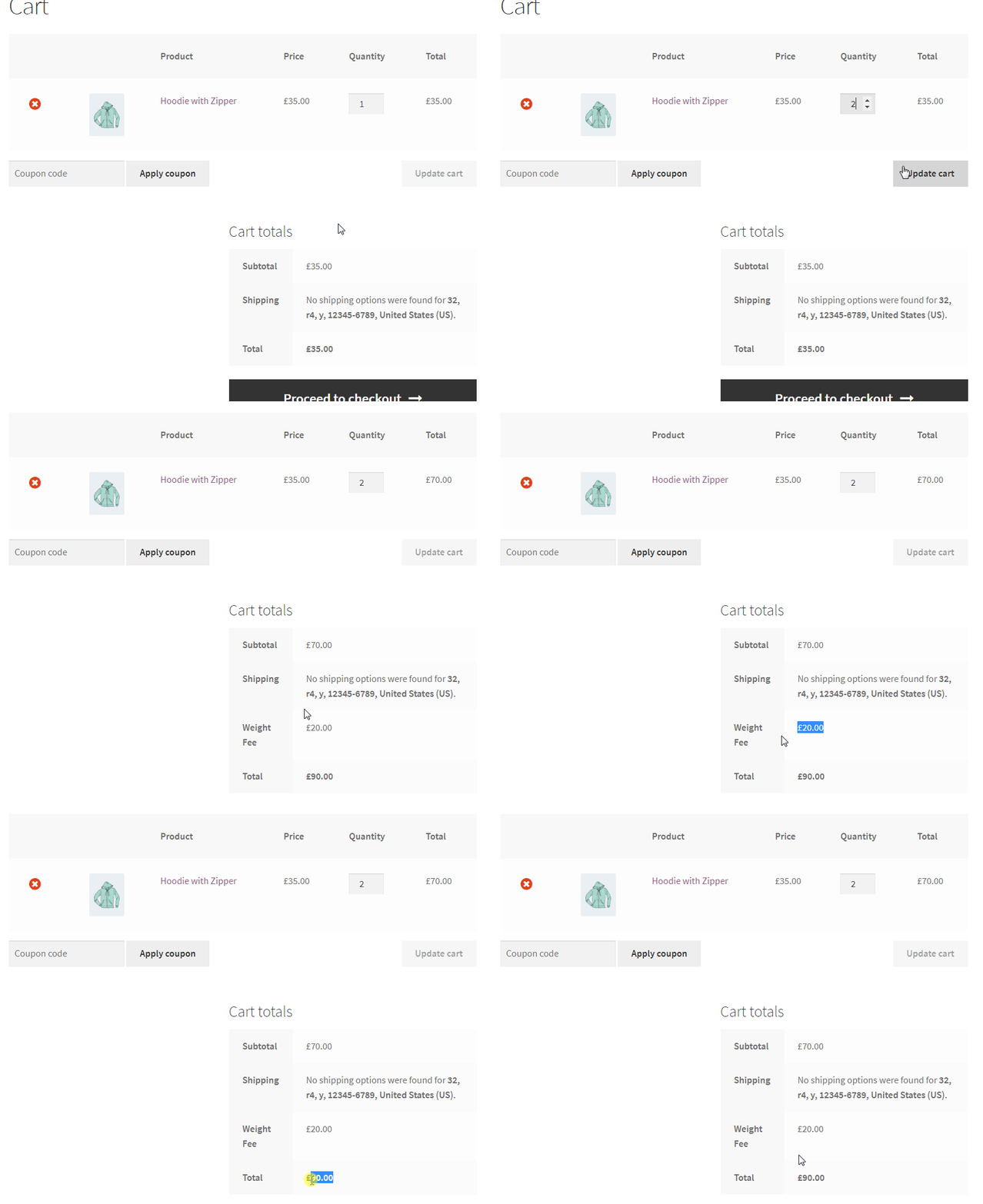
Checkout fee rule — charge a fee based on cart weight.
Faq
Install the plugin, go to Woo Pricing & Discounts Pricing tab Add from Template, and select the Bulk Savings: Buy More, Save % template. Set your quantity ranges and discount amounts (percentage or fixed). The bulk pricing table will appear automatically on the product page. You can also use the [wccs_bulk_table] shortcode to display it anywhere. Available in the free version. Full tutorial: WooCommerce Bulk Discounts.
Go to Woo Pricing & Discounts Pricing tab Add from Template and select one of the “BOGO: Buy 1 Get 1 Free” or “Free Gift: Buy X, Get Y for Free” templates. Select your buy and get products. The free product is added to the cart automatically. Buy 1 Get 1, Buy 2 Get 1, Buy 3 Get 1, and Buy X Get Y are all available in the free version. Full tutorial: BOGO Deals in WooCommerce.
Go to Woo Pricing & Discounts Pricing tab Add from Template and select the “Buy 2 Get 1 Free (Same Item)” or “Combo Pack: Buy 2 of X, Get 1 Y Free” template. Select your buy and get products. The free item is added to the cart automatically. Available in the free version. Full tutorial: Buy 2 Get 1 Free in WooCommerce.
Go to Woo Pricing & Discounts Pricing tab Add from Template and select the “Category Discovery” template. Choose Percentage or Price for the Adjustment Type, then under Discounted Products select Categories. The discount applies to all products in those categories automatically. Available in the free version. Full tutorial: WooCommerce Category Discounts.
Basic quantity-based tiered discounts (buy more, save more) are available in the free version — go to Woo Pricing & Discounts Pricing tab Add from Template and select the Bulk Savings: Buy More, Save % template. Add multiple quantity ranges with different discount percentages. Advanced tiered pricing with role-based conditions, attribute targeting, and live price display is available in the PRO version. Full tutorial: Tiered Discounts in WooCommerce.
They refer to the same concept. “Bulk discount” and “quantity discount” mean giving a lower price when customers buy more items. “Tiered pricing” and “volume pricing” describe the same strategy with multiple price levels at different quantity thresholds. Basic bulk/quantity discounts are available in the free version. Advanced tiered pricing rules with additional conditions are available in PRO.
Unlike standard tiered pricing, where only the units past a threshold get the lower price, a volume kick discount applies the discount retroactively to every unit once the threshold is met — e.g. buy 10+, and all 10 units get 20% off, not just units 10 and up. Available in the free version.
Create a Cart Discount rule and set your conditions (date, cart total, products, etc.). When a customer meets those conditions, the WooCommerce coupon discount is applied at checkout automatically — no code needed. You can also create manual coupons that require a specific code. Both modes are available in the free version.
Go to Woo Pricing & Discounts Discounts tab Add from Template and select the Minimum Spend template. Set the cart total threshold and discount amount — for example, spend over $100, get 15% off. Available in the free version.
WooCommerce checkout fees are available in the PRO version. Go to Woo Pricing & Discounts Fees tab to create a checkout fee rule. You can base fees on payment method, cart weight, shipping postcode, or specific products in the cart. Full tutorial: Create Payment Gateway Fees in WooCommerce.
Yes, this is a PRO version feature. Create a Checkout Fee rule and add a Payment Method condition — for example, add a 2% surcharge for credit card payments. Full tutorial: Payment Method Fee in WooCommerce.
This is a PRO version feature. With PRO, create a pricing rule and add a User Role condition. For example, wholesale customers get 25% off all products automatically when they log in. Full tutorial: User Role Based Pricing for WooCommerce.
Yes, available in the free version. Every rule has a Date Range option (From Date / To Date). Set the start and end date and the rule activates and deactivates automatically. You can also target specific days of the week. The PRO version adds a Countdown Timer on product pages. Full tutorial: WooCommerce Flash Sale.
Yes, available in the free version. When you create a bulk pricing rule, a quantity table appears on the product page automatically. Customize its position and style in the plugin settings. Use [wccs_bulk_table] shortcode to place it anywhere.
This is a PRO version feature. Add a Purchase History condition to any rule — for example, customers who spent $200+ in previous orders get 10% off their next order.
The free version supports discount rules on variable products as a whole. Targeting individual product variations specifically (e.g. only Size: XL of a shirt) is a PRO version feature.
This is a PRO version feature. Go to Woo Pricing & Discounts Discounts tab Add from Template and select the “New Customer Welcome” or “Welcome Gift” template. Full tutorial: First Order Discount in WooCommerce.
Go to Woo Pricing & Discounts Pricing tab Add from Template, select the Storewide template, and set your discount type and amount. Available in the free version. Add date conditions to make it a scheduled storewide sale. Full tutorial: WooCommerce Apply Discount to All Products.
Yes, available in the free version. Every rule has an Excluded Products section where you can select individual products or categories to exclude — for example, exclude already on-sale products from a storewide discount.
Yes, this is a PRO version feature. Define a pool of eligible products and a bundle price or discount — for example, “Any 3 items from this category for $60.” Customers can mix any combination from the pool and the price adjusts automatically in the cart. tutorial: Create Mix & Match Product Discounts
Yes, available in the free version. Create a shipping rule with a cart total condition (e.g. free shipping over $50). PRO adds advanced conditions plus a Shipping Discount addon for percentage/fixed discounts on existing methods. Full tutorial: WooCommerce Free Shipping Based on Cart Subtotal.
The Auto Add Products to Cart feature is available as an addon for the PRO version. When a customer reaches a spending threshold, a free gift product is automatically added to their cart. Full tutorial: Auto Add Products to Cart in WooCommerce.
Yes. The plugin includes compatibility with WooCommerce Subscriptions, including recurring discount types.
Unlimited rules in both free and PRO, and yes, multiple rules can run simultaneously — they’re applied by priority, so you control which one takes precedence when more than one matches the same product or cart.
Yes. The plugin includes compatibility with the WooCommerce cart block and checkout block.
Yes. The plugin is compatible with WPML for multilingual WooCommerce stores.
This is a PRO version feature. Add a Shipping Country, Shipping State, or Shipping City condition to any rule. For example: customers shipping to Texas get 15% off.
Yes, available in the free version. The “You Saved” total is displayed in the cart and at checkout so customers clearly see the value of their discount.
Yes. Pricing rules and cart discount rules apply automatically when customers meet the conditions — no coupon code required.
Reviews
Amazing plugin and outstanding support!
By 
We are extremely happy with both the plugin and the support provided by the AsanaPlugins team.
Their customer service has been absolutely excellent. They took the time to understand our specific situation, investigate the conflict we were experiencing on our website, and work with us until the issue was completely resolved. The team was responsive, patient, professional, and genuinely committed to finding a solution. It’s rare to receive this level of support!
The plugin itself works perfectly for our needs and offers great flexibility for managing discounts and dynamic pricing on WooCommerce.
A huge thank you to the whole team for their time, expertise, and dedication. We highly recommend both the plugin and AsanaPlugins !
Makes me lose money
By 
First, argued for many emails that a shipping discount should be applied before taxes, because taxes shown are not calculated before a discountm just a legal thing they don't even understand or want to fix. Now, I realize the coupons mess up with Paypal transactions and I lose the discount twice on the total amount. These guys are not professionals. The basic functionalities probably work, but don't expect too much. I had paid for pro and regret it
Support was great
By 
We had a couple of teething issues when trying to get the plugin to work with out setup however the support team were great in helping us get the issue resolved.
Clunky plugin that slowed our site, followed by a poor support experience
By 
We had a very poor experience with this plugin.
The plugin was clunky, slowed down our WooCommerce site, and created performance issues around pricing, cart behaviour, and overall load speed. When the plugin was disabled, our site was noticeably faster, which made it clear the plugin was contributing to the problem.
We contacted support and were told that certain pricing rules can slow down a site, especially rules involving cart-related or customer-related conditions. That is a major concern for any WooCommerce store that relies on speed, clean product pages, and a smooth checkout experience.
The support and refund experience made things worse. Instead of properly resolving the issue, we were told to contact their payment provider about a refund, which felt completely unreasonable given the plugin’s impact on our store.
They also stated: “If you’d still like to proceed with the refund, and you no longer wish to use the plugin, please update or remove all of your reviews. Then let us know, and we’ll process the refund as a goodwill gesture.”
In my view, asking a customer to update or remove reviews before processing a refund is deeply concerning. It made the whole experience feel even more misleading and raised serious concerns about how negative feedback is handled.
Our original review was also taken down after we posted about our experience. Customers should be able to share honest feedback when a plugin causes real issues on a live ecommerce site.
Overall, this was a bad experience. The plugin was heavy, support did not provide a practical resolution, and the refund process was unnecessarily frustrating.
Review stands.
Great plugin with extensive options
By 
For my case, managing a store with over 10,000 products, I needed a plugin that offered a wide array of targeting conditions, and this plugin delivers.
I can't think of anything missing from this plugin, it's very comprehensive. Support is also outstanding.
Great & fast support
By 
Full of options and support is helpful to find the right settings after explaining what I need!
Very Good
By 
Excelent plugin
Verry good
By 
It is fast and smart. I need it only once but it save me a lot of time.
Great support!
By 
Great support!
Works very well
By 
The plugin is very good. Has a lot of features and works really well.
Changelog
9.4.0
- New: Added more templates for tiered pricing rules.
- New: Enhanced discount page alert message design.
- New: Added direct links to Documentation and Video Tutorials.
- Update: Tested and verified compatibility with WordPress 7.1.
- Update: Tested and verified compatibility with WooCommerce 11.1.0
Note: We kindly request your support in spreading the word by leaving a 5-star review. ❤️😍 Feel free to include your ideas in the review, as we always value and consider your feedback. 🌹
9.3.1
- Improvement: Added version parameters to plugin stylesheets to force cache refresh and ensure the latest styles are always loaded.
- Update: Verified compatibility with WooCommerce 11.0.1
9.3.0
- New: Completely redesigned the quantity table with a modern, user-friendly interface.
- New: Introduced a selection of pre-built themes for the quantity table, accessible via plugin settings.
- New: Added a live preview feature to the settings panel, allowing you to see table changes in real time.
- New: Added Chamevo product customizer plugin compatibility for quantity table.
- New: Added capability to set an active tier for the quantity table when using server-side pricing.
- Fix: Resolved volume kick pricing template apply mode set to Individually.
- Fix: Horizontally centered table content for improved UI consistency.
- Update: Changed the default quantity table layout from Horizontal to Vertical.
9.2.0
- New: Added “You Saved” block to the cart and checkout blocks.
- Update: Verified compatibility with WooCommerce 10.9.4
9.1.1
- Fix: When a product updates, the background price updater now updates only that product.
- Update: Verified compatibility with WooCommerce 10.8.1
9.1.0
- New: Added order total coupon rules.
- New: Added products subtotal coupon rules.
- New: Added minimum spend templates.
- New: Added cart total coupons templates.
- New: Added generate coupon code button to generate coupon codes easily.
- New: Added user role based coupon code templates to create coupons fast & easy.
- Fix: Fixed quantity based on field in bulk pricing for variations templates.
- Update: Verified compatibility with WooCommerce 10.8.1
- Update: Verified compatibility with WordPress 7.0
9.0.1
- Fix: Fixed checkout integration js file doesn’t load issue.
- Update: Verified compatibility with WooCommerce 10.7.0
9.0.0
- New: Added “BOGO” or “Buy One Get One free” deals support for products in free version.
- New: Added “Buy 2 Get 1 Free” deals support for products in the free version.
- New: Added “Buy 3 Get 1 Free” deals support for products in the free version.
- New: Added “Add from Template” button for the rules in the admin side to create rules quickly & easily with just a few edits.
- New: Performance improvement on get_available_variatoins for variable products.
- Fix: Added a compatibility for the Porto theme skeleton feature for bulk pricing rules table.
- Update: Verified compatibility with WooCommerce 10.5.2
8.1.2
- Update: Update WordPress tested version to 6.9
- Update: Verified compatibility with WooCommerce 10.4.3
8.1.1
- Update: Verified compatibility with WordPress 6.9
- Update: Verified compatibility with WooCommerce 10.4.2
8.1.0
- New: Added recurring discount types for the WooCommerce subscriptions plugin.