eCheckpoint
eCheckpoint
Description
eCheckpoint provides comprehensive compliance verification for firearms, ammunition, magazines, and knives eCommerce. It validates customer eligibility based on federal, state, and local regulations before and after order placement.
Key Features:
- Pre-Order Compliance Checks – Validates customer eligibility before checkout completion
- Post-Order Verification – Screens each order again after it is placed and records the result on the order
- Address Validation – Automatic address verification and correction
- Regional Restrictions – Enforces state and local sales restrictions
- FFL Dealer Integration – Google Maps-powered FFL dealer selection for firearm transfers
- Customer Type Support – Supports B2C (consumer), B2B (business), and B2G (government) transactions
- Dual Checkout Support – Works with both Classic and Block checkout
WooCommerce Blocks Compatible
eCheckpoint fully supports WooCommerce’s new Block-based checkout, providing the same robust compliance verification in both Classic and Block checkout experiences.
Customizable Messaging
Configure customer-facing compliance messages directly from the WordPress admin:
- Blocked Products message
- FFL Required message
- Additional Information Required message
Installation
- Upload the
echeckpointfolder to the/wp-content/plugins/directory - Activate the plugin through the ‘Plugins’ menu in WordPress
- Navigate to WooCommerce > eCheckpoint to configure your API settings
- Configure your eCheckpoint API credentials
- Set up Google Maps API key for FFL dealer mapping (optional)
Screenshots

Compliance notice displayed during checkout
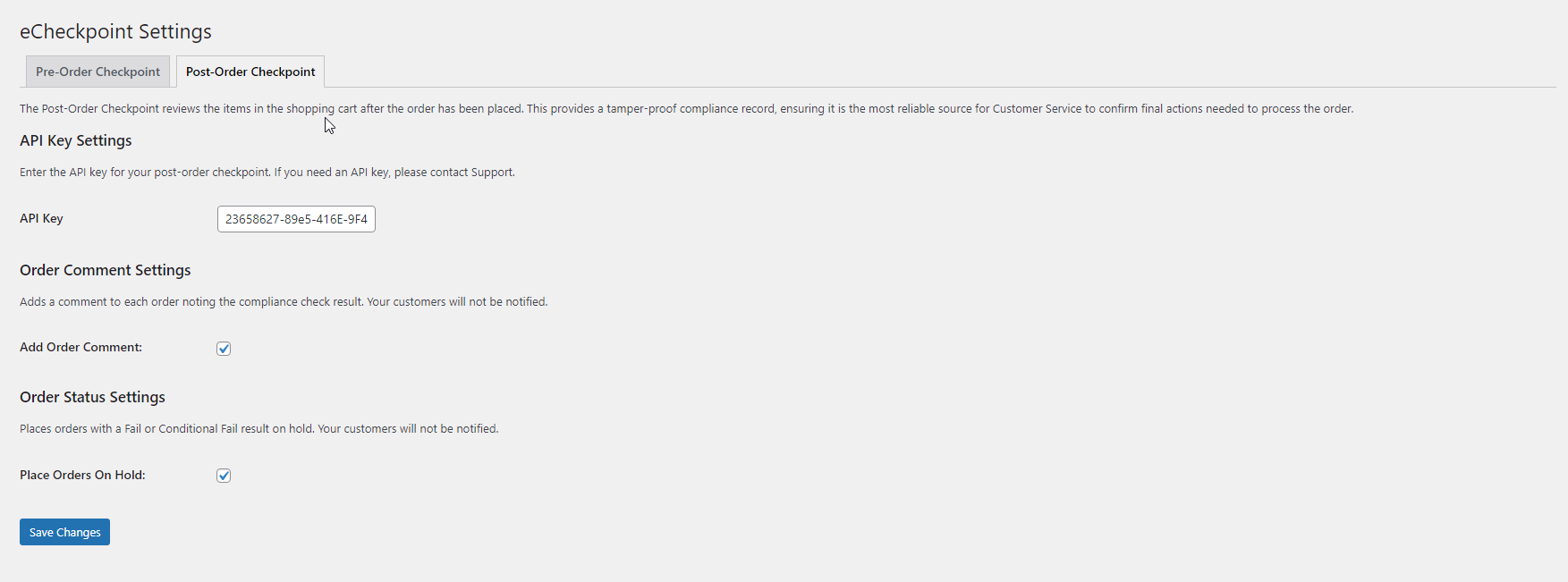
FFL dealer selection map
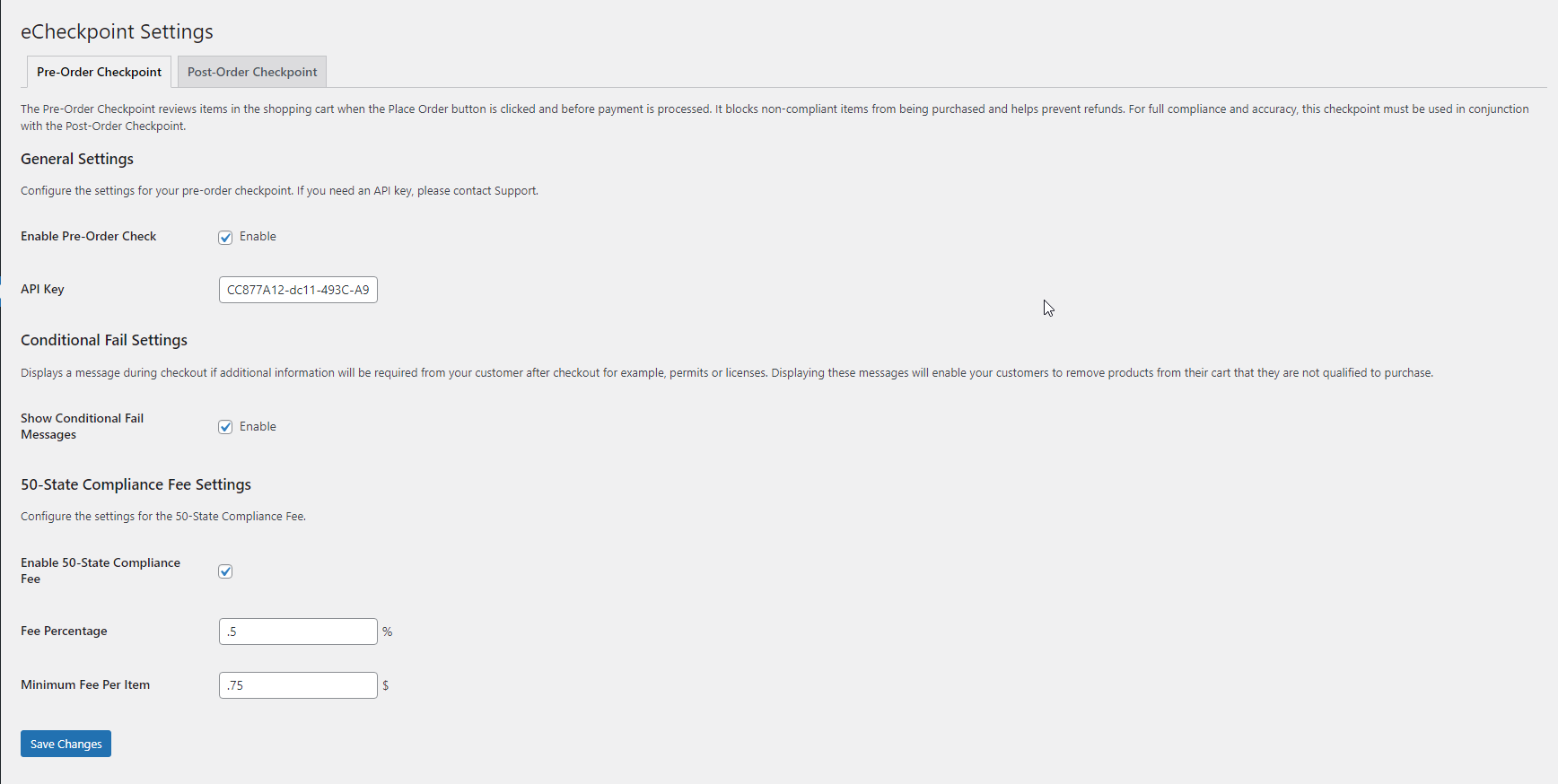
Admin settings page


Faq
eCheckpoint is a compliance verification service that helps firearms retailers ensure their sales comply with federal, state, and local regulations.
Yes, eCheckpoint fully supports both Classic WooCommerce checkout and the new Block-based checkout.
eCheckpoint supports B2C (Business to Consumer), B2B (Business to Business), and B2G (Business to Government) transaction types.
When a product requires transfer through a Federal Firearms License holder, customers can select from nearby FFL dealers displayed on an integrated Google Maps interface.
Reviews
Changelog
3.1.5
- The automatic re-check of held orders is not available in this version and will return in a later one. Its settings (Enable Automatic Remediation, Daily Order Volume, Enable Auto-Cancel for Failed Orders and Compliance Timeout) no longer appear on the Post-Order Checkpoint tab, and it is switched off on every store, including a store that turned it on in an earlier version. We found that the re-check could release, cancel or refund a held order using the compliance record of a different order: one placed on another site that uses the same eCheckpoint account and has the same order number and products. It will come back once each record can be matched to the store that placed the order. Orders are still checked after purchase, held according to your Place Orders On Hold setting, and have their compliance result recorded, exactly as before. A held order now stays on hold until you release, cancel or refund it yourself. Your earlier choices for these settings are kept, but have no effect in this version.
- Fixed a failure that broke the product data feed on a newly set up store. On a store running no other plugins, the requests the block-based storefront makes for product information returned an error, so product blocks, product filters and anything else reading your catalogue that way failed to load. The shop and product pages, and the cart and checkout pages, were unaffected, which is why the problem could go unnoticed. The cause was the plugin clearing leftover checkout messages before the visitor had a session for those messages to live in; it now clears them only once there is one. A store running other plugins may never have seen this, because a plugin that starts a visitor session early enough hides it. This has been present since version 3.1.1.
- Fixed a case where an order could be left unscreened while reading as though it had been screened. Before running an after-order compliance check the plugin asks the eCheckpoint service whether that order has already been checked, so that a shopper who reloads the thank-you page is not screened twice and the merchant is not billed twice. It was treating any reply it could read as “already checked”, including replies that were error responses rather than answers, so anything sitting between your store and the eCheckpoint service that alters the request, such as another plugin or a proxy, could silently cancel the check and still mark the order as handled. The plugin now treats a reply as “already checked” only when the service actually answered that way, and runs the check whenever it cannot get a straight answer, because a duplicate check costs a call and a missed check is a compliance failure. Orders the service confirms were already checked are still not checked a second time. When a check goes ahead because the question could not be answered, the order says so in its notes and the reason is written to the WooCommerce logs, so an order screened for that reason can be told apart from one that was skipped.
- Fixed orders paid by card being left unscreened, with no compliance result and no eCheckpoint note, while orders paid by cash on delivery were screened normally. A card payment completes during checkout, and at that point the plugin asks the eCheckpoint service whether the order has already been checked. The service files its records by order number, and an order number is not unique to one store: a staging copy, a restored database or a second shop using the same eCheckpoint account can each have an order with the same number. The plugin was accepting any record under that number as proof the order had been checked, so a card order whose number had been used before was skipped and nothing on it said so. A record now counts only when your store itself has already started a check of that same order, and the record names the order and lists only products on it, and is no older than that check (allowing a few minutes for any difference between your store’s clock and the service’s). Anything else is noted on the order and the order is checked. Reloading the thank-you page, or a payment confirmation arriving twice, still does not check or bill an order a second time, because the plugin remembers on the order itself that it has been checked. If a payment confirmation arrives while your store’s own check of that order is still under way, the order is not checked a second time; it records that check’s result, follows your Place Orders On Hold setting exactly as a fresh check would, and carries a note saying which record it relied on. The after-order check now also waits up to 30 seconds for the eCheckpoint service to answer, as the check during checkout already did, instead of 5 seconds, so a slower check on an order with a licensed dealer is no longer lost; on a card payment that wait is part of placing the order.
- Fixed a case on the block-based checkout where the compliance message a shopper saw could describe a cart they no longer had. The result of a check was reused whenever the delivery address had not changed, so changing the cart left the previous answer standing. A shopper who removed the product that had been refused and put something else in its place could still be refused, by name, for the product they had just taken out. More seriously, a shopper who had already entered their delivery address and then added a product that cannot be sold to them could be shown nothing at all, and would only find out when they pressed Place Order. What the checkout shows is now worked out for the cart the shopper currently has as well as for the address it ships to, and a shopper who arrives at the checkout with their address already on file is told what applies to their cart without having to edit anything to bring it up. Changing what is in the cart now costs a compliance check where it previously did not. Viewing the checkout again and changing the quantity of an item already in the cart do not, and an empty cart is no longer checked at all. What happens when an order is placed is unchanged by this fix. The shortcode checkout was not affected and is unchanged.
- A shopper whose cart contains a product that has not been registered with eCheckpoint is now told about it on the checkout screen, at the same point as any other compliance problem, instead of only finding out when they press Place Order. The explanation now asks them to contact customer service, which is the step that actually resolves it. On the block-based checkout these shoppers were previously told that federal, state or local regulations prevented the item being shipped to their location, which was not the case: an unregistered product is a setup step that has not been finished in the eCheckpoint Portal, and it has nothing to do with where the shopper lives. The shortcode checkout already showed the correct wording. Orders containing such a product are still declined, and a product that genuinely cannot ship to the shopper’s location still shows the blocked-products message configured in your settings, unchanged.
- Clearing the Blocked Products Message, Dealer Required Message or Additional Information Message box in the settings now restores the standard wording rather than leaving shoppers with no explanation, and the settings screen shows that wording in the box. A message box saved empty was previously treated as configured wording, so the refusal it belongs to arrived with nothing in it, the block-based checkout showed no dealer explanation and no additional information notice, and the shortcode checkout showed wording of its own instead, so the two checkouts disagreed. Both checkouts now show the same wording for the same settings. On the shortcode checkout this also means a custom Dealer Required Message is shown once rather than twice, the dealer notice no longer adds its own line asking for an active FFL address, and a product needing additional information is announced in your Additional Information Message rather than in a fixed sentence naming the product. If you had deliberately blanked one of these boxes, the default text will reappear; put your own wording in the box to replace it.
- The licensed dealer recorded on an order is now written only when that order actually ships to that dealer’s registry-validated premise, and the selection is released once the order is created. Previously a dealer chosen earlier in a shopping session could be copied onto whatever order was placed next, so an accepted order could name a dealer that had nothing to do with it. For a firearms order the dealer named on the order is the record of where the transfer took place, so an order now either names the dealer it shipped to or names no dealer at all.
- Fixed a case on the classic checkout where a compliance message could stay on screen after a later check had passed, so a shopper could be stopped by a verdict that no longer applied to their cart or delivery address. A message shown at checkout is now tied to the cart contents and the delivery address it was produced for, and is taken down as soon as a check passes or as soon as the address it was based on changes. Editing a name, phone number or company does not take down a message that still applies.
- An order that passes its after-order compliance check now records that it passed, and an order skipped because it ships to an excluded state records that too. Previously a screened order and a never-screened order carried no way to tell them apart, so there was no record that a check had been done. The record is held on the order itself and is available to support and to anything reading the order through the API; it does not yet appear on the orders list in your admin. Please note this changes the outcome for some orders, and the reason is worth reading. The compliance service returns one of three results per item: pass, fail, or a conditional result. The plugin was treating a conditional result as a failure when it came from the regional restrictions check, and as a pass when the same result came from the product-catalog or address checks. So an order the service had flagged could be completed and recorded as compliant, purely because of which check reported it. All three are now treated the same way, which is how the eCheckpoint extension for Magento has always worked. The compliance rules themselves are unchanged; this is the plugin honouring the whole of the service’s answer rather than part of it. Whether a flagged order is placed on hold remains controlled by your Place Orders On Hold setting.
- Compliance guidance at checkout is now worked out by the store and sent to the shopper’s screen, rather than the screen keeping its own copy and deciding what to show. The copy could fall out of date, which is what caused shoppers to be told a licensed dealer was needed when their delivery address already was one, and caused a message from an earlier attempt to keep blocking a shopper after a later check had passed. What a shopper is told now always reflects the address they have actually entered, and a delivery address that cannot be verified is explained to them with a link to look it up. This also matches how the eCheckpoint extension for Magento has always worked, so the two behave the same way for the same situation.
- Fixed a case on the block-based checkout where a shopper could be prevented from completing an order the store would have accepted. If the delivery address already satisfies the dealer requirement, for example a shopper who enters a licensed dealer’s address directly, or a store that uses a separate dealer-selection service alongside eCheckpoint, the order now completes. An address that does not satisfy the requirement is still declined, with an explanation naming the products that need a dealer. Stores using a third-party dealer service were previously unable to complete firearms orders at all.
- Fixed a case on the block-based checkout where a shopper buying a product that must ship to a licensed dealer could be stopped at Place Order with nothing on screen telling them why. The dealer explanation now stays visible for as long as a dealer is still needed, and the checkout is never held closed without an explanation the shopper can see. An order that needs a dealer still cannot be completed until one is properly selected.
- Choosing a licensed dealer on the map at the block-based checkout now clears the dealer requirement message as soon as the dealer is confirmed, with no other step needed from the shopper, and any detail the shopper is part-way through entering is kept. Removing the dealer, or moving the delivery address away from the dealer, brings the message back. Choosing a dealer runs one compliance check, so the guidance shown reflects the dealer the shopper picked.
- The dealer-lookup feature used by the FFL map is now turned off together with the pre-order check setting, and a single visitor can no longer run unlimited dealer lookups: after a burst of rapid lookups the store asks them to wait a few minutes. Real shoppers are unaffected; this protects the merchant’s compliance service usage from abuse.
- When an order is refused for compliance on the block-based checkout, the plugin no longer adds its own copy of an explanation the checkout is already showing. Previously the same message could appear twice, once from the checkout itself and once from the plugin’s own notice.
- The security token that protects order placement on the classic checkout is now built into the page itself instead of being added by a script. Stores whose scripts are altered or blocked, for example by a site optimizer or a conflicting plugin, can no longer see orders refused with “Security verification failed” for that reason.
- The “Enable Pre-Order Check” setting now works. Turning it off stops all pre-order compliance screening at checkout, removes the customer type field, and stops the compliance fee, on both checkout types; turning it back on restores all of them. Previously the setting had no effect. Post-order screening is not affected by this setting. While the setting is off, an admin notice reminds staff that pre-order screening is disabled.
- Fixed a checkout failure that could refuse every order on stores whose checkout page setting does not match the checkout their shoppers actually use. Affected stores showed “Security verification failed. Please refresh the page and try again.” and could not take orders at all.
- The plugin now loads its checkout files based on the page a shopper is actually on, rather than the page nominated in the store’s checkout setting.
- Removed a reference to a script file the plugin does not include, which produced a browser error on affected stores.
- Hardened compliance screening so it cannot be skipped by a forged request header.
- Compliance screening on the block-based checkout is now enforced on the server when an order is placed. Previously the block checkout relied on the browser to stop a restricted order, so an order submitted outside the normal checkout screen could be accepted without being screened.
- Screening on the block-based checkout is now performed against the address actually submitted with the order, rather than the last address the shopper had entered.
- Orders with nothing to pay, such as a cart fully covered by a coupon, are now screened. Previously they were not.
- If a compliance check cannot be completed, the block-based checkout now declines the order instead of accepting it unscreened. Please note this is a change in behavior: if the eCheckpoint service is unreachable, or if an order is submitted without complete billing and shipping address details, that order will be declined and the shopper is asked to try again. Stores that have made billing name, address or email optional at checkout may see those orders declined.
- Orders shipping outside the United States are not screened and are not affected by the changes above. eCheckpoint covers United States sales.
- Products that must ship to a licensed dealer are now enforced on the server when an order is placed on the block-based checkout. An order containing such a product is declined unless the shipping address satisfies the dealer requirement, and the shopper is told which products need a dealer. Previously this relied on the checkout screen in the browser.
- Compliance screening now determines the customer type from the type recorded on the order rather than from separate browser values, on both checkout types. This closes a path by which a submission could claim a customer type that skips a required rule without that type being recorded on the order.
- Fixed a case where a shopper who removed a restricted item from the cart could still be prevented from checking out for the rest of their visit.
- A selected firearms dealer is now confirmed against the eCheckpoint dealer registry before its license is used for screening, and the dealer’s official premise address is used rather than any address submitted with the selection. If the dealer cannot be confirmed (including when the registry lookup is temporarily unavailable), the shopper is asked to re-select a dealer. This ensures a regulated product can only ship to a genuine, verified dealer.
- The 50-State Compliance Fee now decides whether an order is a United States order using the same test as compliance screening, so the two can no longer disagree. Please note this is a change in behavior for stores that charge the fee: a country recorded in lower case or with extra spaces now correctly counts as United States and is charged the fee, and an order whose country is missing or is not a valid two-letter code is now treated as a United States order for the fee, where previously the fee was skipped. Orders with a valid country outside the United States are unaffected and are still not charged.
3.1.4
- FFL dealer selection is now recorded on the order and shown to staff on the order screen
- Firearm compliance confirms the selected FFL dealer by license number, so a lawful transfer is approved even when the dealer’s address cannot be validated
- Selecting a dealer sets the shipping address and company to the dealer’s premise; changing the address requires re-selecting a dealer
- The FFL map now lists all nearby dealers for the customer’s ZIP, so a dealer can be changed after selection
3.1.3
- Added automatic compliance remediation cron for held orders
- Orders automatically released when compliance clears in the eCheckpoint portal
- Configurable check frequency based on daily order volume
- Action Scheduler integration for reliable background processing
- Added compliance pending flag infrastructure for order tracking
3.1.2
- Added woocommerce_payment_complete hook for off-site payment gateways (e.g., Credova)
- Post-order compliance check now fires reliably for all payment methods
- Two-layer deduplication prevents duplicate compliance checks (local meta + OrderStatus API)
3.1.1
- Updated post-order check to better handle excluded states
3.1.0
- Fixed styling conflicts with other WooCommerce plugins
- Improved checkout compatibility
3.0.0
- Added admin-configurable Blocked Products checkout message
- Added admin-configurable FFL Required checkout message
- Added admin-configurable Additional Information Required checkout message
- Added Block checkout shipping address change detection for compliance rechecks
- Improved product list display in compliance notices (comma-delimited format)
- Consolidated message system with centralized PHP helper methods
- Fixed notice styling alignment in Block checkout
2.0.0
- Added full WooCommerce Blocks checkout support
- React-based checkout integration
- Improved FFL dealer map integration
- Enhanced customer type selection
1.0.0
- Initial release
- Classic WooCommerce checkout support
- Pre-order and post-order compliance checks
- Address validation
- Regional restrictions enforcement
- FFL dealer selection