Editor Block Outline

Editor Block Outline
Description
This a Gutenberg plugin that adds an outline around each block. Outline settings are based on user meta. Each user can
change the settings according to their needs and it will applied only to their account.
Users can change:
- When to show outline. On hover or always displayed.
- Lock outline for a single block.
- Disable outline completely.
- Show data (name and class) outside block, inside or floating when hovering over block
- Change outline color.
- Change outline style to solid, dashed or dotted line
- Change padding size
- Show/hide block name
Filters
- editor_outline_default_user_meta
You can override the default user meta by using this filter. The filter will receive the default user meta as an array and
you can return a modified array.
Check github repo for more information. https://github.com/kalimahapps/Editor-Block-Outline#filters
Screenshots

Outline around each block when set to always visible
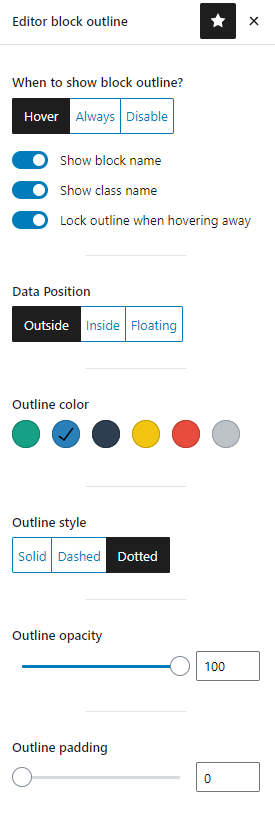
Editor outline settings
Reviews
Great plugin - should be part of wp core
By 
Absolutely great plugin. You seem to have thought of everything. Makes Gutenberg/block editor actually usable. Should be part of wp core. Thanks for your great work 🙂
This should have been baked in from the start!
By 
I was never ready to make the jump to Gutenberg but I had to do it sooner or later. Coming from (leaving?) Elementor with it's nice interface, it's a brutal contrast and I have never understood why they made it so empty and counter-intuitive. Your plugin will make my transition much less painful so thanks for the great work! I have actually tried a few of these plugins but you really raised the bar and has some great extra features.
Nice visual tool but...
By 
Works great with latest version of WP 6.4.3. The only issue is that it disable a native function (from the browser of WordPress) that when you select multiple blocks they become highlighted. When that plugin is enable, you don't see that anymore and it's difficult to see which blocks are selected. So it's a plugin that help to better see the limits of the blocks but makes you blind with other things... (I'm on Mac with Firefox).
Simple and just a very helpfull plugin
By 
I use this on all my WP installs, and it just makes editing blocks so much easier. Never had an issue with this plugin.
Thank you.
This should be a standard feature
By 
Excellent!
Nice plugin with good developer support
By 
While testing the Editor Block Outline plugin, I came up with a feature I thought would be helpful to most anyone and likely not too difficult for the developer to add. I suggested the feature to the developer, and within a few days, it was added. Amazing!
Love at first sight
By 
This little gem of a plugin is really helpful, especially when working with layouts in the block editor. Installed it, found the settings in the block editor (top right) and fell in love. This will be installed on all my WP sites.
Very useful plugin
By 
Excellent
By 
Excellent!
By 
Changelog
1.4.1
- Update inconsistent documentation
1.4.0
- Remove editor scripts from the frontend of the site
1.3.2
- Updated and fixed compatibility issues with WordPress 6.5
1.3.1
- Tested with version 6.5
1.3.0
- Add default meta filter
1.2.1
- Fixed colorpalette issue with WordPress 6.0+
1.2
- Added toggle for enabling/disabling outline padding
Please note that this is a breaking behavioral change. Users who set
padding previously will need to enable this option for padding to take
effect.
1.1.2
- Fixed block title for cover block
1.1.1
- Fixed floating box bug
- Set initial show class name to false
1.1
- Added data position setting (outside, inside or floating)
- Added show class name option
- Fixed hover setting for nested blocks
- Removed twitter admin notice
- Code formatting and optimization
1.0.4
- Fixed bugs
1.0.3
- Added lock outline per single block
- Added outline padding
- Fixed drag and drop issue with WP 5.7 where dragging line is not showing
- Removed outline for add block box
- New icon and banner design
- Fixed block name for spacer block
1.0.2
- Code formatting and optimization
1.0.1
- Added opacity option
1.0
- First version