Theme and Plugin file Search
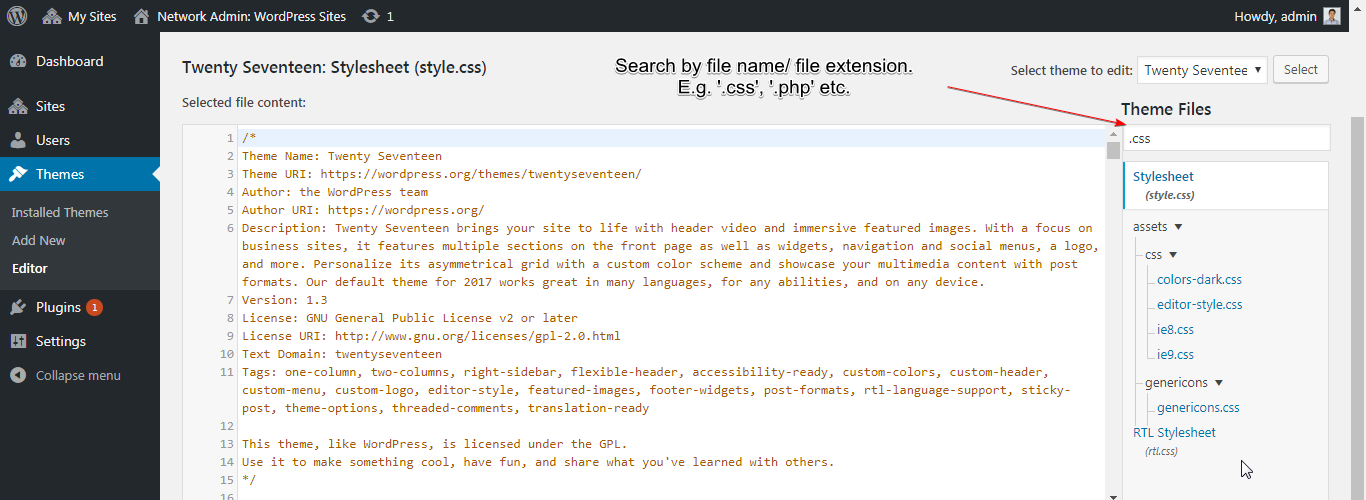
Theme and Plugin file Search
Description
Adds a search box on Appearance Theme File Editor and Plugins Plugin File Editor so you can filter files in the sidebar quickly.
This release adopts the shared empire platform admin shell (Home, Support, Settings) while keeping the original search feature.
Extend on Github
Installation
- Install from the WordPress plugin directory or upload to
wp-content/plugins/. - Activate the plugin.
- Open a theme or plugin file editor — the search field appears above the file list.
Reviews
Simple yet useful!
By 
Convinient
great it works as i needed
By 
thanks for it
Changelog
1.2.2
- Fix: Complete wp.org tag deploy after 1.2.1 SVN asset race (Stable tag + tags/1.2.2).
1.2.1
- Improvement: Updated WordPress.org plugin banner and icon artwork.
- Fix: Tag deploy no longer attempts SVN /assets/ changes (assets via separate workflow).
1.2.0
- New: Platform admin shell (Home, Support, Settings) with shared PluginKit stack.
- Improvement: PHP 7.4+, WordPress 6.0+; tested up to 7.1.
- Improvement: Composer-bundled PluginKit for reliable wp.org installs.
1.1.1
- Improvement: WordPress 5.4 compatibility.
1.1.0
- New: Filter
editor_file_search_input_placeholder.
1.0.2
- Improvement: UI and accessibility fixes.
1.0.1
- New: Multisite compatibility.
1.0.0
- Initial release.