Editoria11y Accessibility Checker
Editoria11y Accessibility Checker
Description
Editoria11y (“editorial accessibility ally”) is a quality assurance tool built for an author’s workflow:
- It provides instant feedback in the post and page editors. Authors do not need to remember to press a button or visit a dashboard to check their work.
- It checks in context on pages, not just within the post editor, allowing it to test content edited in widgets or theme features.
- It focuses exclusively on content issues: assisting authors at improving the things that are their responsibility.
This plugin is the WordPress adaptation of the open-source Editoria11y library. Tests run in the browser and findings are stored in your own database; nothing is sent to any third party. It is meant to supplement, not replace, testing your code and visual design with developer-focused tools and testing practices.
The authoring experience
Check out a demo of the checker itself.
- When logged-in authors and editors are viewing pages, Editoria11y inserts tooltips marking any issues present on the current page. Issues are also highlighted while editing in the Block Editor (Gutenberg) and Classic Editor (TinyMCE).
- Tooltips explain each problem and what actions are needed to resolve it. Some issues are “manual checks,” which have buttons to ignore the check or mark the content as OK.
- Clicking the main toggle shows and hides the tooltips.
- The main toggle also allows authors to jump to the next issue, restore previously dismissed alerts, visualize text alternatives for images on the page (“alts”), view the document’s heading outline, and view site-wide detection lists.
The admin experience
- Filterable reports let you explore recent issues, which pages have the most issues, which issues are most common, and which issues have been dismissed. These populate and update when published content is viewed by logged-in authors.
- Various settings are available to constrain checks to specific parts of the page and tweak the sensitivity of several tests.
The tests
- Text alternatives for visual content
- Images with no alt text
- Images with a filename as alt text
- Images with very long alt text
- Images with fake alt text to get around field validation (e.g. “TBD”)
- Alt text that contains redundant text like “image of” or “photo of”
- Images in links with alt text that appears to be describing the image instead of the link destination
- Embedded visualizations that usually require a text alternative
- Meaningful links
- Links with no text
- Links titled with a filename
- Links only titled with generic text: “click here,” “learn more,” “download,” etc.
- Links that open in a new window without warning
- Document outline and structure
- Skipped heading levels
- Empty headings
- Very long headings
- Suspiciously short blockquotes that may actually be headings
- All-bold paragraphs with no punctuation that may actually be headings
- Suspicious formatting that should probably be converted to a list (sequences of sentences that start with asterisks, emoji or incrementing numbers/letters)
- Tables without headers
- Empty table header cells
- Tables with document headers (“Header 3”) instead of table headers
- General quality assurance
- LARGE QUANTITIES OF CAPS LOCK TEXT
- Links to PDFs and other documents, reminding the user to test the download for accessibility or provide an alternate, accessible format
- Video embeds, reminding the user to add closed captions
- Audio embeds, reminding the user to provide a transcript
- Social media embeds, reminding the user to provide alt attributes
- Custom results provided by your JS
Credit
Editoria11y’s WordPress plugin is maintained by Princeton University’s Web Development Services team:
- John Jameson: Editoria11y JS and CMS integrations
- Jason Partyka: Devops
- Brian Osborne: Code review
- Michael Muzzie: Wapuu photos
Editoria11y began as a fork of the Toronto Metropolitan University’s Sa11y Accessibility Checker, and our teams regularly pass new code and ideas back and forth.
Installation
Editoria11y’s default settings will work great for most sites.
Your first task after installation should be clicking through a representative sampling of the main pages of your site. This will start to populate your dashboard report, and give you a chance to look for issues to fix or dismiss.
If you notice anything amiss, experiment with these settings:
- Pick a “Theme for tooltips” that looks nice with your site’s colors.
- If the checker is flagging issues that are not relevant to content editors, either use “Check content in these containers” to constrain checks to the parts of the page with editable content, or “Exclude these elements from checks” to skip over certain elements, regions or widgets.
- Editoria11y also provides an “as-you-type” issue highlighter that works inside the editor. If you find live correction annoying rather than helpful, change “Check while editing content” to unset “always show tips,” or chose “Do not check while editing.”
- If you do not want PDF or other document types flagged for manual checks, provide a shorter selector list or set “Document types that need manual review” to
false - If your theme has done something very unusual with its layout, such as setting the height of the content container to 0px, you may see confusing alerts when opening Editoria11y tips saying that the highlighted element may be off-screen or invisible. If that happens, disable “Check if elements are visible when using panel navigation buttons.” This is disabled by defaults on any WordPress themes we have noticed this on, so if you find a theme
If you are a theme developer, note that the library dispatches JavaScript events at several key moments (scan finishes, panel opens, tooltip opens or shuts), allowing you to attach custom functionality. JavaScript on sites running Editoria11y can use these events to do things like automatically opening accordion widgets if they contain hidden alerts, disabling “sticky” site menus if the panel is open, inserting custom results, or syncing results to third-party dashboards.
And then…tell us how it went! This plugin and its base library are both under active development. Ideally send bug reports and feature requests through the GitHub issue queue.
Screenshots

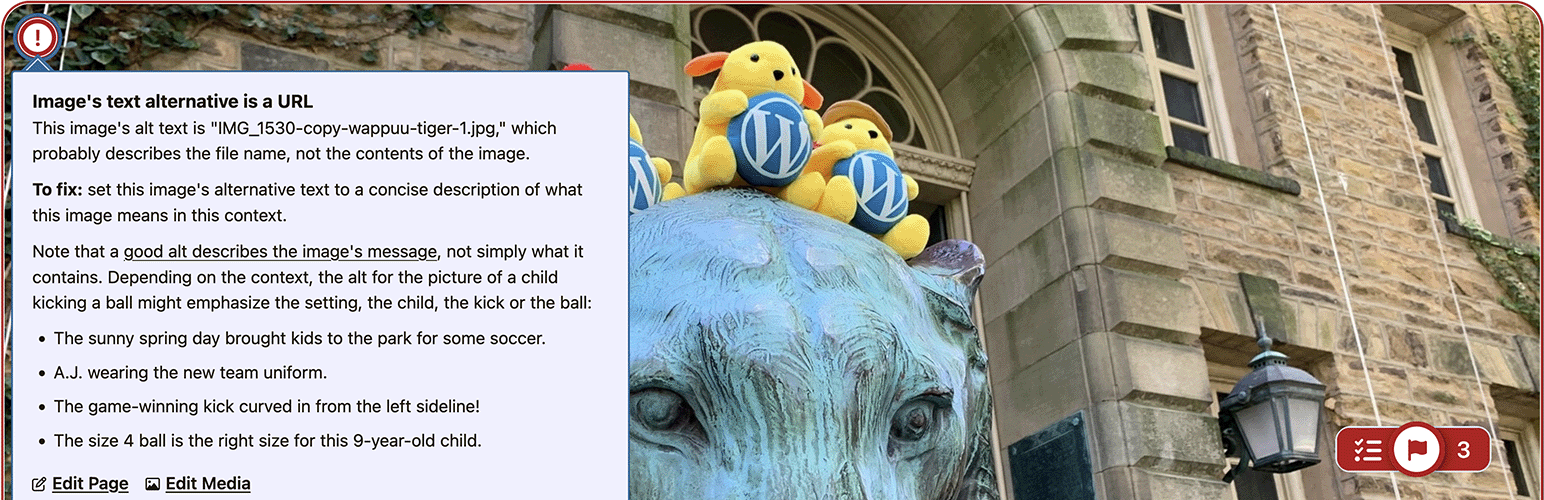
Checker with an open "manual check" request, for an image without alt text.
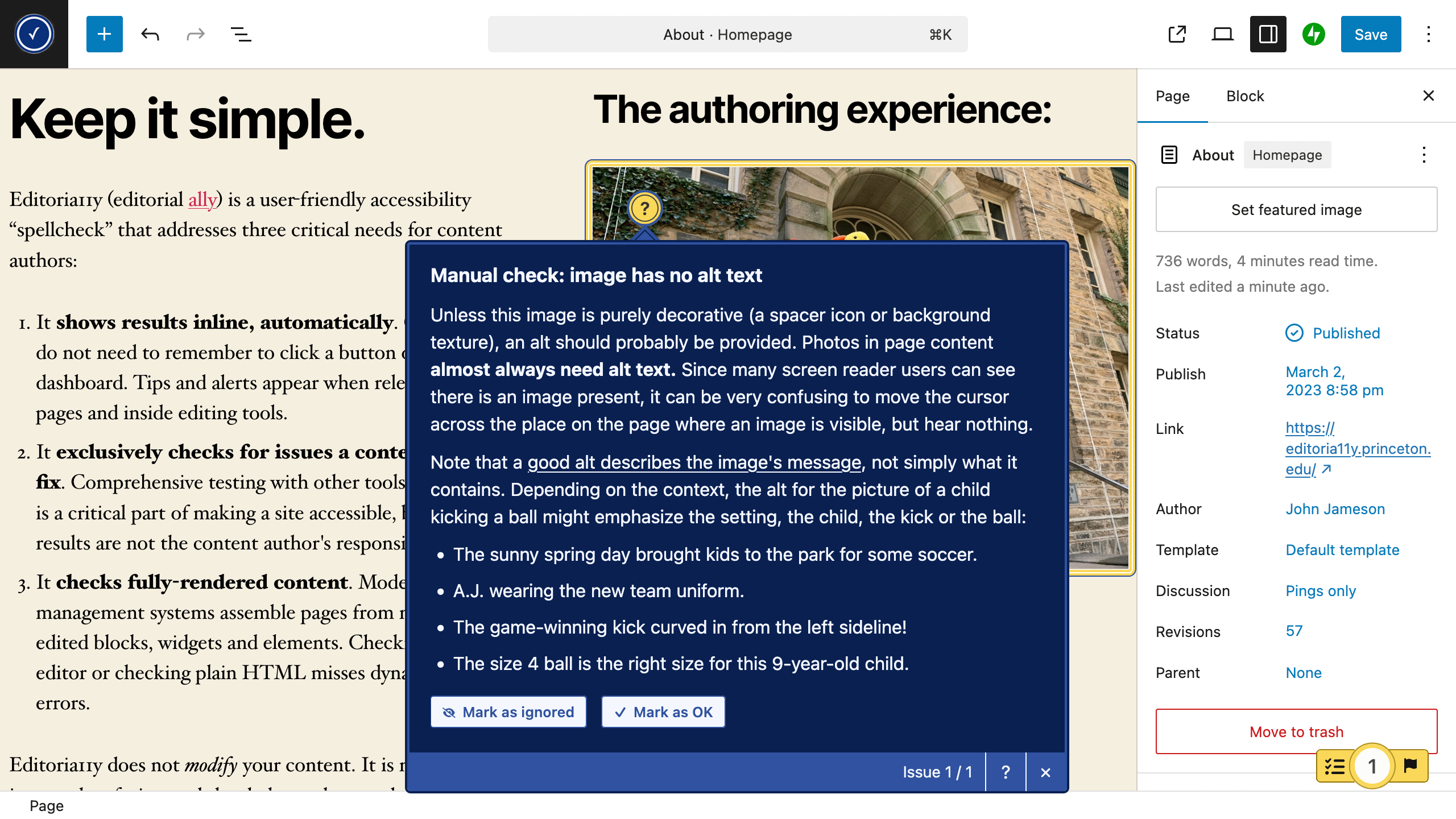
The same issue shown while editing the page, this time using the dark theme.
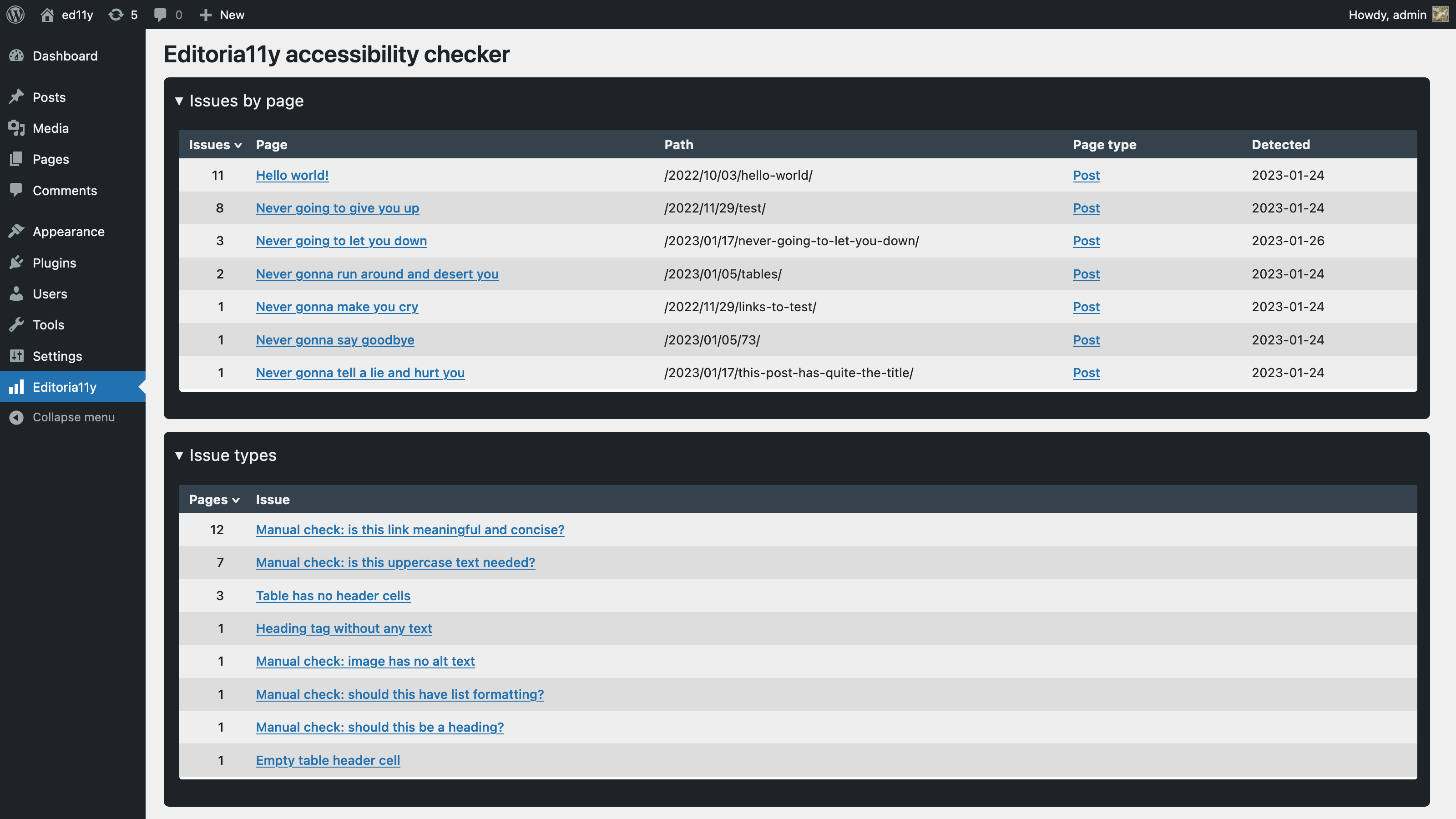
The site-wide reporting dashboard.
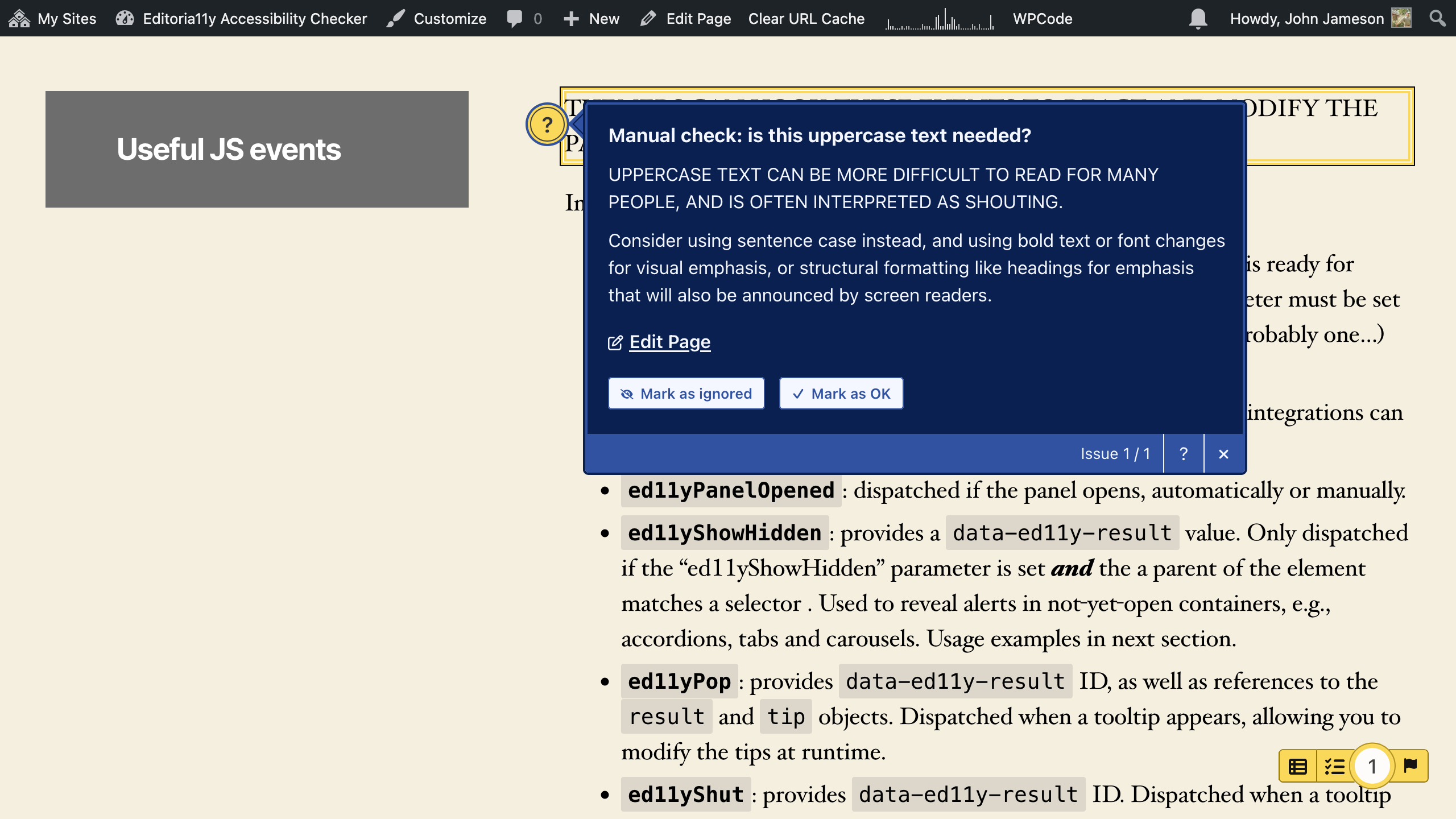
Checker set to dark theme, asking if the whole sentence needs to be in caps lock.
Faq
Editoria11y is meant to supplement, not replace, these tools.
Editoria11y is…spellcheck: a seamless, automatic and intuitive integration for content authoring. It:
- Does not require training before use.
- Eschews obfuscation and techno-legal jargon. It explains what the issue is in plain language, with a simple explanation of how to fix it. “This image needs alternative text” with a short explanation of what alternative text is makes sense without prior technical knowledge; “Failure of WCAG 1.1.1 Level A: Non-text Content” does not.
- Deliberately excludes tests for theme and plugin issues, like invalid HTML tags and ARIA attributes. Testing is critically important for themers and developers, but it is work for themers and developers, not content editors. For ongoing quality assurance, Editoria11y provides people with a tool that fits their role, so they only receive alerts for things they can fix.
Editoria11y’s test suite is quite similar to Sa11y. Editoria11y began as a Sa11y fork, and the maintainers collaborate on new tests and optimizations.
The look, feel and features outside the core test suite are a bit different. At a high level:
- Sa11y provides a broader test suite:
- A legibility scoring library is included
- A contrast checking library is included
- The end-user can override appearance and test coverage settings from the results panel
- Editoria11y provides live-editing feedback and server-side tools:
- Editors receive feedback while editing.
- Findings are synchronized to a site-wide reporting dashboard
- Manual-checks marked as “OK” are dismissed for all users, not just the current user
- All configuration is managed in the plugin settings
Overlays are scripts that make untested modifications to your site’s themes and content, claiming these automated changes will better meet the accessibility needs of your users. Overlays may do things like override your theme’s font sizes or colors, or modify its heading tags and buttons. This differs from buttons that make potentially the exact same changes to a specific site — the key difference is in whether the button has been tested with that specific theme, or attempts to work in any context without testing.
You should familiarize yourself with the assistive technology compatibility problems untested overlays may introduce before assuming these changes will be helpful, as any untested code can break existing accessibility features or introduce new invisible errors. If you choose to install an overlay, you should test each of its features on your site using assistive tools or pay for a professional accessibility test.
Editoria11y is not an overlay. It does not modify the site viewed by not-logged-in-users in any way. It is an editor-facing testing tool that helps your site editors create accessible content.
Reviews
Shockingly Full Featured!
By 
This is such a fantastic, simple tool for helping editors write content, it's incredible that it's open source and free! I've never found such an intuitive, easy to understand, and easy to implement accessibility checker like this. Great work, I've already installed it on all of my latest projects, and I'll continue to do so going forward. And I absolutely love the logging feature!
Can't believe this only has 300 installs, I'll definitely be spreading the word as much as I can!
Outstanding!
By 
I have used other accessibility checkers that cannot function properly outside of core and are crazy complicated. This work wonderfully in core, Bricks Builder, and even Avada (live builder). The reporting is easy to understand and the plugin is so lightweight. Thank you for this!
great resource and easy to use
By 
We’ve been using this plugin for a while. It’s a great asset for composing posts. The checks show up in real time as content is added to the editor, which is a huge help and reminder to write accessible content the first time around, rather than having to go back and fix badly presented content later.
I also appreciate that this checker focuses on the issues that an editor can actually control and excludes issues with navigation, headers, etc. While these other issues are important and deserve a look by an administrator or site designer, they would only be a distraction to someone editing a post.
Great tool for helping editors
By 
I've experimented with installing similar tools like Tota11y, Sa11y, and the Equalize Digital Accessibility Checker, but this is the tool that has stuck for me because it feels the most approachable to less-experienced editors and it provides suggestions for fixing things.
The errors are helpfully focused on issues that editors can actually do something about, and I think it mostly gets the right balance of making errors appear urgent but not overwhelming.
Each error includes an explanation of why the issue is important and how to resolve it, so that editors can actually take action. And the ability to track issue resolutions overtime in the dashboard is fabulous!
A great tool for content editors
By 
My agency has been installing the Editoria11y javascript as part of a custom theme on every client site for months. I was delighted to discover it's now available as an official plugin in the repository.
We build sites and train clients on how to enter and update content. Editoria11y Accessibility Checker is a fantastic training tool - it helps content editors see where accessibility problems exist in their content, and helps them figure out solutions and alternatives. Using the plugin is a no-brainer; editors see the alerts right in the web page next to the problem.
Even if you're not concerned about accessibility (you should be), you can use this plugin to highlight issues that affect SEO, since accessibility is closely related to SEO.
We're going to be using this plugin on every site for the foreseeable future. Thanks for building this!
Changelog
2.1.7
- Adds option on the plugin settings page to select between the library’s various assertiveness levels: start open for any issues, start open for new issues, always start open, start minimized.
- Adds “editoria11y_viewing_params” and “editoria11y_editing_params” filters for developers to modify configuration sent to the browser at runtime.
2.1.5
- Fix for dismissals not saving when editing a page that was not previously tracked. Note that this only syncs if the page already exists in the database; dismissals on the “New Post” or “New Page” screen are only stored temporarily in your browser.
2.1.4
- Fix for text from alerts on headings being included in the heading text in the document outline visualizer.
2.1.3
- Fixes an intermittent false positive on anchor links in the Classic editor.
2.1.2
- Fixes a bug that crashed the Classic editor checker when jumping to a tip on a recently fixed issue.
2.1.1
- Adds an option on the configuration page to hide the shortcut link to the dashboard reports. Hiding it makes the toggle smaller, and the link does not work in all configurations.
2.1.0
- Adds support for live-checking in the Classic editor (TinyMCE). Big thank you to Ricardo at PressBooks for showing me how to pass variables in and out of its iframe!
No configuration changes are needed for this to work. If you do not want to check inside the classic editor, add a “.mce-edit-area iframe” selector to the “Do not flag these elements” field on the plugin configuration page. - Switches the position of the flag and number in the checker toggle in response to user feedback.
2.0.12
- Adds custom test for Buttons without links not flagged in the block editor
- Adds images with role=presentation to the default ignore list.
- Fix issue with false positives for links containing both images and text when the link contains space characters.
2.0.11
- Resolves PHP error when image ID is not set.
2.0.10
- Adds dismiss-all buttons when there are several of the same issue type on a page.
- Adds “Edit Media” link to the tooltips for alt text error messages (hat tip cbirdsong).
- Adds auto shadow DOM detection for the frontend checker, and automatically inserts buttons outside shadow host nodes. This is disabled in the as-you-type checker at the moment; reach out if you need it while editing. It adds ~20ms to test runs, so I am waiting to see if somebody actually needs it first, since performance matters much more there.
- Empty first table header cell is now a manual check.
- Name calculation better handles null aria labels, title attributes and pseudoContent.
- Various bugfixes and typo corrections.