eInvoice Viewer for PEPPOL & EN16931

eInvoice Viewer for PEPPOL & EN16931
Description
➜ Try the live demo – upload an XRechnung, ZUGFeRD/Factur-X or Peppol BIS invoice and see it rendered instantly.
eInvoice Viewer for PEPPOL & EN16931 turns an uploaded electronic invoice into a clear, structured HTML view directly on your page – without any external service and without storing the file.
Add the [spev_einvoice_viewer] shortcode to a page and your visitors can drag and drop an electronic invoice into the viewer. The document is read and rendered entirely in the visitor’s own browser – it is never uploaded to your server. The result (invoice header, parties, order and delivery data, payment details, line items, VAT breakdown and totals) appears instantly, without a page reload and without a single byte of the invoice ever crossing the network. The layout is inspired by the official ZUGFeRD Quba viewer and is rendered inside a Shadow DOM, so it looks identical in every theme.
Supported formats
- ZUGFeRD / Factur-X (PDF) – the embedded XML is extracted and read automatically.
- CII (UN/CEFACT) XML – read directly.
- UBL / XRechnung (XML) – read directly. Covers XRechnung-UBL and Peppol BIS Billing 3.0, including credit notes.
Highlights
- Drag & drop uploader – vanilla JavaScript, no framework, no page reload.
- Complete field coverage – the field catalogue knows 268 EN 16931 business terms in 43 business groups. Empty fields are shown as placeholders on purpose, so you can see which terms the standard defines and which ones this invoice omitted. Every bank account and every payment means of the invoice is shown, not only the first one.
- Amounts that do not add up are marked – the viewer recalculates line amounts, VAT breakdown and totals. A stated amount that differs from the calculated one is marked red, with both amounts below it.
- Fields that break a rule of the invoice itself are marked – a missing mandatory field, a VAT category whose rules are not met, a due date before the invoice date or a period that ends before it starts is marked red, with a note below it that names the rule, where the standard has one. Marked fields stay visible even with “Only filled fields” switched on. A box above the invoice says what the viewer checks – mandatory fields, VAT category rules, the order of the dates and whether the totals add up – and that a validator checks all rules.
- Attachments – below the invoice, every attachment is listed with its name, type and size. PDFs and images can be viewed in place, and an attachment of one of six permitted types can be saved.
- Business-term labels with a short description – each field can carry its BT / BG code, and hovering it shows the term name plus a short description of the field in German, English or French. Further details (cardinality, data type, business rules) are provided by the separate “eInvoice Viewer – Technical Details” extension. Toggled live, per setting or via the shortcode attribute
bt="1"/bt="0". - Trilingual – the interface is available in English, German and French.
- Theme-independent – rendered inside a Shadow DOM with a full style reset, so no theme styles leak through.
- Reads like an invoice – a document header with the amount due, every business group in a block with its name as a flag on the frame, the label beside the value, and two field rows side by side in a wide block. The layout adapts to the column it sits in, not to the window. Typefaces ship inside the plugin; nothing is loaded from a font service.
- The document never leaves your browser – reading and rendering both happen client-side; your server never receives the file, so there is nothing to store, log or leak in the first place.
- Secure by design – the invoice is parsed by the browser’s own
DOMParser(no server-side XML parser, so no XXE surface for the upload itself); every invoice value is escaped on output. Sibling paid extensions that genuinely need server-side processing (validation, export, …) keep their own independent upload, nonce and rate-limit handling. - Extensible – an add-on can extend the invoice model and the BT/BG tooltips through two hooks on the viewer component,
extendModelandextendTooltip, and aeinvoice-model-readyevent hands it the finished model, the raw XML and the original file.
Third-party libraries
The only bundled third-party code is Mozilla pdf.js (assets/js/pdfjs/, Apache License 2.0, license text next to the files), used to pull the embedded XML out of a ZUGFeRD / Factur-X PDF. Everything else in the plugin is this plugin family’s own code under GPL-2.0-or-later.
Demo
Try the viewer without installing anything: live demo on invoicePress.de. Drop in your own e-invoice; it is read and rendered in your browser, exactly as on your own site. The plugin itself never contacts the demo site.
Installation
- Upload the plugin folder to
/wp-content/plugins/or install it through the WordPress plugins screen. - Activate the plugin through the “Plugins” screen in WordPress.
- Add the shortcode
[spev_einvoice_viewer]to any page or post. To show the EN 16931 business-term numbers initially, use[spev_einvoice_viewer bt="1"]. - Optionally adjust the options under Settings -> E-Invoice Viewer (maximum file size, default BT visibility, design kit). The design kit applies to all eInvoice tools on the site.
- The complete manual comes with the plugin, in the folder
manual/of the plugin (manual/manual.en.html, Germanmanual/manual.de.html).
Screenshots
![The drag & drop uploader rendered by the <code>[spev_einvoice_viewer]</code> shortcode.](https://ps.w.org/einvoice-viewer-for-peppol-en16931/assets/screenshot-1.png?rev=3739799)
The drag & drop uploader rendered by the
[spev_einvoice_viewer]shortcode.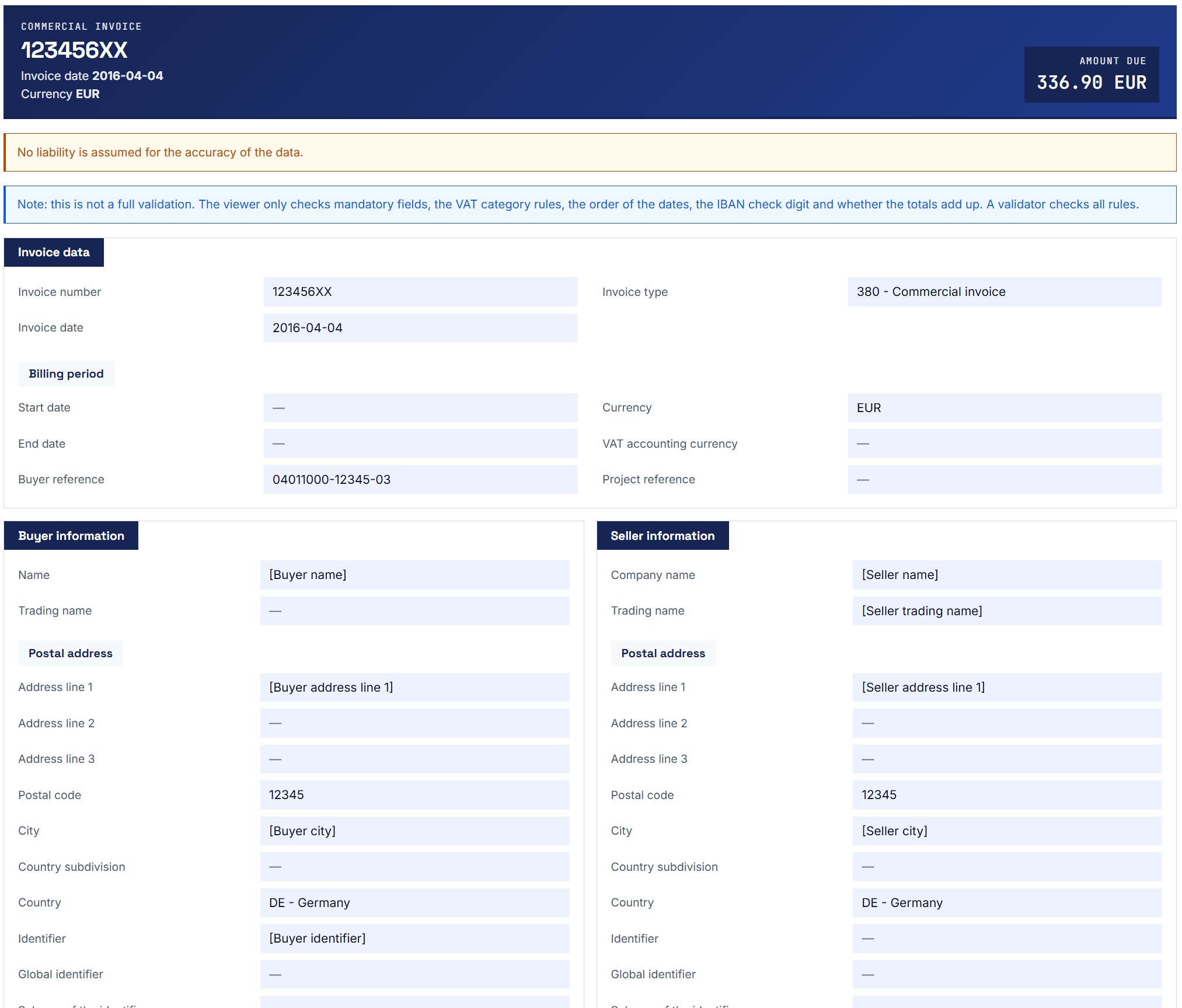
A rendered invoice with the structured Quba-inspired layout.
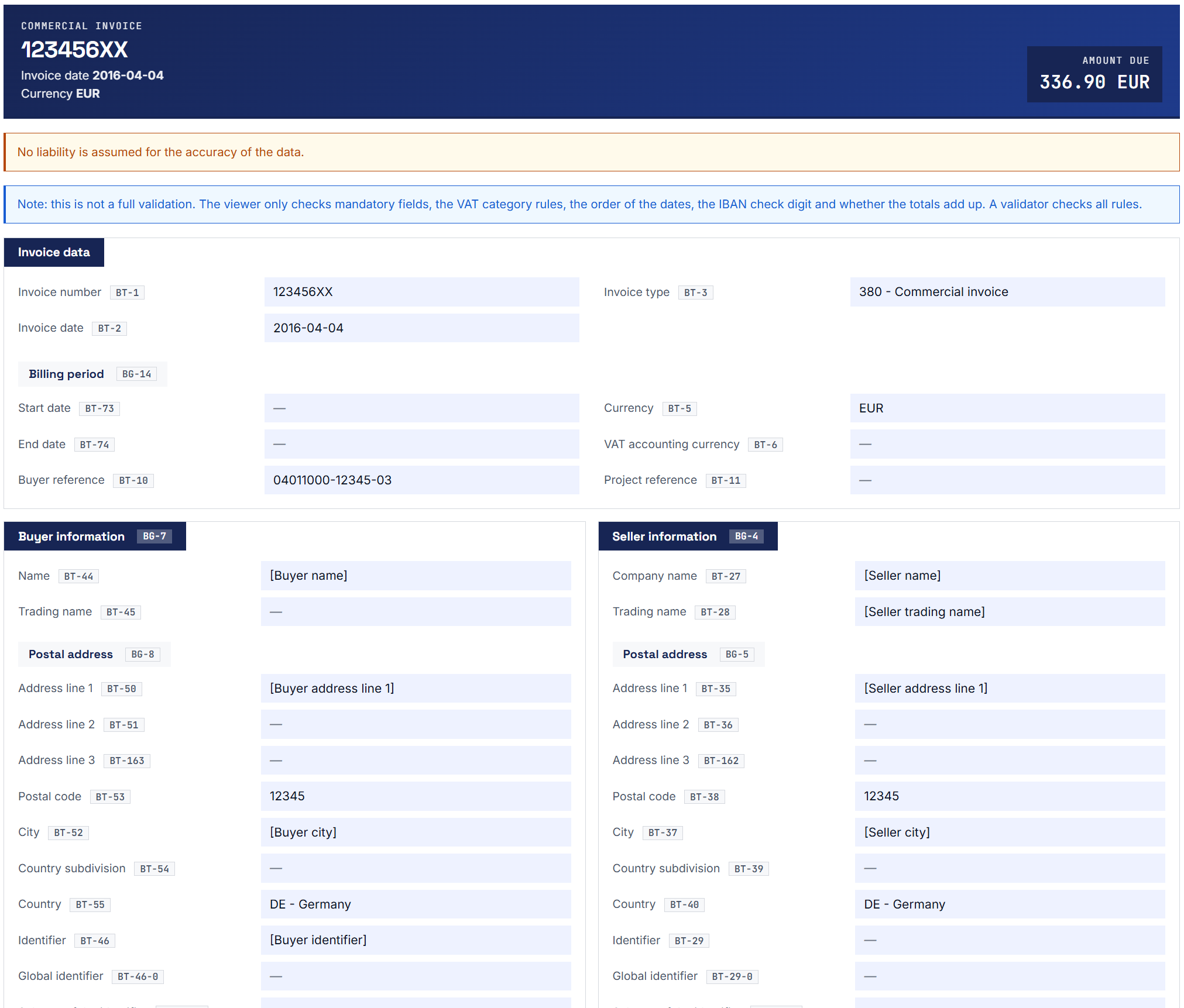
The same invoice with the EN 16931 business-term numbers enabled.
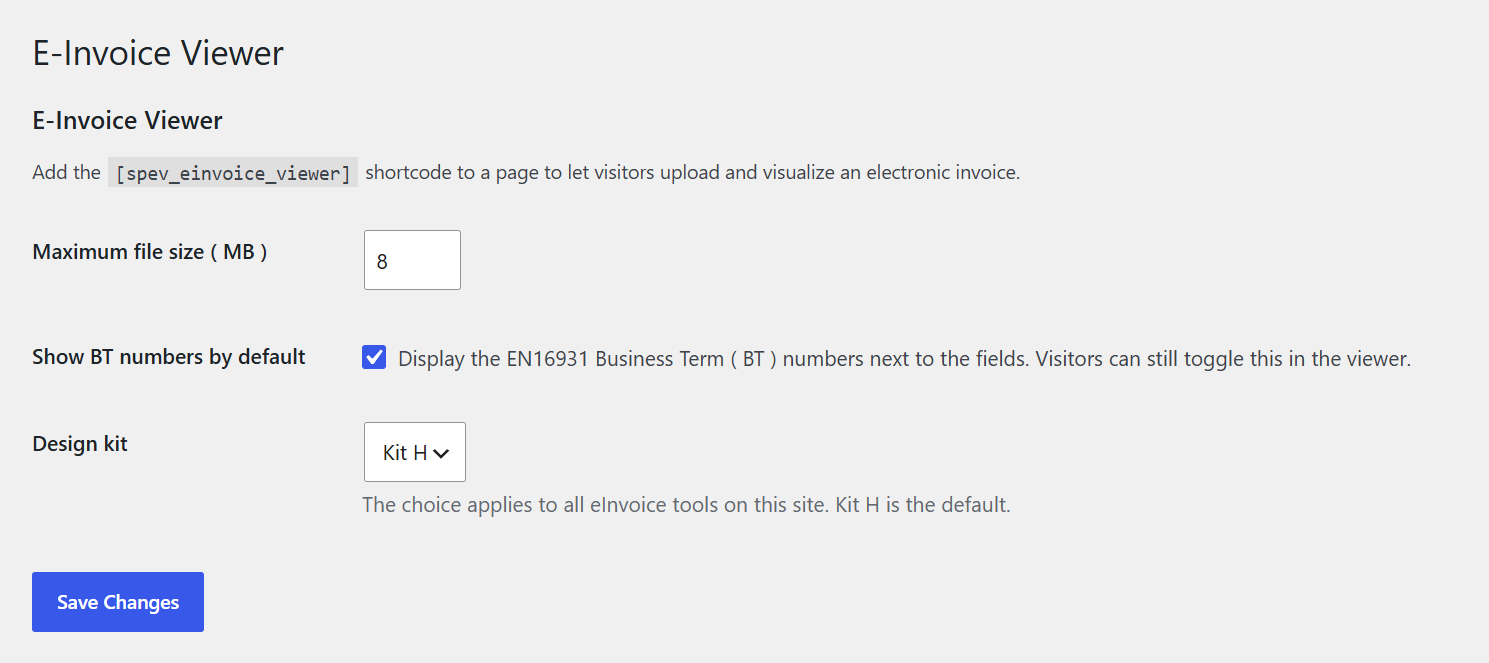
The settings page under Settings -> E-Invoice Viewer.
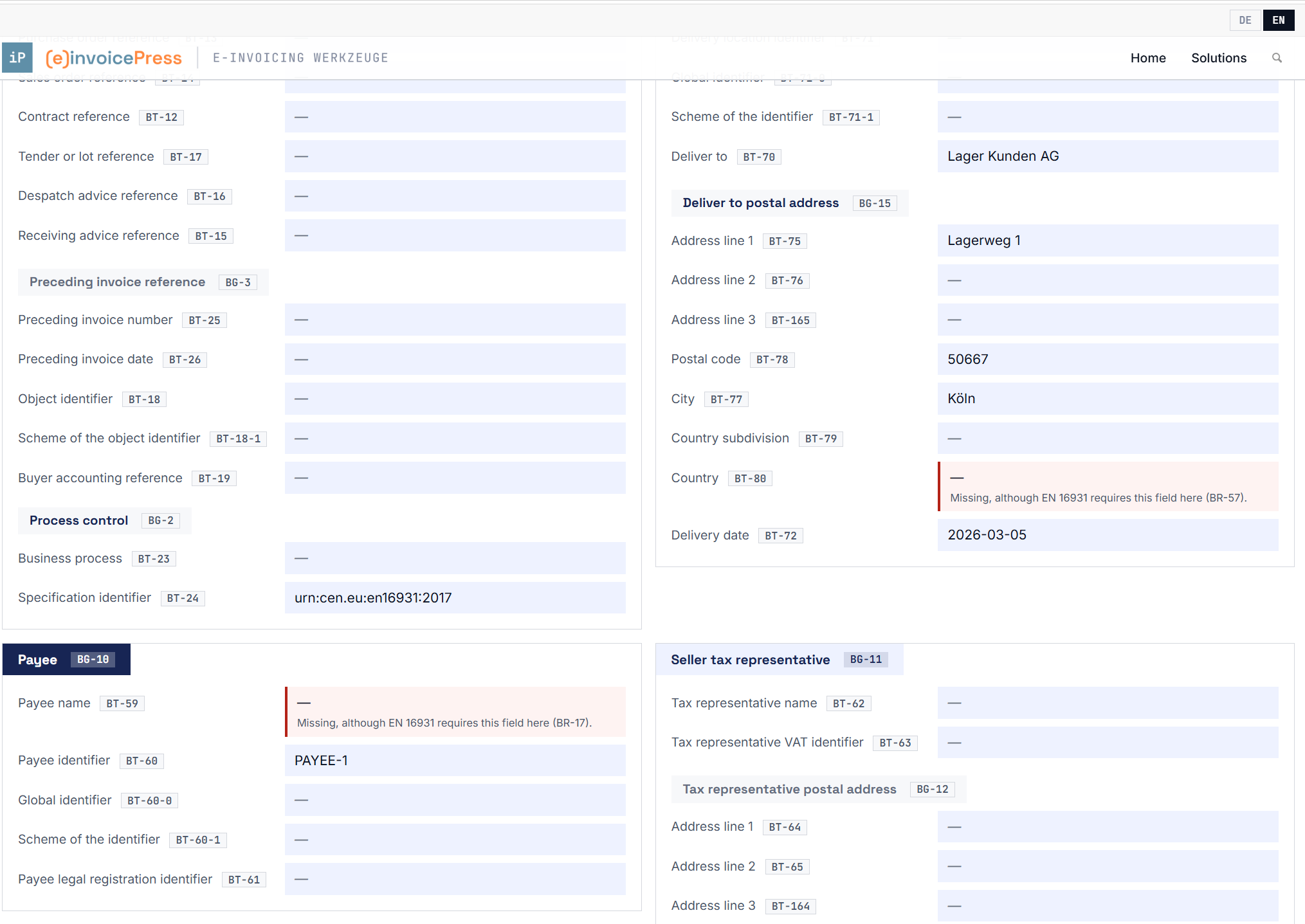
An invoice with missing mandatory fields: each field is marked red with the rule below it.
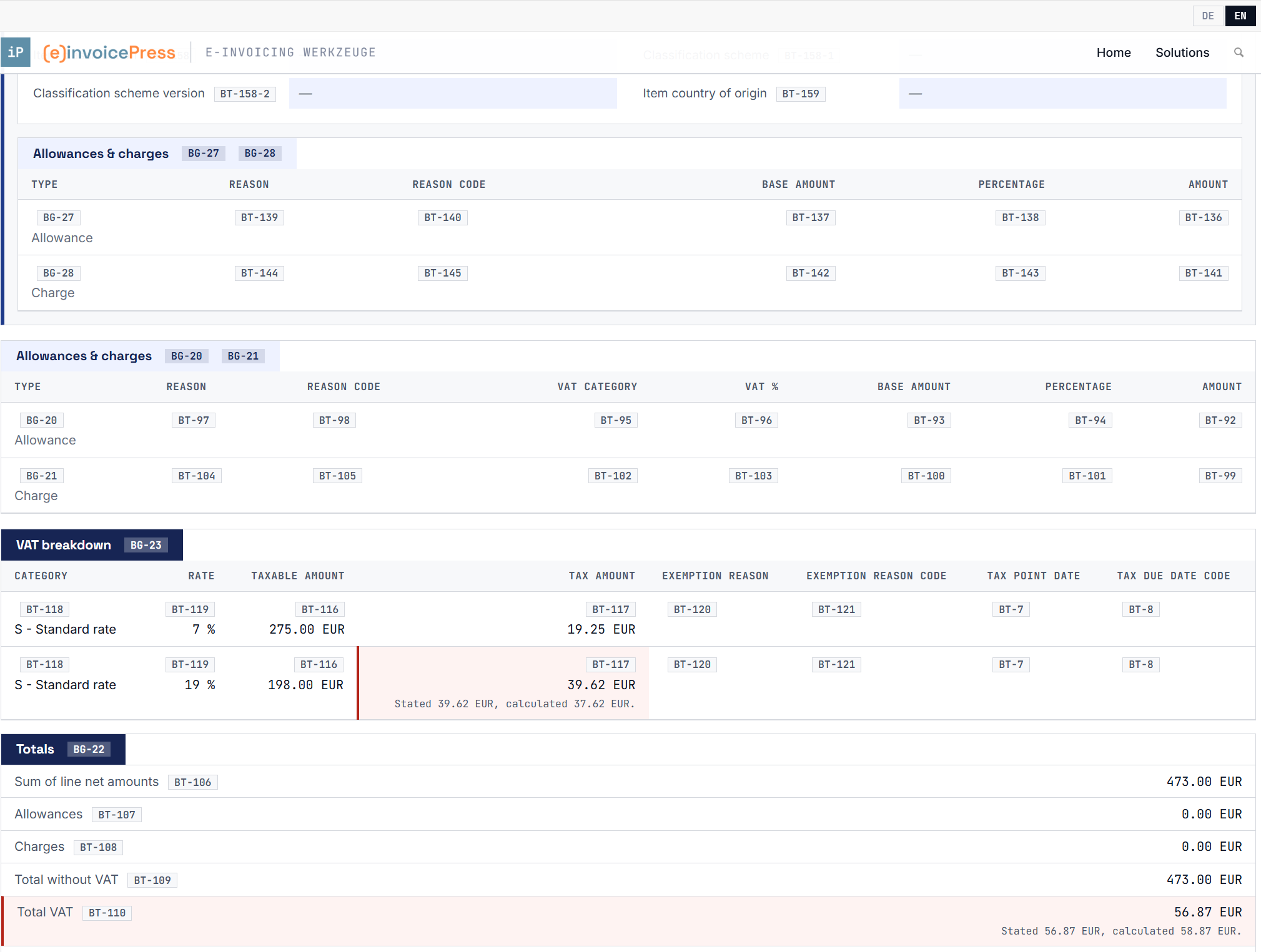
An amount that does not add up: the stated and the calculated amount stand below the marked field.
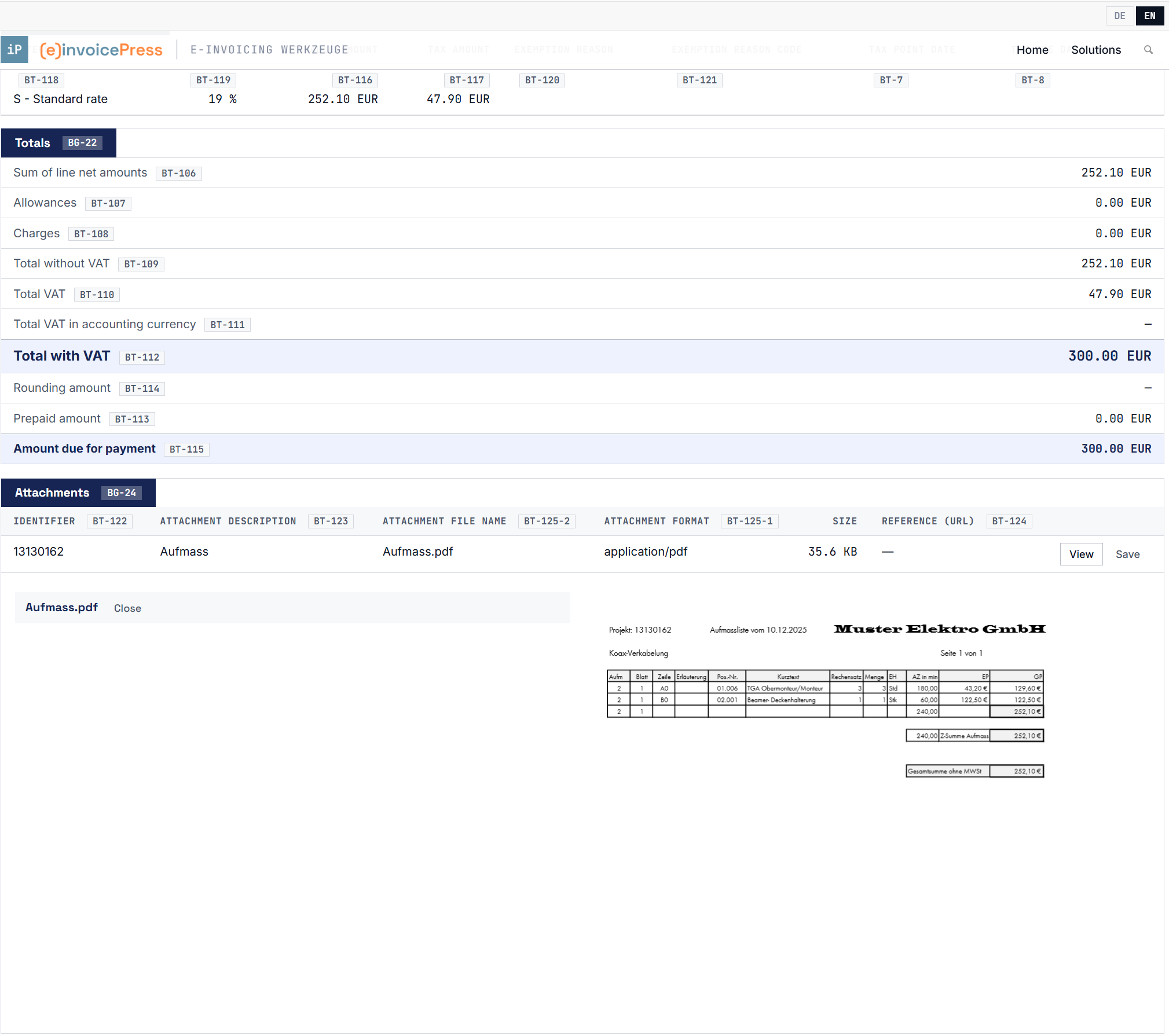
The attachments below the invoice, with a PDF attachment opened in place.
Faq
No. The invoice is read and rendered entirely in the visitor’s own browser – it is never sent to your server, so there is nothing to store, log or delete. Nothing is written to the uploads directory or the database. (Paid sibling extensions that genuinely need server-side processing, such as validation or export, do their own upload and say so.)
ZUGFeRD and Factur-X PDFs (the embedded XML is extracted), plus CII (UN/CEFACT) XML and UBL / XRechnung XML.
No. The viewer shows what the invoice says, and it marks amounts that do not add up from their parts and fields that break a rule following from the invoice itself. Whether an invoice complies with the rules of its specification is for a validator to judge. A PDF without embedded invoice data, such as a scan, cannot be read, and the viewer says so.
The Quba viewer transforms the invoice with the KoSIT XRechnung XSLT 3.0 via Saxon-JS. This plugin builds its own view instead: it reads the invoice directly, assembles an EN 16931 model from it and renders that model. The result is Quba-inspired and functionally equivalent, but it is not the identical KoSIT markup. The advantage of the own path is that it covers CII and UBL on their own terms and labels every field with its business-term number.
There is nothing to limit: the invoice never reaches your server. It is read and rendered in the visitor’s own browser, so no request is made and no resource of yours is consumed, however many invoices a visitor looks at. The only setting that applies to the file is the maximum size, under Settings -> E-Invoice Viewer; a larger file is refused before it is read.
Paid sibling extensions that genuinely do send the invoice to your server (KoSIT validation, Excel export, Visualizer) each carry their own daily limit per visitor, set on the same settings page.
Reviews
Changelog
2.37.0
- The viewer follows the design kit chosen in the settings ( Kit H, Kit A, Kit S or a kit of your own uploaded there ): buttons, the language switch, messages and the settings dialog now take their look from it.
- The plugin list links to the manual and to support.
- Scanned PDF attachments ( black-and-white scans, as many scanners and fax programs produce them ) are shown in the preview again instead of as empty pages.
- The preview of an attachment uses the full width of the page.
- The label “Layout” stands before its selection, so the buttons above the invoice take one row less.
- The buttons “Validate with VAMPIRE” and “Validate with Mustang” work for a ZUGFeRD or Factur-X PDF; before, the validator answered “Please choose an XML file.”
- The cards of a section stand in two columns, and in a narrow column one below the other, also when the viewer sits in a narrow part of the page; the switches above the invoice look like the rest of the design kit.
2.36.0
- The line above the invoice names the edition of the format when the invoice states it, for example “XRechnung-CII 3.0”.
- New button “Settings” above the drop area, once an add-on with settings is active. The settings are stored on the site, and each add-on sets who may view and who may change them; a backup file saves and loads them.
- Add-ons can show a second small badge next to the field number, for example the name of the reference list a code comes from.
- New design “Kit S” on the settings page: the viewer in the colours of the specialPress websites.
2.35.0
- The toolbar has two rows: the switches and the add-on buttons on top, Field Browser, Rule Browser and Reset below.
- With Extended Profiles active, the new switch “Only filled BT-X fields” hides empty extension fields; it is on by default.
- New section “Access and limits” on the settings page: a daily number of invoices per role, and for each add-on the role from which it is available.
- With the Mustang and the VAMPIRE validator active, the viewer shows a button for each of them, next to the KoSIT button.
2.34.1
- Changed: with the Identifier Check add-on, the toolbar button is now called “Check identifiers online” and appears only when its online check is switched on; the add-on marks wrong identifiers directly at their fields.
- Fixed: with the Visualizer active, the toolbar keeps “Reset” in place at the top right, and the layout selection has the same height and look as the buttons next to it, also under themes such as Enfold.
2.34.0
- The check digit of an IBAN is no longer checked by the viewer; the Identifier Check add-on checks it, together with the other identifiers.
- A UBL credit note now shows its payment due date and its project reference.
2.33.1
- Maintenance release without visible change.
2.33.0
- Every bank account and every payment means of the invoice is shown, not only the first one.
2.32.0
- The note above the marked fields now says exactly what the viewer checks.
- The bundled translations now also appear when the plugin is network-activated and on older WordPress versions.
2.31.0
- For a UBL invoice, fields that always stayed empty are now shown, among them the specification identifier, the payee, the seller’s tax representative, the VAT point date, the bank assigned creditor identifier and the invoice notes.
- The business process type of the invoice is now shown, for UBL and CII.
- Dates of a UBL invoice are written the way the language of the page writes them.
- A gross price, a base quantity, the base amount or percentage of an allowance or charge, or a VAT rate that the invoice does not state stays empty instead of showing 0.
- With version 1.6.0 or later of the Extended Profiles add-on, the fields of the XRechnung Extension and of EXTENDED-CTC-FR also show their name in the tooltip.
2.30.0
- If a field breaks a rule that follows from the invoice itself, such as a missing mandatory field, a rule of its VAT category or a due date before the invoice date, the field is marked red with a note below it, and a box above the invoice says that these are hints and not a complete validation.
- The buttons of the add-ons and the layout choice of the Visualizer follow the design kit, and the layout choice stays in one row with its two buttons.
- On a page with the viewer and a field or rule browser, both are translated.
2.29.0
- Tender or lot reference and invoiced object identifier now appear under order and contract data, with the scheme of the object identifier, and no longer as supporting documents.
- The VAT total in accounting currency is recognised by its currency and no longer by its position, and the calculation note under the invoice total uses the right amount.
- The invoice view can show an invoice that the eInvoice Inbound plugin has already checked, with field names in the tooltips, attachments and the original PDF.
2.28.1
- With the Extended Profiles add-on active, the cards of the extension appear in the language of the page.
2.28.0
- With the Extended Profiles add-on active, the extension fields of an EXTENDED invoice carry their names in the tooltips.
2.27.0
- Changed: the cards “Supporting documents” inside the invoice are gone. The same attachments are now listed only once, in the section “Attachments” below the invoice.
2.26.0
- New: the design kit of the viewer can be chosen under Settings E-Invoice Viewer. The choice applies to all eInvoice tools on the site, and Kit H remains the default.
- New: below the invoice, a section “Attachments” lists every attachment with its name, type and size. PDFs and images can be viewed there, and every attachment of an allowed type can be saved.
2.25.0
- If an amount in the invoice does not add up from its parts, the field is marked red, and the stated and the calculated amount are shown below it.
2.24.5
- Totals that the invoice does not state are now shown empty instead of as 0.00.
- German field names revised.
2.24.4
- Maintenance release without visible changes.
2.24.3
- Fixed: line groups were headed “Item 2” in the German and French view; they now read “Position 2” and “Ligne 2”.
2.24.2
- Spacing and type sizes of the invoice view match version 2.18.0 again.
2.24.1
- The grey area behind the whole tool is gone; the invoice sits on the page background.
- A block across the full width shows two field rows side by side again.
2.24.0
- New look for the invoice view: a dark flag as the block heading, the label beside the value, a light blue value box and a yellow disclaimer.
- The switch for filled fields only now hides a sub-group together with its heading.
2.23.2
- Block headings use the title typeface again.
2.23.1
- Fixed: no space stood between label and value in the document header ( “Invoice date11.02.2026” ).
- The disclaimer is a notice above the invoice.
- The totals block spans the full width.
2.23.0
- The toolbar, upload area and buttons use the colours of the other e-invoice tools.
2.22.0
- Maintenance release without visible changes.
2.21.1
- Maintenance release without visible changes.
2.21.0
- Fixed: 2.20.0 hid the allowance and charge areas of an invoice or line that carries none. Every business group is shown again, and only the switch for filled fields only hides anything.
- Fixed: the totals left out the rows for allowances, charges, prepaid amount and rounding when their value was zero.
2.20.0
- The allowances and charges of an invoice line form one full-width table per line.
2.19.1
- Fixed: on a site running the viewer without its companion plugins, every page with the viewer ended in a fatal error.
2.19.0
- Numbers and dates follow the selected language: German writes 5.900,00 EUR and 01.12.2017, English 5,900.00 EUR and 2017-12-01, French 5 900,00 EUR.
2.18.0
- The shortcode is now
[spev_einvoice_viewer]. A page that still uses[einvoice_viewer]shows nothing — please see the upgrade notice.
2.17.7
- Fixed: a page that loads the viewer twice stayed empty.
2.17.6
- The message line, the switches and the origin line line up with the upload area.
2.17.5
- The invoice view adapts to the width of the box it sits in, not to the browser window. In a narrow column the blocks stack, and below 420 pixels each label moves above its value.
2.17.4
- Fixed: a language chosen in the stand-alone viewer changed the language of a WordPress page on the same site.
2.17.3
- A language chosen with the switcher of the stand-alone viewer is remembered.
- The formats PDF and XML are highlighted inside the hint line of the upload area.
- No rounded corners anywhere, in line with the other e-invoice tools.
2.17.1
- Fixed: the upload area shows the formats PDF and XML again.
- Removed: the settings “Daily uploads per visitor” and “Trust proxy header”. They had no effect since 2.12.0, because the invoice no longer reaches the server. A saved value stays in the database unused.
2.17.0
- Fixed: after a language switch, an add-on such as the Inbound Check, the Excel export or the Visualizer could work on the invoice in the previous language.
- Fixed: “Reset” kept the uploaded invoice in memory.
- Fixed: the maximum file size is enforced again.
- Removed: the settings “Daily uploads per visitor”, “Trust proxy headers” and “Layout template”, which had no effect since 2.12.0. The layout is chosen in the Visualizer add-on.
2.16.3
- Maintenance release without visible changes.
2.16.2
- Fixed: the fields “Global identifier” (BT-71-0) and “Scheme of the identifier” (BT-71-1) disappeared when empty, while every other empty field was shown with a dash. The same applied to seller, buyer and payee.
2.16.1
- A ZUGFeRD / Factur-X PDF is read faster and with less code.
- Fixed: the embeddable
<einvoice-viewer>element ignored itsdata-langattribute for the upload area and the switches.
2.16.0
- Fixed: on a site in German or French, field labels, code names, the VAT breakdown, the allowances and charges and the totals appeared in English.
- Fixed: three labels in the document header stayed English.
- Fixed: 72 texts, among them the toolbar buttons and every progress and error message, were never translated.
2.14.11
- The viewer uses the visual style of the other e-invoice tools: square corners, lines instead of shadows, monospace for identifiers.
2.14.10
- The plugin download is smaller; the tooltips are unchanged.
- Fixed: the FAQ still described the invoice as uploaded to the server.
2.14.9
- Fixed: the extra tooltip details of the Technical Details add-on — cardinality, data type, applicable rules, XSD level, reference table, CII/UBL path — no longer appeared.
2.14.8
- Fixed: when a party carried both a plain and a global identifier, the plain one was dropped and its value shown under the wrong business term.
2.14.7
- Fixed: on some hosts a PDF upload failed with “Failed to fetch dynamically imported module”.
2.14.6
- The PDF library is bundled with the plugin instead of being loaded from a third-party server.
2.14.5
- Fixed: a PDF upload still failed with “The PDF does not contain a readable e-invoice”.
2.14.4
- The accent colour is the navy of the other e-invoice tools.
2.14.3
- Fixed: a PDF upload failed with “PDF reading needs pdf.js, which this page has not loaded.”
- Fixed: several fields of a UBL / PEPPOL BIS invoice — identifier schemes, unit codes, payment means name, item classification codes — were always empty.
- Fixed: the delivery information of a UBL / PEPPOL BIS invoice was always empty.
2.14.2
- Fixed: with some themes the shortcode showed an empty box.
2.14.1
- The plugin header names the required PHP version.
2.12.4
- Fixed: the fields of the Extended Profiles add-on no longer appeared in the invoice view.
2.12.3
- Maintenance release without visible changes.
2.12.2
- Maintenance release without visible changes.
2.12.1
- Maintenance release without visible changes.
2.12.0
- The invoice is read and shown entirely in the browser and never reaches the server. The daily upload limit of this plugin no longer applies; the add-ons that send an invoice to the server keep their own.
- Business-term tooltips appear in the visitor’s language.
2.10.10
- The upload area has the same width in the Viewer, the Validator and the Explainer.
2.10.9
- Fixed: the invoice used only the width of the upload area instead of the full width available.
2.10.8
- New “Field Browser” and “Rule Browser” buttons when the Technical Details add-on is active.
2.10.7
- For developers: new action
spev_register_settings, which lets an add-on add its own block to the settings page.
2.10.4
- Maintenance release without visible changes.
2.10.3
- Fixed: the buyer’s contact could show the seller’s contact name, phone and e-mail.
2.10.2
- The document header no longer shows BT numbers; the same fields carry them in the block below.
- In the allowances and VAT tables, the BT number stands above the value.
- The heading of the allowances and charges table names both business groups, BG-20 and BG-21.
2.10.1
- Fixed: the buyer’s contact showed the seller’s contact name, phone and e-mail when the buyer had none.
- Fixed: the buyer reference (BT-10) appeared twice.
- Fixed: the seller’s further legal information (BT-33) was never shown.
2.10.0
- For developers: new method
SPEV_Renderer::model_json()and new actionspev_register_templates, used by the Visualizer add-on for its print layouts.
2.9.0
- New REST route
POST /wp-json/einvoice/v1/render. Existing settings carry over unchanged.
2.8.0
- Optional Excel export button when the Exporter add-on is active.
2.7.0
- Optional “Check with KoSIT” button when the companion eInvoice Validator is active; the report appears on the same page.
2.6.1
- Two more coded fields show their designation instead of a bare code: BT-21 and BT-128-0.
2.6.0
- Fixed: the upload area and its messages ignored the visitor’s own language.
- Coded values show as “code – designation” throughout.
- More coded fields show their designation instead of a bare code.
- Fixed: a long XPath could overflow its tooltip.
2.5.3
- Maintenance release without visible changes.
2.5.2
- Fixed: the scheme of the seller and buyer identifier (BT-29-1, BT-46-1) stayed empty for some invoices.
2.5.0
- For developers: new filter
spev_invoice_model, which lets an add-on add sections to the invoice.
2.4.0
- For developers: new filter
spev_code_tooltip, which lets an add-on extend a business-term tooltip. - Fixed: a tooltip could show the wording of another invoice.
2.3.0
- Typefaces and colours match the companion Validation Explainer plugin.
2.2.0
- Consistent block headings: a group nested inside another block carries its own, lighter heading.
- Dates and numbers follow the site language instead of being German everywhere. For developers: new filter
spev_date_format. - Fixed: document type, payment means, unit, VAT category and country were always German.
- Fixed: an unknown document type code was shown as “invoice”; it is now shown as the code itself.
- Tested against WordPress 7.1.
2.1.0
- Complete EN 16931 coverage: all 164 business terms and all 32 business groups are shown, including the seller tax representative and the payee.
- Business-term tooltips in German, English and French, in the wording of the official specification.
- French interface translation.
- Fixed: every charge row of the allowances and charges table was labelled as an allowance.
- Fixed: on Windows servers every upload failed with “No file received.”
- Base amounts, percentages and reason codes of allowances and charges, the item attribute value (BT-161) and the line identifier (BT-126) are shown.
- The plugin download is much smaller.
- For developers:
SPEV_Renderer::model()returns the invoice data instead of HTML, and the filterspev_label_localechooses the language of the business terms.
2.0.1
- Corrected business terms, checked against the official EN 16931 specification.
- Updated translations.
- The plugin is now called “invoicePress – e-Invoice Viewer”.
2.0.0
- New layout with coloured section tabs and a block per invoice line.
- Many more fields, among them BT-127 to BT-160, payment cards and delivery details.