Embed Webmap

Embed Webmap
Description
Easily and quickly embed ArcGIS Online Webmaps into WordPress!
Usage
Get your webmap ID (see screenshots for help) of a public webmap in ArcGIS Online, then in any page or post in WordPress include this shortcode:
[webmap id="52475e6edb18471780858627b40460c2"]
… replacing the ID section with the webmap ID that you got from your map.
You can add many different options to the shortcode. See “Other Notes” above for details.
Shortcode Options
- id – The webmap ID of the map you wish to embed. Get this from the URL bar on arcgis.com. See the “Screenshots” page for help. Example: [webmap id=”52475e6edb18471780858627b40460c2″]
- extent – in the “shortened” form. Use http://psstl.esri.com/apps/extenthelper/ for help. Example: [webmap extent=”-159.3635,7.093,-45.8967,63.7401″]
- height – specify the height, in pixels. Example: [webmap height=”600″]
- width – specify the width, in pixels. Example: [webmap width=”230″]
- zoom – Include zoom buttons. Example: [webmap id=”52475e6edb18471780858627b40460c2″ zoom]
- home – Include a home button. If this is included, the zoom buttons will automatically be included. Example: [webmap id=”52475e6edb18471780858627b40460c2″ home]
- scale – Include a scale bar. Example: [webmap scale id=”52475e6edb18471780858627b40460c2″]
- legend – Include a legend button. Example: [webmap id=”52475e6edb18471780858627b40460c2″ legend]
- search – Include a location search textbox. Example: [webmap id=”52475e6edb18471780858627b40460c2″ search]
- searchextent – When using ‘search’ (above), only search the current extent. Example: [webmap id=”52475e6edb18471780858627b40460c2″ search searchextent]
- basemap_toggle – Show a basemap toggle. Must also include ‘alt_basemap’ to indicate alternate basemap that will show when the toggle button is clicked. Example: [webmap id=”52475e6edb18471780858627b40460c2″ basemap_toggle alt_basemap=”streets”]
- basemap_gallery – Include a basemap menu. [webmap id=”52475e6edb18471780858627b40460c2″ basemap_gallery]
- view-larger-link – Include a link below the map to view the map in a larger window. Example: [webmap id=”52475e6edb18471780858627b40460c2″ view-larger-link]
- disable_scroll – When the mouse is over the map, the scroll will not zoom the map if this is added. Example: [webmap id=”52475e6edb18471780858627b40460c2″ disable_scroll]
- details – Show the map details pane. Example: [webmap id=”52475e6edb18471780858627b40460c2″ details]
Depricated Options:
- description – DEPRICATED. PLEASE USE ‘DETAILS’ INSTEAD.
- basemaps – DEPRICATED. PLEASE USE BASEMAP_GALLERY INSTEAD.
Installation
Using The WordPress Dashboard
- Navigate to the ‘Add New’ in the plugins dashboard
- Search for ’embed-webmap’
- Click ‘Install Now’
- Activate the plugin on the Plugin dashboard
Uploading in WordPress Dashboard
- Navigate to the ‘Add New’ in the plugins dashboard
- Navigate to the ‘Upload’ area
- Select
embed-webmap.zipfrom your computer - Click ‘Install Now’
- Activate the plugin in the Plugin dashboard
Using FTP
- Download
embed-webmap.zip - Extract the
embed-webmapdirectory to your computer - Upload the
embed-webmapdirectory to the/wp-content/plugins/directory - Activate the plugin in the Plugin dashboard
Screenshots

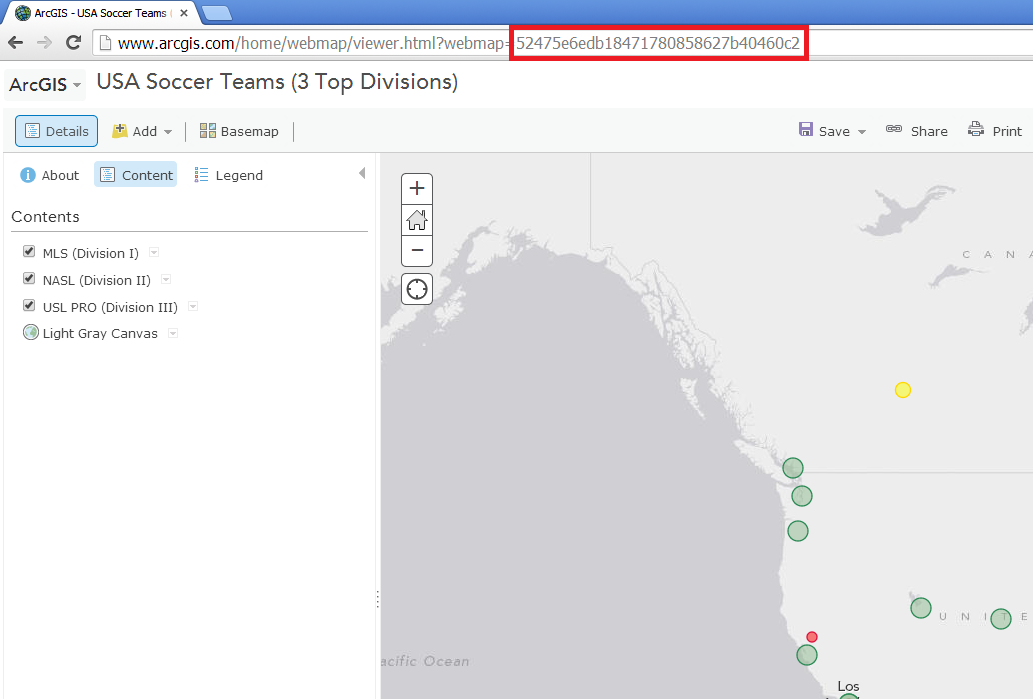
Get webmap ID from Arcgis.com details page.
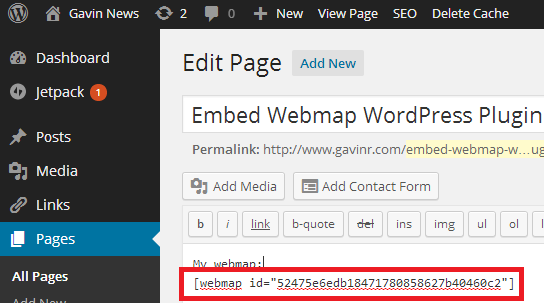
Or, get webmap ID from Arcgis.com map page.
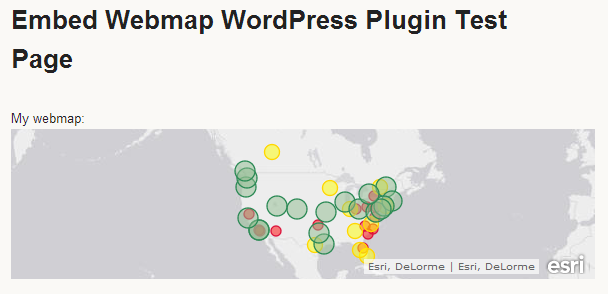
Then, embed the ID in your WordPress page or post using the shortcode.
Your map appears!
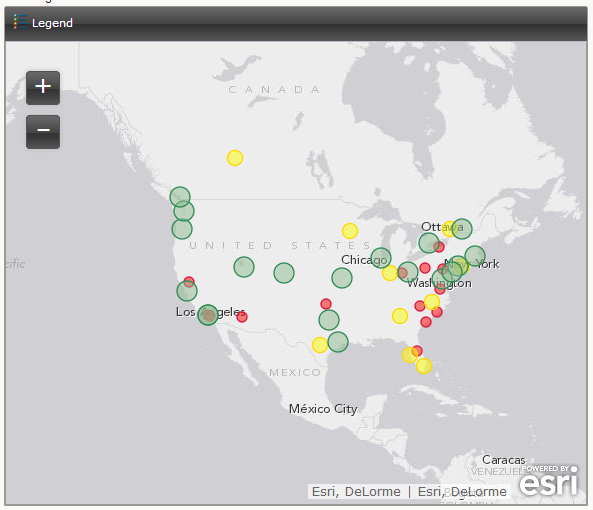
The shortcode has many options, including legend and zoom.
Faq
What is Arcgis.com and how do I create a webmap?
Go to http://www.arcgis.com. If you have an account, login. If not, sign up for an account. Then create a new map, add some content, save, then share the map publicly. Then use the webmap ID (see the “Screenshots” page for help) to embed the map in WordPress in the format [webmap id="MyWebmapId"]
Does my webmap need to be publicly shared?
Yes. Share your webmap with the public, copy the webmap ID (from the URL bar when you’re on the ArcGIS Online map page) and paste it into the shortcode!
What options are available in the shortcode?
Height, width, zoom, scale, and many more! Please see the “Shortcode Options” page for more details.
Feedback, Problems, Questions?
File issues on the github page: https://github.com/gavreh/embed-webmap. Also, you can find more resources at http://www.gavinr.com/embed-webmap-plugin.
Reviews
Still works! 5⭐
By 
Yesterday I was using the official plugin (why are links no longer allowed?) - Web Maps for WordPress By GEO-Jobe GIS Consulting.
It worked well in itself, but broke functionality on my site that I was unable to fix (I use Divi page builder and some custom plugins).
I was apprehensive installing this old unofficial plugin, but it works very well and does not seem to break anything else on my site. (In fact, even my old shortcode worked, out of the box!)
It would be nice to get a plugin update to officially confirm WP compatability and remove the soft warning:
"Version: 2.0.4 Last updated: 4 years ago.
This plugin hasn’t been tested with the latest 3 major releases of WordPress. It may no longer be maintained or supported."
But other than that, many thanks to the author @gavinr for providing this option. 5⭐
Working in WordPress 5.8.2!
By 
Added ERSI ARCGis map
By 
Easy way to embed ESRI webmap
By 
Simple Straightforward Plug-in that saves a ton of coding
By 
An Excellent Plug-in for Version 1.0
I wanted to give 4 and-a-half stars but decided to round up. There is a bit of confusion with using the 'extent' option. The author gives a link for help, which I used, but the helper site gave the wrong info.... I think. Just a wee bit more help with Options in shortcodes, but truly awesome.
Thanks.
Changelog
2.0.4
- 2019-01-27
- Fixing bug where on some servers the widget would not show.
2.0.3
- 2018-01-18
- Sanitize shortcode parameters
- Localize ‘View larger map’ string
2.0.2
- 2018-01-14
- Removed unnecessary activation/deactivation/uninstall of the widget. https://github.com/gavinr/embed-webmap/issues/1
2.0.1
- 2017-11-09
- Supports WordPress 4.9
2.0
- 2016-04-10
- Updating to work with WordPress 4.5
- ‘description’ and ‘basemaps’ are now depricated. See the readme for alternatives. They should still work in this version but may not in the future.
- New shortcode options! Added ‘searchextent’, ‘basemap_toggle’, ‘alt_basemap’, ‘basemap_gallery’, ‘disable_scroll’, ‘details’ options.
- Misc code cleanup.
1.0
- 2014-08-08
- Initial Release