Emergency password reset

Plugin Banner

Emergency password reset

by andy_moyle

Download
Description

This plugin does 3 things
1) It will check you don’t have a username called “admin” which is asking to be hacked
2) It will allow you to reset all passwords, with an password reset link sent to all users to warn them.
Following a couple of reviews from v7.0 the plugin will allow you to set the email from address, name, subject and message
3) You can also change the SALTS which forces a logout of all users.

  1. Upload the emergency-password-reset directory to the /wp-content/plugins/ directory.
  2. Activate the plugin through the ‘Plugins’ menu in WordPress.
  3. Click on Emergency Password Reset in the Users menu
  4. Adjust the settings as required
  5. Click on the ‘Reset Passwords’ button
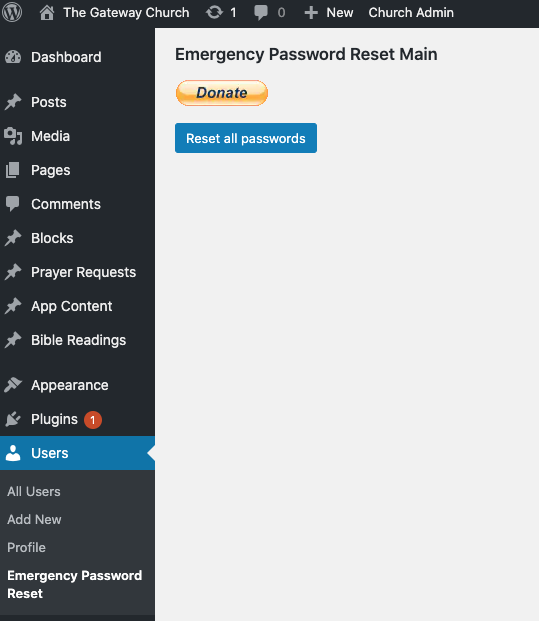
  1. The main and only screen!

    The main and only screen!

How does it work?

When you click rest passwords, the plugin recreates random passwords for every user and emails them the reset password link.

Will I be secure now from a hack?

Not necessarily. We advise you change your SALTS in the wp-config.php file which will force logouts for all users. WordPress provide a tool to generate new ones.
You can now reset them automatically from the plugin Dashboard>Settings>Reset SALTs
Check out our blog post on hacked WordPress sites

Use with caution - Get Technical Assistance if possible

By warrenganes on March 30, 2022

It does it's core function (i.e it resets passowrds) but the email may not arrive. If it doesn't, it will take Backend access to users SQL's to resolve.

Don't use this!

By cyndin on March 6, 2022

Does it work? Yes. Those subscribed to my WordPress blog got emails asking them to reset their passwords. But... 1) I was not able to set the text or add to it. The outgoing message looked like spam. The subject was okay: Password reset for [website] The body was not. It only said: We have had to reset your password on [website]. Your username is still [username], please reset your password Thanks. Had I been able to add a personal message, my legit users (a tiny percentage of the total; the rest being bot accounts) would have known it came from me. 2) I was not able to set the From address. It didn't even go from my address at that website. Rather, it went from my primary email address. 3) Gmail looked at the large volume of emails that went out and blocked me. (And/or people who received the emails marked them as spam.) It's been a week and I can not send any mail to gmail users (all gmail users, not just ones the email went to). I am deleting this plugin and never ever using it again.

Great for malware emergencies

By Alberto (ixistudio) on February 18, 2022

This plugin does what it says it does. I used it after we found malware in one of the sites I migrated into my Multsite WP install. All passwords where reset and the "Password reset" email was sent to the users. Definetly helped fixing this emergency. Thanks!

It's all or nothing

By nate2 on April 15, 2021

Or, if it crashes, some. I'd rate it higher if you could reset passwords for only a group at a time, instead of literally every single account that has ever been made on your website. That's sending over 2000 (useless) emails for companies using things like woocommerce!

Doesn't work right

By Razorfrog Web Design (razorfrog) on March 3, 2020

See support thread - it doesn't email out a working link.

Great single-purpose plugin

By Mr Tibbs (mtibesar) on January 24, 2019

As we all know our members may get lazy with maintaining (updating) their passwords. This really is a nice simple way of resetting everyone's password. I have about 100 user accounts and all of my members were able to quickly and easily change their password. The Password Reset Link they receive in their email is really great! One of the other benefits of this plugin is it quickly helps you identify user accounts with defunct email addresses. I simply deleted these accounts thereby forcing users with outdated email accounts to re-register. A couple of suggestions: #1. Reset All Passwords in the morning. This gives users enough time to reset their passwords before the link expires. #2. When installing the plugin, add the following css code to your Customizer's Custom CSS. This will nudge your users to choose strong passwords. Note - install this css code before resetting all passwords.
.pw-weak {
display: none !important;
}
I will use this plugin to force all of my members to change their passwords on an annual basis. Great job Andy!

Works on MS, may crash with many users

By Manuel Razzari (ManuelRazzari) on February 24, 2017

This plugin does what it says on the tin. Works with multisite. Simply run it from the main blog in the network. Then delete it. Gotcha: it runs thorugh all users in a single request, so it may time out if your network has more than, say, 500 users.. Depending on your server env, you may not even see an error page, so you won't know which users were processed and which ones are pending.

Works well, but turn off wp-better-security first

By colfetski on February 21, 2017

This does what it says on the tin, and for that I am grateful! However, if you have iThemes Security installed, with the 'hide backend' feature, you will want to turn that feature off before resetting the passwords. Or you will find yourself unable to use the reset link that gets sent in the email.

Worked

By Harsh Agrawal (denharsh) on September 3, 2016

Worked fine on my blog. Thanks

Nice Work

By byronyasgur on February 7, 2017

This plugin worked perfectly for me. It's so necessary for an admin to be able to reset everybody's password quickly and this plugin does a great job. There is no configuration just point and shoot.

9.4

  • Extra step added for resetting SALTS

9.3

  • Adjusted menu to manage_option role only (was administrator before)

9.2

  • Fix not all users password changed

9.1

  • Security audit and update

9.0

  • Check nonce for settings change to prevent CSRF

8.0

  • Emails sent in batches of 10 as BCC, to avoid crashes and email errors

7.0

  • Setttings to change email name, from and message

6.2

  • Translation ready

6.1

  • New username when changing from “admin” properly sanitized.

6.0

  • Don’t allow a user to reset admin username to empty field!

5.0

  • Added WordPress reset “salt keys” to secure your site – Dashboard>Settings>Reset SALTs

4.0

  • Updated deprecated functions

3.0

  • Updated reset link

2.0

  • Password reset link sent

1.0

  • Sends link to reset password page rather than new password

0.5

  • Form to change username from “admin”

0.4

  • Shows WP 4.0 compatability

0.3

  • Add Screenshot

0.2

  • Correct the title in readme.txt!

0.1

  • Initial release
Back to top