Enable Responsive Image

Enable Responsive Image
Description
Enable Responsive Image adds settings to the Image block to display different images depending on the width of the screen. You can add multiple images and set media queries and resolution for each image. If the screen width matches the conditions of that media query, it will switch to the corresponding image.
Resources
Image for screenshot
- License: Public Domain
- Source: https://openverse.org/image/cd8e5cc5-d38a-462e-b4c1-1ea5c6f94e20
Installation
- Upload the
enable-responsive-imagefolder to the/wp-content/plugins/directory. - Activate the plugin through the \’Plugins\’ menu in WordPress.
Screenshots
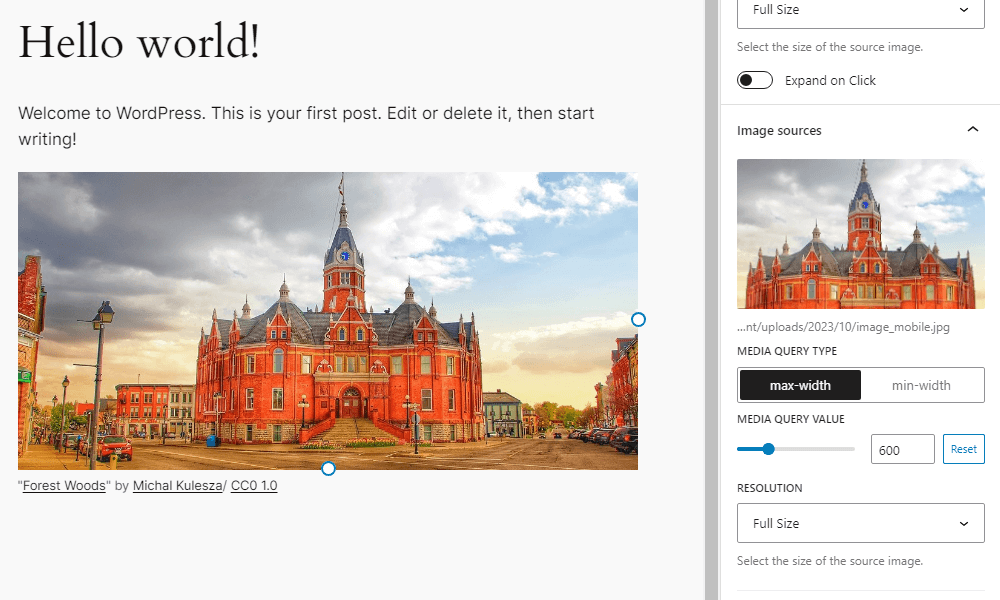
Settings added to the block sidebar of the image block
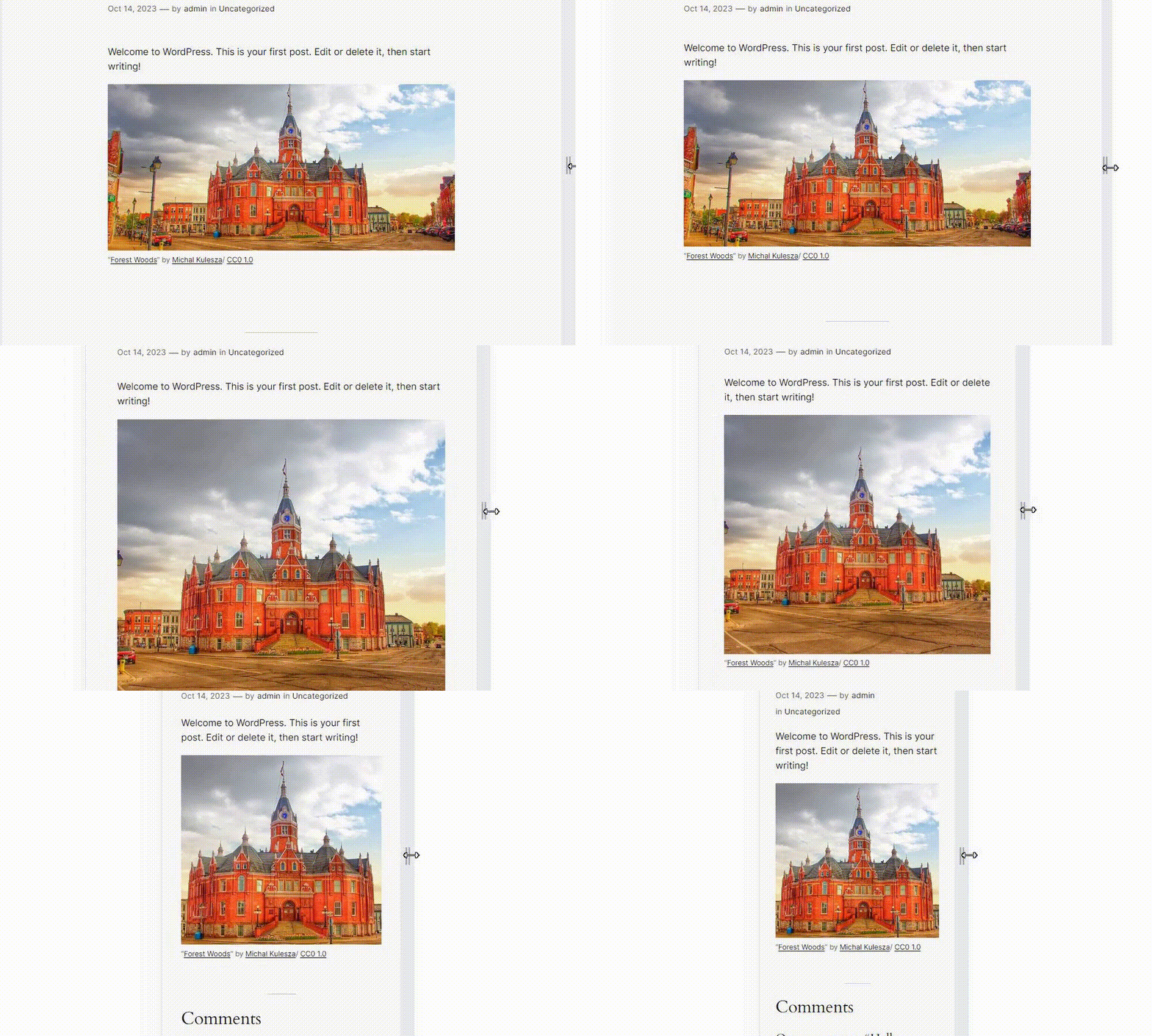
How the image changes depending on the screen width
Faq
This plugin rewrites the HTML markup for the image block rendered on the front end. Wrap the img element with a picture element, and add source elements with srcset and media attributes inside the picture element based on the settings of the added image.
Try rearranging the order of the images. For example, if both images have a Media Query Type of max-width, the one with the smaller value should be ordered on top.
On the editor side, images do not switch by default. Click the “Enable responsive image preview” button on the block toolbar.
You can find a list of the available filters in the Github readme.
Reviews
Great Plug-In. Should be added to Core
By 
Must-have plug-in for responsive websites.
Must install for website creation at work.
By 
This is exactly the plugin I wanted. Thank you.
5 Stars
By 
Very convenient!
Very useful for professional site builds
By 
Working well, just what was needed. Thanks for making this! While I understand this functionality not being the core image block, it's essential for any kind of professional site build so thank you very much for making it!
The Plugin I Have Been Waiting For!!
By 
At last! I have waited a long time for this functionality to come to Gutenberg... As far as I know, this is the only plugin out there that will allow you to set different images for different screen sizes - all inside the block editor!! No more outside-the-editor workarounds needed to achieve this - Brilliant!!!
By-the-way, this developer has created a whole "swiss army knife" range of additional plugins for Gutenberg: Flexible Spacer Block, Flexible Table Block and more.
Well done, thank you, and keep up the great work, Very Best Wishes!!!!
Changelog
1.5.0
- Tested to WordPress 6.9
- Enhancement: Update block toolbar icon
- Drop support for WordPress 6.6 and 6.7
- Drop support for PHP 7
1.4.0
- Tested to WordPress 6.8
- Enhancement: Show full srcset url
- Accessibility: Respect user preference for CSS transitions
- Drop support for WordPress 6.5
1.3.0
- Tested to WordPress 6.7
- Drop support for WordPress 6.4
1.2.0
- Tested to WordPress 6.6
1.1.1
- Remove unnecessary changelog
1.1.0
- Tested to WordPress 6.5
- Enhancement: Polish block sidebar
1.0.0
- Initial release