EP Woocommerce Checkout Address AutoComplete

EP Woocommerce Checkout Address AutoComplete
Description
- Address Suggestions on checkout page.
- Automatically fills address related fileds when user select address.
- add specific countries.
- Suggest Address.
Installation
To install EP Woocommerce Checkout Address AutoComplete, follow these steps:
-
Download and unzip the plugin
-
Upload ep-address-autocomplete-woocommerce to the /wp-content/plugins/ directory.
-
Activate the plugin through the ‘Plugins’ menu in WordPress
After installing the plugin you will see a new menu under Woocommerce called “Ep Autocomplete”. Add Google Api Key in the field and hit “Save Changes” and you all set up.
Screenshots

Checkout page front end view of plugin workings.

Plugin Setting Page where you need to fill Google Maps jQuery API Key.
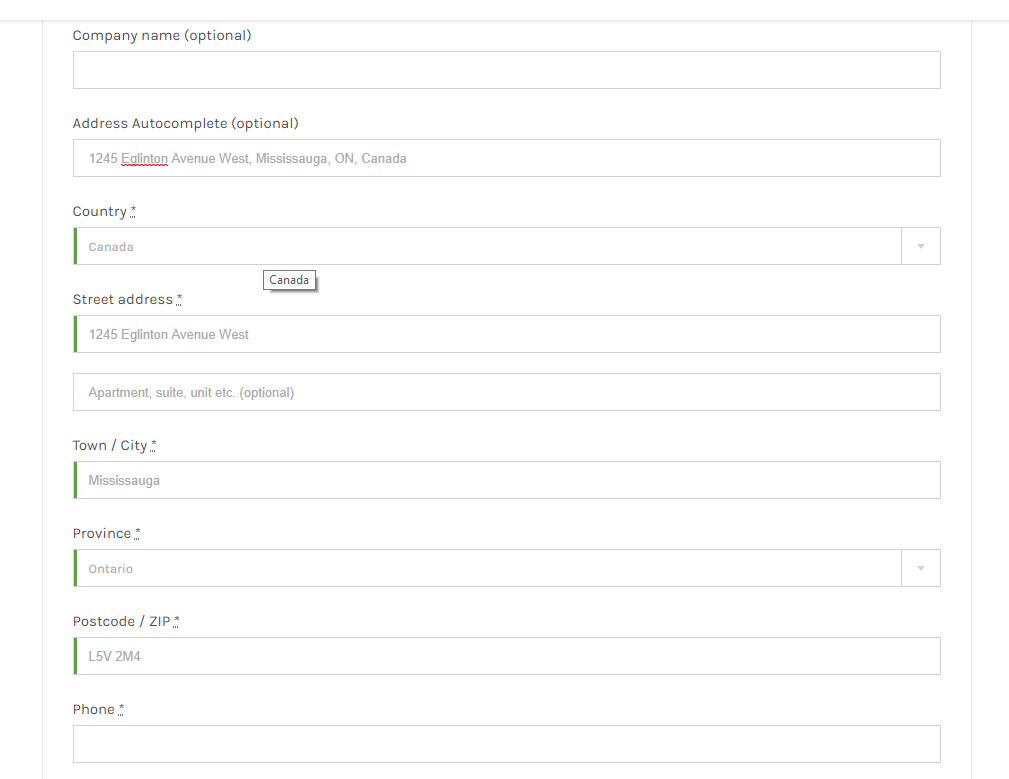
After selecting address in checkout, fields are auto filled up.
Reviews
Great concept and easy to use
By 
Great Concept, Excellent Plugin
By 
Changelog
1.0 – Initial Release
1.1 – Add country selection and restriction option